Linear Regression

Published

Last modified: 2026-10-27

Show code
# The Python chunks on this page import numpy, pandas, matplotlib, scipy and statsmodels;
# reticulate provisions them.
# The Julia chunks run through JuliaCall.
library(reticulate)
py_require(c("numpy", "pandas", "matplotlib", "scipy", "statsmodels"))
jl <- function(expr) JuliaCall::julia_eval(expr)
f3 <- function(v) sprintf("%.3f", v)
f9 <- function(v) sprintf("%.9f", v)
# A positive number in scientific notation, for display math: 2.4\times10^{2}.
sci <- function(v) {
  e <- floor(log10(v))
  m <- signif(v / 10^e, 2)
  if (m >= 10) {
    m <- m / 10
    e <- e + 1
  }
  sprintf("%.1f\\times10^{%d}", m, e)
}

Consolidated from Brian Hutchinson’s Fall 2025 topic notes and Kameron Decker Harris’ 2022 weekly notes, and drawing on Logan Sizemore’s Spring 2025 lecture on multivariate regression for the feature-expansion section.

1 Linear functions and geometry

1.1 Linear function fundamentals

DefDefinition 1 (Affine function)

Definition 1 (Affine function) An affine function of an input \(x\) is a constant plus a multiple of the input. With one input it is \[\modmemf{x} = \coef{0} + \coef{1} x,\] and with a vector of \(p\) inputs it adds one multiple per input, \[\modmemf{\vx} = \coef{0} + \dprod{\vcoef}{\vx}.\] In words, the intercept \(\coef{0}\) is the output when every input is zero, and each slope \(\coef{j}\) is how much the output changes when input \(j\) goes up by one and the others stay fixed. The graph of an affine function of one input is a line, and of two inputs a plane. Neither has to pass through the origin [1].

DefDefinition 2 (Linear function)

Definition 2 (Linear function) A linear function in the strict sense of linear algebra is an affine function whose intercept \(\coef{0}\) is zero, so that \(\modmemf{\vx} = \dprod{\vcoef}{\vx}\).

ExmExample 1 (A linear and an affine function with the same slope)

Example 1 (A linear and an affine function with the same slope) Take the slope \(\coef{1} = 2\) and compare \(\modmemof{\text{lin}}(x) = 2x\), which has intercept \(0\), with \(\modmemof{\text{aff}}(x) = 1 + 2x\), which has intercept \(1\). Figure 1 plots both. The chunk computes the two functions on a grid of inputs, so the plot and the numbers quoted below come from the same arrays.

Show code
import numpy as np
import matplotlib.pyplot as plt

# One slope, two intercepts: the only difference between the two functions.
slope = 2.0
intercept_lin, intercept_aff = 0.0, 1.0

# Evaluate both on one grid of inputs; the plot and the text read these arrays.
x_grid = np.linspace(-2, 2, 101)
h_lin = intercept_lin + slope * x_grid
h_aff = intercept_aff + slope * x_grid

fig, ax = plt.subplots(figsize=(4.5, 3.5), layout="constrained")
ax.plot(x_grid, h_lin, label="linear: $2x$");
ax.plot(x_grid, h_aff, label="affine: $1 + 2x$");
# Mark the output at x = 0, which is the intercept by definition.
ax.plot([0], [intercept_aff], "o", color="C1");
ax.axhline(0, color="gray", linewidth=0.5);
ax.axvline(0, color="gray", linewidth=0.5);
ax.set_xlabel("Input, $x$");
ax.set_ylabel("Output, $h(x)$");
fig.legend(loc="outside lower center", ncol=2);
plt.show()
Figure 1: A linear function (intercept 0) and an affine function (intercept 1) with the same slope 2. The affine line is the linear one shifted up by its intercept, so it crosses the vertical axis at 1.
A plot of two parallel straight lines with slope 2. The lower line passes through the origin. The upper line is shifted up by one unit and crosses the vertical axis at 1, marked with a dot.

The affine line is the linear line moved up by the intercept. Doubling the input shows the other difference. The next chunk doubles \(x = 1\) and compares the output at the doubled input with double the original output.

# Compare h(2x) with 2 h(x) at x = 1, for each function.
# A linear function scales exactly, h(2x) = 2 h(x); an affine one does not,
# because doubling the input doubles the slope term but leaves the intercept alone.
x0 = 1.0
gap = {}
for name, intercept in [("linear", intercept_lin), ("affine", intercept_aff)]:
    h_of_double = intercept + slope * (2 * x0)
    double_of_h = 2 * (intercept + slope * x0)
    gap[name] = double_of_h - h_of_double
    print(f"{name}: h(2x) = {h_of_double}, 2 h(x) = {double_of_h}")
linear: h(2x) = 4.0, 2 h(x) = 4.0
affine: h(2x) = 5.0, 2 h(x) = 6.0

For the linear function the two numbers agree. For the affine function they differ by 1, which is its intercept.

RemarkRemark 1 (A linear function scales and passes through the origin)

Remark 1 (A linear function scales and passes through the origin). A linear function satisfies \(\modmemf{c\vx} = c\,\modmemf{\vx}\) for every number \(c\), and \(\modmemf{\vzero} = 0\). An affine function with \(\coef{0} \neq 0\) satisfies neither.

DefDefinition 3 (Linear function and linear model)

Definition 3 (Linear function and linear model) A linear function maps an input vector \(\vx \in \reals^p\) to a scalar output via a linear combination (strictly speaking, affine, as in Definition 1) of the features:

\[ \begin{aligned} \modmemf{\vx} &= \coef{0} + \sumjp \coef{j} x_j \\ &= \coef{0} + \dprod{\vcoef}{\vx} \end{aligned} \]

where \(\coef{0} \in \reals\) is the intercept (or bias parameter) and \(\vcoef = \tp{[\coef{1}, \coef{2}, \ldots, \coef{p}]} \in \reals^p\) is the vector of slopes (or feature weights).

  • When \(p = 1\), the function fits a line: \[\modmemf{x} = \coef{0} + \coef{1} x\] recovering simple linear regression.
  • When \(p > 1\), the function fits a hyperplane, as in multiple linear regression.

In statistics and machine learning, this functional form defines the linear regression model [2].

ExmExample 2 (A line and a plane for fuel efficiency)

Example 2 (A line and a plane for fuel efficiency) The Auto data [3] give each car’s fuel efficiency (mpg), horsepower and weight. With one feature, the linear function of Definition 3 is a line, \(\modmemf{x} = \coef{0} + \coef{1} x\). With two features it is a plane, \(\modmemf{\vx} = \coef{0} + \coef{1} x_1 + \coef{2} x_2\). Fit both by least squares, and predict mpg for a car with 100 horsepower and a weight of 2,800 pounds:

import numpy as np
import pandas as pd

auto_lm = pd.read_csv("data/auto.csv")
y_lm = auto_lm["mpg"].to_numpy(float)

# One column per feature, with a leading column of ones so that the
# first coefficient is the intercept.
X_line_lm = np.column_stack([np.ones(len(y_lm)), auto_lm["horsepower"]])
X_plane_lm = np.column_stack([X_line_lm, auto_lm["weight"]])
beta_line_lm = np.linalg.lstsq(X_line_lm, y_lm, rcond=None)[0]
beta_plane_lm = np.linalg.lstsq(X_plane_lm, y_lm, rcond=None)[0]

# h(x) = intercept + dot product of the slopes with the features.
h_line_lm = beta_line_lm[0] + beta_line_lm[1:] @ [100]
h_plane_lm = beta_plane_lm[0] + beta_plane_lm[1:] @ [100, 2800]
print(beta_line_lm, beta_plane_lm)
[39.93586102 -0.15784473] [ 4.56402108e+01 -4.73028631e-02 -5.79415736e-03]
print(h_line_lm, h_plane_lm)
24.15138768580511 24.686283910109854
auto_lm <- read.csv("data/auto.csv")
fit_line_lm <- lm(mpg ~ horsepower, data = auto_lm)
fit_plane_lm <- lm(mpg ~ horsepower + weight, data = auto_lm)

# h(x) = intercept + dot product of the slopes with the features.
h_line_lm <- coef(fit_line_lm)[[1]] + sum(coef(fit_line_lm)[-1] * 100)
h_plane_lm <- coef(fit_plane_lm)[[1]] + sum(coef(fit_plane_lm)[-1] * c(100, 2800))
c(line = h_line_lm, plane = h_plane_lm)
    line    plane 
24.15139 24.68628 

The line predicts 24.2 miles per gallon, using horsepower alone. The plane predicts 24.7, because it also lets weight move the prediction: the weight slope is -0.0058 miles per gallon for each extra pound.

1.2 Linear functions, visually

DefDefinition 4 (Hyperplane)

Definition 4 (Hyperplane) A hyperplane in \(\reals^p\) is a \((p-1)\)-dimensional affine subspace:

\[\mathcal{H} = \set{ \vx \in \reals^p : \dprod{\vcoef}{\vx} + \coef{0} = 0 }\]

for a non-zero normal vector \(\vcoef \in \reals^p\) and offset \(\coef{0} \in \reals\) [4].

ExmExample 3 (The synthetic data)

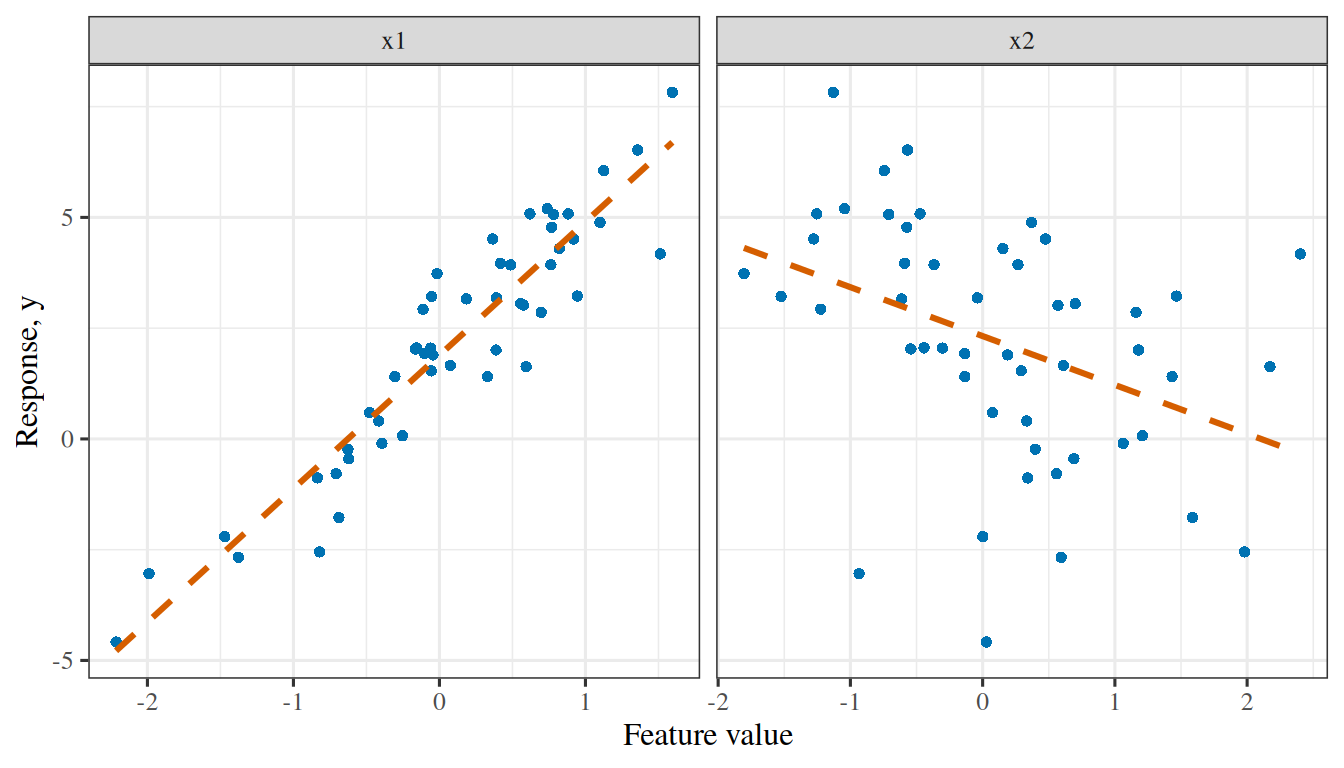
Example 3 (The synthetic data) Let’s simulate some data that we can use to demonstrate how linear models work. We’ll call this simulated dataset “the synthetic data”, and reuse it for the rest of this chapter. Listing 1 generates a sample with a fixed random seed. Each observation has two features, x1 and x2, drawn independently from the standard normal distribution, and a response y, which is a linear function of the two features plus a small amount of normal noise. The data frame has two further columns, jitter and y_collinear, which the later examples introduce where they use them. The R chunk defines the data frame synthetic, and the Python and Julia chunks of later examples read it from there.

Listing 1: Simulating the synthetic data
# Simulate the sample once, in R, so that the R, Python and Julia chunks
# of later examples all analyse identical numbers
# (each language's random number generator would draw different ones).
set.seed(1)
n_syn <- 50
synthetic <- data.frame(
  x1 = rnorm(n_syn),
  x2 = rnorm(n_syn),
  jitter = rnorm(n_syn) # a third, unrelated draw, used to perturb x2 in a later example
)
noise_syn <- rnorm(n_syn, sd = 0.1)
# y depends on both features
synthetic$y <- 2 + 3 * synthetic$x1 - synthetic$x2 + noise_syn
# y_collinear depends on x1 alone, for the examples with collinear features
synthetic$y_collinear <- 2 + synthetic$x1 + noise_syn

The sample has 50 observations.

Show code
library(ggplot2)
syf_long <- data.frame(
  feature = rep(c("x1", "x2"), each = nrow(synthetic)),
  value = c(synthetic$x1, synthetic$x2),
  y = rep(synthetic$y, 2)
)
ggplot(syf_long, aes(value, y)) +
  geom_point(colour = "#0072B2", shape = 16) +
  geom_smooth(
    method = "lm", formula = y ~ x, se = FALSE,
    colour = "#D55E00", linetype = "dashed"
  ) +
  facet_wrap(vars(feature), scales = "free_x") +
  labs(x = "Feature value", y = "Response, y")
Show code
import matplotlib.pyplot as plt
import numpy as np

syf_df = r.synthetic
fig, axes = plt.subplots(1, 2, figsize=(7, 4), sharey=True, layout="constrained")
for ax, feature in zip(axes, ["x1", "x2"]):
    value_syf = syf_df[feature].to_numpy()
    slope_syf, intercept_syf = np.polyfit(value_syf, syf_df["y"], 1)
    grid_syf = np.array([value_syf.min(), value_syf.max()])
    ax.plot(value_syf, syf_df["y"], color="#0072B2", marker="o", linestyle="");
    ax.plot(grid_syf, intercept_syf + slope_syf * grid_syf, color="#D55E00", linestyle="--");
    ax.set_title(feature);
    ax.set_xlabel("Feature value");
axes[0].set_ylabel("Response, y");
plt.show()
Figure 2: The synthetic data plotted as y against each of the two features, with a dashed straight line drawn through each panel. The two features were drawn separately, so each panel’s line rises or falls by about the amount that the formula that generated the data gives it, \(3\) for x1 and \(-1\) for x2.
(a)
Two side-by-side scatter plots of the response y of the 50 synthetic observations, one against the feature x1 and one against x2, with blue circles for the observations. In the left panel the points rise steeply from left to right, from about -5 at the lowest x1 to about 8 at the highest, and a dashed vermilion fitted line rises with them, with a slope of about 3. In the right panel the points fall more gently and with more scatter around a dashed vermilion fitted line with a slope of about -1.
(b)
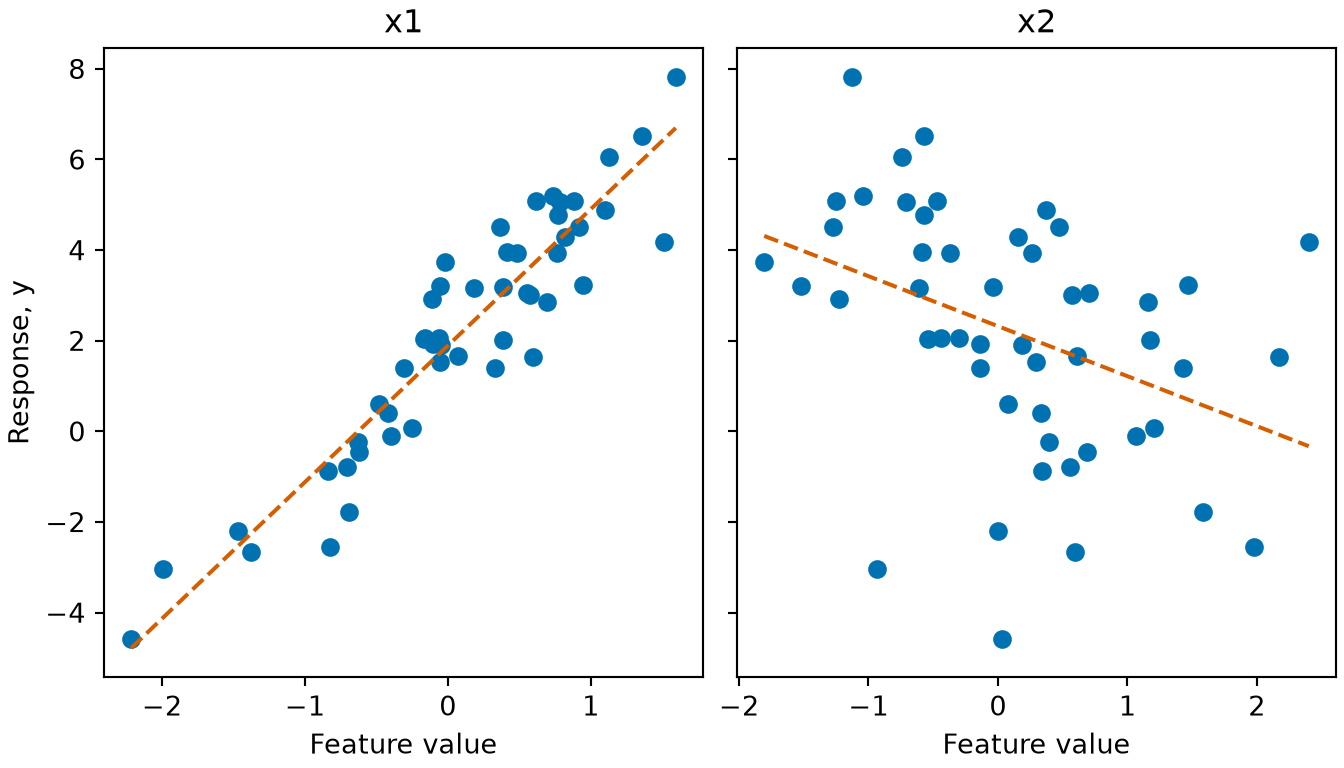
Two side-by-side scatter plots of the response y of the 50 synthetic observations, one against the feature x1 and one against x2, with blue circles for the observations. In the left panel the points rise steeply from left to right, from about -5 at the lowest x1 to about 8 at the highest, and a dashed vermilion fitted line rises with them, with a slope of about 3. In the right panel the points fall more gently and with more scatter around a dashed vermilion fitted line with a slope of about -1.
ExmExample 4 (The hyperplane of a fitted linear function)

Example 4 (The hyperplane of a fitted linear function) Fit \(\modmemf{\vx} = \dprod{\vcoef}{\vx} + \coef{0}\) to the two features of the synthetic data by least squares, and find a point on the hyperplane \(\dprod{\vcoef}{\vx} + \coef{0} = 0\) with first coordinate \(1\):

import numpy as np

geo = r.synthetic.to_numpy()
x_geo, y_geo = geo[:, :2], geo[:, 3]
design_geo = np.column_stack([np.ones(len(y_geo)), x_geo])
coef_geo = np.linalg.solve(design_geo.T @ design_geo, design_geo.T @ y_geo)
b0_geo, b_geo = coef_geo[0], coef_geo[1:]
point_geo = np.array([1.0, -(b0_geo + b_geo[0]) / b_geo[1]])
print(point_geo, b_geo @ point_geo + b0_geo)
[1.         4.96042842] 0.0
geo <- synthetic
fit_geo <- lm(y ~ x1 + x2, data = geo)
b0_geo <- coef(fit_geo)[["(Intercept)"]]
b_geo <- coef(fit_geo)[c("x1", "x2")]
point_geo <- c(1, -(b0_geo + b_geo[["x1"]]) / b_geo[["x2"]])
point_geo
[1] 1.000000 4.960428
sum(b_geo * point_geo) + b0_geo
[1] 4.440892e-16

The normal vector is \(\vcoef =\) (2.967, -1.004), both entries non-zero, so the hyperplane in \(\reals^2\) is a line; the point above lies on it, since \(\dprod{\vcoef}{\vx} + \coef{0}\) is zero there up to rounding error.

LemTheorem 1 (Linear and affine hyperplanes)

Theorem 1 (Linear and affine hyperplanes) Let \(\mathcal{H}\) be the hyperplane of Definition 4.

  1. If \(\coef{0} = 0\), then \(\mathcal{H}\) passes through the origin and is a linear subspace.
  2. If \(\coef{0} \neq 0\), then \(\mathcal{H}\) does not contain the origin. For any \(\vx_0 \in \mathcal{H}\), \(\mathcal{H} = \set{ \vx_0 + \vv : \dprod{\vcoef}{\vv} = 0 }\), which is the linear subspace \(\set{ \vv : \dprod{\vcoef}{\vv} = 0 }\) shifted by \(\vx_0\).

Proof.

  1. With \(\coef{0} = 0\), \(\mathcal{H} = \set{ \vx : \dprod{\vcoef}{\vx} = 0 }\), which contains \(\vzero\) and is closed under addition and scalar multiplication.

  2. At the origin, \(\dprod{\vcoef}{\vzero} + \coef{0} = \coef{0} \neq 0\), so \(\vzero \notin \mathcal{H}\). For \(\vx_0 \in \mathcal{H}\), \(\dprod{\vcoef}{\vx_0} = -\coef{0}\), so for any \(\vx\),

    \[ \begin{aligned} \dprod{\vcoef}{\vx} + \coef{0} = 0 &\iff \dprod{\vcoef}{\vx} = \dprod{\vcoef}{\vx_0} \\ &\iff \dprod{\vcoef}{\vx - \vx_0} = 0. \end{aligned} \]

    Hence \(\vx \in \mathcal{H}\) exactly when \(\vx - \vx_0\) lies in the linear subspace.

ExmExample 5 (The fitted hyperplane misses the origin)

Example 5 (The fitted hyperplane misses the origin) For the hyperplane of Example 4, check that the origin is not on it, and that moving from the point \(\vx_0\) in a direction \(\vv\) with \(\dprod{\vcoef}{\vv} = 0\) stays on it:

direction_geo = np.array([b_geo[1], -b_geo[0]])
print(b0_geo, b_geo @ direction_geo, b_geo @ (point_geo + 2.5 * direction_geo) + b0_geo)
2.011438958958926 0.0 0.0
direction_geo <- c(b_geo[["x2"]], -b_geo[["x1"]])
c(origin = b0_geo,
  direction = sum(b_geo * direction_geo),
  shifted = sum(b_geo * (point_geo + 2.5 * direction_geo)) + b0_geo)
      origin    direction      shifted 
2.011439e+00 0.000000e+00 4.440892e-16 

The value at the origin is the offset \(\coef{0} =\) 2.011, which is not zero, so this hyperplane is affine and not a linear subspace.

LemTheorem 2 (The graph of a linear function is a hyperplane)

Theorem 2 (The graph of a linear function is a hyperplane) The set of input-output pairs

\[\set{ [\vx; y] \in \reals^{p+1} : y = \dprod{\vcoef}{\vx} + \coef{0} }\]

is a hyperplane in \(\reals^{p+1}\), with normal vector \([\vcoef; -1]\) and offset \(\coef{0}\).

Proof. For \([\vx; y] \in \reals^{p+1}\),

\[ \begin{aligned} y = \dprod{\vcoef}{\vx} + \coef{0} &\iff \dprod{\vcoef}{\vx} - y + \coef{0} = 0 \\ &\iff \dprod{[\vcoef; -1]}{[\vx; y]} + \coef{0} = 0. \end{aligned} \]

The vector \([\vcoef; -1]\) is non-zero, since its last entry is \(-1\).

ExmExample 6 (The fitted values lie on the graph hyperplane)

Example 6 (The fitted values lie on the graph hyperplane) For the fit of Example 4, the pairs of an input and its fitted value satisfy the hyperplane equation of Theorem 2, and the pairs of an input and its observed response do not:

normal_geo = np.append(b_geo, -1.0)
fitted_geo = x_geo @ b_geo + b0_geo
on_fitted = np.column_stack([x_geo, fitted_geo]) @ normal_geo + b0_geo
on_observed = np.column_stack([x_geo, y_geo]) @ normal_geo + b0_geo
print(np.abs(on_fitted).max(), np.abs(on_observed).max())
4.440892098500626e-16 0.2515321410227709
normal_geo <- c(b_geo, -1)
fitted_geo <- fitted(fit_geo)
on_fitted <- cbind(geo$x1, geo$x2, fitted_geo) %*% normal_geo + b0_geo
on_observed <- cbind(geo$x1, geo$x2, geo$y) %*% normal_geo + b0_geo
c(fitted = max(abs(on_fitted)), observed = max(abs(on_observed)))
      fitted     observed 
7.549517e-15 2.515321e-01 

The fitted pairs deviate from the hyperplane only by rounding error. The largest deviation of an observed pair is 0.25, because the observed pairs differ from the fitted pairs by the residuals.

DefDefinition 5 (Half-spaces)

Definition 5 (Half-spaces) The hyperplane \(\mathcal{H}\) of Definition 4 divides \(\reals^p\) into two opposing half-spaces (illustrated in Figure 3) [5]:

\[ \mathcal{H}^+ = \set{ \vx \in \reals^p : \dprod{\vcoef}{\vx} + \coef{0} \ge 0 }, \qquad \mathcal{H}^- = \set{ \vx \in \reals^p : \dprod{\vcoef}{\vx} + \coef{0} < 0 } \]

ExmExample 7 (Training points on each side of the fitted hyperplane)

Example 7 (Training points on each side of the fitted hyperplane) Count the training points of Example 4 in each half-space:

side_geo = x_geo @ b_geo + b0_geo >= 0
print(side_geo.sum(), (~side_geo).sum())
39 11
side_geo <- as.matrix(geo[, c("x1", "x2")]) %*% b_geo + b0_geo >= 0
c(positive = sum(side_geo), negative = sum(!side_geo))
positive negative 
      39       11 

39 of the 50 points lie in \(\mathcal{H}^+\), and the rest lie in \(\mathcal{H}^-\). In linear binary classification, the hyperplane is the decision boundary, and the two half-spaces are the two predicted classes.

DefDefinition 6 (Level set)

Definition 6 (Level set) For a function \(\modmem: \reals^p \to \reals\), the level set (or contour) at value \(c \in \reals\) is the pre-image of \(c\) [6]:

\[\levelsetof{c}{\modmem} = \set{ \vx \in \reals^p : \modmemf{\vx} = c }\]

ExmExample 8 (A level set of the fitted function)

Example 8 (A level set of the fitted function) For the fitted function \(\modmemf{\vx} = \dprod{\vcoef}{\vx} + \coef{0}\) of Example 4, the level set at \(c = 1\) contains the point with first coordinate \(1\) that solves \(\modmemf{\vx} = c\):

level_geo = 1.0
level_point_geo = np.array([1.0, (level_geo - b0_geo - b_geo[0]) / b_geo[1]])
print(level_point_geo, level_point_geo @ b_geo + b0_geo)
[1.         3.96401683] 1.0
level_geo <- 1
level_point_geo <- c(1, (level_geo - b0_geo - b_geo[["x1"]]) / b_geo[["x2"]])
level_point_geo
[1] 1.000000 3.964017
sum(level_point_geo * b_geo) + b0_geo
[1] 1

The value of \(\modmem\) at this point equals \(c\), so the point is in \(\levelsetof{1}{\modmem}\).

LemTheorem 3 (Level sets of a linear function)

Theorem 3 (Level sets of a linear function) Let \(\modmemf{\vx} = \dprod{\vcoef}{\vx} + \coef{0}\) with \(\vcoef \neq \vzero\). Every level set \(\levelsetof{c}{\modmem}\) of Definition 6 is a hyperplane with normal vector \(\vcoef\), parallel to the decision boundary \(\levelsetof{0}{\modmem}\). Its dimension is \(p - 1\): a point for \(p = 1\), a line for \(p = 2\), and a two-dimensional plane for \(p = 3\).

Proof. For any \(c\),

\[ \begin{aligned} \levelsetof{c}{\modmem} &= \set{ \vx : \dprod{\vcoef}{\vx} + \coef{0} = c } \\ &= \set{ \vx : \dprod{\vcoef}{\vx} + (\coef{0} - c) = 0 }. \end{aligned} \]

This is the hyperplane of Definition 4 with normal vector \(\vcoef\) and offset \(\coef{0} - c\). Different values of \(c\) change only the offset, so the level sets share the normal vector and are parallel. A hyperplane in \(\reals^p\) has dimension \(p - 1\) by Definition 4.

ExmExample 9 (Parallel level lines and a level point)

Example 9 (Parallel level lines and a level point) With two features, the level set of the fitted function of Example 4 at value \(c\) is the line \(x_2 = (c - \coef{0} - \coef{1} x_1) / \coef{2}\). Compute the slope and intercept of the level lines at three values of \(c\). With one feature (x1 alone), the level set is a single point:

levels_geo = np.array([-1.0, 0.0, 1.0])
slope_geo = -b_geo[0] / b_geo[1]
intercept_geo = (levels_geo - b0_geo) / b_geo[1]
print(slope_geo, intercept_geo)
2.956207321500671 [3.00063269 2.0042211  1.00780951]
design_one = np.column_stack([np.ones(len(y_geo)), x_geo[:, 0]])
coef_one = np.linalg.solve(design_one.T @ design_one, design_one.T @ y_geo)
print((0.0 - coef_one[0]) / coef_one[1])
-0.6270727820462808
levels_geo <- c(-1, 0, 1)
slope_geo <- -b_geo[["x1"]] / b_geo[["x2"]]
intercept_geo <- (levels_geo - b0_geo) / b_geo[["x2"]]
slope_geo
[1] 2.956207
intercept_geo
[1] 3.000633 2.004221 1.007810
fit_one <- lm(y ~ x1, data = geo)
(0 - coef(fit_one)[["(Intercept)"]]) / coef(fit_one)[["x1"]]
[1] -0.6270728

All three level lines have the same slope, 2.956, and the intercepts differ, so the lines are parallel. The level set at \(c = 0\) of the one-feature fit is the single point \(x_1 =\) -0.627.

LemTheorem 4 (The normal vector is orthogonal to the level sets and points uphill)

Theorem 4 (The normal vector is orthogonal to the level sets and points uphill) Let \(\modmemf{\vx} = \dprod{\vcoef}{\vx} + \coef{0}\) with \(\vcoef \neq \vzero\), and write \(\norm{\vcoef}\) for the Euclidean norm of \(\vcoef\).

  1. If \(\vx, \vx' \in \levelsetof{c}{\modmem}\) lie in the same level set of Definition 6, then \(\vcoef \perp (\vx - \vx')\).
  2. For every \(\vx \in \reals^p\) and \(t \in \reals\), \(\modmemf{\vx + t\vcoef} = \modmemf{\vx} + t\norm{\vcoef}^2\).
  3. Among unit vectors \(\vu\) (\(\norm{\vu} = 1\)), the change \(\modmemf{\vx + t\vu} - \modmemf{\vx}\) with \(t > 0\) is largest for \(\vu = \vcoef / \norm{\vcoef}\).

Proof. Part 1. Both points satisfy \(\dprod{\vcoef}{\vx} + \coef{0} = c\) and \(\dprod{\vcoef}{\vx'} + \coef{0} = c\). Subtracting the second equation from the first gives \(\dprod{\vcoef}{\vx} - \dprod{\vcoef}{\vx'} = 0\). By linearity of the dot product, this is \(\dprod{\vcoef}{\vx - \vx'} = 0\). That is orthogonality.

Part 2. Substituting the definition of \(\modmem\) and using linearity of the dot product,

\[ \begin{aligned} \modmemf{\vx + t\vcoef} &= \dprod{\vcoef}{\vx + t\vcoef} + \coef{0} \\ &= \dprod{\vcoef}{\vx} + t\dprod{\vcoef}{\vcoef} + \coef{0} \\ &= \modmemf{\vx} + t\norm{\vcoef}^2. \end{aligned} \]

Part 3. For a unit vector \(\vu\),

\[ \begin{aligned} \modmemf{\vx + t\vu} - \modmemf{\vx} &= \paren{\dprod{\vcoef}{\vx + t\vu} + \coef{0}} - \paren{\dprod{\vcoef}{\vx} + \coef{0}} \\ &= t\dprod{\vcoef}{\vu}. \end{aligned} \]

Since \(t > 0\), maximizing this change is the same as maximizing \(\dprod{\vcoef}{\vu}\). By the Cauchy-Schwarz inequality, \(\dprod{\vcoef}{\vu} \le \norm{\vcoef}\norm{\vu} = \norm{\vcoef}\). Equality holds exactly when \(\vu = \alpha\vcoef\) for some \(\alpha > 0\). The condition \(\norm{\vu} = 1\) then forces \(\alpha\norm{\vcoef} = 1\), so \(\vu = \vcoef / \norm{\vcoef}\).

RemarkRemark 2 (Reading the normal-vector theorem)

Remark 2 (Reading the normal-vector theorem). Part 1 of Theorem 4 is why \(\vcoef\) is called normal: it is orthogonal to every displacement within a level set (Theorem 3). In part 2, let \(\vx\) lie in the level set \(\levelsetof{c}{\modmem}\), so \(\modmemf{\vx} = c\). A step of \(t > 0\) along \(\vcoef\) lands in the level set \(\levelsetof{c + t\norm{\vcoef}^2}{\modmem}\), which has a larger value, so \(\vcoef\) points toward increasing values of \(\modmem\). A step with \(t < 0\) lands in a level set with a smaller value. Part 3 is the sense in which that direction is the steepest.

ExmExample 10 (The coefficient vector is orthogonal to a level line)

Example 10 (The coefficient vector is orthogonal to a level line) For the fitted function of Example 4, take two points of the level set \(\levelsetof{1}{\modmem}\) from Example 8, one with first coordinate \(1\) and one with first coordinate \(2\). Check that their difference is orthogonal to \(\vcoef\), and that a step of \(t = 0.5\) along \(\vcoef\) raises \(\modmem\) by \(t\norm{\vcoef}^2\) (Theorem 4):

# two points on the level set at c = 1
pt_a_geo = np.array([1.0, (level_geo - b0_geo - b_geo[0] * 1.0) / b_geo[1]])
pt_b_geo = np.array([2.0, (level_geo - b0_geo - b_geo[0] * 2.0) / b_geo[1]])
# part 1: the dot product with the difference is zero
print(b_geo @ (pt_b_geo - pt_a_geo))
4.440892098500626e-16
# part 2: the change in f after a step of 0.5 along the coefficient vector
step_geo = 0.5
print(((pt_a_geo + step_geo * b_geo) @ b_geo + b0_geo) - level_geo, step_geo * (b_geo @ b_geo))
4.904717949284366 4.904717949284368
# two points on the level set at c = 1
pt_a_geo <- c(1, (level_geo - b0_geo - b_geo[["x1"]] * 1) / b_geo[["x2"]])
pt_b_geo <- c(2, (level_geo - b0_geo - b_geo[["x1"]] * 2) / b_geo[["x2"]])
# part 1: the dot product with the difference is zero
sum(b_geo * (pt_b_geo - pt_a_geo))
[1] 0
# part 2: the change in f after a step of 0.5 along the coefficient vector
step_geo <- 0.5
sum((pt_a_geo + step_geo * b_geo) * b_geo) + b0_geo - level_geo
[1] 4.904718
step_geo * sum(b_geo^2)
[1] 4.904718

The dot product in part 1 is zero up to rounding, and the two values in part 2 agree.

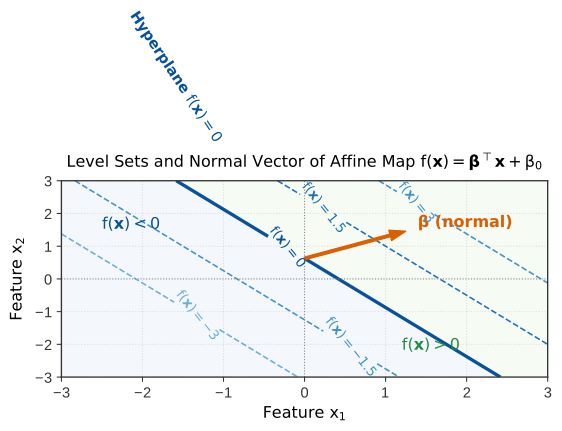
Figure 3: Level sets \(\levelsetof{c}{\modmem}\) (Definition 6) of an affine function \(\modmem\) in \(\reals^2\), drawn as level lines because \(p = 2\). The coefficient vector \(\vcoef\), the normal vector of Definition 4, is orthogonal to the level lines and points toward increasing values of \(\modmemf{\vx}\) (Theorem 4).

Contour lines of an affine function in two dimensions showing level sets parallel to each other, the zero-contour separating hyperplane, and the normal vector pointing in the direction of steepest increase.

DefDefinition 7 (Contour plot)

Definition 7 (Contour plot) For a function \(\modmem: \reals^2 \to \reals\), a contour plot draws several level sets \(\levelsetof{c_1}{\modmem}, \levelsetof{c_2}{\modmem}, \ldots\) of Definition 6 in the plane, each labelled by its value \(c\).

ExmExample 11 (A contour plot of the fitted function)

Example 11 (A contour plot of the fitted function) Draw the level sets of the fitted function of Example 4 at the values \(c = -1, 0, 1\):

Show code
library(ggplot2)
grid_geo <- expand.grid(x1 = seq(-2, 2, length.out = 50), x2 = seq(-2, 2, length.out = 50))
grid_geo$h <- b0_geo + b_geo[["x1"]] * grid_geo$x1 + b_geo[["x2"]] * grid_geo$x2
ggplot(grid_geo, aes(x1, x2, z = h)) +
  geom_contour(aes(colour = factor(after_stat(level))), breaks = levels_geo) +
  labs(colour = "c") +
  coord_equal() +
  theme(legend.position = "bottom")
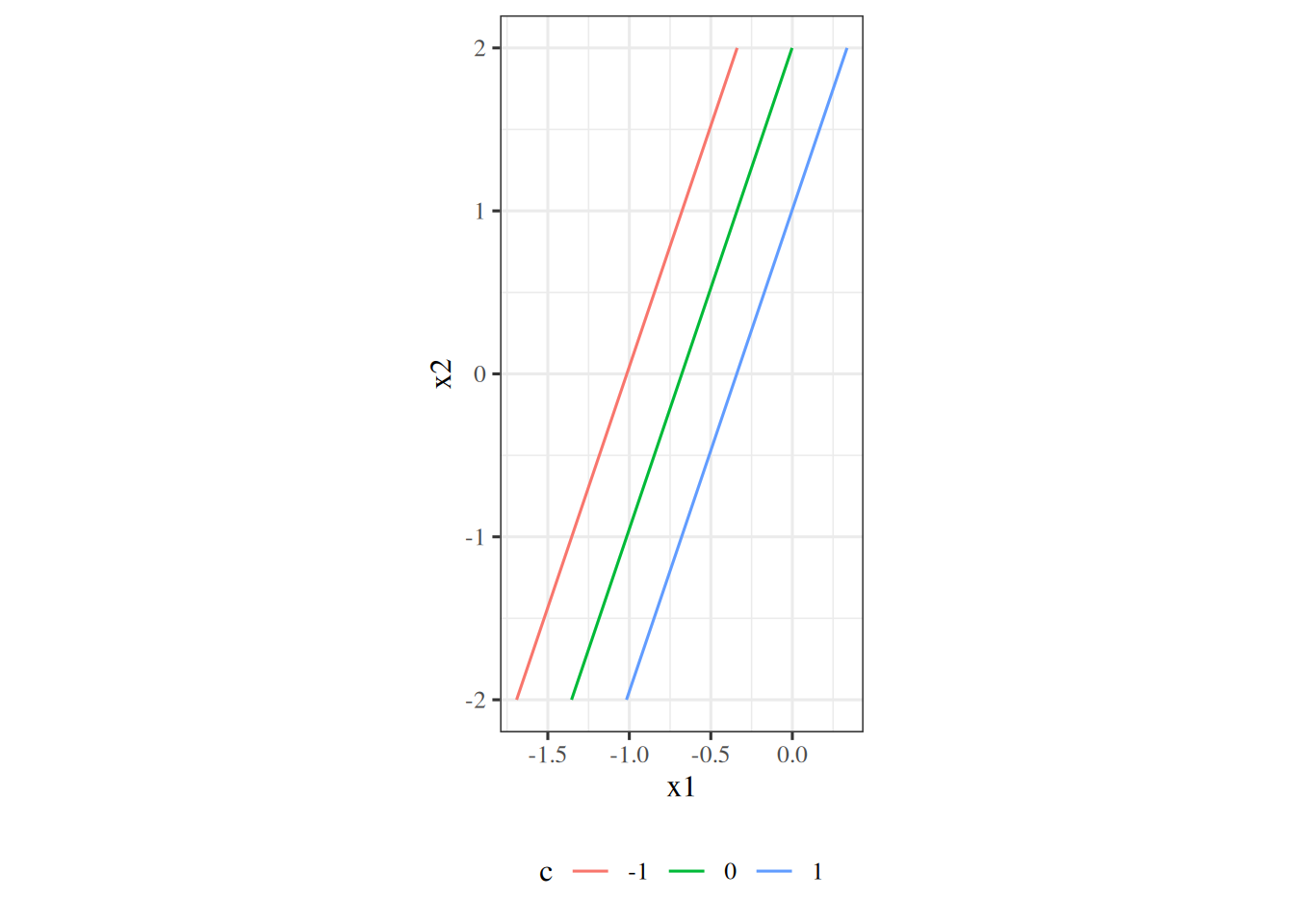
Figure 4: Level lines of the fitted linear function at c = -1, 0 and 1.
Three parallel straight lines in the plane of the two features, coloured by the values minus one, zero and one.

The lines are parallel, as Theorem 3 says, and the orientation and spacing of the lines show the direction and steepness of the fitted function.

1.3 Linear functions as inner products

DefDefinition 8 (Inner product (dot product))

Definition 8 (Inner product (dot product)) For vectors \(\vx, \vy \in \reals^p\), the standard dot product / inner product is

\[ \begin{aligned} \dprod{\vx}{\vy} &= \vx \cdot \vy \\ &= \langle \vx, \vy \rangle \\ &= \sumjp x_j y_j \end{aligned} \]

ExmExample 12 (The inner product of the two synthetic features)

Example 12 (The inner product of the two synthetic features) Compute the inner product of the two feature columns of the synthetic data, as a sum of products and with the built-in product:

x1_geo, x2_geo = x_geo[:, 0], x_geo[:, 1]
print(np.sum(x1_geo * x2_geo), np.dot(x1_geo, x2_geo))
-0.9534465347538759 -0.9534465347538756
c(sum_of_products = sum(geo$x1 * geo$x2), built_in = drop(crossprod(geo$x1, geo$x2)))
sum_of_products        built_in 
     -0.9534465      -0.9534465 
DefDefinition 9 (Euclidean norm (\(L_2\) norm))

Definition 9 (Euclidean norm (\(L_2\) norm)) The Euclidean norm (\(L_2\) norm) of \(\vx \in \reals^p\) is induced by the inner product of Definition 8:

\[ \begin{aligned} \norm{\vx}_2 &= \sqrt{\dprod{\vx}{\vx}} \\ &= \sqrt{\sumjp x_j^2} \end{aligned} \]

ExmExample 13 (The norms of the two synthetic features)

Example 13 (The norms of the two synthetic features) Compute the Euclidean norm of each feature column of the synthetic data:

print(np.sqrt(np.dot(x1_geo, x1_geo)), np.linalg.norm(x2_geo))
5.862940419034619 6.832351161195385
c(x1 = sqrt(sum(geo$x1^2)), x2 = norm(as.matrix(geo$x2), type = "F"))
      x1       x2 
5.862940 6.832351 
LemTheorem 5 (The sign of the inner product)

Theorem 5 (The sign of the inner product) For nonzero \(\vx, \vy \in \reals^p\) with angle \(\angpar \in [0, \pi]\) between them,

\[\dprod{\vx}{\vy} = \norm{\vx}_2 \norm{\vy}_2 \cos\angpar,\]

so:

  • \(\dprod{\vx}{\vy} > 0\) when the vectors point broadly in the same direction (\(\angpar < \pi/2\)).
  • \(\dprod{\vx}{\vy} = 0\) exactly when the vectors are orthogonal (\(\angpar = \pi/2\)).
  • \(\dprod{\vx}{\vy} < 0\) when the vectors point broadly in opposing directions (\(\angpar > \pi/2\)).

Proof. By the definition of the angle, \(\cos\angpar = \dprod{\vx}{\vy} / (\norm{\vx}_2 \norm{\vy}_2)\), which gives the identity. The product \(\norm{\vx}_2 \norm{\vy}_2\) is positive because both vectors are nonzero, so \(\dprod{\vx}{\vy}\) has the sign of \(\cos\angpar\). On \([0, \pi]\), the cosine is positive for \(\angpar < \pi/2\), zero at \(\pi/2\) and negative for \(\angpar > \pi/2\).

ExmExample 14 (The angle between the synthetic features)

Example 14 (The angle between the synthetic features) Compute the angle between the two feature columns of the synthetic data, and compare the sign of the cosine with the sign of the inner product:

cos_geo = np.dot(x1_geo, x2_geo) / (np.linalg.norm(x1_geo) * np.linalg.norm(x2_geo))
print(cos_geo, np.degrees(np.arccos(cos_geo)), np.dot(x1_geo, x2_geo))
-0.023801848374948625 91.36387425599459 -0.9534465347538756
cos_geo <- sum(geo$x1 * geo$x2) / (sqrt(sum(geo$x1^2)) * sqrt(sum(geo$x2^2)))
c(cosine = cos_geo, degrees = acos(cos_geo) * 180 / pi, inner_product = sum(geo$x1 * geo$x2))
       cosine       degrees inner_product 
  -0.02380185   91.36387426   -0.95344653 

The cosine is -0.024, so the angle is 91.4 degrees. The inner product and the cosine have the same sign, as the theorem says.

RemarkRemark 3 (An affine function as a projection)

Remark 3 (An affine function as a projection). By Theorem 5, evaluating an affine function \(\modmemf{\vx} = \dprod{\vcoef}{\vx} + \coef{0}\) measures the projection of \(\vx\) along the parameter direction \(\vcoef\), offset by the intercept \(\coef{0}\).

DefDefinition 10 (The intercept trick (bias trick, 1-padding))

Definition 10 (The intercept trick (bias trick, 1-padding)) The intercept trick, also called the bias trick or 1-padding, writes an affine function of \(\vx \in \reals^p\) as one inner product. It places the constant \(1\) before the entries of \(\vx\) in the design vector \(\vfeatmap(\vx)\), and places the intercept \(\coef{0}\) before the slope coefficients in the parameter vector \(\vcoef\):

\[ \vfeatmap(\vx) = \begin{bmatrix} 1 \\ \vx \end{bmatrix} \in \reals^{p^*}, \qquad \vcoef = \begin{bmatrix} \coef{0} \\ \vcoef_{\text{slope}} \end{bmatrix} \in \reals^{p^*}, \qquad p^* = p + 1. \]

In words: the intercept becomes one more entry of \(\vcoef\), paired with the entry of \(\vfeatmap(\vx)\) that is always \(1\).

ExmExample 15 (Applying the intercept trick to one input)

Example 15 (Applying the intercept trick to one input) Take \(p = 2\) features, \(\vx = \tp{[3, 5]}\), intercept \(\coef{0} = 1\) and slope parameters \(\vcoef_{\text{slope}} = \tp{[2, -1]}\). The intercept trick gives \(\vfeatmap(\vx) = \tp{[1, 3, 5]}\) and \(\vcoef = \tp{[1, 2, -1]}\), so \(p^* = 3\).

Show code
bp_x <- c(3, 5)
bp_beta <- c(1, 2, -1)
bp_padded <- c(1, bp_x)

The padded inner product is 2. The intercept 1 plus the inner product of the slope parameters with \(\vx\), 1, is the same number.

ExrExercise 1 (The padding is not a convention, it is an identity)

Exercise 1 (The padding is not a convention, it is an identity) Let \(\vx \in \reals^p\) and \(\vcoef_{\text{slope}} \in \reals^p\), and set the design vector \(\vfeatmap(\vx) \in \reals^{p^*}\) and full parameter vector \(\vcoef \in \reals^{p^*}\) with \(p^* = p + 1\):

\[\vfeatmap(\vx) = \begin{bmatrix} 1 \\ \vx \end{bmatrix} \in \reals^{p^*}, \qquad \vcoef = \begin{bmatrix} \coef{0} \\ \vcoef_{\text{slope}} \end{bmatrix} \in \reals^{p^*}\]

Show that \(\dprod{\vcoef}{\vfeatmap(\vx)} = \dprod{\vcoef_{\text{slope}}}{\vx} + \coef{0}\).

Then say what goes wrong if the padded \(1\) is put at the end of \(\vfeatmap(\vx)\) but the intercept is left at the start of \(\vcoef\).

Solution 1. Write the inner product as a sum over all \(p^*\) coordinates, indexed from \(0\):

\[ \begin{aligned} \dprod{\vcoef}{\vfeatmap(\vx)} &= \sum_{i=0}^{p} \coef{i} \featmap(\vx)_i \\ &= \coef{0} \cdot 1 + \sumip \coef{i} x_i \end{aligned} \]

The zeroth coordinate is \(\coef{0}\) and \(\featmap(\vx)_0 = 1\), so the first term is \(\coef{0}\). The remaining coordinates are exactly \(\vcoef_{\text{slope}}\) and \(\vx\), so the sum is \(\dprod{\vcoef_{\text{slope}}}{\vx}\). Adding them gives the claim.

The intercept is therefore not a special parameter with its own update rule. It is an ordinary coefficient on an input that happens to be constant, so a single formula covers all \(p^* = p + 1\) coordinates with no special case for it.

If the padding is misaligned, the identity fails silently and gives the wrong function rather than an error. With a misaligned design vector \(\tilde{\vfeatmap}(\vx) = [\vx; 1]\) and \(\vcoef = [\coef{0}; \vcoef_{\text{slope}}]\), the product pairs \(\coef{0}\) with \(x_1\) and \(\coef{p}\) with the constant \(1\):

\[\dprod{\vcoef}{\tilde{\vfeatmap}(\vx)} = \coef{0} x_1 + \coef{1} x_2 + \dots + \coef{p-1} x_p + \coef{p}\]

Every coefficient is attached to the wrong feature. The shapes still conform, so no library will complain; the fit will simply be worse than it should be, for no visible reason. Choose the padding position once and use it everywhere.

LemTheorem 6 (The padded 1 absorbs the intercept)

Theorem 6 (The padded 1 absorbs the intercept) Let \(\vx \in \reals^p\) and \(\vcoef_{\text{slope}} \in \reals^p\), and set \(\vfeatmap(\vx) = \tp{[1, \tp{\vx}]} \in \reals^{p^*}\) and \(\vcoef = \tp{[\coef{0}, \tp{\vcoef_{\text{slope}}}]} \in \reals^{p^*}\) with \(p^* = p + 1\). Then

\[ \dprod{\vcoef}{\vfeatmap(\vx)} = \dprod{\vcoef_{\text{slope}}}{\vx} + \coef{0}. \]

Proof. This is the solution to Exercise 1: see Solution 1.

ExmExample 16 (Padding a design vector with a 1)

Example 16 (Padding a design vector with a 1) Take \(p = 2\), \(\vx = \tp{[3, 5]}\), \(\coef{0} = 1\) and \(\vcoef_{\text{slope}} = \tp{[2, -1]}\). Then \(\vfeatmap(\vx) = \tp{[1, 3, 5]}\) and \(\vcoef = \tp{[1, 2, -1]}\).

Show code
bt_x <- c(3, 5)
bt_b0 <- 1
bt_slope <- c(2, -1)
c(padded = sum(c(bt_b0, bt_slope) * c(1, bt_x)), slope_plus_intercept = sum(bt_slope * bt_x) + bt_b0)
              padded slope_plus_intercept 
                   2                    2 

Both sides equal 2: the slope part contributes 1 and the intercept adds 1.

NoteFour senses of “bias”

The \(\coef{0}\) that Theorem 6 absorbs into \(\hvcoef\) is the bias term. It is the first of four barely-related senses this course gives the word, and the only one of the four that is a number in the model.

The bias term is the constant \(\coef{0}\), also called the intercept or the offset. It lets the fitted line not pass through the origin. It measures nothing and it is not an error.

The bias of an estimator is \(\Ep[\hparam] - \param\), for an estimator \(\hparam\) of a parameter \(\param\): how far the estimate lands from the truth on average over repeated samples. The hat here marks an estimator, not the 1-padding of Theorem 6, which is a separate notation clash to watch for. Least squares is unbiased whenever \(X\) has full column rank and the errors have mean zero given \(X\), which makes a sentence that reads like a contradiction and is not: the model has a bias term, and least squares estimates that term without bias.

The bias in the bias-variance decomposition is the part of expected prediction error that comes from the learning algorithm’s average fitted model, averaged over training samples, differing from the truth. A First Model and Generalization writes it \((\truemeanf{x} - \avgfitf{x})^2\), with \(\avgfit\) the average over samples. It is a property of the algorithm rather than of any one fit, and it is about predictions rather than parameters. The first and third senses are related, and the relation is the opposite of what the shared word suggests: forcing a line through the origin is a smaller family than letting it choose an intercept, so dropping the bias term generally adds bias in this sense.

Inductive bias is the set of assumptions a learning algorithm makes about the target function, which restrict or prioritize the models it will return. The learning theory chapter defines it, and compares algorithms by it. It is the source of the third sense rather than a synonym for it: the assumptions determine where the average fitted model lands. It is also the only one of the four that is not a number.

Ask which sense is meant every time you read the word, and name the sense every time you write it. A fifth sense, the fairness one, belongs to the ethics of deploying a model rather than to its arithmetic, and shares only the word with these four.

2 Regression and least squares

2.1 The regression task

DefDefinition 11 (Regression task)

Definition 11 (Regression task) Regression is a supervised learning task where the goal is to learn a mapping \(f: \mathcal{X} \to \mathcal{Y}\) from input feature vectors to quantitative outputs [7]:

\[\mathcal{D} = \set{ (\vx_1, y_1), (\vx_2, y_2), \ldots, (\vx_n, y_n) } \subset \reals^p \times \mathcal{Y}\]

Course Overview introduces regression alongside classification.

DefDefinition 12 (Univariate regression)

Definition 12 (Univariate regression) A regression task (Definition 11) is univariate when the target is a scalar, \(y \in \reals\).

ExmExample 17 (The synthetic data have a scalar target)

Example 17 (The synthetic data have a scalar target) In the synthetic data, each row has one response \(y_i\). Check that the response is a one-dimensional vector with one entry per row:

n_resp_geo = len(y_geo)
print(y_geo.ndim, n_resp_geo, geo.shape[0])
1 50 50
c(is_vector = is.null(dim(geo$y)), length = length(geo$y), rows = nrow(geo))
is_vector    length      rows 
        1        50        50 

The response has 50 entries, one for each of the 50 rows, so each \(y_i\) is a scalar and the task is univariate.

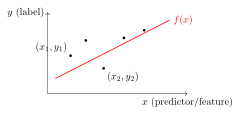
Figure 5: A simple linear regression line \(\hy = \coef{1} x + \coef{0}\) fitted through a set of observed data points.

Linear regression model showing data points scattered along a line y = beta_1 x + beta_0 with slope beta_1 and intercept beta_0.

DefDefinition 13 (Residual)

Definition 13 (Residual) For an observation \((\vx_i, y_i)\) and model prediction \(\hy_i = f(\vx_i)\), the residual is the difference between observed and predicted values [8]:

\[ \begin{aligned} e_i &= y_i - \hy_i \\ &= y_i - f(\vx_i) \end{aligned} \]

  • A positive residual (\(e_i > 0\)) indicates under-prediction (\(y_i > \hy_i\)).
  • A negative residual (\(e_i < 0\)) indicates over-prediction (\(y_i < \hy_i\)).
ExmExample 18 (Residuals of the first five cars)

Example 18 (Residuals of the first five cars) Fit mpg on horsepower in the Auto data [3] by least squares, and compute the residual \(e_i = y_i - \hy_i\) of the first five cars:

import numpy as np
import pandas as pd

auto_res = pd.read_csv("data/auto.csv")
y_res = auto_res["mpg"].to_numpy(float)
Phi_res = np.column_stack([np.ones(len(y_res)), auto_res["horsepower"]])
beta_res = np.linalg.lstsq(Phi_res, y_res, rcond=None)[0]

# Residual = observed minus predicted, so a positive value is an under-prediction.
fitted_res = Phi_res @ beta_res
resid_res = y_res - fitted_res
print(pd.DataFrame({
    "name": auto_res["name"], "mpg": y_res,
    "fitted": fitted_res.round(2), "residual": resid_res.round(2),
}).head(5))
                        name   mpg  fitted  residual
0  chevrolet chevelle malibu  18.0   19.42     -1.42
1          buick skylark 320  15.0   13.89      1.11
2         plymouth satellite  18.0   16.26      1.74
3              amc rebel sst  16.0   16.26     -0.26
4                ford torino  17.0   17.84     -0.84
auto_res <- read.csv("data/auto.csv")
fit_res <- lm(mpg ~ horsepower, data = auto_res)

# Residual = observed minus predicted, so a positive value is an under-prediction.
head(data.frame(
  name = auto_res$name, mpg = auto_res$mpg,
  fitted = round(fitted(fit_res), 2), residual = round(residuals(fit_res), 2)
), 5)

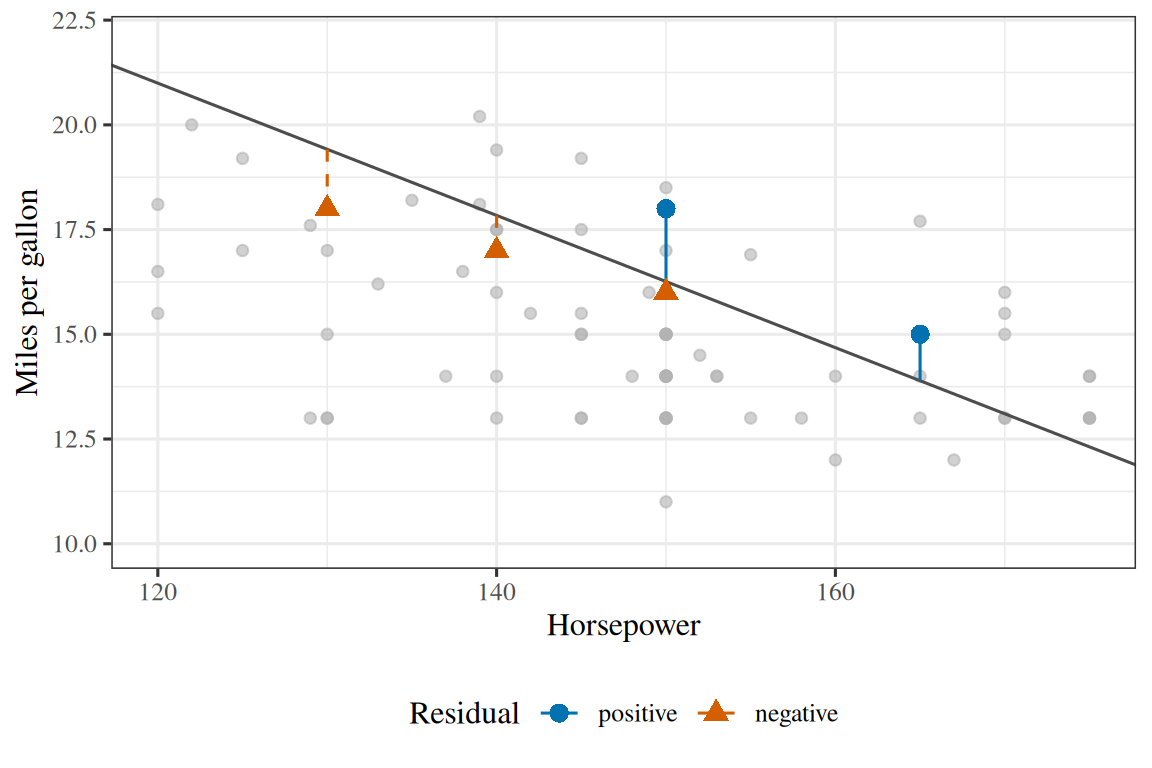
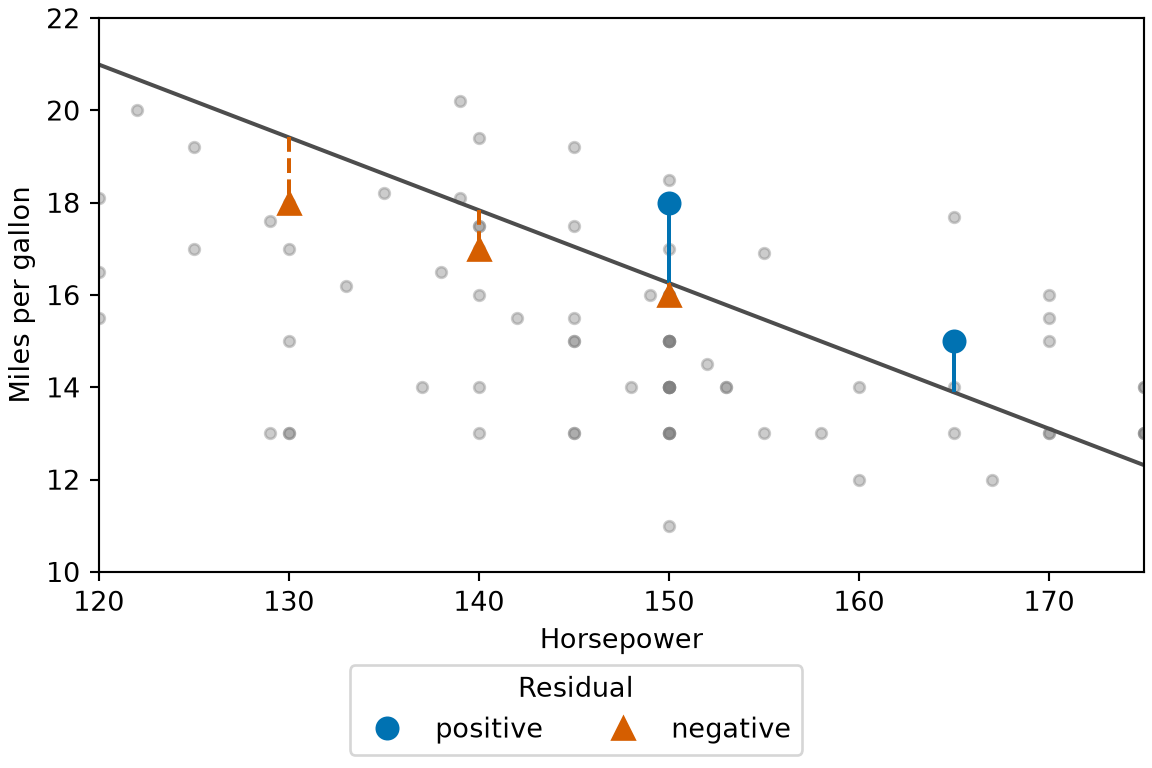
The first car gets -1.4: its observed mpg is below the line, so the line over-predicts it, and its residual is negative. The plymouth satellite gets +1.7: the line under-predicts it, so its residual is positive.

Show code
library(ggplot2)
resf_five <- data.frame(
  horsepower = auto_res$horsepower[1:5],
  mpg = auto_res$mpg[1:5],
  fitted = fitted(fit_res)[1:5],
  sign = factor(
    ifelse(residuals(fit_res)[1:5] >= 0, "positive", "negative"),
    levels = c("positive", "negative")
  )
)
ggplot(auto_res, aes(horsepower, mpg)) +
  geom_point(colour = "grey70", alpha = 0.6) +
  geom_abline(intercept = coef(fit_res)[[1]], slope = coef(fit_res)[[2]], colour = "grey30") +
  geom_segment(
    data = resf_five,
    aes(xend = horsepower, y = fitted, yend = mpg, colour = sign, linetype = sign)
  ) +
  geom_point(data = resf_five, aes(colour = sign, shape = sign), size = 3) +
  scale_colour_manual(values = c(positive = "#0072B2", negative = "#D55E00")) +
  scale_shape_manual(values = c(positive = 16, negative = 17)) +
  scale_linetype_manual(values = c(positive = "solid", negative = "dashed")) +
  coord_cartesian(xlim = c(120, 175), ylim = c(10, 22)) +
  labs(
    x = "Horsepower", y = "Miles per gallon",
    colour = "Residual", shape = "Residual", linetype = "Residual"
  )
Show code
import matplotlib.pyplot as plt

hp_resf = auto_res["horsepower"].to_numpy(float)
fig, ax = plt.subplots(figsize=(6, 4), layout="constrained")
ax.plot(hp_resf, y_res, color="grey", marker="o", linestyle="", alpha=0.4, markersize=4);
grid_resf = np.array([hp_resf.min(), hp_resf.max()])
ax.plot(grid_resf, beta_res[0] + beta_res[1] * grid_resf, color="#4d4d4d");
for sign_resf, colour, marker, style in [
    ("positive", "#0072B2", "o", "-"), ("negative", "#D55E00", "^", "--")
]:
    keep_resf = [i for i in range(5) if (resid_res[i] >= 0) == (sign_resf == "positive")]
    ax.vlines(hp_resf[keep_resf], fitted_res[keep_resf], y_res[keep_resf],
              color=colour, linestyle=style);
    ax.plot(hp_resf[keep_resf], y_res[keep_resf], color=colour, marker=marker,
            markersize=8, linestyle="", label=sign_resf);
ax.set_xlim(120, 175);
ax.set_ylim(10, 22);
ax.set_xlabel("Horsepower");
ax.set_ylabel("Miles per gallon");
fig.legend(loc="outside lower center", ncol=2, title="Residual");
plt.show()
Figure 6: The residuals of the first five cars of Example 18. Each segment runs from the line to a car, and its length is that car’s vertical distance from the line.
(a)
Scatter plot of the miles per gallon of Auto cars against their horsepower, zoomed to cars with 120 to 175 horsepower and 10 to 22 miles per gallon, with the cars as grey points and a grey straight line sloping downward through them. Five cars are highlighted, each with a vertical segment from the line to the car. The segments of cars 1, 4 and 5, whose points lie below the line, are dashed vermilion with triangles, and the segments of cars 2 and 3, whose points lie above the line, are solid blue with circles. The segments are short, none longer than about 2 miles per gallon.
(b)
Scatter plot of the miles per gallon of Auto cars against their horsepower, zoomed to cars with 120 to 175 horsepower and 10 to 22 miles per gallon, with the cars as grey points and a grey straight line sloping downward through them. Five cars are highlighted, each with a vertical segment from the line to the car. The segments of cars 1, 4 and 5, whose points lie below the line, are dashed vermilion with triangles, and the segments of cars 2 and 3, whose points lie above the line, are solid blue with circles. The segments are short, none longer than about 2 miles per gallon.
DefDefinition 14 (Squared error loss (square loss))

Definition 14 (Squared error loss (square loss)) The squared error loss (or square loss) assigns a non-negative penalty proportional to the square of the residual:

\[\lossf{y, f(\vx)} = \paren{y - f(\vx)}^2\]

Squaring penalizes large errors much more severely than small ones and ensures that positive and negative errors cannot cancel out when summed across the dataset. Summed over the dataset, this forms the residual sum of squares (RSS):

\[\text{RSS} = \sumin \paren{y_i - f(\vx_i)}^2\]

ExmExample 19 (Squaring lets one large miss dominate)

Example 19 (Squaring lets one large miss dominate) For the straight-line fit of mpg on horsepower in the residual example, compute the residual sum of squares and ask what share of it the single worst car contributes:

# Squared residuals, one per car; their sum is the RSS.
sq_loss = resid_res ** 2
rss_loss = sq_loss.sum()
worst_loss = sq_loss.argmax()
print(rss_loss, auto_res["name"][worst_loss], resid_res[worst_loss])
9385.915871932417 mazda glc 16.92404664681701
print(sq_loss[worst_loss] / rss_loss)
0.03051629258260845
# Squared residuals, one per car; their sum is the RSS.
sq_loss <- residuals(fit_res)^2
rss_loss <- sum(sq_loss)
worst_loss <- which.max(sq_loss)
c(rss = rss_loss, residual = unname(residuals(fit_res)[worst_loss]),
  share = unname(sq_loss[worst_loss] / rss_loss))
         rss     residual        share 
9.385916e+03 1.692405e+01 3.051629e-02 

The RSS is 9,386 over 392 cars. The worst car, the mazda glc, is 16.9 miles per gallon off the line, and it alone contributes 3.1% of the total. An average car is off by only 3.8, so squaring lets a few large misses outweigh many small ones.

Figure 7: The vertical offsets between observed targets \(y_i\) and fitted values \(\hy_i\) define the residuals whose squares are summed in the least-squares objective.

Vertical distances between observed data points and the fitted regression line representing individual residuals.

NoteWhat \(x\), \(y\) and \(\beta\) are called elsewhere

Regression is older than machine learning, as the course overview sets out, and the fields that used it first named its pieces first. Every name in the right-hand column is current somewhere.

Here Also called
\(x\), the inputs features, predictors, covariates, regressors, independent variables, attributes
\(y\), the outputs targets, responses, outcomes, labels, dependent variables
\(\beta_0\) and \(\beta\), the parameters coefficients, weights

The symbols move too. This chapter writes the parameters \(\beta\), following the statistics convention, and keeps the intercept as \(\beta_0\) until the intercept trick absorbs it. Machine learning texts more often write \(w\) for the same vector and \(b\) for the same intercept, and optimization texts write \(\theta\) for any parameter vector at all. A source writing \(\modmemf{x} = \dprod{w}{x} + b\) is writing this chapter’s \(\modmemf{x} = \tp{\beta} x + \beta_0\).

Three of these names carry a distinction rather than just a dialect.

Independent variable is the name to use most carefully. The word independent promises that \(x\) was set rather than observed, which holds in a designed experiment and rarely holds anywhere else. You did not set \(x\) in data you merely collected, so predictor or covariate is the accurate word.

Label normally implies that \(y\) takes one of a fixed set of values. Calling a house price a label will be understood, but it will read as though you expected a classification problem.

Parameter is wider than coefficient and weight. Those two names belong to a number that multiplies an entry of \(\hat x\), which under the 1-padding \(\hat x = [1; x]\) includes \(\beta_0\), since it multiplies the constant \(1\). A parameter is any number the fitting procedure chooses, which in other models includes quantities that multiply nothing, such as a noise variance. A hyperparameter is not a narrower kind of parameter at all: it is fixed before the fit runs, and the fit never adjusts it. An outer model-selection procedure may still choose it, by fitting once per candidate and comparing on held-out data.

VideosWatch

Andrew Ng sets up the same regression problem in the second CS229 lecture, from 0:45, and then sets up the least-squares algorithm, from 14:44 [9], Lecture 2. The rest of that lecture is gradient descent, the subject of Gradient Descent.

VideosWatch

Abu-Mostafa introduces linear regression, from 18:51, and derives its algorithm, from 31:41 [10], Lecture 3.

VideosWatch
ReadingRead

GeeksforGeeks explains linear regression [13].

ReadingRead

The University of Washington’s CSE 446 slides cover linear regression and linear regression with basis functions [14], Lectures 3 and 4.

2.2 Fitting by least squares

DefDefinition 15 (Ordinary least squares objective)

Definition 15 (Ordinary least squares objective) Ordinary least squares (OLS) estimates the parameters \(\vcoef\) by minimizing the empirical risk under squared error loss [15]:

\[ \begin{aligned} \hvcoef &= \argmin_{\vcoef} \hat{R}(\vcoef) \\ &= \argmin_{\vcoef} \avgin \paren{\outvar_i - \eoutvar_i}^2 \end{aligned} \tag{1}\]

Here \(\eoutvar_i = \modmemf{\vxi}\) is the fitted value (the prediction) for example \(i\).

In vector notation, with targets \(\vy \in \reals^n\) and design matrix \(\design \in \reals^{n \times p^*}\):

\[ \begin{aligned} \hvcoef &= \argmin_{\vcoef} \frac{1}{n} \pt{\vy - \design\vcoef} (\vy - \design\vcoef) \\ &= \argmin_{\vcoef} \frac{1}{n} \norm{\design\vcoef - \vy}^2 \end{aligned} \]

ExmExample 20 (The objective at the least-squares fit and nearby)

Example 20 (The objective at the least-squares fit and nearby) In the Auto data [3], evaluate the objective of Definition 15 for mpg on horsepower at the least-squares coefficients, and at coefficients that shift the intercept or the slope a little. Evaluate it both as the average of squared residuals and in the vector form \(\frac{1}{n} \norm{\design\vcoef - \vy}^2\):

import numpy as np
import pandas as pd

auto_obj = pd.read_csv("data/auto.csv")
y_obj = auto_obj["mpg"].to_numpy(float)
Phi_obj = np.column_stack([np.ones(len(y_obj)), auto_obj["horsepower"]])
beta_obj = np.linalg.lstsq(Phi_obj, y_obj, rcond=None)[0]

def objective_obj(b):
    """Average squared residual, written as (1/n) * ||Phi b - y||^2."""
    return np.sum((Phi_obj @ b - y_obj) ** 2) / len(y_obj)

# The fit, then the fit with the intercept or the slope nudged either way.
nudges_obj = {"fit": (0, 0), "intercept +1": (1, 0), "intercept -1": (-1, 0),
              "slope +0.02": (0, 0.02), "slope -0.02": (0, -0.02)}
values_obj = {k: float(objective_obj(beta_obj + np.array(d))) for k, d in nudges_obj.items()}
print({k: round(v, 2) for k, v in values_obj.items()})
{'fit': 23.94, 'intercept +1': 24.94, 'intercept -1': 24.94, 'slope +0.02': 28.9, 'slope -0.02': 28.9}
# The average-of-squares form gives the same number.
print(np.isclose(values_obj["fit"], np.mean((y_obj - Phi_obj @ beta_obj) ** 2)))
True
auto_obj <- read.csv("data/auto.csv")
y_obj <- auto_obj$mpg
Phi_obj <- cbind(1, auto_obj$horsepower)
beta_obj <- coef(lm(mpg ~ horsepower, data = auto_obj))

# (1/n) * ||Phi b - y||^2: the average squared residual.
objective_obj <- function(b) sum((Phi_obj %*% b - y_obj)^2) / length(y_obj)

# The fit, then the fit with the intercept or the slope nudged either way.
nudges_obj <- list(fit = c(0, 0), `intercept +1` = c(1, 0), `intercept -1` = c(-1, 0),
                   `slope +0.02` = c(0, 0.02), `slope -0.02` = c(0, -0.02))
sapply(nudges_obj, function(d) round(objective_obj(beta_obj + d), 2))
         fit intercept +1 intercept -1  slope +0.02  slope -0.02 
       23.94        24.94        24.94        28.90        28.90 

The objective is 23.94 at the least-squares coefficients, and every nudge raises it, the smallest rise being to 24.94. The minimizer is the point where no direction lowers the objective.

Show code
# The objective of @def-least-squares-objective,
# the mean squared error of the line b0 + b1 horsepower,
# for the Auto data of @exm-least-squares-objective,
# on a grid of intercepts and slopes around the least-squares fit.
auto_surf <- read.csv("data/auto.csv")
x_surf <- auto_surf$horsepower
y_surf <- auto_surf$mpg
fit_surf <- lm(y_surf ~ x_surf)
best_b0 <- coef(fit_surf)[[1]]
best_b1 <- coef(fit_surf)[[2]]

b0_grid <- seq(best_b0 - 40, best_b0 + 40, length.out = 90)
b1_grid <- seq(best_b1 - 0.4, best_b1 + 0.4, length.out = 90)
mse_of <- function(b0, b1) mean((b0 + b1 * x_surf - y_surf)^2)
mse_grid <- outer(b0_grid, b1_grid, Vectorize(mse_of))
best_mse <- mse_of(best_b0, best_b1)

# Contour levels as multiples of the minimum,
# the same on the surface and in the contour plot.
level_mult <- c(1.25, 1.5, 2, 3, 4, 5, 6)
level_surf <- best_mse * level_mult

# The error axis stops here, past the outermost contour.
mse_axis_max <- 150

# The surface and the contour plot below both read the grid as a table.
grid_surf <- expand.grid(b0 = b0_grid, b1 = b1_grid)
grid_surf$mse <- as.vector(mse_grid)
Show code
# HTML formats get an interactive plotly widget;
# the handout and other formats get a colour map of the same grid.
# The handout hides this code.
curves_surf <- contourLines(b0_grid, b1_grid, mse_grid, levels = level_surf)
lines_surf <- do.call(rbind, lapply(curves_surf, function(curve) {
  n <- length(curve$x)
  data.frame(
    b0 = c(curve$x, NA),
    b1 = c(curve$y, NA),
    mse = c(rep(curve$level, n), NA)
  )
}))

surf_alt <- paste(
  "The mean squared error over the intercept and the slope,",
  "drawn as a three-dimensional surface:",
  "a bowl with a long narrow floor,",
  "one lowest point marked in orange,",
  "and black contour lines around it.",
  "Below it, sliders for the intercept and slope",
  "and a scatter plot of the data with the chosen line."
)

if (knitr::is_html_output()) {
  hover_surf <- paste0(
    "intercept (β₀): %{x:.2f}<br>slope (β₁): %{y:.4f}",
    "<br>mean squared error: %{z:.2f}<extra></extra>"
  )
  widget_surf <- plotly::plot_ly() |>
    plotly::add_surface(
      x = b0_grid,
      y = b1_grid,
      z = t(mse_grid),
      showscale = FALSE,
      colorscale = list(
        c(0, "#ffffcc"),
        c(0.5, "#41b6c4"),
        c(1, "#253494")
      ),
      hovertemplate = hover_surf
    ) |>
    plotly::add_trace(
      data = lines_surf,
      x = ~b0,
      y = ~b1,
      z = ~mse,
      type = "scatter3d",
      mode = "lines",
      line = list(color = "#222222", width = 3),
      hoverinfo = "skip"
    ) |>
    plotly::add_trace(
      x = best_b0,
      y = best_b1,
      z = best_mse,
      type = "scatter3d",
      mode = "markers",
      marker = list(
        size = 6,
        color = "#d95f02",
        line = list(color = "#ffffff", width = 1)
      ),
      hovertemplate = sub(
        "<extra></extra>",
        "<extra>minimum</extra>",
        hover_surf
      )
    ) |>
    plotly::add_trace(
      x = best_b0,
      y = best_b1,
      z = best_mse,
      type = "scatter3d",
      mode = "markers",
      marker = list(
        size = 7,
        color = "#1f77b4",
        line = list(color = "#ffffff", width = 1)
      ),
      hoverinfo = "skip"
    ) |>
    plotly::layout(
      showlegend = FALSE,
      margin = list(l = 0, r = 0, t = 0, b = 0),
      paper_bgcolor = "rgba(0,0,0,0)",
      scene = list(
        xaxis = list(title = lab_b0),
        yaxis = list(title = lab_b1),
        zaxis = list(
          title = "mean squared error",
          range = c(0, mse_axis_max)
        ),
        camera = list(eye = list(x = 1.5, y = -1.7, z = 0.9))
      )
    ) |>
    plotly::config(displaylogo = FALSE, responsive = TRUE)

  # Sliders and a data plot under the surface, all driven by `window.mseFit`.
  # The chosen point is the fourth trace of the surface (index 3).
  surface_js <- paste0("
    function(el, x, data) {", sync_js, "
      var mse = function(b0, b1) {
        var total = 0;
        for (var i = 0; i < data.x.length; i++) {
          total += Math.pow(b0 + b1 * data.x[i] - data.y[i], 2);
        }
        return total / data.x.length;
      };

      var controls = document.createElement('div');
      var slider = function(label, min, max, step, start) {
        var row = document.createElement('label');
        row.style.display = 'block';
        row.textContent = label + ' ';
        var input = document.createElement('input');
        input.type = 'range';
        input.min = min;
        input.max = max;
        input.step = step;
        input.value = start;
        input.style.width = '70%';
        row.appendChild(input);
        controls.appendChild(row);
        return input;
      };
      var b0Slider = slider('intercept (β₀)', data.b0Min, data.b0Max, 0.05, data.b0);
      var b1Slider = slider('slope (β₁)', data.b1Min, data.b1Max, 0.0005, data.b1);
      var panel = document.createElement('div');
      panel.style.height = '340px';
      el.parentNode.appendChild(controls);
      el.parentNode.appendChild(panel);

      var ink = getComputedStyle(el).color;
      var xs = [Math.min.apply(null, data.x), Math.max.apply(null, data.x)];
      var drawn = false;
      var draw = function(b0, b1) {
        var title = 'intercept ' + b0.toFixed(2) + ', slope ' +
          b1.toFixed(4) + ', mean squared error ' + mse(b0, b1).toFixed(2);
        if (drawn) {
          // After the first draw, move only the chosen line and the title.
          Plotly.restyle(panel, {y: [xs.map(function(v) { return b0 + b1 * v; })]}, [2]);
          Plotly.relayout(panel, {'title.text': title});
          return;
        }
        drawn = true;
        var traces = [
          {x: data.x, y: data.y, mode: 'markers', type: 'scatter',
           name: 'data', marker: {color: '#7f7f7f', size: 5, opacity: 0.6}},
          {x: xs, y: xs.map(function(v) { return data.b0 + data.b1 * v; }),
           mode: 'lines', type: 'scatter', name: 'least-squares fit',
           line: {color: '#d95f02', dash: 'dot', width: 2}},
          {x: xs, y: xs.map(function(v) { return b0 + b1 * v; }),
           mode: 'lines', type: 'scatter', name: 'chosen line',
           line: {color: '#1f77b4', width: 3}}
        ];
        var layout = {
          title: {text: title, font: {size: 13}},
          xaxis: {title: 'horsepower'}, yaxis: {title: 'mpg', range: [0, 50]},
          paper_bgcolor: 'rgba(0,0,0,0)', plot_bgcolor: 'rgba(0,0,0,0)',
          font: {color: ink}, margin: {t: 40, r: 10},
          legend: {orientation: 'h', y: -0.25}
        };
        Plotly.react(panel, traces, layout, {displaylogo: false, responsive: true});
      };

      window.mseFit.b0 = data.b0;
      window.mseFit.b1 = data.b1;
      window.mseFit.listeners.push(function(b0, b1) {
        draw(b0, b1);
        b0Slider.value = b0;
        b1Slider.value = b1;
        Plotly.restyle(el, {x: [[b0]], y: [[b1]], z: [[mse(b0, b1)]]}, [3]);
      });
      draw(data.b0, data.b1);

      var fromSliders = function() {
        window.mseFit.set(parseFloat(b0Slider.value), parseFloat(b1Slider.value));
      };
      b0Slider.addEventListener('input', fromSliders);
      b1Slider.addEventListener('input', fromSliders);
      el.on('plotly_click', function(ev) {
        window.mseFit.set(ev.points[0].x, ev.points[0].y);
      });
    }
  ")
  ok_surf <- is.finite(x_surf) & is.finite(y_surf)
  widget_surf <- htmlwidgets::onRender(
    widget_surf,
    surface_js,
    data = list(
      x = x_surf[ok_surf],
      y = y_surf[ok_surf],
      b0 = best_b0,
      b1 = best_b1,
      b0Min = min(b0_grid),
      b0Max = max(b0_grid),
      b1Min = min(b1_grid),
      b1Max = max(b1_grid)
    )
  )
  htmltools::div(
    role = "img",
    `aria-label` = surf_alt,
    lazy_widget(widget_surf)
  )
} else {
  local({
    library(ggplot2)
    ggplot(grid_surf, aes(b0, b1)) +
      geom_raster(aes(fill = pmin(mse, mse_axis_max))) +
      geom_contour(aes(z = mse), breaks = level_surf, colour = "#222222") +
      annotate("point", x = best_b0, y = best_b1, colour = "#d95f02", size = 3) +
      scale_fill_gradientn(
        colours = c("#ffffcc", "#41b6c4", "#253494"),
        name = "mean squared error"
      ) +
      labs(x = lab_b0, y = lab_b1)
  })
}
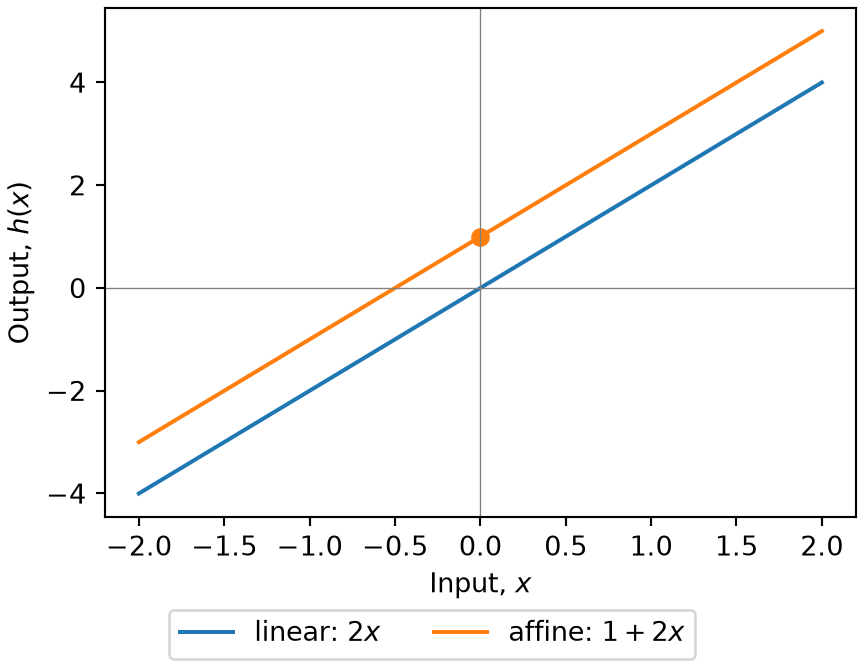
Figure 8: The sample mean squared error (sMSE) of the line \(\intcoef + \coef{1} \cdot \text{horsepower}\) for mpg in the Auto data, over a grid of the intercept \(\intcoef\) and the slope \(\coef{1}\). It is a bowl with one lowest point, at the least-squares fit: \(\intcoef\) = 39.94, \(\coef{1}\) = -0.1578, sMSE 23.94. The black lines are its contours, at 1.25, 1.5, 2, 3, 4, 5, 6 times the minimum. They are long, thin, tilted ellipses, so the error changes least along the long axis, where a higher intercept is offset by a lower slope. On the course website, drag the surface to rotate it, and move the sliders, or click the surface, to choose an intercept and a slope. The blue point marks the choice on the surface and on the gradient and Hessian figures below, and the blue line shows it over the data, beside the orange dotted least-squares line.
LemTheorem 7 (The least squares objective is a convex quadratic)

Theorem 7 (The least squares objective is a convex quadratic) The objective \(\hat{R}(\vcoef) = \frac{1}{n} \norm{\design\vcoef - \vy}^2\) of Definition 15 is a quadratic function of \(\vcoef\). Its Hessian matrix is the same at every \(\vcoef\):

\[\frac{2}{n} \stprod{\design},\]

and this matrix is positive semidefinite, so \(\hat{R}\) is convex.

Proof. By Theorem 9, dividing by \(n\), \(\grad_{\vcoef} \hat{R}(\vcoef) = \frac{2}{n} \paren{\stprod{\design} \vcoef - \tp{\design} \vy}\). This is a linear function of \(\vcoef\), so \(\hat{R}\) is quadratic. Differentiating once more gives the Hessian \(\frac{2}{n} \stprod{\design}\).

For every \(\vv \in \reals^{p^*}\),

\[ \begin{aligned} \tp{\vv} \stprod{\design} \vv &= \dprod{\design\vv}{\design\vv} \\ &= \norm{\design\vv}^2 \\ &\ge 0. \end{aligned} \]

A twice-differentiable function whose Hessian is positive semidefinite everywhere is convex.

ExmExample 21 (Eigenvalues of the Hessian)

Example 21 (Eigenvalues of the Hessian) Take the design matrix with an intercept and the inputs x1 and x2 of the synthetic data. Compute the Hessian \(\frac{2}{n} \stprod{\design}\) of Theorem 7 and its eigenvalues. A symmetric matrix is positive semidefinite exactly when all its eigenvalues are nonnegative:

import numpy as np

syn_ls = r.synthetic.to_numpy()
Phi_ls = np.column_stack([np.ones(len(syn_ls)), syn_ls[:, 0], syn_ls[:, 1]])
hessian_ls = 2 / len(syn_ls) * Phi_ls.T @ Phi_ls
eig_ls = np.linalg.eigvalsh(hessian_ls)
print(eig_ls)
[1.29534302 1.74529121 2.20156948]
syn_ls <- synthetic
Phi_ls <- cbind(1, syn_ls$x1, syn_ls$x2)
hessian_ls <- 2 / nrow(Phi_ls) * crossprod(Phi_ls)
eigen(hessian_ls, symmetric = TRUE, only.values = TRUE)$values
[1] 2.201569 1.745291 1.295343

The Hessian has 3 eigenvalues, from 1.3 to 2.2. None is negative, so the objective is convex. All are positive, so for these data the objective is strictly convex and has a single minimizer.

Show code
# The four entries of the Hessian of the objective,
# (2 / n) times the matrix of sums of 1, x, x and x squared,
# at every intercept and slope on the grid of @fig-mse-surface.
design_surf <- cbind(1, x_surf[ok_surf])
hessian_surf <- 2 / nrow(design_surf) * crossprod(design_surf)

# The formula agrees with a finite difference of the objective.
step <- 1e-3
stopifnot(isTRUE(all.equal(
  hessian_surf[2, 2],
  (mse_of(30, -0.1 + step) - 2 * mse_of(30, -0.1) +
     mse_of(30, -0.1 - step)) / step^2,
  tolerance = 1e-4
)))

hessian_grids <- lapply(
  c(hessian_surf[1, 1], hessian_surf[1, 2], hessian_surf[2, 1], hessian_surf[2, 2]),
  function(value) matrix(value, nrow = length(b0_grid), ncol = length(b1_grid))
)
hessian_titles <- c(
  "∂²MSE/∂intercept²", "∂²MSE/∂intercept∂slope",
  "∂²MSE/∂slope∂intercept", "∂²MSE/∂slope²"
)

hessian_alt <- paste(
  "Four three-dimensional surfaces over the intercept and the slope,",
  "arranged as the two-by-two Hessian matrix.",
  "Each is a perfectly flat horizontal plane,",
  "at the height of one entry of the matrix.",
  "A blue point on each marks the chosen line."
)

if (knitr::is_html_output()) {
  widget_hessian <- mse_panels(
    hessian_grids,
    titles = hessian_titles,
    kinds = c("h11", "h12", "h21", "h22"),
    nrow = 2, ncol = 2, height = 800, coarse = TRUE
  )
  htmltools::div(
    role = "img",
    `aria-label` = hessian_alt,
    lazy_widget(widget_hessian)
  )
} else {
  local({
    library(ggplot2)
    ggplot(
      data.frame(
        row = factor(c("intercept", "intercept", "slope", "slope"),
                     levels = c("slope", "intercept")),
        col = factor(c("intercept", "slope", "intercept", "slope"),
                     levels = c("intercept", "slope")),
        value = c(hessian_surf)
      ),
      aes(col, row, label = signif(value, 4))
    ) +
      geom_tile(fill = "#ffffcc", colour = "white") +
      geom_text() +
      labs(x = "differentiate second by", y = "differentiate first by")
  })
}
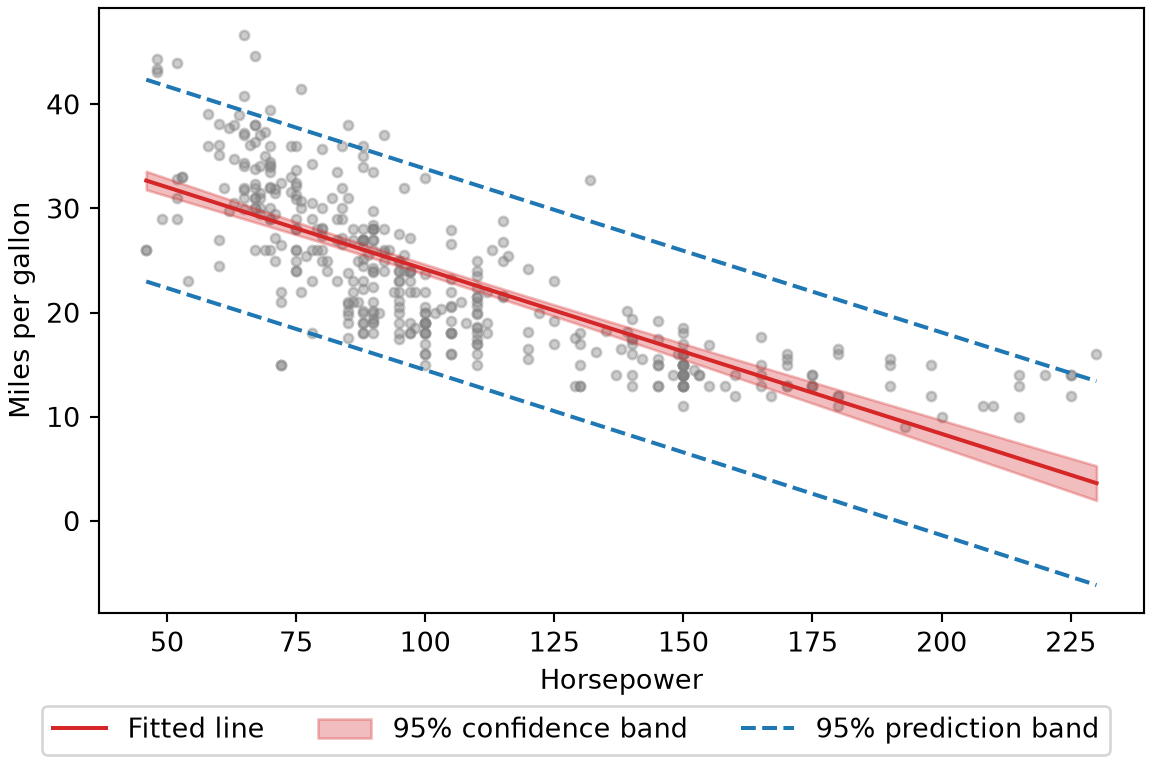
Figure 9: The Hessian of the objective of Theorem 7, one surface for each of its four entries, over the same intercepts and slopes as Figure 8. Every surface is flat, at the height of one entry of \(\frac{2}{n} \stprod{\design}\) (2, 208.9, 208.9, 24780, reading across the rows), because the objective is quadratic: its curvature is the same at every intercept and slope. The two off-diagonal surfaces are equal, because the matrix is symmetric. On the course website, the blue points follow the choice made in Figure 8.
NoteLoss, cost, objective, risk

The parts of Equation 1 each have a name, and the literature adds more. Loss function names the term inside the average, here \(\paren{\outvar_i - \eoutvar_i}^2\), which scores one example; written for any loss, it is \(\lossf{\outvar_i, \eoutvar_i}\). Empirical risk names the average itself over the whole sample, \(\empriskf{\vcoef}\). Objective function names whatever is actually handed to the minimizer.

Two further names overlap with those three, and both are worth defining precisely before they cause trouble.

Cost function is used for all three, so it identifies nothing on its own. The course’s own notes use it for the sum of losses and again for that sum plus a penalty, which are the two readings furthest apart on this list. Say which quantity you mean and leave the word out of the formula.

Error function usually names the summed or averaged quantity rather than the per-example one. Bishop’s Pattern Recognition and Machine Learning writes \(E(\vw)\) for the sum of squared residuals over all \(N\) examples, and that is the reading to assume unless a source says otherwise.

In Equation 1 the empirical risk, the objective and both readings of cost coincide, because nothing has been added to the average yet. Two of the distinctions start to matter in the chapters that follow.

The hat on \(\emprisk\) is the difference between risk and empirical risk. The risk \(\popriskf{\modmem}\) is the expected loss over the distribution the data came from, which is the quantity you actually care about and the one you can never compute. \(\empriskf{\modmem}\) is its average over the \(n\) examples you have. Minimizing the second in the hope of minimizing the first is called empirical risk minimization, and the difference \(\popriskf{\modmem} - \empriskf{\modmem}\) is the generalization gap. Generalization itself is the ability to predict well on unseen data, which the gap measures rather than defines.

Objective and empirical risk separate once a penalty is added. Later chapters minimize \(\empriskf{\modmem}\) plus a term that grows with the size of \(\regcoef\). The objective is then the sum, the empirical risk is still only the first part, and a sentence that says “the loss went down” has stopped saying which of the two it means.

NoteFitting, training, learning, estimating

Choosing \(\regcoef\) from data has four common names. Statistics calls it fitting a model or estimating its parameters. Machine learning calls it training a model or learning its parameters. No arithmetic changes between the four.

Inference names opposite ends of the process in the two fields.

Statistics uses it for reasoning from the sample to the population. The course overview gives the goal version, following An Introduction to Statistical Learning: inference means understanding \(f\) itself, as opposed to predicting \(y\) well. The procedures that pursue the goal carry the name too:

  • estimating \(\regcoef\),
  • putting an interval around it,
  • testing a hypothesis about it.

Machine learning systems use it for running the trained model forward on a new \(x\) to get a \(\hy\). A sentence about “inference time” is about the phase after fitting, and the quantity that phase produces is a prediction.

The clash is sharper than a difference of dialect. The course overview sets inference against prediction, and a deployed system uses inference for prediction itself. Read the word from the speaker’s field, never from its other sense.

A model carries two senses as well. Sometimes it is the family of functions under consideration, here every linear function of \(x\), and sometimes one fitted member of the family, here the single \(\regcoef\) least squares returned. Ask which is meant whenever a sentence could take either.

2.3 Setting up the design matrix

DefDefinition 16 (The design matrix and 1-padding)

Definition 16 (The design matrix and 1-padding) To absorb the intercept \(\coef{0}\) directly into the parameter vector, we prepend a constant \(1\) to each input vector \(\vx_i \in \reals^p\), forming the design vector \(\vfeatmap(\vx_i) \in \reals^{p^*}\) with dimension \(p^* = p + 1\):

\[\vfeatmap(\vx_i) = \begin{bmatrix} 1 \\ x_{i1} \\ x_{i2} \\ \vdots \\ x_{ip} \end{bmatrix} \in \reals^{p^*}, \qquad \vcoef = \begin{bmatrix} \coef{0} \\ \coef{1} \\ \coef{2} \\ \vdots \\ \coef{p} \end{bmatrix} \in \reals^{p^*}\]

so that \(f(\vx_i) = \dprod{\vfeatmap(\vx_i)}{\vcoef} = \coef{0} + \sumjp \coef{j} x_{ij}\).

Stacking all \(n\) training instances as rows creates the design matrix \(\design(\mX) \in \reals^{n \times p^*}\) (often written simply as \(\design\)) and response vector \(\vy \in \reals^n\) [16]:

\[ \begin{aligned} \design(\mX) &= \begin{bmatrix} \rule{0.6cm}{0.4pt} & \vfeatmap\pt{\vx_1} & \rule{0.6cm}{0.4pt} \\ \rule{0.6cm}{0.4pt} & \vfeatmap\pt{\vx_2} & \rule{0.6cm}{0.4pt} \\ & \vdots & \\ \rule{0.6cm}{0.4pt} & \vfeatmap\pt{\vx_n} & \rule{0.6cm}{0.4pt} \end{bmatrix} \\ &= \begin{bmatrix} 1 & x_{11} & \cdots & x_{1p} \\ 1 & x_{21} & \cdots & x_{2p} \\ \vdots & \vdots & \ddots & \vdots \\ 1 & x_{n1} & \cdots & x_{np} \end{bmatrix} \in \reals^{n \times p^*}, \end{aligned} \qquad \vy = \begin{bmatrix} y_1 \\ y_2 \\ \vdots \\ y_n \end{bmatrix} \in \reals^n \]

The matrix-vector product computes all \(n\) predictions simultaneously:

\[\design\vcoef = \begin{bmatrix} \dprod{\vfeatmap(\vx_1)}{\vcoef} \\ \dprod{\vfeatmap(\vx_2)}{\vcoef} \\ \vdots \\ \dprod{\vfeatmap(\vx_n)}{\vcoef} \end{bmatrix} = \hat{\vy} \in \reals^n\]

and the sum of squared errors becomes the squared Euclidean norm:

\[\sumin \paren{\dprod{\vfeatmap(\vx_i)}{\vcoef} - y_i}^2 = \norm{\design\vcoef - \vy}^2\]

ExmExample 22 (From a data table to the design matrix)

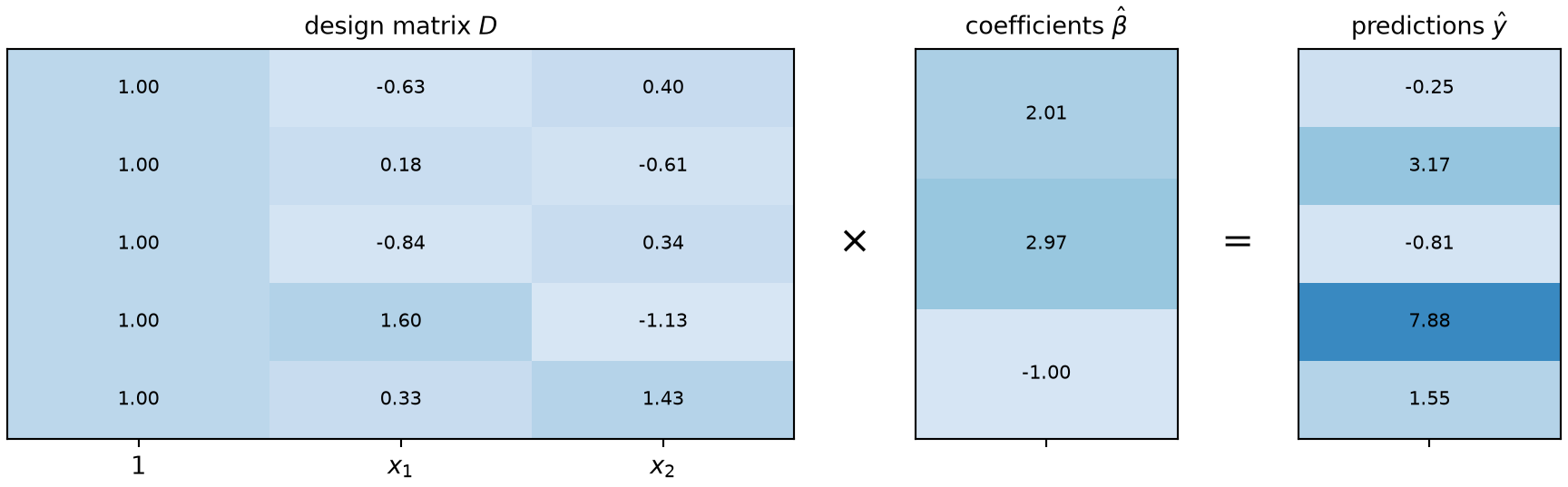
Example 22 (From a data table to the design matrix) Take the first five rows of the synthetic data. Each row of the table is one observation: two features, x1 and x2, and a response y. The design matrix \(\design\) keeps the features, adds a leading column of ones for the intercept, and drops the response. So it has one row per observation and one column per coefficient. The chunk builds it, fits the coefficients by least squares, and then computes all five predictions with one matrix-vector product.

import numpy as np

# Keep the first five rows of the synthetic data (defined in R above).
rows = r.synthetic.iloc[:5]
y_five = rows["y"].to_numpy()

# Design matrix: a column of ones (so the first coefficient is the intercept),
# then one column per feature. Each row is still one observation.
X_five = np.column_stack([np.ones(5), rows["x1"], rows["x2"]])

# Coefficients fitted on all 50 observations, so they are the same ones
# used in later examples; here they only serve to produce predictions.
X_all = np.column_stack([np.ones(len(r.synthetic)), r.synthetic["x1"], r.synthetic["x2"]])
beta_hat = np.linalg.solve(X_all.T @ X_all, X_all.T @ r.synthetic["y"].to_numpy())

# One matrix-vector product gives the prediction for every row at once.
y_hat_five = X_five @ beta_hat

# The same five predictions, one dot product per observation, to show they agree.
y_hat_loop = np.array([np.dot(row, beta_hat) for row in X_five])
print(X_five.shape, beta_hat.shape, y_hat_five.shape)
(5, 3) (3,) (5,)
print(np.allclose(y_hat_five, y_hat_loop))
True

Figure 10 draws the three arrays side by side. Each row of \(\design\), times the coefficient vector, gives the entry in the same row of \(\hat{\vy}\).

Show code
import matplotlib.pyplot as plt

def show_table(ax, values, col_labels, title):
    """Draw a small array as a grid of cells, printing each value inside its cell."""
    ax.imshow(values, cmap="Blues", aspect="auto", vmin=-4, vmax=14);
    for i in range(values.shape[0]):
        for j in range(values.shape[1]):
            ax.text(j, i, f"{values[i, j]:.2f}", ha="center", va="center", fontsize=8);
    ax.set_xticks(range(len(col_labels)), col_labels);
    ax.set_yticks([]);
    ax.set_title(title, fontsize=10);

fig, axes = plt.subplots(
    1, 5, figsize=(9, 2.8), layout="constrained",
    gridspec_kw={"width_ratios": [3, 0.35, 1, 0.35, 1]},
)
show_table(axes[0], X_five, ["1", "$x_1$", "$x_2$"], r"design matrix $D$")
show_table(axes[2], beta_hat.reshape(-1, 1), [""], r"coefficients $\hat\beta$")
show_table(axes[4], y_hat_five.reshape(-1, 1), [""], r"predictions $\hat y$")
# The operators between the tables read "times" and "equals".
for ax, sym in [(axes[1], r"$\times$"), (axes[3], "$=$")]:
    ax.axis("off");
    ax.text(0.5, 0.5, sym, ha="center", va="center", fontsize=16, transform=ax.transAxes);
plt.show()
Figure 10: The design matrix of the first five synthetic observations (left, with its column of ones), the fitted coefficient vector (middle), and the predictions that the product gives (right). Each row on the left, combined with the middle column, makes the same row on the right.
Three small tables of coloured cells drawn side by side with the symbols times and equals between them. The left table has five rows and three columns, labelled one, x1 and x2, and its first column is all ones. The middle table is one column of three coefficients. The right table is one column of five predictions.

Stacking the observations this way lets us write one equation, \(\design\vcoef = \hat{\vy}\), instead of \(n\) separate ones. It also lets us write the sum of squared errors as \(\norm{\design\vcoef - \vy}^2\) and solve for \(\vcoef\) with linear algebra.

ExmExample 23 (Extracting the design matrix from a fitted model)

Example 23 (Extracting the design matrix from a fitted model) Fitting a model with a formula builds the design matrix for you. Both R and Python let you get back the matrix that the fit used, which is the safest way to check that a formula means what you intended: the columns are exactly the features, in order, that the coefficients multiply. Fit y ~ x1 + x2 to the synthetic data, extract the design matrix from the fitted model, and check that it equals the matrix that we built by hand in Example 22.

statsmodels stores the design matrix in the fitted model’s model attribute: fit.model.exog is the array, and fit.model.exog_names names its columns. The patsy package, which statsmodels uses to read formulas, builds the same matrix directly from a formula and a data frame with dmatrix().

import numpy as np
import statsmodels.formula.api as smf
from patsy import dmatrix

# Fit by least squares; the formula adds the intercept column automatically.
fit_syn_py = smf.ols("y ~ x1 + x2", data=r.synthetic).fit()

# The design matrix that the fit used, and the name of each column.
X_fit = fit_syn_py.model.exog
print(fit_syn_py.model.exog_names)
['Intercept', 'x1', 'x2']
print(X_fit.shape)
(50, 3)
# patsy builds the same matrix without fitting anything, which is useful
# for inspecting a formula before spending time on a model.
X_patsy = np.asarray(dmatrix("x1 + x2", data=r.synthetic))

# The hand-built matrix: a column of ones, then one column per feature.
X_hand = np.column_stack([np.ones(len(r.synthetic)), r.synthetic["x1"], r.synthetic["x2"]])
print(np.allclose(X_fit, X_hand), np.allclose(X_patsy, X_hand))
True True

model.matrix() takes the fitted model, and returns the design matrix with named columns and one row per observation. It also takes a formula and a data frame, so it can build the matrix without fitting anything.

# Fit by least squares; the formula adds the intercept column automatically.
fit_syn_r <- lm(y ~ x1 + x2, data = synthetic)

# The design matrix that the fit used; its column names label the coefficients.
X_fit_r <- model.matrix(fit_syn_r)
colnames(X_fit_r)
[1] "(Intercept)" "x1"          "x2"         
dim(X_fit_r)
[1] 50  3
# The same matrix from the formula alone, without fitting anything.
X_formula_r <- model.matrix(~ x1 + x2, data = synthetic)

# The hand-built matrix: a column of ones, then one column per feature.
X_hand_r <- cbind(1, synthetic$x1, synthetic$x2)
all.equal(unname(X_fit_r), X_hand_r, check.attributes = FALSE)
[1] TRUE
all.equal(X_fit_r, X_formula_r)
[1] TRUE

The matrix has 50 rows, one per observation, and 3 columns: the intercept (Intercept) or Intercept, x1 and x2. All three routes give the same numbers, so \(\design\) is the matrix the formula builds, and the fit hides no step from us. The extracted matrix is also the quickest way to see how a formula encodes a categorical predictor or an interaction, since each of those adds columns that the coefficients then multiply.

ExrExercise 2 (Shapes)

Exercise 2 (Shapes) Take \(n\) training points in \(p\) input dimensions, forming design vectors \(\vfeatmap(\vx_i) \in \reals^{p^*}\) with dimension \(p^* = p + 1\) under the padding of Exercise 1.

Give the shape of each of \(\vfeatmap(\vx_i)\), \(\vcoef\), \(\design\), \(\vy\), \(\design\vcoef\), \(\stprod{\design}\), \(\tp{\design} \vy\), and \((\stprod{\design})^{-1} \tp{\design} \vy\).

Solution 2.

object shape
\(\vfeatmap(\vx_i)\) \(p^* \times 1\)
\(\vcoef\) \(p^* \times 1\)
\(\design\) \(n \times p^*\)
\(\vy\) \(n \times 1\)
\(\design\vcoef\) \(n \times 1\)
\(\stprod{\design}\) \(p^* \times p^*\)
\(\tp{\design} \vy\) \(p^* \times 1\)
\((\stprod{\design})^{-1} \tp{\design} \vy\) \(p^* \times 1\)

The last line is worth checking rather than assuming: it has to come out \(p^* \times 1\), because it is \(\vcoef\). A formula for \(\vcoef\) with any other shape is wrong before it is evaluated.

ExrExercise 3 (Shapes (part 2))

Exercise 3 (Shapes (part 2)) Use the setup of Exercise 2.

Which of those shapes depend on \(\nobs\), and which do not?

Solution 3. Only \(\design\), \(\vy\), and \(\design\vcoef\) carry \(n\). Every object on the solving side — \(\stprod{\design}\), \(\tp{\design} \vy\), and \(\vcoef\) itself — is sized by \(p^*\) (and thus by \(p\)) alone.

That is the structural fact behind the whole method. A million training points in two dimensions still produce a \(3 \times 3\) system. The data enters only through the sums \(\stprod{\design}\) and \(\tp{\design} \vy\), after which the number of rows \(n\) no longer appears.

ExrExercise 4 (Shapes (part 3))

Exercise 4 (Shapes (part 3)) Use the setup of Exercise 2.

Write \(\design\) out in full for these four points, with \(p = 2\) (\(p^* = 3\)):

\(\predvar_{i1}\) \(\predvar_{i2}\) \(\outvar_i\)
1 0 3
2 1 5
0 4 2
3 3 9

Solution 4. Four rows, each a \(1\) followed by that point’s inputs:

\[\design = \begin{bmatrix} 1 & 1 & 0 \\ 1 & 2 & 1 \\ 1 & 0 & 4 \\ 1 & 3 & 3 \end{bmatrix}_{\,4 \times 3} \qquad \vy = \begin{bmatrix} 3 \\ 5 \\ 2 \\ 9 \end{bmatrix}_{\,4 \times 1}\]

Here \(n = 4 \ge p^* = 3\) (and \(n > p = 2\)), so this one can be solvable. That is a necessary condition rather than a sufficient one: two columns that are linearly dependent leave \(\stprod{\design}\) singular however many rows there are.

VideosWatch

3 Deriving the solution

3.1 The gradient

DefDefinition 17 (The gradient)

Definition 17 (The gradient) For a multivariable objective function \(\hat{R}: \reals^{p^*} \to \reals\), the gradient is the vector of its first-order partial derivatives:

\[\grad_{\vcoef} \hat{R}(\vcoef) = \begin{bmatrix} \frac{\partial \hat{R}}{\partial \coef{0}} \\ \frac{\partial \hat{R}}{\partial \coef{1}} \\ \vdots \\ \frac{\partial \hat{R}}{\partial \coef{p}} \end{bmatrix} \in \reals^{p^*}\]

Geometrically, the gradient points in the direction of steepest instantaneous ascent on the objective surface, and its magnitude equals the directional derivative along that path [20]. A stationary point is any \(\vcoef^*\) where the gradient vanishes: \(\grad_{\vcoef} \hat{R}(\vcoef^*) = \vzero\).

ExmExample 24 (The gradient points uphill)

Example 24 (The gradient points uphill) In the Auto data [3], take the objective of mpg on horsepower, a function of the two coefficients \((\coef{0}, \coef{1})\). Estimate its gradient at \(\vcoef = (30, -0.1)\) with finite differences, which nudge one coefficient at a time and divide the change in the objective by the size of the nudge. Then take a small step along the gradient, and a small step against it:

import numpy as np
import pandas as pd

auto_grad = pd.read_csv("data/auto.csv")
y_grad = auto_grad["mpg"].to_numpy(float)
Phi_grad = np.column_stack([np.ones(len(y_grad)), auto_grad["horsepower"]])

def risk_grad(b):
    """The average squared residual, as a function of the coefficients."""
    return np.mean((y_grad - Phi_grad @ b) ** 2)

b0_grad = np.array([30.0, -0.1])
eps_grad = 1e-6

# One partial derivative per coefficient: nudge that coefficient alone.
grad_hat = np.array([
    (risk_grad(b0_grad + eps_grad * e) - risk_grad(b0_grad)) / eps_grad
    for e in np.eye(2)
])

# A step of length 0.001 along the unit vector in the gradient's direction, and against it.
unit_grad = grad_hat / np.linalg.norm(grad_hat)
step_up = risk_grad(b0_grad + 0.001 * unit_grad)
step_down = risk_grad(b0_grad - 0.001 * unit_grad)
print(grad_hat, risk_grad(b0_grad), step_up, step_down)
[  -7.78571329 -642.39168999] 44.04270408163266 44.697547696594 43.412645176641256
auto_grad <- read.csv("data/auto.csv")
y_grad <- auto_grad$mpg
Phi_grad <- cbind(1, auto_grad$horsepower)

# The average squared residual, as a function of the coefficients.
risk_grad <- function(b) mean((y_grad - Phi_grad %*% b)^2)

b0_grad <- c(30, -0.1)
eps_grad <- 1e-6

# One partial derivative per coefficient: nudge that coefficient alone.
grad_hat <- sapply(1:2, function(j) {
  e <- diag(2)[, j]
  (risk_grad(b0_grad + eps_grad * e) - risk_grad(b0_grad)) / eps_grad
})

# A step of length 0.001 along the unit vector in the gradient's direction, and against it.
unit_grad <- grad_hat / sqrt(sum(grad_hat^2))
c(gradient = grad_hat, at_b0 = risk_grad(b0_grad),
  step_along = risk_grad(b0_grad + 0.001 * unit_grad),
  step_against = risk_grad(b0_grad - 0.001 * unit_grad))
   gradient1    gradient2        at_b0   step_along step_against 
   -7.785713  -642.391690    44.042704    44.697548    43.412645 

The gradient is (-7.8, -642.4), so the objective is falling in both coefficients as they increase. A step of length 0.001 along the gradient raises the objective from 44.0427 to 44.6975; the same step against it lowers it to 43.4126. The rise per unit of step is 655, close to the gradient’s length, 642, as the definition says.

Figure 11: Contour lines of an objective surface showing the gradient vector \(\grad_{\vcoef}\hat{R}\) pointing perpendicular to the tangent of the level sets toward increasing loss.

Contour plot of a loss surface illustrating gradient vectors pointing orthogonal to level sets in the direction of steepest increase.

ExrExercise 5 (Two gradients by hand)

Exercise 5 (Two gradients by hand) Let \(f(\hvcoef) = 2\coef{0} + 3\coef{1} - \coef{1}\coef{2}\). Compute \(\grad_{\hvcoef} f\).

Solution 5. Differentiate with respect to each coordinate in turn, treating the others as constants:

\[\grad_{\hvcoef} f = \begin{bmatrix} \partial f / \partial \coef{0} \\ \partial f / \partial \coef{1} \\ \partial f / \partial \coef{2} \end{bmatrix} = \begin{bmatrix} 2 \\ 3 - \coef{2} \\ -\coef{1} \end{bmatrix}\]

ExrExercise 6 (Two gradients by hand (part 2))

Exercise 6 (Two gradients by hand (part 2)) Use the setup of Exercise 5.

Let \(J(z_1, z_2) = 3z_1^2 + 4z_1 z_2 + z_2^2\). Compute \(\grad_{\vz} J\), find every point where it vanishes, and decide whether that point is a minimum.

Solution 6. \[\grad_{\vz} J = \begin{bmatrix} \partial J/\partial z_1 \\ \partial J/\partial z_2 \end{bmatrix} = \begin{bmatrix} 6z_1 + 4z_2 \\ 4z_1 + 2z_2 \end{bmatrix}\]

Setting both components to zero gives \(6z_1 + 4z_2 = 0\) and \(4z_1 + 2z_2 = 0\). The second gives \(z_2 = -2z_1\); substituting into the first gives

\[ \begin{aligned} 6z_1 - 8z_1 &= -2z_1 \\ &= 0, \end{aligned} \]

so \(z_1 = 0\) and then \(z_2 = 0\). The only critical point is \((0,0)\).

It is not a minimum. A vanishing gradient says only that the point is critical. The matrix of second derivatives here is

\[ \begin{bmatrix} 6 & 4 \\ 4 & 2 \end{bmatrix}, \qquad \begin{aligned} \det &= 6\cdot 2 - 4 \cdot 4 \\ &= -4 \\ &< 0 \end{aligned} \]

and a negative determinant means the surface curves up along one direction and down along another. So \((0,0)\) is a saddle point.

Check it directly if the determinant test is unfamiliar: \(J(t, 0) = 3t^2 > 0\) while

\[ \begin{aligned} J(t, -2t) &= 3t^2 - 8t^2 + 4t^2 \\ &= -t^2 < 0, \end{aligned} \]

so every neighbourhood of the origin contains points where \(J\) is larger and points where it is smaller.

So solving \(\grad J = \vzero\) finds candidates rather than answers. For the error surface of least squares, convexity resolves this.

LemTheorem 8 (Minimizing a smooth convex function)

Theorem 8 (Minimizing a smooth convex function) Let \(g: \reals^p \to \reals\) be a smooth convex function and \(\mathcal{C} \subseteq \reals^p\) a convex set. Then any \(\vx^*\) minimizing \(g\) over \(\mathcal{C}\) lies either on the boundary of \(\mathcal{C}\) or at an unconstrained stationary point where \(\grad g(\vx^*) = \vzero\).

Conversely, if \(g\) is convex, any interior point \(\vx^*\) with \(\grad g(\vx^*) = \vzero\) is a global minimizer of \(g\) over \(\mathcal{C}\).

Proof. For any \(\vx \in \mathcal{C}\), first-order convexity yields \(g(\vx) \ge g(\vx^*) + \dprod{\grad g(\vx^*)}{\vx - \vx^*}\). When \(\grad g(\vx^*) = \vzero\), the linear term vanishes, giving \(g(\vx) \ge g(\vx^*)\) for all \(\vx \in \mathcal{C}\).

ExmExample 25 (The gradient vanishes at the minimizer)

Example 25 (The gradient vanishes at the minimizer) The objective of mpg on horsepower in the Auto data [3] is a smooth convex function of the two coefficients. By Theorem 8, at its minimizer the gradient is zero, and no other point does better. Estimate the gradient at the least-squares coefficients with finite differences, and compare the objective there with its value at the eight points of a grid around it:

import numpy as np
import pandas as pd

auto_cm = pd.read_csv("data/auto.csv")
y_cm = auto_cm["mpg"].to_numpy(float)
Phi_cm = np.column_stack([np.ones(len(y_cm)), auto_cm["horsepower"]])
beta_cm = np.linalg.lstsq(Phi_cm, y_cm, rcond=None)[0]

def risk_cm(b):
    return np.mean((y_cm - Phi_cm @ b) ** 2)

# A central difference nudges a coefficient both ways, which is accurate near a minimum.
eps_cm = 1e-5
grad_cm = np.array([
    (risk_cm(beta_cm + eps_cm * e) - risk_cm(beta_cm - eps_cm * e)) / (2 * eps_cm)
    for e in np.eye(2)
])

# The eight neighbours on a grid around the minimizer (the centre is the minimizer itself).
steps_cm = [(a, b) for a in (-1, 0, 1) for b in (-1, 0, 1) if (a, b) != (0, 0)]
gaps_cm = [risk_cm(beta_cm + np.array([0.5 * a, 0.005 * b])) - risk_cm(beta_cm) for a, b in steps_cm]
print(grad_cm, min(gaps_cm))
[0. 0.] 0.037444132653064344
auto_cm <- read.csv("data/auto.csv")
y_cm <- auto_cm$mpg
Phi_cm <- cbind(1, auto_cm$horsepower)
beta_cm <- coef(lm(mpg ~ horsepower, data = auto_cm))

risk_cm <- function(b) mean((y_cm - Phi_cm %*% b)^2)

# A central difference nudges a coefficient both ways, which is accurate near a minimum.
eps_cm <- 1e-5
grad_cm <- sapply(1:2, function(j) {
  e <- diag(2)[, j]
  (risk_cm(beta_cm + eps_cm * e) - risk_cm(beta_cm - eps_cm * e)) / (2 * eps_cm)
})

# The eight neighbours on a grid around the minimizer (the centre is the minimizer itself).
grid_cm <- expand.grid(a = -1:1, b = -1:1)
grid_cm <- grid_cm[!(grid_cm$a == 0 & grid_cm$b == 0), ]
gaps_cm <- mapply(function(a, b) risk_cm(beta_cm + c(0.5 * a, 0.005 * b)) - risk_cm(beta_cm),
                  grid_cm$a, grid_cm$b)
c(gradient = grad_cm, smallest_gap = min(gaps_cm))
    gradient1     gradient2  smallest_gap 
 0.000000e+00 -1.776357e-10  3.744413e-02 

The estimated gradient is (0.0e+00, -1.8e-10), zero up to the error of the finite difference. Every one of the eight neighbours has a larger objective than the minimizer, the smallest increase being 0.037. The converse in the theorem makes this useful. A convex objective with a zero gradient has no better point anywhere, so we can find the fit by solving for the zero.

ExrExercise 7 (The gradient of the squared error, one point at a time)

Exercise 7 (The gradient of the squared error, one point at a time) Take a single training point, so the empirical risk is just

\[J(\vcoef) = \paren{\dprod{\vfeatmap(\vx)}{\vcoef} - y}^2\]

with design vector \(\vfeatmap(\vx) \in \reals^{p^*}\) and coefficients \(\vcoef \in \reals^{p^*}\) (\(p^* = p + 1\)).

Compute \(\dfrac{\partial J}{\partial \coef{k}}\) for a general \(k \in \{0, 1, \dots, p\}\).

Solution 7. Name the residual \(r = \dprod{\vfeatmap(\vx)}{\vcoef} - y\), so \(J = r^2\) and the chain rule gives

\[\frac{\partial J}{\partial \coef{k}} = 2r \cdot \frac{\partial r}{\partial \coef{k}}\]

Now \(r = \paren{\sum_{i=0}^{p} \featmap(\vx)_i \coef{i}} - y\), and \(\coef{k}\) appears in exactly one term of that sum and nowhere else — not in \(y\), and not in any \(\featmap(\vx)_i\), which are data. So

\[ \begin{aligned} \frac{\partial r}{\partial \coef{k}} &= \deriv{\coef{k}} \sum_{i=0}^{p} \featmap(\vx)_i \coef{i} \\ &= \featmap(\vx)_k \end{aligned} \]

and therefore

\[\frac{\partial J}{\partial \coef{k}} = 2\paren{\dprod{\vfeatmap(\vx)}{\vcoef} - y}\, \featmap(\vx)_k\]

ExrExercise 8 (The gradient of the squared error, one point at a time (part 2))

Exercise 8 (The gradient of the squared error, one point at a time (part 2)) Use the setup of Exercise 7.

Assemble the components into \(\grad_{\vcoef} J\), and write the answer without any sums or indices.

Solution 8. Stacking those \(p^*\) components:

\[\grad_{\vcoef} J = \begin{bmatrix} 2(\dprod{\vfeatmap(\vx)}{\vcoef} - y)\, \featmap(\vx)_0 \\ 2(\dprod{\vfeatmap(\vx)}{\vcoef} - y)\, \featmap(\vx)_1 \\ \vdots \\ 2(\dprod{\vfeatmap(\vx)}{\vcoef} - y)\, \featmap(\vx)_p \end{bmatrix}\]

Every entry carries the same scalar factor \(2(\dprod{\vfeatmap(\vx)}{\vcoef} - y)\), so we can pull it out front, leaving the vector \([\featmap(\vx)_0, \featmap(\vx)_1, \dots, \featmap(\vx)_p]^\top\), which is \(\vfeatmap(\vx)\):

\[\grad_{\vcoef} J = 2\paren{\dprod{\vfeatmap(\vx)}{\vcoef} - y}\, \vfeatmap(\vx)\]

The whole gradient is the residual times the design vector, scaled by two. It points along \(\vfeatmap(\vx)\), with a sign set by whether the model over- or under-predicted at this point — which is the rule gradient descent will use throughout these notes.

ExrExercise 9 (The gradient of the squared error, one point at a time (part 3))

Exercise 9 (The gradient of the squared error, one point at a time (part 3)) Use the setup of Exercise 7.

The intercept \(\coef{0}\) had its own symbol and its own place in every formula before the padding was introduced. Where did its special case go?

Solution 9. It went into \(\featmap(\vx)_0 = 1\).

Setting \(k = 0\) in Solution 7 gives \(\partial J/\partial\coef{0} = 2(\dprod{\vfeatmap(\vx)}{\vcoef} - \outvar)\cdot 1\), which is the \(k = 0\) instance of the general formula rather than an exception to it. The intercept is an ordinary coefficient on a feature that happens to be constant, exactly as Exercise 1 set up.

LemLemma 1 (Gradient of the squared error at one point)

Lemma 1 (Gradient of the squared error at one point) For a design vector \(\vfeatmap(\vpredvar) \in \reals^{p^*}\), an outcome \(\outvar\) and coefficients \(\vcoef \in \reals^{p^*}\), the gradient of \(J(\vcoef) = \paren{\dprod{\vfeatmap(\vpredvar)}{\vcoef} - \outvar}^2\) is

\[\grad_{\vcoef} J = 2\paren{\dprod{\vfeatmap(\vpredvar)}{\vcoef} - \outvar}\, \vfeatmap(\vpredvar).\]

Proof. By Solution 8.

ExmExample 26 (The gradient at one point)

Example 26 (The gradient at one point) Take the design vector \(\vfeatmap(\vpredvar) = (1, 2)\), the outcome \(\outvar = 1\) and the coefficients \(\vcoef = (0, 1)\). Lemma 1 gives the gradient \(2\paren{\dprod{\vfeatmap(\vpredvar)}{\vcoef} - \outvar}\, \vfeatmap(\vpredvar)\):

phi_gop <- c(1, 2)
b_gop <- c(0, 1)
y_gop <- 1
2 * (sum(phi_gop * b_gop) - y_gop) * phi_gop
[1] 2 4

The residual is 1, so the gradient is twice the design vector.

ExrExercise 10 (From one point to all of them)

Exercise 10 (From one point to all of them) Now take all \(n\) training points, so

\[ \begin{aligned} J(\vcoef) &=\norm{\design\vcoef - \vy}^2 \\ &= \sumin \paren{\dprod{\vfeatmap(\vx_i)}{\vcoef} - y_i}^2 \end{aligned} \]

Using Exercise 7, write \(\grad_{\vcoef} J\) as a sum over the training points.

Solution 10. Differentiation is linear, so the gradient of a sum is the sum of the gradients, and Lemma 1 gives each term, with \(\vfeatmap(\vpredvar_i), \outvar_i\) in place of \(\vfeatmap(\vpredvar), \outvar\):

\[\grad_{\vcoef} J = \sumin 2\paren{\dprod{\vfeatmap(\vpredvar_i)}{\vcoef} - \outvar_i}\, \vfeatmap(\vpredvar_i)\]

The factor \((\dprod{\vfeatmap(\vpredvar_i)}{\vcoef} - \outvar_i)\) is a scalar, so it commutes with \(\vfeatmap(\vpredvar_i)\) and the sum splits:

\[ \begin{aligned} \grad_{\vcoef} J &= 2\sumin \vfeatmap(\vpredvar_i) \paren{\dprod{\vfeatmap(\vpredvar_i)}{\vcoef}} - 2\sumin \vfeatmap(\vpredvar_i) \outvar_i \\ &= 2\paren{\sumin \vfeatmap(\vpredvar_i) \tp{\vfeatmap(\vpredvar_i)}}\vcoef - 2\sumin \vfeatmap(\vpredvar_i) \outvar_i \end{aligned} \]

The step that moved \(\vcoef\) outside the sum is associativity: \(\vfeatmap(\vpredvar_i) (\dprod{\vfeatmap(\vpredvar_i)}{\vcoef}) = (\vfeatmap(\vpredvar_i) \tp{\vfeatmap(\vpredvar_i)})\vcoef\), the left side reading as a vector times a scalar and the right as a \(p^* \times p^*\) matrix times a vector. They are the same number in every coordinate, and only the second groups the \(\vcoef\) out of the sum.

LemLemma 2 (Gradient of the squared error over all points)

Lemma 2 (Gradient of the squared error over all points) For design vectors \(\vfeatmap(\vpredvar_1), \dots, \vfeatmap(\vpredvar_n)\) and outcomes \(\outvar_1, \dots, \outvar_n\), the gradient of \(J(\vcoef) = \sumin \paren{\dprod{\vfeatmap(\vpredvar_i)}{\vcoef} - \outvar_i}^2\) is

\[\grad_{\vcoef} J = 2\paren{\sumin \vfeatmap(\vpredvar_i) \tp{\vfeatmap(\vpredvar_i)}}\vcoef - 2\sumin \vfeatmap(\vpredvar_i) \outvar_i.\]

Proof. By Solution 10.

ExmExample 27 (The gradient at two points)

Example 27 (The gradient at two points) Take the design vectors \((1, 2)\) and \((1, 3)\), the outcomes \(1\) and \(2\), and the coefficients \(\vcoef = (0, 1)\). Lemma 2 gives the gradient from the two sums:

phi_gap <- rbind(c(1, 2), c(1, 3))
y_gap <- c(1, 2)
b_gap <- c(0, 1)
sum_outer_gap <- tcrossprod(phi_gap[1, ]) + tcrossprod(phi_gap[2, ])
sum_y_gap <- phi_gap[1, ] * y_gap[1] + phi_gap[2, ] * y_gap[2]
2 * (sum_outer_gap %*% b_gap - sum_y_gap)
     [,1]
[1,]    4
[2,]   10
ExrExercise 11 (From one point to all of them (part 2))

Exercise 11 (From one point to all of them (part 2)) Use the setup of Exercise 10.

Prove the two identities \(\displaystyle\sumin \vfeatmap(\vx_i) \vfeatmap(\vx_i)^\top = \design^\top \design\) and \(\displaystyle\sumin \vfeatmap(\vx_i) \outvar_i = \design^\top \vy\), by comparing one entry of each side.

Solution 11. The rows of \(\design\) are the \(\vfeatmap(\vx_i)^\top\), so \(\design_{ij} = (\vfeatmap(\vx_i))_j\), and the columns of \(\design^\top\) are the \(\vfeatmap(\vx_i)\). Compare entry \((j,k)\):

\[ \begin{aligned} \paren{\design^\top \design}_{jk} &= \sumin \paren{\design^\top}_{ji} \design_{ik} \\ &= \sumin \design_{ij} \design_{ik} \\ &= \sumin (\vfeatmap(\vx_i))_j (\vfeatmap(\vx_i))_k \\ &= \paren{\sumin \vfeatmap(\vx_i) \vfeatmap(\vx_i)^\top}_{jk} \end{aligned} \]

and entry \(j\) of the second:

\[ \begin{aligned} \paren{\design^\top \vy}_j &= \sumin \paren{\design^\top}_{ji} y_i \\ &= \sumin \design_{ij}\, y_i \\ &= \sumin (\vfeatmap(\vx_i))_j\, y_i \\ &= \paren{\sumin \vfeatmap(\vx_i) y_i}_j \end{aligned} \]

Both hold entry by entry, so both hold as matrices.

LemLemma 3 (Sums of design vectors as matrix products)

Lemma 3 (Sums of design vectors as matrix products) Let \(\design\) be the design matrix, whose \(i\)th row is \(\tp{\vfeatmap(\vpredvar_i)}\), and let \(\vy = (\outvar_1, \dots, \outvar_n)\). Then

\[\sumin \vfeatmap(\vpredvar_i) \tp{\vfeatmap(\vpredvar_i)} = \tp{\design} \design \qquad\text{and}\qquad \sumin \vfeatmap(\vpredvar_i) \outvar_i = \tp{\design} \vy.\]

Proof. By Solution 11.

ExmExample 28 (The two sums as matrix products)

Example 28 (The two sums as matrix products) With the design vectors \((1, 2)\) and \((1, 3)\) and the outcomes \(1\) and \(2\) of Example 27, Lemma 3 equates the two sums with matrix products. The sums computed one point at a time match the products:

phi_gi <- rbind(c(1, 2), c(1, 3))
y_gi <- c(1, 2)
sum_outer_gi <- tcrossprod(phi_gi[1, ]) + tcrossprod(phi_gi[2, ])
sum_outer_gi
     [,1] [,2]
[1,]    2    5
[2,]    5   13
all.equal(sum_outer_gi, t(phi_gi) %*% phi_gi)
[1] TRUE
all.equal(phi_gi[1, ] * y_gi[1] + phi_gi[2, ] * y_gi[2], drop(t(phi_gi) %*% y_gi))
[1] TRUE
ExrExercise 12 (From one point to all of them (part 3))

Exercise 12 (From one point to all of them (part 3)) Use the setup of Exercise 10.

Use them to reach a form with no sum in it, and factor the result. Check the shape of every factor.

Solution 12. Substituting,

\[\grad_{\vcoef} J = 2 \design^\top \design \vcoef - 2 \design^\top \vy = 2\design^\top\paren{\design\vcoef - \vy}\]

Shapes: \(\design\vcoef - \vy\) is \(\nobs \times 1\) — fitted minus observed, so the negative of the residual \(\vy - \design\vcoef\); \(\design^\top\) is \(p^* \times n\); the product is \(p^* \times 1\), which is the shape a gradient with respect to \(\vcoef\) must have.

The factored form says something the summed form hides. The gradient vanishes exactly when \(\design^\top(\design\vcoef - \vy) = \vzero\) — that is, when the residual vector is orthogonal to every column of \(\design\). The sign does not matter to that statement: a vector is orthogonal to a column exactly when its negative is.

3.2 The gradient for squared error

LemTheorem 9 (Gradient of the least-squares objective)

Theorem 9 (Gradient of the least-squares objective) Let

\[ \begin{aligned} J(\vcoef) &= \norm{\design\vcoef - \vy}^2 \\ &= (\vy - \design\vcoef)^\top (\vy - \design\vcoef) \end{aligned} \]

for design matrix \(\design \in \reals^{n \times p^*}\), response \(\vy \in \reals^n\), and coefficients \(\vcoef \in \reals^{p^*}\). The gradient of \(J\) with respect to \(\vcoef\) is:

\[ \begin{aligned} \grad_{\vcoef} J(\vcoef) &= 2 \tp{\design} (\design\vcoef - \vy) \\ &= 2 \tp{\design} \design \vcoef - 2 \tp{\design} \vy \end{aligned} \]

Proof. Take the rows of \(\design\) to be \(\tp{\vfeatmap(\vpredvar_i)}\). Lemma 2 gives the gradient as two sums, and Lemma 3 replaces the two sums with \(\tp{\design} \design\) and \(\tp{\design} \vy\), which is the second line. Factoring \(2 \tp{\design}\) out of the second line gives the first.

ExmExample 29 (Checking the gradient formula against finite differences)

Example 29 (Checking the gradient formula against finite differences) Take the design matrix with an intercept and the inputs x1 and x2 of the synthetic data, and a coefficient vector \(\vcoef = (1, 1, 1)\) that is not the minimizer. Compute the gradient \(2 \tp{\design}(\design\vcoef - \vy)\) of Theorem 9, and compare it with finite differences of \(J(\vcoef) = \norm{\design\vcoef - \vy}^2\):

import numpy as np

syn_lsg = r.synthetic
Phi_lsg = np.column_stack([np.ones(len(syn_lsg)), syn_lsg["x1"], syn_lsg["x2"]])
y_lsg = syn_lsg["y"].to_numpy()
b_lsg = np.ones(3)

# The formula of the theorem.
grad_formula_lsg = 2 * Phi_lsg.T @ (Phi_lsg @ b_lsg - y_lsg)

# Central finite differences: nudge one coefficient at a time, in both directions.
def J_lsg(b):
    return np.sum((Phi_lsg @ b - y_lsg) ** 2)

eps_lsg = 1e-6
grad_fd_lsg = np.array([
    (J_lsg(b_lsg + eps_lsg * e) - J_lsg(b_lsg - eps_lsg * e)) / (2 * eps_lsg)
    for e in np.eye(3)
])
print(grad_formula_lsg)
[ -97.39305808 -149.19791176  178.94404189]
print(np.max(np.abs(grad_formula_lsg - grad_fd_lsg)))
4.25036432716297e-08
Phi_lsg <- cbind(1, synthetic$x1, synthetic$x2)
y_lsg <- synthetic$y
b_lsg <- rep(1, 3)

# The formula of the theorem.
grad_formula_lsg <- 2 * t(Phi_lsg) %*% (Phi_lsg %*% b_lsg - y_lsg)

# Central finite differences: nudge one coefficient at a time, in both directions.
J_lsg <- function(b) sum((Phi_lsg %*% b - y_lsg)^2)
eps_lsg <- 1e-6
grad_fd_lsg <- sapply(1:3, function(j) {
  e <- diag(3)[, j]
  (J_lsg(b_lsg + eps_lsg * e) - J_lsg(b_lsg - eps_lsg * e)) / (2 * eps_lsg)
})
c(formula = grad_formula_lsg)
  formula1   formula2   formula3 
 -97.39306 -149.19791  178.94404 
max(abs(grad_formula_lsg - grad_fd_lsg))
[1] 2.7233e-08

The formula gives (-97.4, -149.2, 178.9). It differs from the finite-difference estimate by at most 2.7e-08, which is rounding error, so the matrix formula and the sum of single-point gradients agree.

Show code
# The two components of the gradient of the objective,
# (2 / n) times the sum of the residual and of the residual times horsepower,
# at every intercept and slope on the grid of @fig-mse-surface.
n_surf <- sum(ok_surf)
grad_intercept <- function(b0, b1) {
  2 * mean(b0 + b1 * x_surf[ok_surf] - y_surf[ok_surf])
}
grad_slope <- function(b0, b1) {
  2 * mean((b0 + b1 * x_surf[ok_surf] - y_surf[ok_surf]) * x_surf[ok_surf])
}
grad_intercept_grid <- outer(b0_grid, b1_grid, Vectorize(grad_intercept))
grad_slope_grid <- outer(b0_grid, b1_grid, Vectorize(grad_slope))

# The formula agrees with a finite difference of the objective,
# and is zero at the least-squares fit.
step <- 1e-5
stopifnot(
  isTRUE(all.equal(
    grad_intercept(30, -0.1),
    (mse_of(30 + step, -0.1) - mse_of(30 - step, -0.1)) / (2 * step),
    tolerance = 1e-6
  )),
  isTRUE(all.equal(
    grad_slope(30, -0.1),
    (mse_of(30, -0.1 + step) - mse_of(30, -0.1 - step)) / (2 * step),
    tolerance = 1e-6
  )),
  abs(grad_intercept(best_b0, best_b1)) < 1e-8,
  abs(grad_slope(best_b0, best_b1)) < 1e-6
)

gradient_alt <- paste(
  "Two three-dimensional surfaces over the intercept and the slope.",
  "Each is a tilted flat plane.",
  "The left one is the derivative of the mean squared error",
  "with respect to the intercept,",
  "the right one the derivative with respect to the slope.",
  "A blue point on each marks the chosen line."
)

if (knitr::is_html_output()) {
  widget_gradient <- mse_panels(
    list(grad_intercept_grid, grad_slope_grid),
    titles = c("∂sMSE/∂intercept", "∂sMSE/∂slope"),
    kinds = c("g0", "g1"),
    nrow = 1, ncol = 2, coarse = TRUE
  )
  htmltools::div(
    role = "img",
    `aria-label` = gradient_alt,
    lazy_widget(widget_gradient)
  )
} else {
  local({
    library(ggplot2)
    # The two components differ in scale by a factor of about 100,
    # so each is divided by its largest magnitude, to share one colour scale.
    grid_gradient <- rbind(
      data.frame(grid_surf[c("b0", "b1")],
                 value = as.vector(grad_intercept_grid) /
                   max(abs(grad_intercept_grid)),
                 component = "intercept component"),
      data.frame(grid_surf[c("b0", "b1")],
                 value = as.vector(grad_slope_grid) /
                   max(abs(grad_slope_grid)),
                 component = "slope component")
    )
    ggplot(grid_gradient, aes(b0, b1, fill = value)) +
      geom_raster() +
      geom_contour(aes(z = value), breaks = 0, colour = "#222222") +
      annotate("point", x = best_b0, y = best_b1, colour = "#d95f02", size = 3) +
      facet_wrap(vars(component)) +
      scale_fill_gradient2(
        low = "#253494", mid = "#ffffcc", high = "#d95f02", midpoint = 0
      ) +
      labs(x = lab_b0, y = lab_b1, fill = "scaled value") +
      theme(legend.position = "bottom")
  })
}
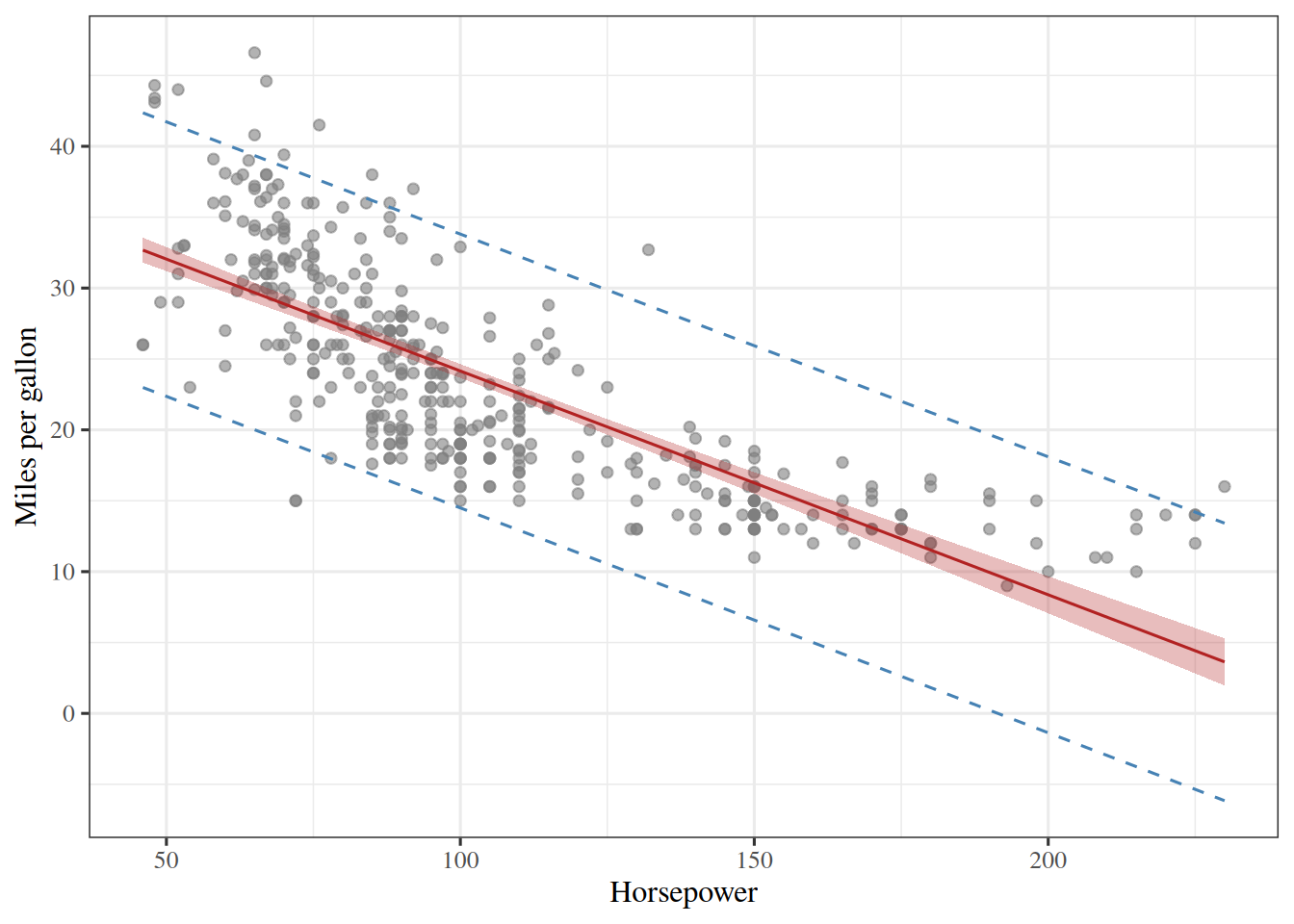
Figure 12: The gradient \(\grad_{\vcoef} \hat{R}\) of the objective of Theorem 9, one surface for each of its two components, over the same intercepts and slopes as Figure 8. Each component is a plane, because the objective is quadratic: the gradient is a linear function of \(\vcoef\). Both planes cross zero along a line, and the two lines meet at the least-squares fit, where the gradient is zero: \(\hat{R}\) is flat there, and nowhere else. On the course website, the blue points follow the choice made in Figure 8; in the handout, each component is scaled by its largest magnitude, and the black line is where it is zero.
ExrExercise 13 (Why two of the four terms are the same)

Exercise 13 (Why two of the four terms are the same) Expanding the objective in matrix notation gives four terms:

\[\pt{\vy - \design\vcoef}(\vy - \design\vcoef) = \dprod{\vy}{\vy} - \tp{\vy} \design \vcoef - \tp{\vcoef} \tp{\design} \vy + \tp{\vcoef} \stprod{\design} \vcoef\]

Give the shape of \(\tp{\vy} \design \vcoef\).

Solution 13. Multiply the shapes left to right:

\[\underbrace{\tp{\vy}}_{1 \times n} \underbrace{\design}_{n \times p^*} \underbrace{\vcoef}_{p^* \times 1} \;\longrightarrow\; 1 \times 1\]

It is a \(1 \times 1\) matrix — a single number.

ExrExercise 14 (Why two of the four terms are the same (part 2))

Exercise 14 (Why two of the four terms are the same (part 2)) Use the setup of Exercise 13.

Show that \(\tp{\vy} \design \vcoef = \tp{\vcoef} \tp{\design} \vy\), naming the property used at each step.

Solution 14. A \(1 \times 1\) matrix has one entry, in position \((1,1)\), and transposing sends that entry to position \((1,1)\). So a \(1 \times 1\) matrix equals its own transpose, and

\[ \begin{aligned} \tp{\vy} \design \vcoef &= \tp{\paren{\tp{\vy} \design \vcoef}} \\ &= \tp{\vcoef} \tp{\design} \tp{\paren{\tp{\vy}}} \\ &= \tp{\vcoef} \tp{\design} \vy \end{aligned} \]

Three properties in order: a \(1\times1\) matrix is its own transpose; \(\pt{ABC} = \tp{C} \tp{B} \tp{A}\), which reverses the order; and \(\pt{\tp{\vy}} = \vy\).

So the two middle terms are the same number, and the expansion collapses to

\[\dprod{\vy}{\vy} - 2\tp{\vcoef} \tp{\design} \vy + \tp{\vcoef} \stprod{\design}\vcoef\]

ExrExercise 15 (Why two of the four terms are the same (part 3))

Exercise 15 (Why two of the four terms are the same (part 3)) Use the setup of Exercise 13.

Is \(AB = \tp{B} \tp{A}\) true for matrices in general?

Solution 15. No. For general matrices \(AB\) and \(\tp{B} \tp{A}\) need not even have the same shape: with \(A\) being \(2\times 3\) and \(B\) being \(3 \times 5\), \(AB\) is \(2\times 5\) while \(\tp{B} \tp{A}\) is \(5 \times 2\). In general, \(\pt{AB} = \tp{B} \tp{A}\), which is a statement about one product and its transpose, not about two products being equal.

ExrExercise 16 (Why two of the four terms are the same (part 4))

Exercise 16 (Why two of the four terms are the same (part 4)) Use the setup of Exercise 13.

What does the argument in Exercise 14 actually rely on?

Solution 16. The argument in Solution 14 uses that general fact plus the fact that this particular product is \(1 \times 1\), so that its transpose is itself. Drop the second and nothing goes through. The step is about a scalar written in matrix notation, so it is available exactly where a product collapses to \(1 \times 1\) and nowhere else.

3.3 The gradient by the vector chain rule

ExrExercise 17 (The gradient of the mean squared error by the vector chain rule)

Exercise 17 (The gradient of the mean squared error by the vector chain rule) For coefficients \(\vcoef\), the model predicts \(\eoutvar_i = \dprod{\vfeatmap(\vpredvar_i)}{\vcoef}\) for observation \(i\). Its prediction error is the prediction minus the observed outcome, \(\prederr_i = \eoutvar_i - \outvar_i\), the negative of its residual. The least squares objective is the average of the squared prediction errors, which is the sample mean squared error (sMSE) of the coefficients \(\vcoef\) (Definition 25, defined later in this chapter):

\[\sMSE{\vcoef} \eqdef \avgin \prederr_i^2.\]

Collect the errors in the \(n \times 1\) vector \(\vprederr = \design\vcoef - \voutvar\), whose entry \(i\) is \(\prederr_i\).

Write \(\sMSE{\vcoef}\) as a dot product of \(\vprederr\) with itself.

Solution 17. Colors track where each part’s result is used later: \(\textcolor{violet}{\text{violet}}\) for Solution 17, \(\textcolor{blue}{\text{blue}}\) for the inner derivative (Solution 19), \(\textcolor{red}{\text{red}}\) for the outer derivative (Solution 20), and \(\textcolor{teal}{\text{teal}}\) for the gradient (Solution 21).

Entry \(i\) of \(\vprederr\) is \(\prederr_i\), and a dot product sums the products of matching entries, so

\[ \begin{aligned} \sMSE{\vcoef} &= \frac{1}{n} \sumin \prederr_i^2 && \text{(definition of sMSE)}\\ &= \frac{1}{n} \sumin \prederr_i \prederr_i && \text{(square as a product)}\\ &= \textcolor{violet}{\frac{1}{n} \dprod{\vprederr}{\vprederr}} && \text{(definition of the dot product)} \end{aligned} \]

ExrExercise 18 (The gradient of the mean squared error by the vector chain rule (part 2))

Exercise 18 (The gradient of the mean squared error by the vector chain rule (part 2)) Use the setup of Exercise 17.

Use the vector chain rule to write the gradient \(\deriv{\vcoef} \sMSE{\vcoef}\) as the product of two derivatives: the inner derivative \(\deriv{\vcoef} \vprederr\) and the outer derivative of the sMSE with respect to \(\vprederr\).

Solution 18. Solution 17 writes \(\sMSE{\vcoef}\) as a scalar function of the vector \(\vprederr\), which is itself a vector-valued function of \(\vcoef\). The vector chain rule multiplies the two derivatives, inner function first:

\[ \begin{aligned} \deriv{\vcoef} \sMSE{\vcoef} &= \deriv{\vcoef} \paren{\textcolor{violet}{\frac{1}{n} \dprod{\vprederr}{\vprederr}}} && \text{(@sol-mse-gradient-chain-rule)}\\ &= \underbrace{\textcolor{blue}{\paren{\deriv{\vcoef} \vprederr}}}_{p^* \times n} \underbrace{\textcolor{red}{\paren{\deriv{\vprederr} \paren{\frac{1}{n} \dprod{\vprederr}{\vprederr}}}}}_{n \times 1} && \text{(vector chain rule)} \end{aligned} \]

To go further, we need the two factors. Parts 3 and 4 find them, one at a time, and Solution 21 substitutes them back in.

ExrExercise 19 (The gradient of the mean squared error by the vector chain rule (part 3))

Exercise 19 (The gradient of the mean squared error by the vector chain rule (part 3)) Use the setup of Exercise 17.

Find the inner derivative \(\deriv{\vcoef} \vprederr\), and give its shape.

Solution 19. The vector \(\voutvar\) does not depend on \(\vcoef\), so it is constant and its derivative is a zero matrix. The derivative of \(\vcoef\) with respect to itself is the \(p^* \times p^*\) identity matrix \(\matr{I}\), because entry \((i, j)\) is \(\deriv{\coef{i}} \coef{j}\), which is 1 when \(i = j\) and 0 otherwise. Using the derivative of a matrix-vector product, the inner derivative is

\[ \begin{aligned} \textcolor{blue}{\deriv{\vcoef} \vprederr} &= \deriv{\vcoef} \paren{\design\vcoef - \voutvar} && \text{(definition of the error vector)}\\ &= \deriv{\vcoef} \paren{\design\vcoef} - \deriv{\vcoef} \voutvar && \text{(derivative of a difference)}\\ &= \paren{\deriv{\vcoef} \vcoef} \design^\top - \deriv{\vcoef} \voutvar && \text{(derivative of a matrix-vector product)}\\ &= \paren{\deriv{\vcoef} \vcoef} \design^\top - \matr{0} && \text{($\voutvar$ is constant)}\\ &= \matr{I} \design^\top - \matr{0} && \text{(derivative of $\vcoef$ is $\matr{I}$)}\\ &= \matr{I} \design^\top && \text{(subtract a zero matrix)}\\ &= \textcolor{blue}{\design^\top} && \text{(multiply by the identity)} \end{aligned} \]

Its shape is \(p^* \times n\): one row for each coefficient and one column for each observation’s error, the denominator layout.

ExrExercise 20 (The gradient of the mean squared error by the vector chain rule (part 4))

Exercise 20 (The gradient of the mean squared error by the vector chain rule (part 4)) Use the setup of Exercise 17.

Find the outer derivative.

Solution 20. The scalar \(\frac{1}{n}\) does not depend on \(\vprederr\), so it factors out of the derivative. The derivative of a dot product of a vector with itself is twice that vector. So the outer derivative is

\[ \begin{aligned} \textcolor{red}{\deriv{\vprederr} \paren{\frac{1}{n} \dprod{\vprederr}{\vprederr}}} &= \frac{1}{n} \deriv{\vprederr} \dprod{\vprederr}{\vprederr} && \text{(factor out a constant)}\\ &= \frac{1}{n} \paren{2 \vprederr} && \text{(derivative of a dot product with itself)}\\ &= \textcolor{red}{\frac{2}{n} \vprederr} && \text{(multiply the scalars)} \end{aligned} \]

Its shape is \(n \times 1\), the same as \(\vprederr\).

ExrExercise 21 (The gradient of the mean squared error by the vector chain rule (part 5))

Exercise 21 (The gradient of the mean squared error by the vector chain rule (part 5)) Use the setup of Exercise 17.

Substitute Exercise 19 and Exercise 20 into Exercise 18 to find the gradient, without expanding the dot product.

Solution 21. Return to Solution 18, and substitute the two factors:

\[ \begin{aligned} \deriv{\vcoef} \sMSE{\vcoef} &= \textcolor{blue}{\paren{\deriv{\vcoef} \vprederr}} \textcolor{red}{\paren{\deriv{\vprederr} \paren{\frac{1}{n} \dprod{\vprederr}{\vprederr}}}} && \text{(@sol-mse-gradient-chain-rule-part2)}\\ &= \textcolor{blue}{\design^\top} \textcolor{red}{\paren{\deriv{\vprederr} \paren{\frac{1}{n} \dprod{\vprederr}{\vprederr}}}} && \text{(@sol-mse-gradient-chain-rule-part3)}\\ &= \textcolor{blue}{\design^\top} \textcolor{red}{\paren{\frac{2}{n} \vprederr}} && \text{(@sol-mse-gradient-chain-rule-part4)}\\ &= \textcolor{teal}{\frac{2}{n} \design^\top \vprederr} && \text{(move the scalar to the front)} \end{aligned} \]

The product of a \(p^* \times n\) matrix and an \(n \times 1\) vector is \(p^* \times 1\), one entry for each coefficient, as a gradient must be. The chain rule never needed the four-term expansion of Exercise 13, because it treats the error vector as one object until the last step.

ExrExercise 22 (The gradient of the mean squared error by the vector chain rule (part 6))

Exercise 22 (The gradient of the mean squared error by the vector chain rule (part 6)) Use the setup of Exercise 17.

Check that your answer is \(\frac{1}{\nobs}\) times the gradient in Theorem 9.

Solution 22. Substitute \(\vprederr = \design\vcoef - \voutvar\), and compare with the gradient of \(J\) in Theorem 9:

\[ \begin{aligned} \deriv{\vcoef} \sMSE{\vcoef} &= \textcolor{teal}{\frac{2}{n} \design^\top \vprederr} && \text{(@sol-mse-gradient-chain-rule-part5)}\\ &= \frac{2}{n} \design^\top \paren{\design\vcoef - \voutvar} && \text{(definition of the error vector)}\\ &= \frac{1}{n} \paren{2 \design^\top \paren{\design\vcoef - \voutvar}} && \text{(factor out $\tfrac{1}{n}$)}\\ &= \frac{1}{n} \grad_{\vcoef} J(\vcoef) && \text{(gradient of $J$)} \end{aligned} \]

So the sMSE and \(J\) have the same stationary points, and setting this gradient to \(\vzero\) gives the same normal equations.

ExrExercise 23 (The gradient of the mean squared error by the vector chain rule (part 7))

Exercise 23 (The gradient of the mean squared error by the vector chain rule (part 7)) Use the setup of Exercise 17.

Find the Hessian of \(\sMSE{\vcoef}\).

Solution 23. The Hessian is the derivative of the gradient. The gradient from Solution 21 is a constant matrix times the error vector, so the derivative of a matrix-vector product applies again, with \(\matr{A} = \frac{2}{n} \design^\top\):

\[ \begin{aligned} \matr{H} &= \deriv{\vcoef} \paren{\deriv{\vcoef} \sMSE{\vcoef}} && \text{(definition of the Hessian)}\\ &= \deriv{\vcoef} \paren{\textcolor{teal}{\frac{2}{n} \design^\top \vprederr}} && \text{(@sol-mse-gradient-chain-rule-part5)}\\ &= \textcolor{blue}{\paren{\deriv{\vcoef} \vprederr}} \paren{\frac{2}{n} \design^\top}^\top && \text{(derivative of a matrix-vector product)}\\ &= \textcolor{blue}{\design^\top} \paren{\frac{2}{n} \design^\top}^\top && \text{(@sol-mse-gradient-chain-rule-part3)}\\ &= \design^\top \paren{\frac{2}{n} \design} && \text{(transpose of a transpose)}\\ &= \frac{2}{n} \design^\top \design && \text{(move the scalar to the front)} \end{aligned} \]

It is \(p^* \times p^*\) and does not depend on \(\vcoef\).

ExrExercise 24 (The gradient of the mean squared error by the vector chain rule (part 8))

Exercise 24 (The gradient of the mean squared error by the vector chain rule (part 8)) Use the setup of Exercise 17.

Show that it is positive definite when the columns of \(\design\) are linearly independent.

Solution 24. To show it is positive definite, take any \(p^* \times 1\) vector \(\vv \ne \vzero\):

\[ \begin{aligned} \dprod{\vv}{\paren{\matr{H} \vv}} &= \dprod{\vv}{\paren{\frac{2}{n} \design^\top \design \vv}} && \text{(value of $\matr{H}$)}\\ &= \frac{2}{n} \dprod{\vv}{\paren{\design^\top \design \vv}} && \text{(move the scalar out of the dot product)}\\ &= \frac{2}{n} \dprod{\paren{\design \vv}}{\paren{\design \vv}} && \text{(move $\design^\top$ across the dot product)}\\ &= \frac{2}{n} \normsq{\design \vv} && \text{(definition of the squared norm)} \end{aligned} \]

The third step uses \(\dprod{\vv}{\paren{\design^\top \vu}} = \dprod{\paren{\design \vv}}{\vu}\), which holds because both sides equal \(\sumin \sum_j u_i \design_{ij} v_j\). A squared norm is never negative, and it is zero only for the zero vector. When the columns of \(\design\) are linearly independent, \(\design \vv\) is a combination of them with coefficients \(\vv \ne \vzero\), so \(\design \vv \ne \vzero\). Then \(\dprod{\vv}{\paren{\matr{H} \vv}} > 0\) for every \(\vv \ne \vzero\), and \(\matr{H}\) is positive definite.

ExrExercise 25 (The gradient of the mean squared error by the vector chain rule (part 9))

Exercise 25 (The gradient of the mean squared error by the vector chain rule (part 9)) Use the setup of Exercise 17.

What does that tell you about the stationary point?

Solution 25. By the second-derivative test for convexity, a Hessian that is positive definite at every \(\vcoef\) makes \(\sMSE{\vcoef}\) strictly convex. So the stationary point from Solution 22 is the unique global minimizer. If the columns of \(\design\) are not linearly independent, some \(\vv \ne \vzero\) has \(\design \vv = \vzero\), so \(\matr{H}\) is only positive semidefinite and the minimizer is not unique.

3.4 The normal equations

LemTheorem 10 (The normal equations)

Theorem 10 (The normal equations) The ordinary least squares estimator \(\hvcoef\) satisfies the linear system of normal equations:

\[(\design^\top \design) \vcoef = \design^\top \vy \tag{2}\]

When the matrix \(\design^\top \design \in \reals^{p^* \times p^*}\) is invertible, there is a unique global minimizer, and it has the closed-form solution:

\[\hvcoef = (\design^\top \design)^{-1} \design^\top \vy \tag{3}\]

Proof. Since \(J(\vcoef) = \norm{\design\vcoef - \vy}^2\) is a smooth convex function on \(\reals^{p^*}\), any global minimizer \(\hvcoef\) must satisfy \(\grad_{\vcoef} J(\hvcoef) = \vzero\) by Theorem 8. By Theorem 9, setting

\[ \begin{aligned} \grad_{\vcoef} J &= 2 \design^\top \design \vcoef - 2 \design^\top \vy \\ &= \vzero \end{aligned} \]

yields \((\design^\top \design)\vcoef = \design^\top \vy\). Multiplying both sides on the left by \((\design^\top \design)^{-1}\) gives \(\hvcoef = (\design^\top \design)^{-1} \design^\top \vy\).

ExmExample 30 (Solving the normal equations for fuel efficiency)

Example 30 (Solving the normal equations for fuel efficiency) In the Auto data [3], regress mpg on horsepower and weight. Form \(\tp{\design}\design\) and \(\tp{\design}\vy\), solve the normal equations of Theorem 10, and compare with the coefficients from a library fit:

import numpy as np
import pandas as pd

auto_ne = pd.read_csv("data/auto.csv")
y_ne = auto_ne["mpg"].to_numpy(float)
Phi_ne = np.column_stack([np.ones(len(y_ne)), auto_ne["horsepower"], auto_ne["weight"]])

# Solve (Phi'Phi) beta = Phi'y directly; solve() avoids forming the inverse explicitly.
beta_ne = np.linalg.solve(Phi_ne.T @ Phi_ne, Phi_ne.T @ y_ne)
beta_ne_lib = np.linalg.lstsq(Phi_ne, y_ne, rcond=None)[0]
print(beta_ne)
[ 4.56402108e+01 -4.73028631e-02 -5.79415736e-03]
print(np.allclose(beta_ne, beta_ne_lib))
True
auto_ne <- read.csv("data/auto.csv")
Phi_ne <- cbind(1, auto_ne$horsepower, auto_ne$weight)

# Solve (Phi'Phi) beta = Phi'y directly; solve() with two arguments avoids forming the inverse.
beta_ne <- solve(crossprod(Phi_ne), crossprod(Phi_ne, auto_ne$mpg))
beta_ne_lib <- coef(lm(mpg ~ horsepower + weight, data = auto_ne))
cbind(normal_equations = drop(beta_ne), lm = beta_ne_lib)
            normal_equations           lm
(Intercept)     45.640210840 45.640210840
horsepower      -0.047302863 -0.047302863
weight          -0.005794157 -0.005794157

The two routes agree. The intercept is 45.64, each extra horsepower changes the prediction by -0.0473 miles per gallon, and each extra pound by -0.00579. Library routines use a more numerically stable factorization than forming \(\tp{\design}\design\), but they solve the same problem.

RemarkRemark 4 (Invertibility, sample size, and collinearity)

Remark 4 (Invertibility, sample size, and collinearity). For \((\stprod{\design})^{-1}\) to exist, the design matrix \(\design\) must have full column rank \(p^*\). The matrix \(\stprod{\design}\) is the Gram matrix of the columns of \(\design\): its entry \((j, k)\) is the dot product of columns \(j\) and \(k\), and it is symmetric and positive semidefinite. Two distinct conditions can cause invertibility to fail:

  1. Underdetermined system (\(n < p^*\) or \(n \le p\)): When there are fewer observations than parameters, the columns of \(\design\) cannot be linearly independent. If \(\design\) has full row rank, there exist infinitely many parameter vectors \(\vcoef\) that interpolate the training data with zero residual error.
  2. Collinearity among features: If any feature is an exact linear combination of others (or if a feature is constant alongside the 1-padding), the matrix \(\design\) is rank-deficient and \(\stprod{\design}\) is singular regardless of how large \(n\) is. Statisticians call this perfect multicollinearity.
ExrExercise 26 (Solve the normal equations by hand)

Exercise 26 (Solve the normal equations by hand) Three training points, one feature each:

\[(x_1, y_1) = (0, 1), \quad (x_2, y_2) = (1, 3), \quad (x_3, y_3) = (2, 3)\]

Fit \(\modmemf{x} = \coef{0} + \coef{1} x\) by least squares, working in exact fractions throughout.

Write down \(\design\) and \(\vy\), using the design vector of Exercise 1.

Solution 26. The design vector for each input is \(\vfeatmap(\vx_i) = \pt{1, x_i}\), so

\[\design = \begin{bmatrix} 1 & 0 \\ 1 & 1 \\ 1 & 2 \end{bmatrix}, \qquad \vy = \begin{bmatrix} 1 \\ 3 \\ 3 \end{bmatrix}\]

ExrExercise 27 (Solve the normal equations by hand (part 2))

Exercise 27 (Solve the normal equations by hand (part 2)) Use the setup of Exercise 26.

Give the shape of each.

Solution 27. \(\design\) is \(3 \times 2\) and \(\vy\) is \(3 \times 1\). Here \(n = 3\) and \(p = 1\), so \(\design\) has \(p^* = p + 1 = 2\) columns.

ExrExercise 28 (Solve the normal equations by hand (part 3))

Exercise 28 (Solve the normal equations by hand (part 3)) Use the setup of Exercise 26.

Compute \(\stprod{\design}\) and \(\tp{\design} \vy\).

Solution 28. Both products are sized by \(p^*\) alone, as Exercise 2 worked out: \(\stprod{\design}\) is \(2 \times 2\) and \(\tp{\design} \vy\) is \(2 \times 1\), whatever \(n\) is.

\[\stprod{\design} = \begin{bmatrix} 3 & 3 \\ 3 & 5 \end{bmatrix}, \qquad \tp{\design} \vy = \begin{bmatrix} 7 \\ 9 \end{bmatrix}\]

The top-left entry is \(n\), because the first column of \(\design\) is all ones.

ExrExercise 29 (Solve the normal equations by hand (part 4))

Exercise 29 (Solve the normal equations by hand (part 4)) Use the setup of Exercise 26.

Solve \((\stprod{\design})\vcoef = \tp{\design} \vy\) for \(\vcoef\).

Solution 29. \(\stprod{\design}\) is \(2 \times 2\), so invert it by the formula for a \(2 \times 2\) matrix. Its determinant is \(3 \cdot 5 - 3 \cdot 3 = 6\), which is non-zero, so the inverse exists:

\[(\stprod{\design})^{-1} = \frac{1}{6} \begin{bmatrix} 5 & -3 \\ -3 & 3 \end{bmatrix}\]

\[ \begin{aligned} \vcoef &= (\stprod{\design})^{-1} \tp{\design} \vy \\ &= \frac{1}{6} \begin{bmatrix} 5 & -3 \\ -3 & 3 \end{bmatrix} \begin{bmatrix} 7 \\ 9 \end{bmatrix} \\ &= \frac{1}{6} \begin{bmatrix} 35 - 27 \\ -21 + 27 \end{bmatrix} \\ &= \begin{bmatrix} 4/3 \\ 1 \end{bmatrix} \end{aligned} \]

So the fitted line is \(\modmemf{\predvar} = \tfrac{4}{3} + \predvar\).

ExrExercise 30 (Solve the normal equations by hand (part 5))

Exercise 30 (Solve the normal equations by hand (part 5)) Use the setup of Exercise 26.

Compute the fitted values and the residuals.

Solution 30. The fitted values are \(\design\vcoef\), and the residuals are \(\vy - \design\vcoef\) — observed minus fitted.

\[\design\vcoef = \begin{bmatrix} 4/3 \\ 7/3 \\ 10/3 \end{bmatrix}, \qquad \vy - \design\vcoef = \begin{bmatrix} -1/3 \\ 2/3 \\ -1/3 \end{bmatrix}\]

The residual sum of squares is

\[ \begin{aligned} (-1/3)^2 + (2/3)^2 + (-1/3)^2 &= \tfrac{1}{9} + \tfrac{4}{9} + \tfrac{1}{9} \\ &= \tfrac{2}{3}. \end{aligned} \]

ExrExercise 31 (Solve the normal equations by hand (part 6))

Exercise 31 (Solve the normal equations by hand (part 6)) Use the setup of Exercise 26.

No residual is zero. Should you expect any to be?

Solution 31. No, you should not expect any residual to be zero. Three points determine a line only when they are collinear, and these are not: the steps in \(y\) are \(+2\) then \(0\) while the steps in \(x\) are \(+1\) then \(+1\). Two free parameters cannot satisfy three independent equations, so the best a line can do is miss all three by a little. The residuals sum to zero rather than vanishing, which is a different statement and is the first half of Solution 32.

ExrExercise 32 (Solve the normal equations by hand (part 7))

Exercise 32 (Solve the normal equations by hand (part 7)) Use the setup of Exercise 26.

Verify that \(\tp{\design} (\vy - \design\vcoef) = \vzero\).

Solution 32. Multiply out, column by column:

\[ \begin{aligned} \tp{\design} (\vy - \design\vcoef) &= \begin{bmatrix} 1 & 1 & 1 \\ 0 & 1 & 2 \end{bmatrix} \begin{bmatrix} -1/3 \\ 2/3 \\ -1/3 \end{bmatrix} \\ &= \begin{bmatrix} -1/3 + 2/3 - 1/3 \\ 0 + 2/3 - 2/3 \end{bmatrix} \\ &= \begin{bmatrix} 0 \\ 0 \end{bmatrix} \end{aligned} \]

ExrExercise 33 (Solve the normal equations by hand (part 8))

Exercise 33 (Solve the normal equations by hand (part 8)) Use the setup of Exercise 26.

Say what that equation says geometrically.

Solution 33. Each entry of \(\tp{\design} (\vy - \design\vcoef)\) is the inner product of one column of \(\design\) with the residual vector. So the equation says the residual is orthogonal to every column of \(\design\), and therefore to every combination of those columns — the set of all vectors \(\design\vcoef\) the model can reach. The fitted values are the point of that space closest to \(\vy\), and the residual is the remainder, perpendicular to it.

ExrExercise 34 (Solve the normal equations by hand (part 9))

Exercise 34 (Solve the normal equations by hand (part 9)) Use the setup of Exercise 26.

Say why it had to hold, given how \(\vcoef\) was obtained.

Solution 34. It had to hold because it is the normal equations. Setting the gradient \(-2\tp{\design} \vy + 2\stprod{\design}\vcoef\) to zero and dividing by \(2\) gives \(\tp{\design} (\vy - \design\vcoef) = \vzero\) directly. So this is not an extra check on the answer; it is the equation that was solved, rearranged. It does check the arithmetic of the earlier steps.

The first column being all ones is why the residuals sum to zero, and it is also why the fitted line passes through the sample mean of the data: \(\bar \predvar = 1\) and \(\bar y = 7/3\), and

\[ \begin{aligned} \modmemf{1} &= \tfrac{4}{3} + 1 \\ &= \tfrac{7}{3}. \end{aligned} \]

Drop the intercept and both facts go with it.

LemLemma 4 (Shortcut formulas for the centered sums)

Lemma 4 (Shortcut formulas for the centered sums) For data \((x_1, y_1), \ldots, (x_n, y_n)\) with sample means \(\xbar\) and \(\bar{y}\), let \(S_{xx} = \sumin (x_i - \xbar)^2\) and \(S_{xy} = \sumin (x_i - \xbar)(y_i - \bar{y})\). Then

\[ S_{xx} = \sumin x_i^2 - n \xbar^2, \qquad S_{xy} = \sumin x_i y_i - n \xbar \bar{y}. \tag{4}\]

Proof. Expand the products, then use \(\sumin x_i = n \xbar\) and \(\sumin y_i = n \bar{y}\):

\[ \begin{aligned} S_{xx} &= \sumin x_i^2 - 2 \xbar \sumin x_i + n \xbar^2 \\ &= \sumin x_i^2 - 2 n \xbar^2 + n \xbar^2 \\ &= \sumin x_i^2 - n \xbar^2, \\ S_{xy} &= \sumin x_i y_i - \bar{y} \sumin x_i - \xbar \sumin y_i + n \xbar \bar{y} \\ &= \sumin x_i y_i - n \xbar \bar{y} - n \xbar \bar{y} + n \xbar \bar{y} \\ &= \sumin x_i y_i - n \xbar \bar{y}. \end{aligned} \]

ExmExample 31 (Both forms of the centered sums, for three points)

Example 31 (Both forms of the centered sums, for three points) Take the three points \((0, 1)\), \((1, 3)\), \((2, 3)\) of Exercise 26. Compute \(S_{xx}\) and \(S_{xy}\) from the definitions and from Equation 4:

x_cs <- c(0, 1, 2)
y_cs <- c(1, 3, 3)
n_cs <- length(x_cs)

# Definition: sums of centered products.
sxx_def <- sum((x_cs - mean(x_cs))^2)
sxy_def <- sum((x_cs - mean(x_cs)) * (y_cs - mean(y_cs)))

# Shortcut: raw sums minus n times the product of the means; no centering needed.
sxx_short <- sum(x_cs^2) - n_cs * mean(x_cs)^2
sxy_short <- sum(x_cs * y_cs) - n_cs * mean(x_cs) * mean(y_cs)
c(sxx_def, sxx_short, sxy_def, sxy_short)
[1] 2 2 2 2

Both forms give \(S_{xx} = 2\) and \(S_{xy} = 2\).

LemTheorem 11 (The simple linear regression slope is the sample covariance over the sample variance)

Theorem 11 (The simple linear regression slope is the sample covariance over the sample variance) Let \((x_1, y_1), \ldots, (x_n, y_n)\) be data with \(n \ge 2\) whose inputs are not all equal. Write \(\xbar = \avgin x_i\) and \(\bar{y} = \avgin y_i\), and let \(\covh{x, y} = \frac{1}{n-1} \sumin (x_i - \xbar)(y_i - \bar{y})\) and \(\hVar{x} = \frac{1}{n-1} \sumin (x_i - \xbar)^2\) be the sample covariance and the sample variance. The least squares fit \(\modmemf{x} = \hcoef{0} + \hcoef{1} x\) has

\[ \hcoef{1} = \frac{\covh{x, y}}{\hVar{x}}, \qquad \hcoef{0} = \bar{y} - \hcoef{1} \xbar. \tag{5}\]

Proof. Let \(S_{xx} = \sumin (x_i - \xbar)^2\) and \(S_{xy} = \sumin (x_i - \xbar)(y_i - \bar{y})\), as in Lemma 4. Then \(S_{xx} > 0\) because the \(x_i\) are not all equal.

1. The normal equations. The design matrix \(\design\) has a column of ones and a column of the \(x_i\), so

\[ \stprod{\design} = \begin{bmatrix} n & \sumin x_i \\ \sumin x_i & \sumin x_i^2 \end{bmatrix}, \qquad \tp{\design} \vy = \begin{bmatrix} \sumin y_i \\ \sumin x_i y_i \end{bmatrix}. \]

Its determinant is \(n \sumin x_i^2 - \paren{\sumin x_i}^2\). Using \(\sumin x_i = n \xbar\) and then Lemma 4,

\[ \begin{aligned} n \sumin x_i^2 - \paren{\sumin x_i}^2 &= n \paren{\sumin x_i^2 - n \xbar^2} \\ &= n S_{xx}, \end{aligned} \]

which is non-zero. So by Theorem 10 the minimizer is unique and solves the two normal equations:

\[ \begin{aligned} n \coef{0} + \paren{\sumin x_i} \coef{1} &= \sumin y_i, \\ \paren{\sumin x_i} \coef{0} + \paren{\sumin x_i^2} \coef{1} &= \sumin x_i y_i. \end{aligned} \]

2. The intercept. Divide the first equation by \(n\), using \(\sumin x_i = n \xbar\) and \(\sumin y_i = n \bar{y}\):

\[ \begin{aligned} \coef{0} + \xbar \coef{1} &= \bar{y}, \\ \coef{0} &= \bar{y} - \coef{1} \xbar. \end{aligned} \]

3. The slope. Substitute \(\coef{0} = \bar{y} - \coef{1} \xbar\) into the second equation and use \(\sumin x_i = n \xbar\):

\[ \begin{aligned} n \xbar \paren{\bar{y} - \coef{1} \xbar} + \paren{\sumin x_i^2} \coef{1} &= \sumin x_i y_i, \\ \paren{\sumin x_i^2 - n \xbar^2} \coef{1} &= \sumin x_i y_i - n \xbar \bar{y}. \end{aligned} \]

By Lemma 4, this says \(S_{xx} \coef{1} = S_{xy}\). Since \(S_{xx} > 0\),

\[ \hcoef{1} = \frac{S_{xy}}{S_{xx}} = \frac{S_{xy} / (n-1)}{S_{xx} / (n-1)} = \frac{\covh{x, y}}{\hVar{x}}. \]

The factor \(n - 1\) cancels, so dividing by \(n\) instead (the population versions) gives the same slope. The intercept is step 2 with \(\coef{1} = \hcoef{1}\).

ExmExample 32 (The slope of fuel efficiency on weight)

Example 32 (The slope of fuel efficiency on weight) In the Auto data [3], regress mpg on weight. Compute the slope as the sample covariance over the sample variance (Equation 5), and compare it with the coefficient from a library fit:

import numpy as np
import pandas as pd

auto_cv = pd.read_csv("data/auto.csv")
x_cv = auto_cv["weight"].to_numpy(float)
y_cv = auto_cv["mpg"].to_numpy(float)

# np.cov already divides by n - 1; np.var needs ddof=1 to match it.
# The ratio is the slope either way, but matching the divisors keeps each piece a sample moment.
slope_cv = np.cov(x_cv, y_cv)[0, 1] / np.var(x_cv, ddof=1)
intercept_cv = y_cv.mean() - slope_cv * x_cv.mean()

# Compare with a library least squares fit of degree 1, which returns (slope, intercept).
fit_cv = np.polyfit(x_cv, y_cv, 1)
print(slope_cv, intercept_cv)
-0.007647342535779581 46.21652454901758
print(np.allclose([slope_cv, intercept_cv], fit_cv))
True
auto_cv <- read.csv("data/auto.csv")

# cov() and var() both divide by n - 1, so their ratio is the slope.
slope_cv <- cov(auto_cv$weight, auto_cv$mpg) / var(auto_cv$weight)
intercept_cv <- mean(auto_cv$mpg) - slope_cv * mean(auto_cv$weight)

# Compare with lm(), which solves the least squares problem by a QR factorization.
fit_cv <- coef(lm(mpg ~ weight, data = auto_cv))
cbind(cov_over_var = c(intercept_cv, slope_cv), lm = fit_cv)
            cov_over_var           lm
(Intercept) 46.216524549 46.216524549
weight      -0.007647343 -0.007647343

The two routes agree: the slope is -0.00765 miles per gallon for each extra pound, and the intercept is 46.22. The slope is negative because the covariance of weight and fuel efficiency is -5517.4, while the variance of weight, 721485, is always positive.

The three points of Exercise 26 give a check by hand. Their sample means are \(\xbar = 1\) and \(\bar{y} = 7/3\), so \(S_{xy} = (-1)(-4/3) + 0 + (1)(2/3) = 2\) and \(S_{xx} = 1 + 0 + 1 = 2\). The slope is \(S_{xy} / S_{xx} = 1\), the value that exercise finds by solving the normal equations.

For the same slope written with the correlation, see the OLS slope and the correlation.

CorCorollary 1 (The two simple regression slopes multiply to the squared correlation)

Corollary 1 (The two simple regression slopes multiply to the squared correlation) Let \((x_1, y_1), \ldots, (x_n, y_n)\) be data whose \(x_i\) are not all equal and whose \(y_i\) are not all equal. Let \(\hcoef{y \mid x}\) be the slope from regressing \(y\) on \(x\), let \(\hcoef{x \mid y}\) be the slope from regressing \(x\) on \(y\), and let \(r = \covh{x, y} / \sqrt{\hVar{x} \, \hVar{y}}\) be the sample correlation. Then

\[ \hcoef{y \mid x} \, \hcoef{x \mid y} = r^2, \qquad\text{so}\qquad \sqrt{\hcoef{y \mid x} \, \hcoef{x \mid y}} = \abs{r}. \tag{6}\]

Both slopes have the sign of \(\covh{x, y}\), so \(r\) has that same sign. The square root of the product is the correlation, not the covariance: the covariance is \(r \sqrt{\hVar{x} \, \hVar{y}}\), and it has the units of \(x\) times the units of \(y\).

Proof. By Theorem 11 applied to each regression,

\[ \hcoef{y \mid x} = \frac{\covh{x, y}}{\hVar{x}}, \qquad \hcoef{x \mid y} = \frac{\covh{y, x}}{\hVar{y}} = \frac{\covh{x, y}}{\hVar{y}}, \]

because the covariance is symmetric in its two arguments. Multiply:

\[ \begin{aligned} \hcoef{y \mid x} \, \hcoef{x \mid y} &= \frac{\covh{x, y}^2}{\hVar{x} \, \hVar{y}} \\ &= \paren{\frac{\covh{x, y}}{\sqrt{\hVar{x} \, \hVar{y}}}}^2 \\ &= r^2. \end{aligned} \]

Taking square roots gives \(\abs{r}\). The variances are positive, so each slope has the sign of \(\covh{x, y}\), which is the sign of \(r\).

ExmExample 33 (The two slopes for fuel efficiency and weight)

Example 33 (The two slopes for fuel efficiency and weight) Regress weight on mpg as well as mpg on weight, and compare the product of the slopes with the squared correlation:

auto_sc <- read.csv("data/auto.csv")

# Slope of mpg on weight, and the reverse slope of weight on mpg, each as covariance over variance.
slope_y_on_x <- cov(auto_sc$weight, auto_sc$mpg) / var(auto_sc$weight)
slope_x_on_y <- cov(auto_sc$weight, auto_sc$mpg) / var(auto_sc$mpg)

# The square root of their product should equal the absolute correlation;
# the common sign of the slopes should equal the sign of the correlation.
r_sc <- cor(auto_sc$weight, auto_sc$mpg)
c(
  product = slope_y_on_x * slope_x_on_y, r_squared = r_sc^2,
  sqrt_product = sqrt(slope_y_on_x * slope_x_on_y), abs_r = abs(r_sc)
)
     product    r_squared sqrt_product        abs_r 
   0.6926304    0.6926304    0.8322442    0.8322442 

The slope of mpg on weight is -0.00765, and the slope of weight on mpg is -90.57. Their product is 0.6926, which is \(r^2\), and its square root is 0.8322, which is \(\abs{r}\). Both slopes are negative, matching the sign of the correlation, -0.8322. The covariance, -5517.4, is a different number: it carries the units of pounds times miles per gallon.

VideosWatch

Weinberger teaches linear and ridge regression in one lecture [21], Lecture 13.

VideosWatch

Hutchinson teaches linear regression (17 min) [22]. The video site requires a login, which enrolled students find in the syllabus.

ReadingRead

GeeksforGeeks explains the normal equation [23].

3.5 When \(\stprod{\design}\) is not invertible

DefDefinition 18 (The Moore–Penrose pseudoinverse and minimum-norm solution)

Definition 18 (The Moore–Penrose pseudoinverse and minimum-norm solution) When \(\stprod{\design}\) is singular (rank-deficient), the normal equations have infinitely many solutions. Using the eigendecomposition \(\stprod{\design} = Q \Eigvals \tp{Q}\), where \(Q\) is an orthogonal matrix of eigenvectors and \(\Eigvals = \diag(\eigval_1, \ldots, \eigval_r, 0, \ldots, 0)\) contains eigenvalues with \(\eigval_j > 0\), the Moore–Penrose pseudoinverse is defined by inverting only the non-zero eigenvalues [24]:

\[ \begin{aligned} (\stprod{\design})^+ &= Q \Eigvals^+ \tp{Q} \\ &= Q \begin{bmatrix} 1/\eigval_1 & & & \\ & \ddots & & \\ & & 1/\eigval_r & \\ & & & 0 \end{bmatrix} \tp{Q} \end{aligned} \]

The pseudoinverse solution

\[ \begin{aligned} \vcoef^+ &= (\stprod{\design})^+ \tp{\design} \vy \\ &= \design^+ \vy \end{aligned} \]

selects the unique least-squares minimizer with the smallest Euclidean norm \(\norm{\vcoef}_2\).

ExmExample 34 (Horsepower in two units)

Example 34 (Horsepower in two units) In the Auto data [3], add a second copy of horsepower measured in kilowatts, \(0.7457\) kW per horsepower. The two columns carry the same information, so \(\stprod{\design}\) is singular. Fit mpg with the pseudoinverse, and compare with the fit on horsepower alone and with another least-squares solution:

import numpy as np
import pandas as pd

auto_pi = pd.read_csv("data/auto.csv")
y_pi = auto_pi["mpg"].to_numpy(float)
hp_pi = auto_pi["horsepower"].to_numpy(float)

# Columns: intercept, horsepower, and the same quantity in kilowatts.
Phi_pi = np.column_stack([np.ones(len(y_pi)), hp_pi, 0.7457 * hp_pi])
rank_pi = np.linalg.matrix_rank(Phi_pi)

# The pseudoinverse picks the least-squares solution of smallest norm.
beta_pi = np.linalg.pinv(Phi_pi) @ y_pi

# Any multiple of the null vector of Phi can be added without changing the fit.
null_pi = np.array([0, 0.7457, -1.0])
beta_other_pi = beta_pi + 5 * null_pi
fit_one_pi = np.linalg.lstsq(Phi_pi[:, :2], y_pi, rcond=None)[0]
print(rank_pi, beta_pi)
2 [39.93586102 -0.10143817 -0.07564244]
print(np.allclose(Phi_pi @ beta_pi, Phi_pi @ beta_other_pi), np.allclose(Phi_pi @ beta_pi, Phi_pi[:, :2] @ fit_one_pi))
True True
print(np.linalg.norm(beta_pi), np.linalg.norm(beta_other_pi))
39.936061485610516 40.42017713014687
auto_pi <- read.csv("data/auto.csv")
y_pi <- auto_pi$mpg
hp_pi <- auto_pi$horsepower

# Columns: intercept, horsepower, and the same quantity in kilowatts.
Phi_pi <- cbind(1, hp_pi, 0.7457 * hp_pi)
rank_pi <- qr(Phi_pi)$rank

# The pseudoinverse (MASS::ginv) picks the least-squares solution of smallest norm.
beta_pi <- drop(MASS::ginv(Phi_pi) %*% y_pi)

# Any multiple of the null vector of Phi can be added without changing the fit.
null_pi <- c(0, 0.7457, -1)
beta_other_pi <- beta_pi + 5 * null_pi
fit_one_pi <- coef(lm(mpg ~ horsepower, data = auto_pi))
c(rank = rank_pi, beta = beta_pi)
       rank       beta1       beta2       beta3 
 2.00000000 39.93586102 -0.10143817 -0.07564244 
c(same_fit_as_other = isTRUE(all.equal(drop(Phi_pi %*% beta_pi), drop(Phi_pi %*% beta_other_pi))),
  same_fit_as_one_column = isTRUE(all.equal(drop(Phi_pi %*% beta_pi), drop(Phi_pi[, 1:2] %*% fit_one_pi))))
     same_fit_as_other same_fit_as_one_column 
                  TRUE                   TRUE 
c(pinv = sqrt(sum(beta_pi^2)), other = sqrt(sum(beta_other_pi^2)))
    pinv    other 
39.93606 40.42018 

The design matrix has rank 2 with three columns, so the normal equations have infinitely many solutions. The pseudoinverse returns one of them, and it splits the horsepower effect between the two columns. Adding any multiple of the null vector gives another solution with exactly the same predictions, as the second line of output shows, but a larger norm: 40.42 against 39.94. The predictions equal those of the one-feature fit. Only the split between the duplicated columns is arbitrary.

ReadingRead

GeeksforGeeks explains the Moore–Penrose pseudoinverse [25].

ExrExercise 35 (Two ways to lose the inverse)

Exercise 35 (Two ways to lose the inverse) The chapter says \(\stprod{\design}\) has no inverse when \(n < p^*\) (or \(n \le p\)), and also that “any two exactly collinear features make \(\stprod{\design}\) singular however large \(n\) is”. Those are different failures showing the same symptom.

Take \(p = 2\) raw features, so the design matrix \(\design\) has \(p^* = 3\) columns under the intercept trick.

\[\design_A = \begin{bmatrix} 1 & 0 & 2 \\ 1 & 1 & 5 \end{bmatrix}, \qquad \design_B = \begin{bmatrix} 1 & 1 & 2 \\ 1 & 2 & 4 \\ 1 & 3 & 6 \\ 1 & 4 & 8 \end{bmatrix}\]

Compute \(\det(\stprod{\design_A})\) and \(\det(\stprod{\design_B})\).

Solution 35. Both determinants are zero.

\[\stprod{\design_A} = \begin{bmatrix} 2 & 1 & 7 \\ 1 & 1 & 5 \\ 7 & 5 & 29 \end{bmatrix}, \qquad \stprod{\design_B} = \begin{bmatrix} 4 & 10 & 20 \\ 10 & 30 & 60 \\ 20 & 60 & 120 \end{bmatrix}\]

In \(\stprod{\design_B}\) the third row is twice the second, so the determinant is zero by inspection. In \(\stprod{\design_A}\) it takes the cofactor expansion, which gives \(2(29 - 25) - 1(29 - 35) + 7(5 - 7) = 8 + 6 - 14 = 0\).

ExrExercise 36 (Two ways to lose the inverse (part 2))

Exercise 36 (Two ways to lose the inverse (part 2)) Use the setup of Exercise 35.

For each, find a non-zero \(\vv\) with \(\design\vv = \vzero\), and say what that vector means about the fitted model.

Solution 36. A vector in the null space of \(\design\) is also in the null space of \(\stprod{\design}\), so it is enough to find \(\vv\) with \(\design\vv = \vzero\).

For \(\design_A\), the third column is \(2\) times the first plus \(3\) times the second:

\[2\begin{bmatrix} 1 \\ 1 \end{bmatrix} + 3\begin{bmatrix} 0 \\ 1 \end{bmatrix} = \begin{bmatrix} 2 \\ 5 \end{bmatrix} \qquad\text{so}\qquad \vv_A = \begin{bmatrix} 2 \\ 3 \\ -1 \end{bmatrix}\]

For \(\design_B\), the third column is \(2\) times the second, so \(\vv_B = \pt{0, 2, -1}\).

What such a vector means: if \(\vcoef\) minimizes the risk then so does \(\vcoef + t\vv\), for every real \(t\), because \(\design(\vcoef + t\vv) = \design\vcoef\) — the two parameter vectors make the same prediction at every training point. The fit is not unique. Reporting one \(\vcoef\) and reading meaning into its individual entries is then reporting an arbitrary choice from an infinite line of equally good answers.

ExrExercise 37 (Two ways to lose the inverse (part 3))

Exercise 37 (Two ways to lose the inverse (part 3)) Use the setup of Exercise 35.

One of these two failures can be fixed by collecting more training data and the other cannot. Say which, and why.

Solution 37. \(\design_A\)’s failure is fixable; \(\design_B\)’s is not.

\(\design_A\) has two rows and three columns, and any three vectors in \(\reals^2\) are linearly dependent. Nothing about the data caused this — the shape forces it. Collect a third and fourth point and the columns are free to become independent.

\(\design_B\) has four rows, more than three columns, and is still singular, because its third feature is exactly twice its second. That is a statement about the feature map rather than about how many points were collected. Every new point obeys it too, so \(n\) can grow without bound and the columns stay dependent. The fix is to drop one of the two features, not to gather more data.

This is the practical reading of the chapter’s two conditions: \(n < p^*\) (\(n \le p\)) is a problem of too little data, and collinearity is a modelling problem.

ExrExercise 38 (Two ways to lose the inverse (part 4))

Exercise 38 (Two ways to lose the inverse (part 4)) Use the setup of Exercise 35.

The chapter’s remedy is the pseudo-inverse, which returns the solution of smallest \(\norm{\vcoef}\). Does that fix the underlying problem in either case?

Solution 38. No, in both cases, and the two failures are worth separating again.

The pseudo-inverse picks one point on that infinite line — the one closest to the origin. That is a well-defined and often sensible choice, but it is a choice, not a recovery of information the data does not contain. The predictions it produces are the same as those from any other point on the line, so nothing is lost for prediction on data where the dependence holds.

We lose the individual coefficients. In \(\design_B\), features two and three carry identical information, and the minimum-norm solution splits the coefficient between them in a fixed ratio that comes from the norm rather than from the data. “This feature has coefficient \(0.4\)” is then a fact about which solution the algorithm picked.

And nothing constrains the model off the line the dependence describes. If a future point ever arrives with \(x_3 \ne 2x_2\), every point on that line of solutions predicts something different for it, and the training data gives no reason to prefer one.

3.6 When \(\stprod{\design}\) is nearly singular

ExrExercise 39 (How close to singular?)

Exercise 39 (How close to singular?) Example 34 made \(\design\) exactly rank deficient by adding a second copy of horsepower. Exact copies are rare in real data, but nearly dependent columns are common.

The smallest singular value of \(\design\) is \(0\) exactly when \(\design\) is rank deficient. How could the smallest singular value tell us that \(\design\) is nearly rank deficient?

Solution 39. A small, but not zero, smallest singular value says that some combination of the columns of \(\design\) is close to the zero vector. So the columns are nearly dependent.

ExrExercise 40 (How close to singular? (part 2))

Exercise 40 (How close to singular? (part 2)) Use the setup of Exercise 39.

Multiply every entry of \(\design\) by \(1000\), for instance by changing the units of every column. What happens to the singular values, and why does the smallest singular value alone not measure how close \(\design\) is to rank deficiency?

Solution 40. Every singular value is multiplied by \(1000\), because \(1000\,\design = \matr{U}\,(1000\,\matr{D})\,\tp{\matr{V}}\) for an SVD \(\design = \matr{U}\matr{D}\tp{\matr{V}}\). The smallest singular value grows a thousandfold, yet the columns are exactly as close to dependent as before. The size of the smallest singular value depends on the units of the columns, so it needs a yardstick.

ExrExercise 41 (How close to singular? (part 3))

Exercise 41 (How close to singular? (part 3)) Use the setup of Exercise 39.

What quantity built from the singular values is unchanged by that rescaling, and still small or large when \(\design\) is nearly rank deficient?

Solution 41. The ratio of the largest singular value to the smallest. Both are multiplied by \(1000\), so the ratio does not change. It is large when the smallest singular value is small compared with the largest, which is when the columns are nearly dependent. It equals \(\infty\) when the columns are exactly dependent.

DefDefinition 19 (Condition number)

Definition 19 (Condition number) The condition number of an \(n \times p\) matrix \(\matr{A}\) is the ratio of its largest to its smallest singular value, counting all \(\min(n, p)\) singular values of \(\matr{A}\), zeros included [26]:

\[ \condnum(\matr{A}) \eqdef \frac{\singval_{\max}}{\singval_{\min}} = \frac{\singval_1}{\singval_{\min(n,p)}}. \]

For a nonzero matrix, it is at least \(1\). When the columns of a tall matrix \(\matr{A}\) (\(n \ge p\)) are dependent, its smallest singular value is \(0\), and \(\condnum(\matr{A}) = \infty\).

  • Other norms give other condition numbers. These notes use the one built from the 2-norm, the singular values.
  • Squaring the singular values of \(\design\) gives those of \(\stprod{\design}\), so \(\condnum(\stprod{\design}) = \condnum(\design)^2\).
  • For the symmetric matrix \(\stprod{\design}\), the singular values are its eigenvalues, so the condition number is the ratio of its largest to its smallest eigenvalue. Gradient Descent shows that this ratio sets how fast gradient descent converges.
  • The definition follows Trefethen and Bau [27], Lecture 12.
ExmExample 35 (The condition number of an intercept and horsepower)

Example 35 (The condition number of an intercept and horsepower) In the Auto data [3], take \(\design\) with a column of ones and a column of horsepower. Compute its singular values and their ratio, then repeat after multiplying every entry by \(1000\):

import numpy as np
import pandas as pd

auto_cn = pd.read_csv("data/auto.csv")
Phi_cn = np.column_stack([np.ones(len(auto_cn)), auto_cn["horsepower"].to_numpy(float)])

sv_cn = np.linalg.svd(Phi_cn, compute_uv=False)
sv_cn_1000 = np.linalg.svd(1000 * Phi_cn, compute_uv=False)
print(sv_cn, sv_cn[0] / sv_cn[-1])
[2204.05745265    6.83706171] 322.3691031299226
print(sv_cn_1000, sv_cn_1000[0] / sv_cn_1000[-1])
[2204057.45265116    6837.06171358] 322.3691031299226
print(np.linalg.cond(Phi_cn))
322.3691031299226
auto_cn <- read.csv("data/auto.csv")
Phi_cn <- cbind(1, auto_cn$horsepower)

sv_cn <- svd(Phi_cn)$d
sv_cn_1000 <- svd(1000 * Phi_cn)$d
print(sv_cn)
[1] 2204.057453    6.837062
print(sv_cn[1] / sv_cn[2])
[1] 322.3691
print(sv_cn_1000)
[1] 2204057.453    6837.062
print(sv_cn_1000[1] / sv_cn_1000[2])
[1] 322.3691
kappa(Phi_cn, exact = TRUE)
[1] 322.3691

The singular values are 2204.1 and 6.84, so \(\condnum(\design) =\) 322.4. After the rescaling the singular values become \(2.2\times10^{6}\) and 6837, and the condition number is still 322.4. The squared matrix \(\stprod{\design}\) has condition number \(\condnum(\design)^2 =\) \(1.0\times10^{5}\).

DefDefinition 20 (Ill-conditioned and well-conditioned matrices)

Definition 20 (Ill-conditioned and well-conditioned matrices) A matrix \(\matr{A}\) is ill-conditioned when its condition number is so large that small relative changes in its entries, such as rounding errors, can change the solution of a linear system by a much larger relative amount. The relative change in the solution can be up to \(\condnum(\matr{A})\) times the relative change in the entries [27], Lecture 12. A solution computed with \(\condnum(\matr{A}) \approx 10^k\) therefore loses about \(k\) of the digits that the floating-point arithmetic carries.

The matrix \(\matr{A}\) is well-conditioned when its condition number is close to \(1\). There is no sharp threshold between the two: how large is too large depends on how many accurate digits the answer needs.

ExmExample 36 (Polynomials in horsepower)

Example 36 (Polynomials in horsepower) Fit mpg to a polynomial in horsepower of degree \(d = 1, 2, 3, 4\) [3]. The columns of \(\design\) are \(1, x, \dots, x^d\). Compute \(\condnum(\design)\) for raw horsepower \(x\), and again for the standardized horsepower \(z = (x - \bar{x}) / s_x\):

import numpy as np
import pandas as pd

auto_ic = pd.read_csv("data/auto.csv")
x_ic = auto_ic["horsepower"].to_numpy(float)
z_ic = (x_ic - x_ic.mean()) / x_ic.std(ddof=1)

def poly_cond(v, d):
    return np.linalg.cond(np.column_stack([v ** k for k in range(d + 1)]))

degrees_ic = [1, 2, 3, 4]
cond_raw_ic = [poly_cond(x_ic, d) for d in degrees_ic]
cond_std_ic = [poly_cond(z_ic, d) for d in degrees_ic]
eps_ic = np.finfo(float).eps
print(cond_raw_ic)
[np.float64(322.3691031299226), np.float64(128782.4331456845), np.float64(55313928.96961322), np.float64(27290182071.877678)]
print(cond_std_ic)
[np.float64(1.001277955793012), np.float64(3.5283967220330443), np.float64(10.474705288948204), np.float64(48.47229081606958)]
print(eps_ic)
2.220446049250313e-16
auto_ic <- read.csv("data/auto.csv")
x_ic <- auto_ic$horsepower
z_ic <- (x_ic - mean(x_ic)) / sd(x_ic)

poly_cond <- function(v, d) kappa(outer(v, 0:d, `^`), exact = TRUE)

degrees_ic <- 1:4
cond_raw_ic <- sapply(degrees_ic, poly_cond, v = x_ic)
cond_std_ic <- sapply(degrees_ic, poly_cond, v = z_ic)
print(cond_raw_ic)
[1] 3.223691e+02 1.287824e+05 5.531393e+07 2.729018e+10
print(cond_std_ic)
[1]  1.001278  3.528397 10.474705 48.472291
.Machine$double.eps
[1] 2.220446e-16

For raw horsepower, the condition number grows from 320 at \(d = 1\) to \(2.7\times10^{10}\) at \(d = 4\). The normal equations square it, to \(7.4\times10^{20}\) at \(d = 4\). Double-precision arithmetic has \(1/\epsilon \approx\) \(4.5\times10^{15}\), and a condition number far above that leaves no correct digits: \(\design\) at \(d = 4\) is ill-conditioned for the normal equations. Standardizing \(x\) keeps the condition number at 48 for \(d = 4\), so the normal equations lose about 3 digits instead of all of them, though the model and its fitted values are the same.

4 Linear regression in code

4.1 Fitting models in Python, R, and Julia

NoteExact normal equations vs. matrix decomposition

Solving the linear system \((\stprod{\design}) \vcoef = \tp{\design} \vy\) directly via LU (lower-upper) or Cholesky decomposition is both faster and more accurate than computing the explicit matrix inverse \((\stprod{\design})^{-1}\). Modern library solvers (np.linalg.lstsq, lm(), Julia’s \) go further by decomposing \(\design\) directly using QR or singular value decomposition (SVD), which avoids squaring the matrix condition number and handles rank-deficient systems. All three languages use the synthetic data.

VideosWatch

Hastie and Tibshirani fit the same models in code in their Python lab [17].

import numpy as np

data = r.synthetic.to_numpy()
x1, x2, y = data[:, 0], data[:, 1], data[:, 3]
n = len(x1)

X = np.column_stack([np.ones(n), x1, x2])

beta_normal = np.linalg.solve(X.T @ X, X.T @ y)
beta = np.linalg.lstsq(X, y, rcond=None)[0]

print(np.allclose(beta_normal, beta))
True
print(beta.round(2))
[ 2.01  2.97 -1.  ]
data <- synthetic
n <- nrow(data)

X <- cbind(1, data$x1, data$x2)

beta_normal <- solve(t(X) %*% X, t(X) %*% data$y)
beta <- coef(lm(y ~ x1 + x2, data = data))

all.equal(as.vector(beta_normal), unname(beta))
[1] TRUE
round(beta, 2)
(Intercept)          x1          x2 
       2.01        2.97       -1.00 
using LinearAlgebra

data = synthetic;
n = size(data, 1);
x1, x2, y = data[:, 1], data[:, 2], data[:, 4];

X = [ones(n) x1 x2];

beta_normal = (X' * X) \ (X' * y);
beta = X \ y;

println(isapprox(beta_normal, beta))
true
println(round.(beta, digits = 2))
[2.01, 2.97, -1.0]

4.2 What happens when \(\design\) is rank deficient

NoteStructural collinearity across libraries

Setting \(x_2 = 2x_1\) makes \(\design\) have rank 2 instead of 3, rendering \(\stprod{\design}\) singular. Each library detects and resolves rank deficiency on the shared dataset according to its own design conventions: NumPy and Julia return the minimum Euclidean norm solution \(\vcoef^+\), while R drops the aliased predictor and returns NA.

import numpy as np

data = r.synthetic.to_numpy()
x1, y = data[:, 0], data[:, 4]                  # y_collinear target
n = len(x1)
x2 = 2 * x1                                    # exactly collinear with x1
X = np.column_stack([np.ones(n), x1, x2])

print(np.linalg.matrix_rank(X))
2
try:
    np.linalg.solve(X.T @ X, X.T @ y)
except np.linalg.LinAlgError as err:
    print("normal equations:", err)
normal equations: Singular matrix
beta = np.linalg.lstsq(X, y, rcond=None)[0]
print(beta.round(3))
[2.011 0.193 0.387]
data <- synthetic
x1 <- data$x1
x2 <- 2 * x1                                   # exactly collinear with x1
y <- data$y_collinear
X <- cbind(1, x1, x2)

print(qr(X)$rank)
[1] 2
attempt <- try(solve(t(X) %*% X, t(X) %*% y), silent = TRUE)
if (inherits(attempt, "try-error")) {
  cat("normal equations:", conditionMessage(attr(attempt, "condition")), "\n")
}
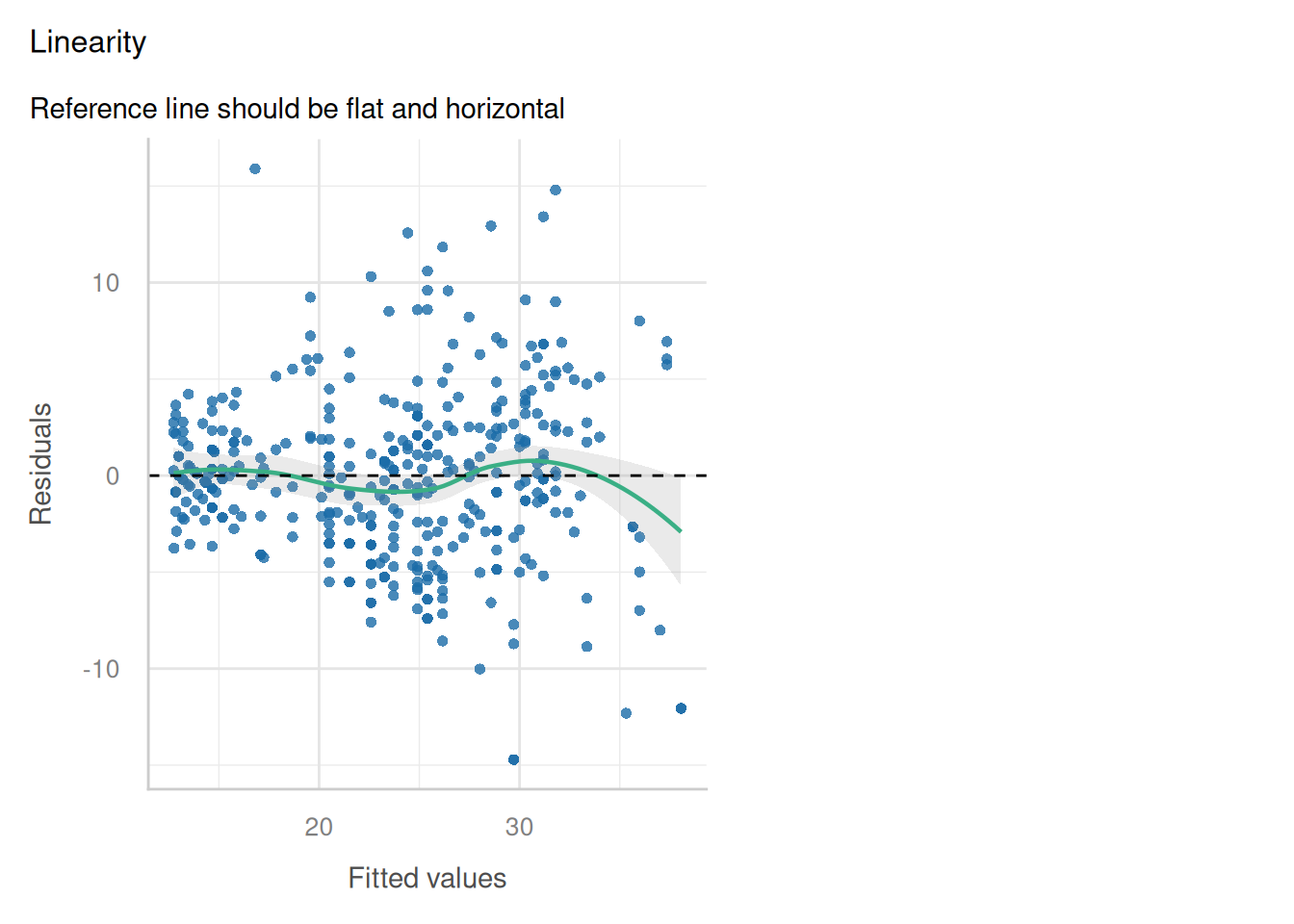
normal equations: Lapack routine dgesv: system is exactly singular: U[3,3] = 0 
print(round(coef(lm(y ~ x1 + x2)), 3))
(Intercept)          x1          x2 
      2.011       0.967          NA 
using LinearAlgebra

data = synthetic;
n = size(data, 1);
x1, y = data[:, 1], data[:, 5];
# exactly collinear with x1
x2 = 2 .* x1;
X = [ones(n) x1 x2];

println(rank(X))
2

try
    (X' * X) \ (X' * y)
catch err
    println("normal equations: ", err)
end
normal equations: SingularException(3)

println(round.(X \ y, digits = 3))
[2.011, 0.193, 0.387]
Show code
# The Python tab's minimum-norm answer, and the same data fitted on (1, x1)
# alone, which is R's representative.
rd_py = beta
X1 = X[:, :2]
b1 = np.linalg.lstsq(X1, y, rcond=None)[0]
rd_slope = b1[1]
rd_rss_min_norm = float((y - X @ beta) @ (y - X @ beta))
rd_rss_dropped = float((y - X1 @ b1) @ (y - X1 @ b1))
Show code
rd_r <- coef(lm(y ~ x1 + x2))
rd_r_combo <- rd_r[["x1"]] + 2 * ifelse(is.na(rd_r[["x2"]]), 0, rd_r[["x2"]])
Show code
rd_jl = X \ y;
Show code
rd_py <- reticulate::py$rd_py
rd_jl <- jl("rd_jl")
combo <- function(b) b[2] + 2 * b[3]
rss_gap <- abs(reticulate::py$rd_rss_dropped - reticulate::py$rd_rss_min_norm)
rss_gap_text <- if (rss_gap == 0) {
  "are identical"
} else {
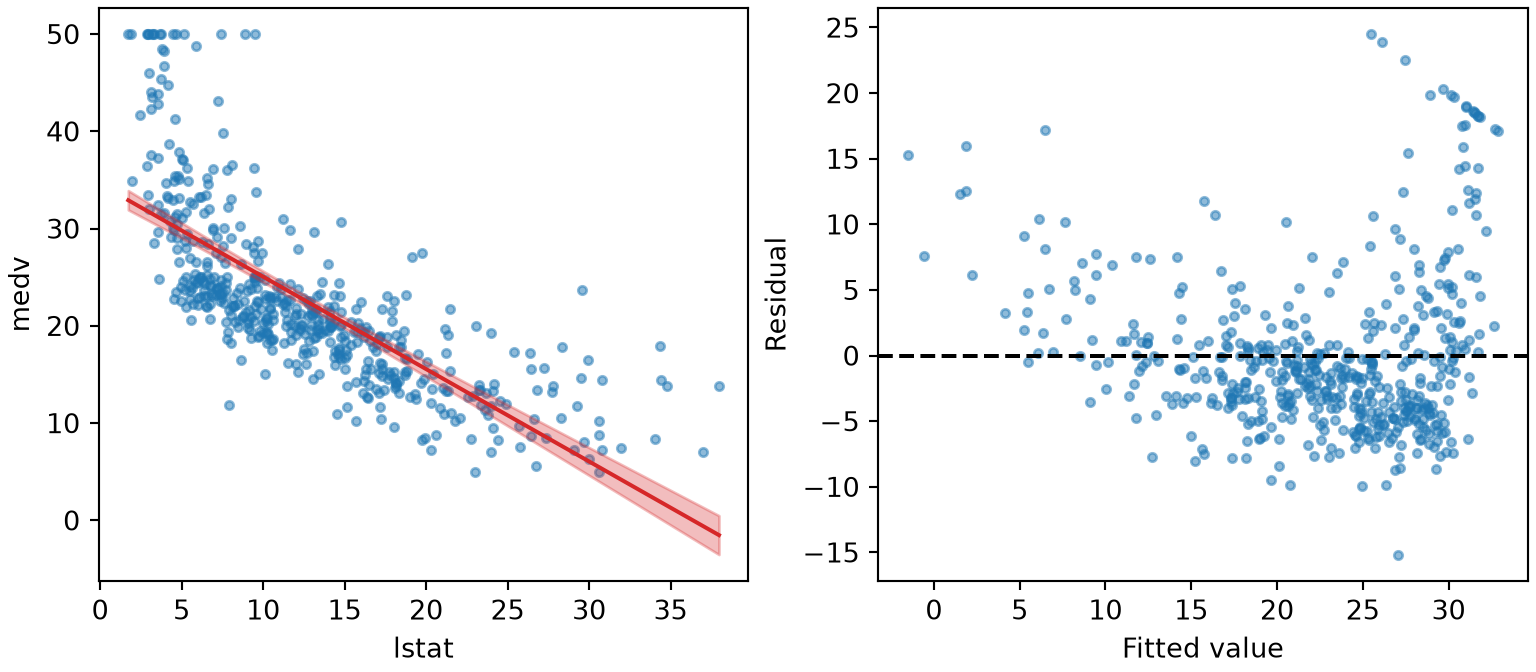
  paste0("differ by $", sci(rss_gap), "$, the size of floating-point rounding")
}
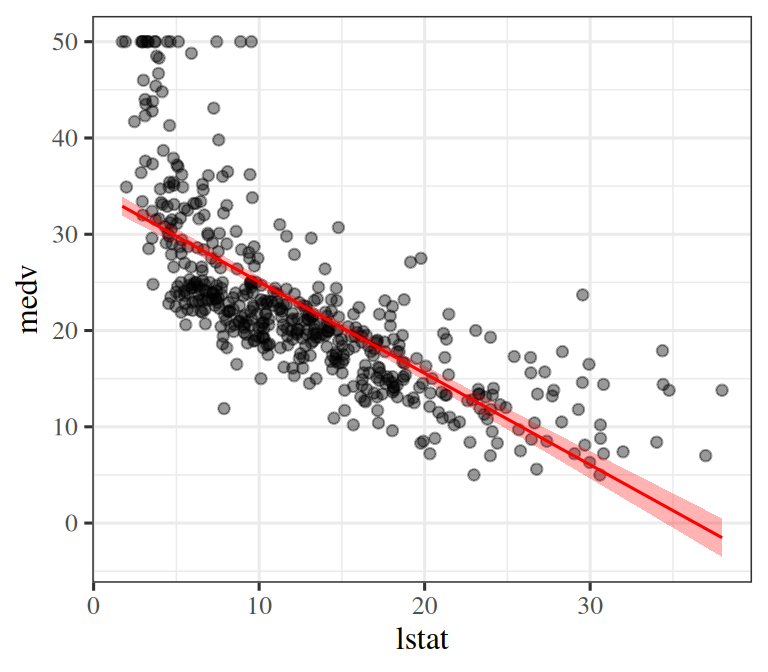
NoteComparing rank-deficient fits on identical data
  1. Refusal of the normal equations: Under exact collinearity, standard direct solvers refuse to invert \(\stprod{\design}\): R detects computational singularity, NumPy raises LinAlgError: Singular matrix, and Julia raises SingularException(3). Explicitly forming \(\stprod{\design}\) squares condition numbers and destroys information preserved in \(\design\).
  2. All three survive QR/SVD factorization on the same data: Because \(x_2 = 2x_1\), the data only identifies the combination \(\coef{1} + 2\coef{2} = 1\): Python and Julia both yield the minimum Euclidean norm solution \((2.011, 0.193, 0.387)\), where \(0.193 + 2(0.387) = 0.967\). R drops the aliased column and returns \((2.011, 0.967, \text{NA})\), where \(0.967 + 2(0) = 0.967\).
  3. Different parameter representations yield identical predictions: Fitting \(y\) on \((1, x_1)\) alone yields residual sum of squares \(0.461691312\), matching lstsq’s \(0.461691312\) (are identical).

4.3 Numerical stability and near-collinearity

import numpy as np

data = r.synthetic.to_numpy()
x1, jitter, y = data[:, 0], data[:, 2], data[:, 4]
n = len(x1)

def report(name, b, X, y):
    resid = y - X @ b
    print("    %-16s -> largest coefficient %8.1e, RSS %.9f"
          % (name, np.abs(b).max(), resid @ resid))

for eps in (1e-4, 1e-12, 0.0):
    x2 = 2 * x1 + eps * jitter                 # eps = 0 is exact collinearity
    X = np.column_stack([np.ones(n), x1, x2])
    cx = np.linalg.cond(X)
    print("perturbation %-7g cond(X) = %7.1e   cond(X)^2 = %7.1e   "
          "cond(X'X) = %7.1e" % (eps, cx, cx * cx, np.linalg.cond(X.T @ X)))
    try:
        report("normal equations", np.linalg.solve(X.T @ X, X.T @ y), X, y)
    except np.linalg.LinAlgError as err:
        print("    normal equations -> %s" % err)
    report("lstsq", np.linalg.lstsq(X, y, rcond=None)[0], X, y)
perturbation 0.0001  cond(X) = 4.7e+04   cond(X)^2 = 2.2e+09   cond(X'X) = 2.2e+09
    normal equations -> largest coefficient  5.0e+02, RSS 0.436741178
    lstsq            -> largest coefficient  5.0e+02, RSS 0.436741178
perturbation 1e-12   cond(X) = 4.7e+12   cond(X)^2 = 2.2e+25   cond(X'X) = 6.8e+15
    normal equations -> largest coefficient  2.3e+01, RSS 0.461691312
    lstsq            -> largest coefficient  5.0e+10, RSS 0.436751759
perturbation 0       cond(X) = 3.0e+16   cond(X)^2 = 8.8e+32   cond(X'X) =     inf
    normal equations -> Singular matrix
    lstsq            -> largest coefficient  2.0e+00, RSS 0.461691312
Show code
# Re-runs the loop above for 1e-4 and 1e-12, storing what it printed so
# the prose can quote it.
def summary(b, X, y):
    resid = y - X @ b
    return dict(largest=float(np.abs(b).max()), rss=float(resid @ resid))

near = {}
for eps in (1e-4, 1e-12):
    x2 = 2 * x1 + eps * jitter
    X = np.column_stack([np.ones(n), x1, x2])
    near["%g" % eps] = dict(
        cond=float(np.linalg.cond(X)),
        cond_xtx=float(np.linalg.cond(X.T @ X)),
        normal=summary(np.linalg.solve(X.T @ X, X.T @ y), X, y),
        lstsq=summary(np.linalg.lstsq(X, y, rcond=None)[0], X, y),
    )
Show code
near <- reticulate::py$near
n4 <- near[["0.0001"]]
n12 <- near[["1e-12"]]
stopifnot(n12$lstsq$rss < n12$normal$rss)
orders <- function(a, b) round(abs(log10(a / b)))
cond_gap <- sprintf(
  "%d orders of magnitude %s",
  orders(n12$cond_xtx, n12$cond^2),
  if (n12$cond_xtx < n12$cond^2) "below" else "above"
)
NoteCondition number squaring and catastrophic cancellation
  • Perturbation \(\epsilon = 10^{-4}\): Both routes agree; \(\operatorname{cond}(\stprod{\design}) = 2.2\times10^{9}\) equals \(\operatorname{cond}(\design)^2 = 2.2\times10^{9}\), confirming the condition number squaring.
  • Perturbation \(\epsilon = 10^{-12}\): The normal equations return coefficients of magnitude \(23\), while lstsq inflates coefficients to \(5.0\times10^{10}\) to fit noise slightly better (a difference of 9 orders of magnitude).
  • Loss of precision: At \(\epsilon = 10^{-12}\), \(\operatorname{cond}(\stprod{\design})\) comes out 10 orders of magnitude below \(\operatorname{cond}(\design)^2\) because the smallest singular values have rounded away to machine epsilon noise.

Rendered with NumPy 2.5.4 on Python 3.13.18, R 4.6.1, and Julia 1.13.3. Where a near-singular or rank-deficient matrix falls relative to a solver’s threshold depends on the data, floating-point summation order, and the underlying LAPACK build. While exact collinearity mathematically produces zero pivots in exact arithmetic, finite-precision rounding in matrix products can yield condition numbers near machine precision.

5 Predictions, geometry, and extensions

5.1 Predictions and the hat matrix

DefDefinition 21 (Prediction at a new point)

Definition 21 (Prediction at a new point) For an unseen input point \(\vx_{\text{new}} \in \reals^p\), the design vector is \(\vfeatmap(\vx_{\text{new}}) = \tp{[1, x_{\text{new}, 1}, \ldots, x_{\text{new}, p}]} \in \reals^{p^*}\). The linear model makes the point prediction:

\[ \begin{aligned} \hy_{\text{new}} &= \modmemf{\vx_{\text{new}}} \\ &= \dprod{\vfeatmap(\vx_{\text{new}})}{\hvcoef} \\ &= \dprod{\vfeatmap(\vx_{\text{new}})}{\paren{\stprod{\design}}^{-1} \tp{\design} \vy} \end{aligned} \]

DefDefinition 22 (The hat matrix)

Definition 22 (The hat matrix) The fitted values on the training data are given by

\[ \begin{aligned} \hat{\vy} &= \design \hvcoef \\ &= \design (\stprod{\design})^{-1} \tp{\design} \vy. \end{aligned} \]

The operator mapping observed responses \(\vy\) to fitted responses \(\hat{\vy}\) is the hat matrix \(\hatmat \in \reals^{n \times n}\):

\[\hatmat = \design(\stprod{\design})^{-1} \tp{\design}\]

so that \(\hat{\vy} = \hatmat\vy\) (“\(\hatmat\) puts a hat on \(\vy\)”) [28].

ExmExample 37 (The hat matrix of the synthetic data)

Example 37 (The hat matrix of the synthetic data) Build \(\hatmat\) for the design matrix of the synthetic data, and check that \(\hatmat\vy\) equals the fitted values \(\design\hvcoef\):

import numpy as np

synthetic = r.synthetic.to_numpy()
y_syn = synthetic[:, 3]
X_syn = np.column_stack([np.ones(len(y_syn)), synthetic[:, 0], synthetic[:, 1]])
H_syn = X_syn @ np.linalg.inv(X_syn.T @ X_syn) @ X_syn.T
beta_syn = np.linalg.solve(X_syn.T @ X_syn, X_syn.T @ y_syn)
print(H_syn.shape, np.allclose(H_syn @ y_syn, X_syn @ beta_syn))
(50, 50) True
X_syn <- model.matrix(~ x1 + x2, data = synthetic)
H_syn <- X_syn %*% solve(crossprod(X_syn)) %*% t(X_syn)
fit_syn <- lm(y ~ x1 + x2, data = synthetic)
dim(H_syn)
[1] 50 50
all.equal(as.vector(H_syn %*% synthetic$y), unname(fitted(fit_syn)))
[1] TRUE

\(\hatmat\) is an \(n \times n\) matrix even though the model has only 3 coefficients, because it maps all \(n\) responses to all \(n\) fitted values.

Figure 13: The hat matrix \(\hatmat = \design(\stprod{\design})^{-1}\tp{\design}\) orthogonally projects the target vector \(\vy \in \reals^n\) onto the column space \(\operatorname{col}(\design)\), minimizing the Euclidean length of the residual vector \(\vy - \hat{\vy}\).

Three-dimensional vector diagram showing target vector y projecting orthogonally onto the column space of the design matrix to produce prediction y_hat, leaving residual error e orthogonal to the subspace.

LemTheorem 12 (The hat matrix is an orthogonal projection)

Theorem 12 (The hat matrix is an orthogonal projection) The hat matrix \(\hatmat\) of Definition 22 is an orthogonal projection matrix:

  1. \(\hatmat\) is symmetric: \(\tp{\hatmat} = \hatmat\).
  2. \(\hatmat\) is idempotent: \(\hatmat^2 = \hatmat\).
  3. The residual vector \(\vy - \hat{\vy} = (I - \hatmat)\vy\) is orthogonal to every column of \(\design\): \(\tp{\design} (\vy - \hat{\vy}) = \vzero\).

Geometrically, as illustrated in Figure 13, \(\hatmat\) projects the observation vector \(\vy \in \reals^n\) orthogonally onto the column space of \(\design\).

Proof.

  1. Symmetry:

    \[ \begin{aligned} \tp{\hatmat} &= \tp{\paren{\design(\stprod{\design})^{-1}\tp{\design}}} \\ &= \design(\stprod{\design})^{-1}\tp{\design} \\ &= \hatmat. \end{aligned} \]

  2. Idempotence:

    \[ \begin{aligned} \hatmat^2 &= \hatmat \hatmat \\ &= \design(\stprod{\design})^{-1}\tp{\design} \design(\stprod{\design})^{-1}\tp{\design} \\ &= \design(\stprod{\design})^{-1}\tp{\design} \\ &= \hatmat. \end{aligned} \]

  3. Orthogonality of the residuals:

    \[ \begin{aligned} \tp{\design} (\vy - \hatmat\vy) &= \tp{\design}\vy - \stprod{\design}(\stprod{\design})^{-1}\tp{\design}\vy \\ &= \tp{\design}\vy - \tp{\design}\vy \\ &= \vzero. \end{aligned} \]

ExmExample 38 (Checking the projection properties)

Example 38 (Checking the projection properties) For the hat matrix of Example 37, check each property of Theorem 12 (each check prints a true value if the property holds within rounding error):

resid_syn = y_syn - H_syn @ y_syn
print(np.allclose(H_syn, H_syn.T),
      np.allclose(H_syn @ H_syn, H_syn),
      np.allclose(X_syn.T @ resid_syn, 0))
True True True
resid_syn <- synthetic$y - H_syn %*% synthetic$y
c(symmetric = isTRUE(all.equal(H_syn, t(H_syn))),
  idempotent = isTRUE(all.equal(H_syn %*% H_syn, H_syn)),
  orthogonal = isTRUE(all.equal(as.vector(t(X_syn) %*% resid_syn), rep(0, ncol(X_syn)))))
 symmetric idempotent orthogonal 
      TRUE       TRUE       TRUE 
DefDefinition 23 (Leverage)

Definition 23 (Leverage) The leverage of observation \(i\) is the \(i\)th diagonal entry of the hat matrix \(\hatmat\) of Definition 22:

\[ \begin{aligned} \leverage{i} &= \hatmat_{ii} \\ &= \vfeatmap\pt{\vx_i} (\stprod{\design})^{-1} \vfeatmap(\vx_i). \end{aligned} \]

It quantifies the influence of observation \(i\) on its own fitted response, since \(\hy_i = \leverage{i} y_i + \sum_{j \ne i} \hatmat_{ij} y_j\) [29].

ExmExample 39 (Leverages of the synthetic data)

Example 39 (Leverages of the synthetic data) Compute the leverages of the synthetic data of Example 37, and show the five largest:

h_syn = np.diag(H_syn)
np.round(np.sort(h_syn)[-5:], 4)
array([0.1173, 0.1212, 0.1776, 0.1791, 0.1989])
h_syn <- diag(H_syn)
round(sort(h_syn, decreasing = TRUE)[1:5], 4)
    11     14     24     20      6 
0.1989 0.1791 0.1776 0.1212 0.1173 
Show code
library(ggplot2)
lvf <- data.frame(
  observation = seq_along(h_syn),
  leverage = h_syn,
  high = h_syn > 2 * mean(h_syn)
)
ggplot(lvf, aes(observation, leverage, colour = high, shape = high)) +
  geom_hline(yintercept = mean(h_syn), linetype = "dashed", colour = "grey40") +
  geom_hline(yintercept = 2 * mean(h_syn), linetype = "dotted", colour = "grey40") +
  geom_point(size = 2.5) +
  scale_colour_manual(
    values = c("FALSE" = "#0072B2", "TRUE" = "#D55E00"),
    labels = c("FALSE" = "No", "TRUE" = "Yes")
  ) +
  scale_shape_manual(
    values = c("FALSE" = 16, "TRUE" = 17),
    labels = c("FALSE" = "No", "TRUE" = "Yes")
  ) +
  labs(
    x = "Observation", y = "Leverage",
    colour = "Above twice the average", shape = "Above twice the average"
  )
Show code
import matplotlib.pyplot as plt
import numpy as np

obs_lvf = np.arange(1, len(h_syn) + 1)
high_lvf = h_syn > 2 * h_syn.mean()
fig, ax = plt.subplots(figsize=(6, 4), layout="constrained")
ax.axhline(h_syn.mean(), color="grey", linestyle="--");
ax.axhline(2 * h_syn.mean(), color="grey", linestyle=":");
ax.plot(obs_lvf[~high_lvf], h_syn[~high_lvf], color="#0072B2", marker="o", linestyle="",
        label="No");
ax.plot(obs_lvf[high_lvf], h_syn[high_lvf], color="#D55E00", marker="^", markersize=8,
        linestyle="", label="Yes");
ax.set_xlabel("Observation");
ax.set_ylabel("Leverage");
fig.legend(title="Above twice the average", loc="outside lower center", ncol=2);
plt.show()
Figure 14: The leverages of the synthetic data, one per observation. The dashed line is their average, \(p / n\) with \(n = 50\) observations and \(p = 3\) columns in the design matrix, and the dotted line is twice that.
(a)
Plot of the leverage of each of the 50 synthetic observations against its row number, from 1 to 50. A dashed grey horizontal line marks the average leverage, 0.06. A second dotted grey line marks twice that, 0.12. Most points are blue circles between 0.02 and 0.12, scattered around the average line. Four points above the dotted line are vermilion triangles, the highest at about 0.2, which is observation 11.
(b)
Plot of the leverage of each of the 50 synthetic observations against its row number, from 1 to 50. A dashed grey horizontal line marks the average leverage, 0.06. A second dotted grey line marks twice that, 0.12. Most points are blue circles between 0.02 and 0.12, scattered around the average line. Four points above the dotted line are vermilion triangles, the highest at about 0.2, which is observation 11.
LemTheorem 13 (Bounds on the leverage)

Theorem 13 (Bounds on the leverage) Let \(p^*\) be the number of columns of \(\design\). The leverages of Definition 23 satisfy \(0 \le \leverage{i} \le 1\) for every \(i\), and their mean is

\[ \begin{aligned} \avgleverage &= \frac{\tr(\hatmat)}{n} \\ &= \frac{p^*}{n}. \end{aligned} \]

Proof. By Theorem 12, \(\hatmat\) is symmetric and idempotent, so

\[ \begin{aligned} \leverage{i} &= \hatmat_{ii} \\ &= (\hatmat^2)_{ii} \\ &= \sum_{j=1}^n \hatmat_{ij} \hatmat_{ji} \\ &= \sum_{j=1}^n \hatmat_{ij}^2 \\ &= \leverage{i}^2 + \sum_{j \ne i} \hatmat_{ij}^2. \end{aligned} \]

The sum of squares is nonnegative, so \(\leverage{i} \ge 0\). Also \(\leverage{i} \ge \leverage{i}^2\), so \(\leverage{i} \le 1\).

By the cyclic property of the trace,

\[ \begin{aligned} \tr(\hatmat) &= \trf{\design(\stprod{\design})^{-1}\tp{\design}} \\ &= \trf{(\stprod{\design})^{-1}\stprod{\design}} \\ &= \tr(I_{p^*}) \\ &= p^*. \end{aligned} \]

Dividing by \(n\) gives \(\avgleverage = p^*/n\).

ExmExample 40 (Checking the leverage bounds)

Example 40 (Checking the leverage bounds) For the leverages of Example 39, the smallest and largest values and the mean are:

print(h_syn.min(), h_syn.max(), h_syn.mean(), X_syn.shape[1] / len(h_syn))
0.020715599268734834 0.19892097513195148 0.06 0.06
c(min = min(h_syn), max = max(h_syn), mean = mean(h_syn), p_star_over_n = ncol(X_syn) / length(h_syn))
          min           max          mean p_star_over_n 
    0.0207156     0.1989210     0.0600000     0.0600000 

All leverages lie between 0 and 1, and the mean equals \(p^*/n\) with \(p^* =\) 3 and \(n =\) 50.

LemTheorem 14 (Least squares as maximum likelihood estimation)

Theorem 14 (Least squares as maximum likelihood estimation) Assume the true data-generating process is linear with additive Gaussian noise:

\[y_i = \dprod{\vfeatmap(\vx_i)}{\vcoef} + \noise_i, \qquad \noise_i \overset{\text{i.i.d.}}{\sim} \mathcal{N}(0, \varpar)\]

Then the ordinary least squares estimator \(\hvcoef = (\stprod{\design})^{-1} \tp{\design} \vy\) is identical to the maximum likelihood estimator (MLE) of \(\vcoef\), so squared error is the plausible loss under additive Gaussian noise.

Proof. Because errors \(\noise_i\) are independent, the conditional likelihood of \(\vy\) given \(\design\) factors into: \[p(\vy \mid \design, \vcoef, \varpar) = \prodin \frac{1}{\sqrt{2\pi\varpar}} \expf{-\frac{(y_i - \dprod{\vfeatmap(\vx_i)}{\vcoef})^2}{2\varpar}}\] Taking the log-likelihood yields: \[\log p(\vy \mid \design, \vcoef, \varpar) = -\frac{n}{2}\log(2\pi\varpar) - \frac{1}{2\varpar} \sumin (y_i - \dprod{\vfeatmap(\vx_i)}{\vcoef})^2\] Maximizing this log-likelihood with respect to \(\vcoef\) is mathematically equivalent to minimizing \(\sumin (y_i - \dprod{\vfeatmap(\vx_i)}{\vcoef})^2 = \norm{\design\vcoef - \vy}^2\), which is the least-squares objective.

ExmExample 41 (Maximizing the Gaussian likelihood recovers least squares)

Example 41 (Maximizing the Gaussian likelihood recovers least squares) In the Auto data [3], model mpg as a linear function of horsepower plus Gaussian noise. Let the noise variance be \(\varpar = 25\). The maximizing coefficients do not depend on this choice, as the proof of Theorem 14 shows. Maximize the log-likelihood numerically from \(\vcoef = \vzero\), and compare with the least-squares solution:

import numpy as np
import pandas as pd
from scipy.optimize import minimize

auto_mle = pd.read_csv("data/auto.csv")
y_mle = auto_mle["mpg"].to_numpy(float)
# Centre horsepower so the optimizer is not slowed by badly scaled coordinates;
# the intercept then means "mpg at average horsepower", and the slope is unchanged.
hp_mean_mle = auto_mle["horsepower"].mean()
Phi_mle = np.column_stack([np.ones(len(y_mle)), auto_mle["horsepower"] - hp_mean_mle])
var_mle = 25.0

def neg_loglik_mle(b):
    """Negative Gaussian log-likelihood of the responses given the coefficients b."""
    resid = y_mle - Phi_mle @ b
    return 0.5 * len(y_mle) * np.log(2 * np.pi * var_mle) + 0.5 * np.sum(resid ** 2) / var_mle

mle_fit = minimize(neg_loglik_mle, x0=np.zeros(2), method="BFGS", options={"gtol": 1e-8})
ols_mle = np.linalg.lstsq(Phi_mle, y_mle, rcond=None)[0]
print(mle_fit.x, ols_mle)
[23.44591852 -0.15784474] [23.44591837 -0.15784473]
print(np.allclose(mle_fit.x, ols_mle, atol=1e-4))
True
auto_mle <- read.csv("data/auto.csv")
y_mle <- auto_mle$mpg
# Centre horsepower so the optimizer is not slowed by badly scaled coordinates;
# the intercept then means "mpg at average horsepower".
Phi_mle <- cbind(1, auto_mle$horsepower - mean(auto_mle$horsepower))
var_mle <- 25

# Negative Gaussian log-likelihood of the responses given the coefficients b.
neg_loglik_mle <- function(b) {
  resid <- y_mle - Phi_mle %*% b
  0.5 * length(y_mle) * log(2 * pi * var_mle) + 0.5 * sum(resid^2) / var_mle
}

mle_fit <- optim(c(0, 0), neg_loglik_mle, method = "BFGS", control = list(reltol = 1e-12))
ols_mle <- coef(lm(y_mle ~ Phi_mle[, 2]))
rbind(mle = mle_fit$par, ols = unname(ols_mle))
        [,1]       [,2]
mle 23.44592 -0.1578447
ols 23.44592 -0.1578447

The numerical maximizer and the least-squares solution agree to within 5.4e-10. Changing var_mle to any other positive value changes the log-likelihood but not where it peaks, since the variance only scales the sum of squared residuals.

5.2 Multivariate linear regression

DefDefinition 24 (Multivariate linear regression)

Definition 24 (Multivariate linear regression) When predicting multiple target variables (\(C > 1\)), each response vector is \(\vy_i \in \reals^C\). The linear model assumes:

\[\vy = \tp{B} \vfeatmap(\vx) + \vnoise, \qquad \vfeatmap(\vx) \in \reals^{p^*},\ B \in \reals^{p^* \times C}\]

where noise vectors \(\vnoise \sim \mathcal{N}(\vzero, \covmat)\) have zero mean and covariance matrix \(\covmat \in \reals^{C \times C}\).

In matrix notation over all \(n\) instances:

\[Y = \design B + E\]

where \(Y \in \reals^{n \times C}\) stacks target rows, \(\design \in \reals^{n \times p^*}\) is the design matrix, and \(E \in \reals^{n \times C}\) stacks noise rows.

The objective minimizes the squared Frobenius norm of the residual matrix:

\[\hat{B} = \argmin_B \norm{Y - \design B}_F^2\]

Write \(Y_{*,k}\) and \(B_{*,k}\) for the \(k\)-th columns of \(Y\) and \(B\), respectively.

ExmExample 42 (Two targets at once)

Example 42 (Two targets at once) In the Auto data [3], let the targets be mpg and weight, so \(C = 2\), and let the features be an intercept and horsepower, so \(p^* = 2\). Build \(Y\), \(\design\), the fitted \(\hat{B}\) and the residual matrix \(E\) of Definition 24, and estimate the noise covariance \(\covmat\) from the residuals:

import numpy as np
import pandas as pd

auto_mr = pd.read_csv("data/auto.csv")
Y_mr = auto_mr[["mpg", "weight"]].to_numpy(float)
Phi_mr = np.column_stack([np.ones(len(Y_mr)), auto_mr["horsepower"]])

# One column of B per target; lstsq fits all columns at once.
B_mr = np.linalg.lstsq(Phi_mr, Y_mr, rcond=None)[0]
E_mr = Y_mr - Phi_mr @ B_mr
# The C x C covariance of the noise: average outer product of the residual rows.
Sigma_mr = E_mr.T @ E_mr / len(Y_mr)
print(Y_mr.shape, Phi_mr.shape, B_mr.shape, E_mr.shape)
(392, 2) (392, 2) (2, 2) (392, 2)
print(np.array2string(Sigma_mr, precision=1, suppress_small=True))
[[    23.9  -1053.2]
 [ -1053.2 181763.8]]
# Bootstrap: resample cars with replacement, refit both targets,
# and recompute the off-diagonal covariance entry each time.
rng_mr = np.random.default_rng(571)
boot_cov_mr = np.empty(2000)
for b in range(2000):
    rows = rng_mr.integers(0, len(Y_mr), len(Y_mr))
    coef_b = np.linalg.lstsq(Phi_mr[rows], Y_mr[rows], rcond=None)[0]
    resid_b = Y_mr[rows] - Phi_mr[rows] @ coef_b
    boot_cov_mr[b] = (resid_b.T @ resid_b / len(rows))[0, 1]
# The 2.5th and 97.5th percentiles of the resampled entries.
cov_ci_mr = np.quantile(boot_cov_mr, [0.025, 0.975])
print(cov_ci_mr)
[-1277.54117641  -822.01445198]
auto_mr <- read.csv("data/auto.csv")
Y_mr <- as.matrix(auto_mr[, c("mpg", "weight")])
Phi_mr <- cbind(1, auto_mr$horsepower)

# One column of B per target; lm with a matrix response fits all columns at once.
B_mr <- coef(lm(Y_mr ~ auto_mr$horsepower))
E_mr <- Y_mr - Phi_mr %*% B_mr
# The C x C covariance of the noise: average outer product of the residual rows.
Sigma_mr <- crossprod(E_mr) / nrow(Y_mr)
rbind(Y = dim(Y_mr), Phi = dim(Phi_mr), B = dim(B_mr), E = dim(E_mr))
    [,1] [,2]
Y    392    2
Phi  392    2
B      2    2
E    392    2
round(Sigma_mr, 1)
           mpg   weight
mpg       23.9  -1053.2
weight -1053.2 181763.8
# Bootstrap: resample cars with replacement, refit both targets,
# and recompute the off-diagonal covariance entry each time.
set.seed(571)
boot_cov_mr <- replicate(2000, {
  rows <- sample(nrow(Y_mr), replace = TRUE)
  coef_b <- coef(lm(Y_mr[rows, ] ~ auto_mr$horsepower[rows]))
  resid_b <- Y_mr[rows, ] - Phi_mr[rows, ] %*% coef_b
  crossprod(resid_b)[1, 2] / length(rows)
})
# The 2.5th and 97.5th percentiles of the resampled entries.
cov_ci_mr <- quantile(boot_cov_mr, c(0.025, 0.975))
cov_ci_mr
      2.5%      97.5% 
-1270.0709  -818.2046 

\(Y\) and \(E\) have one row per car and one column per target, \(\design\) has one column per feature, and \(\hat{B}\) has one column per target, so its shape is \(p^* \times C\). The diagonal of the covariance matrix holds the residual variance of each target. The off-diagonal entry, -1053.2, is negative: cars whose mpg is above the line tend to be lighter than the line predicts, so the errors of the two targets are correlated. Its \(95\%\) bootstrap percentile interval, from \(2000\) resamples of the cars, runs from -1270.1 to -818.2 (in miles per gallon times pounds), so the interval excludes zero. The interval describes which cars were drawn, not the process that produced them beyond that. This is the structure the matrix \(\covmat\) in the definition allows for.

LemTheorem 15 (The Frobenius objective is a sum over columns)

Theorem 15 (The Frobenius objective is a sum over columns) For every \(B \in \reals^{p^* \times C}\), the objective of Definition 24 equals the sum of the squared-error objectives of the \(C\) single-target regressions:

\[\norm{Y - \design B}_F^2 = \sumto{k}{C} \norm{Y_{*,k} - \design B_{*,k}}^2.\]

Proof. The squared Frobenius norm of a matrix is the sum of the squares of its entries. Sum them column by column. Column \(k\) of \(Y - \design B\) is \(Y_{*,k} - \design B_{*,k}\), and the sum of squares of its entries is \(\norm{Y_{*,k} - \design B_{*,k}}^2\). Adding over \(k = 1, \ldots, C\) gives the right side.

ExmExample 43 (Two targets from horsepower)

Example 43 (Two targets from horsepower) In the Auto data [3], predict the two targets mpg and acceleration from an intercept and horsepower. For the least squares \(\hat{B}\) and for a second matrix \(B\) that shifts every entry of \(\hat{B}\) by the same amount, compute the squared Frobenius norm of the residual matrix and the sum of the squared norms of its columns:

import numpy as np
import pandas as pd

auto_mv = pd.read_csv("data/auto.csv")
Phi_mv = np.column_stack([np.ones(len(auto_mv)), auto_mv["horsepower"].to_numpy(float)])
Y_mv = auto_mv[["mpg", "acceleration"]].to_numpy(float)
B_hat_mv = np.linalg.lstsq(Phi_mv, Y_mv, rcond=None)[0]
B_other_mv = B_hat_mv + 0.5

def both_sides(B):
    resid = Y_mv - Phi_mv @ B
    return np.linalg.norm(resid, "fro") ** 2, sum(np.sum(resid[:, k] ** 2) for k in range(resid.shape[1]))

sides_hat = both_sides(B_hat_mv)
sides_other = both_sides(B_other_mv)
print(sides_hat, sides_other)
(np.float64(10948.360306521437), np.float64(10948.360306521441)) (np.float64(2480858.3603065214), np.float64(2480858.3603065214))
auto_mv <- read.csv("data/auto.csv")
Phi_mv <- cbind(1, auto_mv$horsepower)
Y_mv <- as.matrix(auto_mv[, c("mpg", "acceleration")])
B_hat_mv <- solve(crossprod(Phi_mv), crossprod(Phi_mv, Y_mv))
B_other_mv <- B_hat_mv + 0.5

both_sides <- function(B) {
  resid <- Y_mv - Phi_mv %*% B
  c(frobenius = norm(resid, "F")^2, columns = sum(apply(resid, 2, function(col) sum(col^2))))
}
rbind(fitted = both_sides(B_hat_mv), other = both_sides(B_other_mv))
        frobenius    columns
fitted   10948.36   10948.36
other  2480858.36 2480858.36

For the fitted matrix, both sides equal 10,948.4. For the shifted matrix, they equal 2,480,858 and 2,480,858. The identity holds for every \(B\), not only the minimizer. The fitted matrix has the smaller residual, as the minimizer must.

LemTheorem 16 (Multivariate normal equations)

Theorem 16 (Multivariate normal equations) The least-squares estimator for multivariate linear regression is given by:

\[\hat{B} = (\stprod{\design})^{-1} \tp{\design} Y\]

Proof. By Theorem 15, \[\norm{Y - \design B}_F^2 = \sumto{k}{C} \norm{Y_{*,k} - \design B_{*,k}}^2,\] so each column \(B_{*,k}\) of \(B\) can be optimized independently. By Theorem 10, the minimizer for each column is \(\hat{B}_{*,k} = (\stprod{\design})^{-1} \tp{\design} Y_{*,k}\). Concatenating all \(C\) columns yields \(\hat{B} = (\stprod{\design})^{-1} \tp{\design} Y\).

ExmExample 44 (One formula, three separate fits)

Example 44 (One formula, three separate fits) In the Auto data [3], predict mpg, acceleration and weight from an intercept, horsepower and displacement. Compute \(\hat{B} = (\stprod{\design})^{-1} \tp{\design} Y\) of Theorem 16 in one step, and compare each of its columns with a separate least-squares fit of that target:

import numpy as np
import pandas as pd

auto_mn = pd.read_csv("data/auto.csv")
Y_mn = auto_mn[["mpg", "acceleration", "weight"]].to_numpy(float)
Phi_mn = np.column_stack([np.ones(len(Y_mn)), auto_mn["horsepower"], auto_mn["displacement"]])

# All three targets at once.
B_mn = np.linalg.solve(Phi_mn.T @ Phi_mn, Phi_mn.T @ Y_mn)

# One univariate fit per target column.
B_cols_mn = np.column_stack([
    np.linalg.lstsq(Phi_mn, Y_mn[:, k], rcond=None)[0] for k in range(Y_mn.shape[1])
])
print(np.array2string(B_mn, precision=4, suppress_small=True))
[[  37.4695   21.3115 1380.2336]
 [  -0.0583   -0.074     3.1021]
 [  -0.0408    0.0101    6.5494]]
print(np.allclose(B_mn, B_cols_mn))
True
auto_mn <- read.csv("data/auto.csv")
Y_mn <- as.matrix(auto_mn[, c("mpg", "acceleration", "weight")])
Phi_mn <- cbind(1, auto_mn$horsepower, auto_mn$displacement)

# All three targets at once.
B_mn <- solve(crossprod(Phi_mn), crossprod(Phi_mn, Y_mn))

# One univariate fit per target column.
B_cols_mn <- sapply(colnames(Y_mn), function(k) coef(lm(Y_mn[, k] ~ Phi_mn[, 2] + Phi_mn[, 3])))
round(B_mn, 4)
         mpg acceleration    weight
[1,] 37.4695      21.3115 1380.2336
[2,] -0.0583      -0.0740    3.1021
[3,] -0.0408       0.0101    6.5494
isTRUE(all.equal(unname(B_mn), unname(B_cols_mn)))
[1] TRUE

\(\hat{B}\) has one column per target, and each column matches the fit that ignores the other targets. The multivariate problem decouples this way because the squared Frobenius norm is a sum over the columns of the residual matrix.

VideosWatch

Hutchinson teaches the multivariate case (11 min) [22].

6 Measuring error and non-linear extensions

6.1 Measuring error

RemarkRemark 5 (Three steps of linear regression)

Remark 5 (Three steps of linear regression). Fitting a linear model consists of three choices:

  1. Model family: \(f(\vx) = \dprod{\vx}{\vcoef}\), assuming an affine relationship between inputs and output.
  2. Loss function: \(\lossf{\outvar, \predval} = \prederr^2\), penalizing the prediction error \(\prederr = \predval - \outvar\) by its square.
  3. Optimization: \(\hvcoef = \argmin_{\vcoef} \sumin (f(\vx_i) - y_i)^2\), minimizing empirical risk.

A fitted model raises questions about generalization to new data, comparison with alternative model families, training fit (measured by sMSE and residual standard error), and predictor interpretation.

DefDefinition 25 (Sample mean squared error (sMSE))

Definition 25 (Sample mean squared error (sMSE)) The sample mean squared error (sMSE) of a model \(f\) on data \((\vx_1, y_1), \ldots, (\vx_n, y_n)\) is the average of the squared residuals:

\[\sMSEt = \frac{1}{n}\sumin \paren{y_i - f(\vx_i)}^2\]

ExmExample 45 (sMSE of a straight-line fit)

Example 45 (sMSE of a straight-line fit) The Auto data [3] give each car’s fuel efficiency (mpg) and horsepower. Fit mpg on horsepower by least squares, and average the squared residuals:

import numpy as np
import pandas as pd

auto_metrics = pd.read_csv("data/auto.csv")
hp = auto_metrics["horsepower"].to_numpy(float)
mpg = auto_metrics["mpg"].to_numpy(float)
Phi_metrics = np.column_stack([np.ones(len(hp)), hp])
beta_metrics = np.linalg.lstsq(Phi_metrics, mpg, rcond=None)[0]
residuals_metrics = mpg - Phi_metrics @ beta_metrics
mse_metrics = np.mean(residuals_metrics ** 2)
print(mse_metrics)
23.943662938603104
auto_metrics <- read.csv("data/auto.csv")
fit_metrics <- lm(mpg ~ horsepower, data = auto_metrics)
mse_metrics <- mean(residuals(fit_metrics)^2)
mse_metrics
[1] 23.94366

The sMSE is 23.94. Its unit is squared miles per gallon, which is hard to picture. Because sMSE divides by \(n\), we can compare it across data sets of different sizes. This sMSE is a training error, since we fitted the line to these same cars. It gets no confidence interval, because the fit adapts to the cars it is scored on: the residuals are not independent draws, and the training error is biased low.

Show code
library(ggplot2)
msef_sq <- data.frame(squared = residuals(fit_metrics)^2)
ggplot(msef_sq, aes(squared)) +
  geom_histogram(binwidth = 10, boundary = 0, fill = "#0072B2", colour = "white") +
  geom_vline(xintercept = mse_metrics, colour = "#D55E00", linetype = "dashed") +
  labs(x = "Squared residual (squared miles per gallon)", y = "Number of cars")
Show code
import matplotlib.pyplot as plt
import numpy as np

fig, ax = plt.subplots(figsize=(6, 4), layout="constrained")
ax.hist(residuals_metrics ** 2, bins=np.arange(0, 300, 10), color="#0072B2", edgecolor="white");
ax.axvline(mse_metrics, color="#D55E00", linestyle="--");
ax.set_xlabel("Squared residual (squared miles per gallon)");
ax.set_ylabel("Number of cars");
plt.show()
Figure 15: The squared residuals of the line of Example 45, one per car. The dashed line is their average, the sMSE. A few large squared residuals pull the average to the right of where most cars lie.
(a)
Histogram of the squared residuals of the 392 Auto cars, in squared miles per gallon, with the bars piled up against 0 and a long tail reaching to the right. A vertical dashed vermilion line marks the mean squared residual, which lies to the right of the tallest bars, in the tail. Most cars have a squared residual smaller than the mean.
(b)
Histogram of the squared residuals of the 392 Auto cars, in squared miles per gallon, with the bars piled up against 0 and a long tail reaching to the right. A vertical dashed vermilion line marks the mean squared residual, which lies to the right of the tallest bars, in the tail. Most cars have a squared residual smaller than the mean.
DefDefinition 26 (Sample root mean squared error (sRMSE))

Definition 26 (Sample root mean squared error (sRMSE)) The sample root mean squared error (sRMSE), introduced in Course Overview, of a model \(f\) is the square root of the sMSE (Definition 25):

\[ \begin{aligned} \sRMSEt &= \sqrt{\sMSEt} \\ &= \sqrt{\frac{1}{n}\sumin \paren{y_i - f(\vx_i)}^2} \end{aligned} \]

ExmExample 46 (sRMSE in miles per gallon)

Example 46 (sRMSE in miles per gallon) Take the square root of the sMSE from Example 45:

rmse_metrics = np.sqrt(mse_metrics)
print(rmse_metrics)
4.893226230065713
rmse_metrics <- sqrt(mse_metrics)
rmse_metrics
[1] 4.893226

The sRMSE is 4.89 miles per gallon, in the same unit as mpg itself. A typical prediction from the straight line misses a car’s fuel efficiency by roughly 5 miles per gallon. Like the sMSE it comes from, this sRMSE is a training error, so it also gets no confidence interval.

RemarkRemark 6 (Why report sRMSE instead of sMSE)

Remark 6 (Why report sRMSE instead of sMSE). Reports of prediction error usually give the sRMSE (Definition 26) rather than the sMSE (Definition 25), for three reasons.

  1. Units. Squaring the residuals squares their unit, so the sMSE of a rent prediction is in dollars squared. The square root returns the sRMSE to the unit of the outcome, as Example 46 shows for miles per gallon.
  2. Interpretation. Because the sRMSE is in the outcome’s unit, a reader can compare it with a typical outcome value or with the outcome’s spread. It is roughly the size of a typical residual, though not exactly, since squaring weights large residuals more heavily.
  3. No loss of ranking. The square root is increasing, so the sRMSE ranks models in the same order as the sMSE. Taking the root does not change the choice among models.

The sMSE remains the right quantity for the math. We minimize it (or the sum of squared errors) when fitting, because it is a smooth function of the coefficients. It also splits into a sum of squared bias and variance, which the sRMSE does not. The sRMSE is the form we report, in figures and tables.

DefDefinition 27 (Residual standard error (RSE, standard error of the regression))

Definition 27 (Residual standard error (RSE, standard error of the regression)) The residual standard error (RSE) (also called the standard error of the regression) divides the sum of squared residuals by the residual degrees of freedom \(n - p^* = n - p - 1\) instead of by \(n\):

\[ \begin{aligned} \text{RSE} &= \sqrt{\frac{1}{n - p^*} \sumin \paren{y_i - f(\vx_i)}^2} \\ &= \sqrt{\frac{1}{n - p - 1} \sumin \paren{y_i - f(\vx_i)}^2} \end{aligned} \]

Here \(p\) is the number of predictors, and \(p^* = p + 1\) is the number of estimated parameters, including the intercept.

ExmExample 47 (RSE of the straight-line fit)

Example 47 (RSE of the straight-line fit) The fit in Example 45 has \(p = 1\) predictor, so \(p^* = 2\). Compute the RSE, and a \(95\%\) confidence interval for the noise standard deviation \(\sigma\) that it estimates:

from scipy import stats

n_metrics = len(mpg)
rss_metrics = np.sum(residuals_metrics ** 2)
rse_metrics = np.sqrt(rss_metrics / (n_metrics - 2))
# With Gaussian errors, RSS / sigma^2 follows a chi-squared distribution
# with n - 2 degrees of freedom; inverting that statement bounds sigma.
rse_ci = np.sqrt(rss_metrics / stats.chi2.ppf([0.975, 0.025], df=n_metrics - 2))
print(rse_metrics, rse_ci)
4.905756919545939 [4.58432256 5.27603679]
rss_metrics <- sum(residuals(fit_metrics)^2)
rse_metrics <- sqrt(rss_metrics / df.residual(fit_metrics))
# With Gaussian errors, RSS / sigma^2 follows a chi-squared distribution
# with n - 2 degrees of freedom; inverting that statement bounds sigma.
chi_sq <- qchisq(c(0.975, 0.025), df = df.residual(fit_metrics))
rse_ci <- sqrt(rss_metrics / chi_sq)
c(rse_metrics, rse_ci)
[1] 4.905757 4.584323 5.276037
performance::model_performance(fit_metrics) |>
  insight::print_md(digits = 3)
Indices of model performance
AIC AICc BIC R2 R2 (adj.) RMSE Sigma
2363.3 2363.4 2375.2 0.606 0.605 4.893 4.906

The RSE is 4.906, slightly larger than the sRMSE of 4.893 from Example 46, because it divides by \(n - 2 = 390\) instead of \(n = 392\). In R, the performance package reports the training RMSE (here the sRMSE) in a column named RMSE and the RSE as Sigma. The \(95\%\) confidence interval for \(\sigma\) runs from 4.58 to 5.28 miles per gallon. It inverts the chi-squared distribution of \(\mathrm{RSS} / \sigma^2\) under Gaussian errors, and it is more sensitive to non-Gaussian errors than the \(t\) intervals for the coefficients. Unlike the training sRMSE, the RSE gets an interval, because it estimates the noise level \(\sigma\) of the model and not the error on the cars used to fit.

RemarkRemark 7 (Why RSE can rise when a predictor is added)

Remark 7 (Why RSE can rise when a predictor is added). Adding a predictor never increases the training sum of squared residuals. It does shrink the denominator \(n - p^*\) of the RSE (Definition 27). So the RSE goes up when a new predictor reduces the sum of squares too little to make up for the lost degree of freedom.

Exercise 42 The Auto data [3] give each car’s fuel efficiency (mpg) and horsepower.

We fit lm(mpg ~ horsepower) to the Auto data and obtain \(R^2 = 0.61\), with a 95% bootstrap interval of 0.56 to 0.65. The interval is the 2.5th to 97.5th percentile of \(R^2\) over 2,000 refits to resamples of the cars. Which statement correctly interprets \(R^2\)?

ReadingRead

GeeksforGeeks explains regression metrics [30], including MSE and RMSE (its names for the sMSE and sRMSE).

6.2 Error decomposition: reducible error and residual variance

Figure 16: The true data-generating relationship \(y = \truemeanf{\vx} + \noise\) with random noise \(\noise\) versus the fitted model approximation \(f(\vx)\).

Diagram contrasting the true data-generating function with irreducible noise against a fitted linear regression approximation.

PrpProposition 1 (Reducible error and residual variance decomposition)

Proposition 1 (Reducible error and residual variance decomposition) Fix an input value \(\vx\) and a fitted model \(f\). Let \(\hy\) be the prediction of \(f\) at \(\vx\). Let \(\noise = \Outvar - \truemeanf{\vx}\) be the noise, the deviation of the outcome from the true mean function at \(\vx\), so that

\[\Outvar = \truemeanf{\vx} + \noise\]

The noise has zero mean (\(\E{\noise} = 0\)), because the true mean function is the population mean of the outcome at \(\vx\). Let \(\varpar = \Var{\noise}\) be its variance at \(\vx\).

The expected squared prediction error of \(\hy\) decomposes into:

\[\E{\sqf{\hy - \Outvar}} = \underbrace{\sqf{\erf{\hy}}}_{\text{Reducible error}} + \underbrace{\varpar}_{\text{Residual variance}}\]

Proof. Substitute \(\Outvar = \truemeanf{\vx} + \noise\). Let \(\erf{\hy} = \hy - \truemeanf{\vx}\) be the error of the prediction \(\hy\) at \(\vx\). It has a single value, because the point \(\vx\) and the fitted model \(f\) are fixed: \[\begin{aligned} \E{\sqf{\hy - \Outvar}} &= \E{\sqf{\erf{\hy} - \noise}} \\ &= \E{\sqf{\erf{\hy}} - 2\noise\erf{\hy} + \sqf{\noise}} \\ &= \sqf{\erf{\hy}} - 2\,\underbrace{\E{\noise}}_{0}\erf{\hy} + \E{\sqf{\noise}} \\ &= \sqf{\erf{\hy}} + \Var{\noise} \end{aligned}\] The reducible error \(\sqf{\erf{\hy}}\) depends on the model family and the parameter estimates. The residual variance \(\varpar\) is an inherent property of the data-generating process and the chosen inputs, and provides a theoretical lower bound on the expected prediction error of models that use those inputs.

ExmExample 48 (Reducible error and residual variance on the synthetic data)

Example 48 (Reducible error and residual variance on the synthetic data) For the synthetic data we know the truth, \(\truemeanf{\vx} = 2 + 3 x_1 - x_2\), and the noise standard deviation, \(0.1\), so \(\varpar = 0.01\). Fit the linear model by least squares, and at the input \(\vx_0 = (0.5, -1)\) compute the reducible error \(\paren{f(\vx_0) - \truemeanf{\vx_0}}^2\). Then average the squared prediction error over the 50 noise draws that generated the data, as if each had produced a new response at \(\vx_0\):

import numpy as np

syn_ed = r.synthetic
Phi_ed = np.column_stack([np.ones(len(syn_ed)), syn_ed["x1"], syn_ed["x2"]])
beta_ed = np.linalg.lstsq(Phi_ed, syn_ed["y"].to_numpy(), rcond=None)[0]

x0_ed = np.array([1.0, 0.5, -1.0])            # intercept, x1, x2
f_star_ed = 2 + 3 * 0.5 - (-1.0)               # the true mean at x0
f_hat_ed = x0_ed @ beta_ed                     # the fitted prediction at x0
reducible_ed = (f_hat_ed - f_star_ed) ** 2

# y at x0 would be mu(x0) plus a noise draw; reuse the 50 draws that generated the data.
noise_ed = np.asarray(r.noise_syn)
mean_sq_err_ed = np.mean((f_hat_ed - (f_star_ed + noise_ed)) ** 2)
print(reducible_ed, np.mean(noise_ed ** 2), mean_sq_err_ed)
2.3498217295359075e-06 0.01002980638696177 0.010055722991748768
from scipy import stats

# 95% confidence interval for the fitted prediction at x0 (the mean-response interval).
df_ed = len(syn_ed) - 3
resid_ed = syn_ed["y"].to_numpy() - Phi_ed @ beta_ed
sigma_ed = np.sqrt(np.sum(resid_ed ** 2) / df_ed)
h0_ed = x0_ed @ np.linalg.inv(Phi_ed.T @ Phi_ed) @ x0_ed
f_hat_ci_ed = f_hat_ed + np.array([-1, 1]) * stats.t.ppf(0.975, df_ed) * sigma_ed * np.sqrt(h0_ed)
# The noise has mean zero by construction, so n * (mean square) / sigma^2 is chi-squared
# with n degrees of freedom; inverting that gives an interval for the noise variance.
n_noise_ed = len(noise_ed)
noise_var_ci_ed = (n_noise_ed * np.mean(noise_ed ** 2)
                   / stats.chi2.ppf([0.975, 0.025], df=n_noise_ed))
print(f_hat_ci_ed, noise_var_ci_ed)
[4.45345901 4.54347516] [0.00702169 0.01549849]
fit_ed <- lm(y ~ x1 + x2, data = synthetic)
f_star_ed <- 2 + 3 * 0.5 - (-1)                # the true mean at x0 = (0.5, -1)
f_hat_ed <- unname(predict(fit_ed, data.frame(x1 = 0.5, x2 = -1)))
reducible_ed <- (f_hat_ed - f_star_ed)^2

# y at x0 would be mu(x0) plus a noise draw; reuse the 50 draws that generated the data.
c(reducible = reducible_ed, noise_variance = mean(noise_syn^2),
  mean_squared_error = mean((f_hat_ed - (f_star_ed + noise_syn))^2))
         reducible     noise_variance mean_squared_error 
      2.349822e-06       1.002981e-02       1.005572e-02 
# 95% confidence interval for the fitted prediction at x0
# (the mean-response interval).
f_hat_ci_ed <- predict(fit_ed, data.frame(x1 = 0.5, x2 = -1),
                       interval = "confidence")
f_hat_ci_ed
       fit      lwr      upr
1 4.498467 4.453459 4.543475
# The noise has mean zero by construction,
# so n * (mean square) / sigma^2 is chi-squared with n degrees of freedom;
# inverting that gives an interval for the noise variance.
noise_var_ci_ed <- length(noise_syn) * mean(noise_syn^2) /
  qchisq(c(0.975, 0.025), df = length(noise_syn))
noise_var_ci_ed
[1] 0.007021688 0.015498491

The reducible error is 2.3e-06: with 50 observations the fit is already close to the truth at \(\vx_0\). The residual variance is the noise variance, 0.0100 in these draws against the true \(0.01\). Their sum, 0.0100, is close to the average squared error, 0.0101. The \(95\%\) confidence interval for the noise variance, from the chi-squared distribution of a Gaussian sample’s mean square, runs from 0.0070 to 0.0155, and it contains the true \(0.01\). The fitted prediction at \(\vx_0\) is 4.498, with a \(95\%\) confidence interval from 4.453 to 4.543, which contains the true mean 4.5. The average squared error reuses the noise draws that generated the fitted data, so it gets no interval. No better model can push the error below the noise variance. That is why the second term is called irreducible, given these inputs.

6.3 Non-linear regression by feature expansion

DefDefinition 28 (Non-linear regression by feature expansion)

Definition 28 (Non-linear regression by feature expansion) A non-linear relationship can be modelled using linear regression by defining a fixed non-linear feature map \(\vfeatmap: \reals^p \to \reals^{p^*}\):

\[ \begin{aligned} \modmemf{\vx} &= \dprod{\vcoef}{\vfeatmap(\vx)} \\ &= \dprod{\vfeatmap(\vx)}{\vcoef} \end{aligned} \]

Stacking transformed inputs into the design matrix \(\design \in \reals^{n \times p^*}\):

\[\design = \begin{bmatrix} \rule{0.6cm}{0.4pt} & \vfeatmap\pt{\vx_1} & \rule{0.6cm}{0.4pt} \\ \rule{0.6cm}{0.4pt} & \vfeatmap\pt{\vx_2} & \rule{0.6cm}{0.4pt} \\ & \vdots & \\ \rule{0.6cm}{0.4pt} & \vfeatmap\pt{\vx_n} & \rule{0.6cm}{0.4pt} \end{bmatrix} \in \reals^{n \times p^*}\]

ExmExample 49 (What the feature map does to a table)

Example 49 (What the feature map does to a table) In the Auto data [3], one raw feature is horsepower, so \(p = 1\). Take the feature map \(\vfeatmap(x) = \tp{[1, x, x^2]}\) of Definition 28, which has \(p^* = 3\) entries. Apply it to the first four cars, and compare the straight-line and quadratic fits of mpg on the whole data:

import numpy as np
import pandas as pd

auto_fx = pd.read_csv("data/auto.csv")
hp_fx = auto_fx["horsepower"].to_numpy(float)
mpg_fx = auto_fx["mpg"].to_numpy(float)

# Each row of Phi is the feature map applied to one car.
Phi_quad_fx = np.column_stack([np.ones(len(hp_fx)), hp_fx, hp_fx ** 2])
Phi_line_fx = Phi_quad_fx[:, :2]
print(Phi_quad_fx[:4])
[[1.0000e+00 1.3000e+02 1.6900e+04]
 [1.0000e+00 1.6500e+02 2.7225e+04]
 [1.0000e+00 1.5000e+02 2.2500e+04]
 [1.0000e+00 1.5000e+02 2.2500e+04]]
def rmse_fx(Phi):
    beta = np.linalg.lstsq(Phi, mpg_fx, rcond=None)[0]
    return np.sqrt(np.mean((mpg_fx - Phi @ beta) ** 2))

rmse_line_fx, rmse_quad_fx = rmse_fx(Phi_line_fx), rmse_fx(Phi_quad_fx)
print(rmse_line_fx, rmse_quad_fx)
4.893226230065713 4.3571514671419465
auto_fx <- read.csv("data/auto.csv")
hp_fx <- auto_fx$horsepower

# Each row of Phi is the feature map applied to one car.
Phi_quad_fx <- unname(cbind(1, hp_fx, hp_fx^2))
head(Phi_quad_fx, 4)
     [,1] [,2]  [,3]
[1,]    1  130 16900
[2,]    1  165 27225
[3,]    1  150 22500
[4,]    1  150 22500
rmse_fx <- function(Phi) sqrt(mean(residuals(lm(auto_fx$mpg ~ Phi - 1))^2))
c(line = rmse_fx(Phi_quad_fx[, 1:2]), quadratic = rmse_fx(Phi_quad_fx))
     line quadratic 
 4.893226  4.357151 

One raw feature became three columns, so the model is still linear in \(\vcoef\) but fits a curve in horsepower. The extra column lowers the training sRMSE from 4.89 to 4.36 miles per gallon (why we report sRMSE), because the relationship between horsepower and mpg bends. These are training errors from fits to the same cars, so they get no confidence intervals: the residuals are not independent draws, and the errors are biased low, more so for the more flexible quadratic model.

DefDefinition 29 (Linear in the parameters (linear functional form))

Definition 29 (Linear in the parameters (linear functional form)) A model \(\modmemf{\vx}\) is linear in the parameters (it has a linear functional form) if it can be written as the inner product of the parameter vector \(\vcoef\) with a fixed feature map \(\vfeatmap(\vx)\) that does not depend on \(\vcoef\), as in Definition 28:

\[ \modmemf{\vx} = \dprod{\vcoef}{\vfeatmap(\vx)}. \]

The model can be nonlinear in the inputs \(\vx\), but each parameter enters only as a multiplier of a feature.

ExmExample 50 (A quadratic is linear in the parameters; an exponential decay is not)

Example 50 (A quadratic is linear in the parameters; an exponential decay is not) Let \(x\) be a single input.

  • The quadratic \(\modmemf{x} = \coef{0} + \coef{1} x + \coef{2} x^2\) is nonlinear in \(x\). It is linear in the parameters, because \(\vfeatmap(x) = \tp{[1, x, x^2]}\) is fixed and \(\modmemf{x} = \dprod{\vcoef}{\vfeatmap(x)}\).
  • The exponential decay \(\modmemf{x} = \coef{0} \expf{-\coef{1} x}\) is not linear in the parameters, because \(\coef{1}\) sits inside the exponential, so no fixed \(\vfeatmap\) writes it as \(\dprod{\vcoef}{\vfeatmap(x)}\).
LemTheorem 17 (Normal equations for expanded features)

Theorem 17 (Normal equations for expanded features) Let \(\design \in \reals^{n \times p^*}\) be the design matrix of Definition 28. If \(\stprod{\design}\) is invertible, the least squares coefficients of the expanded model are

\[\hvcoef = (\stprod{\design})^{-1} \tp{\design} \vy.\]

Proof. The model \(\modmemf{\vx} = \dprod{\vcoef}{\vfeatmap(\vx)}\) is linear in \(\vcoef \in \reals^{p^*}\), and row \(i\) of \(\design\) is \(\vfeatmap(\vx_i)\). The fitted values are therefore \(\design\vcoef\), as in Definition 15, and the objective depends on the data only through \(\design\) and \(\vy\). Theorem 10 uses nothing else about \(\design\), so its closed-form solution holds with this \(\design\).

ExmExample 51 (A quadratic in horsepower)

Example 51 (A quadratic in horsepower) In the Auto data [3], let \(\vfeatmap(x) = \tp{[1, x, x^2]}\) for horsepower \(x\). Solve the normal equations of Theorem 17 for mpg, and compare with the coefficients from a library fit of the same quadratic:

import numpy as np
import pandas as pd

auto_fe = pd.read_csv("data/auto.csv")
hp_fe = auto_fe["horsepower"].to_numpy(float)
mpg_fe = auto_fe["mpg"].to_numpy(float)
Phi_fe = np.column_stack([np.ones(len(hp_fe)), hp_fe, hp_fe ** 2])
beta_fe = np.linalg.solve(Phi_fe.T @ Phi_fe, Phi_fe.T @ mpg_fe)
beta_fe_lib = np.linalg.lstsq(Phi_fe, mpg_fe, rcond=None)[0]
print(beta_fe)
[ 5.69000997e+01 -4.66189630e-01  1.23053610e-03]
print(np.allclose(beta_fe, beta_fe_lib))
True
auto_fe <- read.csv("data/auto.csv")
Phi_fe <- cbind(1, auto_fe$horsepower, auto_fe$horsepower^2)
beta_fe <- solve(crossprod(Phi_fe), crossprod(Phi_fe, auto_fe$mpg))
fit_fe <- lm(mpg ~ horsepower + I(horsepower^2), data = auto_fe)
print(drop(beta_fe))
[1] 56.900099702 -0.466189630  0.001230536
all.equal(drop(beta_fe), unname(coef(fit_fe)))
[1] TRUE

The intercept, linear coefficient and quadratic coefficient are 56.9, -0.466 and 0.00123. The quadratic coefficient is positive, so the fitted curve is convex: it falls steeply at low horsepower and flattens at high horsepower, the pattern in the scatter plot of Solution 48. The closed-form solution and the library agree.

LemTheorem 18 (The number of polynomial features)

Theorem 18 (The number of polynomial features) The degree-\(d\) polynomial expansion of \(p\) raw inputs \(x_1, \ldots, x_p\) has one feature for every monomial

\[x_1^{a_1} x_2^{a_2} \cdots x_p^{a_p}\]

with integer exponents \(a_j \ge 0\) and \(a_1 + \cdots + a_p \le d\). This includes the constant \(1\) and every cross-term. The number of features is

\[p^* = \binom{p+d}{d}.\]

Proof. Add a slack exponent \(a_0 = d - (a_1 + \cdots + a_p) \ge 0\). Monomials correspond one-to-one to the tuples \((a_0, a_1, \ldots, a_p)\) of nonnegative integers with \(a_0 + a_1 + \cdots + a_p = d\).

Count these tuples with stars and bars. Write \(d\) stars in a row and place \(p\) bars among them. The bars split the stars into \(p + 1\) groups, and the group sizes are \(a_0, a_1, \ldots, a_p\). Every tuple arises from exactly one arrangement. An arrangement is a row of \(d + p\) symbols in which we choose which \(d\) are stars, so there are \(\binom{p+d}{d}\) of them.

ExmExample 52 (Counting monomials of the Auto inputs)

Example 52 (Counting monomials of the Auto inputs) Expand the three Auto inputs horsepower, weight and displacement to degree three, so \(p\) is the number of inputs and \(d\) is the degree. List every exponent tuple \((a_1, \ldots, a_p)\) with \(a_1 + \cdots + a_p \le d\), count the tuples, and compare with the formula of Theorem 18:

from itertools import product
from math import comb

p_fc, d_fc = 3, 3
tuples_fc = [a for a in product(range(d_fc + 1), repeat=p_fc) if sum(a) <= d_fc]
print(len(tuples_fc), comb(p_fc + d_fc, d_fc))
20 20
p_fc <- 3
d_fc <- 3
grid_fc <- do.call(expand.grid, rep(list(0:d_fc), p_fc))
c(listed = sum(rowSums(grid_fc) <= d_fc), formula = choose(p_fc + d_fc, d_fc))
 listed formula 
     20      20 

Both counts are 20, the number of columns that the design matrix of this expansion has, including the intercept column. The raw count of \((d+1)^p =\) 64 tuples shrinks to this number once the degree constraint is imposed.

Figure 17: Polynomial feature expansion on non-linear data comparing underfitting (degree 1), balanced fit (degree 3), and overfitting (degree 10).

Three panels comparing polynomial feature expansion on non-linear data: degree 1 underfits with high bias, degree 3 provides a balanced fit, and degree 10 overfits with wild oscillations at the boundaries.

DefDefinition 30 (The Fourier basis expansion)

Definition 30 (The Fourier basis expansion) For periodic or smoothly oscillating scalar inputs \(x \in \reals\) with period \(T\), the degree-\(k\) Fourier basis expansion maps \(x\) into sinusoids of increasing harmonic frequencies:

\[\vfeatmap(x) = \tp{\sb{ 1,\ \cosf{\frac{2\pi x}{T}},\ \sinf{\frac{2\pi x}{T}},\ \dots,\ \cosf{\frac{2\pi k x}{T}},\ \sinf{\frac{2\pi k x}{T}} }} \in \reals^{2k+1}\]

Unlike high-degree polynomials, which tend to oscillate wildly between training points (Runge’s phenomenon) and produce severely ill-conditioned matrices, the Fourier basis provides a well-conditioned orthogonal representation for periodic signals.

ExmExample 53 (Hours of the day)

Example 53 (Hours of the day) Take \(x\) to be the hour of the day, \(0, 1, \ldots, 23\), a periodic input with period \(T = 24\). Build the degree-\(k = 2\) Fourier basis expansion of Definition 30, which has \(2k + 1 = 5\) columns, and the degree-4 polynomial expansion, which also has 5. Compare the two by computing \(\stprod{\design}\) and its condition number:

import numpy as np

hours_fb = np.arange(24)
T_fb, k_fb = 24, 2

# Columns: 1, then a cosine and a sine for each harmonic 1..k.
cols_fb = [np.ones(24)]
for j in range(1, k_fb + 1):
    cols_fb += [np.cos(2 * np.pi * j * hours_fb / T_fb), np.sin(2 * np.pi * j * hours_fb / T_fb)]
Phi_fourier_fb = np.column_stack(cols_fb)
Phi_poly_fb = np.column_stack([hours_fb ** d for d in range(5)])

gram_fb = Phi_fourier_fb.T @ Phi_fourier_fb
# Adding 0.0 turns the "-0." entries that rounding leaves into plain zeros.
print(gram_fb.round(6) + 0.0)
[[24.  0.  0.  0.  0.]
 [ 0. 12.  0.  0.  0.]
 [ 0.  0. 12.  0.  0.]
 [ 0.  0.  0. 12.  0.]
 [ 0.  0.  0.  0. 12.]]
print(np.linalg.cond(gram_fb), np.linalg.cond(Phi_poly_fb.T @ Phi_poly_fb))
2.0000000000000004 206057799742.09592
hours_fb <- 0:23
T_fb <- 24
k_fb <- 2

# Columns: 1, then a cosine and a sine for each harmonic 1..k.
Phi_fourier_fb <- cbind(1, do.call(cbind, lapply(1:k_fb, function(j) {
  cbind(cos(2 * pi * j * hours_fb / T_fb), sin(2 * pi * j * hours_fb / T_fb))
})))
Phi_poly_fb <- outer(hours_fb, 0:4, `^`)

gram_fb <- crossprod(Phi_fourier_fb)
round(gram_fb, 6)
     [,1] [,2] [,3] [,4] [,5]
[1,]   24    0    0    0    0
[2,]    0   12    0    0    0
[3,]    0    0   12    0    0
[4,]    0    0    0   12    0
[5,]    0    0    0    0   12
c(fourier = kappa(gram_fb, exact = TRUE), polynomial = kappa(crossprod(Phi_poly_fb), exact = TRUE))
     fourier   polynomial 
           2 206057799551 

For equally spaced hours, the Fourier columns are orthogonal: \(\stprod{\design}\) is diagonal, with \(24\) for the constant and \(12\) for each cosine and sine. Its condition number is 2.0, the ratio of those two numbers. The polynomial expansion of the same size has a condition number of about 2.1e+11, so solving its normal equations would lose about 11 of the roughly \(16\) digits that double precision carries.

ExrExercise 43 (Count the features a polynomial expansion produces)

Exercise 43 (Count the features a polynomial expansion produces) The chapter states that a degree-\(d\) polynomial expansion on \(p\) raw inputs, with the constant term and every cross-term included, has \(p^* = \binom{p+d}{d}\) features.

Write out every feature for \(p = 2\) and \(d = 4\), grouped by degree.

Solution 42. With \(p = 2\) inputs and degree \(d \le 4\):

Degree Features
0 \(1\)
1 \(x_1,\ x_2\)
2 \(x_1^2,\ x_1x_2,\ x_2^2\)
3 \(x_1^3,\ x_1^2x_2,\ x_1x_2^2,\ x_2^3\)
4 \(x_1^4,\ x_1^3x_2,\ x_1^2x_2^2,\ x_1x_2^3,\ x_2^4\)
ExrExercise 44 (Count the features a polynomial expansion produces (part 2))

Exercise 44 (Count the features a polynomial expansion produces (part 2)) Use the setup of Exercise 43.

Count them.

Solution 43. The degrees \(0\) to \(4\) have \(1\), \(2\), \(3\), \(4\) and \(5\) features, which total \(15\).

ExrExercise 45 (Count the features a polynomial expansion produces (part 3))

Exercise 45 (Count the features a polynomial expansion produces (part 3)) Use the setup of Exercise 43.

Check the count against the formula.

Solution 44. \[ \begin{aligned} \binom{p+d}{d} &= \binom{6}{4} \\ &= 15. \end{aligned} \]

ExrExercise 46 (Count the features a polynomial expansion produces (part 4))

Exercise 46 (Count the features a polynomial expansion produces (part 4)) Use the setup of Exercise 43.

Derive the formula for \(p^*\). A feature is a monomial \(\predvar_1^{a_1} \predvar_2^{a_2} \cdots \predvar_p^{a_p}\) with every \(a_j \ge 0\) and \(a_1 + \cdots + a_p \le d\). Turn that inequality into an equality by introducing one more variable, then count the solutions.

Solution 45. The constraint is \(a_1 + \cdots + a_p \le d\) with every \(a_j \ge 0\). Introduce a slack variable \(a_0 \ge 0\) holding the unused degree, so that

\[a_0 + a_1 + \cdots + a_p = d\]

Every feature gives exactly one such tuple and every tuple gives exactly one feature, so counting features is now counting non-negative integer solutions of one equation in \(p+1\) unknowns.

That is the stars-and-bars count. Lay out \(d\) indistinguishable stars in a row and choose \(p\) positions among them for bars; the bars cut the row into \(p+1\) groups, and the group sizes are \(a_0, a_1, \ldots, a_p\). The row holds \(d + p\) symbols altogether and we choose which \(d\) of them are stars, so there are

\[\binom{p+d}{d}\]

tuples, hence that many features.

Sanity-check the bijection on a small case. With \(p = 3\) and \(d = 1\) there is one star and three bars, and the four arrangements

\[\star||| \quad |\star|| \quad ||\star| \quad |||\star\]

are the four monomials \(1\), \(x_1\), \(x_2\), \(x_3\) in that order.

ExrExercise 47 (Count the features a polynomial expansion produces (part 5))

Exercise 47 (Count the features a polynomial expansion produces (part 5)) Use the setup of Exercise 43.

Evaluate the count for \(p = 100\) and \(d = 3\).

Solution 46. \(\binom{103}{3} = \frac{103 \cdot 102 \cdot 101}{6} = 176{,}851\).

A hundred inputs and a cubic is not an extravagant-sounding model, and it asks for more than a hundred and seventy thousand features.

ExrExercise 48 (Count the features a polynomial expansion produces (part 6))

Exercise 48 (Count the features a polynomial expansion produces (part 6)) Use the setup of Exercise 43.

Suppose you have \(\nobs = 5000\) training points and use that expansion. What does Exercise 35 say about \(\stprod{\design}\), and is it the fixable failure or the unfixable one?

Solution 47. \(\design\) is \(5000 \times 176{,}851\), so \(\nobs \ll p^*\) and \(\stprod{\design}\) is singular — the first of the two failures in Exercise 35, the one forced by shape rather than by the data.

It is the fixable one in that exercise’s sense: more data would eventually cure it. But “eventually” implies more than \(176{,}851\) points, and the null space today has dimension at least \(176{,}851 - 5000 = 171{,}851\). Reading a coefficient off one solution drawn from a space that size is meaningless, and the minimum-norm solution is exactly such a draw.

So the diagnosis and the remedy diverge here. Calling the failure fixable is true but unhelpful. The real options are a smaller degree \(d\), a subset of the \(p\) inputs, or a penalty that makes the problem well-posed at the \(n\) you have.

ReadingRead

GeeksforGeeks explains polynomial regression [31].

6.4 Choosing how far to expand

RemarkRemark 8 (Choosing expansion degree: bias and variance)

Remark 8 (Choosing expansion degree: bias and variance). Choosing the complexity of \(\phi\) (such as polynomial degree \(d\), illustrated in Figure 17) is a hyperparameter decision:

  • Expanding too little (underfitting): high bias; \(\truemean\) is not a linear combination of the features, leaving large reducible error.
  • Expanding too much (overfitting): high variance; \(\vcoef\) fits the noise \(\err\), giving low training error but high generalization error.
  • Residual variance: \(\Var{\err} = \varpar\) stays the same whatever the expansion.

Choosing the degree requires held-out validation data or cross-validation; see Model Selection.

RemarkRemark 9 (Numerical stability of high-degree expansions)

Remark 9 (Numerical stability of high-degree expansions).

  • Powers of a feature (\(x, x^2, x^3, \dots\)) become strongly collinear over a bounded interval.
  • \(\stprod{\design}\) becomes severely ill-conditioned as the degree grows.
  • Factorizing \(\design\) directly (by QR or SVD) is much more numerically stable than forming \(\stprod{\design}\).

6.5 Lab: linear regression on the Auto data

The lab exercises in this section and the next are adapted from the lab that accompanies [32, Ch. 3], whose Python code is published as ISLP_labs. The book’s lab uses the Boston and Carseats data and the statsmodels package; here the same steps use the Auto data. Each solution gives the code in Python with statsmodels, as the book’s lab does; in Python with the np.linalg.lstsq of this chapter; in R with tidymodels; and in base R. The tidymodels code follows ISLR-tidymodels-labs, the tidymodels version of the book’s labs.

The labs below report 95% intervals. These helpers are defined once, here, so no lab depends on another lab’s code. Each takes all its inputs as arguments.

Python interval helpers used by the labs
import numpy as np


def bootstrap_corr_ci(a, b, B=20000, seed=571):
    """95% percentile interval for the correlation of a and b.

    Resamples the cases with replacement B times,
    which mimics drawing new cases from the same population,
    and recomputes the correlation each time.
    """
    rng = np.random.default_rng(seed)
    a, b = np.asarray(a, float), np.asarray(b, float)
    corr = np.empty(B)
    for i in range(B):
        rows = rng.integers(0, len(a), len(a))
        corr[i] = np.corrcoef(a[rows], b[rows])[0, 1]
    return np.quantile(corr, [0.025, 0.975])


def bootstrap_vif_ci(features, B=20000, seed=571):
    """95% percentile interval for each feature's VIF.

    The VIF of feature j is the jth diagonal entry
    of the inverse of the features' correlation matrix,
    which gives the same value as 1 / (1 - R^2) without a regression per feature.
    """
    rng = np.random.default_rng(seed)
    F = np.asarray(features, float)
    vifs = np.empty((B, F.shape[1]))
    for b in range(B):
        rows = rng.integers(0, len(F), len(F))
        vifs[b] = np.diag(np.linalg.inv(np.corrcoef(F[rows], rowvar=False)))
    return np.quantile(vifs, [0.025, 0.975], axis=0)
R interval helpers used by the labs
# Formats an interval's endpoints for the prose
ci_text <- function(bounds, digits) {
  sprintf("%.*f to %.*f", digits, bounds[[1]], digits, bounds[[2]])
}

# 95% percentile interval for R^2 from resampled cars.
# Resampling rows with replacement mimics
# drawing a new set of cars from the same population.
# The refits use lm.fit directly, because 2,000 workflow fits would be slow.
boot_r2_ci <- function(formula, data, n_boot = 2000) {
  set.seed(571)
  design <- model.matrix(formula, data)
  y <- model.response(model.frame(formula, data))
  r2 <- vapply(seq_len(n_boot), \(b) {
    rows <- sample(nrow(design), replace = TRUE)
    sse <- sum(lm.fit(design[rows, ], y[rows])$residuals^2)
    1 - sse / sum((y[rows] - mean(y[rows]))^2)
  }, numeric(1))
  unname(quantile(r2, c(0.025, 0.975)))
}

# 95% percentile interval for the correlation of a and b
boot_cor_ci <- function(a, b, n_boot = 20000) {
  set.seed(571)
  corr <- vapply(seq_len(n_boot), \(i) {
    rows <- sample(length(a), replace = TRUE)
    cor(a[rows], b[rows])
  }, numeric(1))
  unname(quantile(corr, c(0.025, 0.975)))
}

# 95% percentile interval for each feature's VIF.
# The VIF of feature j is the jth diagonal entry
# of the inverse of the features' correlation matrix,
# which gives the same value as 1 / (1 - R^2) without a regression per feature.
boot_vif_ci <- function(features, n_boot = 20000) {
  set.seed(571)
  vifs <- vapply(seq_len(n_boot), \(b) {
    resample <- features[sample(nrow(features), replace = TRUE), ]
    diag(solve(cor(resample)))
  }, numeric(ncol(features)))
  apply(vifs, 1, quantile, probs = c(0.025, 0.975))
}

# The 95% interval for a linear combination w'beta
# of a fitted model's coefficients:
# the estimate plus or minus a t quantile times its standard error,
# from the coefficients' covariance matrix
lincomb_ci <- function(model, w) {
  estimate <- sum(w * coef(model))
  half <- qt(0.975, df.residual(model)) * sqrt(drop(t(w) %*% vcov(model) %*% w))
  c(estimate = estimate, lower = estimate - half, upper = estimate + half)
}
ExrExercise 49 (Lab: fit a line to the Auto data)

Exercise 49 (Lab: fit a line to the Auto data) This is the first of six short lab exercises on the Auto data. Work in pairs, at a computer. Use Python or R; each solution shows both.

Download the Auto data from data/auto.csv, the file used in this chapter. Save it as data/auto.csv next to your code, because the solutions read it from that path. It has \(392\) cars, and comes from the book [32]; the Python package ISLP and the R package ISLR2 also provide it.

Predict a car’s fuel economy mpg from its horsepower.

Load the data and look at its first rows.

Solution 48.

import numpy as np
import pandas as pd
import statsmodels.api as sm

# ISLP's load_data("Auto") reads this same file.
Auto = pd.read_csv("data/auto.csv")
print(Auto.head())
    mpg  cylinders  displacement  ...  year  origin                       name
0  18.0          8         307.0  ...    70       1  chevrolet chevelle malibu
1  15.0          8         350.0  ...    70       1          buick skylark 320
2  18.0          8         318.0  ...    70       1         plymouth satellite
3  16.0          8         304.0  ...    70       1              amc rebel sst
4  17.0          8         302.0  ...    70       1                ford torino

[5 rows x 9 columns]
import numpy as np
import pandas as pd
from scipy import stats

# ISLP's load_data("Auto") reads this same file.
Auto = pd.read_csv("data/auto.csv")
print(Auto.head())
    mpg  cylinders  displacement  ...  year  origin                       name
0  18.0          8         307.0  ...    70       1  chevrolet chevelle malibu
1  15.0          8         350.0  ...    70       1          buick skylark 320
2  18.0          8         318.0  ...    70       1         plymouth satellite
3  16.0          8         304.0  ...    70       1              amc rebel sst
4  17.0          8         302.0  ...    70       1                ford torino

[5 rows x 9 columns]

y = Auto["mpg"].to_numpy()
horsepower = Auto["horsepower"].to_numpy(float)
weight = Auto["weight"].to_numpy(float)
n = len(y)
library(tidymodels)

auto <- read.csv("data/auto.csv")
lm_spec <- linear_reg() |> set_engine("lm")
auto <- read.csv("data/auto.csv")
head(auto)

1. The file has 392 rows, one per car.

ExrExercise 50 (Lab: fit a line to the Auto data (part 2))

Exercise 50 (Lab: fit a line to the Auto data (part 2)) Use the setup of Exercise 49.

Build the design matrix \(\design\) with a column of ones and a column of horsepower. Compute \(\hvcoef\) with np.linalg.lstsq in Python, or lm() in R.

Solution 49.

mpg = Auto["mpg"]
X_auto_simple = pd.DataFrame({"intercept": np.ones(Auto.shape[0]),
                              "horsepower": Auto["horsepower"]})
auto_simple = sm.OLS(mpg, X_auto_simple).fit()

# Each coefficient with its 95% confidence interval
print(pd.concat([auto_simple.params, auto_simple.conf_int()], axis=1)
      .set_axis(["coef", "lower", "upper"], axis=1))
                 coef      lower      upper
intercept   39.935861  38.525212  41.346510
horsepower  -0.157845  -0.170517  -0.145172
def fit(columns):
    Phi = np.column_stack([np.ones(n)] + columns)
    beta_hat = np.linalg.lstsq(Phi, y, rcond=None)[0]
    return beta_hat, Phi

def mean_squared_error(beta_hat, Phi):
    return np.mean((Phi @ beta_hat - y) ** 2)

def rmse(beta_hat, Phi):
    return np.sqrt(mean_squared_error(beta_hat, Phi))

def r_squared(beta_hat, Phi):
    sst = np.sum((y - y.mean()) ** 2)
    return 1 - mean_squared_error(beta_hat, Phi) * n / sst

def ols_summary(beta_hat, Phi, y_obs=y):
    """Residual degrees of freedom, the estimated noise variance, and (Phi'Phi)^{-1}."""
    df = len(y_obs) - Phi.shape[1]
    sigma2 = np.sum((y_obs - Phi @ beta_hat) ** 2) / df
    # The pseudoinverse gives (Phi'Phi)^{-1} without forming Phi'Phi,
    # which is badly conditioned for high-degree polynomials
    pinv = np.linalg.pinv(Phi)
    return df, sigma2, pinv @ pinv.T

def coef_ci(beta_hat, Phi):
    """95% interval for each coefficient: the estimate plus or minus a t quantile times its standard error."""
    df, sigma2, PtP_inv = ols_summary(beta_hat, Phi)
    half = stats.t.ppf(0.975, df) * np.sqrt(sigma2 * np.diag(PtP_inv))
    return np.column_stack([beta_hat - half, beta_hat + half])

def mean_ci(beta_hat, Phi, Phi_new, prediction=False, y_obs=y):
    """95% interval at the rows of Phi_new: for the mean response, or with prediction=True for one new response."""
    df, sigma2, PtP_inv = ols_summary(beta_hat, Phi, y_obs)
    # The variance of the fitted value, plus the noise of one new response for a prediction interval
    variance = sigma2 * (np.sum((Phi_new @ PtP_inv) * Phi_new, axis=1) + prediction)
    half = stats.t.ppf(0.975, df) * np.sqrt(variance)
    fitted_new = Phi_new @ beta_hat
    return fitted_new - half, fitted_new + half

def bootstrap_r2_ci(Phi, B=2000, seed=571):
    """95% percentile interval for R^2 from B resamples of the cars, refitted each time."""
    rng = np.random.default_rng(seed)
    r2 = np.empty(B)
    for b in range(B):
        rows = rng.integers(0, n, n)
        beta_b = np.linalg.lstsq(Phi[rows], y[rows], rcond=None)[0]
        sse = np.sum((y[rows] - Phi[rows] @ beta_b) ** 2)
        r2[b] = 1 - sse / np.sum((y[rows] - y[rows].mean()) ** 2)
    return np.quantile(r2, [0.025, 0.975])

beta_simple, Phi_simple = fit([horsepower])
print(np.column_stack([beta_simple, coef_ci(beta_simple, Phi_simple)]))
[[39.93586102 38.52521179 41.34651025]
 [-0.15784473 -0.17051701 -0.14517246]]
# Each coefficient with its 95% confidence interval
tm_simple <- lm_spec |> fit(mpg ~ horsepower, data = auto)
tidy(tm_simple, conf.int = TRUE)
fit_simple <- lm(mpg ~ horsepower, data = auto)
# The table includes each coefficient's 95% confidence interval
parameters::parameters(fit_simple) |>
  parameters::print_md(digits = 4)
Parameter Coefficient SE 95% CI t(390) p
(Intercept) 39.9359 0.7175 (38.5252, 41.3465) 55.6598 < .001
horsepower -0.1578 0.0064 (-0.1705, -0.1452) -24.4891 < .001
Show code
coef_ci_simple <- py$coef_ci(py$beta_simple, py$Phi_simple)
rmse_simple <- py$rmse(py$beta_simple, py$Phi_simple)

2.

The fit uses \(n =\) 392 cars. The line is \(\widehat{\text{mpg}} =\) 39.9 \(-\) 0.158 \(\times\) horsepower. Each interval in the coefficient tables is a 95% confidence interval for a coefficient, the estimate plus or minus a \(t\) quantile times its standard error (Definition 34). The intercept’s interval is 38.5 to 41.3, and the slope’s is -0.171 to -0.145.

ExrExercise 51 (Lab: fit a line to the Auto data (part 3))

Exercise 51 (Lab: fit a line to the Auto data (part 3)) Use the setup of Exercise 49.

Draw a scatter plot of mpg against horsepower with the fitted line. Does a straight line describe the pattern well?

Solution 50.

Show code
import matplotlib.pyplot as plt
import numpy as np

hp_grid = np.linspace(Auto["horsepower"].min(), Auto["horsepower"].max(), 100)
# The band is the 95% confidence interval for the mean mpg at each horsepower
band = auto_simple.get_prediction(
    pd.DataFrame({"intercept": 1.0, "horsepower": hp_grid})).conf_int(alpha=0.05)
fig, ax = plt.subplots(figsize=(6, 4), layout="constrained")
ax.scatter(Auto["horsepower"], mpg, s=12, alpha=0.6);
ax.fill_between(hp_grid, band[:, 0], band[:, 1], color="C3", alpha=0.3);
ax.plot(hp_grid,
        auto_simple.params["intercept"] + auto_simple.params["horsepower"] * hp_grid,
        color="C3");
ax.set_xlabel("Horsepower");
ax.set_ylabel("Miles per gallon");
plt.show()

Drawn with statsmodels and matplotlib: scatter plot of miles per gallon against horsepower for 392 cars. Points fall along a downward curve, steep at low horsepower and flat at high horsepower. A straight fitted line slopes down through them, inside a narrow shaded 95% confidence band. The points curve above the line at both ends.

Show code
import matplotlib.pyplot as plt

grid = np.linspace(horsepower.min(), horsepower.max(), 100)
Phi_grid = np.column_stack([np.ones(100), grid])
band_lower, band_upper = mean_ci(beta_simple, Phi_simple, Phi_grid)
fig, ax = plt.subplots(figsize=(6, 4), layout="constrained")
ax.scatter(horsepower, y, s=12, alpha=0.6);
ax.fill_between(grid, band_lower, band_upper, color="C3", alpha=0.3);
ax.plot(grid, beta_simple[0] + beta_simple[1] * grid, color="C3");
ax.set_xlabel("Horsepower");
ax.set_ylabel("Miles per gallon");
plt.show()
Figure 18: Fuel economy against horsepower for the Auto data, with the least squares line and its 95% confidence band for the mean.
Scatter plot of miles per gallon against horsepower for 392 cars. Points fall along a downward curve, steep at low horsepower and flat at high horsepower. A straight fitted line slopes down through them, inside a narrow shaded 95% confidence band. The points curve above the line at both ends.
Show code
library(tidymodels)

# The band is the 95% confidence interval for the mean mpg at each horsepower
hp_grid <- tibble(horsepower = seq(min(auto$horsepower), max(auto$horsepower),
                                   length.out = 100))
simple_band <- bind_cols(
  hp_grid,
  predict(tm_simple, new_data = hp_grid),
  predict(tm_simple, new_data = hp_grid, type = "conf_int")
)
ggplot() +
  geom_point(data = auto, aes(horsepower, mpg), alpha = 0.4) +
  geom_ribbon(data = simple_band,
              aes(horsepower, ymin = .pred_lower, ymax = .pred_upper),
              fill = "red", alpha = 0.3) +
  geom_line(data = simple_band, aes(horsepower, .pred), colour = "red") +
  labs(x = "Horsepower", y = "Miles per gallon")

Drawn in R with ggplot2: scatter plot of miles per gallon against horsepower for 392 cars. Points fall along a downward curve, steep at low horsepower and flat at high horsepower. A straight fitted line slopes down through them, inside a narrow shaded 95% confidence band. The points curve above the line at both ends.

Show code
sjPlot::plot_model(fit_simple, type = "pred", terms = "horsepower",
                   show.data = TRUE, title = "") +
  ggplot2::labs(x = "Horsepower", y = "Miles per gallon")

Scatter plot of miles per gallon against horsepower for 392 cars, drawn in R with sjPlot. Points fall along a downward curve, steep at low horsepower and flat at high horsepower. A straight fitted line with a narrow shaded 95% confidence band slopes down through them. The points curve above the line at both ends.

3. The scatter plot shows a curve, not a line: the points bend, and the line misses them in the same direction at both ends. That is the pattern a later exercise fixes with a quadratic term. The shaded band in the figure is the 95% confidence interval for the mean mpg at every horsepower.

ExrExercise 52 (Lab: fit a line to the Auto data (part 4))

Exercise 52 (Lab: fit a line to the Auto data (part 4)) Use the setup of Exercise 49.

Compute the sMSE and \(R^2 = 1 - \text{SSE}/\text{SST}\), where SSE is the sum of squared residuals and SST is the sum of squared deviations of mpg from its sample mean.

Solution 51.

# Training root mean squared error, in miles per gallon
print(np.sqrt(auto_simple.ssr / auto_simple.nobs))
4.8932262300657134
print(auto_simple.rsquared)
0.6059482578894348
# R^2 has no formula for its interval, so refit on resampled cars.
# Resampling rows with replacement mimics drawing a new set of 392 cars from the same population.
def bootstrap_rsquared_ci(X, B=2000, seed=571):
    """95% percentile interval for R^2 from B resamples of the cars."""
    rng = np.random.default_rng(seed)
    X_arr, mpg_arr = np.asarray(X, float), mpg.to_numpy()
    rsquared = np.empty(B)
    for b in range(B):
        rows = rng.integers(0, len(mpg_arr), len(mpg_arr))
        rsquared[b] = sm.OLS(mpg_arr[rows], X_arr[rows]).fit().rsquared
    return np.quantile(rsquared, [0.025, 0.975])

print(bootstrap_rsquared_ci(X_auto_simple))
[0.55644218 0.65267338]
print(rmse(beta_simple, Phi_simple))
4.893226230065713
print(r_squared(beta_simple, Phi_simple))
0.6059482578894351
r2_ci_simple = bootstrap_r2_ci(Phi_simple)
print(r2_ci_simple)
[0.55644218 0.65267338]
# Training root mean squared error and R^2 of a fitted model
auto_metrics <- function(model, data = auto) {
  augment(model, new_data = data) |>
    summarise(rmse = sqrt(mean((mpg - .pred)^2)),
              r_squared = rsq_trad_vec(mpg, .pred))
}
auto_metrics(tm_simple)
# R^2 has no formula for its interval,
# so boot_r2_ci (in the interval helpers) refits on resampled cars.
boot_r2_ci(mpg ~ horsepower, auto)
[1] 0.5598592 0.6525384
rmse <- function(model) sqrt(mean(residuals(model)^2))
r_squared <- function(model) summary(model)$r.squared
c(rmse = rmse(fit_simple), r_squared = r_squared(fit_simple))
     rmse r_squared 
4.8932262 0.6059483 
# R^2 has no formula for its interval,
# so boot_r2_ci (in the interval helpers) refits on resampled cars.
boot_r2_ci(mpg ~ horsepower, auto)
[1] 0.5598592 0.6525384

4. The exercise asks for the sample mean squared error (sMSE); we report its square root, the sample root mean squared error (sRMSE), which is in miles per gallon (why we report sRMSE). The training sRMSE is 4.9 miles per gallon. It has no interval, because the same cars chose the coefficients and measure the error, so it understates the error on new cars, and an interval around it would describe the wrong quantity. The coefficient of determination is \(R^2 =\) 0.61, with a 95% bootstrap interval of 0.56 to 0.65: the 2.5th and 97.5th percentiles of \(R^2\) over 2,000 resamples of the cars drawn with replacement, each resample refitted. The Python and R tabs draw different random resamples, so their bootstrap endpoints agree only up to simulation error.

ExrExercise 53 (Lab: fit a line to the Auto data (part 5))

Exercise 53 (Lab: fit a line to the Auto data (part 5)) Use the setup of Exercise 49.

Predict mpg for a car with \(98\) horsepower. Say in words what the slope means.

Solution 52.

# The prediction for a 98-horsepower car, with the confidence interval for the mean
# (mean_ci_*) and the prediction interval for one car (obs_ci_*)
new_car = pd.DataFrame({"intercept": [1.0], "horsepower": [98]})
print(auto_simple.get_prediction(new_car).summary_frame(alpha=0.05).to_string())
        mean   mean_se  mean_ci_lower  mean_ci_upper  obs_ci_lower  obs_ci_upper
0  24.467077  0.251262      23.973079      24.961075     14.809396     34.124758
# The prediction for a 98-horsepower car, with the interval for the mean and for one car
Phi_98 = np.array([[1.0, 98.0]])
print(beta_simple @ [1, 98])
24.467077152512417
mean_ci_98 = np.array(mean_ci(beta_simple, Phi_simple, Phi_98)).ravel()
pred_ci_98 = np.array(mean_ci(beta_simple, Phi_simple, Phi_98, prediction=True)).ravel()
print(mean_ci_98, pred_ci_98)
[23.97307896 24.96107534] [14.80939607 34.12475823]
# The prediction for a 98-horsepower car,
# with the interval for the mean and for one car
new_car <- tibble(horsepower = 98)
predict(tm_simple, new_data = new_car)
predict(tm_simple, new_data = new_car, type = "conf_int")
predict(tm_simple, new_data = new_car, type = "pred_int")
# The prediction for a 98-horsepower car,
# with the interval for the mean and for one car
new_car <- tibble::tibble(horsepower = 98)
predict(fit_simple, new_car, interval = "confidence")
       fit      lwr      upr
1 24.46708 23.97308 24.96108
predict(fit_simple, new_car, interval = "prediction")
       fit     lwr      upr
1 24.46708 14.8094 34.12476

5. A \(98\)-horsepower car is predicted to get 24.5 miles per gallon. The 95% confidence interval for the average of such cars is 24.0 to 25.0 (Definition 38), and the 95% prediction interval for one such car is 14.8 to 34.1. The prediction interval is wider because it includes the noise of a single car around the line.

The slope says that, across these cars, each extra horsepower goes with 0.16 fewer miles per gallon on average (95% confidence interval 0.15 to 0.17 fewer). It describes a pattern in the data, and does not say what would happen to one car if its engine were changed.

ExrExercise 54 (Lab: add a second feature)

Exercise 54 (Lab: add a second feature) Add weight to the model of Exercise 49.

Fit mpg on horsepower and weight. Report the coefficients, the sMSE and \(R^2\).

Solution 53.

import statsmodels.api as sm

X_auto_multiple = sm.add_constant(Auto[["horsepower", "weight"]])
auto_multiple = sm.OLS(mpg, X_auto_multiple).fit()

# Each coefficient with its 95% confidence interval
print(pd.concat([auto_multiple.params, auto_multiple.conf_int()], axis=1)
      .set_axis(["coef", "lower", "upper"], axis=1))
                 coef      lower      upper
const       45.640211  44.080724  47.199698
horsepower  -0.047303  -0.069097  -0.025509
weight      -0.005794  -0.006782  -0.004807
print(np.sqrt(auto_multiple.ssr / auto_multiple.nobs))  # training sRMSE
4.2239131670230385
print(auto_multiple.rsquared)
0.7063752737298348
print(bootstrap_rsquared_ci(X_auto_multiple))
[0.66805951 0.74469229]
# The correlation of two features has no simple interval either,
# so bootstrap_corr_ci (in the interval helpers)
# resamples the cars and recomputes it each time

print(Auto["horsepower"].corr(Auto["weight"]))
0.8645377375741444
print(bootstrap_corr_ci(Auto["horsepower"], Auto["weight"]))
[0.83368218 0.89020865]
beta_multiple, Phi_multiple = fit([horsepower, weight])
print(np.column_stack([beta_multiple, coef_ci(beta_multiple, Phi_multiple)]))
[[ 4.56402108e+01  4.40807235e+01  4.71996981e+01]
 [-4.73028631e-02 -6.90970417e-02 -2.55086845e-02]
 [-5.79415736e-03 -6.78177296e-03 -4.80654177e-03]]
print(rmse(beta_multiple, Phi_multiple))
4.2239131670230385
print(r_squared(beta_multiple, Phi_multiple))
0.7063752737298348
r2_ci_multiple = bootstrap_r2_ci(Phi_multiple)
print(r2_ci_multiple)
[0.66805951 0.74469229]
# The correlation of two features has no simple interval either,
# so bootstrap_corr_ci (in the interval helpers)
# resamples the cars and recomputes it each time

print(np.corrcoef(horsepower, weight)[0, 1])
0.864537737574144
corr_ci_hp_weight = bootstrap_corr_ci(horsepower, weight)
print(corr_ci_hp_weight)
[0.83368218 0.89020865]
library(tidymodels)

# Each coefficient with its 95% confidence interval
tm_multiple <- lm_spec |> fit(mpg ~ horsepower + weight, data = auto)
tidy(tm_multiple, conf.int = TRUE)
auto_metrics(tm_multiple)
boot_r2_ci(mpg ~ horsepower + weight, auto)
[1] 0.6692914 0.7438732
# The correlation of two features has no simple interval either,
# so boot_cor_ci (in the interval helpers)
# resamples the cars and recomputes it each time
auto |> summarise(correlation = cor(horsepower, weight))
boot_cor_ci(auto$horsepower, auto$weight)
[1] 0.8338286 0.8898624
# Each coefficient with its 95% confidence interval
fit_multiple <- lm(mpg ~ horsepower + weight, data = auto)
parameters::parameters(fit_multiple) |>
  parameters::print_md(digits = 4)
Parameter Coefficient SE 95% CI t(389) p
(Intercept) 45.6402 0.7932 (44.0807, 47.1997) 57.5397 < .001
horsepower -0.0473 0.0111 (-0.0691, -0.0255) -4.2673 < .001
weight -0.0058 0.0005 (-0.0068, -0.0048) -11.5346 < .001
c(rmse = rmse(fit_multiple), r_squared = r_squared(fit_multiple))
     rmse r_squared 
4.2239132 0.7063753 
boot_r2_ci(mpg ~ horsepower + weight, auto)
[1] 0.6692914 0.7438732
# The correlation of two features has no simple interval either,
# so boot_cor_ci (in the interval helpers)
# resamples the cars and recomputes it each time
cor(auto$horsepower, auto$weight)
[1] 0.8645377
boot_cor_ci(auto$horsepower, auto$weight)
[1] 0.8338286 0.8898624
Show code
coef_ci_multiple <- py$coef_ci(py$beta_multiple, py$Phi_multiple)

The sample root mean squared error (sRMSE) falls from 4.9 to 4.2 miles per gallon, and \(R^2\) rises from 0.61 (95% bootstrap interval 0.56 to 0.65) to 0.71 (0.67 to 0.74). The intervals are percentiles of \(R^2\) over 2,000 resamples of the cars, each refitted. As in Solution 48, the training sRMSE has no interval, because the same cars chose the coefficients and measure the error. The intercept is 45.64, the horsepower coefficient is -0.0473, and the weight coefficient is -0.00579. The 95% confidence intervals of the coefficients are in the tables above.

ExrExercise 55 (Lab: add a second feature (part 2))

Exercise 55 (Lab: add a second feature (part 2)) Use the setup of Exercise 54.

Did the horsepower coefficient change?

Solution 54. The horsepower coefficient moved from -0.158 (95% confidence interval -0.171 to -0.145) to -0.047 (-0.069 to -0.026), a much smaller effect.

ExrExercise 56 (Lab: add a second feature (part 3))

Exercise 56 (Lab: add a second feature (part 3)) Use the setup of Exercise 54.

Compute the correlation between horsepower and weight.

Solution 55. The correlation of the two features is 0.86, with a 95% bootstrap interval of 0.83 to 0.89.

ExrExercise 57 (Lab: add a second feature (part 4))

Exercise 57 (Lab: add a second feature (part 4)) Use the setup of Exercise 54.

Use it to explain why.

Solution 56. Heavy cars tend to have powerful engines, so in the one-feature fit horsepower also stands in for weight. In the two-feature fit, its coefficient is the change in mpg per horsepower with weight held fixed.

ExrExercise 58 (Lab: add a second feature (part 5))

Exercise 58 (Lab: add a second feature (part 5)) Use the setup of Exercise 54.

Can the training error of the larger model be higher than that of the smaller one? Use the normal equations to explain.

Solution 57. No. The smaller model is the larger one with the weight coefficient set to \(0\), and least squares finds the lowest error over all coefficients. So adding a column can never raise the training error. So training error cannot tell us whether a bigger model is better, a question for the next lectures on generalization.

ExrExercise 59 (Lab: a curve, and a held-out check)

Exercise 59 (Lab: a curve, and a held-out check) Fit mpg on horsepower and \(\text{horsepower}^2\). Report the training sMSE.

Solution 58.

import numpy as np
import pandas as pd
import statsmodels.api as sm
from scipy import stats

# Columns 1, hp, hp^2, ..., hp^degree
def poly_design(hp, degree):
    return pd.DataFrame({f"hp^{k}": hp.astype(float) ** k for k in range(degree + 1)})

auto_quadratic = sm.OLS(mpg, poly_design(Auto["horsepower"], 2)).fit()
print(np.sqrt(auto_quadratic.ssr / auto_quadratic.nobs))  # training sRMSE
4.3571514671419465
beta_quadratic, Phi_quadratic = fit([horsepower, horsepower ** 2])
print(rmse(beta_quadratic, Phi_quadratic))
4.3571514671419465
library(tidymodels)

quadratic_recipe <- recipe(mpg ~ horsepower, data = auto) |>
  step_mutate(horsepower2 = horsepower^2)
tm_quadratic <- workflow() |>
  add_recipe(quadratic_recipe) |>
  add_model(lm_spec) |>
  fit(auto)
auto_metrics(tm_quadratic)
fit_quadratic <- lm(mpg ~ horsepower + I(horsepower^2), data = auto)
rmse(fit_quadratic)
[1] 4.357151

1. The training sample root mean squared error (sRMSE) of the quadratic is 4.4 miles per gallon, against 4.9 for the straight line. The curve fits better. As in Solution 48, a training sRMSE has no interval, because the same cars chose the coefficients and measure the error.

ExrExercise 60 (Lab: a curve, and a held-out check (part 2))

Exercise 60 (Lab: a curve, and a held-out check (part 2)) Use the setup of Exercise 59.

Use the even-numbered rows (\(0, 2, 4, \dots\) counting from \(0\)) as a training set and the odd-numbered rows as a test set, \(196\) cars each. For polynomial degrees \(1\), \(2\) and \(5\) in horsepower, fit on the training set and report the sMSE on both sets.

Solution 59.

# The sRMSE of held-out cars, with a 95% t interval for the mean of their squared errors,
# whose endpoints are then square-rooted
def rmse_with_ci(squared_errors):
    mean_squared = squared_errors.mean()
    half = (stats.t.ppf(0.975, len(squared_errors) - 1)
            * squared_errors.std(ddof=1) / np.sqrt(len(squared_errors)))
    return np.sqrt([mean_squared, mean_squared - half, mean_squared + half])

auto_train = np.arange(Auto.shape[0]) % 2 == 0
errors_by_degree = []
for degree in [1, 2, 5]:
    X_poly = poly_design(Auto["horsepower"], degree)
    poly_results = sm.OLS(mpg[auto_train], X_poly[auto_train]).fit()
    test_squared = ((mpg[~auto_train] - poly_results.predict(X_poly[~auto_train])) ** 2).to_numpy()
    errors_by_degree.append([degree, np.sqrt(poly_results.ssr / poly_results.nobs),
                             *rmse_with_ci(test_squared)])
print(pd.DataFrame(errors_by_degree,
                   columns=["degree", "train RMSE", "test RMSE", "test lower", "test upper"])
      .to_string(index=False))
 degree  train RMSE  test RMSE  test lower  test upper
      1    5.003756   4.796201    4.244935    5.290333
      2    4.532780   4.175060    3.598475    4.681156
      5    4.498467   4.135151    3.559981    4.639557
# The sRMSE of held-out cars, with a 95% t interval for the mean of their squared errors,
# whose endpoints are then square-rooted
def rmse_with_ci(squared_errors):
    mean_squared = squared_errors.mean()
    half = (stats.t.ppf(0.975, len(squared_errors) - 1)
            * squared_errors.std(ddof=1) / np.sqrt(len(squared_errors)))
    return np.sqrt([mean_squared, mean_squared - half, mean_squared + half])

train = np.arange(n) % 2 == 0
test = ~train

errors_by_degree_np = []
for degree in [1, 2, 5]:
    Phi = np.column_stack([horsepower ** k for k in range(degree + 1)])
    beta_hat = np.linalg.lstsq(Phi[train], y[train], rcond=None)[0]
    train_rmse = np.sqrt(np.mean((Phi[train] @ beta_hat - y[train]) ** 2))
    test_squared = (Phi[test] @ beta_hat - y[test]) ** 2
    errors_by_degree_np.append([degree, train_rmse, *rmse_with_ci(test_squared)])
    print(degree, np.round(errors_by_degree_np[-1][1:], 3))
1 [5.004 4.796 4.245 5.29 ]
2 [4.533 4.175 3.598 4.681]
5 [4.498 4.135 3.56  4.64 ]
# Even-numbered rows counting from 0 are R's odd-numbered rows
auto_train <- auto |> filter(row_number() %% 2 == 1)
auto_test <- auto |> filter(row_number() %% 2 == 0)

poly_fit <- function(degree) {
  poly_recipe <- recipe(mpg ~ horsepower, data = auto_train) |>
    step_poly(horsepower, degree = degree, options = list(raw = TRUE))
  workflow() |>
    add_recipe(poly_recipe) |>
    add_model(lm_spec) |>
    fit(auto_train)
}

# The sRMSE of held-out cars,
# with a 95% t interval for the mean of their squared errors,
# whose endpoints are then square-rooted
test_rmse_ci <- function(model, data) {
  squared_errors <- (augment(model, new_data = data)$.pred - data$mpg)^2
  n_test <- length(squared_errors)
  half <- qt(0.975, n_test - 1) * sd(squared_errors) / sqrt(n_test)
  tibble(test_rmse = sqrt(mean(squared_errors)),
         test_lower = sqrt(mean(squared_errors) - half),
         test_upper = sqrt(mean(squared_errors) + half))
}
map(c(1, 2, 5), \(degree) {
  model <- poly_fit(degree)
  bind_cols(tibble(degree, train_rmse = auto_metrics(model, auto_train)$rmse),
            test_rmse_ci(model, auto_test))
}) |>
  list_rbind()
# The sRMSE of held-out cars,
# with a 95% t interval for the mean of their squared errors,
# whose endpoints are then square-rooted
train <- seq_len(nrow(auto)) %% 2 == 1
rmse_by_degree <- function(degree) {
  model <- lm(mpg ~ poly(horsepower, degree, raw = TRUE),
              data = dplyr::filter(auto, train))
  squared_errors <- function(rows) {
    (auto$mpg[rows] - predict(model, dplyr::filter(auto, rows)))^2
  }
  held_out <- squared_errors(!train)
  n_held_out <- length(held_out)
  half <- qt(0.975, n_held_out - 1) * sd(held_out) / sqrt(n_held_out)
  c(degree = degree,
    train_rmse = sqrt(mean(squared_errors(train))),
    test_rmse = sqrt(mean(held_out)),
    test_lower = sqrt(mean(held_out) - half),
    test_upper = sqrt(mean(held_out) + half))
}
t(sapply(c(1, 2, 5), rmse_by_degree))
     degree train_rmse test_rmse test_lower test_upper
[1,]      1   5.003756  4.796201   4.244935   5.290333
[2,]      2   4.532780  4.175060   3.598475   4.681156
[3,]      5   4.498467  4.135151   3.559981   4.639557
Show code
quadratic_table <- as.data.frame(do.call(rbind, py$errors_by_degree_np))
names(quadratic_table) <- c("degree", "train", "test", "lower", "upper")
quadratic_table[] <- lapply(quadratic_table, unlist)
# Whether the three test-sRMSE intervals share a common value,
# and whether every test error is below its training error
intervals_overlap <- max(quadratic_table$lower) <= min(quadratic_table$upper)
test_below_train <- all(quadratic_table$test < quadratic_table$train)

2. The test sRMSE is 4.80 miles per gallon for degree \(1\) (95% interval 4.24 to 5.29), 4.18 for degree \(2\) (3.60 to 4.68) and 4.14 for degree \(5\) (3.56 to 4.64). Each interval is a 95% \(t\) interval for the mean of the \(196\) squared errors on the test cars, with its endpoints square-rooted, so it reflects which test cars were drawn, with the fitted curve held fixed.

ExrExercise 61 (Lab: a curve, and a held-out check (part 3))

Exercise 61 (Lab: a curve, and a held-out check (part 3)) Use the setup of Exercise 59.

Plot the three fitted curves over a scatter plot of the test cars.

Solution 60.

Show code
import matplotlib.pyplot as plt
import numpy as np
import pandas as pd
import statsmodels.api as sm

hp_grid = pd.Series(np.linspace(Auto["horsepower"].min(), Auto["horsepower"].max(), 100))
fig, ax = plt.subplots(figsize=(6, 4), layout="constrained")
ax.scatter(Auto["horsepower"][~auto_train], mpg[~auto_train], s=12, alpha=0.6, color="gray");
for degree in [1, 2, 5]:
    X_poly = poly_design(Auto["horsepower"], degree)
    poly_results = sm.OLS(mpg[auto_train], X_poly[auto_train]).fit()
    grid_design = poly_design(hp_grid, degree)
    # The band is the 95% confidence interval for the mean mpg at each horsepower
    band = poly_results.get_prediction(grid_design).conf_int(alpha=0.05)
    (line,) = ax.plot(hp_grid, poly_results.predict(grid_design), label=f"degree {degree}")
    ax.fill_between(hp_grid, band[:, 0], band[:, 1], color=line.get_color(), alpha=0.2);
ax.set_xlabel("Horsepower");
ax.set_ylabel("Miles per gallon");
fig.legend(loc="outside lower center", ncol=3);
plt.show()

Drawn with statsmodels and matplotlib: scatter plot of miles per gallon against horsepower for the test cars, with a straight line, a quadratic curve and a degree-5 curve fitted on the training cars, each inside a shaded 95% confidence band. The line is a poor fit at both ends. The quadratic and degree-5 curves follow the downward bend of the points. The bands are narrowest in the middle of the horsepower range and widen at both ends, most for the degree-5 curve.

Show code
grid = np.linspace(horsepower.min(), horsepower.max(), 100)
fig, ax = plt.subplots(figsize=(6, 4), layout="constrained")
ax.scatter(horsepower[test], y[test], s=12, alpha=0.6, color="gray");
for degree in [1, 2, 5]:
    Phi = np.column_stack([horsepower ** k for k in range(degree + 1)])
    beta_hat = np.linalg.lstsq(Phi[train], y[train], rcond=None)[0]
    Phi_grid = np.column_stack([grid ** k for k in range(degree + 1)])
    # The band is the 95% confidence interval for the mean mpg at each horsepower,
    # from the fit to the training cars
    band_lower, band_upper = mean_ci(beta_hat, Phi[train], Phi_grid, y_obs=y[train])
    (line,) = ax.plot(grid, Phi_grid @ beta_hat, label=f"degree {degree}")
    ax.fill_between(grid, band_lower, band_upper, color=line.get_color(), alpha=0.2);
ax.set_xlabel("Horsepower");
ax.set_ylabel("Miles per gallon");
fig.legend(loc="outside lower center", ncol=3);
plt.show()
Figure 19: Test cars with polynomial fits of degree 1, 2 and 5 to horsepower, fitted on the training cars, each with its 95% confidence band for the mean.
Scatter plot of miles per gallon against horsepower for the test cars. A straight line, a quadratic curve and a degree-5 curve are drawn, each inside a shaded 95% confidence band. The line is a poor fit at both ends. The quadratic and degree-5 curves follow the downward bend of the points, and the degree-5 curve wiggles at the ends, where its band is the widest.
Show code
library(tidymodels)

# The bands are the 95% confidence intervals
# for the mean mpg at each horsepower
hp_grid <- tibble(horsepower = seq(min(auto$horsepower),
                                   max(auto$horsepower)))
curves <- map(c(1, 2, 5), \(degree) {
  model <- poly_fit(degree)
  bind_cols(hp_grid,
            predict(model, new_data = hp_grid),
            predict(model, new_data = hp_grid, type = "conf_int"),
            degree = factor(degree))
}) |>
  list_rbind()
ggplot() +
  geom_point(data = auto_test, aes(horsepower, mpg),
             colour = "grey50", alpha = 0.6) +
  geom_ribbon(data = curves,
              aes(horsepower, ymin = .pred_lower, ymax = .pred_upper,
                  fill = degree),
              alpha = 0.2) +
  geom_line(data = curves, aes(horsepower, .pred, colour = degree),
            linewidth = 1) +
  labs(x = "Horsepower", y = "Miles per gallon",
       colour = "Degree", fill = "Degree")

Drawn in R with ggplot2: scatter plot of miles per gallon against horsepower for the test cars, with a straight line, a quadratic curve and a degree-5 curve fitted on the training cars, each inside a shaded 95% confidence band. The line is a poor fit at both ends. The quadratic and degree-5 curves follow the downward bend of the points. The bands are narrowest in the middle of the horsepower range and widen at both ends, most for the degree-5 curve.

Show code
library(ggplot2)

test_cars <- dplyr::filter(auto, !train)
grid <- tibble::tibble(
  horsepower = seq(min(auto$horsepower), max(auto$horsepower), length.out = 100)
)
train_cars <- dplyr::filter(auto, train)
# The bands are the 95% confidence intervals
# for the mean mpg at each horsepower
poly_curves <- c(1, 2, 5) |>
  lapply(function(degree) {
    model <- lm(mpg ~ poly(horsepower, degree, raw = TRUE), data = train_cars)
    fit_band <- predict(model, grid, interval = "confidence")
    tibble::tibble(grid, mpg = fit_band[, "fit"],
                   lower = fit_band[, "lwr"], upper = fit_band[, "upr"],
                   degree = factor(degree))
  }) |>
  dplyr::bind_rows()
ggplot(test_cars, aes(horsepower, mpg)) +
  geom_point(colour = "grey50", alpha = 0.6) +
  geom_ribbon(data = poly_curves,
              aes(ymin = lower, ymax = upper, fill = degree),
              alpha = 0.2) +
  geom_line(data = poly_curves, aes(colour = degree), linewidth = 1) +
  labs(x = "Horsepower", y = "Miles per gallon",
       colour = "Degree", fill = "Degree")

Scatter plot of miles per gallon against horsepower for the test cars, drawn in R with ggplot2. A straight line, a quadratic curve and a degree-5 curve are drawn, fitted on the training cars, each inside a shaded 95% confidence band. The line is a poor fit at both ends. The quadratic and degree-5 curves follow the downward bend of the points. The bands are narrowest in the middle of the horsepower range and widen at both ends, most for the degree-5 curve.

3. The shaded bands in the figures are 95% confidence intervals for the mean mpg at each horsepower, from the fit to the training cars.

ExrExercise 62 (Lab: a curve, and a held-out check (part 4))

Exercise 62 (Lab: a curve, and a held-out check (part 4)) Use the setup of Exercise 59.

Which degree would you choose?

Solution 61. Going from degree \(1\) to degree \(2\) lowers both errors by a lot. Going from degree \(2\) to degree \(5\) lowers both only slightly. Degree \(2\) gets nearly all of the gain with \(3\) coefficients, so it is the natural choice here.

ExrExercise 63 (Lab: a curve, and a held-out check (part 5))

Exercise 63 (Lab: a curve, and a held-out check (part 5)) Use the setup of Exercise 59.

What does the comparison of the two error columns show that the training error alone does not?

Solution 62. The training error always falls as the degree rises, as in Solution 53, so a small fall is weak evidence for the extra terms. The test error is the honest column, because we did not use those cars to choose the coefficients. The intervals all overlap, but the same test cars score every degree, so the three errors move together, and an overlap would not show that the degrees tie. Here every test error is smaller than its training error. The usual order is the reverse, and a split like this one shows that one split is a noisy estimate: a different split can give a different order. Measuring that gap, and choosing a model by test error, is the subject of Generalization.

ExrExercise 64 (Lab: use a category as a feature)

Exercise 64 (Lab: use a category as a feature) The origin column codes where each car was made: \(1\) for American, \(2\) for European and \(3\) for Japanese. The numbers are labels, and not amounts, so a column of \(1\), \(2\) and \(3\) would be wrong as a feature.

Build two indicator columns, one that is \(1\) for European cars and one that is \(1\) for Japanese cars. Fit mpg on these two columns alone.

Solution 63.

import pandas as pd
import statsmodels.api as sm

place = Auto["origin"].map({1: "American", 2: "European", 3: "Japanese"})
# drop_first drops "American", the first level, which becomes the baseline
origin_columns = pd.get_dummies(place, drop_first=True, dtype=float)

auto_origin = sm.OLS(mpg, sm.add_constant(origin_columns)).fit()
# Each coefficient with its 95% confidence interval
print(pd.concat([auto_origin.params, auto_origin.conf_int()], axis=1)
      .set_axis(["coef", "lower", "upper"], axis=1))
               coef      lower      upper
const     20.033469  19.230049  20.836890
European   7.569472   5.845776   9.293167
Japanese  10.417164   8.790110  12.044217
origin = Auto["origin"].to_numpy()
european = (origin == 2).astype(float)
japanese = (origin == 3).astype(float)

beta_origin, Phi_origin = fit([european, japanese])
print(np.column_stack([beta_origin, coef_ci(beta_origin, Phi_origin)]))
[[20.03346939 19.23004902 20.83688976]
 [ 7.56947179  5.84577627  9.2931673 ]
 [10.41716352  8.79011016 12.04421689]]
library(tidymodels)

auto_origin <- auto |>
  mutate(origin = factor(origin, levels = 1:3,
                         labels = c("American", "European", "Japanese")))

origin_recipe <- recipe(mpg ~ origin, data = auto_origin) |>
  step_dummy(origin)
tm_origin <- workflow() |>
  add_recipe(origin_recipe) |>
  add_model(lm_spec) |>
  fit(auto_origin)

# Each coefficient with its 95% confidence interval
tidy(tm_origin, conf.int = TRUE)
fit_origin <- lm(mpg ~ factor(origin), data = auto)
# The table includes each coefficient's 95% confidence interval
parameters::parameters(fit_origin) |>
  parameters::print_md(digits = 4)
Parameter Coefficient SE 95% CI t(389) p
(Intercept) 20.0335 0.4086 (19.2300, 20.8369) 49.0247 < .001
origin (2) 7.5695 0.8767 (5.8458, 9.2932) 8.6339 < .001
origin (3) 10.4172 0.8276 (8.7901, 12.0442) 12.5878 < .001
Show code
coef_ci_origin <- py$coef_ci(py$beta_origin, py$Phi_origin)

1. The intercept is 20.0 (95% confidence interval 19.2 to 20.8), the average mpg of American cars, which have both indicators equal to \(0\). The European coefficient is 7.6 (5.8 to 9.3), the gap between the European and American averages, and the Japanese coefficient is 10.4 (8.8 to 12.0), the gap between the Japanese and American averages.

ExrExercise 65 (Lab: use a category as a feature (part 2))

Exercise 65 (Lab: use a category as a feature (part 2)) Use the setup of Exercise 64.

Draw side-by-side box plots of mpg for the three groups. Compute the sample mean mpg of each group. How do the sample means relate to the coefficients?

Solution 64.

print(mpg.groupby(place).mean())
origin
American    20.033469
European    27.602941
Japanese    30.450633
Name: mpg, dtype: float64
# The three group averages, each with a 95% confidence interval
group_rows = pd.DataFrame({"const": 1.0, "European": [0.0, 1.0, 0.0],
                           "Japanese": [0.0, 0.0, 1.0]})
print(auto_origin.get_prediction(group_rows).summary_frame(alpha=0.05)
      [["mean", "mean_ci_lower", "mean_ci_upper"]]
      .set_axis(["American", "European", "Japanese"]))
               mean  mean_ci_lower  mean_ci_upper
American  20.033469      19.230049      20.836890
European  27.602941      26.077936      29.127947
Japanese  30.450633      29.035777      31.865489
print(Auto.groupby("origin")["mpg"].mean())
origin
1    20.033469
2    27.602941
3    30.450633
Name: mpg, dtype: float64
# The three group averages, each with a 95% confidence interval
Phi_groups = np.array([[1, 0, 0], [1, 1, 0], [1, 0, 1]], float)
group_means = Phi_groups @ beta_origin
group_lower, group_upper = mean_ci(beta_origin, Phi_origin, Phi_groups)
print(np.column_stack([group_means, group_lower, group_upper]))
[[20.03346939 19.23004902 20.83688976]
 [27.60294118 26.07793562 29.12794673]
 [30.45063291 29.0357766  31.86548922]]
Show code
groups = [Auto.loc[Auto["origin"] == k, "mpg"] for k in (1, 2, 3)]
positions = [1, 2, 3]
fig, ax = plt.subplots(figsize=(6, 4), layout="constrained")
_ = ax.boxplot(groups, tick_labels=["American", "European", "Japanese"])
# The averages and their intervals come from the model with the two indicator columns
ax.vlines(positions, group_lower, group_upper, color="C3", linewidth=3);
ax.plot(positions, group_means, "o", color="C3");
ax.set_ylabel("Miles per gallon");
plt.show()
Figure 20: Fuel economy by place of manufacture in the Auto data, with each group’s average and its 95% confidence interval in red.
Three box plots of miles per gallon for American, European and Japanese cars. American cars have the lowest median, near 18.5. European and Japanese medians are higher, near 26 and 32, and the boxes for the three groups overlap partly. A red dot marks each group's average, with a short red vertical bar for its 95% confidence interval, which lies within the group's box.
auto_origin |> group_by(origin) |> summarise(mean_mpg = mean(mpg))
# The three group averages, each with a 95% confidence interval
origin_groups <- tibble(origin = factor(c("American", "European", "Japanese"),
                                        levels = levels(auto_origin$origin)))
group_means <- bind_cols(origin_groups,
                         predict(tm_origin, new_data = origin_groups),
                         predict(tm_origin, new_data = origin_groups,
                                 type = "conf_int"))
group_means
Show code
library(tidymodels)

# One line from the lower to the upper end of each group's interval
interval_ends <- bind_rows(transmute(group_means, origin, mpg = .pred_lower),
                           transmute(group_means, origin, mpg = .pred_upper))
ggplot() +
  geom_boxplot(data = auto_origin, aes(origin, mpg)) +
  geom_line(data = interval_ends, aes(origin, mpg, group = origin),
            colour = "red", linewidth = 1.5) +
  geom_point(data = group_means, aes(origin, .pred), colour = "red", size = 2) +
  labs(x = NULL, y = "Miles per gallon")

Drawn in R with ggplot2: three box plots of miles per gallon for American, European and Japanese cars. American cars have the lowest median, near 18.5. European and Japanese medians are higher, near 26 and 32, and the boxes for the three groups overlap partly. A red dot marks each group's average, with a short red vertical bar for its 95% confidence interval, which lies within the group's box.

tapply(auto$mpg, auto$origin, mean)
       1        2        3 
20.03347 27.60294 30.45063 
# The three group averages, each with a 95% confidence interval
origin_groups <- tibble::tibble(origin = 1:3)
group_means_base <- predict(fit_origin, origin_groups, interval = "confidence")
rownames(group_means_base) <- c("American", "European", "Japanese")
group_means_base
              fit      lwr      upr
American 20.03347 19.23005 20.83689
European 27.60294 26.07794 29.12795
Japanese 30.45063 29.03578 31.86549
Show code
library(ggplot2)

origin_labels <- c("American", "European", "Japanese")
group_means_plot <- data.frame(
  origin = factor(origin_labels, levels = origin_labels),
  group_means_base
)
# One line from the lower to the upper end of each group's interval
interval_ends <- rbind(
  data.frame(origin = group_means_plot$origin, mpg = group_means_plot$lwr),
  data.frame(origin = group_means_plot$origin, mpg = group_means_plot$upr)
)
ggplot() +
  geom_boxplot(data = auto, aes(factor(origin, labels = origin_labels), mpg)) +
  geom_line(data = interval_ends, aes(origin, mpg, group = origin),
            colour = "red", linewidth = 1.5) +
  geom_point(data = group_means_plot, aes(origin, fit),
             colour = "red", size = 2) +
  labs(x = NULL, y = "Miles per gallon")

Three box plots of miles per gallon for American, European and Japanese cars, drawn in R with ggplot2. American cars have the lowest median, near 18.5. European and Japanese medians are higher, near 26 and 32, and the boxes for the three groups overlap partly. A red dot marks each group's average, with a short red vertical bar for its 95% confidence interval, which lies within the group's box.

2. With only indicator columns, least squares reproduces the three group averages. The red intervals in the figure are the 95% confidence intervals of those averages, and each coefficient’s interval is its \(t\) interval, the estimate plus or minus a \(t\) quantile times its standard error.

ExrExercise 66 (Lab: use a category as a feature (part 3))

Exercise 66 (Lab: use a category as a feature (part 3)) Use the setup of Exercise 64.

Add weight as a third column. What happens to the two origin coefficients, and why?

Solution 65.

X_origin_weight = sm.add_constant(pd.concat([Auto["weight"], origin_columns], axis=1))
auto_origin_weight = sm.OLS(mpg, X_origin_weight).fit()
print(pd.concat([auto_origin_weight.params, auto_origin_weight.conf_int()], axis=1)
      .set_axis(["coef", "lower", "upper"], axis=1))
               coef      lower      upper
const     43.732236  41.543128  45.921345
weight    -0.007027  -0.007656  -0.006398
European   0.970906  -0.324295   2.266106
Japanese   2.327150   1.020080   3.634220
beta_origin_weight, Phi_origin_weight = fit([weight, european, japanese])
print(np.column_stack([beta_origin_weight,
                       coef_ci(beta_origin_weight, Phi_origin_weight)]))
[[ 4.37322362e+01  4.15431276e+01  4.59213447e+01]
 [-7.02708331e-03 -7.65634196e-03 -6.39782466e-03]
 [ 9.70905585e-01 -3.24294839e-01  2.26610601e+00]
 [ 2.32714990e+00  1.02008022e+00  3.63421958e+00]]
origin_weight_recipe <- recipe(mpg ~ weight + origin, data = auto_origin) |>
  step_dummy(origin)
tm_origin_weight <- workflow() |>
  add_recipe(origin_weight_recipe) |>
  add_model(lm_spec) |>
  fit(auto_origin)
tidy(tm_origin_weight, conf.int = TRUE)
fit_origin_weight <- lm(mpg ~ weight + factor(origin), data = auto)
parameters::parameters(fit_origin_weight) |>
  parameters::print_md(digits = 4)
Parameter Coefficient SE 95% CI t(388) p
(Intercept) 43.7322 1.1134 (41.5431, 45.9213) 39.2771 < .001
weight -0.0070 0.0003 (-0.0077, -0.0064) -21.9559 < .001
origin (2) 0.9709 0.6588 (-0.3243, 2.2661) 1.4738 0.141
origin (3) 2.3271 0.6648 (1.0201, 3.6342) 3.5005 < .001
Show code
coef_ci_origin_weight <- py$coef_ci(py$beta_origin_weight, py$Phi_origin_weight)

3. With weight in the model, the origin coefficients become 1.0 (95% confidence interval -0.3 to 2.3) and 2.3 (1.0 to 3.6). They are now the gaps between cars of the same weight. American cars are heavier on average, so much of the raw gap was a weight gap, and it shrinks once weight is held fixed.

6.6 Interaction terms

ExrExercise 67 (Does the horsepower slope depend on weight?)

Exercise 67 (Does the horsepower slope depend on weight?) In the model of Exercise 54, how much does the predicted mpg change per extra horsepower for a light car (\(2000\) pounds), and for a heavy car (\(4000\) pounds)?

Solution 66. The fitted model is \(\hat{y} = \hintcoef + \hcoef{1} \, \text{hp} + \hcoef{2} \, w\), where \(\text{hp}\) is horsepower and \(w\) is weight. Differentiating in \(\text{hp}\) gives \(\hcoef{1}\), which does not involve \(w\). So the change is -0.047 miles per gallon per horsepower for the light car and for the heavy car alike.

The same holds for every pair of features in a model that is a sum of one-feature terms: the effect of one feature on the prediction is the same at every value of the others. James et al. [32, Sec. 3.3.2], p. 94 calls this the additive assumption. To let the horsepower slope change with weight, the design matrix needs a column that combines the two features.

DefDefinition 31 (Interaction term (product term, cross term))

Definition 31 (Interaction term (product term, cross term)) An interaction term (also called a product term or a cross term) between two features \(x_1\) and \(x_2\) is their product \(x_1 x_2\), used as an extra column of the design matrix [33]. With an interaction term, the feature map of Definition 28 is \(\phi(\vx) = \tp{[1, x_1, x_2, x_1 x_2]}\), and the model is

\[ \modmemf{\vx} = \intcoef + \coef{1} x_1 + \coef{2} x_2 + \coef{3} x_1 x_2. \]

The slope of \(\modmem\) in \(x_1\), with \(x_2\) held fixed, is

\[ \frac{\partial \modmem}{\partial x_1} = \coef{1} + \coef{3} x_2, \]

so it changes with \(x_2\). In the same way, the slope in \(x_2\) is \(\coef{2} + \coef{3} x_1\). If \(\coef{3} = 0\), the model is additive, as in Solution 66.

NoteOther names for interactions

Marketing calls an interaction a synergy effect [32, Sec. 3.3.2], p. 95, and epidemiology calls it effect modification. These notes say interaction.

In R’s model formulas, x1:x2 is the product column alone, and x1 * x2 is short for x1 + x2 + x1:x2.

ExmExample 54 (Weight matters more in newer cars)

Example 54 (Weight matters more in newer cars) The Auto data record each car’s model year, from \(1970\) to \(1982\), as \(70\) to \(82\). Fit mpg on weight, year and their interaction:

year = Auto["year"].to_numpy(float)
beta_weight_year, Phi_weight_year = fit([weight, year, weight * year])
print(beta_weight_year)
[-1.10451919e+02  2.75465227e-02  2.04047640e+00 -4.57932342e-04]
def weight_slope(model_year):
    """Change in predicted mpg per 1000 pounds, in a given model year."""
    return 1000 * (beta_weight_year[1] + beta_weight_year[3] * model_year)

print(weight_slope(70), weight_slope(82))
-4.508741178179798 -10.003929277689418
from scipy import stats

# The covariance of the coefficients is sigma^2 (Phi'Phi)^-1.
# Phi'Phi = R'R for the QR factor R of Phi, so (Phi'Phi)^-1 = R^-1 R^-T,
# which is more accurate than inverting Phi'Phi, since the weight-by-year column is large.
df_wy = n - Phi_weight_year.shape[1]
rse_wy = np.sqrt(np.sum((y - Phi_weight_year @ beta_weight_year) ** 2) / df_wy)
R_inv = np.linalg.inv(np.linalg.qr(Phi_weight_year, mode="r"))
cov_wy = rse_wy ** 2 * R_inv @ R_inv.T
t_wy = stats.t.ppf(0.975, df=df_wy)

def combination_ci(a):
    """95% confidence interval for a'beta: the estimate plus or minus t standard errors."""
    half = t_wy * np.sqrt(a @ cov_wy @ a)
    return np.array([a @ beta_weight_year - half, a @ beta_weight_year + half])

ci_interaction = combination_ci(np.array([0, 0, 0, 1.0]))
ci_slope_70 = combination_ci(1000 * np.array([0, 1, 0, 70.0]))
ci_slope_82 = combination_ci(1000 * np.array([0, 1, 0, 82.0]))
print(ci_interaction, ci_slope_70, ci_slope_82)
[-0.00057407 -0.00034179] [-5.1754346  -3.84204775] [-10.94509211  -9.06276645]
# The ratio of the two slopes is nonlinear in the coefficients, so bootstrap it:
# resample cars with replacement, refit, and recompute the ratio each time.
rng_wy = np.random.default_rng(571)
ratio_wy = np.empty(2000)
for b in range(2000):
    rows = rng_wy.integers(0, n, n)
    beta_b = np.linalg.lstsq(Phi_weight_year[rows], y[rows], rcond=None)[0]
    ratio_wy[b] = (beta_b[1] + 82 * beta_b[3]) / (beta_b[1] + 70 * beta_b[3])
ratio_ci_wy = np.quantile(ratio_wy, [0.025, 0.975])
print(ratio_ci_wy)
[1.81334968 2.77069719]
Show code
# A function, so the plotting calls' return values are not printed.
def plot_weight_year():
    grid = np.linspace(weight.min(), weight.max(), 100)
    fig, ax = plt.subplots(figsize=(6, 4), layout="constrained")
    ax.scatter(weight, y, s=12, alpha=0.4, color="grey");
    for model_year, colour in [(70, "C0"), (82, "C3")]:
        # The design matrix of the fitted line for this model year.
        Phi_grid = np.column_stack([np.ones_like(grid), grid,
                                    np.full_like(grid, model_year), grid * model_year])
        line = Phi_grid @ beta_weight_year
        # Half-width of the 95% confidence band: t * sqrt(phi' cov phi) at each weight.
        half = t_wy * np.sqrt(np.sum((Phi_grid @ cov_wy) * Phi_grid, axis=1))
        ax.fill_between(grid, line - half, line + half, color=colour, alpha=0.3);
        ax.plot(grid, line, color=colour, label=f"19{model_year}");
    ax.set_xlabel("Weight (pounds)");
    ax.set_ylabel("Miles per gallon");
    fig.legend(title="Fitted line", loc="outside lower center", ncol=2);
    plt.show()

plot_weight_year()
Figure 21: Fuel economy against weight for the Auto data, with the fitted lines of the interaction model for model years 1970 and 1982. Each shaded ribbon is the 95% confidence band for the mean fuel economy of cars of that model year.
Scatter plot of miles per gallon against weight for 392 cars, in grey. Two fitted lines slope down. The line for 1982 starts higher than the line for 1970 and falls more steeply, and the two lines cross near 4500 pounds. A shaded ribbon around each line shows its 95 percent confidence band, narrow in the middle of the weights and wider at the ends, and wide enough at the heavy end that the two ribbons overlap.
fit_weight_year <- lm(mpg ~ weight * year, data = auto)
parameters::parameters(fit_weight_year) |>
  parameters::print_md(digits = 4)
Parameter Coefficient SE 95% CI t(388) p
(Intercept) -110.4519 12.9470 (-135.9069, -84.9969) -8.5311 < .001
weight 0.0275 0.0044 (0.0189, 0.0362) 6.2415 < .001
year 2.0405 0.1718 (1.7027, 2.3783) 11.8756 < .001
weight × year -0.0005 5.9071e-05 (-0.0006, -0.0003) -7.7522 < .001
weight_slope <- function(model_year) {
  b <- coef(fit_weight_year)
  1000 * (b[["weight"]] + b[["weight:year"]] * model_year)
}
c(weight_slope(70), weight_slope(82))
[1]  -4.508741 -10.003929
# 95% confidence interval for the weight slope in a given model year:
# the slope is the linear combination a'b, with variance a' vcov a.
slope_ci <- function(model_year) {
  a <- 1000 * c(0, 1, 0, model_year)
  half <- qt(0.975, df.residual(fit_weight_year)) *
    sqrt(drop(t(a) %*% vcov(fit_weight_year) %*% a))
  sum(a * coef(fit_weight_year)) + c(-1, 1) * half
}
ci_interaction <- confint(fit_weight_year)["weight:year", ]
rbind(interaction = ci_interaction,
      slope_1970 = slope_ci(70), slope_1982 = slope_ci(82))
                    2.5 %        97.5 %
interaction -5.740726e-04 -0.0003417921
slope_1970  -5.175435e+00 -3.8420477515
slope_1982  -1.094509e+01 -9.0627664467
# The ratio of the two slopes is nonlinear in the coefficients, so bootstrap it:
# resample cars with replacement, refit, and recompute the ratio each time.
set.seed(571)
ratio_wy <- replicate(2000, {
  resampled <- auto[sample(nrow(auto), replace = TRUE), ]
  b <- coef(lm(mpg ~ weight * year, data = resampled))
  slope_82 <- b[["weight"]] + 82 * b[["weight:year"]]
  slope_70 <- b[["weight"]] + 70 * b[["weight:year"]]
  slope_82 / slope_70
})
ratio_ci_wy <- quantile(ratio_wy, c(0.025, 0.975))
ratio_ci_wy
    2.5%    97.5% 
1.814234 2.777316 
Show code
library(ggplot2)

weight_year_grid <- expand.grid(
  weight = seq(min(auto$weight), max(auto$weight), length.out = 100),
  year = c(70, 82)
)
# predict() returns the fit and the ends of its 95% confidence band.
band <- predict(fit_weight_year, weight_year_grid, interval = "confidence")
weight_year_grid <- cbind(weight_year_grid, band)
ggplot(auto, aes(weight, mpg)) +
  geom_point(colour = "grey50") +
  geom_ribbon(data = weight_year_grid,
              aes(y = NULL, ymin = lwr, ymax = upr, fill = factor(year + 1900)),
              alpha = 0.3) +
  geom_line(data = weight_year_grid,
            aes(y = fit, colour = factor(year + 1900)), linewidth = 1) +
  scale_colour_manual(values = c("steelblue", "firebrick")) +
  scale_fill_manual(values = c("steelblue", "firebrick")) +
  labs(x = "Weight (pounds)", y = "Miles per gallon",
       colour = "Fitted line", fill = "Fitted line")

Scatter plot of miles per gallon against weight for 392 cars, drawn in R with ggplot2. Two fitted lines slope down. The line for 1982 starts higher than the line for 1970, falls more steeply, and crosses it near 4500 pounds. A shaded ribbon around each line shows its 95 percent confidence band, narrow in the middle of the weights and wider at the ends, and wide enough at the heavy end that the two ribbons overlap.

The interaction coefficient is \(\hcoef{3} = -4.6\times10^{-4}\), with a \(95\%\) confidence interval from \(-5.7\times10^{-4}\) to \(-3.4\times10^{-4}\). By Definition 31, the slope in weight is \(\hcoef{1} + \hcoef{3} \cdot \text{year}\). Per \(1000\) pounds, it is -4.5 miles per gallon for a \(1970\) car (interval -5.2 to -3.8) and -10.0 for a \(1982\) car (interval -10.9 to -9.1). The intervals for the coefficient and the slopes are model-based \(t\) intervals. In the fitted model, the estimated slope in weight for \(1982\) cars is about 2.2 times the estimated slope for \(1970\) cars (both slopes are negative), with a \(95\%\) bootstrap percentile interval for the ratio from 1.8 to 2.8. All of these intervals describe which cars were drawn, and assume the model’s form is right.

RemarkRemark 10 (The hierarchy principle)

Remark 10 (The hierarchy principle). When a model includes an interaction term \(x_1 x_2\), keep the main effects \(x_1\) and \(x_2\) as well. The fitted model then stays the same when either feature is shifted by a constant.

ExrExercise 68 (Lab: let the effect of one feature depend on another)

Exercise 68 (Lab: let the effect of one feature depend on another) Add the product \(\text{horsepower} \times \text{weight}\) as a third column of the design matrix of Exercise 54. This is a feature expansion, like those of Non-linear regression by feature expansion.

Fit the model, and report the sMSE and \(R^2\).

Solution 67.

import statsmodels.api as sm

X_auto_interaction = sm.add_constant(Auto[["horsepower", "weight"]])
X_auto_interaction["horsepower:weight"] = Auto["horsepower"] * Auto["weight"]
auto_interaction = sm.OLS(mpg, X_auto_interaction).fit()

# Each coefficient with its 95% confidence interval
print(pd.concat([auto_interaction.params, auto_interaction.conf_int()], axis=1)
      .set_axis(["coef", "lower", "upper"], axis=1))
                        coef      lower      upper
const              63.557940  58.951474  68.164406
horsepower         -0.250838  -0.304472  -0.197205
weight             -0.010772  -0.012294  -0.009251
horsepower:weight   0.000054   0.000040   0.000067
print(np.sqrt(auto_interaction.ssr / auto_interaction.nobs))  # training sRMSE
3.9097019687062478
print(auto_interaction.rsquared)
0.7484351450253209
print(bootstrap_rsquared_ci(X_auto_interaction))
[0.7075474  0.78808742]
beta_interaction, Phi_interaction = fit([horsepower, weight, horsepower * weight])
print(np.column_stack([beta_interaction, coef_ci(beta_interaction, Phi_interaction)]))
[[ 6.35579400e+01  5.89514745e+01  6.81644055e+01]
 [-2.50838171e-01 -3.04471555e-01 -1.97204787e-01]
 [-1.07724112e-02 -1.22937951e-02 -9.25102740e-03]
 [ 5.35537776e-05  4.04809307e-05  6.66266245e-05]]
print(rmse(beta_interaction, Phi_interaction))
3.9097019687062478
print(r_squared(beta_interaction, Phi_interaction))
0.7484351450253209
r2_ci_interaction = bootstrap_r2_ci(Phi_interaction)
print(r2_ci_interaction)
[0.7075474  0.78808742]
library(tidymodels)

interaction_recipe_auto <- recipe(mpg ~ horsepower + weight, data = auto) |>
  step_interact(~ horsepower:weight)
tm_interaction <- workflow() |>
  add_recipe(interaction_recipe_auto) |>
  add_model(lm_spec) |>
  fit(auto)

# Each coefficient with its 95% confidence interval
tidy(tm_interaction, conf.int = TRUE)
auto_metrics(tm_interaction)
boot_r2_ci(mpg ~ horsepower * weight, auto)
[1] 0.7083071 0.7911274
fit_interaction <- lm(mpg ~ horsepower * weight, data = auto)

# Each coefficient with its 95% confidence interval
parameters::parameters(fit_interaction) |>
  parameters::print_md(digits = 4)
Parameter Coefficient SE 95% CI t(388) p
(Intercept) 63.5579 2.3429 (58.9515, 68.1644) 27.1273 < .001
horsepower -0.2508 0.0273 (-0.3045, -0.1972) -9.1952 < .001
weight -0.0108 0.0008 (-0.0123, -0.0093) -13.9213 < .001
horsepower × weight 5.3554e-05 6.6491e-06 (4.0481e-05, 6.6627e-05) 8.0542 < .001
c(rmse = rmse(fit_interaction), r_squared = r_squared(fit_interaction))
     rmse r_squared 
3.9097020 0.7484351 
boot_r2_ci(mpg ~ horsepower * weight, auto)
[1] 0.7083071 0.7911274

The sample root mean squared error (sRMSE) is 3.9 miles per gallon and \(R^2 =\) 0.75 (95% bootstrap interval 0.71 to 0.79, from 2,000 refitted resamples of the cars), better than the two-feature fit on the training data. As before, the training sRMSE has no interval.

ExrExercise 69 (Lab: let the effect of one feature depend on another (part 2))

Exercise 69 (Lab: let the effect of one feature depend on another (part 2)) Use the setup of Exercise 68.

For the fitted model, what is the change in mpg per extra horsepower for a car of weight \(w\)?

Solution 68. The fitted model is \(\hy = \hcoef{0} + \hcoef{1} \, \text{hp} + \hcoef{2} \, w + \hcoef{3} \, \text{hp}\cdot w\). Differentiating in \(\text{hp}\) gives a change of \(\hcoef{1} + \hcoef{3} w\) per extra horsepower.

ExrExercise 70 (Lab: let the effect of one feature depend on another (part 3))

Exercise 70 (Lab: let the effect of one feature depend on another (part 3)) Use the setup of Exercise 68.

Evaluate that change for a light car (\(2000\) pounds) and a heavy car (\(4000\) pounds).

Solution 69.

# The change per horsepower, beta_1 + beta_3 w, is a linear combination of the coefficients,
# so t_test gives its 95% confidence interval from the coefficients' covariance matrix
for w in [2000, 4000]:
    change = auto_interaction.t_test(np.array([0, 1, 0, w]))
    print(w, change.effect[0], change.conf_int(alpha=0.05)[0])
2000 -0.1437306158206603 [-0.17474791 -0.11271332]
4000 -0.03662306065352933 [-0.05698969 -0.01625644]
def contrast_ci(beta_hat, Phi, c):
    """95% interval for the linear combination c'beta of the coefficients."""
    df, sigma2, PtP_inv = ols_summary(beta_hat, Phi)
    half = stats.t.ppf(0.975, df) * np.sqrt(sigma2 * c @ PtP_inv @ c)
    return c @ beta_hat - half, c @ beta_hat + half

# The change per horsepower, beta_1 + beta_3 w, is c'beta for c = (0, 1, 0, w)
weights = [2000, 4000]
change_ci = [contrast_ci(beta_interaction, Phi_interaction, np.array([0, 1, 0, w]))
             for w in weights]
for w, interval in zip(weights, change_ci):
    print(w, beta_interaction[1] + beta_interaction[3] * w, interval)
2000 -0.14373061582060576 (np.float64(-0.17474790679968843), np.float64(-0.11271332484152308))
4000 -0.03662306065342058 (np.float64(-0.05698968503453583), np.float64(-0.016256436272305334))
library(tidymodels)

# lincomb_ci (in the interval helpers) gives the 95% interval
# for a linear combination w'beta of the coefficients

# The change per horsepower, beta_1 + beta_3 w, uses the weights (0, 1, 0, w)
engine_interaction <- extract_fit_engine(tm_interaction)
map(c(2000, 4000), \(w) {
  bind_cols(weight = w, as_tibble(as.list(
    lincomb_ci(engine_interaction, c(0, 1, 0, w))
  )))
}) |>
  list_rbind()
# lincomb_ci (in the interval helpers) gives the 95% interval
# for a linear combination w'beta of the coefficients

# The change per horsepower, beta_1 + beta_3 w, uses the weights (0, 1, 0, w)
t(sapply(c(2000, 4000), \(w) {
  c(weight = w, lincomb_ci(fit_interaction, c(0, 1, 0, w)))
}))
     weight    estimate       lower       upper
[1,]   2000 -0.14373062 -0.17474791 -0.11271332
[2,]   4000 -0.03662306 -0.05698969 -0.01625644

At \(2000\) pounds the change is -0.144 (95% confidence interval -0.175 to -0.113), and at \(4000\) pounds it is -0.037 (-0.057 to -0.016). Each is a 95% confidence interval for a linear combination of the coefficients, built from the estimated covariance matrix of the coefficients. The estimated slope in horsepower is more negative for light cars than for heavy ones. The model is still linear in \(\vcoef\), so the normal equations of The normal equations still apply.

ExrExercise 71 (Lab: let the weight slope depend on a category)

Exercise 71 (Lab: let the weight slope depend on a category) Let american be the indicator that is \(1\) for American cars (origin \(= 1\)) and \(0\) for the rest. Fit mpg on weight, american and their interaction \(\text{weight} \times \text{american}\). What is the fitted change in mpg per \(1000\) pounds for American cars, and for other cars?

Solution 70.

import statsmodels.api as sm

X_american = sm.add_constant(Auto[["weight"]])
X_american["american"] = (Auto["origin"] == 1).astype(float)
X_american["weight:american"] = X_american["weight"] * X_american["american"]
auto_american = sm.OLS(mpg, X_american).fit()

# Each coefficient with its 95% confidence interval
print(pd.concat([auto_american.params, auto_american.conf_int()], axis=1)
      .set_axis(["coef", "lower", "upper"], axis=1))
                      coef      lower      upper
const            48.771246  44.871650  52.670842
weight           -0.008467  -0.010121  -0.006812
american         -5.622778 -10.173892  -1.071663
weight:american   0.001613  -0.000175   0.003400
# Per 1000 pounds, the slope is a linear combination of the coefficients,
# so t_test gives its 95% confidence interval
for label, weights_1000 in [("other", [0, 1000, 0, 0]), ("american", [0, 1000, 0, 1000])]:
    change = auto_american.t_test(np.array(weights_1000))
    print(label, change.effect[0], change.conf_int(alpha=0.05)[0])
other -8.46677756922959 [-10.12122921  -6.81232592]
american -6.853986380923989 [-7.53124225 -6.17673051]
american = (origin == 1).astype(float)
beta_american, Phi_american = fit([weight, american, weight * american])
print(np.column_stack([beta_american, coef_ci(beta_american, Phi_american)]))
[[ 4.87712463e+01  4.48716503e+01  5.26708424e+01]
 [-8.46677757e-03 -1.01212292e-02 -6.81232592e-03]
 [-5.62277783e+00 -1.01738925e+01 -1.07166317e+00]
 [ 1.61279119e-03 -1.74912859e-04  3.40049524e-03]]
# Per 1000 pounds, the slope is a linear combination c'beta of the coefficients
c_other = np.array([0, 1000, 0, 0])
c_american = np.array([0, 1000, 0, 1000])
slope_ci_other = contrast_ci(beta_american, Phi_american, c_other)
slope_ci_american = contrast_ci(beta_american, Phi_american, c_american)
print(c_other @ beta_american, slope_ci_other)
-8.466777569232235 (np.float64(-10.121229213739927), np.float64(-6.812325924724543))
print(c_american @ beta_american, slope_ci_american)
-6.853986380922909 (np.float64(-7.5312422523846685), np.float64(-6.17673050946115))
library(tidymodels)

auto_american <- auto |> mutate(american = as.numeric(origin == 1))
tm_american <- lm_spec |> fit(mpg ~ weight * american, data = auto_american)

# Each coefficient with its 95% confidence interval
tidy(tm_american, conf.int = TRUE)
# Per 1000 pounds, the slope is a linear combination of the coefficients,
# with the weights (0, 1000, 0, 0) for other cars
# and (0, 1000, 0, 1000) for American cars.
# lincomb_ci() is one of the interval helpers.
engine_american <- extract_fit_engine(tm_american)
bind_rows(
  other = as_tibble(as.list(lincomb_ci(engine_american, c(0, 1000, 0, 0)))),
  american = as_tibble(as.list(
    lincomb_ci(engine_american, c(0, 1000, 0, 1000))
  )),
  .id = "cars"
)
auto <- dplyr::mutate(auto, american = as.numeric(origin == 1))
fit_american <- lm(mpg ~ weight * american, data = auto)

# Each coefficient with its 95% confidence interval
parameters::parameters(fit_american) |>
  parameters::print_md(digits = 4)
Parameter Coefficient SE 95% CI t(388) p
(Intercept) 48.7712 1.9834 (44.8717, 52.6708) 24.5895 < .001
weight -0.0085 0.0008 (-0.0101, -0.0068) -10.0616 < .001
american -5.6228 2.3148 (-10.1739, -1.0717) -2.4291 0.016
weight × american 0.0016 0.0009 (-0.0002, 0.0034) 1.7737 0.077
# Per 1000 pounds, the slope is a linear combination of the coefficients,
# with the weights (0, 1000, 0, 0) for other cars
# and (0, 1000, 0, 1000) for American cars.
# lincomb_ci() is one of the interval helpers.
rbind(other = lincomb_ci(fit_american, c(0, 1000, 0, 0)),
      american = lincomb_ci(fit_american, c(0, 1000, 0, 1000)))
          estimate      lower     upper
other    -8.466778 -10.121229 -6.812326
american -6.853986  -7.531242 -6.176731

The model is \(\hat{y} = \hintcoef + \hcoef{1} w + \hcoef{2} a + \hcoef{3} \, w a\), where \(w\) is weight and \(a\) is the american indicator. For other cars, \(a = 0\), and the model is the line \(\hintcoef + \hcoef{1} w\). For American cars, \(a = 1\), and the model is the line \((\hintcoef + \hcoef{2}) + (\hcoef{1} + \hcoef{3}) w\). So the interaction gives each group its own intercept and its own slope.

Per \(1000\) pounds, the fitted change in mpg is -8.5 (95% confidence interval -10.1 to -6.8) for other cars and -6.9 (-7.5 to -6.2) for American cars. Each interval is a \(t\) interval for a linear combination of the coefficients, built from their estimated covariance matrix. Without the product column, the two lines would be parallel, as in part 3 of Exercise 64.

7 Inference for the coefficients

This section follows [32, Sec. 3.1.2], and takes the matrix form of the results from the rme notes on linear models.

7.1 How precise is a coefficient?

ExrExercise 72 (How much would the slope change with new data?)

Exercise 72 (How much would the slope change with new data?) Solution 48 fitted a slope of -0.158 miles per gallon per horsepower to \(392\) cars. Suppose we measured \(392\) different cars of the same kinds and fitted the same model. Would we get the same slope?

Solution 71. No. Each response is \(y_i = \dprod{\phi(\vx_i)}{\vcoef} + \err_i\), and the noise terms \(\err_i\) differ from one sample to the next. The estimate \(\hvcoef = (\stprod{\design})^{-1} \tp{\design} \vy\) is a function of \(\vy\), so it is a random variable too.

ExrExercise 73 (How much would the slope change with new data? (part 2))

Exercise 73 (How much would the slope change with new data? (part 2)) Use the setup of Exercise 72.

What would describe how much the slope changes from one sample of cars to another?

Solution 72. The standard deviation of \(\hcoef{1}\) over repeated samples describes how much the slope changes. A small standard deviation shows that one sample pins the slope down well.

7.2 The covariance of the least squares estimate

ExrExercise 74 (The mean and covariance of the least squares estimate)

Exercise 74 (The mean and covariance of the least squares estimate) Suppose \(\vy = \design \vcoef + \veps\), where \(\design\) is a fixed \(n \times p^*\) design matrix with full column rank, \(\E{\veps} = \mathbf{0}_{n \times 1}\) and \(\Cov{\veps} = \sigma^2 \mathbf{I}_n\). Find the mean \(\E{\hvcoef}\) and the covariance matrix \(\Cov{\hvcoef}\) of the least squares estimate \(\hvcoef = (\stprod{\design})^{-1} \tp{\design} \vy\).

TipHint

First write \(\hvcoef - \vcoef\) as a matrix times \(\veps\).

Solution 73. Let \(\mathbf{A} = (\stprod{\design})^{-1} \tp{\design}\), a fixed \(p^* \times n\) matrix. Substitute the model for \(\vy\):

\[ \begin{aligned} \hvcoef &= \mathbf{A} (\design \vcoef + \veps) && \text{(substitute } \vy = \design\vcoef + \veps \text{)} \\ &= (\stprod{\design})^{-1} \stprod{\design} \vcoef + \mathbf{A} \veps && \text{(distribute)} \\ &= \vcoef + \mathbf{A} \veps && \text{(} (\stprod{\design})^{-1} \stprod{\design} = \mathbf{I}_{p^*} \text{)} \end{aligned} \]

The mean follows from linearity of expectation:

\[ \begin{aligned} \E{\hvcoef} &= \vcoef + \mathbf{A} \, \E{\veps} && \text{(linearity; } \mathbf{A} \text{ is fixed)} \\ &= \vcoef && \text{(} \E{\veps} = \mathbf{0} \text{)} \end{aligned} \]

So \(\hvcoef\) is unbiased. For the covariance, \(\hvcoef - \E{\hvcoef} = \mathbf{A}\veps\):

\[ \begin{aligned} \Cov{\hvcoef} &= \E{(\mathbf{A}\veps)\pt{\mathbf{A}\veps}} && \text{(definition of covariance)} \\ &= \E{\mathbf{A} \veps \tp{\veps} \mathbf{A}^\top} && \text{(} \pt{\mathbf{A}\veps} = \tp{\veps} \mathbf{A}^\top \text{)} \\ &= \mathbf{A} \, \E{\veps \tp{\veps}} \mathbf{A}^\top && \text{(linearity; } \mathbf{A} \text{ is fixed)} \\ &= \mathbf{A} \, (\sigma^2 \mathbf{I}_n) \, \mathbf{A}^\top && \text{(} \E{\veps \tp{\veps}} = \Cov{\veps} \text{, since } \E{\veps} = \mathbf{0} \text{)} \\ &= \sigma^2 (\stprod{\design})^{-1} \stprod{\design} (\stprod{\design})^{-1} && \text{(} \mathbf{A}^\top = \design (\stprod{\design})^{-1} \text{, as } \stprod{\design} \text{ is symmetric)} \\ &= \sigma^2 (\stprod{\design})^{-1} && \text{(} \stprod{\design} (\stprod{\design})^{-1} = \mathbf{I}_{p^*} \text{)} \end{aligned} \]

LemTheorem 19 (Mean and covariance of the least squares estimate)

Theorem 19 (Mean and covariance of the least squares estimate) If \(\vy = \design \vcoef + \veps\) with \(\design\) fixed and of full column rank, \(\E{\veps} = \mathbf{0}_{n \times 1}\) and \(\Cov{\veps} = \sigma^2 \mathbf{I}_n\), then

\[ \E{\hvcoef} = \vcoef, \qquad \Cov{\hvcoef} = \sigma^2 \underbrace{(\stprod{\design})^{-1}}_{p^* \times p^*}. \]

In particular, \(\Var{\hcoef{j}} = \sigma^2 \sb{(\stprod{\design})^{-1}}_{jj}\).

Proof. By Solution 73.

ExmExample 55 (Checking the slope’s variance by simulation)

Example 55 (Checking the slope’s variance by simulation) Take the design matrix of Solution 48 (an intercept and horsepower for the \(392\) Auto cars), treat its fitted coefficients as the true \(\vcoef\), and take \(\sigma\) to be its residual standard error. Simulate \(2000\) new response vectors \(\vy = \design\vcoef + \veps\) with \(\veps \sim \Normal(\mathbf{0}, \sigma^2 \mathbf{I}_n)\), refit each one, and compare the standard deviation of the \(2000\) slopes with \(\sqrt{\sigma^2 [(\stprod{\design})^{-1}]_{11}}\) from Theorem 19:

residuals_simple = y - Phi_simple @ beta_simple
sigma_simple = np.sqrt(np.sum(residuals_simple ** 2) / (n - 2))
PtP_inv = np.linalg.inv(Phi_simple.T @ Phi_simple)
sd_theory = sigma_simple * np.sqrt(PtP_inv[1, 1])

rng = np.random.default_rng(571)
n_sims = 2000
sim_slopes = np.empty(n_sims)
sim_ses = np.empty(n_sims)
for sim in range(n_sims):
    y_sim = Phi_simple @ beta_simple + rng.normal(0, sigma_simple, n)
    b_sim = PtP_inv @ Phi_simple.T @ y_sim
    rse_sim = np.sqrt(np.sum((y_sim - Phi_simple @ b_sim) ** 2) / (n - 2))
    sim_slopes[sim] = b_sim[1]
    sim_ses[sim] = rse_sim * np.sqrt(PtP_inv[1, 1])

from scipy import stats

# The simulated slopes are exactly Gaussian, so (N - 1) s^2 / sd^2 follows
# a chi-squared distribution with N - 1 degrees of freedom;
# inverting that statement gives a 95% interval for the true standard deviation.
sd_sim = np.std(sim_slopes, ddof=1)
sd_sim_ci = sd_sim * np.sqrt((n_sims - 1) / stats.chi2.ppf([0.975, 0.025], df=n_sims - 1))
print(sd_theory, sd_sim, sd_sim_ci)
0.006445500517685036 0.006482351093736395 [0.00628751 0.00668974]
design <- model.matrix(fit_simple)
sigma_simple <- summary(fit_simple)$sigma
xtx_inv <- solve(crossprod(design))
sd_theory <- sigma_simple * sqrt(xtx_inv[2, 2])

set.seed(571)
sim_fits <- replicate(2000, {
  y_sim <- fitted(fit_simple) + rnorm(nrow(design), 0, sigma_simple)
  coef(summary(lm(y_sim ~ design - 1)))[2, c("Estimate", "Std. Error")]
})
sd_sim <- sd(sim_fits["Estimate", ])
n_sims <- ncol(sim_fits)
# The simulated slopes are exactly Gaussian, so (N - 1) s^2 / sd^2 follows
# a chi-squared distribution with N - 1 degrees of freedom;
# inverting that statement gives a 95% interval for the true standard deviation.
chi_sq <- qchisq(c(0.975, 0.025), df = n_sims - 1)
sd_sim_ci <- sd_sim * sqrt((n_sims - 1) / chi_sq)
c(theory = sd_theory, simulated = sd_sim,
  lower = sd_sim_ci[1], upper = sd_sim_ci[2])
     theory   simulated       lower       upper 
0.006445501 0.006367362 0.006175978 0.006571075 

The formula gives 0.00645, and the \(2000\) simulated slopes have standard deviation 0.00648, with a \(95\%\) confidence interval from 0.00629 to 0.00669. The interval measures only the simulation error of using \(2000\) draws, and it uses the exact chi-squared distribution of a Gaussian sample’s variance. The formula’s value lies inside it, so the two agree to within simulation error.

7.3 Standard errors

DefDefinition 32 (Standard error of a coefficient)

Definition 32 (Standard error of a coefficient) The standard error of \(\hcoef{j}\) is its standard deviation over repeated samples,

\[ \SE{\hcoef{j}} = \sigma \sqrt{\sb{(\stprod{\design})^{-1}}_{jj}}, \]

by Theorem 19.

ExmExample 56 (Standard errors when \(\sigma\) is known)

Example 56 (Standard errors when \(\sigma\) is known) In the simulation of Example 55, the noise level \(\sigma\) is known, so we can compute the standard errors of Definition 32 exactly:

se_known_sigma = sigma_simple * np.sqrt(np.diag(PtP_inv))
print(se_known_sigma)
[0.71749866 0.0064455 ]
se_known_sigma <- sigma_simple * sqrt(diag(xtx_inv))
se_known_sigma
(Intercept)  horsepower 
0.717498656 0.006445501 

The slope’s standard error is 0.00645. It is one fixed number for the whole simulation, and it matches the spread of the \(2000\) simulated slopes, whose standard deviation is 0.00648.

DefDefinition 33 (Estimated standard error)

Definition 33 (Estimated standard error) In practice the noise level \(\sigma\) in Definition 32 is unknown. Replacing it by the residual standard error of Definition 27, \(\hat\sigma = \text{RSE}\), gives the estimated standard error

\[ \hse{\hcoef{j}} = \hat\sigma \sqrt{\sb{(\stprod{\design})^{-1}}_{jj}}. \]

Software output, and most books, call \(\hse{\hcoef{j}}\) “the standard error” too [32, Sec. 3.1.2], p. 75.

ExmExample 57 (The slope’s estimated standard error for the Auto data)

Example 57 (The slope’s estimated standard error for the Auto data) For the one-feature fit of Solution 48, compute \(\hse{\hcoef{1}}\) from Definition 33, and compare it with the standard error in the table from R’s parameters package:

se_simple = sigma_simple * np.sqrt(np.diag(PtP_inv))
print(se_simple)
[0.71749866 0.0064455 ]
se_by_hand <- sigma_simple * sqrt(diag(xtx_inv))
se_by_hand
(Intercept)  horsepower 
0.717498656 0.006445501 
parameters::parameters(fit_simple) |>
  parameters::print_md(digits = 4)
Parameter Coefficient SE 95% CI t(390) p
(Intercept) 39.9359 0.7175 (38.5252, 41.3465) 55.6598 < .001
horsepower -0.1578 0.0064 (-0.1705, -0.1452) -24.4891 < .001

The residual standard error is \(\hat\sigma =\) 4.91, and \(\hse{\hcoef{1}} =\) 0.00645, the same value as the standard error column of the parameters table. It also equals the standard error of Example 56, because that simulation set \(\sigma\) to this same \(\hat\sigma\). The slope \(\hcoef{1} =\) -0.158 is about 24 standard errors away from \(0\).

Unlike the standard error, the estimate changes from one data set to the next. Across the \(2000\) simulated data sets of Example 55, \(\hse{\hcoef{1}}\) ranges from 0.0057 to 0.00727, around the standard error 0.00645 of Example 56.

7.4 The \(t\) distribution of a coefficient

LemTheorem 20 (The standardized coefficient has a \(t\) distribution)

Theorem 20 (The standardized coefficient has a \(t\) distribution) Under the assumptions of Theorem 19, suppose also that the noise is Gaussian, \(\veps \sim \Normal(\mathbf{0}, \sigma^2 \mathbf{I}_n)\). Then for each coefficient,

\[ T_j = \frac{\hcoef{j} - \coef{j}}{\hse{\hcoef{j}}} \sim t_{n - p^*}, \]

the \(t\) distribution with \(n - p^*\) degrees of freedom [32, Sec. 3.1.2], p. 77.

The proof needs the distribution of \(\hat\sigma^2\) and its independence from \(\hvcoef\), which these notes do not cover. James et al. [32, Sec. 3.1.2] states the result for simple linear regression, and the rme notes state it for multiple regression.

ExmExample 58 (Checking the \(t\) distribution by simulation)

Example 58 (Checking the \(t\) distribution by simulation) For each of the \(2000\) simulated samples of Example 55, compute \(T_1 = (\hcoef{1} - \coef{1}) / \hse{\hcoef{1}}\). By Theorem 20, about \(5\%\) of them should land outside \(\pm t_{n-2}(0.975)\), the \(97.5\)th percentile of \(t_{n-2}\):

from scipy import stats

t_sim = (sim_slopes - beta_simple[1]) / sim_ses
t_crit = stats.t.ppf(0.975, df=n - 2)
n_outside = int(np.sum(np.abs(t_sim) > t_crit))
# An exact (Clopper-Pearson) 95% interval for the proportion outside.
outside_ci = stats.binomtest(n_outside, len(t_sim)).proportion_ci(
    confidence_level=0.95, method="exact")
outside_lo, outside_hi = outside_ci.low, outside_ci.high
print(t_crit, n_outside / len(t_sim), outside_lo, outside_hi)
1.9660653313011052 0.0495 0.04041037792654773 0.05993731615842642
t_sim <- (sim_fits["Estimate", ] - coef(fit_simple)[["horsepower"]]) /
  sim_fits["Std. Error", ]
t_crit <- qt(0.975, df = fit_simple$df.residual)
n_outside <- sum(abs(t_sim) > t_crit)
# binom.test gives an exact (Clopper-Pearson) 95% interval
# for the proportion outside.
outside_ci <- binom.test(n_outside, length(t_sim))$conf.int
c(t_crit = t_crit, outside = n_outside / length(t_sim),
  lower = outside_ci[1], upper = outside_ci[2])
    t_crit    outside      lower      upper 
1.96606533 0.04400000 0.03543624 0.05393046 

With \(n - 2 =\) 390 degrees of freedom, \(t_{n-2}(0.975) =\) 1.966, and 5.0% of the simulated \(T_1\) values land outside \(\pm\) 1.966, with an exact \(95\%\) confidence interval for that proportion from 4.0% to 6.0%. The interval covers the nominal \(5\%\), and it measures only the simulation error of \(2000\) draws.

7.5 Confidence intervals

ExrExercise 75 (An interval that catches the true coefficient)

Exercise 75 (An interval that catches the true coefficient) Use Theorem 20 to find an interval, computed from the data, that contains the true \(\coef{j}\) with probability \(0.95\).

Solution 74. Write \(c = t_{n-p^*}(0.975)\) for the \(97.5\)th percentile of \(t_{n-p^*}\). By Theorem 20, \(T_j \sim t_{n-p^*}\), and the \(t\) distribution is symmetric about \(0\), so

\[ \begin{aligned} 0.95 &= \Pf{-c \le T_j \le c} && \text{(definition of } c \text{; symmetry)} \\ &= \Pf{-c \le \frac{\hcoef{j} - \coef{j}}{\hse{\hcoef{j}}} \le c} && \text{(definition of } T_j \text{)} \\ &= \Pf{-c \, \hse{\hcoef{j}} \le \hcoef{j} - \coef{j} \le c \, \hse{\hcoef{j}}} && \text{(multiply by } \hse{\hcoef{j}} > 0 \text{)} \\ &= \Pf{\hcoef{j} - c \, \hse{\hcoef{j}} \le \coef{j} \le \hcoef{j} + c \, \hse{\hcoef{j}}} && \text{(rearrange for } \coef{j} \text{)} \end{aligned} \]

So the interval \(\hcoef{j} \pm c \, \hse{\hcoef{j}}\) contains \(\coef{j}\) with probability \(0.95\). The interval is random, and \(\coef{j}\) is fixed.

LemTheorem 21 (The coefficient interval has probability \(0.95\) of containing the coefficient)

Theorem 21 (The coefficient interval has probability \(0.95\) of containing the coefficient) Let \(c = t_{n-p^*}(0.975)\). Under the assumptions of Theorem 20,

\[ \Pf{\hcoef{j} - c \, \hse{\hcoef{j}} \le \coef{j} \le \hcoef{j} + c \, \hse{\hcoef{j}}} = 0.95. \]

The interval is random, and \(\coef{j}\) is fixed.

Proof. This is the solution to Exercise 75: see Solution 74.

ExmExample 59 (Coverage of the coefficient interval in simulation)

Example 59 (Coverage of the coefficient interval in simulation) Simulate \(5000\) data sets of \(n = 30\) points from \(y = 1 + 2x + \err\) with \(\err \sim \ndist{0, 1}\). For each, build the \(95\%\) interval for the slope of Definition 34 and check whether it contains the true slope \(2\).

Show code
# Save and restore the random seed, so this example does not change later random output.
ci_old_seed <- if (exists(".Random.seed", globalenv())) get(".Random.seed", globalenv())
set.seed(571)
ci_covered <- replicate(5000, {
  x <- runif(30)
  y <- 1 + 2 * x + rnorm(30)
  ci <- confint(lm(y ~ x))["x", ]
  ci[1] <= 2 && 2 <= ci[2]
})
if (!is.null(ci_old_seed)) assign(".Random.seed", ci_old_seed, globalenv())
mean(ci_covered)
[1] 0.9532

The intervals contain the true slope in 95.3% of the data sets, close to the stated \(95\%\).

DefDefinition 34 (Confidence interval for a coefficient)

Definition 34 (Confidence interval for a coefficient) The \(95\%\) confidence interval for \(\coef{j}\) is

\[ \hcoef{j} \pm t_{n - p^*}(0.975) \, \hse{\hcoef{j}}. \]

Over repeated samples, \(95\%\) of the intervals built this way contain the true \(\coef{j}\), by Theorem 21. For large \(n\), \(t_{n - p^*}(0.975)\) is close to \(2\), and James et al. [32, Sec. 3.1.2], p. 75 writes the interval as \(\hcoef{j} \pm 2 \, \hse{\hcoef{j}}\).

ExmExample 60 (A confidence interval for the horsepower slope)

Example 60 (A confidence interval for the horsepower slope) Compute the \(95\%\) confidence interval for the slope of Solution 48 from Definition 34, and compare it with the 95% confidence interval columns of the table from R’s parameters package:

ci_slope = beta_simple[1] + np.array([-1, 1]) * t_crit * se_simple[1]
print(ci_slope)
[-0.17051701 -0.14517246]
coef(fit_simple)[["horsepower"]] + c(-1, 1) * t_crit * se_by_hand[[2]]
[1] -0.1705170 -0.1451725
parameters::parameters(fit_simple) |>
  parameters::print_md(digits = 4, ci_digits = 4)
Parameter Coefficient SE 95% CI t(390) p
(Intercept) 39.9359 0.7175 (38.5252, 41.3465) 55.6598 < .001
horsepower -0.1578 0.0064 (-0.1705, -0.1452) -24.4891 < .001

The interval runs from -0.171 to -0.145 miles per gallon per horsepower. Every value in the interval is negative, so the interval excludes a slope of zero.

7.6 Testing whether a coefficient is zero

DefDefinition 35 (The \(t\)-test for a coefficient)

Definition 35 (The \(t\)-test for a coefficient) To test the null hypothesis \(H_0: \coef{j} = 0\) (feature \(j\) adds nothing to the model that already contains the other features) against \(H_A: \coef{j} \neq 0\), compute the \(t\)-statistic

\[ t_j = \frac{\hcoef{j}}{\hse{\hcoef{j}}}. \]

Under \(H_0\), \(t_j\) has the \(t_{n-p^*}\) distribution, by Theorem 20. The \(p\)-value is the probability, under \(H_0\), of a statistic at least as far from \(0\):

\[ \begin{aligned} p &= \Pf{\abs{T_{n-p^*}} \ge |t_j|} \\ &= 2 \, \Pf{T_{n-p^*} \ge |t_j|}. \end{aligned} \]

A small \(p\)-value is evidence against \(H_0\) [32, Sec. 3.1.2], p. 77.

ExmExample 61 (Does horsepower matter once weight is in the model?)

Example 61 (Does horsepower matter once weight is in the model?) For the two-feature fit of Solution 53, compute the \(t\)-statistic and \(p\)-value for horsepower from Definition 35, and compare them with the table from R’s parameters package:

p_star = Phi_multiple.shape[1]
rse_multiple = np.sqrt(
    np.sum((y - Phi_multiple @ beta_multiple) ** 2) / (n - p_star)
)
se_multiple = rse_multiple * np.sqrt(
    np.diag(np.linalg.inv(Phi_multiple.T @ Phi_multiple))
)
t_multiple = beta_multiple / se_multiple
p_multiple = 2 * stats.t.sf(np.abs(t_multiple), df=n - p_star)
print(t_multiple)
[ 57.5396503   -4.26725251 -11.53463263]
print(p_multiple)
[2.31711323e-192 2.48848204e-005 1.12436236e-026]
parameters::parameters(fit_multiple) |>
  parameters::print_md(digits = 4)
Parameter Coefficient SE 95% CI t(389) p
(Intercept) 45.6402 0.7932 (44.0807, 47.1997) 57.5397 < .001
horsepower -0.0473 0.0111 (-0.0691, -0.0255) -4.2673 < .001
weight -0.0058 0.0005 (-0.0068, -0.0048) -11.5346 < .001

For horsepower, \(t =\) -4.27 with \(n - p^* =\) 389 degrees of freedom, so \(p = 2.5\times10^{-5}\). Even with weight held fixed, the data are unlikely under \(H_0: \coef{\text{hp}} = 0\). The \(t\)-statistic for horsepower is much smaller in size than in the one-feature fit, where it was -24.5, because horsepower and weight carry much of the same information (Solution 53).

7.7 Is any feature useful?

ExrExercise 76 (Why not just check each \(t\)-test?)

Exercise 76 (Why not just check each \(t\)-test?) Suppose a model has \(p = 100\) features, and none of them is related to the response:

\[ \begin{aligned} \coef{1} &= \coef{2} \\ &= \cdots \\ &= \coef{100} \\ &= 0. \end{aligned} \]

We run the \(t\)-test of Definition 35 on each coefficient at level \(0.05\). About how many of the \(100\) \(p\)-values will fall below \(0.05\)?

Solution 75. Under \(H_0: \coef{j} = 0\), each \(p\)-value falls below \(0.05\) with probability \(0.05\). So we expect about \(100 \times 0.05 = 5\) of them to fall below \(0.05\) by chance, even though no feature is related to the response.

ExrExercise 77 (Why not just check each \(t\)-test? (part 2))

Exercise 77 (Why not just check each \(t\)-test? (part 2)) Use the setup of Exercise 76.

What does that say about using the separate \(t\)-tests to decide whether any feature is related to the response?

Solution 76. If we declared a relationship whenever any one \(p\)-value was small, we would almost always find one. We need a single test of all the coefficients together, whose chance of a false alarm is \(0.05\) no matter how many features there are [32, Sec. 3.2.2], p. 86.

DefDefinition 36 (The \(F\)-test that any feature is useful)

Definition 36 (The \(F\)-test that any feature is useful) To test

\[ H_0: \coef{j} = 0 \text{ for every } j \in \{1, \ldots, p\} \quad \text{against} \quad H_A: \text{at least one } \coef{j} \neq 0, \]

compute the \(F\)-statistic

\[ F = \frac{(\text{TSS} - \text{RSS}) / p}{\text{RSS} / (n - p - 1)}, \]

where \(\text{TSS} = \sum_i (y_i - \bar{y})^2\) is the total sum of squares and \(\text{RSS} = \sum_i (y_i - \hat{y}_i)^2\) is the residual sum of squares [32, Sec. 3.2.2], p. 84. If \(H_0\) holds and the noise is Gaussian, \(F\) has the \(F\) distribution with \(p\) and \(n - p - 1\) degrees of freedom [32, Sec. 3.2.2], p. 85. The \(p\)-value is \(\Pf{F_{p, n-p-1} \ge F}\).

The numerator is the drop in squared error per feature, and the denominator is \(\hat\sigma^2\), the squared residual standard error. Under \(H_0\), both estimate \(\sigma^2\), so \(F\) is near \(1\); when some feature is useful, the numerator is larger, and so is \(F\).

ExmExample 62 (The \(F\)-test for horsepower and weight)

Example 62 (The \(F\)-test for horsepower and weight) For the two-feature fit of Solution 53, compute \(F\) and its \(p\)-value from Definition 36, and compare them with the \(F\)-statistic that broom::glance() reports in R:

tss = np.sum((y - y.mean()) ** 2)
rss_multiple = np.sum((y - Phi_multiple @ beta_multiple) ** 2)
p_features = 2
f_multiple = ((tss - rss_multiple) / p_features) / (
    rss_multiple / (n - p_features - 1)
)
print(f_multiple, stats.f.sf(f_multiple, p_features, n - p_features - 1))
467.91015349994683 3.059606299669705e-104
broom::glance(fit_multiple) |>
  dplyr::select(statistic, p.value, df, df.residual)

\(F =\) 467.9 on \(2\) and 389 degrees of freedom, far above \(1\). Its \(p\)-value is below \(10^{-100}\), so at least one of horsepower and weight is related to mpg.

7.8 Testing a group of features

DefDefinition 37 (The partial \(F\)-test for a group of features)

Definition 37 (The partial \(F\)-test for a group of features) To test whether a group of \(q\) features adds anything to a model that already contains the other \(p - q\), fit the model twice: once with all \(p\) features, with residual sum of squares \(\text{RSS}\), and once without the \(q\) features, with residual sum of squares \(\text{RSS}_0\). The partial \(F\)-statistic is

\[ F = \frac{(\text{RSS}_0 - \text{RSS}) / q}{\text{RSS} / (n - p - 1)} \]

[32, Sec. 3.2.2], p. 85. If the \(q\) coefficients are all \(0\) and the noise is Gaussian, \(F\) has the \(F_{q, n-p-1}\) distribution. Definition 36 is the case \(q = p\), where the smaller model has only an intercept and \(\text{RSS}_0 = \text{TSS}\). With \(q = 1\), the partial \(F\)-statistic is the square of that feature’s \(t\)-statistic.

The rme notes derive this test and connect it to the likelihood ratio test; see the partial \(F\)-test.

ExmExample 63 (Does origin matter once weight is known?)

Example 63 (Does origin matter once weight is known?) The model of Exercise 64, part 3, fits mpg on weight and the two origin indicators. Test whether the two indicators together add anything to weight alone, so \(q = 2\) and \(p = 3\):

beta_weight, Phi_weight = fit([weight])
rss_0 = np.sum((y - Phi_weight @ beta_weight) ** 2)
rss_1 = np.sum((y - Phi_origin_weight @ beta_origin_weight) ** 2)
f_origin = ((rss_0 - rss_1) / 2) / (rss_1 / (n - 3 - 1))
print(f_origin, stats.f.sf(f_origin, 2, n - 3 - 1))
6.126802214577667 0.002400578748351605
fit_weight <- lm(mpg ~ weight, data = auto)
anova(fit_weight, fit_origin_weight) |>
  parameters::parameters() |>
  parameters::print_md(footer = "")
Parameter RSS Sum_Squares df df (error) Mean_Square F p
Model 1: mpg ~ weight 7321.23 390
Model 2: mpg ~ weight + factor(origin) 7097.10 224.14 2 388 112.07 6.13 0.002

\(F =\) 6.13 on \(2\) and 388 degrees of freedom, with \(p =\) 0.0024. The data are unlikely if origin adds nothing once weight is known, even though Solution 63 showed that weight explains much of the raw gap between origins.

7.9 Confidence and prediction intervals

ExrExercise 78 (Two questions about a \(98\)-horsepower car)

Exercise 78 (Two questions about a \(98\)-horsepower car) Solution 48 predicted 24.5 miles per gallon for a car with \(98\) horsepower. Which sources of error make that number uncertain as an estimate of the average mpg of all \(98\)-horsepower cars?

Solution 77. In Exercise 78, the average mpg at \(98\) horsepower is \(\dprod{\phi(\vx_0)}{\vcoef}\), with \(\phi(\vx_0) = \tp{[1, 98]}\). Its estimate \(\dprod{\phi(\vx_0)}{\hvcoef}\) is off only because \(\hvcoef\) differs from \(\vcoef\): the reducible error of Proposition 1.

ExrExercise 79 (Two questions about a \(98\)-horsepower car (part 2))

Exercise 79 (Two questions about a \(98\)-horsepower car (part 2)) Use the setup of Exercise 78. Which sources of error make that number uncertain as a guess at the mpg of one particular \(98\)-horsepower car?

Solution 78. One car’s mpg is \(\outvar_0 = \dprod{\phi(\vx_0)}{\vcoef} + \err_0\). The guess has the same error from \(\hvcoef\), plus the car’s own noise \(\err_0\), whose variance is the residual variance.

ExrExercise 80 (Two questions about a \(98\)-horsepower car (part 3))

Exercise 80 (Two questions about a \(98\)-horsepower car (part 3)) Use the setup of Exercise 78. Which of the two should we be less sure about?

Solution 79. We should be less sure about the single car, because its error adds the noise \(\err_0\) to the error in \(\hvcoef\) [32, Sec. 3.2.2], p. 90.

ExrExercise 81 (The variance of a prediction)

Exercise 81 (The variance of a prediction) Under the assumptions of Theorem 19, let \(\phi_0 = \phi(\vx_0)\) be the feature vector of a new input, let \(\hat{y}_0 = \dprod{\phi_0}{\hvcoef}\), and let \(y_0 = \dprod{\phi_0}{\vcoef} + \err_0\), where \(\err_0\) has mean \(0\) and variance \(\sigma^2\) and is independent of the training noise \(\veps\). Find

\(\Var{\eoutvar_0}\), and

Solution 80. Here \(\vx_0\) is the new input of Exercise 81, \(\phi_0\) is its feature vector, \(\err_0\) is the noise in the new outcome \(\Outvar_0\) at \(\vx_0\), and \(\sigma^2\) is the noise variance of Theorem 19.

\(\est{\Outvar}_0 = \dprod{\phi_0}{\hvcoef}\) is a linear combination of the entries of \(\hvcoef\) with fixed weights \(\phi_0\), and Theorem 19 gives its covariance, so

\[ \begin{aligned} \Var{\est{\Outvar}_0} &= \tp{\phi_0} \, \Cov{\hvcoef} \, \phi_0 && \text{(variance of a fixed linear combination)} \\ &= \tp{\phi_0} \, \sigma^2 (\stprod{\design})^{-1} \, \phi_0 && \text{(covariance of } \hvcoef \text{)} \\ &= \sigma^2 \, \tp{\phi_0} (\stprod{\design})^{-1} \phi_0 && \text{(move the noise variance } \sigma^2 \text{ out)} \\ &= \sigma^2 \leverage{0} && \text{(let } \leverage{0} \text{ be the leverage of the new input, } \tp{\phi_0} (\stprod{\design})^{-1} \phi_0 \text{)} \end{aligned} \]

ExrExercise 82 (The variance of a prediction (part 2))

Exercise 82 (The variance of a prediction (part 2)) Use the setup of Exercise 81.

\(\Var{\outvar_0 - \eoutvar_0}\).

Solution 81. \(\Outvar_0 - \est{\Outvar}_0 = \dprod{\phi_0}{\vcoef} + \err_0 - \est{\Outvar}_0\), and \(\dprod{\phi_0}{\vcoef}\) is a constant. The new noise \(\err_0\) is independent of \(\hvcoef\), which depends only on the training noise, so

\[ \begin{aligned} \Var{\Outvar_0 - \est{\Outvar}_0} &= \Var{\err_0} + \Var{\est{\Outvar}_0} && \text{(constants add no variance; independent terms)} \\ &= \sigma^2 + \sigma^2 \leverage{0} && \text{(@sol-prediction-variance)} \\ &= \sigma^2 \paren{1 + \leverage{0}} && \text{(factor out } \sigma^2 \text{)} \end{aligned} \]

The extra \(1\) is the residual variance of Solution 78.

LemTheorem 22 (The variance of a prediction)

Theorem 22 (The variance of a prediction) Under the assumptions of Theorem 19, let \(\phi_0 = \phi(\vx_0)\) be the feature vector of a new input and \(\hat{y}_0 = \dprod{\phi_0}{\hvcoef}\). Then

\[ \Var{\hat{y}_0} = \sigma^2 \, \tp{\phi_0} (\stprod{\design})^{-1} \phi_0. \]

Proof. This is the solution to Exercise 81: see Solution 80.

ExmExample 64 (The variance of a prediction at a new input)

Example 64 (The variance of a prediction at a new input) Fit a line to the inputs \(x = 1, 2, 3, 4, 5\) with noise variance \(\sigma^2 = 4\), and predict at \(x_0 = 3.5\), so \(\phi_0 = \tp{[1, 3.5]}\).

Show code
pv_Phi <- cbind(1, 1:5)
pv_phi0 <- c(1, 3.5)
pv_sigma2 <- 4
pv_h0 <- drop(t(pv_phi0) %*% solve(t(pv_Phi) %*% pv_Phi) %*% pv_phi0)
c(h0 = pv_h0, var_prediction = pv_sigma2 * pv_h0)
            h0 var_prediction 
         0.225          0.900 

By Theorem 22, \(\Var{\hat{y}_0} = 4 \times 0.225 = 0.9\). The variance is smallest at the center of the inputs, \(x_0 = 3\), and grows as \(x_0\) moves away from it.

LemTheorem 23 (The variance of a prediction error)

Theorem 23 (The variance of a prediction error) In the setting of Theorem 22, let \(y_0 = \dprod{\phi_0}{\vcoef} + \err_0\), where \(\err_0\) has mean \(0\) and variance \(\sigma^2\) and is independent of the training noise. Then

\[ \Var{y_0 - \hat{y}_0} = \sigma^2 \paren{1 + \tp{\phi_0} (\stprod{\design})^{-1} \phi_0}. \]

Proof. This is the solution to Exercise 82: see Solution 80.

ExmExample 65 (The variance of a prediction error)

Example 65 (The variance of a prediction error) Continue Example 64, with \(\sigma^2 = 4\) and \(\phi_0 = \tp{[1, 3.5]}\) for the inputs \(x = 1, \dots, 5\).

Show code
pe_Phi <- cbind(1, 1:5)
pe_phi0 <- c(1, 3.5)
pe_sigma2 <- 4
pe_h0 <- drop(t(pe_phi0) %*% solve(t(pe_Phi) %*% pe_Phi) %*% pe_phi0)
c(var_prediction = pe_sigma2 * pe_h0, var_error = pe_sigma2 * (1 + pe_h0))
var_prediction      var_error 
           0.9            4.9 

By Theorem 23, \(\Var{y_0 - \hat{y}_0} = 4 \times (1 + 0.225) = 4.9\). Of this, \(4\) is the new response’s own noise, which no amount of training data removes.

DefDefinition 38 (Confidence interval for the mean response)

Definition 38 (Confidence interval for the mean response) The \(95\%\) confidence interval for the mean response \(\dprod{\phi_0}{\vcoef}\) at a new input \(\vx_0\) is

\[ \hat{y}_0 \pm t_{n-p^*}(0.975) \, \hat\sigma \sqrt{\tp{\phi_0} (\stprod{\design})^{-1} \phi_0}, \]

where \(\hat{y}_0 = \dprod{\phi_0}{\hvcoef}\) and \(\hat\sigma\) is the residual standard error. It is Definition 34 with the variance of Theorem 22 in place of \(\Var{\hcoef{j}}\).

ExmExample 66 (Average fuel economy at \(98\) horsepower)

Example 66 (Average fuel economy at \(98\) horsepower) For the one-feature fit of Solution 48 and \(\phi_0 = \tp{[1, 98]}\), compute the confidence interval of Definition 38, and compare it with R’s predict(..., interval = "confidence"):

# PtP_inv and sigma_simple come from the covariance example,
# and t_crit from the t-distribution example, earlier in this chapter.
phi_0 = np.array([1, 98])
y_hat_0 = phi_0 @ beta_simple
h_0 = phi_0 @ PtP_inv @ phi_0
mean_ci = y_hat_0 + np.array([-1, 1]) * t_crit * sigma_simple * np.sqrt(h_0)
print(y_hat_0, mean_ci)
24.467077152512417 [23.97307896 24.96107534]
predict(fit_simple, tibble::tibble(horsepower = 98), interval = "confidence")
       fit      lwr      upr
1 24.46708 23.97308 24.96108

The interval runs from 23.97 to 24.96 miles per gallon. It is narrow, because \(392\) cars pin down the line well near \(98\) horsepower.

DefDefinition 39 (Prediction interval)

Definition 39 (Prediction interval) The \(95\%\) prediction interval for a single new response \(y_0\) at input \(\vx_0\) is

\[ \hat{y}_0 \pm t_{n-p^*}(0.975) \, \hat\sigma \sqrt{1 + \tp{\phi_0} (\stprod{\design})^{-1} \phi_0}. \]

If the noise is Gaussian, it contains the new response \(y_0\) with probability \(0.95\) [34].

ExmExample 67 (One car at \(98\) horsepower)

Example 67 (One car at \(98\) horsepower) Compute the prediction interval of Definition 39 at \(98\) horsepower, compare it with R’s predict(..., interval = "prediction"), and draw both intervals across the range of horsepower:

pred_int = y_hat_0 + np.array([-1, 1]) * t_crit * sigma_simple * np.sqrt(1 + h_0)
print(pred_int)
[14.80939607 34.12475823]
Show code
# A function, so the plotting calls' return values are not printed.
def plot_prediction_bands():
    grid = np.linspace(horsepower.min(), horsepower.max(), 100)
    Phi_grid = np.column_stack([np.ones_like(grid), grid])
    fitted_grid = Phi_grid @ beta_simple
    h_grid = np.sum(Phi_grid @ PtP_inv * Phi_grid, axis=1)
    half_mean = t_crit * sigma_simple * np.sqrt(h_grid)
    half_pred = t_crit * sigma_simple * np.sqrt(1 + h_grid)
    fig, ax = plt.subplots(figsize=(6, 4), layout="constrained")
    ax.scatter(horsepower, y, s=12, alpha=0.4, color="grey");
    ax.plot(grid, fitted_grid, color="C3", label="Fitted line");
    ax.fill_between(grid, fitted_grid - half_mean, fitted_grid + half_mean,
                    color="C3", alpha=0.3, label="95% confidence band");
    ax.plot(grid, fitted_grid - half_pred, color="C0", linestyle="--",
            label="95% prediction band");
    ax.plot(grid, fitted_grid + half_pred, color="C0", linestyle="--");
    ax.set_xlabel("Horsepower");
    ax.set_ylabel("Miles per gallon");
    fig.legend(loc="outside lower center", ncol=3);
    plt.show()

plot_prediction_bands()
Figure 22: Fuel economy against horsepower for the Auto data, with the least squares line, its 95% confidence band for the mean response, and its 95% prediction band.
Scatter plot of miles per gallon against horsepower for 392 cars with a downward fitted line. A narrow shaded band hugs the line; it is the confidence band. Two dashed curves sit about 10 miles per gallon above and below the line; they form the prediction band, and most of the points fall between them.
predict(fit_simple, tibble::tibble(horsepower = 98), interval = "prediction")
       fit     lwr      upr
1 24.46708 14.8094 34.12476
Show code
library(ggplot2)

grid <- tibble::tibble(horsepower = seq(min(auto$horsepower),
                                    max(auto$horsepower), length.out = 100))
band_mean <- predict(fit_simple, grid, interval = "confidence")
band_pred <- predict(fit_simple, grid, interval = "prediction")
bands <- tibble::tibble(grid, fit = band_mean[, "fit"],
                    mean_lwr = band_mean[, "lwr"], mean_upr = band_mean[, "upr"],
                    pred_lwr = band_pred[, "lwr"], pred_upr = band_pred[, "upr"])
ggplot(bands, aes(horsepower)) +
  geom_point(data = auto, aes(y = mpg), colour = "grey50", alpha = 0.6) +
  geom_ribbon(aes(ymin = mean_lwr, ymax = mean_upr),
              fill = "firebrick", alpha = 0.3) +
  geom_line(aes(y = fit), colour = "firebrick") +
  geom_line(aes(y = pred_lwr), colour = "steelblue", linetype = "dashed") +
  geom_line(aes(y = pred_upr), colour = "steelblue", linetype = "dashed") +
  labs(x = "Horsepower", y = "Miles per gallon")

Scatter plot of miles per gallon against horsepower for 392 cars, drawn in R with ggplot2, with a downward fitted line, a narrow shaded confidence band around it, and wider dashed prediction-band curves that contain most of the points.

The prediction interval at \(98\) horsepower runs from 14.8 to 34.1 miles per gallon, about 20 times as wide as the confidence interval of Example 66. The number of cars controls the width of the confidence band, which would shrink toward the line with more data. The prediction band would not shrink below about \(\pm 2\hat\sigma\), because no amount of data removes a new car’s own noise.

LemTheorem 24 (The prediction interval is wider than the confidence interval)

Theorem 24 (The prediction interval is wider than the confidence interval) At the same input \(\vx_0\) and the same level, the prediction interval of Definition 39 is wider than the confidence interval for the mean response of Definition 38. With \(\leverage{0} = \tp{\phi_0} (\stprod{\design})^{-1} \phi_0\), the ratio of their widths is \(\sqrt{(1 + \leverage{0}) / \leverage{0}}\) [32, Sec. 3.2.2], p. 90.

Proof. Both intervals have the center \(\hat{y}_0\) and use the same \(t_{n-p^*}(0.975)\) and \(\hat\sigma\). Their half-widths are

\[ t_{n-p^*}(0.975) \, \hat\sigma \sqrt{\leverage{0}} \quad \text{and} \quad t_{n-p^*}(0.975) \, \hat\sigma \sqrt{1 + \leverage{0}}. \]

Because \(1 + \leverage{0} > \leverage{0}\), the second is larger. The ratio of the two is \(\sqrt{(1 + \leverage{0}) / \leverage{0}}\). The extra \(1\) is the variance of the new response’s own noise.

ExmExample 68 (Both intervals at every car)

Example 68 (Both intervals at every car) For each car of the Auto data, take its own horsepower as \(\vx_0\). Compute the width of the confidence interval for the mean response and of the prediction interval, and check that the prediction interval is wider at every car, with the width ratio of Theorem 24:

# Phi_simple, PtP_inv, sigma_simple and t_crit come from the examples earlier in this chapter.
h_cars = np.sum(Phi_simple @ PtP_inv * Phi_simple, axis=1)
width_mean = 2 * t_crit * sigma_simple * np.sqrt(h_cars)
width_pred = 2 * t_crit * sigma_simple * np.sqrt(1 + h_cars)
ratio_cars = width_pred / width_mean
print(np.all(width_pred > width_mean), ratio_cars.min(), ratio_cars.max())
True 5.883031030489702 19.82234421472044
conf_cars <- predict(fit_simple, auto, interval = "confidence")
pred_cars <- predict(fit_simple, auto, interval = "prediction")
width_conf <- conf_cars[, "upr"] - conf_cars[, "lwr"]
width_pred <- pred_cars[, "upr"] - pred_cars[, "lwr"]
c(all_wider = all(width_pred > width_conf),
  min_ratio = min(width_pred / width_conf),
  max_ratio = max(width_pred / width_conf))
all_wider min_ratio max_ratio 
 1.000000  5.883031 19.822344 

The prediction interval is wider than the confidence interval at 392 of the 392 cars. The ratio of widths runs from 5.9 to 19.8. It is smallest where \(\leverage{0}\) is largest, at the extreme horsepower values, where the fitted line is least certain. Even there, the new car’s own noise makes the prediction interval wider.

8 Checking the model

This section follows the list of potential problems in [32, Sec. 3.3.3]. The rme notes on diagnostics go further, with quantile-quantile (QQ) plots, Cook’s distance and formal tests.

8.1 Non-linearity

ExrExercise 83 (Plot the residuals)

Exercise 83 (Plot the residuals) For the one-feature fit of Solution 48, plot each car’s residual \(e_i = y_i - \hat{y}_i\) against its fitted value \(\hat{y}_i\).

Solution 82.

Show code
# A function, so the plotting calls' return values are not printed.
def plot_residuals(beta_hat, Phi, label):
    fitted_values = Phi @ beta_hat
    fig, ax = plt.subplots(figsize=(6, 4), layout="constrained")
    ax.scatter(fitted_values, y - fitted_values, s=12, alpha=0.5);
    ax.axhline(0, color="grey", linewidth=1);
    ax.set_xlabel(f"Fitted mpg ({label})");
    ax.set_ylabel("Residual");
    plt.show()

plot_residuals(beta_simple, Phi_simple, "straight line")
Figure 23: Residuals against fitted values for the straight-line fit of mpg on horsepower.
Scatter plot of residuals against fitted miles per gallon for 392 cars. The points form a U shape: residuals are mostly positive at low and high fitted values and mostly negative in the middle. A horizontal line marks zero.
Show code
performance::check_model(fit_simple, check = "linearity") |>
  plot()

Scatter plot of residuals against fitted miles per gallon for 392 cars, drawn in R with the performance package. The points form a U shape around a dashed line at zero, and a smooth trend curve traces the U.

ExrExercise 84 (Plot the residuals (part 2))

Exercise 84 (Plot the residuals (part 2)) Use the setup of Exercise 83.

If the straight line captured the relationship, what would the plot look like?

Solution 83. If the line captured the relationship, the residuals would scatter evenly above and below \(0\) at every fitted value, with no pattern.

ExrExercise 85 (Plot the residuals (part 3))

Exercise 85 (Plot the residuals (part 3)) Use the setup of Exercise 83.

What do you see instead?

Solution 84. Instead they form a U: mostly positive at both ends and mostly negative in the middle. The line is too high in the middle of the horsepower range and too low at both ends, so the relationship is curved [32, Sec. 3.3.3], pp. 100–101.

DefDefinition 40 (Residual plot)

Definition 40 (Residual plot) A residual plot shows the residuals \(e_i = y_i - \hat{y}_i\) of Definition 13 against the fitted values \(\hat{y}_i\) (or, in simple linear regression, against the feature). For a model that captures the relationship, the points scatter around \(0\) with no visible pattern; a curve in the plot is a sign of non-linearity [32, Sec. 3.3.3], p. 101.

ExmExample 69 (The residual plot after adding \(\text{horsepower}^2\))

Example 69 (The residual plot after adding \(\text{horsepower}^2\)) The residual plot for the quadratic fit of Exercise 59, part 1:

Show code
plot_residuals(beta_quadratic, Phi_quadratic, "quadratic")
Figure 24: Residuals against fitted values for the quadratic fit of mpg on horsepower.
Scatter plot of residuals against fitted miles per gallon for the quadratic fit. The U shape is gone and the points scatter around zero, but their vertical spread grows from left to right, like a funnel opening to the right.
Show code
performance::check_model(fit_quadratic, check = "linearity") |>
  plot()

Scatter plot of residuals against fitted miles per gallon for the quadratic fit, drawn in R with the performance package. The points scatter around zero with no U shape, the smooth trend curve stays near zero, and the points spread more widely at higher fitted values.

The U shape is gone, so the quadratic term captured the curve.

8.2 Non-constant variance

ExrExercise 86 (Does the spread change?)

Exercise 86 (Does the spread change?) In the residual plot of Example 69, split the cars into thirds by fitted value, and compute the standard deviation of the residuals in each third.

Solution 85.

def spread_by_third(fitted_values, residuals):
    """Standard deviation of the residuals in each third of the fitted values."""
    cuts = np.quantile(fitted_values, [1 / 3, 2 / 3])
    third = np.searchsorted(cuts, fitted_values)
    return np.array([np.std(residuals[third == k], ddof=1) for k in range(3)])

fitted_quadratic = Phi_quadratic @ beta_quadratic
spread_quadratic = spread_by_third(fitted_quadratic, y - fitted_quadratic)
print(spread_quadratic)
[2.85532811 4.46613435 5.36238522]
# The spreads have no simple interval, so resample the cars.
# Each resample refits the quadratic, finds its own thirds, and recomputes the spreads.
def bootstrap_spread_ci(B=2000, seed=571):
    """95% percentile intervals for the three spreads and for the highest third's spread over the lowest's."""
    rng = np.random.default_rng(seed)
    spreads = np.empty((B, 3))
    for b in range(B):
        rows = rng.integers(0, n, n)
        beta_b = np.linalg.lstsq(Phi_quadratic[rows], y[rows], rcond=None)[0]
        fitted_b = Phi_quadratic[rows] @ beta_b
        spreads[b] = spread_by_third(fitted_b, y[rows] - fitted_b)
    return (np.quantile(spreads, [0.025, 0.975], axis=0),
            np.quantile(spreads[:, 2] / spreads[:, 0], [0.025, 0.975]))

spread_ci_quadratic, spread_ratio_ci = bootstrap_spread_ci()
print(spread_ci_quadratic.T)
[[2.25359029 3.54058612]
 [3.74873411 5.05624762]
 [4.56392342 6.10287934]]
print(spread_quadratic[2] / spread_quadratic[0], spread_ratio_ci)
1.878027678194057 [1.42727074 2.46554721]
spread_of_thirds <- function(fitted_values, residuals) {
  third <- cut(fitted_values, quantile(fitted_values, c(0, 1 / 3, 2 / 3, 1)),
               include.lowest = TRUE)
  tapply(residuals, third, sd)
}
spread_by_third <- function(model) {
  spread_of_thirds(fitted(model), residuals(model))
}
spread_quadratic_r <- spread_by_third(fit_quadratic)
spread_quadratic_r
[12.7,20.5] (20.5,26.4] (26.4,38.1] 
   2.855328    4.504321    5.288733 
# The spreads have no simple interval, so resample the cars.
# Each resample refits the quadratic,
# finds its own thirds, and recomputes the spreads.
boot_spread_ci <- function(model, data, n_boot = 2000) {
  set.seed(571)
  design <- model.matrix(model)
  y <- data$mpg
  spreads <- vapply(seq_len(n_boot), \(b) {
    rows <- sample(nrow(design), replace = TRUE)
    residuals_b <- lm.fit(design[rows, ], y[rows])$residuals
    spread_of_thirds(y[rows] - residuals_b, residuals_b)
  }, numeric(3))
  list(spreads = apply(spreads, 1, quantile, probs = c(0.025, 0.975)),
       ratio = quantile(spreads[3, ] / spreads[1, ], c(0.025, 0.975)))
}
spread_ci_r <- boot_spread_ci(fit_quadratic, auto)
t(spread_ci_r$spreads)
                2.5%    97.5%
[13.5,22.4] 2.266060 3.574281
(22.4,26.9] 3.698487 5.030732
(26.9,36.7] 4.588323 6.091378
spread_quadratic_r[[3]] / spread_quadratic_r[[1]]
[1] 1.852233
spread_ci_r$ratio
    2.5%    97.5% 
1.421881 2.447919 
ExrExercise 87 (Does the spread change? (part 2))

Exercise 87 (Does the spread change? (part 2)) Use the setup of Exercise 86.

Is the spread of the residuals the same across the range of fitted values?

Solution 86. No. The standard deviation grows from 2.9 (95% bootstrap interval 2.3 to 3.5) in the lowest third to 5.4 (4.6 to 6.1) in the highest, so the plot fans out like a funnel. The highest third’s spread is 1.9 times the lowest third’s (1.4 to 2.5), an interval that excludes \(1\), the ratio for equal spreads. Each interval is the 2.5th to 97.5th percentile over 2,000 resamples of the cars, refitting the quadratic and recomputing the thirds each time.

ExrExercise 88 (Does the spread change? (part 3))

Exercise 88 (Does the spread change? (part 3)) Use the setup of Exercise 86.

Which assumption of Theorem 19 does that bear on?

Solution 87. Theorem 19 assumes \(\Cov{\veps} = \sigma^2 \mathbf{I}_n\), the same variance \(\sigma^2\) for every car. A funnel says the noise variance grows with the fitted value, which pds calls heteroskedasticity. Then the standard errors estimated as in Definition 33, and the intervals and tests built on them, are no longer right [32, Sec. 3.3.3], p. 103.

ExmExample 70 (Fitting \(\log(\text{mpg})\) instead)

Example 70 (Fitting \(\log(\text{mpg})\) instead) A common remedy for a funnel is to model a concave function of the response, such as \(\log y\), which shrinks large responses more than small ones [32, Sec. 3.3.3], p. 103. Refit the quadratic model with \(\log(\text{mpg})\) as the response, and repeat Exercise 86:

log_y = np.log(y)
beta_log = np.linalg.lstsq(Phi_quadratic, log_y, rcond=None)[0]
fitted_log = Phi_quadratic @ beta_log
spread_log = spread_by_third(fitted_log, log_y - fitted_log)
print(spread_log)
[0.15802602 0.18322063 0.18559353]
print(spread_quadratic[2] / spread_quadratic[0], spread_log[2] / spread_log[0])
1.878027678194057 1.1744492221667266
# Bootstrap: resample cars, refit the quadratic model to each response,
# and recompute the ratio of the highest third's spread to the lowest third's.
rng_log = np.random.default_rng(571)
ratio_boot = np.empty((2000, 2))
for b in range(2000):
    rows = rng_log.integers(0, n, n)
    for j, response in enumerate([y, log_y]):
        beta_b = np.linalg.lstsq(Phi_quadratic[rows], response[rows], rcond=None)[0]
        fitted_b = Phi_quadratic[rows] @ beta_b
        spread_b = spread_by_third(fitted_b, response[rows] - fitted_b)
        ratio_boot[b, j] = spread_b[2] / spread_b[0]
# Columns: original scale, log scale; rows: 2.5th and 97.5th percentiles.
ratio_ci = np.quantile(ratio_boot, [0.025, 0.975], axis=0)
print(ratio_ci)
[[1.42727074 0.93581492]
 [2.46554721 1.4846279 ]]
fit_log <- lm(log(mpg) ~ horsepower + I(horsepower^2), data = auto)
spread_by_third(fit_log)
[2.53,2.99] (2.99,3.24]  (3.24,3.7] 
  0.1580260   0.1832827   0.1851136 
# Bootstrap: resample cars, refit the quadratic model to each response,
# and recompute the ratio of the highest third's spread to the lowest third's.
set.seed(571)
ratio_boot <- replicate(2000, {
  boot_cars <- auto[sample(nrow(auto), replace = TRUE), ]
  spread_orig <- spread_by_third(
    lm(mpg ~ horsepower + I(horsepower^2), data = boot_cars))
  spread_log <- spread_by_third(
    lm(log(mpg) ~ horsepower + I(horsepower^2), data = boot_cars))
  c(original = spread_orig[[3]] / spread_orig[[1]],
    log = spread_log[[3]] / spread_log[[1]])
})
# Rows: 2.5th and 97.5th percentiles; columns: original scale, log scale.
apply(ratio_boot, 1, quantile, c(0.025, 0.975))
      original       log
2.5%  1.421881 0.9329021
97.5% 2.447919 1.4673721

On the original scale, the highest third’s residual spread was 1.88 times the lowest third’s, with a \(95\%\) bootstrap percentile interval from 1.43 to 2.47. On the log scale, the ratio is 1.17, with an interval from 0.94 to 1.48. Equal spread in the two thirds is a ratio of \(1\): the original-scale interval excludes it, and the log-scale interval includes it. Each interval comes from \(2000\) resamples of the cars, refitting the model each time, and describes which cars were drawn. Another remedy, when the variance of each response is known up to a constant, is weighted least squares, which gives each squared residual a weight inversely proportional to that response’s variance [32, Sec. 3.3.3], p. 103.

8.3 Correlated errors

ExrExercise 89 (Plot the residuals in time order)

Exercise 89 (Plot the residuals in time order) The rows of the Auto data are sorted by model year. For the quadratic fit of Exercise 59, compute the correlation between each residual and the next one in the file, and the average residual for each model year. Theorem 19 assumes the noise terms are uncorrelated. Do the residuals look uncorrelated?

Solution 88.

def lag_correlation(residuals):
    """Correlation between each residual and the next one in the file."""
    return np.corrcoef(residuals[:-1], residuals[1:])[0, 1]

residuals_quadratic = y - fitted_quadratic
lag_quadratic = lag_correlation(residuals_quadratic)
year_means = pd.Series(residuals_quadratic).groupby(year).mean()
year_means_min, year_means_max = year_means.min(), year_means.max()
last_negative_year = int(year_means.index[year_means < 0].max())
print(lag_quadratic)
0.4602676830246073
print(year_means)
70.0   -0.616227
71.0   -1.750040
72.0   -1.938788
73.0   -2.506749
74.0   -2.170697
75.0   -2.926681
76.0   -2.024674
77.0    0.326999
78.0    0.439857
79.0    1.808373
80.0    5.245947
81.0    2.593976
82.0    4.701654
dtype: float64
# Each year's average residual, with a 95% t interval from the cars of that year
residuals_by_year = pd.Series(residuals_quadratic).groupby(year)
year_table = pd.DataFrame({"mean": residuals_by_year.mean(),
                           "sem": residuals_by_year.sem(),
                           "df": residuals_by_year.count() - 1})
year_table["half"] = stats.t.ppf(0.975, year_table["df"]) * year_table["sem"]
year_table["lower"] = year_table["mean"] - year_table["half"]
year_table["upper"] = year_table["mean"] + year_table["half"]
year_table["year"] = year_table.index.astype(int)
print(year_table[["year", "mean", "lower", "upper"]].to_string(index=False))
 year      mean     lower     upper
   70 -0.616227 -1.903516  0.671061
   71 -1.750040 -3.100018 -0.400061
   72 -1.938788 -3.191400 -0.686177
   73 -2.506749 -3.560732 -1.452767
   74 -2.170697 -3.193823 -1.147571
   75 -2.926681 -4.515174 -1.338188
   76 -2.024674 -3.075580 -0.973768
   77  0.326999 -0.683219  1.337218
   78  0.439857 -0.710148  1.589862
   79  1.808373  0.316701  3.300046
   80  5.245947  3.100536  7.391358
   81  2.593976  1.185572  4.002381
   82  4.701654  3.459409  5.943899
beta_with_year, Phi_with_year = fit([horsepower, horsepower ** 2, year])
lag_with_year = lag_correlation(y - Phi_with_year @ beta_with_year)
print(lag_with_year)
0.3075231574213514
# Neighboring residuals are correlated, so resampling single cars would break the order.
# Instead resample blocks of 20 consecutive cars, refit the model, and recompute the correlation.
def block_bootstrap_lag_ci(Phi, block=20, B=20000, seed=571):
    """95% percentile interval for the neighboring-residual correlation from resampled blocks of cars."""
    rng = np.random.default_rng(seed)
    n_blocks = int(np.ceil(n / block))
    lag = np.empty(B)
    for b in range(B):
        starts = rng.integers(0, n - block + 1, n_blocks)
        rows = (starts[:, None] + np.arange(block)).ravel()[:n]
        beta_b = np.linalg.lstsq(Phi[rows], y[rows], rcond=None)[0]
        lag[b] = lag_correlation(y[rows] - Phi[rows] @ beta_b)
    return np.quantile(lag, [0.025, 0.975])

lag_ci_quadratic = block_bootstrap_lag_ci(Phi_quadratic)
lag_ci_with_year = block_bootstrap_lag_ci(Phi_with_year)
print(lag_ci_quadratic, lag_ci_with_year)
[0.31733878 0.50875017] [0.1433561  0.38124989]
lag_correlation <- function(e) cor(head(e, -1), tail(e, -1))
lag_correlation(residuals(fit_quadratic))
[1] 0.4602677
tapply(residuals(fit_quadratic), auto$year, mean)
        70         71         72         73         74         75         76 
-0.6162271 -1.7500396 -1.9387883 -2.5067494 -2.1706968 -2.9266811 -2.0246741 
        77         78         79         80         81         82 
 0.3269993  0.4398570  1.8083732  5.2459472  2.5939761  4.7016539 
# Each year's average residual,
# with a 95% t interval from the cars of that year
sapply(split(residuals(fit_quadratic), auto$year), function(e) {
  half <- qt(0.975, length(e) - 1) * sd(e) / sqrt(length(e))
  c(mean = mean(e), lower = mean(e) - half, upper = mean(e) + half)
}) |>
  t()
         mean      lower      upper
70 -0.6162271 -1.9035155  0.6710612
71 -1.7500396 -3.1000185 -0.4000607
72 -1.9387883 -3.1914000 -0.6861766
73 -2.5067494 -3.5607316 -1.4527671
74 -2.1706968 -3.1938231 -1.1475706
75 -2.9266811 -4.5151741 -1.3381881
76 -2.0246741 -3.0755802 -0.9737680
77  0.3269993 -0.6832193  1.3372179
78  0.4398570 -0.7101477  1.5898617
79  1.8083732  0.3167006  3.3000458
80  5.2459472  3.1005363  7.3913580
81  2.5939761  1.1855717  4.0023805
82  4.7016539  3.4594092  5.9438985
fit_with_year <- lm(mpg ~ horsepower + I(horsepower^2) + year, data = auto)
lag_correlation(residuals(fit_with_year))
[1] 0.3075232
# Neighboring residuals are correlated,
# so resampling single cars would break the order.
# Instead resample blocks of 20 consecutive cars,
# refit the model, and recompute the correlation.
block_bootstrap_lag_ci <- function(model, block = 20, n_boot = 20000) {
  set.seed(571)
  design <- model.matrix(model)
  y <- model.response(model.frame(model))
  n_blocks <- ceiling(nrow(design) / block)
  lag <- vapply(seq_len(n_boot), \(b) {
    starts <- sample(nrow(design) - block + 1, n_blocks, replace = TRUE)
    rows <- head(as.vector(outer(0:(block - 1), starts, "+")), nrow(design))
    lag_correlation(lm.fit(design[rows, ], y[rows])$residuals)
  }, numeric(1))
  unname(quantile(lag, c(0.025, 0.975)))
}
block_bootstrap_lag_ci(fit_quadratic)
[1] 0.3175578 0.5078073
block_bootstrap_lag_ci(fit_with_year)
[1] 0.1445910 0.3820917
Show code
year_table_py <- py$year_table
year_min <- year_table_py[which.min(year_table_py$mean), ]
year_max <- year_table_py[which.max(year_table_py$mean), ]

No. Neighboring residuals have correlation 0.46 (95% bootstrap interval 0.32 to 0.51). The interval comes from 20,000 resamples of blocks of \(20\) consecutive cars, which keep the order of the file, with the quadratic refitted and the correlation recomputed on each resample. The average residual is negative for every year up to 1976 and positive for every later year (Figure 25), ranging from -2.9 (1975, 95% interval -4.5 to -1.3) to 5.2 (1980, 3.1 to 7.4): the model over-predicts the older cars and under-predicts the newer ones. Each year’s interval is a 95% \(t\) interval for the average residual of the cars of that year, and it excludes \(0\) in 10 of the 13 years. James et al. [32, Sec. 3.3.3], p. 102 calls runs of same-signed neighboring residuals tracking. With correlated errors, the estimated standard errors of Definition 33 are too small, and the confidence intervals too narrow [32, Sec. 3.3.3], p. 101.

Figure 25: The average residual of the quadratic fit of Exercise 59 for each year, with each year’s 95% \(t\) interval.

Part of the cause is a missing feature. Adding year to the model lowers the neighboring correlation to 0.31 (0.14 to 0.38), but does not remove it.

8.4 Outliers

DefDefinition 41 (Standardized residual)

Definition 41 (Standardized residual) The standardized residual of observation \(i\) is its residual divided by its estimated standard deviation,

\[ r_i = \frac{e_i}{\hat\sigma \sqrt{1 - \leverage{i}}}, \]

where \(\leverage{i}\) is the leverage of Definition 23 and \(\hat\sigma\) is the residual standard error. Dividing by \(\sqrt{1 - \leverage{i}}\) accounts for high-leverage points having smaller residuals, because they pull the fit toward themselves.

ExmExample 71 (Standardized residuals of the quadratic fit)

Example 71 (Standardized residuals of the quadratic fit) Compute the standardized residuals of the quadratic fit of Exercise 59, and look at the car with the highest leverage:

PtP_inv_quadratic = np.linalg.inv(Phi_quadratic.T @ Phi_quadratic)
h_quadratic = np.sum(Phi_quadratic @ PtP_inv_quadratic * Phi_quadratic, axis=1)
sigma_quadratic = np.sqrt(np.sum(residuals_quadratic ** 2) / (n - 3))
r_quadratic = residuals_quadratic / (sigma_quadratic * np.sqrt(1 - h_quadratic))
top_leverage = np.argmax(h_quadratic)
print(Auto.loc[top_leverage, ["name", "horsepower", "mpg"]])
name          pontiac grand prix
horsepower                   230
mpg                         16.0
Name: 115, dtype: object
print(h_quadratic[top_leverage], residuals_quadratic[top_leverage],
      r_quadratic[top_leverage])
0.09359709306399572 1.2281554548362656 0.2949319391422815
r_quadratic <- rstandard(fit_quadratic)
top_leverage <- which.max(hatvalues(fit_quadratic))
auto |>
  dplyr::mutate(id = dplyr::row_number()) |>
  dplyr::filter(id == top_leverage) |>
  dplyr::select(id, name, horsepower, mpg)
c(leverage = hatvalues(fit_quadratic)[[top_leverage]],
  residual = residuals(fit_quadratic)[[top_leverage]],
  standardized = r_quadratic[[top_leverage]])
    leverage     residual standardized 
  0.09359709   1.22815545   0.29493194 

The car with the highest leverage has \(\leverage{i} =\) 0.094, residual \(e_i =\) 1.23 and standardized residual \(r_i =\) 0.29. R’s rstandard() gives the same \(r_i\) for every car: the largest difference from the Python values is \(4\times 10^{-13}\), which is rounding error.

NoteOther names for standardized residuals

James et al. [32, Sec. 3.3.3], p. 104 calls \(r_i\) a studentized residual, and R computes it with rstandard(). Other sources keep studentized for the version that estimates \(\sigma\) without observation \(i\), which R computes with rstudent(). These notes say standardized.

DefDefinition 42 (Outlier)

Definition 42 (Outlier) An outlier is an observation whose response is far from what the model predicts. A common rule of thumb flags observation \(i\) as a possible outlier when its standardized residual (Definition 41) has \(|r_i| > 3\) [32, Sec. 3.3.3], p. 104.

ExmExample 72 (Outliers in the quadratic fit)

Example 72 (Outliers in the quadratic fit) List the cars whose standardized residuals in Example 71 have \(|r_i| > 3\):

outliers = np.abs(r_quadratic) > 3
print(Auto.loc[outliers, ["name", "horsepower", "mpg"]].assign(r=r_quadratic[outliers]))
                    name  horsepower   mpg         r
152      mercury monarch          72  15.0 -3.372439
153        ford maverick          72  15.0 -3.372439
320            mazda glc          65  46.6  3.397282
327  honda civic 1500 gl          67  44.6  3.076382
330        datsun 280-zx         132  32.7  3.646286
auto |>
  dplyr::mutate(id = dplyr::row_number(), r = r_quadratic) |>
  dplyr::filter(abs(r) > 3) |>
  dplyr::select(id, name, horsepower, mpg, r)

5 of the \(392\) cars have \(|r_i| > 3\), and the largest is \(|r_i| =\) 3.65. Of these, 3 get more miles per gallon than the model predicts, and 2 get fewer. Under Gaussian noise with constant variance, about 1.1 of \(392\) cars would have \(|r_i| > 3\) by chance, so there are more than chance alone would give. Before removing an outlier, check whether it is a recording error; if it is not, it may be a sign that the model is missing something, such as a feature [32, Sec. 3.3.3], p. 104.

8.5 High-leverage points

ExmExample 73 (The highest-leverage car)

Example 73 (The highest-leverage car) The leverage \(\leverage{i}\) of Definition 23 measures how unusual car \(i\)’s features are. Its average is \(p^*/n\), and James et al. [32, Sec. 3.3.3], p. 106 flags points whose leverage greatly exceeds that average. Find the highest-leverage car in the one-feature fit of Solution 48:

h_simple = np.sum(Phi_simple @ PtP_inv * Phi_simple, axis=1)
top = np.argmax(h_simple)
print(Auto.loc[top, ["name", "horsepower"]], h_simple[top], 2 / n)
name          pontiac grand prix
horsepower                   230
Name: 115, dtype: object 0.02975300179092146 0.00510204081632653
h_simple <- hatvalues(fit_simple)
auto |>
  dplyr::mutate(id = dplyr::row_number()) |>
  dplyr::filter(id == which.max(h_simple)) |>
  dplyr::select(id, name, horsepower)
c(max = max(h_simple), average = mean(h_simple))
        max     average 
0.029753002 0.005102041 

The pontiac grand prix, with 230 horsepower, has leverage 0.0298, about 5.8 times the average \(2/392\). Its horsepower is the largest in the data, far from the sample mean of 104. A high-leverage point is worth checking: since \(\hat{\vy} = \hatmat\vy\), a change in its response moves its own fitted value by \(\leverage{i}\) times that change, more than the same change would for any other car.

8.6 Collinearity

DefDefinition 43 (Variance inflation factor)

Definition 43 (Variance inflation factor) Let \(\design\) have an intercept column and \(p\) features \(x_1, \dots, x_p\), and let \(R^2_j\) be the coefficient of determination of the regression of feature \(x_j\) on the other \(p - 1\) features (with an intercept). The variance inflation factor (VIF) [35] of feature \(x_j\) is

\[ \operatorname{VIF}_j \eqdef \frac{1}{1 - R^2_j}. \]

It is at least \(1\), and equals \(1\) exactly when the other features cannot predict \(x_j\) at all, in the sample (\(R^2_j = 0\)). It grows without bound as \(x_j\) approaches a linear combination of the other features (\(R^2_j \to 1\)).

ExmExample 74 (Collinearity of horsepower and weight)

Example 74 (Collinearity of horsepower and weight) Definition 43 defines the variance inflation factor, \(\operatorname{VIF}_j = 1 / (1 - R^2_j)\). Compute it for horsepower and weight in the two-feature fit of Solution 53:

r_hp_weight = np.corrcoef(horsepower, weight)[0, 1]
vif_hp_weight = 1 / (1 - r_hp_weight ** 2)
print(vif_hp_weight)
3.959227866518292
# Bootstrap: resample cars with replacement and recompute the VIF each time.
rng_vif = np.random.default_rng(571)
vif_boot = np.empty(2000)
for b in range(2000):
    rows = rng_vif.integers(0, len(horsepower), len(horsepower))
    r_boot = np.corrcoef(horsepower[rows], weight[rows])[0, 1]
    vif_boot[b] = 1 / (1 - r_boot ** 2)
# The 2.5th and 97.5th percentiles of the resampled VIFs.
vif_ci = np.quantile(vif_boot, [0.025, 0.975])
print(vif_ci)
[3.28696834 4.78555867]
r2_hp <- summary(lm(horsepower ~ weight, data = auto))$r.squared
1 / (1 - r2_hp)
[1] 3.959228
# Bootstrap: resample cars with replacement and recompute the VIF each time.
set.seed(571)
vif_boot <- replicate(2000, {
  rows <- sample(nrow(auto), replace = TRUE)
  1 / (1 - cor(auto$horsepower[rows], auto$weight[rows])^2)
})
# The 2.5th and 97.5th percentiles of the resampled VIFs.
quantile(vif_boot, c(0.025, 0.975))
    2.5%    97.5% 
3.267544 4.794859 

With only two features, \(R^2_j\) is the squared correlation, so both features have the same VIF, 3.96. The variance of each coefficient is 3.96 times what it would be if the two features were uncorrelated. A \(95\%\) bootstrap percentile interval for the VIF, from \(2000\) resamples of the cars, runs from 3.29 to 4.79. The bootstrap fits here because the VIF is a nonlinear function of the correlation, and the interval describes which cars were drawn. The interval lies entirely below the common warning level of \(5\) to \(10\) [32, Sec. 3.3.3], p. 108, and the VIF explains why the horsepower standard error grows from 0.0064 in the one-feature fit to 0.011 in Example 61.

RemarkRemark 11 (Variance inflation from collinear features)

Remark 11 (Variance inflation from collinear features). In a model with an intercept, the variance of the least squares estimate of the coefficient of feature \(x_j\) is

\[ \Var{\hb_j} = \frac{\sigma^2}{(n-1) s_{x_j}^2} \operatorname{VIF}_j, \]

where \(\sigma^2\) is the error variance and \(s_{x_j}^2\) is the sample variance of \(x_j\). The formula follows from the covariance of the least squares estimate (Theorem 19), and James et al. [32, Sec. 3.3.3] defines the VIF. The factor \(\sigma^2 / ((n-1) s_{x_j}^2)\) is the variance of the slope in a simple linear regression on \(x_j\) alone, so \(\operatorname{VIF}_j\) (Definition 43) is the factor by which the other features inflate the variance of \(\hb_j\). Features that are nearly collinear, such as the powers of one feature in Remark 9, have large VIFs and imprecise coefficients.

9 Choosing features

This section follows [32, Sec. 3.2.1] and 3.2.2. Chapter 6 of the same book treats subset selection in more depth.

9.1 A coefficient depends on the other features

ExrExercise 90 (Does faster acceleration raise fuel economy?)

Exercise 90 (Does faster acceleration raise fuel economy?) In the Auto data, acceleration is the time in seconds a car takes to go from 0 to 60 miles per hour, so a larger value means a slower car.

Fit mpg on acceleration alone.

Solution 89.

acceleration = Auto["acceleration"].to_numpy(float)
beta_acc, Phi_acc = fit([acceleration])
beta_acc_hp, Phi_acc_hp = fit([acceleration, horsepower])
# Each coefficient with its 95% confidence interval
print(np.column_stack([beta_acc, coef_ci(beta_acc, Phi_acc)]))
[[4.8332498  0.80576513 8.86073448]
 [1.19762419 0.94245663 1.45279175]]
print(np.column_stack([beta_acc_hp, coef_ci(beta_acc_hp, Phi_acc_hp)]))
[[52.55932488 47.47298392 57.64566585]
 [-0.60977221 -0.8464122  -0.37313222]
 [-0.18796643 -0.20492766 -0.17100519]]
print(np.corrcoef(acceleration, horsepower)[0, 1])
-0.6891955103342359
# bootstrap_corr_ci() is one of the interval helpers
corr_ci_acc_hp = bootstrap_corr_ci(acceleration, horsepower)
print(corr_ci_acc_hp)
[-0.73918546 -0.63352643]
# The tables include each coefficient's 95% confidence interval
lm(mpg ~ acceleration, data = auto) |>
  parameters::parameters() |>
  parameters::print_md(digits = 3)
Parameter Coefficient SE 95% CI t(390) p
(Intercept) 4.833 2.048 (0.806, 8.861) 2.359 0.019
acceleration 1.198 0.130 (0.942, 1.453) 9.228 < .001
lm(mpg ~ acceleration + horsepower, data = auto) |>
  parameters::parameters() |>
  parameters::print_md(digits = 3)
Parameter Coefficient SE 95% CI t(389) p
(Intercept) 52.559 2.587 (47.473, 57.646) 20.316 < .001
acceleration -0.610 0.120 (-0.846, -0.373) -5.066 < .001
horsepower -0.188 0.009 (-0.205, -0.171) -21.788 < .001
cor(auto$acceleration, auto$horsepower)
[1] -0.6891955
# boot_cor_ci() is one of the interval helpers
boot_cor_ci(auto$acceleration, auto$horsepower)
[1] -0.7378244 -0.6332126
Show code
coef_ci_acc <- py$coef_ci(py$beta_acc, py$Phi_acc)
coef_ci_acc_hp <- py$coef_ci(py$beta_acc_hp, py$Phi_acc_hp)
ExrExercise 91 (Does faster acceleration raise fuel economy? (part 2))

Exercise 91 (Does faster acceleration raise fuel economy? (part 2)) Use the setup of Exercise 90.

What is the sign of the slope?

Solution 90. On its own, acceleration has slope 1.198, so slower cars get more miles per gallon.

ExrExercise 92 (Does faster acceleration raise fuel economy? (part 3))

Exercise 92 (Does faster acceleration raise fuel economy? (part 3)) Use the setup of Exercise 90.

Is it significant?

Solution 91. The 95% confidence interval for the slope is 0.942 to 1.453, and \(p = 1.8\times10^{-18}\), so the slope is significant at the \(5\%\) level.

ExrExercise 93 (Does faster acceleration raise fuel economy? (part 4))

Exercise 93 (Does faster acceleration raise fuel economy? (part 4)) Use the setup of Exercise 90.

Add horsepower to the model. What happens to the acceleration coefficient?

Solution 92. With horsepower in the model, the acceleration coefficient is -0.610 (-0.846 to -0.373). It has changed sign. Each coefficient’s interval is its \(t\) interval, the estimate plus or minus a \(t\) quantile times its standard error.

ExrExercise 94 (Does faster acceleration raise fuel economy? (part 5))

Exercise 94 (Does faster acceleration raise fuel economy? (part 5)) Use the setup of Exercise 90.

Explain the change.

Solution 93. The two features have correlation -0.69 (95% bootstrap interval -0.74 to -0.63, from 20,000 resamples of the cars): cars with small engines are slow. In the one-feature fit, acceleration stands in for engine power, and gets the credit for the association between engine power and mpg. Holding horsepower fixed, a slower car gets fewer miles per gallon, not more. James et al. [32, Sec. 3.2.1], p. 83 calls such a feature a surrogate. Their example is a regression of shark attacks on ice cream sales at a beach: the slope is positive, because hot weather brings both, and ice cream sales are no longer significant once temperature is in the model. As in Solution 53, a feature’s coefficient depends on which other features are in the model.

9.2 Forward and backward selection

ExrExercise 95 (How many models?)

Exercise 95 (How many models?) Each model below keeps the intercept and uses some subset of \(p\) candidate features.

How many such models are there?

Solution 94. Each feature is either in the model or out of it, so there are \(2^p\) models.

ExrExercise 96 (How many models? (part 2))

Exercise 96 (How many models? (part 2)) Use the setup of Exercise 95.

How many are there for \(8\) features, and for \(30\)?

Solution 95. For \(p = 8\) there are \(2^8 = 256\) models, few enough to fit them all. For \(p = 30\) there are \(2^{30} =\) 1,073,741,824 models, too many to fit [32, Sec. 3.2.2], p. 87. The procedures that follow fit far fewer.

DefDefinition 44 (Forward selection)

Definition 44 (Forward selection) Forward selection starts from the model with only an intercept. At each step, it fits every model that adds one more feature, and keeps the one with the lowest residual sum of squares (RSS). It stops when a stopping rule is met [32, Sec. 3.2.2], p. 87, [36].

ExmExample 75 (Forward selection on the Auto data)

Example 75 (Forward selection on the Auto data) Run forward selection (Definition 44) for mpg over eight candidate features: cylinders, displacement, horsepower, weight, acceleration, year, and the european and japanese indicators of Exercise 64. Record the order in which the features enter and the RSS after each step.

candidates = {
    name: Auto[name].to_numpy(float)
    for name in ["cylinders", "displacement", "horsepower", "weight",
                 "acceleration", "year"]
}
candidates["european"] = european
candidates["japanese"] = japanese

def rss(names):
    beta_hat, Phi = fit([candidates[k] for k in names])
    return np.sum((y - Phi @ beta_hat) ** 2)

forward_order, forward_rss = [], []
remaining = list(candidates)
while remaining:
    best = min(remaining, key=lambda k: rss(forward_order + [k]))
    forward_order.append(best)
    remaining.remove(best)
    forward_rss.append(rss(forward_order))
print(pd.DataFrame({"added": forward_order, "rss": forward_rss}))
          added          rss
0        weight  7321.233706
1          year  4568.952042
2      japanese  4472.554527
3      european  4310.409498
4  displacement  4271.964759
5    horsepower  4221.333733
6     cylinders  4194.483283
7  acceleration  4187.391678
auto <- dplyr::mutate(auto,
                       european = as.numeric(origin == 2),
                       japanese = as.numeric(origin == 3))
candidates <- c("cylinders", "displacement", "horsepower", "weight",
                "acceleration", "year", "european", "japanese")

rss <- function(names, data) {
  fit <- lm(reformulate(names, response = "mpg"), data = data)
  sum(residuals(fit)^2)
}

forward_order <- character(0)
forward_rss <- numeric(0)
remaining <- candidates
while (length(remaining) > 0) {
  scores <- sapply(remaining, function(k) rss(c(forward_order, k), auto))
  best <- names(which.min(scores))
  forward_order <- c(forward_order, best)
  forward_rss <- c(forward_rss, min(scores))
  remaining <- setdiff(remaining, best)
}
tibble::tibble(added = forward_order, rss = forward_rss)

weight enters first, with RSS 7321, then year, which brings it down to 4569. After that the gains are small: the last 6 features together lower the RSS only to 4187. The RSS falls at every step, as it must (Solution 53), so it cannot by itself say when to stop. These are training RSS values, computed on the cars used to fit, so they get no confidence intervals: the residuals are not independent draws, and the values are biased low.

DefDefinition 45 (Backward selection)

Definition 45 (Backward selection) Backward selection starts from the model with all \(p\) features. At each step, it removes the feature with the largest \(p\)-value (Definition 35) and refits. It stops when a stopping rule is met, such as every remaining \(p\)-value being below a threshold [32, Sec. 3.2.2], p. 87, [36].

ExmExample 76 (Backward selection on the Auto data)

Example 76 (Backward selection on the Auto data) Run backward selection (Definition 45) over the eight features of Example 75, stopping when every remaining \(p\)-value is below \(0.05\).

def p_values(names):
    beta_hat, Phi = fit([candidates[k] for k in names])
    df = n - Phi.shape[1]
    sigma2 = np.sum((y - Phi @ beta_hat) ** 2) / df
    se = np.sqrt(sigma2 * np.diag(np.linalg.inv(Phi.T @ Phi)))
    return 2 * stats.t.sf(np.abs(beta_hat / se), df)[1:]

backward_kept = list(candidates)
backward_dropped, backward_p = [], []
while np.max(p_values(backward_kept)) >= 0.05:
    p = p_values(backward_kept)
    backward_dropped.append(backward_kept[np.argmax(p)])
    backward_p.append(np.max(p))
    backward_kept.remove(backward_dropped[-1])
print(pd.DataFrame({"dropped": backward_dropped, "p": backward_p}))
        dropped         p
0  acceleration  0.421101
1     cylinders  0.117742
print(backward_kept)
['displacement', 'horsepower', 'weight', 'year', 'european', 'japanese']
backward_kept <- candidates
repeat {
  fit <- lm(reformulate(backward_kept, response = "mpg"), data = auto)
  p <- coef(summary(fit))[-1, 4]
  if (max(p) < 0.05) break
  print(c(dropped = names(which.max(p)), p = signif(max(p), 2)))
  backward_kept <- setdiff(backward_kept, names(which.max(p)))
}
       dropped              p 
"acceleration"         "0.42" 
    dropped           p 
"cylinders"      "0.12" 
backward_kept
[1] "displacement" "horsepower"   "weight"       "year"         "european"    
[6] "japanese"    

Backward selection drops acceleration (\(p = 0.42\)) and then cylinders (\(p = 0.12\)), and keeps 6 features: displacement, horsepower, weight, year, european, japanese. Forward selection added those same two features last, so here the two procedures agree on which features matter least. They need not agree in general.

RemarkRemark 12 (Mixed selection, and choosing when to stop)

Remark 12 (Mixed selection, and choosing when to stop). Mixed selection adds features as forward selection does, but after each step it removes any feature whose \(p\)-value has risen above a threshold. It can drop a feature that forward selection added early and that later became redundant. Backward selection needs \(p < n\), since it starts by fitting every feature; forward selection does not [32, Sec. 3.2.2], p. 87.

None of the three procedures is guaranteed to find the best of the \(2^p\) models. A stopping rule based on training error alone always takes the largest model, as Example 75 shows. Model Selection chooses with cross-validation instead.

ExrExercise 97 (Forward selection on baseball salaries, sized by cross-validation)

Exercise 97 (Forward selection on baseball salaries, sized by cross-validation) The Hitters data hold the 1986 and career statistics of Major League baseball players, with their 1987 salaries in thousands of dollars. Drop the players whose salary is missing, and code League, Division and NewLeague as \(0/1\) indicators, which leaves \(19\) candidate features for the salary. Randomly split the players into a training half and a test half.

On the training half, run forward selection (Definition 44) with the RSS as the score, and record the order in which the features enter.

Solution 96.

hs <- na.omit(read.csv("data/hitters.csv"))
hs_x <- model.matrix(Salary ~ ., data = hs)[, -1]
hs_y <- hs$Salary

set.seed(1)
hs_train <- sample(nrow(hs), nrow(hs) / 2)
xt <- hs_x[hs_train, ]
yt <- hs_y[hs_train]

rss_of <- function(x, y, cols) {
  sum(lm.fit(cbind(1, x[, cols, drop = FALSE]), y)$residuals^2)
}

# Forward selection by the RSS: the features in the order they enter.
hs_forward <- function(x, y) {
  chosen <- integer(0)
  while (length(chosen) < ncol(x)) {
    rest <- setdiff(seq_len(ncol(x)), chosen)
    scores <- sapply(rest, function(j) rss_of(x, y, c(chosen, j)))
    chosen <- c(chosen, rest[which.min(scores)])
  }
  chosen
}

# Predictions of the model with the first `size` features of `entry`.
hs_predict <- function(x, y, entry, size, x_new) {
  cols <- entry[seq_len(size)]
  fit <- lm.fit(cbind(1, x[, cols, drop = FALSE]), y)
  drop(cbind(1, x_new[, cols, drop = FALSE]) %*% fit$coefficients)
}

entry_all <- hs_forward(xt, yt)
colnames(xt)[entry_all]
 [1] "CRBI"       "Walks"      "DivisionW"  "Years"      "PutOuts"   
 [6] "CHits"      "CAtBat"     "LeagueN"    "CHmRun"     "Assists"   
[11] "AtBat"      "HmRun"      "NewLeagueN" "Errors"     "CRuns"     
[16] "CWalks"     "Hits"       "Runs"       "RBI"       
hs_py = pd.read_csv("data/hitters.csv").dropna()
hs_x = pd.get_dummies(hs_py.drop(columns="Salary"), drop_first=True)
hs_names = list(hs_x.columns)
hs_x = hs_x.to_numpy(dtype=float)
hs_y = hs_py["Salary"].to_numpy()

hs_rng = np.random.default_rng(1)
hs_train = hs_rng.permutation(len(hs_y))[: len(hs_y) // 2]
hs_test = np.setdiff1d(np.arange(len(hs_y)), hs_train)
xt = hs_x[hs_train]
yt = hs_y[hs_train]

def hs_design(x, cols):
    return np.column_stack([np.ones(len(x)), x[:, cols]])

def hs_beta(x, y, cols):
    return np.linalg.lstsq(hs_design(x, cols), y, rcond=None)[0]

def hs_rss(x, y, cols):
    r = y - hs_design(x, cols) @ hs_beta(x, y, cols)
    return r @ r

# Forward selection by the RSS: the features in the order they enter.
def hs_forward_py(x, y):
    chosen = []
    while len(chosen) < x.shape[1]:
        rest = [j for j in range(x.shape[1]) if j not in chosen]
        chosen.append(min(rest, key=lambda j: hs_rss(x, y, chosen + [j])))
    return chosen

# Predictions of the model with the first `size` features of `entry`.
def hs_predict_py(x, y, entry, size, x_new):
    cols = entry[:size]
    return hs_design(x_new, cols) @ hs_beta(x, y, cols)

entry_all_py = hs_forward_py(xt, yt)
[hs_names[j] for j in entry_all_py]
['CRBI', 'Hits', 'Division_W', 'AtBat', 'PutOuts', 'Years', 'Assists', 'Walks', 'CWalks', 'League_N', 'CRuns', 'CAtBat', 'NewLeague_N', 'Runs', 'CHits', 'Errors', 'CHmRun', 'RBI', 'HmRun']

1. The two languages split the players at random in different ways, so their numbers differ. The numbers below are from the R split.

On the training half, the features enter in the order CRBI, Walks, DivisionW, Years, PutOuts, and so on.

ExrExercise 98 (Forward selection on baseball salaries, sized by cross-validation (part 2))

Exercise 98 (Forward selection on baseball salaries, sized by cross-validation (part 2)) Use the setup of Exercise 97.

Randomly assign the training players to ten folds. For each size \(m = 1, \dots, 19\), compute the 10-fold cross-validation root mean squared error (RMSE) of the model that has the first \(m\) features chosen by forward selection. Run the forward selection again on the other nine folds of each split.

Solution 97.

# The selection is repeated on the other nine folds of each split.
set.seed(2)
folds <- sample(rep(1:10, length.out = nrow(xt)))
cv_sq <- matrix(NA_real_, nrow(xt), ncol(xt))
for (f in 1:10) {
  held <- folds == f
  entry_f <- hs_forward(xt[!held, ], yt[!held])
  for (m in seq_len(ncol(xt))) {
    pred <- hs_predict(xt[!held, ], yt[!held], entry_f, m, xt[held, , drop = FALSE])
    cv_sq[held, m] <- (yt[held] - pred)^2
  }
}
cv_rmse <- sqrt(colMeans(cv_sq))
m_best <- which.min(cv_rmse)
data.frame(size = seq_along(cv_rmse), cv_rmse = round(cv_rmse))
# The selection is repeated on the other nine folds of each split.
folds_py = np.random.default_rng(2).permutation(np.arange(len(yt)) % 10)
cv_sq_py = np.empty((len(yt), xt.shape[1]))
for f in range(10):
    held = folds_py == f
    entry_f = hs_forward_py(xt[~held], yt[~held])
    for m in range(1, xt.shape[1] + 1):
        pred = hs_predict_py(xt[~held], yt[~held], entry_f, m, xt[held])
        cv_sq_py[held, m - 1] = (yt[held] - pred) ** 2
cv_rmse_py = np.sqrt(cv_sq_py.mean(axis=0))
m_best_py = int(np.argmin(cv_rmse_py)) + 1
print(pd.DataFrame({"size": range(1, xt.shape[1] + 1), "cv_rmse": cv_rmse_py.round()}))
    size  cv_rmse
0      1    409.0
1      2    420.0
2      3    400.0
3      4    390.0
4      5    383.0
5      6    385.0
6      7    376.0
7      8    392.0
8      9    395.0
9     10    390.0
10    11    376.0
11    12    376.0
12    13    373.0
13    14    372.0
14    15    374.0
15    16    378.0
16    17    378.0
17    18    378.0
18    19    378.0

2. Cross-validation chooses \(m =\) 3 features, with a cross-validation RMSE of 320 thousand dollars.

ExrExercise 99 (Forward selection on baseball salaries, sized by cross-validation (part 3))

Exercise 99 (Forward selection on baseball salaries, sized by cross-validation (part 3)) Use the setup of Exercise 97.

Choose the size \(m\) with the smallest cross-validation RMSE, refit that model on the whole training half, and compute its root mean squared error on the test half.

Solution 98.

test_rmse_of <- function(m) {
  pred <- hs_predict(xt, yt, entry_all, m, hs_x[-hs_train, ])
  sqrt(mean((hs_y[-hs_train] - pred)^2))
}
c(chosen = test_rmse_of(m_best), all = test_rmse_of(ncol(xt)))
  chosen      all 
389.6647 410.6011 
def hs_test_rmse(m):
    pred = hs_predict_py(xt, yt, entry_all_py, m, hs_x[hs_test])
    return float(np.sqrt(np.mean((hs_y[hs_test] - pred) ** 2)))

print("chosen size", m_best_py, "- test RMSE", round(hs_test_rmse(m_best_py)),
      "- all features", round(hs_test_rmse(xt.shape[1])))
chosen size 14 - test RMSE 332 - all features 332

The model that cross-validation chooses has a test RMSE of 390 thousand dollars on the test half.

ExrExercise 100 (Forward selection on baseball salaries, sized by cross-validation (part 4))

Exercise 100 (Forward selection on baseball salaries, sized by cross-validation (part 4)) Use the setup of Exercise 97.

Compare it with the test error of the model that uses all \(19\) features.

Solution 99. The model with all 19 features has a test RMSE of 411 thousand dollars, which is higher than the test RMSE of the model that cross-validation chooses.

ExrExercise 101 (Forward selection on baseball salaries, sized by cross-validation (part 5))

Exercise 101 (Forward selection on baseball salaries, sized by cross-validation (part 5)) Use the setup of Exercise 97.

Why must the forward selection be run again inside each split, rather than once on the whole training half?

Solution 100. 4. The selection is repeated inside each split because the features chosen on the whole training half have already seen every training player’s salary. The held-out fold would then not be new data for the selection, and the cross-validation error would be too small.

This exercise follows the subset selection lab of [3, Sec. 6.5.1], which uses the same Hitters data. The R lab picks the size of the model with regsubsets, and the Python lab uses a search from the ISLP package [37]. Here we write the forward selection of this chapter ourselves, and we choose the size by cross-validation.

10 Lab: the book’s Chapter 3 lab

These exercises follow the lab of [32, Sec. 3.6], on the Boston and Carseats data, step by step. The Python code follows the book’s Chapter 3 lab notebook, which fits models with statsmodels. That notebook builds its design matrices with ModelSpec from the ISLP package; here we build them with pandas, because installing ISLP also installs PyTorch. The R tidymodels code follows the Chapter 3 lab of ISLR-tidymodels-labs.

ExrExercise 102 (Lab: fit a line to the Boston data)

Exercise 102 (Lab: fit a line to the Boston data) This exercise and the four after it follow the steps of the book’s Chapter 3 lab [32, Sec. 3.6]. Each solution shows the code in Python, in R with tidymodels, and in base R.

Download the Boston data from data/boston.csv and save it as data/boston.csv next to your code. It has \(506\) Boston neighborhoods from the 1970 census [38]. The copy here is the one in the Python package ISLP and the R package ISLR2. The response medv is the median home value, in thousands of dollars, and lstat is the percentage of the population with lower socioeconomic status.

Fit medv on lstat. Report each coefficient with its standard error.

Solution 101.

import numpy as np
import pandas as pd
import statsmodels.api as sm

# ISLP's load_data("Boston") reads this same file.
Boston = pd.read_csv("data/boston.csv")
medv = Boston["medv"]

X_simple = pd.DataFrame({"intercept": np.ones(Boston.shape[0]),
                         "lstat": Boston["lstat"]})
boston_simple = sm.OLS(medv, X_simple).fit()
# Each coefficient with its standard error and 95% confidence interval
print(pd.concat([boston_simple.params, boston_simple.bse, boston_simple.conf_int()], axis=1)
      .set_axis(["coef", "std err", "lower", "upper"], axis=1))
                coef   std err      lower      upper
intercept  34.553841  0.562627  33.448457  35.659225
lstat      -0.950049  0.038733  -1.026148  -0.873951
new_X = pd.DataFrame({"intercept": np.ones(3), "lstat": [5, 10, 15]})
new_predictions = boston_simple.get_prediction(new_X)
print(new_predictions.predicted_mean)
[29.80359411 25.05334734 20.30310057]
print(new_predictions.conf_int(alpha=0.05))
[[29.00741194 30.59977628]
 [24.47413202 25.63256267]
 [19.73158815 20.87461299]]
print(new_predictions.conf_int(obs=True, alpha=0.05))
[[17.56567478 42.04151344]
 [12.82762635 37.27906833]
 [ 8.0777421  32.52845905]]
Show code
import matplotlib.pyplot as plt
import numpy as np

lstat_grid = np.linspace(Boston["lstat"].min(), Boston["lstat"].max(), 100)
# The band is the 95% confidence interval for the mean medv at each lstat
band = boston_simple.get_prediction(
    pd.DataFrame({"intercept": 1.0, "lstat": lstat_grid})).conf_int(alpha=0.05)
fig, (ax1, ax2) = plt.subplots(1, 2, figsize=(8, 3.5), layout="constrained")
ax1.scatter(Boston["lstat"], medv, s=10, alpha=0.5);
ax1.fill_between(lstat_grid, band[:, 0], band[:, 1], color="C3", alpha=0.3);
ax1.plot(lstat_grid,
         boston_simple.params["intercept"] + boston_simple.params["lstat"] * lstat_grid,
         color="C3");
ax1.set_xlabel("lstat");
ax1.set_ylabel("medv");
ax2.scatter(boston_simple.fittedvalues, boston_simple.resid, s=10, alpha=0.5);
ax2.axhline(0, color="k", linestyle="--");
ax2.set_xlabel("Fitted value");
ax2.set_ylabel("Residual");
plt.show()
Figure 26: Left: median home value against lstat for the Boston data, with the least squares line and its 95% confidence band for the mean. Right: the residual plot of that fit.
Two panels. Left: scatter plot of median home value against lstat for 506 neighborhoods. Values fall steeply at low lstat and level off at high lstat, and a straight fitted line slopes down through them, inside a narrow shaded 95% confidence band. Right: residuals against fitted values. The residuals form a U shape: positive at the lowest and highest fitted values and negative in the middle.
library(tidymodels)

boston <- read.csv("data/boston.csv")
lm_spec <- linear_reg() |> set_engine("lm")

tm_boston_simple <- lm_spec |> fit(medv ~ lstat, data = boston)
# Each coefficient with its standard error and 95% confidence interval
tidy(tm_boston_simple, conf.int = TRUE)
new_lstat <- tibble(lstat = c(5, 10, 15))
predict(tm_boston_simple, new_data = new_lstat)
predict(tm_boston_simple, new_data = new_lstat, type = "conf_int")
predict(tm_boston_simple, new_data = new_lstat, type = "pred_int")
Show code
library(tidymodels)

# The band is the 95% confidence interval for the mean medv at each lstat
lstat_grid <- tibble(lstat = seq(min(boston$lstat), max(boston$lstat),
                                 length.out = 100))
boston_band <- bind_cols(
  lstat_grid,
  predict(tm_boston_simple, new_data = lstat_grid),
  predict(tm_boston_simple, new_data = lstat_grid, type = "conf_int")
)
boston_augmented <- augment(tm_boston_simple, new_data = boston)
p_scatter <- ggplot() +
  geom_point(data = boston, aes(lstat, medv), alpha = 0.4) +
  geom_ribbon(data = boston_band,
              aes(lstat, ymin = .pred_lower, ymax = .pred_upper),
              fill = "red", alpha = 0.3) +
  geom_line(data = boston_band, aes(lstat, .pred), colour = "red")
p_resid <- ggplot(boston_augmented, aes(.pred, .resid)) +
  geom_point(alpha = 0.4) +
  geom_hline(yintercept = 0, linetype = "dashed") +
  labs(x = "Fitted value", y = "Residual")
p_scatter
p_resid

Drawn in R with ggplot2: scatter plot of median home value against lstat for 506 neighborhoods, with a straight fitted line sloping down inside a narrow shaded 95% confidence band; the points curve away from the line at both ends.

Drawn in R with ggplot2: residuals against fitted values for the same fit, forming a U shape.

boston <- read.csv("data/boston.csv")
lm_boston_simple <- lm(medv ~ lstat, data = boston)
# The table includes each coefficient's standard error
# and 95% confidence interval
parameters::parameters(lm_boston_simple) |>
  parameters::print_md(digits = 3)
Parameter Coefficient SE 95% CI t(504) p
(Intercept) 34.554 0.563 (33.448, 35.659) 61.415 < .001
lstat -0.950 0.039 (-1.026, -0.874) -24.528 < .001
new_lstat <- tibble::tibble(lstat = c(5, 10, 15))
predict(lm_boston_simple, new_lstat, interval = "confidence")
       fit      lwr      upr
1 29.80359 29.00741 30.59978
2 25.05335 24.47413 25.63256
3 20.30310 19.73159 20.87461
predict(lm_boston_simple, new_lstat, interval = "prediction")
       fit       lwr      upr
1 29.80359 17.565675 42.04151
2 25.05335 12.827626 37.27907
3 20.30310  8.077742 32.52846
Show code
sjPlot::plot_model(lm_boston_simple, type = "pred", terms = "lstat",
                   show.data = TRUE)
performance::check_model(lm_boston_simple, check = "linearity") |>
  plot()

Drawn in R with sjPlot: scatter plot of median home value against lstat for 506 neighborhoods, with a straight fitted line sloping down and a narrow shaded 95% confidence band around it; the points curve away from the line at both ends.

Drawn in R with the performance package: residuals against fitted values for the same fit, with a smooth trend curve that forms a U shape.

The fitted line is \(\widehat{\text{medv}} =\) 34.55 \(-\) 0.95 \(\times\) lstat, with standard errors 0.563 and 0.039. The 95% confidence intervals, the estimate plus or minus a \(t\) quantile times its standard error, are 33.45 to 35.66 for the intercept and -1.026 to -0.874 for the slope. Each extra percentage point of lstat goes with a median home value about 950 dollars lower (95% confidence interval 874 to 1026 dollars lower).

ExrExercise 103 (Lab: fit a line to the Boston data (part 2))

Exercise 103 (Lab: fit a line to the Boston data (part 2)) Use the setup of Exercise 102.

Predict medv for lstat values \(5\), \(10\) and \(15\).

Solution 102. At lstat \(= 10\), the predicted medv is 25.05.

ExrExercise 104 (Lab: fit a line to the Boston data (part 3))

Exercise 104 (Lab: fit a line to the Boston data (part 3)) Use the setup of Exercise 102.

Give the \(95\%\) confidence interval for the mean response at each value.

Solution 103. The confidence interval for the mean response at lstat \(= 10\) is (24.47, 25.63).

ExrExercise 105 (Lab: fit a line to the Boston data (part 4))

Exercise 105 (Lab: fit a line to the Boston data (part 4)) Use the setup of Exercise 102.

Give the \(95\%\) prediction interval at each value.

Solution 104. The prediction interval at lstat \(= 10\) is (12.83, 37.28).

ExrExercise 106 (Lab: fit a line to the Boston data (part 5))

Exercise 106 (Lab: fit a line to the Boston data (part 5)) Use the setup of Exercise 102.

Why is the prediction interval wider?

Solution 105. The confidence interval of Definition 38 covers only the error in the estimated line. The prediction interval of Definition 39 also covers the noise of one new neighborhood around that line, so it is much wider.

ExrExercise 107 (Lab: fit a line to the Boston data (part 6))

Exercise 107 (Lab: fit a line to the Boston data (part 6)) Use the setup of Exercise 102.

Draw a scatter plot of medv against lstat with the fitted line.

Solution 106. The left panel of the figure in Solution 101 is that scatter plot.

ExrExercise 108 (Lab: fit a line to the Boston data (part 7))

Exercise 108 (Lab: fit a line to the Boston data (part 7)) Use the setup of Exercise 102.

Draw the residual plot of Definition 40.

Solution 107. The right panel of the same figure is the residual plot.

ExrExercise 109 (Lab: fit a line to the Boston data (part 8))

Exercise 109 (Lab: fit a line to the Boston data (part 8)) Use the setup of Exercise 102.

What do the plots say about a straight line for these data?

Solution 108. The points curve: they lie above the line at both ends and below it in the middle. The residual plot shows the same pattern as a U shape, the sign of non-linearity in Definition 40. Exercise 117 adds a squared term for it.

ExrExercise 110 (Lab: many features on the Boston data)

Exercise 110 (Lab: many features on the Boston data) Fit medv on lstat and age, the percentage of owner-occupied homes built before 1940. How does the lstat coefficient compare with that of Exercise 102?

Solution 109.

import pandas as pd
import statsmodels.api as sm
from statsmodels.stats.outliers_influence import variance_inflation_factor as VIF

X_lstat_age = sm.add_constant(Boston[["lstat", "age"]])
boston_lstat_age = sm.OLS(medv, X_lstat_age).fit()
print(boston_lstat_age.summary2().tables[1])
           Coef.  Std.Err.          t          P>|t|     [0.025     0.975]
const  33.222761  0.730847  45.457881  2.943785e-180  31.786872  34.658650
lstat  -1.032069  0.048191 -21.416330   8.419554e-73  -1.126748  -0.937389
age     0.034544  0.012225   2.825605   4.906776e-03   0.010525   0.058564
X_all = sm.add_constant(Boston.drop(columns="medv"))
boston_all = sm.OLS(medv, X_all).fit()
print(boston_all.summary2().tables[1])
             Coef.  Std.Err.          t         P>|t|     [0.025     0.975]
const    41.617270  4.936039   8.431308  3.794467e-16  31.919001  51.315539
crim     -0.121389  0.033000  -3.678399  2.605302e-04  -0.186227  -0.056550
zn        0.046963  0.013879   3.383750  7.719966e-04   0.019694   0.074233
indus     0.013468  0.062145   0.216715  8.285201e-01  -0.108633   0.135569
chas      2.839993  0.870007   3.264333  1.173458e-03   1.130614   4.549373
nox     -18.758022  3.851355  -4.870500  1.502073e-06 -26.325116 -11.190928
rm        3.658119  0.420246   8.704714  4.808025e-17   2.832425   4.483813
age       0.003611  0.013329   0.270882  7.865948e-01  -0.022579   0.029800
dis      -1.490754  0.201623  -7.393779  6.170894e-13  -1.886899  -1.094608
rad       0.289405  0.066908   4.325417  1.843595e-05   0.157945   0.420864
tax      -0.012682  0.003801  -3.336504  9.124487e-04  -0.020150  -0.005214
ptratio  -0.937533  0.132206  -7.091443  4.630167e-12  -1.197290  -0.677776
lstat    -0.552019  0.050659 -10.896814  6.392118e-25  -0.651553  -0.452485
vif = pd.DataFrame({"vif": [VIF(X_all, i) for i in range(1, X_all.shape[1])]},
                   index=X_all.columns[1:])

# A VIF has no formula for its interval, so bootstrap_vif_ci
# (in the interval helpers) resamples the neighborhoods
vif[["lower", "upper"]] = bootstrap_vif_ci(Boston.drop(columns="medv")).T
print(vif)
              vif     lower      upper
crim     1.767486  1.555240   2.553470
zn       2.298459  2.026309   2.745879
indus    3.987181  3.390477   5.125450
chas     1.071168  1.049384   1.158832
nox      4.369093  4.046508   5.051079
rm       1.912532  1.670261   2.353259
age      3.088232  2.755750   3.634929
dis      3.954037  3.566747   4.638972
rad      7.445301  6.198520   9.890067
tax      9.002158  7.247533  12.301629
ptratio  1.797060  1.635727   2.078554
lstat    2.870777  2.453071   3.642755
library(tidymodels)

# Each coefficient with its standard error and 95% confidence interval
tm_boston_lstat_age <- lm_spec |> fit(medv ~ lstat + age, data = boston)
tidy(tm_boston_lstat_age, conf.int = TRUE)
tm_boston_all <- lm_spec |> fit(medv ~ ., data = boston)
tidy(tm_boston_all, conf.int = TRUE)
# A VIF has no formula for its interval, so boot_vif_ci
# (in the interval helpers) resamples the neighborhoods

# VIF_j = 1 / (1 - R^2) from regressing feature j on the other features
predictors <- setdiff(names(boston), "medv")
vif_interval <- boot_vif_ci(boston[predictors])
tibble(
  feature = predictors,
  vif = map_dbl(predictors, \(feature) {
    r_squared <- lm_spec |>
      fit(reformulate(setdiff(predictors, feature), feature), data = boston) |>
      glance() |>
      pull(r.squared)
    1 / (1 - r_squared)
  }),
  lower = vif_interval[1, ],
  upper = vif_interval[2, ]
)
# The tables include each coefficient's standard error
# and 95% confidence interval
lm_boston_lstat_age <- lm(medv ~ lstat + age, data = boston)
parameters::parameters(lm_boston_lstat_age) |>
  parameters::print_md(digits = 3)
Parameter Coefficient SE 95% CI t(503) p
(Intercept) 33.223 0.731 (31.787, 34.659) 45.458 < .001
lstat -1.032 0.048 (-1.127, -0.937) -21.416 < .001
age 0.035 0.012 (0.011, 0.059) 2.826 0.005
lm_boston_all <- lm(medv ~ ., data = boston)
parameters::parameters(lm_boston_all) |>
  parameters::print_md(digits = 3)
Parameter Coefficient SE 95% CI t(493) p
(Intercept) 41.617 4.936 (31.919, 51.316) 8.431 < .001
crim -0.121 0.033 (-0.186, -0.057) -3.678 < .001
zn 0.047 0.014 (0.020, 0.074) 3.384 < .001
indus 0.013 0.062 (-0.109, 0.136) 0.217 0.829
chas 2.840 0.870 (1.131, 4.549) 3.264 0.001
nox -18.758 3.851 (-26.325, -11.191) -4.870 < .001
rm 3.658 0.420 (2.832, 4.484) 8.705 < .001
age 0.004 0.013 (-0.023, 0.030) 0.271 0.787
dis -1.491 0.202 (-1.887, -1.095) -7.394 < .001
rad 0.289 0.067 (0.158, 0.421) 4.325 < .001
tax -0.013 0.004 (-0.020, -0.005) -3.337 < .001
ptratio -0.938 0.132 (-1.197, -0.678) -7.091 < .001
lstat -0.552 0.051 (-0.652, -0.452) -10.897 < .001
# A VIF has no formula for its interval, so boot_vif_ci
# (in the interval helpers) resamples the neighborhoods

# VIF_j = 1 / (1 - R^2) from regressing feature j on the other features
predictors <- setdiff(names(boston), "medv")
vif_boston <- sapply(predictors, function(feature) {
  others <- reformulate(setdiff(predictors, feature), feature)
  1 / (1 - summary(lm(others, data = boston))$r.squared)
})
vif_boston
    crim       zn    indus     chas      nox       rm      age      dis 
1.767486 2.298459 3.987181 1.071168 4.369093 1.912532 3.088232 3.954037 
     rad      tax  ptratio    lstat 
7.445301 9.002158 1.797060 2.870777 
vif_boston_ci <- boot_vif_ci(boston[predictors])
t(vif_boston_ci)
            2.5%     97.5%
crim    1.552895  2.550535
zn      2.020795  2.744689
indus   3.394594  5.108599
chas    1.048955  1.159317
nox     4.045030  5.049063
rm      1.662013  2.343394
age     2.752418  3.635210
dis     3.570608  4.649746
rad     6.181721  9.913714
tax     7.218113 12.244461
ptratio 1.634732  2.081573
lstat   2.446677  3.627501
# The same resampling gives an interval for the correlation of two features.
# boot_cor_ci() is defined in the solution of the multiple lab.
cor(boston$tax, boston$rad)
[1] 0.9102282
boot_cor_ci(boston$tax, boston$rad)
[1] 0.8804014 0.9349518

The lstat coefficient moves from -0.950 (95% confidence interval -1.026 to -0.874) to -1.032 (-1.127 to -0.937). It is now the change in medv per point of lstat among neighborhoods with the same age.

ExrExercise 111 (Lab: many features on the Boston data (part 2))

Exercise 111 (Lab: many features on the Boston data (part 2)) Use the setup of Exercise 110.

Fit medv on all \(12\) other columns.

Solution 110. The fit has 12 features besides the intercept.

ExrExercise 112 (Lab: many features on the Boston data (part 3))

Exercise 112 (Lab: many features on the Boston data (part 3)) Use the setup of Exercise 110.

Which coefficients have \(p\)-values above \(0.05\)?

Solution 111. indus and age have \(p\)-values above \(0.05\). With the other features in the model, the data give no clear sign that either one adds anything.

ExrExercise 113 (Lab: many features on the Boston data (part 4))

Exercise 113 (Lab: many features on the Boston data (part 4)) Use the setup of Exercise 110.

Compute the variance inflation factor of Definition 43 for each feature of the full model.

Solution 112. The variance inflation factors of the full model run from 1.07 to 9.00.

ExrExercise 114 (Lab: many features on the Boston data (part 5))

Exercise 114 (Lab: many features on the Boston data (part 5)) Use the setup of Exercise 110.

Which feature has the largest, and what is it?

Solution 113. The largest variance inflation factor is 9.00 (95% bootstrap interval 7.22 to 12.24), for tax, the property tax rate. Its coefficient has about 9 times the variance it would have if that feature were uncorrelated with the others. The next largest is 7.45 (6.18 to 9.91), for rad, the access to radial highways. The two are strongly correlated with each other (correlation 0.91, 95% bootstrap interval 0.88 to 0.93). Each bootstrap interval is the 2.5th to 97.5th percentile over 20,000 resamples of the \(506\) neighborhoods, with the statistic recomputed on each resample. Confidence intervals for the coefficients in the tables above are \(t\) intervals, the estimate plus or minus a \(t\) quantile times its standard error.

ExrExercise 115 (Lab: an interaction on the Boston data)

Exercise 115 (Lab: an interaction on the Boston data) Fit medv on lstat, age and their product \(\text{lstat} \times \text{age}\), the interaction of Definition 31. Report the coefficients with their \(p\)-values.

Solution 114.

import statsmodels.api as sm

X_interaction = sm.add_constant(Boston[["lstat", "age"]])
X_interaction["lstat:age"] = Boston["lstat"] * Boston["age"]
boston_interaction = sm.OLS(medv, X_interaction).fit()
print(boston_interaction.summary2().tables[1])
               Coef.  Std.Err.          t         P>|t|     [0.025     0.975]
const      36.088536  1.469835  24.552773  4.907116e-88  33.200749  38.976323
lstat      -1.392117  0.167456  -8.313352  8.780730e-16  -1.721117  -1.063117
age        -0.000721  0.019879  -0.036262  9.710878e-01  -0.039777   0.038336
lstat:age   0.004156  0.001852   2.244283  2.524911e-02   0.000518   0.007794
library(tidymodels)

interaction_recipe <- recipe(medv ~ lstat + age, data = boston) |>
  step_interact(~ lstat:age)
tm_boston_interaction <- workflow() |>
  add_recipe(interaction_recipe) |>
  add_model(lm_spec) |>
  fit(boston)
# Each coefficient with its standard error and 95% confidence interval
tidy(tm_boston_interaction, conf.int = TRUE)
lm_boston_interaction <- lm(medv ~ lstat * age, data = boston)
# The table includes each coefficient's standard error
# and 95% confidence interval
parameters::parameters(lm_boston_interaction) |>
  parameters::print_md(digits = 3)
Parameter Coefficient SE 95% CI t(502) p
(Intercept) 36.089 1.470 (33.201, 38.976) 24.553 < .001
lstat -1.392 0.167 (-1.721, -1.063) -8.313 < .001
age -7.209e-04 0.020 (-0.040, 0.038) -0.036 0.971
lstat × age 0.004 0.002 (5.177e-04, 0.008) 2.244 0.025

The interaction coefficient is 0.0042 (95% confidence interval 0.0005 to 0.0078), with \(p\)-value 0.025.

ExrExercise 116 (Lab: an interaction on the Boston data (part 2))

Exercise 116 (Lab: an interaction on the Boston data (part 2)) Use the setup of Exercise 115.

Is there evidence that the slope on lstat depends on age?

Solution 115.

Show code
# The slope on lstat, beta_1 + beta_3 age,
# is a linear combination of the coefficients,
# so its 95% interval comes from lincomb_ci(),
# one of the interval helpers,
# with the weights (0, 1, 0, age)
slope_age_20 <- lincomb_ci(lm_boston_interaction, c(0, 1, 0, 20))
slope_age_90 <- lincomb_ci(lm_boston_interaction, c(0, 1, 0, 90))

That is modest evidence that the slope on lstat depends on age. The fitted slope on lstat is \(\hcoef{1} + \hcoef{3} \cdot \text{age}\). It is about -1.31 (95% confidence interval -1.57 to -1.05) in a neighborhood where \(20\%\) of homes were built before 1940, and about -1.02 (-1.11 to -0.92) where \(90\%\) were. Each interval is a \(t\) interval, the estimate plus or minus a \(t\) quantile times its standard error, and the standard error of the slope comes from the coefficients’ estimated covariance matrix. The main effect of age has \(p\)-value 0.97, but the hierarchy principle of Remark 10 keeps it in the model alongside its interaction.

ExrExercise 117 (Lab: a curve in lstat)

Exercise 117 (Lab: a curve in lstat) Add \(\text{lstat}^2\) to the model of Exercise 110, so the features are lstat, \(\text{lstat}^2\) and age. Report the coefficients with their \(p\)-values.

Solution 116.

import statsmodels.api as sm
from statsmodels.stats.anova import anova_lm

X_quadratic = sm.add_constant(Boston[["lstat", "age"]])
X_quadratic["lstat^2"] = Boston["lstat"] ** 2
boston_quadratic = sm.OLS(medv, X_quadratic).fit()
print(boston_quadratic.summary2().tables[1])
             Coef.  Std.Err.          t          P>|t|     [0.025     0.975]
const    41.288537  0.873212  47.283544  4.859728e-187  39.572938  43.004137
lstat    -2.688300  0.131122 -20.502230   2.569236e-68  -2.945917  -2.430684
age       0.070254  0.010857   6.471052   2.316450e-10   0.048924   0.091585
lstat^2   0.049489  0.003717  13.314608   7.468491e-35   0.042186   0.056791
print(anova_lm(boston_lstat_age, boston_quadratic))
   df_resid           ssr  df_diff      ss_diff           F        Pr(>F)
0     503.0  19168.128609      0.0          NaN         NaN           NaN
1     502.0  14165.613251      1.0  5002.515357  177.278785  7.468491e-35
Show code
import matplotlib.pyplot as plt

fig, ax = plt.subplots(figsize=(5, 3.5), layout="constrained")
ax.scatter(boston_quadratic.fittedvalues, boston_quadratic.resid, s=10, alpha=0.5);
ax.axhline(0, color="k", linestyle="--");
ax.set_xlabel("Fitted value");
ax.set_ylabel("Residual");
plt.show()
Figure 27: The residual plot of the fit of medv on lstat, \(\text{lstat}^2\) and age.
Residuals against fitted values for the Boston fit with a squared lstat term. The points scatter around the zero line with no clear U shape. A few large positive residuals sit at the highest fitted values.
library(tidymodels)

quadratic_recipe <- recipe(medv ~ lstat + age, data = boston) |>
  step_mutate(lstat2 = lstat^2)
tm_boston_quadratic <- workflow() |>
  add_recipe(quadratic_recipe) |>
  add_model(lm_spec) |>
  fit(boston)
# Each coefficient with its standard error and 95% confidence interval
tidy(tm_boston_quadratic, conf.int = TRUE)
# anova() compares models only when their responses have the same name,
# so fit the smaller model through a workflow too.
tm_boston_lstat_age_wf <- workflow() |>
  add_recipe(recipe(medv ~ lstat + age, data = boston)) |>
  add_model(lm_spec) |>
  fit(boston)
anova(extract_fit_engine(tm_boston_lstat_age_wf),
      extract_fit_engine(tm_boston_quadratic)) |>
  tidy()
Show code
library(tidymodels)

augment(tm_boston_quadratic, new_data = boston) |>
  ggplot(aes(.pred, .resid)) +
  geom_point(alpha = 0.4) +
  geom_hline(yintercept = 0, linetype = "dashed") +
  labs(x = "Fitted value", y = "Residual")

Drawn in R with ggplot2: residuals against fitted values for the Boston fit with a squared lstat term. The points scatter around the zero line with no clear U shape.

lm_boston_quadratic <- lm(medv ~ lstat + I(lstat^2) + age, data = boston)
# The table includes each coefficient's standard error
# and 95% confidence interval
parameters::parameters(lm_boston_quadratic) |>
  parameters::print_md(digits = 3)
Parameter Coefficient SE 95% CI t(502) p
(Intercept) 41.289 0.873 (39.573, 43.004) 47.284 < .001
lstat -2.688 0.131 (-2.946, -2.431) -20.502 < .001
lstat^2 0.049 0.004 (0.042, 0.057) 13.315 < .001
age 0.070 0.011 (0.049, 0.092) 6.471 < .001
anova_boston <- anova(lm_boston_lstat_age, lm_boston_quadratic)
anova_boston |>
  parameters::parameters() |>
  parameters::print_md(footer = "")
Parameter RSS Sum_Squares df df (error) Mean_Square F p
Model 1: medv ~ lstat + age 19168.13 503
Model 2: medv ~ lstat + I(lstat^2) + age 14165.61 5002.52 1 502 5002.52 177.28 < .001
Show code
performance::check_model(lm_boston_quadratic, check = "linearity") |>
  plot()

Drawn in R with the performance package: residuals against fitted values for the Boston fit with a squared lstat term. The points scatter around the zero line, and the smooth trend curve stays close to it, with no clear U shape.

The coefficient of \(\text{lstat}^2\) is 0.0495 (95% confidence interval 0.0422 to 0.0568, the estimate plus or minus a \(t\) quantile times its standard error), with \(p\)-value \(7.5\times10^{-35}\). The positive sign means the fitted curve flattens as lstat grows, as the scatter plot of Solution 101 suggested.

ExrExercise 118 (Lab: a curve in lstat (part 2))

Exercise 118 (Lab: a curve in lstat (part 2)) Use the setup of Exercise 117.

Compare the two models with the partial \(F\)-test of Definition 37.

Solution 117. The partial \(F\)-statistic, with \(q = 1\), is 177.3, with \(p\)-value \(7.5\times10^{-35}\).

ExrExercise 119 (Lab: a curve in lstat (part 3))

Exercise 119 (Lab: a curve in lstat (part 3)) Use the setup of Exercise 117.

What does it say about the squared term?

Solution 118. The squared term clearly improves the fit. Since \(q = 1\), the \(F\)-statistic is the square of the \(t\)-statistic of \(\text{lstat}^2\) (13.31\(^2\) \(=\) 177.3).

ExrExercise 120 (Lab: a curve in lstat (part 4))

Exercise 120 (Lab: a curve in lstat (part 4)) Use the setup of Exercise 117.

Draw the residual plot of the new model.

Solution 119. The residual plot of the new model is the one in Solution 116.

ExrExercise 121 (Lab: a curve in lstat (part 5))

Exercise 121 (Lab: a curve in lstat (part 5)) Use the setup of Exercise 117.

Compare it with the residual plot of Exercise 102.

Solution 120. The U shape of the first residual plot is gone: the residuals now scatter around \(0\) across the fitted values, though their spread grows at the highest fitted values.

ExrExercise 122 (Lab: a category with three levels)

Exercise 122 (Lab: a category with three levels) Download the Carseats data from data/carseats.csv and save it as data/carseats.csv next to your code. It is simulated data on sales of child car seats at \(400\) stores, from the book [32]. Sales is unit sales in thousands. ShelveLoc is the quality of the shelf space for the car seats at each store: Bad, Medium or Good.

Fit Sales on all the other columns, plus the interactions \(\text{Income} \times \text{Advertising}\) and \(\text{Price} \times \text{Age}\).

Solution 121.

import pandas as pd
import statsmodels.api as sm

# ISLP's load_data("Carseats") reads this same file.
Carseats = pd.read_csv("data/carseats.csv")
sales = Carseats["Sales"]

X_carseats = pd.get_dummies(Carseats.drop(columns="Sales"), drop_first=True, dtype=float)
X_carseats["Income:Advertising"] = Carseats["Income"] * Carseats["Advertising"]
X_carseats["Price:Age"] = Carseats["Price"] * Carseats["Age"]
X_carseats = sm.add_constant(X_carseats)
print(X_carseats.columns.tolist())
['const', 'CompPrice', 'Income', 'Advertising', 'Population', 'Price', 'Age', 'Education', 'ShelveLoc_Good', 'ShelveLoc_Medium', 'Urban_Yes', 'US_Yes', 'Income:Advertising', 'Price:Age']
carseats_fit = sm.OLS(sales, X_carseats).fit()
# The table includes each coefficient's standard error
# and 95% confidence interval
print(carseats_fit.summary2().tables[1])
                       Coef.  Std.Err.  ...    [0.025    0.975]
const               6.575565  1.008747  ...  4.592239  8.558892
CompPrice           0.092937  0.004118  ...  0.084840  0.101034
Income              0.010894  0.002604  ...  0.005773  0.016015
Advertising         0.070246  0.022609  ...  0.025794  0.114699
Population          0.000159  0.000368  ... -0.000564  0.000883
Price              -0.100806  0.007440  ... -0.115434 -0.086179
Age                -0.057947  0.015951  ... -0.089307 -0.026586
Education          -0.020852  0.019613  ... -0.059414  0.017709
ShelveLoc_Good      4.848676  0.152838  ...  4.548177  5.149175
ShelveLoc_Medium    1.953262  0.125768  ...  1.705986  2.200538
Urban_Yes           0.140160  0.112402  ... -0.080837  0.361156
US_Yes             -0.157557  0.148923  ... -0.450360  0.135245
Income:Advertising  0.000751  0.000278  ...  0.000204  0.001298
Price:Age           0.000107  0.000133  ... -0.000155  0.000369

[14 rows x 6 columns]
library(tidymodels)

carseats <- read.csv("data/carseats.csv")
carseats_recipe <- recipe(Sales ~ ., data = carseats) |>
  step_dummy(all_nominal_predictors()) |>
  step_interact(~ Income:Advertising + Price:Age)
carseats_recipe |> prep() |> bake(new_data = NULL) |> names()
 [1] "CompPrice"            "Income"               "Advertising"         
 [4] "Population"           "Price"                "Age"                 
 [7] "Education"            "Sales"                "ShelveLoc_Good"      
[10] "ShelveLoc_Medium"     "Urban_Yes"            "US_Yes"              
[13] "Income_x_Advertising" "Price_x_Age"         
tm_carseats <- workflow() |>
  add_recipe(carseats_recipe) |>
  add_model(lm_spec) |>
  fit(carseats)
# Each coefficient with its standard error and 95% confidence interval
tidy(tm_carseats, conf.int = TRUE)
carseats <- read.csv("data/carseats.csv", stringsAsFactors = TRUE)
contrasts(carseats$ShelveLoc)
       Good Medium
Bad       0      0
Good      1      0
Medium    0      1
lm_carseats <- lm(Sales ~ . + Income:Advertising + Price:Age, data = carseats)
# The table includes each coefficient's standard error
# and 95% confidence interval
parameters::parameters(lm_carseats) |>
  parameters::print_md(digits = 3)
Parameter Coefficient SE 95% CI t(386) p
(Intercept) 6.576 1.009 (4.592, 8.559) 6.519 < .001
CompPrice 0.093 0.004 (0.085, 0.101) 22.567 < .001
Income 0.011 0.003 (0.006, 0.016) 4.183 < .001
Advertising 0.070 0.023 (0.026, 0.115) 3.107 0.002
Population 1.592e-04 3.679e-04 (-5.640e-04, 8.825e-04) 0.433 0.665
Price -0.101 0.007 (-0.115, -0.086) -13.549 < .001
ShelveLoc (Good) 4.849 0.153 (4.548, 5.149) 31.724 < .001
ShelveLoc (Medium) 1.953 0.126 (1.706, 2.201) 15.531 < .001
Age -0.058 0.016 (-0.089, -0.027) -3.633 < .001
Education -0.021 0.020 (-0.059, 0.018) -1.063 0.288
Urban (Yes) 0.140 0.112 (-0.081, 0.361) 1.247 0.213
US (Yes) -0.158 0.149 (-0.450, 0.135) -1.058 0.291
Income × Advertising 7.510e-04 2.784e-04 (2.037e-04, 0.001) 2.698 0.007
Price × Age 1.068e-04 1.333e-04 (-1.554e-04, 3.689e-04) 0.801 0.424

The fit has 14 coefficients: an intercept, the 10 other columns with ShelveLoc expanded into two indicators, and the two products.

ExrExercise 123 (Lab: a category with three levels (part 2))

Exercise 123 (Lab: a category with three levels (part 2)) Use the setup of Exercise 122.

Which indicator columns does the software build for ShelveLoc?

Solution 122. The software builds an indicator for Good and one for Medium.

ExrExercise 124 (Lab: a category with three levels (part 3))

Exercise 124 (Lab: a category with three levels (part 3)) Use the setup of Exercise 122.

Which level has no column of its own?

Solution 123. Bad has no column of its own: it is the baseline, where both indicators are \(0\). Each tool drops the first level in alphabetical order, and Bad comes first.

ExrExercise 125 (Lab: a category with three levels (part 4))

Exercise 125 (Lab: a category with three levels (part 4)) Use the setup of Exercise 122.

Interpret the coefficients of the two ShelveLoc indicators.

Solution 124. The Good coefficient is 4.85 (95% confidence interval 4.55 to 5.15). A store with a good shelf location is predicted to sell about 4,850 more car seats (95% confidence interval 4,550 to 5,150 seats) than a store with a bad one, with the other features held fixed. The Medium coefficient is 1.95 (1.71 to 2.20), so a medium location sits between the two, about 1,950 seats above a bad one (1,710 to 2,200 seats). Each interval is a \(t\) interval, the estimate plus or minus a \(t\) quantile times its standard error.

11 Summary and further reading

11.1 Where this goes next

RemarkRemark 13 (Where linear regression goes next)

Remark 13 (Where linear regression goes next). Least squares fitted by the normal equations is the baseline case. Five directions build on it:

  1. Regularization for ill-conditioned or high-dimensional systems: When \(\stprod{\design}\) is singular or near-singular, or when \(p \ge n\) (or \(p^* > n\)), penalty terms stabilize parameter estimates. See Regularization.
  2. Iterative optimization: When inverting \(\stprod{\design}\) is too costly or when minimizing non-quadratic objectives, gradient methods step downhill iteratively. See Gradient Descent.
  3. Representation learning: When a fixed feature map \(\vfeatmap(\vx)\) is not known in advance, neural networks learn the representation from data. A dense layer applies an affine map \(\tp{B} \vx\) followed by a non-linearity. See Neural Networks.
  4. Non-parametric regression and the curse of dimensionality: Parametric linear regression imposes global structure, avoiding the exponential sample requirements that degrade local non-parametric estimators (e.g. \(K\)-nearest neighbors) in high dimensions. See Non-Parametric Models.
  5. Applied statistical modeling and diagnostics: For applied regression diagnostics (\(F\)-tests, analysis of variance (ANOVA) comparisons, and residual plots), see the ISLP Labs linear regression materials.

11.2 Further reading

  • James et al. [3], Chapter 3
  • Hastie et al. [39], Chapter 3
  • Ma and Ng [40], Chapter 1
  • Zhou [41], Linear Regression — slides on An Introduction to Statistical Learning, Chapter 3, with code in both R and Python
  • Starmer [42], on linear regression, and Starmer [43], on linear and multiple regression — illustrated walk-throughs with little algebra
VideosWatch

The Data Science Learning Community’s book clubs discuss An Introduction to Statistical Learning, Chapter 3, in recorded meetings:

References

[1]
Wikipedia contributors, “Affine transformation — Wikipedia, the free encyclopedia.” 2026. Available: https://en.wikipedia.org/wiki/Affine_transformation
[2]
Wikipedia contributors, “Linear regression — Wikipedia, the free encyclopedia.” 2026. Available: https://en.wikipedia.org/wiki/Linear_regression
[3]
G. James, D. Witten, T. Hastie, and R. Tibshirani, An introduction to statistical learning with applications in R, 2nd ed. Springer, 2021. Available: https://www.statlearning.com/
[4]
Wikipedia contributors, “Hyperplane — Wikipedia, the free encyclopedia.” 2026. Available: https://en.wikipedia.org/wiki/Hyperplane
[5]
Wikipedia contributors, “Half-space (geometry) — Wikipedia, the free encyclopedia.” 2026. Available: https://en.wikipedia.org/wiki/Half-space_(geometry)
[6]
Wikipedia contributors, “Level set — Wikipedia, the free encyclopedia.” 2026. Available: https://en.wikipedia.org/wiki/Level_set
[7]
Wikipedia contributors, “Regression analysis — Wikipedia, the free encyclopedia.” 2026. Available: https://en.wikipedia.org/wiki/Regression_analysis
[8]
Wikipedia contributors, “Errors and residuals — Wikipedia, the free encyclopedia.” 2026. Available: https://en.wikipedia.org/wiki/Errors_and_residuals
[9]
A. Ng et al., “CS229: Machine learning, autumn 2018.” Stanford Online, lecture videos on YouTube, 2018. Available: https://www.youtube.com/playlist?list=PLoROMvodv4rMiGQp3WXShtMGgzqpfVfbU
[10]
Y. S. Abu-Mostafa, “Learning from data: CS 156 lectures.” Caltech, lecture videos on YouTube, 2012. Available: https://www.youtube.com/playlist?list=PLD63A284B7615313A
[11]
J. Starmer, “The main ideas of fitting a line to data (the main ideas of least squares and linear regression.).” StatQuest, video on YouTube, 2017. Available: https://www.youtube.com/watch?v=PaFPbb66DxQ
[12]
J. Starmer, “Linear regression, clearly explained.” StatQuest, video on YouTube, 2022. Available: https://www.youtube.com/watch?v=7ArmBVF2dCs
[13]
GeeksforGeeks, “Linear regression in machine learning.” GeeksforGeeks, tutorial article, 2026. Available: https://www.geeksforgeeks.org/machine-learning/ml-linear-regression/
[14]
N. Jaques, “CSE 446/546: Machine learning, lecture slides.” University of Washington, 2026. Accessed: Oct. 12, 2026. [Online]. Available: https://courses.cs.washington.edu/courses/cse446/26sp/schedule/lectures/
[15]
Wikipedia contributors, “Ordinary least squares — Wikipedia, the free encyclopedia.” 2026. Available: https://en.wikipedia.org/wiki/Ordinary_least_squares
[16]
Wikipedia contributors, “Design matrix — Wikipedia, the free encyclopedia.” 2026. Available: https://en.wikipedia.org/wiki/Design_matrix
[17]
T. Hastie, R. Tibshirani, and J. Taylor, “Statistical learning with python.” Stanford Online, lecture videos on YouTube, 2023. Available: https://www.youtube.com/playlist?list=PLoROMvodv4rPP6braWoRt5UCXYZ71GZIQ
[18]
J. Starmer, “Design matrices for linear models, clearly explained.” StatQuest, video on YouTube, 2019. Available: https://www.youtube.com/watch?v=CqLGvwi-5Pc
[19]
J. Starmer, “Multiple regression, clearly explained.” StatQuest, video on YouTube, 2017. Available: https://www.youtube.com/watch?v=zITIFTsivN8
[20]
Wikipedia contributors, “Gradient — Wikipedia, the free encyclopedia.” 2026. Available: https://en.wikipedia.org/wiki/Gradient
[21]
K. Weinberger, “CS4780: Machine learning for intelligent systems, spring 2017.” Cornell University, lecture videos on YouTube, 2017. Available: https://www.youtube.com/playlist?list=PLl8OlHZGYOQ7bkVbuRthEsaLr7bONzbXS
[22]
B. Hutchinson, “DATA 471/571 (machine learning) and CSCI 481/581 (deep learning) video lectures.” Western Washington University. Accessed: Sep. 28, 2026. [Online]. Available: https://facultyweb.cs.wwu.edu/~hutchib2/video_lectures/data371/
[23]
GeeksforGeeks, “Normal equation in linear regression.” GeeksforGeeks, tutorial article, 2025. Available: https://www.geeksforgeeks.org/machine-learning/ml-normal-equation-in-linear-regression/
[24]
Wikipedia contributors, “Moore–penrose inverse — Wikipedia, the free encyclopedia.” 2026. Available: https://en.wikipedia.org/wiki/Moore%E2%80%93Penrose_inverse
[25]
GeeksforGeeks, “Moore - Penrose pseudoinverse | mathematics.” GeeksforGeeks, tutorial article, 2019. Available: https://www.geeksforgeeks.org/machine-learning/moore-penrose-pseudoinverse-mathematics/
[26]
Wikipedia contributors, “Condition number — Wikipedia, the free encyclopedia.” 2026. Available: https://en.wikipedia.org/wiki/Condition_number
[27]
L. N. Trefethen and D. Bau III, Numerical linear algebra. SIAM, 1997. doi: 10.1137/1.9780898719574.
[28]
Wikipedia contributors, “Projection matrix — Wikipedia, the free encyclopedia.” 2026. Available: https://en.wikipedia.org/wiki/Projection_matrix
[29]
Wikipedia contributors, “Leverage (statistics) — Wikipedia, the free encyclopedia.” 2026. Available: https://en.wikipedia.org/wiki/Leverage_(statistics)
[30]
GeeksforGeeks, “Regression metrics.” GeeksforGeeks, tutorial article, 2026. Available: https://www.geeksforgeeks.org/machine-learning/regression-metrics/
[31]
GeeksforGeeks, “Polynomial regression for non-linear data - ML.” GeeksforGeeks, tutorial article, 2020. Available: https://www.geeksforgeeks.org/machine-learning/polynomial-regression-for-non-linear-data-ml/
[32]
G. James, D. Witten, T. Hastie, R. Tibshirani, and J. Taylor, An introduction to statistical learning: With applications in Python. Springer, 2023. doi: 10.1007/978-3-031-38747-0.
[33]
Wikipedia contributors, “Interaction (statistics) — Wikipedia, the free encyclopedia.” 2026. Available: https://en.wikipedia.org/wiki/Interaction_(statistics)
[34]
Wikipedia contributors, “Prediction interval — Wikipedia, the free encyclopedia.” 2026. Available: https://en.wikipedia.org/wiki/Prediction_interval
[35]
Wikipedia contributors, “Variance inflation factor — Wikipedia, the free encyclopedia.” 2026. Available: https://en.wikipedia.org/wiki/Variance_inflation_factor
[36]
Wikipedia contributors, “Stepwise regression — Wikipedia, the free encyclopedia.” 2026. Available: https://en.wikipedia.org/wiki/Stepwise_regression
[37]
G. James, D. Witten, T. Hastie, R. Tibshirani, and J. Taylor, “ISLP labs: Lab notebooks for an introduction to statistical learning with applications in python.” GitHub repository, BSD 2-Clause license, 2023. Available: https://github.com/intro-stat-learning/ISLP_labs
[38]
D. Harrison and D. L. Rubinfeld, “Hedonic housing prices and the demand for clean air,” Journal of Environmental Economics and Management, vol. 5, no. 1, pp. 81–102, 1978, doi: 10.1016/0095-0696(78)90006-2.
[39]
T. Hastie, R. Tibshirani, and J. Friedman, The elements of statistical learning: Data mining, inference, and prediction, 2nd ed. Springer, 2009. Available: https://hastie.su.domains/ElemStatLearn/
[40]
T. Ma and A. Ng, “CS229 lecture notes.” Stanford University; revised 23 August 2026, 2026. Available: https://cs229.stanford.edu/main_notes.pdf
[41]
J. Zhou, “Biostat 212A: Statistical machine learning a, winter 2026.” UCLA, course webpage with lecture slides, 2026. Available: https://ucla-biostat-212a.github.io/2026winter/
[42]
J. Starmer, The StatQuest illustrated guide to machine learning. StatQuest Publications, 2022. Available: https://statquest.org/statquest-store/
[43]
J. Starmer, The StatQuest illustrated guide to statistics: With hands-on examples in Python and R. 2026. Available: https://statquest.org/statquest-store/
[44]
Data Science Learning Community, “Introduction to statistical learning using R (islr06).” Book club meeting recordings on YouTube, 2023. Available: https://www.youtube.com/playlist?list=PL3x6DOfs2NGjlhpKMiWsDcKL2nngwXROq
[45]
Data Science Learning Community, “Introduction to statistical learning using Python (islp03).” Book club meeting recordings on YouTube, 2025. Available: https://www.youtube.com/playlist?list=PL3x6DOfs2NGgbSNh0UG87rrM-z5LiKLZp
Back to top