Programming Primer

Python and R, by task, for the course labs

Published

Last modified: 2026-10-25

Show code
# The Python chunks on this page import numpy, pandas, matplotlib, scikit-learn, scipy and statsmodels;
# reticulate provisions them.
reticulate::py_require(c("numpy", "pandas", "matplotlib", "scikit-learn", "scipy", "statsmodels"))

Written for this course. It covers the programming you need for the labs and in-class exercises, in Python and in R, one task at a time: arrays, data frames, plots, model fitting, functions and random numbers. Pick a language tab, and the tab you choose carries to every task on the page. It assumes you have programmed before in some language.

The authors of An Introduction to Statistical Learning with Applications in Python cover similar ground at greater length in the first lab of the book [1, p. Ch02], “Introduction to Python”. Read it if you want a second explanation or more examples.

You can run every chunk on this page yourself. For Python, Python 3 with numpy, pandas, matplotlib, scikit-learn, scipy and statsmodels is enough, whether in Jupyter, VS Code or a plain script. For R, base R is enough; the R tabs also show tidyverse versions of the data frame, plotting and function tasks, which need the readr, dplyr, ggplot2 and purrr packages (install.packages(c("readr", "dplyr", "ggplot2", "purrr"))). The sections on reporting a fit also use parameters, performance, insight, gtsummary and sjPlot (install.packages(c("parameters", "performance", "insight", "gtsummary", "sjPlot"))). Each task starts with a short note on the functions it needs, in both languages, and a worked example that uses them. Try the task before looking at the solution, which comments on why the code is written the way it is.

1 Arrays

1.1 Arrays and vectorized arithmetic

Python’s built-in list holds a sequence of any objects, written [3, 4, 5]. The numpy library, imported by convention as import numpy as np, adds the array, a block of numbers of one type. np.array(x) turns a list x into an array, and np.arange(n) makes the array \(0, 1, \dots, n - 1\).

An array has attributes you read without parentheses: a.shape is the tuple of its dimensions, and a.dtype is the type of its entries. Its reshape method, called as a.reshape(rows, cols), returns the same numbers in a new shape, filled one row at a time. Arithmetic operators such as +, * and ** act on whole arrays, and np.sqrt(a) applies a function to every entry. np.log(a) takes the natural logarithm of every entry, and np.round(a, k) rounds every entry to k decimal places.

a.ravel() flattens an array of any shape into a one-dimensional array, reading one row at a time. np.empty(n) reserves an array of n entries (np.empty((r, c)) reserves a matrix) without setting them, so it holds arbitrary leftover numbers until a loop fills every entry.

R’s basic numeric object is the vector, written c(3, 4, 5), and 0:5 makes the vector \(0, 1, \dots, 5\). matrix(v, nrow = r, ncol = k, byrow = TRUE) arranges a vector v into a matrix. R fills a matrix one column at a time unless you set byrow = TRUE.

dim(m) gives the number of rows and columns, and typeof(m) gives the type of the entries. Arithmetic operators such as +, * and ^ act on whole vectors and matrices entry by entry, and sqrt(m) applies a function to every entry. log(m) takes the natural logarithm of every entry, and round(m, k) rounds every entry to k decimal places.

as.vector(m) flattens a matrix into a vector, but reads one column at a time, so as.vector(t(m)) gives the row-at-a-time order that ravel uses. numeric(n) makes a vector of n zeros, which a loop can then fill. R has no uninitialized array.

ExmExample 1 (Four prices, four quantities)

Example 1 (Four prices, four quantities) A shop sells four items at the prices \(10, 20, 30, 40\), and a customer buys \(1, 2, 3, 4\) of them. Multiplying the two vectors entry by entry gives the cost of each line. Then arrange the numbers \(0\) to \(7\) in \(2\) rows and \(4\) columns, and transform every entry at once:

import numpy as np

# Arrays multiply entry by entry, so no loop over the four items is needed.
price_ex = np.array([10, 20, 30, 40])
count_ex = np.array([1, 2, 3, 4])
print(price_ex * count_ex)
[ 10  40  90 160]
# Plain lists do not work this way: `+` joins them end to end.
print([10, 20, 30, 40] + [1, 2, 3, 4])
[10, 20, 30, 40, 1, 2, 3, 4]
# `arange` makes 0, 1, ..., 7, and `reshape` fills the new shape one row at a time.
grid_ex = np.arange(8).reshape(2, 4)
print(grid_ex)
[[0 1 2 3]
 [4 5 6 7]]
print(grid_ex.shape, grid_ex.dtype)
(2, 4) int64
# A function such as `log1p` (the log of 1 + x) acts on every entry, and so does `**`.
print(np.log1p(grid_ex).round(2))
[[0.   0.69 1.1  1.39]
 [1.61 1.79 1.95 2.08]]
print(grid_ex ** 3)
[[  0   1   8  27]
 [ 64 125 216 343]]
# `ravel` flattens the matrix back to one dimension, reading one row at a time.
print(grid_ex.ravel())
[0 1 2 3 4 5 6 7]
# `empty` reserves four entries without setting them, so the loop must fill every one
# before anything reads them: until then they hold arbitrary leftovers.
square_ex = np.empty(4)
for i in range(4):
    square_ex[i] = (i + 1) ** 2
print(square_ex)
[ 1.  4.  9. 16.]
# `np.log` is the natural logarithm of every entry, and `np.round` rounds every entry.
print(np.round(np.log(price_ex), 2))
[2.3  3.   3.4  3.69]
# Vectors multiply entry by entry, so no loop over the four items is needed.
price_ex <- c(10, 20, 30, 40)
count_ex <- 1:4
print(price_ex * count_ex)
[1]  10  40  90 160
# `c()` joins vectors end to end, as `+` does for Python lists.
print(c(price_ex, count_ex))
[1] 10 20 30 40  1  2  3  4
# `matrix` fills one column at a time unless `byrow = TRUE`.
grid_ex <- matrix(0:7, nrow = 2, ncol = 4, byrow = TRUE)
print(grid_ex)
     [,1] [,2] [,3] [,4]
[1,]    0    1    2    3
[2,]    4    5    6    7
print(dim(grid_ex))
[1] 2 4
print(typeof(grid_ex))
[1] "integer"
# A function such as `log1p` (the log of 1 + x) acts on every entry,
# and so does `^`.
print(round(log1p(grid_ex), 2))
     [,1] [,2] [,3] [,4]
[1,] 0.00 0.69 1.10 1.39
[2,] 1.61 1.79 1.95 2.08
print(grid_ex^3)
     [,1] [,2] [,3] [,4]
[1,]    0    1    8   27
[2,]   64  125  216  343
# `as.vector` reads a matrix one column at a time, so transpose first
# to get the row-at-a-time order that Python's `ravel` uses.
print(as.vector(t(grid_ex)))
[1] 0 1 2 3 4 5 6 7
# `numeric(4)` makes four zeros for the loop to overwrite.
square_ex <- numeric(4)
for (i in 1:4) {
  square_ex[i] <- i^2
}
print(square_ex)
[1]  1  4  9 16
# `log` is the natural logarithm of every entry, and `round` rounds every entry.
print(round(log(price_ex), 2))
[1] 2.30 3.00 3.40 3.69

The line costs are 10, 40, 90, 160, and the matrix has 2 rows and 4 columns. The first four squares are 1, 4, 9, 16. The same operators work on a vector of four numbers and on a matrix of eight, so arrays are convenient.

ExrExercise 1 (Arrays and vectorized arithmetic)

Exercise 1 (Arrays and vectorized arithmetic) Use Python or R, in a notebook or a script.

Store the numbers \(3, 4, 5\) and the numbers \(1, 2, 3\) as two numeric arrays (vectors in R), and add them. In Python, also add the two plain lists with +. What do you get, and why does it differ from the array sum?

Solution 1.

import numpy as np

# Python lists are general-purpose containers, so `+` means "join the lists end to end".
a_list = [3, 4, 5]
b_list = [1, 2, 3]
print(a_list + b_list)
[3, 4, 5, 1, 2, 3]
# NumPy arrays are built for numbers, so `+` means "add entry by entry".
# So almost all numerical Python code uses arrays, not lists.
a = np.array(a_list)
b = np.array(b_list)
print(a + b)
[4 6 8]
# `c()` combines numbers into a vector.
# R's arithmetic is vectorized from the start, so `+` adds entry by entry
# and there is no separate list behaviour to trip over.
a <- c(3, 4, 5)
b <- c(1, 2, 3)
print(a + b)
[1] 4 6 8

A Python list stores whatever you put in it, so Python can only say what + should mean for a sequence: concatenate. An array knows that its entries are numbers, so + is the addition you expect from linear algebra.

ExrExercise 2 (Arrays and vectorized arithmetic (part 2))

Exercise 2 (Arrays and vectorized arithmetic (part 2)) Use the setup of Exercise 1.

Make the numbers \(0\) to \(5\) and arrange them in \(2\) rows and \(3\) columns, filled one row at a time. Print the dimensions and the type of the entries.

Solution 2.

# `np.arange(6)` counts from 0 to 5; `reshape` gives the same six numbers a 2-by-3 layout.
# NumPy fills the new shape one row at a time ("row-major" order).
m = np.arange(6).reshape(2, 3)
print(m)
[[0 1 2]
 [3 4 5]]
print(m.shape, m.dtype)
(2, 3) int64
# `0:5` counts from 0 to 5.
# R fills a matrix one column at a time unless told otherwise,
# so `byrow = TRUE` gives the same layout as Python's `reshape`.
m <- matrix(0:5, nrow = 2, ncol = 3, byrow = TRUE)
print(m)
     [,1] [,2] [,3]
[1,]    0    1    2
[2,]    3    4    5
[1] 2 3
[1] "integer"

In Python, the shape attribute is a tuple of the number of rows and columns, and the dtype is the integer type of the entries. Passing a float anywhere in the input makes the whole array floating-point. In R, dim and typeof report the same two facts.

ExrExercise 3 (Arrays and vectorized arithmetic (part 3))

Exercise 3 (Arrays and vectorized arithmetic (part 3)) Use the setup of Exercise 1.

Square every entry of the matrix, and take its square root, without writing a loop.

Solution 3.

# Arithmetic on an array acts on every entry at once.
# This "vectorized" style is shorter than a loop and much faster for large arrays.
print(m ** 2)
[[ 0  1  4]
 [ 9 16 25]]
print(m ** 0.5)
[[0.         1.         1.41421356]
 [1.73205081 2.         2.23606798]]
# Arithmetic acts on every entry at once.
# This "vectorized" style is shorter than a loop and much faster for large vectors.
print(m^2)
     [,1] [,2] [,3]
[1,]    0    1    4
[2,]    9   16   25
         [,1] [,2]     [,3]
[1,] 0.000000    1 1.414214
[2,] 1.732051    2 2.236068
ExrExercise 4 (Arrays and vectorized arithmetic (part 4))

Exercise 4 (Arrays and vectorized arithmetic (part 4)) Use the setup of Exercise 1.

Flatten the matrix back into one dimension in row order, and take the natural logarithm of its entries from \(1\) to \(5\), rounded to \(3\) decimal places.

Solution 4.

# 4. `ravel` reads the matrix one row at a time, so it returns 0, 1, ..., 5 in order.
# We skip the zero, because its logarithm is minus infinity, and round the rest.
flat = m.ravel()
print(np.round(np.log(flat[1:]), 3))
[0.    0.693 1.099 1.386 1.609]
# 4. `as.vector` reads a matrix one column at a time, so we transpose first
# to read the entries in row order. We skip the zero, because its logarithm is minus infinity.
flat <- as.vector(t(m))
print(round(log(flat[-1]), 3))
[1] 0.000 0.693 1.099 1.386 1.609

Flattening in row order needs ravel in Python but a transpose first in R, because the two languages store a matrix in opposite orders.

ExrExercise 5 (Arrays and vectorized arithmetic (part 5))

Exercise 5 (Arrays and vectorized arithmetic (part 5)) Use the setup of Exercise 1.

Fill a new vector of length \(6\) with the cubes \(1^3, 2^3, \dots, 6^3\) using a loop. In Python, start from an array you have reserved but not filled. In R, start from a vector of zeros.

Solution 5.

# 5. `np.empty` reserves six entries without setting them, which saves the work of
# writing zeros that the loop overwrites anyway. The price is that unset entries
# hold arbitrary numbers, so the loop must assign every position before we read any.
cubes = np.empty(6)
for i in range(6):
    cubes[i] = (i + 1) ** 3
print(cubes)
[  1.   8.  27.  64. 125. 216.]
# 5. R has no uninitialized vector, so `numeric(6)` reserves six zeros for the loop to overwrite.
cubes <- numeric(6)
for (i in 1:6) {
  cubes[i] <- i^3
}
print(cubes)
[1]   1   8  27  64 125 216

1.2 Indexing, slicing and masks

An array element is read with square brackets, one index per axis, as in a[i, j] for row i and column j. Indices start at \(0\). A slice start:stop picks the positions from start up to, but not including, stop, and a bare : picks everything along that axis. Negative indices count from the end, so a[-1] is the last entry of a vector.

A comparison such as a > 5 returns an array of True and False values, called a mask. Putting a mask in the brackets, a[mask], keeps the entries where it is True. Slicing returns a view of the original data rather than a copy, and the copy() method returns an independent array.

To collect results from a loop, make the array first and fill it by index. np.empty(n) makes an array of \(n\) entries whose starting values are meaningless leftovers, so every entry must be assigned, as in out[i] = value, before the array is used. (np.zeros(n) is the safer choice when an unfilled entry could go unnoticed.)

A matrix element is read with square brackets, one index per dimension, as in m[i, j] for row i and column j. Indices start at \(1\). A range from:to picks the positions from from through to, including both ends, and leaving an index empty, as in m[2, ], picks everything along that dimension.

A comparison such as m > 5 returns a matrix of TRUE and FALSE values, called a mask. Putting a mask in the brackets, m[mask], keeps the entries where it is TRUE, as a vector. Modifying an object that you have copied out of another one never changes the original.

To collect results from a loop, make the vector first and fill it by index. numeric(n) makes a vector of \(n\) zeros, which is R’s counterpart of NumPy’s np.empty(n), and out[i] <- value fills entry i.

ExmExample 2 (Reading a table of ticket prices)

Example 2 (Reading a table of ticket prices) Rows hold three routes and columns hold five days, with the prices \(100, 101, \dots, 114\) filled one row at a time. Read single entries, a row, a block and a mask from this table:

import numpy as np

prices_ex = np.arange(100, 115).reshape(3, 5)
print(prices_ex)
[[100 101 102 103 104]
 [105 106 107 108 109]
 [110 111 112 113 114]]
# Indices start at 0: row 1 is the second route, column 3 is the fourth day.
print(prices_ex[1, 3])
108
# A bare `:` keeps everything along that axis.
print(prices_ex[1, :])
[105 106 107 108 109]
# `0:2` stops before 2, so this block is rows 0 and 1, columns 1 and 2.
print(prices_ex[0:2, 1:3])
[[101 102]
 [106 107]]
# A negative index counts from the end: the last day of the last route.
print(prices_ex[-1, -1])
114
# A comparison gives a mask, and the mask keeps the entries where it is True.
print(prices_ex[prices_ex > 108])
[109 110 111 112 113 114]
# A slice of a vector is a view: changing it changes the original.
first_ex = prices_ex[0, :]
first_ex[0] = -1
print(prices_ex[0, 0])
-1
# `copy()` gives an independent array, so the original stays as it was.
safe_ex = prices_ex[1, :].copy()
safe_ex[0] = -2
print(prices_ex[1, 0])
105
# To collect one result per route, make the array first, then fill it by index.
# `empty` leaves the entries unset, so every one must be assigned before use.
route_mean_ex = np.empty(3)
for i_ex in range(3):
    route_mean_ex[i_ex] = prices_ex[i_ex, :].mean()
print(route_mean_ex)
[ 81.8 107.  112. ]
prices_ex <- matrix(100:114, nrow = 3, ncol = 5, byrow = TRUE)
print(prices_ex)
     [,1] [,2] [,3] [,4] [,5]
[1,]  100  101  102  103  104
[2,]  105  106  107  108  109
[3,]  110  111  112  113  114
# Indices start at 1: row 2 is the second route, column 4 is the fourth day.
print(prices_ex[2, 4])
[1] 108
# Leaving an index empty keeps everything along that dimension.
print(prices_ex[2, ])
[1] 105 106 107 108 109
# `1:2` includes both ends, so this block is rows 1 and 2, columns 2 and 3.
print(prices_ex[1:2, 2:3])
     [,1] [,2]
[1,]  101  102
[2,]  106  107
# A negative index drops entries instead,
# so use `nrow` and `ncol` to reach the last one.
print(prices_ex[nrow(prices_ex), ncol(prices_ex)])
[1] 114
# A comparison gives a mask, and the mask keeps the entries where it is TRUE.
print(prices_ex[prices_ex > 108])
[1] 110 111 112 113 109 114
# R copies on modification:
# changing the extracted row never changes the original.
first_ex <- prices_ex[1, ]
first_ex[1] <- -1
print(prices_ex[1, 1])
[1] 100
# To collect one result per route, make the vector first, then fill it by index.
# `numeric(3)` starts as three zeros.
route_mean_ex <- numeric(3)
for (i_ex in 1:3) {
  route_mean_ex[i_ex] <- mean(prices_ex[i_ex, ])
}
print(route_mean_ex)
[1] 102 107 112

The entry in the second route and fourth day is 108, and 6 prices are above \(108\). The two languages count from different starting points but pick the same cells, once you shift every index by one. A Python slice can change the array it came from, and an R extraction cannot. The mean prices of the three routes are 102, 107 and 112.

ExrExercise 6 (Indexing, slicing and masks)

Exercise 6 (Indexing, slicing and masks) Make a matrix of the numbers \(0\) to \(11\) with \(3\) rows and \(4\) columns, filled one row at a time, and print it first.

Pull out the entry in the second row and third column, then the whole second row, then the whole third column. Mind where your language starts counting.

Solution 6.

m = np.arange(12).reshape(3, 4)
print(m)
[[ 0  1  2  3]
 [ 4  5  6  7]
 [ 8  9 10 11]]
# Indices start at 0, so the second row is index 1 and the third column is index 2.
# A bare `:` means "all of this axis".
print(m[1, 2])
6
print(m[1, :])
[4 5 6 7]
print(m[:, 2])
[ 2  6 10]
m <- matrix(0:11, nrow = 3, ncol = 4, byrow = TRUE)
print(m)
     [,1] [,2] [,3] [,4]
[1,]    0    1    2    3
[2,]    4    5    6    7
[3,]    8    9   10   11
# Indices start at 1, so the second row is index 2 and the third column is index 3.
# Leaving an index empty means "all of this dimension".
print(m[2, 3])
[1] 6
print(m[2, ])
[1] 4 5 6 7
print(m[, 3])
[1]  2  6 10
ExrExercise 7 (Indexing, slicing and masks (part 2))

Exercise 7 (Indexing, slicing and masks (part 2)) Use the setup of Exercise 6.

Take the top-left \(2 \times 2\) block.

Solution 7.

# A slice `a:b` takes positions a up to, but not including, b.
print(m[:2, :2])
[[0 1]
 [4 5]]
# A range `a:b` takes positions a through b, including both ends.
print(m[1:2, 1:2])
     [,1] [,2]
[1,]    0    1
[2,]    4    5

The two languages differ in three ways that cause most indexing mistakes. Python counts from \(0\) and stops before the end of a slice, while R counts from \(1\) and includes the end.

ExrExercise 8 (Indexing, slicing and masks (part 3))

Exercise 8 (Indexing, slicing and masks (part 3)) Use the setup of Exercise 6.

Make a logical mask that is true where an entry is greater than \(5\), and use it to pull out just those entries.

Solution 8.

# A comparison on an array gives an array of True/False values of the same shape.
# Indexing with it keeps only the entries where the mask is True.
mask = m > 5
print(mask)
[[False False False False]
 [False False  True  True]
 [ True  True  True  True]]
print(m[mask])
[ 6  7  8  9 10 11]
# A comparison on a matrix gives a matrix of TRUE/FALSE values of the same shape.
# Indexing with it keeps only the entries where the mask is TRUE, as a vector.
mask <- m > 5
print(mask)
      [,1]  [,2]  [,3]  [,4]
[1,] FALSE FALSE FALSE FALSE
[2,] FALSE FALSE  TRUE  TRUE
[3,]  TRUE  TRUE  TRUE  TRUE
print(m[mask])
[1]  8  9  6 10  7 11

Python lists the entries picked by a mask row by row, and R lists them column by column.

ExrExercise 9 (Indexing, slicing and masks (part 4))

Exercise 9 (Indexing, slicing and masks (part 4)) Use the setup of Exercise 6.

Name the block from Exercise 7, change its top-left entry to \(100\), and print the original matrix.

Solution 9.

# A slice is a *view*: it shares memory with `m`, so writing to it changes `m`.
# NumPy does this to avoid copying large arrays.
block = m[:2, :2]
block[0, 0] = 100
print(m)
[[100   1   2   3]
 [  4   5   6   7]
 [  8   9  10  11]]
# R copies on modification: changing `block` leaves `m` as it was.
block <- m[1:2, 1:2]
block[1, 1] <- 100
print(m)
     [,1] [,2] [,3] [,4]
[1,]    0    1    2    3
[2,]    4    5    6    7
[3,]    8    9   10   11
ExrExercise 10 (Indexing, slicing and masks (part 5))

Exercise 10 (Indexing, slicing and masks (part 5)) Use the setup of Exercise 6.

Did the original change?

Solution 10. A Python slice is a view, so writing to it changes the original, while an R copy never does.

ExrExercise 11 (Indexing, slicing and masks (part 6))

Exercise 11 (Indexing, slicing and masks (part 6)) Use the setup of Exercise 6.

How do you get a block that never changes the original?

Solution 11.

# When you want an independent array, ask for a copy explicitly.
m[0, 0] = 0
safe = m[:2, :2].copy()
safe[0, 0] = 100
print(m[0, 0])
0
# In R an ordinary slice is already an independent copy.
safe <- m[1:2, 1:2]
safe[1, 1] <- 100
print(m[1, 1])
[1] 0

If a later Python calculation changes your data and you do not know why, look for a slice that was modified in place.

ExrExercise 12 (Indexing, slicing and masks (part 7))

Exercise 12 (Indexing, slicing and masks (part 7)) Use the setup of Exercise 6.

Make an empty vector of length \(3\), and fill it with the sum of each row of the original matrix, using a loop over the rows.

Solution 12.

# 5. `empty` makes an array whose starting values are leftovers, so assign every entry.
row_sums = np.empty(3)
for i in range(3):
    row_sums[i] = m[i, :].sum()
print(row_sums)
[ 6. 22. 38.]
# 5. `numeric(3)` starts as three zeros, which the loop then overwrites.
row_sums <- numeric(3)
for (i in 1:3) {
  row_sums[i] <- sum(m[i, ])
}
print(row_sums)
[1]  6 22 38

1.3 Matrices, broadcasting and summaries

A two-dimensional array is also a matrix. A @ B is the matrix product, which is not the entry-by-entry product A * B. A.T is the transpose, np.linalg.norm(v) is the norm of a vector, and np.linalg.solve(A, b) solves the linear system \(A x = b\) without forming the inverse of \(A\).

To build an array, np.ones(n) makes \(n\) ones, np.linspace(start, stop, n) makes \(n\) evenly spaced numbers from start to stop including both ends, and np.column_stack([u, v]) makes a matrix whose columns are the vectors u and v.

Many functions summarize an array along one axis. a.sum(axis=0) collapses the rows, so it returns one number per column, and a.mean(axis=1) returns one number per row. When two arrays have different shapes, broadcasting stretches the smaller one to fit: for a matrix a with \(3\) columns and a vector v of length \(3\), the expression a - v subtracts v from every row.

A matrix in R supports the same operations. A %*% B is the matrix product, which is not the entry-by-entry product A * B. t(A) is the transpose, sqrt(sum(v^2)) is the norm of a vector v, and solve(A, b) solves the linear system \(A x = b\) without forming the inverse of \(A\).

To build a vector or matrix, rep(1, n) makes \(n\) ones, seq(start, stop, length.out = n) makes \(n\) evenly spaced numbers from start to stop including both ends, and cbind(u, v) makes a matrix whose columns are the vectors u and v.

Many functions summarize a matrix along one dimension. colSums(a) and colMeans(a) return one number per column, and rowSums(a) and rowMeans(a) one per row. R recycles a shorter vector to fit, which fills a matrix by columns, so subtracting a vector from every row takes sweep(a, 2, v) (the 2 says the vector runs along the columns).

ExmExample 3 (Centering the columns of the Auto data)

Example 3 (Centering the columns of the Auto data) Take the first \(6\) cars in the Auto data, and keep their mpg, horsepower and weight. Subtract each column’s sample mean from the column, so that every column is centered at \(0\). Then solve a small linear system and compute a matrix product:

import numpy as np
import pandas as pd

auto_mx_ex = pd.read_csv("data/auto.csv")
cols_mx_ex = auto_mx_ex[["mpg", "horsepower", "weight"]].head(6).to_numpy(dtype=float)

# `axis=0` collapses the rows, so we get one mean per column.
means_mx_ex = cols_mx_ex.mean(axis=0)
print(means_mx_ex.round(2))
[  16.5   155.5  3642.67]
# Broadcasting subtracts the vector of 3 means from every one of the 6 rows,
# so no loop over the rows is needed.
centered_mx_ex = cols_mx_ex - means_mx_ex
print(centered_mx_ex.mean(axis=0).round(10))
[0. 0. 0.]
# `A @ B` is the matrix product; `A.T` flips rows and columns.
# The 3-by-3 matrix `C.T @ C` collects the sums of products of the centered columns.
cross_mx_ex = centered_mx_ex.T @ centered_mx_ex
print(cross_mx_ex.round(0).astype(int))
[[    10   -130  -1633]
 [  -130   2848  38985]
 [ -1633  38985 633609]]
# `solve` finds x with A x = b, and `A @ x` checks it by multiplying back.
A_mx_ex = np.array([[2.0, 1.0], [1.0, 3.0]])
b_mx_ex = np.array([3.0, 5.0])
x_mx_ex = np.linalg.solve(A_mx_ex, b_mx_ex)
print(x_mx_ex, np.allclose(A_mx_ex @ x_mx_ex, b_mx_ex))
[0.8 1.4] True
# `linspace` includes both ends: 5 evenly spaced numbers from 0 to 1.
print(np.linspace(0, 1, 5))
[0.   0.25 0.5  0.75 1.  ]
auto_mx_ex <- read.csv("data/auto.csv")
cols_mx_ex <- as.matrix(head(auto_mx_ex[, c("mpg", "horsepower", "weight")], 6))

# `colMeans` gives one mean per column.
means_mx_ex <- colMeans(cols_mx_ex)
print(round(means_mx_ex, 2))
       mpg horsepower     weight 
     16.50     155.50    3642.67 
# `sweep(a, 2, v)` subtracts the vector of 3 means from every one of the 6 rows;
# the 2 says that the vector runs along the columns.
centered_mx_ex <- sweep(cols_mx_ex, 2, means_mx_ex)
print(round(colMeans(centered_mx_ex), 10))
       mpg horsepower     weight 
         0          0          0 
# `%*%` is the matrix product; `t()` flips rows and columns.
# The 3-by-3 matrix `t(C) %*% C` collects the sums of products of the centered columns.
cross_mx_ex <- t(centered_mx_ex) %*% centered_mx_ex
print(round(cross_mx_ex, 0))
             mpg horsepower weight
mpg           10       -130  -1633
horsepower  -130       2848  38985
weight     -1633      38985 633609
# `solve` finds x with A x = b, and `A %*% x` checks it by multiplying back.
A_mx_ex <- matrix(c(2, 1, 1, 3), nrow = 2, byrow = TRUE)
b_mx_ex <- c(3, 5)
x_mx_ex <- solve(A_mx_ex, b_mx_ex)
print(x_mx_ex)
[1] 0.8 1.4
print(isTRUE(all.equal(as.vector(A_mx_ex %*% x_mx_ex), b_mx_ex)))
[1] TRUE
# `seq` with `length.out` includes both ends: 5 evenly spaced numbers from 0 to 1.
print(seq(0, 1, length.out = 5))
[1] 0.00 0.25 0.50 0.75 1.00

The mean horsepower of the six cars is 155.5, and after centering every column mean is \(0\) up to rounding error. The solution of the system is \(x = (0.8, 1.4)\), which multiplies back to \(b\).

ExrExercise 13 (Matrices, broadcasting and summaries)

Exercise 13 (Matrices, broadcasting and summaries) Use Python or R, in a notebook or a script.

Make the \(3 \times 4\) matrix of the numbers \(1\) to \(12\), filled one row at a time.

Solution 13.

import numpy as np

# `arange(1, 13)` counts 1 to 12; `reshape` fills the new shape one row at a time.
m = np.arange(1, 13).reshape(3, 4)
print(m)
[[ 1  2  3  4]
 [ 5  6  7  8]
 [ 9 10 11 12]]
# `matrix` fills one column at a time unless `byrow = TRUE`.
m <- matrix(1:12, nrow = 3, ncol = 4, byrow = TRUE)
print(m)
     [,1] [,2] [,3] [,4]
[1,]    1    2    3    4
[2,]    5    6    7    8
[3,]    9   10   11   12
ExrExercise 14 (Matrices, broadcasting and summaries (part 2))

Exercise 14 (Matrices, broadcasting and summaries (part 2)) Use the setup of Exercise 13.

Compute its column sums and its row means.

Solution 14.

# `axis=0` collapses the rows (one sum per column); `axis=1` collapses the columns.
print(m.sum(axis=0), m.mean(axis=1))
[15 18 21 24] [ 2.5  6.5 10.5]
# `colSums` gives one sum per column, and `rowMeans` one mean per row.
print(colSums(m))
[1] 15 18 21 24
[1]  2.5  6.5 10.5
ExrExercise 15 (Matrices, broadcasting and summaries (part 3))

Exercise 15 (Matrices, broadcasting and summaries (part 3)) Use the setup of Exercise 13.

Standardize each column of the matrix: subtract the column’s mean and divide by the column’s standard deviation, without writing a loop. Check that every column of the result has mean \(0\) and standard deviation \(1\). (Use the sample standard deviation: ddof=1 in NumPy, which is what sd in R does.)

Solution 15.

# 2. Broadcasting stretches the length-4 vectors of means and standard deviations
# across the 3 rows. `ddof=1` divides by n - 1, the sample standard deviation.
z = (m - m.mean(axis=0)) / m.std(axis=0, ddof=1)
print(z.mean(axis=0).round(10), z.std(axis=0, ddof=1).round(10))
[0. 0. 0. 0.] [1. 1. 1. 1.]
# 2. `sweep(m, 2, v, "-")` subtracts the vector v along the columns, and
# `sweep(..., "/")` divides by it; `sd` is the sample standard deviation.
col_means <- colMeans(m)
col_sds <- apply(m, 2, sd)
z <- sweep(sweep(m, 2, col_means, "-"), 2, col_sds, "/")
print(round(colMeans(z), 10))
[1] 0 0 0 0
print(round(apply(z, 2, sd), 10))
[1] 1 1 1 1

Reductions with axis in NumPy, and colMeans, rowSums and sweep in R, replace most loops over rows and columns.

ExrExercise 16 (Matrices, broadcasting and summaries (part 4))

Exercise 16 (Matrices, broadcasting and summaries (part 4)) Use the setup of Exercise 13.

Let \(A\) be the matrix with rows \((4, 1, 2)\), \((1, 3, 0)\) and \((2, 0, 5)\), and let \(b = (1, 2, 3)\). Solve \(A x = b\), and check the answer by multiplying \(A\) by \(x\).

Solution 16.

# 3. `solve` is more accurate and faster than computing the inverse of A.
# Multiplying back is the check, with `allclose` because of rounding error.
A = np.array([[4.0, 1.0, 2.0], [1.0, 3.0, 0.0], [2.0, 0.0, 5.0]])
b = np.array([1.0, 2.0, 3.0])
x = np.linalg.solve(A, b)
print(x.round(4), np.allclose(A @ x, b))
[-0.3023  0.7674  0.7209] True
# 3. `solve(A, b)` solves the system directly, without forming the inverse of A.
# Multiplying back is the check, with `all.equal` because of rounding error.
A <- matrix(c(4, 1, 2, 1, 3, 0, 2, 0, 5), nrow = 3, byrow = TRUE)
b <- c(1, 2, 3)
x <- solve(A, b)
print(round(x, 4))
[1] -0.3023  0.7674  0.7209
[1] TRUE

Solving with solve(A, b) and not multiplying by the inverse is the habit to keep for larger systems.

ExrExercise 17 (Matrices, broadcasting and summaries (part 5))

Exercise 17 (Matrices, broadcasting and summaries (part 5)) Use the setup of Exercise 13.

Compute \(\tp{A} A\), and check that it is the same as its own transpose.

Solution 17.

# 4. `A.T @ A` is a symmetric matrix, whatever A is.
AtA = A.T @ A
print(AtA)
[[21.  7. 18.]
 [ 7. 10.  2.]
 [18.  2. 29.]]
print(np.allclose(AtA, AtA.T))
True
# 4. `t(A) %*% A` is a symmetric matrix, whatever A is.
AtA <- t(A) %*% A
print(AtA)
     [,1] [,2] [,3]
[1,]   21    7   18
[2,]    7   10    2
[3,]   18    2   29
print(isTRUE(all.equal(AtA, t(AtA))))
[1] TRUE

1.4 Creating and transforming arrays

The notes use these NumPy functions beyond the ones above. Each takes arrays and returns an array, unless the table says otherwise.

Task Functions
Build an array np.zeros(shape), np.full(shape, value), np.eye(n) (the identity matrix), np.logspace(a, b, n) (\(n\) numbers from \(10^a\) to \(10^b\)), np.zeros_like(a) and np.ones_like(a) (same shape as a), np.full_like(a, value) (same shape as a, every entry value)
Repeat and combine np.repeat(a, k) (each entry k times), np.concatenate([a, b]), np.append(a, value) (a new array with value added at the end; a is unchanged), np.vstack([a, b]) (stack as rows), np.delete(a, i) (drop position i), np.broadcast_to(a, shape)
Grids np.meshgrid(x, y) returns two matrices holding every pair of an x value and a y value
Apply to every entry np.abs, np.exp, np.log2, np.sin, np.cos, np.tanh, np.sign, np.floor, np.arccos (inverse cosine, in radians), np.degrees (radians to degrees), np.maximum(a, b) (larger of each pair)
Order and rank np.sort(a), np.argsort(a) (positions that sort a), np.argmin(a) and np.argmax(a) (position of the smallest and the largest entry), np.argpartition(a, k) (positions of the k smallest, unordered), a.max(), np.searchsorted(cuts, a) (for each entry of a, how many of the sorted cut points cuts lie below it, which numbers the bin it falls in)
Running totals np.cumsum(a), np.diff(a) (differences of neighbours)
Count and group np.unique(a) (sorted distinct values; return_counts=True adds how often each occurs), np.bincount(a) (counts of the integers \(0, 1, 2, \dots\))
Distribution np.quantile(a, q), np.cov(x, y) (a \(2 \times 2\) matrix with the variances of x and y on the diagonal and their covariance off it; like np.var(x, ddof=1), it divides by \(n - 1\))
Compare np.isclose(a, b) and np.array_equal(a, b), np.isnan(a), np.isin(a, values) (a mask of entries found in values), np.all(mask) (True when every entry of a mask is True)
Find positions np.flatnonzero(mask) gives the positions where a mask is True
Print np.array2string(a, precision=1, suppress_small=True) returns a rounded text version of a

The corresponding R functions, for the NumPy functions the notes use, are:

Task Functions
Build a vector or matrix numeric(n) and matrix(0, r, c) (zeros), rep(value, n) (so rep(value, length(a)) matches np.full_like), diag(n) (the identity matrix), 10^seq(a, b, length.out = n)
Repeat and combine rep(a, each = k), c(a, b) (so c(a, value) matches np.append), rbind(a, b) (stack as rows), a[-i] (drop position i)
Grids expand.grid(x = x, y = y) returns a data frame with every pair
Apply to every entry abs, exp, log2, sin, cos, tanh, sign, floor, acos (inverse cosine, in radians), a * 180 / pi (radians to degrees; R has no degrees), pmax(a, b) (larger of each pair)
Order and rank sort(a), order(a) (positions that sort a), which.min(a) and which.max(a), max(a), findInterval(a, cuts, left.open = TRUE) (how many of the sorted cut points cuts lie below each entry of a, the same count as np.searchsorted)
Running totals cumsum(a), diff(a)
Count and group unique(a), table(a) (how often each value occurs), tabulate(a) (counts of the integers \(1, 2, 3, \dots\))
Distribution quantile(a, q), cov(x, y) (one number; cov(m) is the covariance matrix of the columns of a matrix, so cov(cbind(x, y)) matches np.cov(x, y))
Compare isTRUE(all.equal(a, b)), is.na(a), a %in% values (a mask of entries found in values), all(mask) (TRUE when every entry of a mask is TRUE)
Find positions which(mask) gives the positions where a mask is TRUE
ExmExample 4 (Counting cylinders and ranking fuel economy)

Example 4 (Counting cylinders and ranking fuel economy) Count how many cars in the Auto data have each number of cylinders, find the quartiles of mpg, and list the three most fuel-efficient cars. Then build a small grid and a block matrix:

import numpy as np
import pandas as pd

auto_at_ex = pd.read_csv("data/auto.csv")
cyl_at_ex = auto_at_ex["cylinders"].to_numpy()
mpg_at_ex = auto_at_ex["mpg"].to_numpy()

# `unique` with `return_counts` lists each distinct value and how often it occurs.
values_at_ex, counts_at_ex = np.unique(cyl_at_ex, return_counts=True)
print(values_at_ex, counts_at_ex)
[3 4 5 6 8] [  4 199   3  83 103]
# `quantile` takes the proportions we want: 0.25, 0.5 and 0.75 give the quartiles.
print(np.quantile(mpg_at_ex, [0.25, 0.5, 0.75]))
[17.   22.75 29.  ]
# `argsort` returns the positions that would sort the vector, smallest first,
# so the last three positions belong to the three largest values.
top_at_ex = np.argsort(mpg_at_ex)[-3:]
print(auto_at_ex["name"].to_numpy()[top_at_ex], mpg_at_ex[top_at_ex])
['vw rabbit c (diesel)' 'honda civic 1500 gl' 'mazda glc'] [44.3 44.6 46.6]
# `flatnonzero` turns a mask into the positions where it is True,
# and `isin` makes a mask from a list of acceptable values.
print(np.flatnonzero(np.isin(cyl_at_ex, [3, 5]))[:5])
[ 70 110 241 272 295]
# `meshgrid` pairs every x value with every y value, as a grid for plotting a surface.
gx_at_ex, gy_at_ex = np.meshgrid(np.linspace(0, 1, 3), np.linspace(0, 2, 2))
print(gx_at_ex)
[[0.  0.5 1. ]
 [0.  0.5 1. ]]
print(gy_at_ex)
[[0. 0. 0.]
 [2. 2. 2.]]
# `eye` is the identity matrix, `zeros` is a block of zeros,
# and `vstack` stacks matrices as rows (the widths must match).
print(np.vstack([np.eye(2), np.zeros((1, 2))]))
[[1. 0.]
 [0. 1.]
 [0. 0.]]
# `cumsum` is a running total and `diff` undoes it.
run_at_ex = np.cumsum([1, 2, 3, 4])
print(run_at_ex, np.diff(run_at_ex))
[ 1  3  6 10] [2 3 4]
# `argmax` is the position of the largest entry, so one call finds the most fuel-efficient car.
best_at_ex = np.argmax(mpg_at_ex)
print(auto_at_ex["name"].to_numpy()[best_at_ex], mpg_at_ex[best_at_ex])
mazda glc 46.6
# `searchsorted` counts how many sorted cut points lie below each value,
# which numbers the bin each car falls in: 0 below the first cut, 2 above the last.
cuts_at_ex = np.quantile(mpg_at_ex, [1 / 3, 2 / 3])
bin_at_ex = np.searchsorted(cuts_at_ex, mpg_at_ex)
print(np.bincount(bin_at_ex))
[131 130 131]
# `all` is True only when every entry of a mask is True.
print(np.all((bin_at_ex >= 0) & (bin_at_ex <= 2)))
True
# `full_like` copies the shape of its first argument and fills it with one value.
# `append` returns a longer copy with the new value at the end and leaves the original alone.
first_at_ex = cyl_at_ex[:3]
print(np.full_like(first_at_ex, 4), np.append(first_at_ex, 99), first_at_ex)
[4 4 4] [ 8  8  8 99] [8 8 8]
# `cov` of two vectors is a 2 x 2 matrix: the variances on the diagonal
# and the covariance of the two vectors off it. The negative sign says that
# heavier cars tend to get fewer miles per gallon.
weight_at_ex = auto_at_ex["weight"].to_numpy()
print(np.cov(mpg_at_ex, weight_at_ex).round(0).tolist())
[[61.0, -5517.0], [-5517.0, 721485.0]]
# `arccos` inverts the cosine and returns radians; `degrees` converts them to degrees.
print(np.degrees(np.arccos([1.0, 0.5, 0.0])))
[ 0. 60. 90.]
auto_at_ex <- read.csv("data/auto.csv")
cyl_at_ex <- auto_at_ex$cylinders
mpg_at_ex <- auto_at_ex$mpg

# `table` lists each distinct value and how often it occurs.
print(table(cyl_at_ex))
cyl_at_ex
  3   4   5   6   8 
  4 199   3  83 103 
# `quantile` takes the proportions we want: 0.25, 0.5 and 0.75 give the quartiles.
print(quantile(mpg_at_ex, c(0.25, 0.5, 0.75)))
  25%   50%   75% 
17.00 22.75 29.00 
# `order` returns the positions that would sort the vector, smallest first,
# so the last three positions belong to the three largest values.
top_at_ex <- tail(order(mpg_at_ex), 3)
print(auto_at_ex$name[top_at_ex])
[1] "vw rabbit c (diesel)" "honda civic 1500 gl"  "mazda glc"           
print(mpg_at_ex[top_at_ex])
[1] 44.3 44.6 46.6
# `which` turns a mask into the positions where it is TRUE,
# and `%in%` makes a mask from a list of acceptable values.
print(head(which(cyl_at_ex %in% c(3, 5)), 5))
[1]  71 111 242 273 296
# `expand.grid` pairs every x value with every y value.
print(expand.grid(x = seq(0, 1, length.out = 3), y = seq(0, 2, length.out = 2)))
    x y
1 0.0 0
2 0.5 0
3 1.0 0
4 0.0 2
5 0.5 2
6 1.0 2
# `diag(2)` is the identity matrix, `matrix(0, ...)` a block of zeros,
# and `rbind` stacks matrices as rows (the widths must match).
print(rbind(diag(2), matrix(0, nrow = 1, ncol = 2)))
     [,1] [,2]
[1,]    1    0
[2,]    0    1
[3,]    0    0
# `cumsum` is a running total and `diff` undoes it.
run_at_ex <- cumsum(1:4)
print(run_at_ex)
[1]  1  3  6 10
print(diff(run_at_ex))
[1] 2 3 4
# `which.max` is the position of the largest entry, so one call finds the most fuel-efficient car.
best_at_ex <- which.max(mpg_at_ex)
print(auto_at_ex$name[best_at_ex])
[1] "mazda glc"
print(mpg_at_ex[best_at_ex])
[1] 46.6
# `findInterval` with `left.open = TRUE` counts how many sorted cut points lie below each value,
# which numbers the bin each car falls in: 0 below the first cut, 2 above the last.
cuts_at_ex <- quantile(mpg_at_ex, c(1 / 3, 2 / 3))
bin_at_ex <- findInterval(mpg_at_ex, cuts_at_ex, left.open = TRUE)
print(tabulate(bin_at_ex + 1))
[1] 131 130 131
# `all` is TRUE only when every entry of a mask is TRUE.
print(all(bin_at_ex >= 0 & bin_at_ex <= 2))
[1] TRUE
# `rep` repeats a value to the length we want, as `full_like` does,
# and `c` adds the new value at the end, as `append` does.
first_at_ex <- cyl_at_ex[1:3]
print(rep(4, length(first_at_ex)))
[1] 4 4 4
print(c(first_at_ex, 99))
[1]  8  8  8 99
# `cov` of a two-column matrix is a 2 x 2 matrix: the variances on the diagonal
# and the covariance of the two columns off it. The negative sign says that
# heavier cars tend to get fewer miles per gallon.
weight_at_ex <- auto_at_ex$weight
print(round(cov(cbind(mpg_at_ex, weight_at_ex)), 0))
             mpg_at_ex weight_at_ex
mpg_at_ex           61        -5517
weight_at_ex     -5517       721485
# `acos` inverts the cosine and returns radians; multiplying by 180 / pi converts to degrees.
print(acos(c(1, 0.5, 0)) * 180 / pi)
[1]  0 60 90

The data contain 199 cars with 4 cylinders, the most common count, and the median mpg is 22.75. The most fuel-efficient car in the data gets 46.6 mpg, and it is car number 321. The three bins hold 131, 130, 131 cars, nearly a third each, because the cut points are the tertiles of mpg.

ExrExercise 18 (Building and transforming arrays)

Exercise 18 (Building and transforming arrays) Use the Auto data in data/auto.csv, with Python or R.

How many cars come from each region of origin?

Solution 18.

import numpy as np
import pandas as pd

auto_at = pd.read_csv("data/auto.csv")
weight_at = auto_at["weight"].to_numpy()

# 1. `bincount` counts the integers 0, 1, 2, ..., so entry 0 is empty here
# and entries 1, 2 and 3 are the three regions.
print(np.bincount(auto_at["origin"].to_numpy()))
[  0 245  68  79]
auto_at <- read.csv("data/auto.csv")
weight_at <- auto_at$weight

# 1. `table` counts how often each value occurs.
print(table(auto_at$origin))

  1   2   3 
245  68  79 
ExrExercise 19 (Building and transforming arrays (part 2))

Exercise 19 (Building and transforming arrays (part 2)) Use the setup of Exercise 18.

Find the \(10\%\) and \(90\%\) quantiles of weight.

Solution 19.

# 2. `quantile` takes proportions between 0 and 1.
print(np.quantile(weight_at, [0.1, 0.9]))
[1990.  4277.6]
# 2. `quantile` takes proportions between 0 and 1.
print(quantile(weight_at, c(0.1, 0.9)))
   10%    90% 
1990.0 4277.6 
ExrExercise 20 (Building and transforming arrays (part 3))

Exercise 20 (Building and transforming arrays (part 3)) Use the setup of Exercise 18.

Which three cars are the heaviest? Print their names and weights, heaviest first.

Solution 20.

# 3. `argsort` sorts from smallest to largest, so we take the last three
# positions and reverse them to put the heaviest car first.
heavy_at = np.argsort(weight_at)[-3:][::-1]
print(auto_at["name"].to_numpy()[heavy_at], weight_at[heavy_at])
['pontiac safari (sw)' 'chevrolet impala' 'dodge monaco (sw)'] [5140 4997 4955]
# 3. `order(x, decreasing = TRUE)` lists positions from largest to smallest,
# so the first three are the heaviest cars.
heavy_at <- head(order(weight_at, decreasing = TRUE), 3)
print(auto_at$name[heavy_at])
[1] "pontiac safari (sw)" "chevrolet impala"    "dodge monaco (sw)"  
print(weight_at[heavy_at])
[1] 5140 4997 4955

Sorting and counting functions replace most explicit loops over a vector.

ExrExercise 21 (Building and transforming arrays (part 4))

Exercise 21 (Building and transforming arrays (part 4)) Use the setup of Exercise 18.

Make a vector of \(5\) weights spaced evenly on a log scale between \(10^3\) and \(10^4\). Take the difference between neighbours, and say whether these differences are equal.

Solution 21.

# 4. `logspace(a, b, n)` is n numbers from 10**a to 10**b, evenly spaced in the exponent.
# Neighbouring differences grow, because the spacing is even on the log scale only.
grid_at = np.logspace(3, 4, 5)
print(grid_at.round(1))
[ 1000.   1778.3  3162.3  5623.4 10000. ]
print(np.diff(grid_at).round(1), np.allclose(np.diff(grid_at), np.diff(grid_at)[0]))
[ 778.3 1384.  2461.1 4376.6] False
# 4. There is no `logspace`, so raise 10 to evenly spaced exponents.
# Neighbouring differences grow, because the spacing is even on the log scale only.
grid_at <- 10^seq(3, 4, length.out = 5)
print(round(grid_at, 1))
[1]  1000.0  1778.3  3162.3  5623.4 10000.0
print(round(diff(grid_at), 1))
[1]  778.3 1384.0 2461.1 4376.6
print(isTRUE(all.equal(diff(grid_at), rep(diff(grid_at)[1], 4))))
[1] FALSE

The log-spaced grid is the standard way to try several tuning values, such as penalty sizes, across orders of magnitude.

ExrExercise 22 (Building and transforming arrays (part 5))

Exercise 22 (Building and transforming arrays (part 5)) Use the setup of Exercise 18.

Build the \(4 \times 4\) matrix that is the identity matrix with its last row replaced by a row of ones.

Solution 22.

# 5. Start from the identity matrix, then overwrite its last row.
# Assigning to a slice changes the array in place.
block_at = np.eye(4)
block_at[-1, :] = 1
print(block_at)
[[1. 0. 0. 0.]
 [0. 1. 0. 0.]
 [0. 0. 1. 0.]
 [1. 1. 1. 1.]]
# 5. Start from the identity matrix, then overwrite its last row.
block_at <- diag(4)
block_at[4, ] <- 1
print(block_at)
     [,1] [,2] [,3] [,4]
[1,]    1    0    0    0
[2,]    0    1    0    0
[3,]    0    0    1    0
[4,]    1    1    1    1
ExrExercise 23 (Building and transforming arrays (part 6))

Exercise 23 (Building and transforming arrays (part 6)) Use the setup of Exercise 18.

Which car has the largest displacement? Print its name and its position in the data.

Solution 23.

# 6. `argmax` returns the position of the largest entry in one pass,
# which is simpler than sorting everything and reading off the last position.
big_at = np.argmax(auto_at["displacement"].to_numpy())
print(auto_at["name"].to_numpy()[big_at], big_at)
pontiac catalina 8
# 6. `which.max` returns the position of the largest entry in one pass,
# which is simpler than sorting everything and reading off the last position.
big_at <- which.max(auto_at$displacement)
print(auto_at$name[big_at])
[1] "pontiac catalina"
print(big_at)
[1] 9
ExrExercise 24 (Building and transforming arrays (part 7))

Exercise 24 (Building and transforming arrays (part 7)) Use the setup of Exercise 18.

Cut weight at its tertiles (the \(1/3\) and \(2/3\) quantiles) to label every car light, medium or heavy as \(0\), \(1\) or \(2\). Count the cars in each class, and check that every label is \(0\), \(1\) or \(2\).

Solution 24.

# 7. `searchsorted` counts the cut points below each weight, so it returns 0, 1 or 2.
# `all` checks the whole mask at once, instead of a loop over the cars.
cuts_at = np.quantile(weight_at, [1 / 3, 2 / 3])
label_at = np.searchsorted(cuts_at, weight_at)
print(np.bincount(label_at), np.all((label_at >= 0) & (label_at <= 2)))
[131 130 131] True
# 7. `findInterval` with `left.open = TRUE` counts the cut points below each weight,
# so it returns 0, 1 or 2, as `searchsorted` does. `all` checks the whole mask at once.
cuts_at <- quantile(weight_at, c(1 / 3, 2 / 3))
label_at <- findInterval(weight_at, cuts_at, left.open = TRUE)
print(table(label_at))
label_at
  0   1   2 
131 130 131 
print(all(label_at >= 0 & label_at <= 2))
[1] TRUE
ExrExercise 25 (Building and transforming arrays (part 8))

Exercise 25 (Building and transforming arrays (part 8)) Use the setup of Exercise 18.

Take the weights of the first five cars. Make a vector of the same length in which every entry is \(0.5\), and then add a final entry \(1\) to it.

Solution 25.

# 8. `full_like` copies the shape of the first five weights, and its value argument sets every entry.
# `append` returns a new, longer array and leaves the original unchanged.
half_at = np.full_like(weight_at[:5], 0.5, dtype=float)
print(np.append(half_at, 1.0))
[0.5 0.5 0.5 0.5 0.5 1. ]
# 8. `rep` fills a vector of the length we want, and `c` adds the final entry.
# R vectors are copied when changed, so we print the new vector instead of editing in place.
half_at <- rep(0.5, length(weight_at[1:5]))
print(c(half_at, 1))
[1] 0.5 0.5 0.5 0.5 0.5 1.0
ExrExercise 26 (Building and transforming arrays (part 9))

Exercise 26 (Building and transforming arrays (part 9)) Use the setup of Exercise 18.

Find the covariance matrix of weight and mpg.

Solution 26.

# `cov` returns a matrix: the variances of the two variables are on the diagonal.
print(np.cov(weight_at, auto_at["mpg"].to_numpy()).round(1).tolist())
[[721484.7, -5517.4], [-5517.4, 60.9]]
# `cov` of a two-column matrix is a matrix: the variances of the two variables are on the diagonal.
print(round(cov(cbind(weight_at, auto_at$mpg)), 1))
          weight_at        
weight_at  721484.7 -5517.4
            -5517.4    60.9
ExrExercise 27 (Building and transforming arrays (part 10))

Exercise 27 (Building and transforming arrays (part 10)) Use the setup of Exercise 18.

Which entry is the covariance of the two variables, and what does its sign say?

Solution 27. The covariance is the same number in both off-diagonal entries. Its negative sign says that heavier cars tend to get fewer miles per gallon.

1.5 Least squares, rank and conditioning

np.dot(a, b) multiplies two vectors into a number and, for matrices, agrees with a @ b. np.outer(u, v) is the matrix whose entry in row \(i\) and column \(j\) is u[i] * v[j]. NumPy has no separate function for \(\tp{X} X\): write X.T @ X, and X.T @ y for \(\tp{X} \vy\). np.linalg.norm(v) is the length \(\norm{v}\) of a vector, and np.linalg.norm(A, "fro") is the Frobenius norm of a matrix, the square root of the sum of its squared entries. Dividing a vector by its norm gives a vector of length \(1\). The angle \(\theta\) between two vectors satisfies \(\cos\theta = \dprod{u}{v} / (\norm{u} \norm{v})\), so np.degrees(np.arccos(c)) turns a cosine c into an angle in degrees.

For a matrix \(A\):

  • np.linalg.inv(A) is the inverse, np.linalg.pinv(A) is the pseudoinverse that exists even when \(A\) is not square or not invertible.
  • np.diag(A) returns the diagonal of a matrix as a vector, and np.diag(v) does the reverse: it builds a matrix with the vector v on its diagonal and zeros elsewhere.
  • np.linalg.qr(A) returns the QR decomposition \(A = QR\) as a tuple (Q, R): \(Q\) has orthonormal columns and \(R\) is upper triangular. With mode="r" it returns only \(R\).
  • np.linalg.matrix_rank(A) counts the independent columns.
  • np.linalg.cond(A) is the condition number, the ratio of its largest to its smallest singular value. A huge value warns that solving with \(A\) loses digits.
  • np.linalg.svd(A) returns the factors \(U\), the singular values and \(\tp{V}\) in that order.
  • np.linalg.eigh(A) returns the eigenvalues, in increasing order, and eigenvectors of a symmetric matrix, and np.linalg.eigvalsh(A) returns the eigenvalues alone.

To fit a line or curve by least squares:

  • np.linalg.lstsq(X, y, rcond=None) returns the coefficients minimizing \(\norm{\vy - X \vbeta}^2\) as the first entry of a tuple. It also works when X has dependent columns, which solve of the normal equations does not.
  • np.polyfit(x, y, degree) fits a polynomial, and returns its coefficients highest power first.
  • np.polyval(coefficients, x) evaluates that polynomial at x.

outer(u, v) is the matrix whose entry in row \(i\) and column \(j\) is u[i] * v[j], and %*% multiplies matrices and vectors. crossprod(X) computes \(\tp{X} X\), the same as t(X) %*% X but faster and exactly symmetric, and crossprod(X, y) computes \(\tp{X} \vy\). The notes use it for the normal equations, as solve(crossprod(X), crossprod(X, y)). R has no function for the length of a vector, so write sqrt(sum(v^2)), and norm(A, "F") is the Frobenius norm of a matrix. acos(c) * 180 / pi turns a cosine c into an angle in degrees.

For a matrix A:

  • solve(A) is the inverse, and MASS::ginv(A) is the pseudoinverse that exists even when A is not square or not invertible.
  • diag(A) returns the diagonal of a matrix as a vector, and diag(v) builds a matrix with the vector v on its diagonal.
  • qr(A) computes the QR decomposition \(A = QR\), and qr.Q(qr(A)) and qr.R(qr(A)) extract \(Q\) and the upper triangular \(R\). backsolve(R, b) solves \(R \vx = b\) for an upper triangular R.
  • qr(A)$rank counts the independent columns.
  • kappa(A, exact = TRUE) is the condition number, the ratio of its largest to its smallest singular value. A huge value warns that solving with A loses digits.
  • svd(A) returns a list with the singular values d and the matrices u and v.
  • eigen(A, symmetric = TRUE) returns the eigenvalues, in decreasing order, and eigenvectors of a symmetric matrix.

To fit a line or curve by least squares:

  • lm.fit(X, y)$coefficients returns the coefficients minimizing \(\norm{\vy - X \vbeta}^2\) for a design matrix X that you built, and qr.solve(X, y) does the same for a matrix of full rank.
  • lm(y ~ poly(x, degree, raw = TRUE)) fits a polynomial, with coefficients lowest power first.
ExmExample 5 (Least squares for fuel economy and horsepower)

Example 5 (Least squares for fuel economy and horsepower) Fit mpg on horsepower by least squares in three ways, then inspect the design matrix:

import numpy as np
import pandas as pd

auto_la_ex = pd.read_csv("data/auto.csv")
hp_la_ex = auto_la_ex["horsepower"].to_numpy(dtype=float)
y_la_ex = auto_la_ex["mpg"].to_numpy(dtype=float)

# The design matrix has a column of ones for the intercept and a column of horsepower.
X_la_ex = np.column_stack([np.ones(len(hp_la_ex)), hp_la_ex])

# 1. `lstsq` minimizes the squared error directly. It returns a tuple,
# and the first entry holds the coefficients.
coef_lstsq_ex = np.linalg.lstsq(X_la_ex, y_la_ex, rcond=None)[0]

# 2. The normal equations, solved with `solve`; `inv` would give the same answer
# but is slower and loses more digits, so we avoid it.
# NumPy has no `crossprod`: `.T` transposes and `@` multiplies, so X'X is `X.T @ X`.
coef_solve_ex = np.linalg.solve(X_la_ex.T @ X_la_ex, X_la_ex.T @ y_la_ex)

# 3. `pinv` is the pseudoinverse; applied to y it gives the least squares coefficients too.
coef_pinv_ex = np.linalg.pinv(X_la_ex) @ y_la_ex
print(coef_lstsq_ex.round(4))
[39.9359 -0.1578]
print(np.allclose(coef_lstsq_ex, coef_solve_ex), np.allclose(coef_lstsq_ex, coef_pinv_ex))
True True
# `polyfit` fits a polynomial in one step: degree 2 adds a squared term.
# Coefficients come highest power first; `polyval` predicts at 100 horsepower.
quad_la_ex = np.polyfit(hp_la_ex, y_la_ex, 2)
print(quad_la_ex.round(5).tolist(), np.polyval(quad_la_ex, 100).round(2))
[0.00123, -0.46619, 56.9001] 22.59
# The rank counts the independent columns (2 here), and the condition number
# measures how close the columns are to dependent: large means close.
print(np.linalg.matrix_rank(X_la_ex), np.linalg.cond(X_la_ex).round(0))
2 322.0
# `eigvalsh` returns the eigenvalues of a symmetric matrix such as X'X, smallest first;
# the squared singular values of X from `svd` are the same numbers, largest first.
print(np.linalg.eigvalsh(X_la_ex.T @ X_la_ex).round(0).tolist())
[47.0, 4857869.0]
print((np.linalg.svd(X_la_ex)[1] ** 2).round(0).tolist())
[4857869.0, 47.0]
# `outer` multiplies every entry of one vector by every entry of the other;
# `dot` is the sum of products of two vectors.
print(np.outer([1, 2], [10, 20, 30]))
[[10 20 30]
 [20 40 60]]
print(np.dot([1, 2, 3], [4, 5, 6]))
32
# `inv` is the inverse. It is the right tool when we need the inverse itself, as for standard errors below;
# for coefficients alone `solve` and `lstsq` above are better.
XtX_inv_la_ex = np.linalg.inv(X_la_ex.T @ X_la_ex)
print(np.allclose(X_la_ex.T @ X_la_ex @ XtX_inv_la_ex, np.eye(2)))
True
# The standard error of each coefficient is sigma-hat times the square root of the
# matching diagonal entry of the inverse. `diag` extracts that diagonal as a vector.
resid_la_ex = y_la_ex - X_la_ex @ coef_lstsq_ex
sigma_la_ex = np.sqrt(resid_la_ex @ resid_la_ex / (len(y_la_ex) - 2))
se_la_ex = sigma_la_ex * np.sqrt(np.diag(XtX_inv_la_ex))
print(se_la_ex.round(5))
[0.7175  0.00645]
# `diag` of a vector builds the matrix with that vector on its diagonal.
print(np.diag([1, 2, 3]))
[[1 0 0]
 [0 2 0]
 [0 0 3]]
# `qr` factors X into Q (orthonormal columns) times R (upper triangular).
# The signs of Q and R depend on the software, so we check the properties instead:
# Q'Q is the identity, QR rebuilds X, and R'R equals X'X.
Q_la_ex, R_la_ex = np.linalg.qr(X_la_ex)
print(np.allclose(Q_la_ex.T @ Q_la_ex, np.eye(2)), np.allclose(Q_la_ex @ R_la_ex, X_la_ex))
True True
print(np.allclose(R_la_ex.T @ R_la_ex, X_la_ex.T @ X_la_ex))
True
# Solving R b = Q'y gives the least squares coefficients without forming X'X.
print(np.allclose(np.linalg.solve(R_la_ex, Q_la_ex.T @ y_la_ex), coef_lstsq_ex))
True
# `norm` is the length of a vector. The cosine of the angle between two vectors is
# their dot product divided by their lengths; `arccos` gives the angle in radians
# and `degrees` converts it. For centered columns this cosine is the correlation.
hp_c_la_ex = hp_la_ex - hp_la_ex.mean()
mpg_c_la_ex = y_la_ex - y_la_ex.mean()
cos_la_ex = (hp_c_la_ex @ mpg_c_la_ex) / (np.linalg.norm(hp_c_la_ex) * np.linalg.norm(mpg_c_la_ex))
print(cos_la_ex.round(4), np.degrees(np.arccos(cos_la_ex)).round(1))
-0.7784 141.1
print(np.allclose(cos_la_ex, np.corrcoef(hp_la_ex, y_la_ex)[0, 1]))
True
auto_la_ex <- read.csv("data/auto.csv")
hp_la_ex <- as.numeric(auto_la_ex$horsepower)
y_la_ex <- auto_la_ex$mpg

# The design matrix has a column of ones for the intercept and a column of horsepower.
X_la_ex <- cbind(1, hp_la_ex)

# 1. `lm.fit` minimizes the squared error directly for a design matrix we built.
coef_lstsq_ex <- unname(lm.fit(X_la_ex, y_la_ex)$coefficients)

# 2. The normal equations, solved with `solve`; `solve(A)` would give the inverse
# but is slower and loses more digits, so we avoid it here.
# `crossprod(X)` is X'X and `crossprod(X, y)` is X'y, the same as `t(X) %*% X` and `t(X) %*% y`.
coef_solve_ex <- as.vector(solve(crossprod(X_la_ex), crossprod(X_la_ex, y_la_ex)))
print(isTRUE(all.equal(crossprod(X_la_ex), t(X_la_ex) %*% X_la_ex)))
[1] TRUE
# 3. `ginv` is the pseudoinverse; applied to y it gives the least squares coefficients too.
coef_pinv_ex <- as.vector(MASS::ginv(X_la_ex) %*% y_la_ex)
print(round(coef_lstsq_ex, 4))
[1] 39.9359 -0.1578
print(c(isTRUE(all.equal(coef_lstsq_ex, coef_solve_ex)), isTRUE(all.equal(coef_lstsq_ex, coef_pinv_ex))))
[1] TRUE TRUE
# `poly(..., raw = TRUE)` fits a polynomial in one step: degree 2 adds a squared term.
# R lists coefficients lowest power first, so `rev` matches NumPy's order.
quad_la_ex <- lm(y_la_ex ~ poly(hp_la_ex, 2, raw = TRUE))
print(round(rev(unname(coef(quad_la_ex))), 5))
[1]  0.00123 -0.46619 56.90010
print(round(sum(coef(quad_la_ex) * 100^(0:2)), 2))
[1] 22.59
# The rank counts the independent columns (2 here), and the condition number
# measures how close the columns are to dependent: large means close.
print(qr(X_la_ex)$rank)
[1] 2
print(round(kappa(X_la_ex, exact = TRUE), 0))
[1] 322
# `eigen` returns the eigenvalues of a symmetric matrix such as X'X, largest first;
# the squared singular values of X from `svd` are the same numbers.
print(round(eigen(t(X_la_ex) %*% X_la_ex, symmetric = TRUE)$values, 0))
[1] 4857869      47
print(round(svd(X_la_ex)$d^2, 0))
[1] 4857869      47
# `outer` multiplies every entry of one vector by every entry of the other;
# `sum(a * b)` is the dot product of two vectors.
print(outer(c(1, 2), c(10, 20, 30)))
     [,1] [,2] [,3]
[1,]   10   20   30
[2,]   20   40   60
print(sum(c(1, 2, 3) * c(4, 5, 6)))
[1] 32
# `solve` is the inverse. It is the right tool when we need the inverse itself, as for standard errors below;
# for coefficients alone `lm.fit` and the two-argument `solve` above are better.
XtX_inv_la_ex <- solve(t(X_la_ex) %*% X_la_ex)
print(isTRUE(all.equal(t(X_la_ex) %*% X_la_ex %*% XtX_inv_la_ex, diag(2), check.attributes = FALSE)))
[1] TRUE
# The standard error of each coefficient is sigma-hat times the square root of the
# matching diagonal entry of the inverse. `diag` extracts that diagonal as a vector.
resid_la_ex <- y_la_ex - X_la_ex %*% coef_lstsq_ex
sigma_la_ex <- sqrt(sum(resid_la_ex^2) / (length(y_la_ex) - 2))
se_la_ex <- sigma_la_ex * sqrt(diag(XtX_inv_la_ex))
print(round(se_la_ex, 5))
         hp_la_ex 
 0.71750  0.00645 
# `diag` of a vector builds the matrix with that vector on its diagonal.
print(diag(c(1, 2, 3)))
     [,1] [,2] [,3]
[1,]    1    0    0
[2,]    0    2    0
[3,]    0    0    3
# `qr` factors X into Q (orthonormal columns) times R (upper triangular).
# The signs of Q and R depend on the software, so we check the properties instead:
# Q'Q is the identity, QR rebuilds X, and R'R equals X'X.
qr_la_ex <- qr(X_la_ex)
Q_la_ex <- qr.Q(qr_la_ex)
R_la_ex <- qr.R(qr_la_ex)
print(c(isTRUE(all.equal(t(Q_la_ex) %*% Q_la_ex, diag(2))), isTRUE(all.equal(Q_la_ex %*% R_la_ex, X_la_ex, check.attributes = FALSE))))
[1] TRUE TRUE
print(isTRUE(all.equal(t(R_la_ex) %*% R_la_ex, t(X_la_ex) %*% X_la_ex, check.attributes = FALSE)))
[1] TRUE
# Solving R b = Q'y gives the least squares coefficients without forming X'X.
# `backsolve` is for an upper triangular matrix.
print(isTRUE(all.equal(as.vector(backsolve(R_la_ex, t(Q_la_ex) %*% y_la_ex)), coef_lstsq_ex)))
[1] TRUE
# The length of a vector is the square root of the sum of its squares.
# The cosine of the angle between two vectors is their dot product divided by their lengths;
# `acos` gives the angle in radians, and multiplying by 180 / pi converts it to degrees.
# For centered columns this cosine is the correlation.
hp_c_la_ex <- hp_la_ex - mean(hp_la_ex)
mpg_c_la_ex <- y_la_ex - mean(y_la_ex)
cos_la_ex <- sum(hp_c_la_ex * mpg_c_la_ex) / (sqrt(sum(hp_c_la_ex^2)) * sqrt(sum(mpg_c_la_ex^2)))
print(c(round(cos_la_ex, 4), round(acos(cos_la_ex) * 180 / pi, 1)))
[1]  -0.7784 141.1000
print(isTRUE(all.equal(cos_la_ex, cor(hp_la_ex, y_la_ex))))
[1] TRUE

Three different calls give the same coefficients, 39.94 for the intercept and -0.1578 for the slope. The slope has standard error 0.0064. The centered horsepower and mpg vectors meet at an angle of 141.1 degrees, wider than a right angle because the two are negatively correlated. The quadratic fit predicts 22.6 mpg at \(100\) horsepower.

ExrExercise 28 (Least squares, rank and conditioning)

Exercise 28 (Least squares, rank and conditioning) Use the Auto data in data/auto.csv, with Python or R.

Build the design matrix with a column of ones and a column of weight, and fit mpg by least squares with a function that takes the design matrix.

Solution 28.

import numpy as np
import pandas as pd

auto_la = pd.read_csv("data/auto.csv")
w_la = auto_la["weight"].to_numpy(dtype=float)
y_la = auto_la["mpg"].to_numpy(dtype=float)

# A column of ones gives the intercept; `lstsq` returns a tuple whose first entry is the fit.
X_la = np.column_stack([np.ones(len(w_la)), w_la])
coef_la = np.linalg.lstsq(X_la, y_la, rcond=None)[0]
print(coef_la.round(5).tolist())
[46.21652, -0.00765]
auto_la <- read.csv("data/auto.csv")
w_la <- as.numeric(auto_la$weight)
y_la <- auto_la$mpg

# A column of ones gives the intercept; `lm.fit` takes the design matrix directly.
X_la <- cbind(1, w_la)
coef_la <- unname(lm.fit(X_la, y_la)$coefficients)
print(round(coef_la, 5))
[1] 46.21652 -0.00765
ExrExercise 29 (Least squares, rank and conditioning (part 2))

Exercise 29 (Least squares, rank and conditioning (part 2)) Use the setup of Exercise 28.

Check the coefficients against the normal equations, \(\tp{\design(\mx)} \design(\mx) \vbeta = \tp{\design(\mx)} \vy\), which you form with X.T @ X in Python and crossprod in R.

Solution 29.

print(np.allclose(coef_la, np.linalg.solve(X_la.T @ X_la, X_la.T @ y_la)))
True
# `crossprod(X)` is X'X and `crossprod(X, y)` is X'y;
# `solve(A, b)` solves A x = b without forming the inverse of A.
print(isTRUE(all.equal(coef_la, as.vector(solve(crossprod(X_la), crossprod(X_la, y_la))))))
[1] TRUE
ExrExercise 30 (Least squares, rank and conditioning (part 3))

Exercise 30 (Least squares, rank and conditioning (part 3)) Use the setup of Exercise 28.

Fit a degree-\(2\) polynomial of mpg in weight, and predict mpg for a car that weighs \(3000\).

Solution 30.

# 2. `polyfit` gives the coefficients highest power first; `polyval` evaluates them.
quad_la = np.polyfit(w_la, y_la, 2)
print(np.polyval(quad_la, 3000).round(2))
22.04
# 2. `poly(..., raw = TRUE)` fits a polynomial; coefficients come lowest power first.
quad_la <- lm(y_la ~ poly(w_la, 2, raw = TRUE))
print(round(sum(coef(quad_la) * 3000^(0:2)), 2))
[1] 22.04
ExrExercise 31 (Least squares, rank and conditioning (part 4))

Exercise 31 (Least squares, rank and conditioning (part 4)) Use the setup of Exercise 28.

Append a third column equal to weight / 1000 to the design matrix. What are the rank and the condition number of the new matrix, and what do they say about the new column?

Solution 31.

# 3. The new column is exactly one thousandth of the weight column, so the three
# columns carry only two independent directions: the rank stays at 2.
# The condition number measures how close to dependent the columns are, and is
# enormous; computed from tiny singular values it also varies with the platform.
X3_la = np.column_stack([X_la, w_la / 1000])
print(np.linalg.matrix_rank(X3_la), np.linalg.cond(X3_la) > 1e10)
2 True
# 3. The new column is exactly one thousandth of the weight column, so the three
# columns carry only two independent directions: the rank stays at 2.
# The condition number measures how close to dependent the columns are, and is
# enormous; computed from tiny singular values it also varies with the platform.
X3_la <- cbind(X_la, w_la / 1000)
print(qr(X3_la)$rank)
[1] 2
print(kappa(X3_la, exact = TRUE) > 1e10)
[1] TRUE
ExrExercise 32 (Least squares, rank and conditioning (part 5))

Exercise 32 (Least squares, rank and conditioning (part 5)) Use the setup of Exercise 28.

Find the eigenvalues of \(\tp{\design(\mx)} \design(\mx)\) for the original two-column design matrix \(\design(\mx)\), and confirm that they equal the squared singular values of \(\design(\mx)\).

Solution 32.

# 4. `eigvalsh` sorts increasingly, and `svd` sorts decreasingly, so we sort one to match.
eig_la = np.linalg.eigvalsh(X_la.T @ X_la)
sv2_la = np.sort(np.linalg.svd(X_la)[1] ** 2)
print(np.allclose(eig_la, sv2_la))
True
# 4. `eigen` sorts decreasingly, like `svd`, so no re-sorting is needed.
eig_la <- eigen(t(X_la) %*% X_la, symmetric = TRUE)$values
print(isTRUE(all.equal(eig_la, svd(X_la)$d^2)))
[1] TRUE

A rank below the number of columns, or a huge condition number, implies that the coefficients of the dependent columns are not determined by the data.

lstsq and lm.fit still return an answer in that case, but solve of the normal equations would fail or return unreliable digits.

ExrExercise 33 (Least squares, rank and conditioning (part 6))

Exercise 33 (Least squares, rank and conditioning (part 6)) Use the setup of Exercise 28.

Using the original two-column design matrix \(\design(\mx)\) from Exercise 28, find the standard error of each coefficient: the residual standard deviation \(\es = \sqrt{\text{RSS} / (\nobs - 2)}\) times the square root of the diagonal of \((\tp{\design(\mx)} \design(\mx))^{-1}\), computed with the inverse of \(\tp{\design(\mx)} \design(\mx)\).

Solution 33.

# 5. `inv` gives (X'X)^-1, and `diag` pulls its diagonal out as a vector.
# The standard errors need only that diagonal; sigma-hat divides RSS by n - 2,
# the sample size minus the two estimated coefficients.
XtX_inv_la = np.linalg.inv(X_la.T @ X_la)
resid_la = y_la - X_la @ coef_la
sigma_la = np.sqrt(resid_la @ resid_la / (len(y_la) - 2))
print((sigma_la * np.sqrt(np.diag(XtX_inv_la))).round(5).tolist())
[0.79867, 0.00026]
# 5. `solve(A)` gives (X'X)^-1, and `diag` pulls its diagonal out as a vector.
# The standard errors need only that diagonal; sigma-hat divides RSS by n - 2,
# the sample size minus the two estimated coefficients.
XtX_inv_la <- solve(t(X_la) %*% X_la)
resid_la <- y_la - X_la %*% coef_la
sigma_la <- sqrt(sum(resid_la^2) / (length(y_la) - 2))
print(round(sigma_la * sqrt(diag(XtX_inv_la)), 5))
           w_la 
0.79867 0.00026 
ExrExercise 34 (Least squares, rank and conditioning (part 7))

Exercise 34 (Least squares, rank and conditioning (part 7)) Use the setup of Exercise 28.

Factor \(\design(\mx)\) as \(QR\). Check that the columns of \(Q\) are orthonormal and that \(QR\) rebuilds \(\design(\mx)\), and recover the coefficients from Exercise 28 by solving \(R \vbeta = \tp{Q} \vy\).

Solution 34.

# 6. `qr` returns Q and R. Q has orthonormal columns, so Q'Q is the identity,
# and QR rebuilds X. Since X = QR, the normal equations reduce to the triangular system R b = Q'y,
# which `solve` handles quickly and without forming X'X (that squares the condition number).
Q_la, R_la = np.linalg.qr(X_la)
print(np.allclose(Q_la.T @ Q_la, np.eye(2)), np.allclose(Q_la @ R_la, X_la))
True True
print(np.allclose(np.linalg.solve(R_la, Q_la.T @ y_la), coef_la))
True
# 6. `qr` factors X; `qr.Q` and `qr.R` extract the factors. Q has orthonormal columns,
# so Q'Q is the identity, and QR rebuilds X. Since X = QR, the normal equations reduce
# to the triangular system R b = Q'y, which `backsolve` handles without forming X'X
# (that squares the condition number).
qr_la <- qr(X_la)
Q_la <- qr.Q(qr_la)
R_la <- qr.R(qr_la)
print(c(isTRUE(all.equal(t(Q_la) %*% Q_la, diag(2))), isTRUE(all.equal(Q_la %*% R_la, X_la, check.attributes = FALSE))))
[1] TRUE TRUE
print(isTRUE(all.equal(as.vector(backsolve(R_la, t(Q_la) %*% y_la)), coef_la)))
[1] TRUE

The QR route is the one such functions use internally: it avoids forming \(\tp{\design(\mx)} \design(\mx)\), which squares the condition number, so it loses fewer digits when the columns are nearly dependent.

ExrExercise 35 (Least squares, rank and conditioning (part 8))

Exercise 35 (Least squares, rank and conditioning (part 8)) Use the setup of Exercise 28.

Center weight and mpg (subtract their means).

Solution 35.

# Subtracting the mean centers a vector at zero.
wc_la = w_la - w_la.mean()
yc_la = y_la - y_la.mean()
print(wc_la.mean().round(6), yc_la.mean().round(6))
0.0 0.0
# Subtracting the mean centers a vector at zero.
wc_la <- w_la - mean(w_la)
yc_la <- y_la - mean(y_la)
print(round(c(mean(wc_la), mean(yc_la)), 6))
[1] 0 0
ExrExercise 36 (Least squares, rank and conditioning (part 9))

Exercise 36 (Least squares, rank and conditioning (part 9)) Use the setup of Exercise 28.

Find the length of each centered vector and the angle between them, in degrees.

Solution 36.

# `norm` is the length of a vector. The cosine of the angle is the dot product over the lengths,
# `arccos` returns the angle in radians, and `degrees` converts it.
cos_la = (wc_la @ yc_la) / (np.linalg.norm(wc_la) * np.linalg.norm(yc_la))
print(np.linalg.norm(wc_la).round(1), np.linalg.norm(yc_la).round(1), np.degrees(np.arccos(cos_la)).round(1))
16795.8 154.3 146.3
# R has no vector-length function, so the length is the square root of the sum of squares.
# The cosine of the angle is the dot product over the lengths, `acos` returns radians,
# and multiplying by 180 / pi converts to degrees.
cos_la <- sum(wc_la * yc_la) / (sqrt(sum(wc_la^2)) * sqrt(sum(yc_la^2)))
print(round(c(sqrt(sum(wc_la^2)), sqrt(sum(yc_la^2)), acos(cos_la) * 180 / pi), 1))
[1] 16795.8   154.3   146.3
ExrExercise 37 (Least squares, rank and conditioning (part 10))

Exercise 37 (Least squares, rank and conditioning (part 10)) Use the setup of Exercise 28.

How does the cosine of that angle relate to the correlation of weight and mpg?

Solution 37.

# The centered cosine equals the correlation, because the correlation is that ratio.
print(np.allclose(cos_la, np.corrcoef(w_la, y_la)[0, 1]))
True
# The centered cosine equals the correlation, because the correlation is that ratio.
print(isTRUE(all.equal(cos_la, cor(w_la, y_la))))
[1] TRUE

The cosine of the angle between two centered vectors is their correlation, which is why a strongly negative correlation implies an angle near \(180\) degrees.

2 Data frames and plots

2.1 Load and explore a data frame

The pandas library, imported as import pandas as pd, provides the data frame, a table whose columns have names and types. pd.read_csv(path) reads a comma-separated file into one.

A data frame df has df.head() for its first rows, df.shape for its numbers of rows and columns, and df.dtypes for its column types. df["name"] selects one column. df.iloc[rows, cols] selects by integer position, and df.loc[rows, cols] selects by label. A mask on a column, such as df[df["x"] == 3], keeps the matching rows. df.isna() marks missing cells, .sum() and .mean() summarize a column or a frame, and df.groupby("name")["other"] splits one column by the values of another before summarizing. .sem() is such a summary: the standard error of the mean, the sample standard deviation divided by \(\sqrt{n}\), of a column or of each group. df.set_axis(labels, axis=1) returns a copy with new column labels, and df.set_axis(labels, axis=0) (the default) with new row labels. It does not change df, so it ends a chain of method calls well, after a summary produced awkward labels.

R’s read.csv(path) reads a comma-separated file into a data frame, a table whose columns have names and types.

A data frame df has head(df) for its first rows, dim(df) for its numbers of rows and columns, and sapply(df, class) for its column types. df$name or df[["name"]] selects one column. df[rows, cols] selects by position or by name, counting from \(1\). A logical test on a column, such as df[df$x == 3, ], keeps the matching rows. is.na(df) marks missing cells, colSums() and mean() summarize them, and tapply(df$other, df$name, mean) splits one column by the values of another before averaging. R has no function for the standard error of the mean, so write sd(x) / sqrt(length(x)), which tapply can apply to each group. setNames(df, labels) returns a copy with new column names, and rownames(df) <- labels sets the row names.

The tidyverse package dplyr, loaded with library(dplyr), does the same work with verbs that take the data frame first. filter(df, x == 3) keeps rows, select(df, a, b) keeps columns, mutate(df, y = 2 * x) adds a column, and summarise(df, m = mean(x)) collapses the table to one row. Put group_by(df, name) before summarise() to get one row per group. The pipe |> passes what is on its left as the first argument of the function on its right, so df |> filter(x == 3) |> summarise(m = mean(y)) reads from left to right. The tidyverse package readr, loaded with library(readr), reads a file with read_csv(path) into a tibble, a data frame that prints compactly, and glimpse(df) lists a data frame’s columns and their types. Each task below shows the base R form first and the dplyr form second, and they give the same numbers.

ExmExample 6 (Cars by region and by model year)

Example 6 (Cars by region and by model year) Read the Auto data, keep the cars from model year \(80\) or later, and compare how fast cars from each region of origin accelerate. In these data origin is coded \(1\), \(2\) or \(3\), standing for the United States, Europe and Japan:

import pandas as pd

pd.set_option("display.width", 120)
pd.set_option("display.max_columns", 20)

# `read_csv` gives a data frame; `shape` is (rows, columns).
auto_ex = pd.read_csv("data/auto.csv")
print(auto_ex.shape)
(392, 9)
# A mask on one column keeps the matching rows.
late_ex = auto_ex[auto_ex["year"] >= 80]
print(late_ex.shape[0], late_ex["acceleration"].mean().round(2))
85 16.61
# `loc` selects by label; the end of a label range is included.
print(auto_ex.loc[0:1, ["name", "year", "origin"]])
                        name  year  origin
0  chevrolet chevelle malibu    70       1
1          buick skylark 320    70       1
# `groupby` splits the rows by one column and summarizes another within each piece.
print(late_ex.groupby("origin")["acceleration"].mean().round(2))
origin
1    16.44
2    18.62
3    16.03
Name: acceleration, dtype: float64
# `sem` is the standard error of the mean, the standard deviation over the square root of n,
# computed within each group.
print(late_ex.groupby("origin")["acceleration"].sem().round(2))
origin
1    0.34
2    1.03
3    0.34
Name: acceleration, dtype: float64
# `agg` computes several summaries at once, one column each.
# `set_axis` then replaces the column labels and, with its default axis=0, the row labels.
# It returns a new frame, so the chain ends with a readable table.
summary_ex = (late_ex.groupby("origin")["acceleration"].agg(["mean", "sem"])
              .set_axis(["mean accel.", "std. error"], axis=1)
              .set_axis(["United States", "Europe", "Japan"], axis=0))
print(summary_ex.round(2))
               mean accel.  std. error
United States        16.44        0.34
Europe               18.62        1.03
Japan                16.03        0.34
# `read.csv` gives a data frame; `dim` is (rows, columns).
auto_ex <- read.csv("data/auto.csv")
print(dim(auto_ex))
[1] 392   9
# A logical test on one column keeps the matching rows.
late_ex <- auto_ex[auto_ex$year >= 80, ]
print(c(nrow(late_ex), round(mean(late_ex$acceleration), 2)))
[1] 85.00 16.61
# Rows can be picked by position and columns by name.
print(auto_ex[1:2, c("name", "year", "origin")])
                       name year origin
1 chevrolet chevelle malibu   70      1
2         buick skylark 320   70      1
# `tapply` splits one column by another and applies a summary to each piece.
print(round(tapply(late_ex$acceleration, late_ex$origin, mean), 2))
    1     2     3 
16.44 18.62 16.03 
# There is no `sem`, so define the standard error of the mean, sd / sqrt(n), as a short function
# and have `tapply` apply it within each group.
sem_ex <- function(v) sd(v) / sqrt(length(v))
print(round(tapply(late_ex$acceleration, late_ex$origin, sem_ex), 2))
   1    2    3 
0.34 1.03 0.34 
# `setNames` gives the columns new names, and `rownames<-` gives the rows new names.
summary_ex <- data.frame(mean = tapply(late_ex$acceleration, late_ex$origin, mean),
                         sem = tapply(late_ex$acceleration, late_ex$origin, sem_ex))
summary_ex <- setNames(summary_ex, c("mean accel.", "std. error"))
rownames(summary_ex) <- c("United States", "Europe", "Japan")
print(round(summary_ex, 2))
              mean accel. std. error
United States       16.44       0.34
Europe              18.62       1.03
Japan               16.03       0.34

The same steps with dplyr:

Show code
library(dplyr)
library(readr)

# `read_csv` reads the file into a tibble.
# `show_col_types = FALSE` silences its note about the column types.
auto_tbl_ex <- read_csv("data/auto.csv", show_col_types = FALSE)

# The pipe `|>` hands the table to the next verb,
# so the steps read in the order they happen.
# `filter` keeps rows, and `group_by` then `summarise` gives one row per group.
auto_tbl_ex |>
  filter(year >= 80) |>
  group_by(origin) |>
  summarise(cars = n(), mean_acceleration = round(mean(acceleration), 2))

Of the 392 cars, 85 are from model year \(80\) or later. Among those, mean acceleration is 16.4 seconds for region \(1\) and 16.0 for region \(3\). A summary by group is one line, because the group, the column and the summary are the only things you have to name.

ExrExercise 38 (Load and explore a data frame)

Exercise 38 (Load and explore a data frame) Download the Auto data from data/auto.csv, and save it as data/auto.csv next to your code. It records the fuel economy and engine details of cars sold in the United States, and comes from the book by James et al. [2]. This is a local copy of the file that the Python package ISLP provides.

Read the file, and look at its first rows, its dimensions and the type of each column.

Solution 38.

import pandas as pd

# `read_csv` returns a DataFrame: a table whose columns each have a name and a type.
# Reading the local copy keeps the page reproducible without a network connection.
# A wider display keeps pandas from hiding the middle columns behind "...".
pd.set_option("display.width", 120)
pd.set_option("display.max_columns", 20)
Auto = pd.read_csv("data/auto.csv")
print(Auto.head())
    mpg  cylinders  displacement  horsepower  weight  acceleration  year  origin                       name
0  18.0          8         307.0         130    3504          12.0    70       1  chevrolet chevelle malibu
1  15.0          8         350.0         165    3693          11.5    70       1          buick skylark 320
2  18.0          8         318.0         150    3436          11.0    70       1         plymouth satellite
3  16.0          8         304.0         150    3433          12.0    70       1              amc rebel sst
4  17.0          8         302.0         140    3449          10.5    70       1                ford torino
print(Auto.shape)
(392, 9)
print(Auto.dtypes)
mpg             float64
cylinders         int64
displacement    float64
horsepower        int64
weight            int64
acceleration    float64
year              int64
origin            int64
name                str
dtype: object
# `read.csv` returns a data frame: a table whose columns each have a name and a type.
# Reading the local copy keeps the page reproducible without a network connection.
auto <- read.csv("data/auto.csv")
print(head(auto))
  mpg cylinders displacement horsepower weight acceleration year origin
1  18         8          307        130   3504         12.0   70      1
2  15         8          350        165   3693         11.5   70      1
3  18         8          318        150   3436         11.0   70      1
4  16         8          304        150   3433         12.0   70      1
5  17         8          302        140   3449         10.5   70      1
6  15         8          429        198   4341         10.0   70      1
                       name
1 chevrolet chevelle malibu
2         buick skylark 320
3        plymouth satellite
4             amc rebel sst
5               ford torino
6          ford galaxie 500
print(dim(auto))
[1] 392   9
print(sapply(auto, class))
         mpg    cylinders displacement   horsepower       weight acceleration 
   "numeric"    "integer"    "numeric"    "integer"    "integer"    "numeric" 
        year       origin         name 
   "integer"    "integer"  "character" 

The same step with dplyr:

library(dplyr)
library(readr)

# `read_csv` reads the file into a tibble, a data frame that prints compactly.
# `glimpse` lists each column with its type, like `dtypes` in pandas.
# A tibble prints only the rows that fit,
# so `head` is not needed to keep the output short.
auto_tbl <- read_csv("data/auto.csv", show_col_types = FALSE)
glimpse(auto_tbl)
Rows: 392
Columns: 9
$ mpg          <dbl> 18, 15, 18, 16, 17, 15, 14, 14, 14, 15, 15, 14, 15, 14, 2…
$ cylinders    <dbl> 8, 8, 8, 8, 8, 8, 8, 8, 8, 8, 8, 8, 8, 8, 4, 6, 6, 6, 4, …
$ displacement <dbl> 307, 350, 318, 304, 302, 429, 454, 440, 455, 390, 383, 34…
$ horsepower   <dbl> 130, 165, 150, 150, 140, 198, 220, 215, 225, 190, 170, 16…
$ weight       <dbl> 3504, 3693, 3436, 3433, 3449, 4341, 4354, 4312, 4425, 385…
$ acceleration <dbl> 12.0, 11.5, 11.0, 12.0, 10.5, 10.0, 9.0, 8.5, 10.0, 8.5, …
$ year         <dbl> 70, 70, 70, 70, 70, 70, 70, 70, 70, 70, 70, 70, 70, 70, 7…
$ origin       <dbl> 1, 1, 1, 1, 1, 1, 1, 1, 1, 1, 1, 1, 1, 1, 3, 1, 1, 1, 3, …
$ name         <chr> "chevrolet chevelle malibu", "buick skylark 320", "plymou…
ExrExercise 39 (Load and explore a data frame (part 2))

Exercise 39 (Load and explore a data frame (part 2)) Use the setup of Exercise 38.

Count the missing values in each column.

Solution 39.

# Before analysing, find out whether any cells are missing.
# `isna()` marks missing cells and `sum()` counts them down each column.
print(Auto.isna().sum())
mpg             0
cylinders       0
displacement    0
horsepower      0
weight          0
acceleration    0
year            0
origin          0
name            0
dtype: int64
# Before analysing, find out whether any cells are missing.
# `is.na` marks missing cells and `colSums` counts them down each column.
print(colSums(is.na(auto)))
         mpg    cylinders displacement   horsepower       weight acceleration 
           0            0            0            0            0            0 
        year       origin         name 
           0            0            0 

The same step with dplyr:

# `across(everything(), ...)` applies a summary to every column;
# `\(x)` defines a short function.
auto_tbl |> summarise(across(everything(), \(x) sum(is.na(x))))
ExrExercise 40 (Load and explore a data frame (part 3))

Exercise 40 (Load and explore a data frame (part 3)) Use the setup of Exercise 38.

Select the mpg column, then the first three rows and columns by position, then the same cells by name.

Solution 40.

# A single column is a Series.
mpg = Auto["mpg"]

# `iloc` selects by integer position (end excluded, as in NumPy);
# `loc` selects by label (end included).
print(Auto.iloc[0:3, 0:3])
    mpg  cylinders  displacement
0  18.0          8         307.0
1  15.0          8         350.0
2  18.0          8         318.0
print(Auto.loc[0:2, ["mpg", "cylinders", "displacement"]])
    mpg  cylinders  displacement
0  18.0          8         307.0
1  15.0          8         350.0
2  18.0          8         318.0
# A single column is a vector.
mpg <- auto$mpg

# Rows and columns are counted from 1, and a range includes both ends.
# The same cells can be picked by column name.
print(auto[1:3, 1:3])
  mpg cylinders displacement
1  18         8          307
2  15         8          350
3  18         8          318
print(auto[1:3, c("mpg", "cylinders", "displacement")])
  mpg cylinders displacement
1  18         8          307
2  15         8          350
3  18         8          318

The same step with dplyr:

# `select` picks columns by name, and `slice` picks rows by position.
auto_tbl |> select(mpg, cylinders, displacement) |> slice(1:3)

In pandas, positions and labels coincide here because the row labels are \(0, 1, 2, \dots\), but iloc ends before its stop value and loc includes it.

ExrExercise 41 (Load and explore a data frame (part 4))

Exercise 41 (Load and explore a data frame (part 4)) Use the setup of Exercise 38.

Keep only the cars with \(4\) cylinders. How many are there, and what is their mean mpg?

Solution 41.

# A boolean mask works on rows, as it did for arrays.
four = Auto[Auto["cylinders"] == 4]
print(four.shape[0], four["mpg"].mean())
199 29.28391959798995
# A logical test works on rows, as it did for matrices.
four <- auto[auto$cylinders == 4, ]
print(c(nrow(four), mean(four$mpg)))
[1] 199.00000  29.28392

The same step with dplyr:

# `filter` keeps the matching rows,
# and `summarise` collapses them to a count and a mean.
auto_tbl |>
  filter(cylinders == 4) |>
  summarise(cars = n(), mean_mpg = mean(mpg))
ExrExercise 42 (Load and explore a data frame (part 5))

Exercise 42 (Load and explore a data frame (part 5)) Use the setup of Exercise 38.

Compute the mean mpg for each number of cylinders in a single command.

Solution 42.

# `groupby` splits the rows by a column and applies a summary to each piece.
# This one line replaces a loop over the distinct cylinder counts.
print(Auto.groupby("cylinders")["mpg"].mean())
cylinders
3    20.550000
4    29.283920
5    27.366667
6    19.973494
8    14.963107
Name: mpg, dtype: float64
# `tapply` splits one column by the values of another and applies a summary to each piece.
# This one line replaces a loop over the distinct cylinder counts.
print(tapply(auto$mpg, auto$cylinders, mean))
       3        4        5        6        8 
20.55000 29.28392 27.36667 19.97349 14.96311 

The same step with dplyr:

# `group_by` then `summarise` replaces the loop
# over the distinct cylinder counts.
auto_tbl |> group_by(cylinders) |> summarise(mean_mpg = mean(mpg))

Mean mpg falls from the four-cylinder cars to the eight-cylinder cars. The three- and five-cylinder groups hold only a handful of cars each, so their means say little.

ExrExercise 43 (Load and explore a data frame (part 6))

Exercise 43 (Load and explore a data frame (part 6)) Use the setup of Exercise 38.

Compute the standard error of the mean mpg for each number of cylinders.

Solution 43.

# `sem` is the standard deviation divided by the square root of the group size.
print(Auto.groupby("cylinders")["mpg"].sem())
cylinders
3    1.282251
4    0.401974
5    4.750556
6    0.420266
8    0.279467
Name: mpg, dtype: float64
# R has no `sem`, so we define the standard error of the mean, sd / sqrt(n), once
# and hand it to `tapply`.
sem <- function(v) sd(v) / sqrt(length(v))
print(tapply(auto$mpg, auto$cylinders, sem))
        3         4         5         6         8 
1.2822506 0.4019744 4.7505555 0.4202664 0.2794674 
ExrExercise 44 (Load and explore a data frame (part 7))

Exercise 44 (Load and explore a data frame (part 7)) Use the setup of Exercise 38.

Why is it large for some groups?

Solution 44. Groups with few cars (the 3- and 5-cylinder ones) have large standard errors, because the divisor is small.

ExrExercise 45 (Load and explore a data frame (part 8))

Exercise 45 (Load and explore a data frame (part 8)) Use the setup of Exercise 38.

What would it be for a group with a single car?

Solution 45. A group with one car would give NaN in Python and NA in R, since a single value has no sample standard deviation.

ExrExercise 46 (Load and explore a data frame (part 9))

Exercise 46 (Load and explore a data frame (part 9)) Use the setup of Exercise 38.

Put the mean and the standard error side by side in one table with the columns named mean mpg and se mpg.

Solution 46.

# 7. `agg` computes both summaries in one pass, with one column each.
# `set_axis(..., axis=1)` returns a copy with new column labels and leaves `Auto` untouched.
table_sem = (Auto.groupby("cylinders")["mpg"].agg(["mean", "sem"])
             .set_axis(["mean mpg", "se mpg"], axis=1))
print(table_sem)
            mean mpg    se mpg
cylinders                     
3          20.550000  1.282251
4          29.283920  0.401974
5          27.366667  4.750556
6          19.973494  0.420266
8          14.963107  0.279467
# 7. `data.frame` puts the two summaries side by side, and `setNames` gives the columns their names.
table_sem <- data.frame(tapply(auto$mpg, auto$cylinders, mean),
                        tapply(auto$mpg, auto$cylinders, sem))
print(setNames(table_sem, c("mean mpg", "se mpg")))
  mean mpg    se mpg
3 20.55000 1.2822506
4 29.28392 0.4019744
5 27.36667 4.7505555
6 19.97349 0.4202664
8 14.96311 0.2794674

The same step with dplyr:

# `summarise` can compute the mean and the standard error side by side;
# naming each result names its column, so no renaming step is needed.
auto_tbl |>
  group_by(cylinders) |>
  summarise(`mean mpg` = mean(mpg), `se mpg` = sd(mpg) / sqrt(n()))
Task pandas
select the columns named in a list cols df[cols]
number the rows 1, 2, 3, … np.arange(1, len(df) + 1)
stack tables with the same columns pd.concat([df1, df2])
stack a list of tables made in a loop, and record which came from which pd.concat(dict_of_tables, names=["group"])
drop the rows with a missing value in a column df.dropna(subset=["column"])
print a table in plain text print(df.to_string(index=False))
build a small table from named columns pd.DataFrame({"a": [1, 2], "b": [3, 4]})
put tables side by side, matching rows by position pd.concat([df1.reset_index(drop=True), df2.reset_index(drop=True)], axis=1); axis=1 matches rows by index label, so reset both indexes first
keep only new columns computed from old ones df.assign(new=df["a"] / df["b"])[["id", "new"]]
take one column out as a plain array df["a"].to_numpy()
filter rows, add a column and select columns in one chain df[df["a"] > 1].assign(c=df["a"] * 2)[["a", "c"]]; there is no package prefix, because these are methods of the table
Function What it does
select(df, all_of(cols)) the columns whose names are in the character vector cols; all_of makes a missing name an error instead of a silent skip
row_number() inside mutate or filter, the position of each row: 1, 2, 3, …
bind_rows(df1, df2) stacks tables with the same columns
list_rbind(list_of_tables, names_to = "group") stacks a list of tables, such as the output of map, and records which element each row came from
drop_na(df, column) drops the rows with a missing value in column
knitr::kable(df, digits = 2) prints a table as a formatted table in the page
tibble::tibble(a = 1:2, b = 3:4) builds a small table from named columns; later columns may use earlier ones, and tibble is the table type of the tidyverse
bind_cols(df1, df2) puts tables side by side, matching rows by position, not by any shared column, so the tables need the same number of rows in the same order
transmute(df, id, new = a / b) like mutate, but keeps only the columns you name, so the result holds id and the new column and drops the rest
pull(df, column) takes one column out of a table as a plain vector, which you can use in a calculation or inline code
dplyr::filter(df, a > 1), dplyr::mutate(df, c = a * 2), dplyr::select(df, a, c) the same functions as filter, mutate and select, with the package named before ::; this calls the dplyr version without loading the package, and avoids another package’s function of the same name, such as stats::filter

The prefix package:: works for any function, as in knitr::kable and tibble::tibble. It is handy for a function you use once or twice, while library suits a package whose functions you use throughout.

ExmExample 7 (Mean of three columns for each region)

Example 7 (Mean of three columns for each region) From the Auto data, take the columns named in a vector, number the rows, treat the cylinders of the 3-cylinder cars as missing and drop them, then compute the column means of each region separately and stack the three small tables into one. Each step is a Python and R pair.

First, pick the named columns, number the rows from 1, and drop the 3-cylinder cars:

import numpy as np
import pandas as pd

auto_tv = pd.read_csv("data/auto.csv")
cols_tv = ["mpg", "horsepower", "weight"]

# Pick the columns named in the list, and add a row number starting at 1.
picked_tv = auto_tv[["origin", "cylinders"] + cols_tv].copy()
picked_tv["row"] = np.arange(1, len(picked_tv) + 1)

# Set the 3-cylinder values to missing (NaN), then drop the rows with a missing `cylinders`.
picked_tv["cylinders"] = picked_tv["cylinders"].where(picked_tv["cylinders"] != 3)
complete_tv = picked_tv.dropna(subset=["cylinders"])
print(len(picked_tv), "rows before and", len(complete_tv), "after")
392 rows before and 388 after
library(dplyr)
library(purrr)
library(tidyr)

auto_tv <- read.csv("data/auto.csv")
cols_tv <- c("mpg", "horsepower", "weight")

# `all_of` picks the columns named in the vector; `row_number` numbers the rows from 1.
picked_tv <- auto_tv |>
  select(origin, cylinders, all_of(cols_tv)) |>
  mutate(row = row_number())

# `na_if` sets the 3-cylinder values to missing, and `drop_na` drops those rows.
complete_tv <- picked_tv |>
  mutate(cylinders = na_if(cylinders, 3)) |>
  drop_na(cylinders)
cat(nrow(picked_tv), "rows before and", nrow(complete_tv), "after\n")
392 rows before and 388 after

Next, compute one small table of means for each region, and stack them with the region recorded as a column:

Show code
import pandas as pd

# One small table of means for each region, stacked with the region recorded as a column.
means_tv ={region: group[cols_tv].mean().to_frame().T
            for region, group in complete_tv.groupby("origin")}
print(pd.concat(means_tv, names=["origin"]).droplevel(1).round(1))
         mpg  horsepower  weight
origin                          
1       20.0       119.0  3372.5
2       27.6        80.6  2433.5
3       31.0        78.8  2211.8
Show code
# `split` makes a list with one table for each region, `map` computes the means of each,
# and `list_rbind` stacks the results, recording the region in the `origin` column.
region_means_tv <- complete_tv |>
  split(~origin) |>
  map(\(d) summarise(d, across(all_of(cols_tv), mean))) |>
  list_rbind(names_to = "origin")
knitr::kable(region_means_tv, digits = 1)
origin mpg horsepower weight
1 20.0 119.0 3372.5
2 27.6 80.6 2433.5
3 31.0 78.8 2211.8

Then name the regions in a small table, and put it beside the means:

Show code
import pandas as pd

# `axis=1` matches rows by index label, so both indexes are reset to 0, 1, 2 to match them by position.
region_names_tv = pd.DataFrame({"origin": [1, 2, 3], "region": ["US", "Europe", "Japan"]})
region_means_tv = pd.concat(means_tv, names=["origin"]).droplevel(1).reset_index(drop=True)
region_table_tv = pd.concat([region_names_tv, region_means_tv], axis=1)
Show code
# `tibble::tibble` builds the table of region names; the `tibble::` prefix names the package it comes from.
# `bind_cols` puts it beside the means, matching rows by position, which is right here
# because `split` ordered both tables by `origin`.
region_names_tv <- tibble::tibble(origin = 1:3, region = c("US", "Europe", "Japan"))
region_table_tv <- bind_cols(region_names_tv, select(region_means_tv, all_of(cols_tv)))

Take the region of the highest-mpg row out as a plain vector:

Show code
best_tv = region_table_tv.loc[region_table_tv["mpg"] == region_table_tv["mpg"].max(), "region"].to_numpy()
print("Highest mean mpg:", best_tv[0])
Highest mean mpg: Japan
Show code
# `pull` takes the `region` of the highest-mpg row out as a plain vector.
best_tv <- region_table_tv |>
  filter(mpg == max(mpg)) |>
  pull(region)
cat("Highest mean mpg:", best_tv, "\n")
Highest mean mpg: Japan 

Finally, keep the efficient cars, and a new column beside the row number:

Show code
# `assign` adds the column and the double brackets select, as `transmute` does in R.
efficient_tv = complete_tv[complete_tv["mpg"] > 30]
print(efficient_tv.assign(hp_per_klb=efficient_tv["horsepower"] / (efficient_tv["weight"] / 1000))[["row", "hp_per_klb"]].head(3).round(1))
     row  hp_per_klb
52    53        36.7
53    54        42.8
127  128        34.4
Show code
# The `dplyr::` prefix calls dplyr's functions even if another package's `filter` is loaded,
# and `transmute` keeps only the row number and the new column.
complete_tv |>
  dplyr::filter(mpg > 30) |>
  transmute(row, hp_per_klb = horsepower / (weight / 1000)) |>
  head(3) |>
  knitr::kable(digits = 1)
row hp_per_klb
53 36.7
54 42.8
128 34.4
Show code
# Without `transmute`, `dplyr::mutate` adds the column and `dplyr::select` then keeps the same two.
complete_tv |>
  dplyr::filter(mpg > 30) |>
  dplyr::mutate(hp_per_klb = horsepower / (weight / 1000)) |>
  dplyr::select(row, hp_per_klb) |>
  head(3) |>
  knitr::kable(digits = 1)
row hp_per_klb
53 36.7
54 42.8
128 34.4
ExrExercise 47 (Select, stack and tabulate)

Exercise 47 (Select, stack and tabulate) Use the Auto data frame from the previous exercises.

Pick the columns named in the vector c("mpg", "weight", "acceleration") together with year, and number the rows from 1.

Solution 47.

Show code
import numpy as np
import pandas as pd

# The named columns plus `year`, and a row number starting at 1.
cols_s = ["mpg", "weight", "acceleration"]
picked_s = Auto[["year"] + cols_s].copy()
picked_s["row"] = np.arange(1, len(picked_s) + 1)
Show code
library(dplyr)
library(purrr)

cols_s <- c("mpg", "weight", "acceleration")
picked_s <- auto |>
  select(year, all_of(cols_s)) |>
  mutate(row = row_number())
ExrExercise 48 (Select, stack and tabulate (part 2))

Exercise 48 (Select, stack and tabulate (part 2)) Use the setup of Exercise 47.

Compute the median of each of the three named columns for model years 70 to 75 and, separately, for model years 76 to 82. Stack the two one-row tables into one, recording which period each row came from.

Solution 48.

# One one-row table of medians for each period, stacked with the period recorded.
periods_s = {"70 to 75": picked_s[picked_s["year"] <= 75],
             "76 to 82": picked_s[picked_s["year"] >= 76]}
medians_s = {name: part[cols_s].median().to_frame().T for name, part in periods_s.items()}
stacked_s = pd.concat(medians_s, names=["period"]).droplevel(1)
# `list` names the two pieces, `map` takes the medians of each, and `list_rbind` stacks them.
# The `dplyr::` prefix calls dplyr's `filter` even if another package's `filter` is loaded.
stacked_s <- list("70 to 75" = dplyr::filter(picked_s, year <= 75),
                  "76 to 82" = dplyr::filter(picked_s, year >= 76)) |>
  map(\(d) summarise(d, across(all_of(cols_s), median))) |>
  list_rbind(names_to = "period")
ExrExercise 49 (Select, stack and tabulate (part 3))

Exercise 49 (Select, stack and tabulate (part 3)) Use the setup of Exercise 47.

Print the stacked table with one decimal place.

Solution 49.

print(stacked_s.round(1))
           mpg  weight  acceleration
period                              
70 to 75  18.0  3094.0          14.5
76 to 82  27.0  2667.5          15.8
knitr::kable(stacked_s, digits = 1)
period mpg weight acceleration
70 to 75 18 3094.0 14.5
76 to 82 27 2667.5 15.8
ExrExercise 50 (Select, stack and tabulate (part 4))

Exercise 50 (Select, stack and tabulate (part 4)) Use the setup of Exercise 47.

Build a small table with one column, n_years, holding the number of model years in each period (6 and 7), and put it beside the stacked table.

Solution 50.

# Put the number of model years beside the table.
# `axis=1` matches rows by index label, so `reset_index` first turns `period` into a column and numbers the rows 0, 1.
n_years_s = pd.DataFrame({"n_years": [6, 7]})
print(pd.concat([stacked_s.reset_index(), n_years_s], axis=1).round(1))
     period   mpg  weight  acceleration  n_years
0  70 to 75  18.0  3094.0          14.5        6
1  76 to 82  27.0  2667.5          15.8        7
# `tibble::tibble` builds the one-column table, and `bind_cols` puts it beside the stacked table.
# It matches rows by position, which is right because the rows are in the order 70 to 75, then 76 to 82.
bind_cols(stacked_s, tibble::tibble(n_years = c(6, 7))) |>
  knitr::kable(digits = 1)
period mpg weight acceleration n_years
70 to 75 18 3094.0 14.5 6
76 to 82 27 2667.5 15.8 7
ExrExercise 51 (Select, stack and tabulate (part 5))

Exercise 51 (Select, stack and tabulate (part 5)) Use the setup of Exercise 47.

Make a table that holds only year and weight_klb, the weight in thousands of pounds. Take weight_klb out as a plain vector, and find its largest value. In R, write the filter that makes the periods in Exercise 48 with the dplyr:: prefix.

Solution 51.

# Keep only `year` and the new column, then take the new column out as an array and find its maximum.
weight_s = picked_s.assign(weight_klb=picked_s["weight"] / 1000)[["year", "weight_klb"]]
print(weight_s["weight_klb"].to_numpy().max())
5.14
# `transmute` keeps only `year` and the new column, and `pull` takes the new column out as a vector.
weight_s <- transmute(picked_s, year, weight_klb = weight / 1000)
max(pull(weight_s, weight_klb))
[1] 5.14

2.2 Recode, count and combine data frames

Beyond loading and selecting, the notes use these pandas functions and methods:

Task Functions
Convert df.to_numpy(dtype=float) returns the values as a NumPy array, s.astype(int) converts a column to another type
Drop df.drop(columns="a") removes columns, df.dropna() removes rows with a missing value
Add a column df.assign(new=expression) returns a copy with the new column, and s.map({"a": 1, "b": 2}) recodes a column through a dictionary
Count s.value_counts() counts each value, s.unique() lists the distinct values, pd.crosstab(a, b) counts each pair of values of two columns
Summarize df.describe() gives summary statistics of each numeric column, df.corr() the correlation matrix
Combine pd.concat([df1, df2]) stacks rows, and pd.concat([df1, df2], axis=1) places columns side by side
Encode pd.get_dummies(df, drop_first=True) replaces each text column by \(0/1\) indicator columns, dropping one level of each as the baseline
Build pd.DataFrame({"a": [1, 2]}) makes a data frame from columns, pd.Series([1, 2]) one column

df.reset_index(drop=True) renumbers the rows from \(0\) after rows have been dropped.

The corresponding base R functions are:

Task Functions
Convert as.matrix(df) returns a matrix, as.integer(x) and as.numeric(x) convert a column to another type
Drop df[, !(names(df) %in% "a")] removes columns, na.omit(df) removes rows with a missing value
Add a column df$new <- expression adds a column, and c(a = 1, b = 2)[x] recodes a vector through a named vector
Count table(x) counts each value, unique(x) lists the distinct values, table(a, b) counts each pair of values of two columns
Summarize summary(df) gives summary statistics of each column, cor(df) the correlation matrix
Combine rbind(df1, df2) stacks rows, and cbind(df1, df2) places columns side by side
Encode model.matrix(~ ., data = df)[, -1] replaces each factor by \(0/1\) indicator columns, dropping the intercept column
Build data.frame(a = 1:2) makes a data frame from columns

Rows are numbered automatically in R, and rownames(df) <- NULL renumbers them after rows have been dropped.

ExmExample 8 (Recoding, counting and encoding the region of origin)

Example 8 (Recoding, counting and encoding the region of origin) In the Auto data, origin is a number: \(1\) for the United States, \(2\) for Europe and \(3\) for Japan. Recode it as text, count the cars by region and cylinders, and encode the region as indicator columns:

import pandas as pd

pd.set_option("display.width", 120)

auto_pm_ex = pd.read_csv("data/auto.csv")

# `map` recodes a column through a dictionary, and `assign` returns a copy with the new column.
auto_pm_ex = auto_pm_ex.assign(region=auto_pm_ex["origin"].map({1: "US", 2: "Europe", 3: "Japan"}))
print(auto_pm_ex["region"].value_counts())
region
US        245
Japan      79
Europe     68
Name: count, dtype: int64
# `crosstab` counts each pair of values of two columns.
print(pd.crosstab(auto_pm_ex["region"], auto_pm_ex["cylinders"]))
cylinders  3   4  5   6    8
region                      
Europe     0  61  3   4    0
Japan      4  69  0   6    0
US         0  69  0  73  103
# `get_dummies` replaces the text column by 0/1 indicator columns; `drop_first=True`
# leaves out one level (here "Europe", the first alphabetically) as the baseline,
# since the intercept already stands for it.
dummies_pm_ex = pd.get_dummies(auto_pm_ex["region"], drop_first=True, dtype=float)
print(dummies_pm_ex.head(3))
   Japan   US
0    0.0  1.0
1    0.0  1.0
2    0.0  1.0
# `concat` with `axis=1` places columns side by side, and `drop` removes the columns we no longer need.
design_pm_ex = pd.concat([auto_pm_ex[["weight"]], dummies_pm_ex], axis=1)
print(design_pm_ex.shape)
(392, 3)
print(auto_pm_ex.drop(columns=["name", "region"]).shape)
(392, 8)
# `describe` summarizes numeric columns, and `corr` gives their correlations.
print(auto_pm_ex[["mpg", "weight"]].describe().round(2))
          mpg   weight
count  392.00   392.00
mean    23.45  2977.58
std      7.81   849.40
min      9.00  1613.00
25%     17.00  2225.25
50%     22.75  2803.50
75%     29.00  3614.75
max     46.60  5140.00
print(auto_pm_ex[["mpg", "weight"]].corr().round(3))
          mpg  weight
mpg     1.000  -0.832
weight -0.832   1.000
# `to_numpy` hands the values to NumPy.
print(design_pm_ex.to_numpy(dtype=float)[:2].tolist())
[[3504.0, 0.0, 1.0], [3693.0, 0.0, 1.0]]
auto_pm_ex <- read.csv("data/auto.csv")

# Indexing a named vector by the codes recodes the column.
auto_pm_ex$region <- c("1" = "US", "2" = "Europe", "3" = "Japan")[as.character(auto_pm_ex$origin)]
print(table(auto_pm_ex$region))

Europe  Japan     US 
    68     79    245 
# `table` with two columns counts each pair of values.
print(table(auto_pm_ex$region, auto_pm_ex$cylinders))
        
           3   4   5   6   8
  Europe   0  61   3   4   0
  Japan    4  69   0   6   0
  US       0  69   0  73 103
# `model.matrix` replaces a factor by 0/1 indicator columns.
# The first level (here "Europe", the first alphabetically) is the baseline,
# since the intercept already stands for it, so we drop the intercept column last.
dummies_pm_ex <- model.matrix(~ region, data = auto_pm_ex)[, -1]
print(head(dummies_pm_ex, 3))
  regionJapan regionUS
1           0        1
2           0        1
3           0        1
# `cbind` places columns side by side.
design_pm_ex <- cbind(weight = auto_pm_ex$weight, dummies_pm_ex)
print(dim(design_pm_ex))
[1] 392   3
# `summary` summarizes columns, and `cor` gives their correlations.
print(summary(auto_pm_ex[, c("mpg", "weight")]))
      mpg            weight    
 Min.   : 9.00   Min.   :1613  
 1st Qu.:17.00   1st Qu.:2225  
 Median :22.75   Median :2804  
 Mean   :23.45   Mean   :2978  
 3rd Qu.:29.00   3rd Qu.:3615  
 Max.   :46.60   Max.   :5140  
print(round(cor(auto_pm_ex[, c("mpg", "weight")]), 3))
          mpg weight
mpg     1.000 -0.832
weight -0.832  1.000
# `as.matrix` hands a data frame to code that wants a matrix.
print(head(as.matrix(auto_pm_ex[, c("mpg", "weight")]), 2))
     mpg weight
[1,]  18   3504
[2,]  15   3693

The data contain 245 American cars, and the correlation of mpg with weight is -0.832.

ExrExercise 52 (Recoding, counting and combining)

Exercise 52 (Recoding, counting and combining) Use the Auto data in data/auto.csv, with Python or R.

Make a text column size that is "small" for cars with \(4\) cylinders or fewer and "large" otherwise.

Solution 52.

import numpy as np
import pandas as pd

pd.set_option("display.width", 120)

auto_pms = pd.read_csv("data/auto.csv")

# A comparison makes a True/False column; `np.where` turns it into text labels.
auto_pms = auto_pms.assign(size=np.where(auto_pms["cylinders"] <= 4, "small", "large"))
print(auto_pms[["cylinders", "size"]].head(3))
   cylinders   size
0          8  large
1          8  large
2          8  large
auto_pms <- read.csv("data/auto.csv")

# `ifelse` picks one label for the cars where the test is TRUE and another elsewhere.
auto_pms$size <- ifelse(auto_pms$cylinders <= 4, "small", "large")
print(head(auto_pms[c("cylinders", "size")], 3))
  cylinders  size
1         8 large
2         8 large
3         8 large
ExrExercise 53 (Recoding, counting and combining (part 2))

Exercise 53 (Recoding, counting and combining (part 2)) Use the setup of Exercise 52.

How many cars are in each group?

Solution 53.

print(auto_pms["size"].value_counts())
size
small    203
large    189
Name: count, dtype: int64
print(table(auto_pms$size))

large small 
  189   203 
ExrExercise 54 (Recoding, counting and combining (part 3))

Exercise 54 (Recoding, counting and combining (part 3)) Use the setup of Exercise 52.

Count the cars by size and by origin.

Solution 54.

# 2. `crosstab` counts each pair of values.
print(pd.crosstab(auto_pms["size"], auto_pms["origin"]))
origin    1   2   3
size               
large   176   7   6
small    69  61  73
# 2. `table` with two columns counts each pair of values.
print(table(auto_pms$size, auto_pms$origin))
       
          1   2   3
  large 176   7   6
  small  69  61  73
ExrExercise 55 (Recoding, counting and combining (part 4))

Exercise 55 (Recoding, counting and combining (part 4)) Use the setup of Exercise 52.

Encode size as indicator columns with "large" as the baseline, and combine them with the horsepower column into one table.

Solution 55.

# 3. `get_dummies` sorts the levels alphabetically and `drop_first=True` drops "large",
# the first one, so "large" is the baseline here, as the exercise asks.
size_pms = pd.get_dummies(auto_pms["size"], drop_first=True, dtype=float)
combined_pms = pd.concat([auto_pms[["horsepower"]], size_pms], axis=1)
print(combined_pms.head(3))
   horsepower  small
0         130    0.0
1         165    0.0
2         150    0.0
# 3. `model.matrix` uses the first level alphabetically as the baseline, which is "large"
# here, as the exercise asks, so dropping the intercept column leaves the indicator for "small".
size_pms <- model.matrix(~ size, data = auto_pms)[, -1, drop = FALSE]
combined_pms <- cbind(horsepower = auto_pms$horsepower, size_pms)
print(head(combined_pms, 3))
  horsepower sizesmall
1        130         0
2        165         0
3        150         0
ExrExercise 56 (Recoding, counting and combining (part 5))

Exercise 56 (Recoding, counting and combining (part 5)) Use the setup of Exercise 52.

Summarize horsepower and acceleration, and find their correlation. Is it positive or negative?

Solution 56.

# 4. `describe` summarizes the columns; `corr` gives the correlation matrix.
print(auto_pms[["horsepower", "acceleration"]].describe().round(2))
       horsepower  acceleration
count      392.00        392.00
mean       104.47         15.54
std         38.49          2.76
min         46.00          8.00
25%         75.00         13.78
50%         93.50         15.50
75%        126.00         17.02
max        230.00         24.80
print(auto_pms[["horsepower", "acceleration"]].corr().round(3))
              horsepower  acceleration
horsepower         1.000        -0.689
acceleration      -0.689         1.000
# 4. `summary` summarizes the columns; `cor` gives the correlation matrix.
print(summary(auto_pms[, c("horsepower", "acceleration")]))
   horsepower     acceleration  
 Min.   : 46.0   Min.   : 8.00  
 1st Qu.: 75.0   1st Qu.:13.78  
 Median : 93.5   Median :15.50  
 Mean   :104.5   Mean   :15.54  
 3rd Qu.:126.0   3rd Qu.:17.02  
 Max.   :230.0   Max.   :24.80  
print(round(cor(auto_pms[, c("horsepower", "acceleration")]), 3))
             horsepower acceleration
horsepower        1.000       -0.689
acceleration     -0.689        1.000

Horsepower and acceleration are negatively correlated, as expected: stronger engines reach a higher speed in less time, so the acceleration time falls as horsepower rises.

2.3 Plot with matplotlib

The matplotlib library, imported as import matplotlib.pyplot as plt, draws figures. plt.subplots(nrows, ncols) returns a figure and its axes, and you draw on an axes object with methods: ax.scatter(x, y) for a scatter plot, ax.hist(x, bins=k) for a histogram, and ax.set_xlabel("...") and ax.set_ylabel("...") for axis labels. With one row and two columns of axes, fig, (ax1, ax2) = plt.subplots(1, 2) unpacks the pair into two names. plt.show() displays the figure.

To count values in bins without drawing them, counts, edges = np.histogram(x, bins=edges) returns the number in each bin (with density=True, the bar heights that make the total area 1). Each bin includes its left edge, except the last, which includes both edges. np.digitize(x, edges) returns the bin number of each value, counting bins from \(1\), so np.digitize(x, edges) - 1 is a position in the array of counts. np.round(a, 2) rounds every entry of an array or list to \(2\) decimal places.

R’s base graphics draw on the current plot. plot(x, y) makes a scatter plot, with xlab and ylab arguments for axis labels, and hist(x, breaks = k) makes a histogram. par(mfrow = c(1, 2)) sets the plotting area to one row of two panels, and par() returns the old settings, which you restore afterwards with par(old).

To count values in bins without drawing them, hist(x, breaks = edges, right = FALSE, plot = FALSE) returns a list whose counts and density are the number in each bin and the bar heights that make the total area 1; right = FALSE makes each bin include its left edge, as np.histogram does. findInterval(x, edges) returns the bin number of each value, counting bins from \(1\), with left edges included. cut(x, edges, right = FALSE, labels = FALSE) does the same for edges you give; cut(x, 50, labels = FALSE) instead splits the range of x into \(50\) equal-width bins. Both give NA for a value outside every bin. round(a, 2) rounds every entry of a vector to \(2\) decimal places. contourLines(x_grid, y_grid, z, levels = c(0.5)) traces the curves along which a matrix z equals each level, where z[i, j] is the value at x_grid[i] and y_grid[j]. It returns a list with one element per curve, each holding the level and the x and y coordinates of the curve.

The tidyverse package ggplot2, loaded with library(ggplot2), builds a figure from layers added with +. ggplot(df, aes(x = a, y = b)) names the data frame and which columns map to the axes, geom_point() adds a scatter plot, geom_histogram(binwidth = w) adds a histogram, and labs(x = "...", y = "...") sets the axis labels. Each figure is its own object, so two plots side by side need an add-on such as patchwork; the ggplot2 examples below draw them one after the other.

ExmExample 9 (Horsepower against acceleration)

Example 9 (Horsepower against acceleration) Plot acceleration against horsepower for the Auto data, and next to it the histogram of model years:

Show code
import matplotlib.pyplot as plt
import numpy as np
import pandas as pd

auto_pl = pd.read_csv("data/auto.csv")

# `subplots(1, 2)` makes one row of two axes; unpacking names them.
fig_pl, (ax_a, ax_b) = plt.subplots(1, 2, figsize=(8, 3.5), layout="constrained")

# Each plotting call is a method on the axes it draws on.
ax_a.scatter(auto_pl["horsepower"], auto_pl["acceleration"], s=12, alpha=0.6);
ax_a.set_xlabel("Horsepower");
ax_a.set_ylabel("Acceleration (seconds, 0 to 60 mph)");

# Model year is a whole number, so put the bar edges halfway between years: one bar per year.
ax_b.hist(auto_pl["year"], bins=np.arange(69.5, 83));
ax_b.set_xlabel("Model year");
ax_b.set_ylabel("Number of cars");

plt.show()
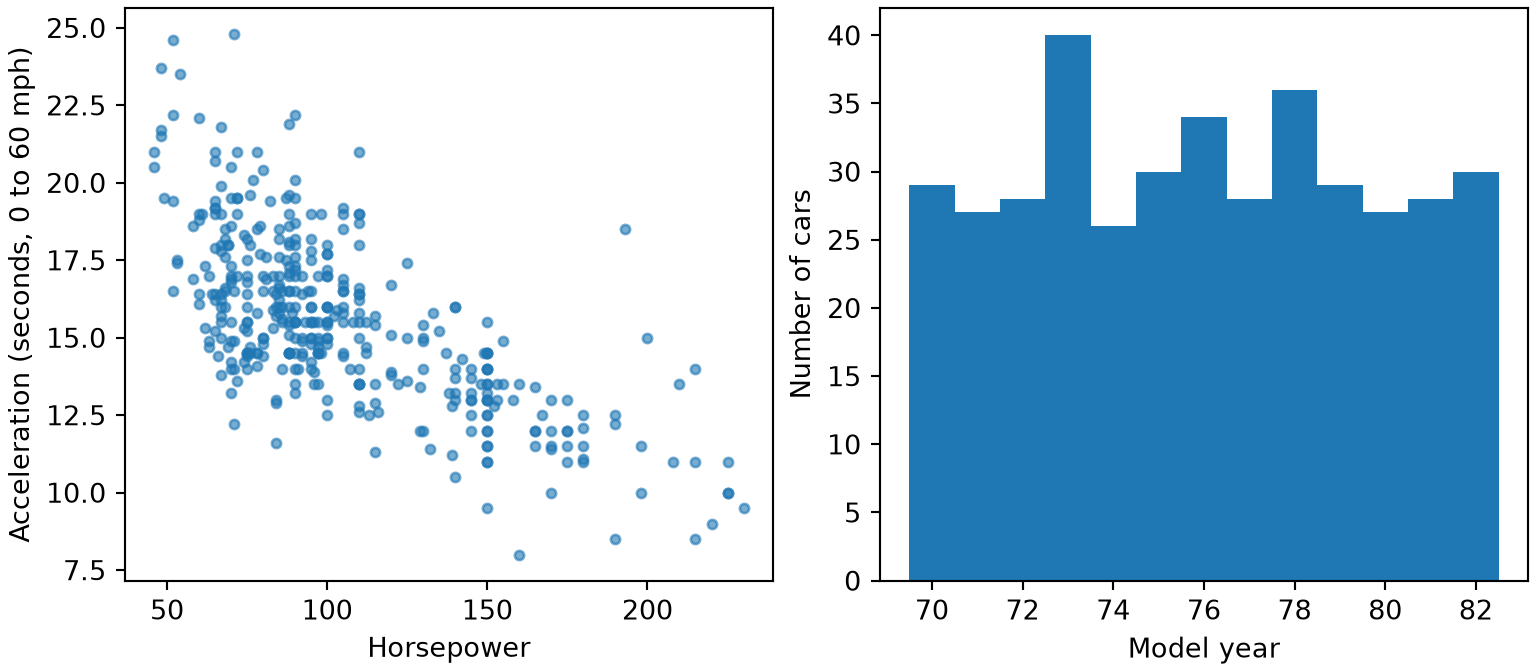
Two plots drawn with matplotlib from the Auto data. Left: a scatter plot of acceleration in seconds against horsepower, where the points fall along a downward slope, so cars with more horsepower reach 60 miles per hour sooner. Right: a histogram of model year from 70 to 82 with one bar per year, each between about 26 and 40 cars and tallest, at 40, in 73.

Show code
auto_pl <- read.csv("data/auto.csv")

# `par(mfrow = c(1, 2))` makes one row of two panels;
# keep the old settings to restore them.
old_pl <- par(mfrow = c(1, 2), mar = c(4, 4, 1, 1))

plot(auto_pl$horsepower, auto_pl$acceleration, pch = 16,
     col = adjustcolor("steelblue", alpha.f = 0.6),
     xlab = "Horsepower", ylab = "Acceleration (seconds, 0 to 60 mph)")

# `breaks` can also be the bar edges themselves.
# Halfway between years gives one bar per year.
hist(auto_pl$year, breaks = seq(69.5, 82.5, by = 1), main = "",
     xlab = "Model year", ylab = "Number of cars")
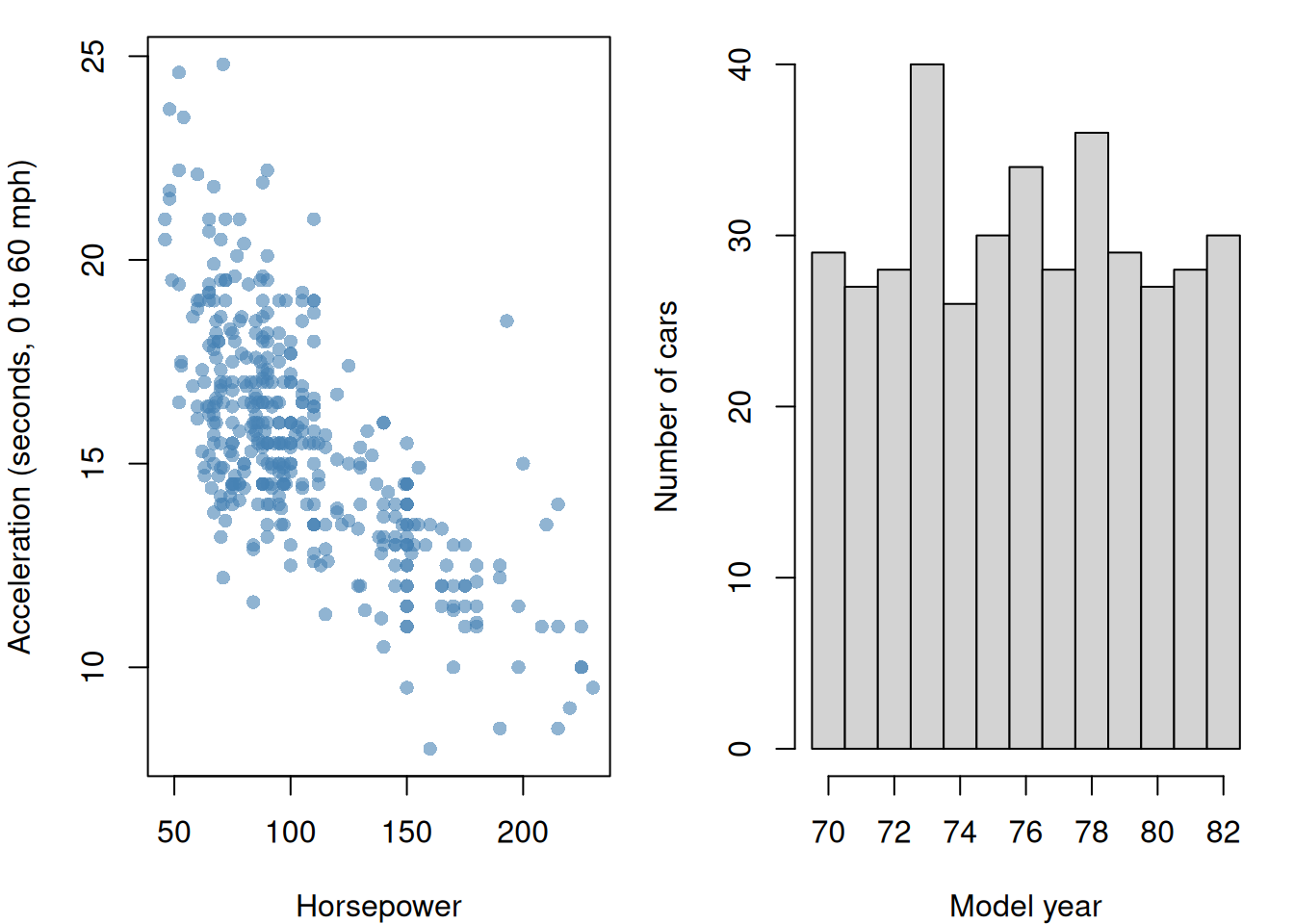
Two plots drawn with base R from the Auto data. Left: a scatter plot of acceleration in seconds against horsepower, where the points fall along a downward slope, so cars with more horsepower reach 60 miles per hour sooner. Right: a histogram of model year from 70 to 82 with one bar per year, each between about 26 and 40 cars and tallest, at 40, in 73.

Show code
par(old_pl)

The same two plots with ggplot2, one after the other:
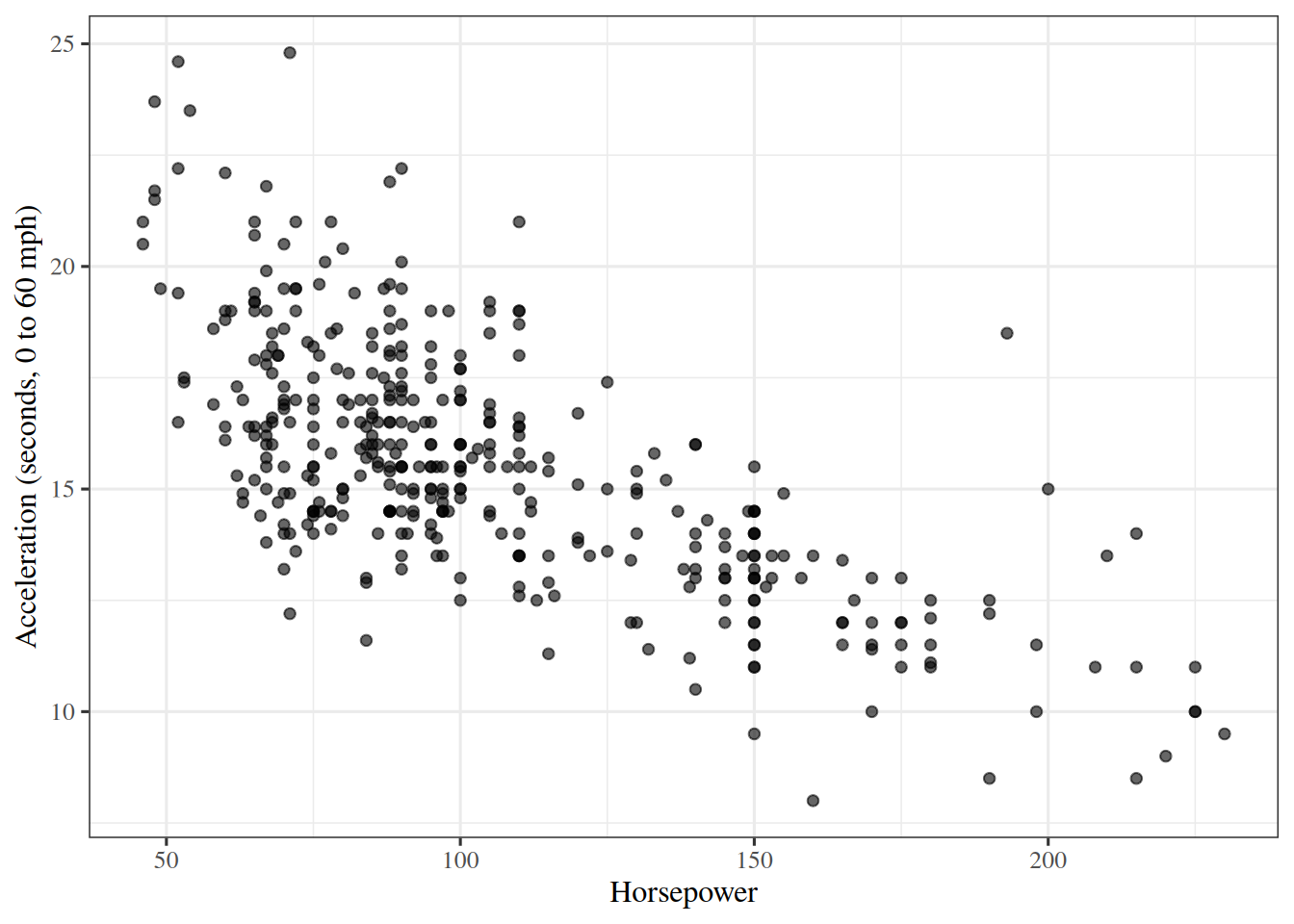
Show code
library(ggplot2)

# `aes` says which columns go on which axes;
# `geom_point` draws one point per row.
ggplot(auto_pl, aes(x = horsepower, y = acceleration)) +
  geom_point(alpha = 0.6) +
  labs(x = "Horsepower", y = "Acceleration (seconds, 0 to 60 mph)")

A scatter plot drawn with ggplot2 from the Auto data: acceleration in seconds against horsepower. The points fall along a downward slope, so cars with more horsepower reach 60 miles per hour sooner.

Show code
# `breaks` gives the bar edges, halfway between years,
# so there is one bar per year.
ggplot(auto_pl, aes(x = year)) +
  geom_histogram(breaks = seq(69.5, 82.5, by = 1), colour = "white") +
  labs(x = "Model year", y = "Number of cars")
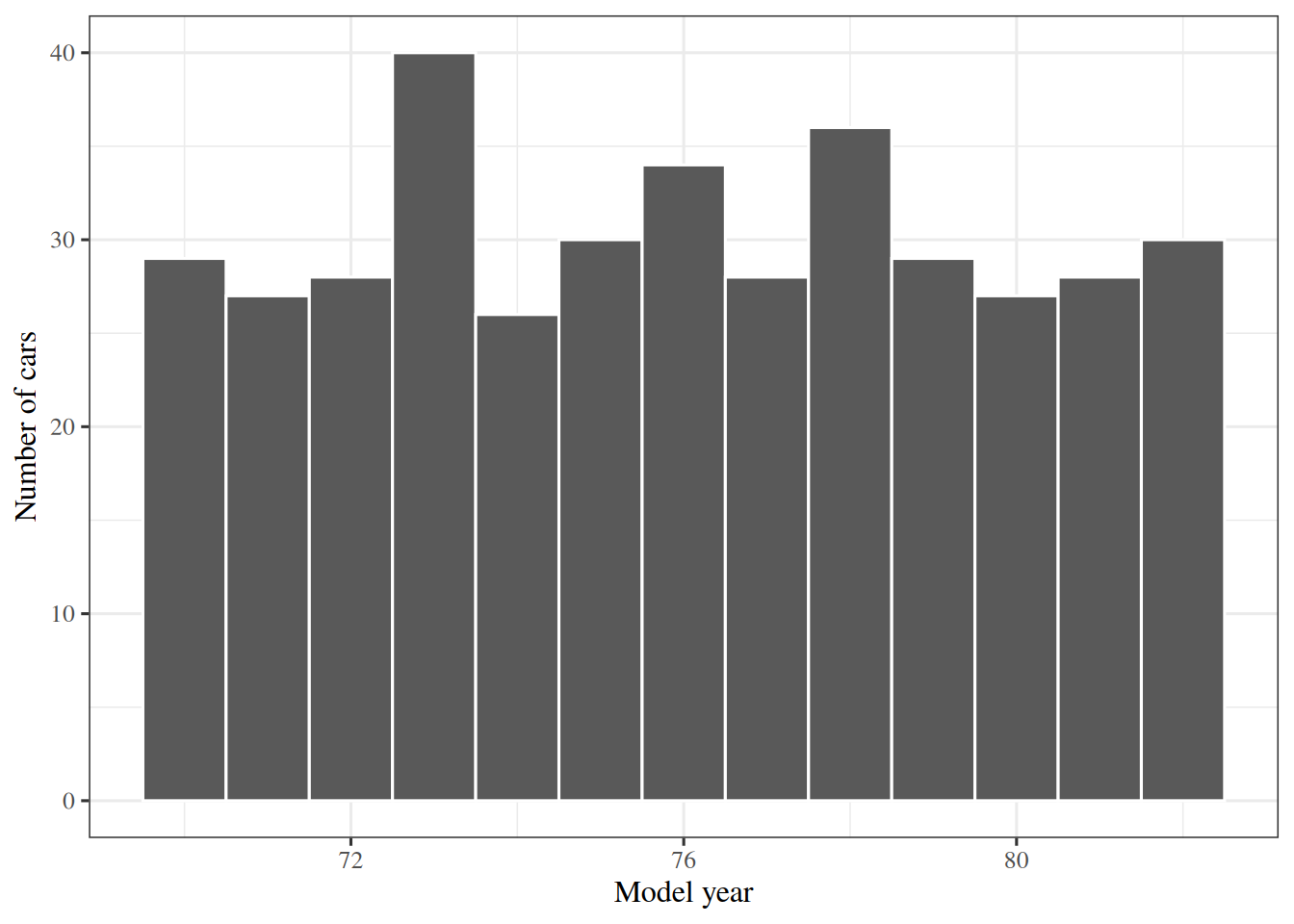
A histogram drawn with ggplot2 of model year from 70 to 82 with one bar per year, each between about 26 and 40 cars and tallest, at 40, in 73.

Cars with more horsepower tend to accelerate faster, which here means a smaller number of seconds. The histogram shows how many cars come from each model year, a question the scatter plot cannot answer.

Now count the cars in each bin of horsepower instead of drawing them, using bins \(20\) wide from \(40\) to \(240\), and trace a contour line of a bowl-shaped surface:

# Horsepower has a few missing values, which `histogram` cannot bin, so drop them.
hp_pl = auto_pl["horsepower"].dropna().to_numpy(float)
edges_pl = np.arange(40, 241, 20)

# `histogram` returns the count in each bin, and the edges back.
counts_pl, _ = np.histogram(hp_pl, bins=edges_pl)
print(counts_pl)
[ 15  97 113  61  22  45  17  11   6   5]
# `digitize` returns the bin number of each car, counting from 1;
# subtracting 1 gives a position in `counts_pl`.
bin_pl = np.digitize(hp_pl, edges_pl) - 1
print(bin_pl[:6], hp_pl[:6])
[4 6 5 5 5 7] [130. 165. 150. 150. 140. 198.]
# `round` keeps the printed shares short.
print(np.round(counts_pl / len(hp_pl), 3))
[0.038 0.247 0.288 0.156 0.056 0.115 0.043 0.028 0.015 0.013]
Show code
# Horsepower has a few missing values, which `hist` cannot bin, so drop them.
hp_pl <- na.omit(auto_pl$horsepower)
edges_pl <- seq(40, 240, 20)

# `plot = FALSE` returns the counts without drawing the histogram;
# `right = FALSE` makes each bin include its left edge.
counts_pl <- hist(hp_pl, breaks = edges_pl, right = FALSE, plot = FALSE)$counts
print(counts_pl)
 [1]  15  97 113  61  22  45  17  11   6   5
Show code
# `findInterval` returns the bin number of each car, counting from 1.
bin_pl <- findInterval(hp_pl, edges_pl)
print(head(bin_pl))
[1] 5 7 6 6 6 8
Show code
print(head(hp_pl))
[1] 130 165 150 150 140 198
Show code
# `cut` with `labels = FALSE` returns the same numbers, from the same edges.
print(all(bin_pl == cut(hp_pl, edges_pl, right = FALSE, labels = FALSE)))
[1] TRUE
Show code
# `round` keeps the printed shares short.
print(round(counts_pl / length(hp_pl), 3))
 [1] 0.038 0.247 0.288 0.156 0.056 0.115 0.043 0.028 0.015 0.013
Show code
# `contourLines` traces where a surface equals a level.
# Here z = x^2 + y^2 on a grid, and the level 0.5 is a circle of radius sqrt(0.5).
grid_pl <- seq(-1, 1, length.out = 41)
z_pl <- outer(grid_pl, grid_pl, function(x, y) x^2 + y^2)
curve_pl <- contourLines(grid_pl, grid_pl, z_pl, levels = 0.5)
print(length(curve_pl))
[1] 2
Show code
print(curve_pl[[1]]$level)
[1] 0.5
Show code
# Each piece is a list with `level`, `x` and `y`; gather the x values of all pieces.
x_curve_pl <- unlist(lapply(curve_pl, function(piece) piece$x))
print(round(range(x_curve_pl), 2))
[1] -0.71  0.71

The most common bin holds 113 cars, and every one of the 392 cars lands in a bin, since the bin counts add up to 392. contourLines returns the circle as 2 pieces, which together make up the circle, and x runs from -0.71 to 0.71 across them, close to \(\pm\sqrt{0.5}\). contourLines has no counterpart among the functions above. In Python, plt.contour(x_grid, y_grid, z) draws the curves instead of returning them.

ExrExercise 57 (Plot your data)

Exercise 57 (Plot your data) Use the Auto data frame from the previous exercise.

Draw a scatter plot of mpg against weight, with labelled axes.

Solution 57.

Show code
import matplotlib.pyplot as plt

# `subplots` returns a figure and its axes.
# `layout="constrained"` keeps labels from overlapping.
fig, ax = plt.subplots(figsize=(4.5, 3.5), layout="constrained")

# A scatter plot shows how two variables move together.
ax.scatter(Auto["weight"], Auto["mpg"], s=12, alpha=0.6);
ax.set_xlabel("Weight (lb)");
ax.set_ylabel("Miles per gallon");
plt.show()
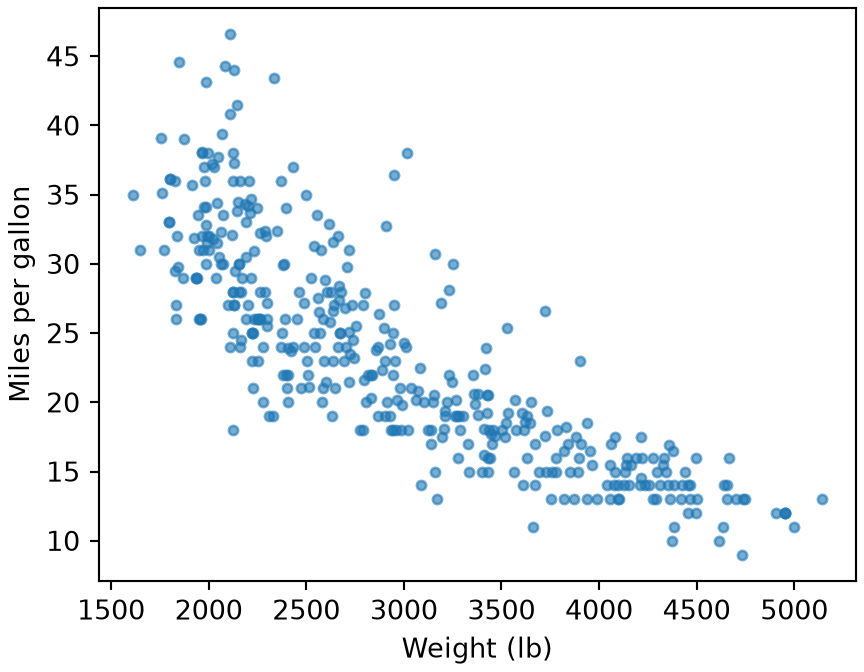
A scatter plot drawn with matplotlib from the Auto data: miles per gallon against car weight in pounds. The points fall along a downward curve, with heavier cars getting fewer miles per gallon and more spread among light cars.

Show code
# A scatter plot shows how two variables move together.
plot(auto$weight, auto$mpg, pch = 16, col = adjustcolor("steelblue", alpha.f = 0.6),
     xlab = "Weight (lb)", ylab = "Miles per gallon")
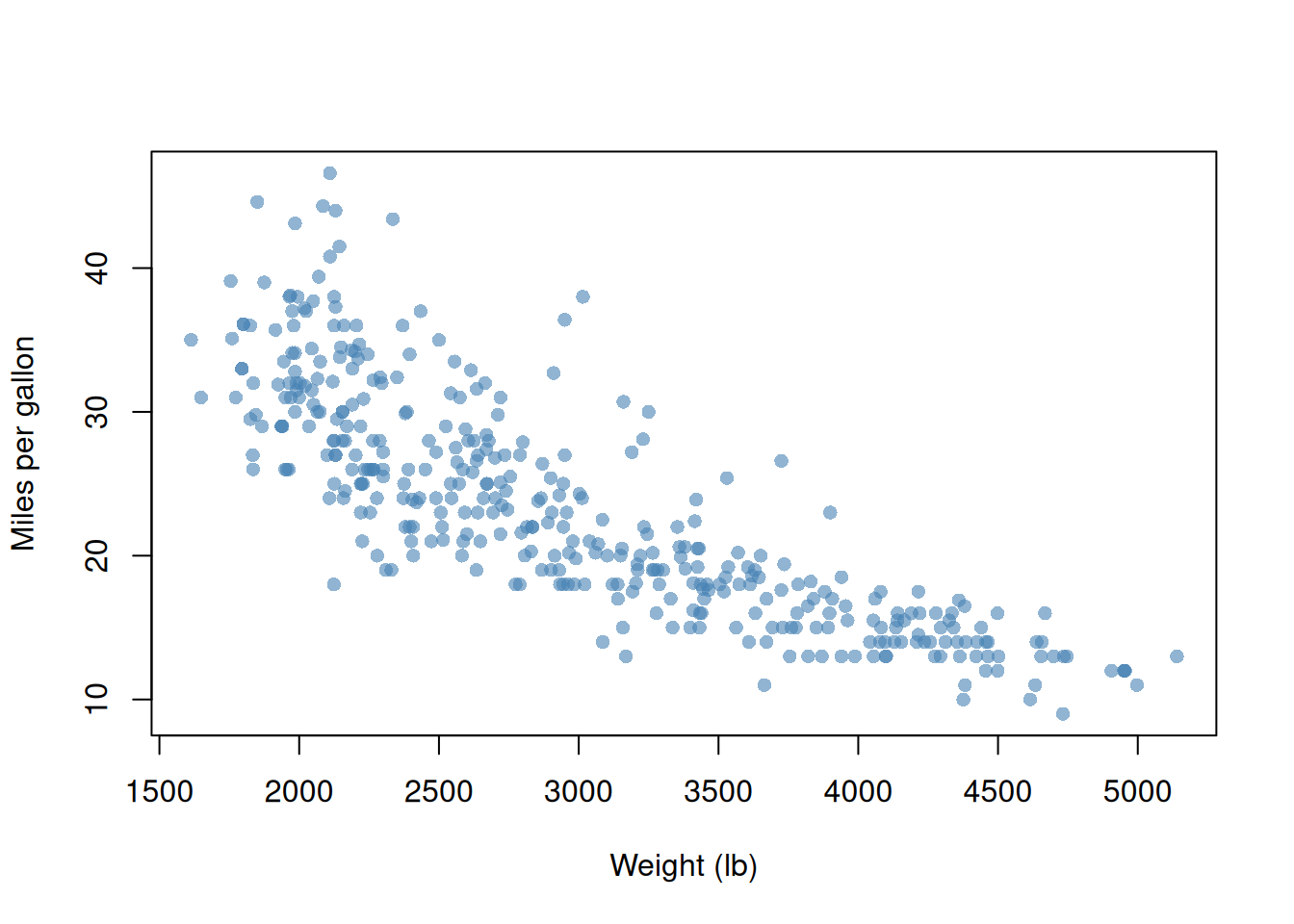
A scatter plot drawn with base R from the Auto data: miles per gallon against car weight in pounds. The points fall along a downward curve, with heavier cars getting fewer miles per gallon and more spread among light cars.

The same plot with ggplot2:

Show code
library(ggplot2)

# A plot starts from the data frame and the columns mapped to the axes;
# each `+` adds a layer.
ggplot(auto, aes(x = weight, y = mpg)) +
  geom_point(alpha = 0.6) +
  labs(x = "Weight (lb)", y = "Miles per gallon")

A scatter plot drawn with ggplot2 from the Auto data: miles per gallon against car weight in pounds. The points fall along a downward curve, with heavier cars getting fewer miles per gallon and more spread among light cars.

The scatter plot shows the relationship between fuel economy and weight, and that it bends rather than following a straight line.

ExrExercise 58 (Plot your data (part 2))

Exercise 58 (Plot your data (part 2)) Use the setup of Exercise 57.

Draw a histogram of mpg.

Solution 58.

Show code
fig, ax = plt.subplots(figsize=(4.5, 3.5), layout="constrained")

# A histogram shows the distribution of one variable.
ax.hist(Auto["mpg"], bins=20);
ax.set_xlabel("Miles per gallon");
ax.set_ylabel("Number of cars");
plt.show()
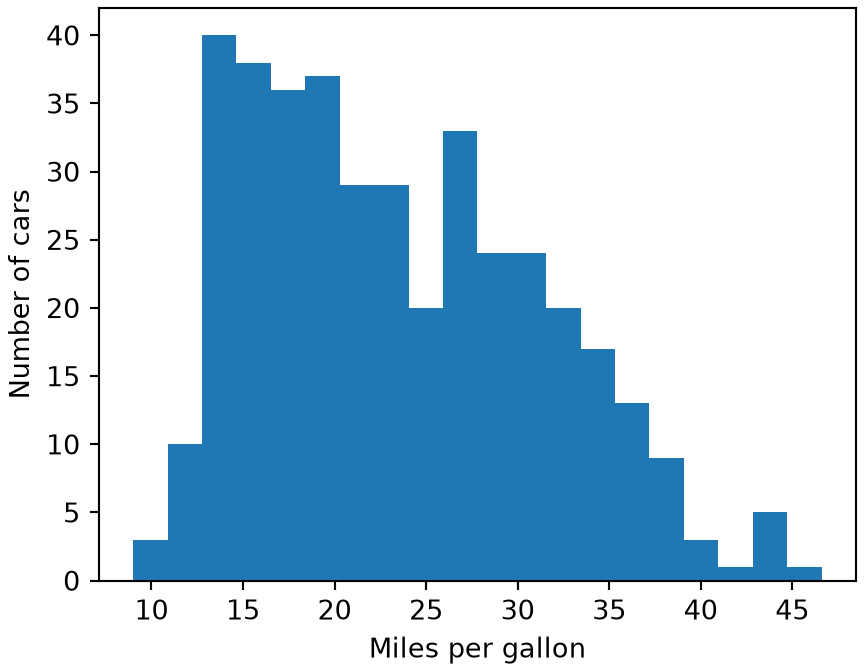
A histogram drawn with matplotlib of miles per gallon, highest between about 13 and 20 and then declining, with a long tail of efficient cars out to about 47.

Show code
# A histogram shows the distribution of one variable.
hist(auto$mpg, breaks = 20, main = "",
     xlab = "Miles per gallon", ylab = "Number of cars")
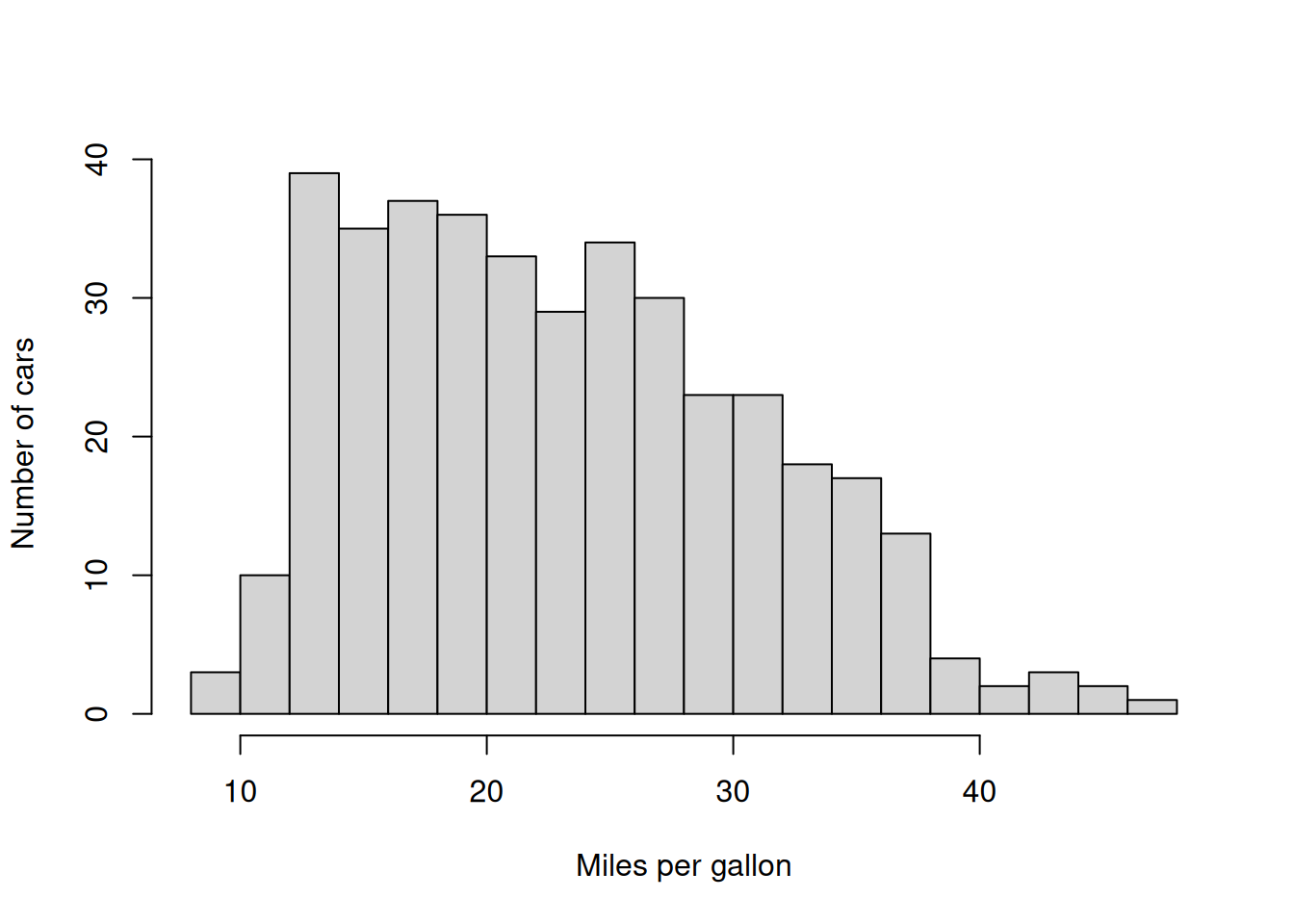
A histogram drawn with base R of miles per gallon, highest between about 13 and 20 and then declining, with a long tail of efficient cars out to about 47.

The same plot with ggplot2:

Show code
# `bins = 20` matches the base R call;
# `colour = "white"` outlines the bars so neighbours stay distinct.
ggplot(auto, aes(x = mpg)) +
  geom_histogram(bins = 20, colour = "white") +
  labs(x = "Miles per gallon", y = "Number of cars")
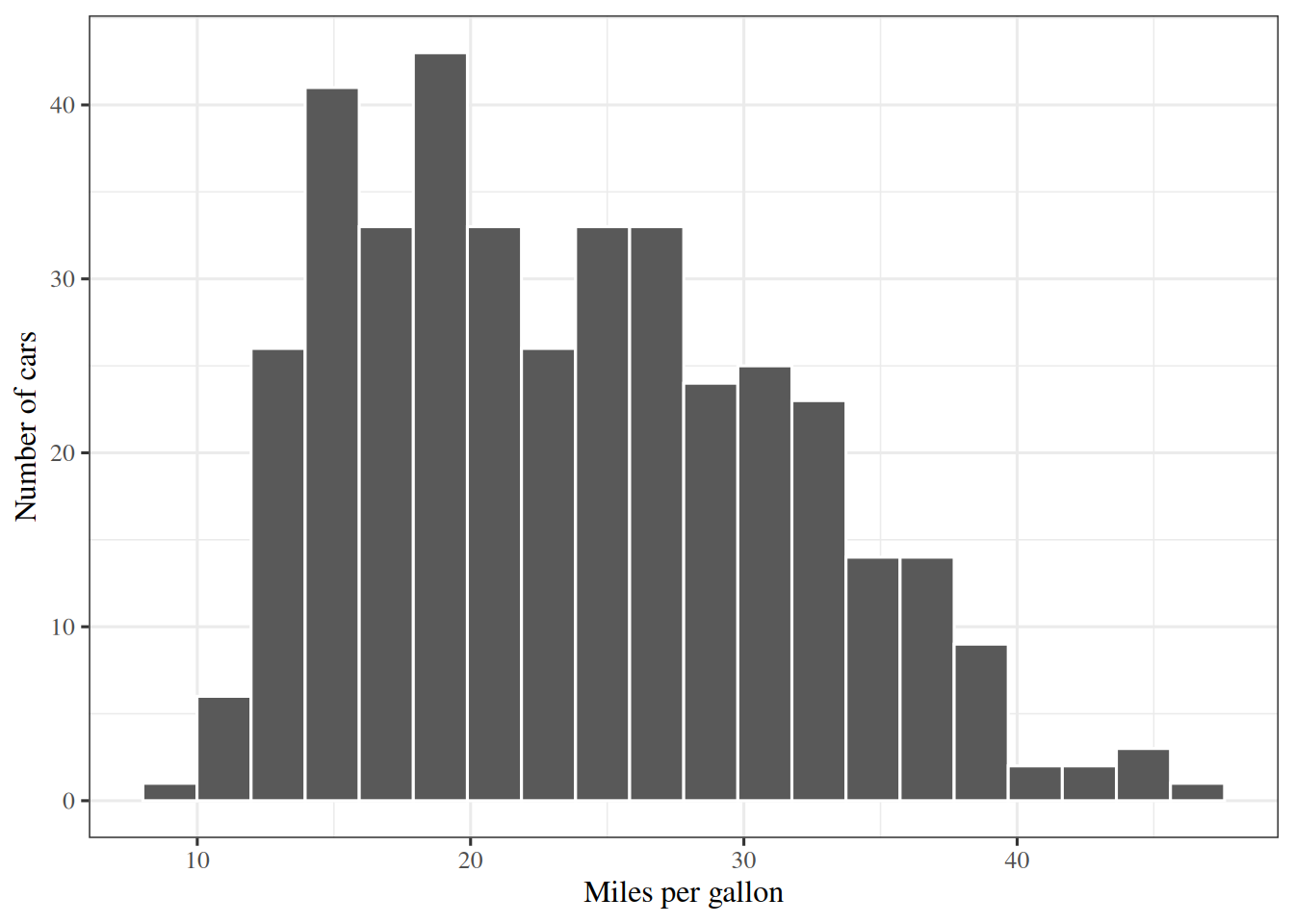
A histogram drawn with ggplot2 of miles per gallon, highest between about 13 and 20 and then declining, with a long tail of efficient cars out to about 47.

The histogram shows the shape of mpg alone, including the skew, which the scatter plot hides.

ExrExercise 59 (Plot your data (part 3))

Exercise 59 (Plot your data (part 3)) Use the setup of Exercise 57.

Put the two plots side by side in one figure. What does each one tell you that the other does not?

Solution 59.

Show code
import matplotlib.pyplot as plt

# `subplots` returns a figure and an array of axes; "unpacking" names the two axes.
# `layout="constrained"` keeps labels from overlapping.
fig, (ax_scatter, ax_hist) = plt.subplots(1, 2, figsize=(8, 3.5), layout="constrained")

# A scatter plot shows how two variables move together.
ax_scatter.scatter(Auto["weight"], Auto["mpg"], s=12, alpha=0.6);
ax_scatter.set_xlabel("Weight (lb)");
ax_scatter.set_ylabel("Miles per gallon");

# A histogram shows the distribution of one variable.
ax_hist.hist(Auto["mpg"], bins=20);
ax_hist.set_xlabel("Miles per gallon");
ax_hist.set_ylabel("Number of cars");

plt.show()
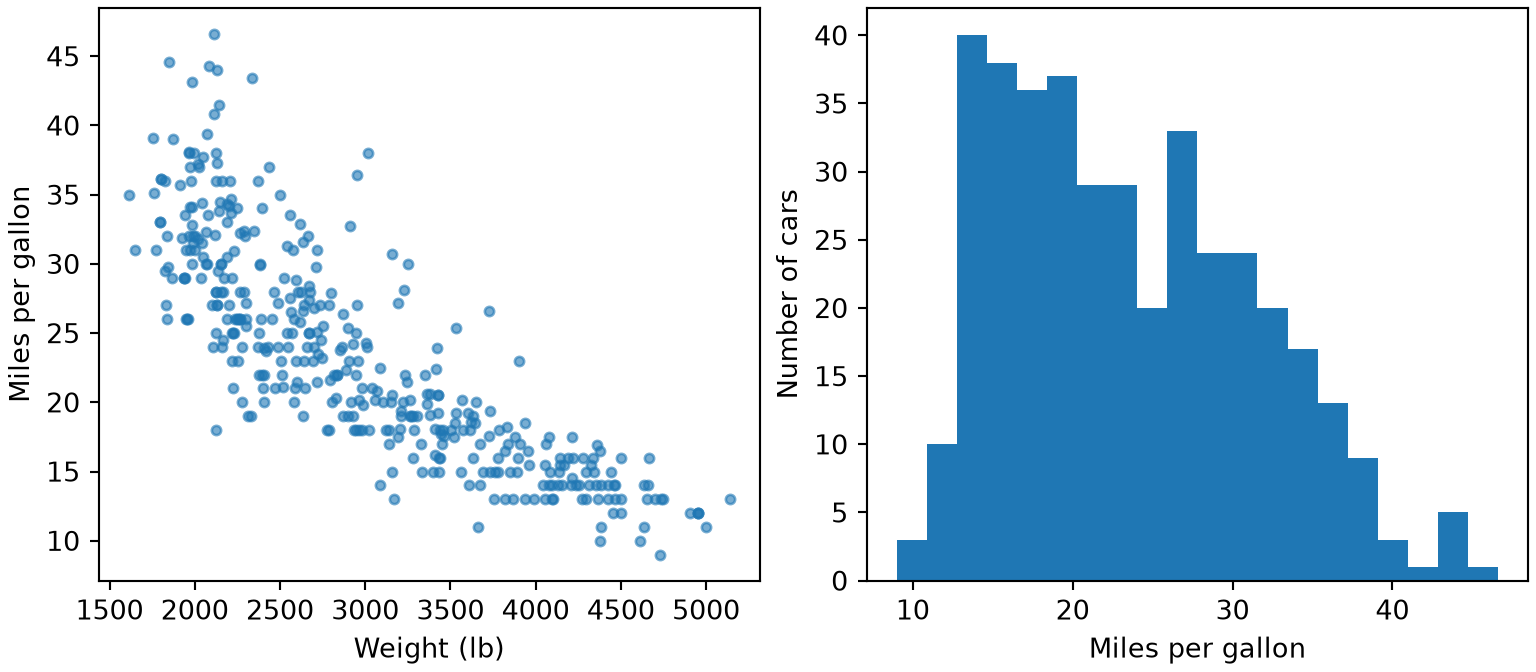
Two plots drawn with matplotlib from the Auto data. Left: a scatter plot of miles per gallon against car weight in pounds; the points fall along a downward curve, with heavier cars getting fewer miles per gallon and more spread among light cars. Right: a histogram of miles per gallon that is highest between about 13 and 20 and then declines, with a long tail of efficient cars out to about 47.

Show code
# `par(mfrow = c(1, 2))` splits the plotting area into one row of two panels.
# It returns the old settings, which we restore at the end so that later plots are unaffected.
old <- par(mfrow = c(1, 2), mar = c(4, 4, 1, 1))

# A scatter plot shows how two variables move together.
plot(auto$weight, auto$mpg, pch = 16, col = adjustcolor("steelblue", alpha.f = 0.6),
     xlab = "Weight (lb)", ylab = "Miles per gallon")

# A histogram shows the distribution of one variable.
hist(auto$mpg, breaks = 20, main = "",
     xlab = "Miles per gallon", ylab = "Number of cars")
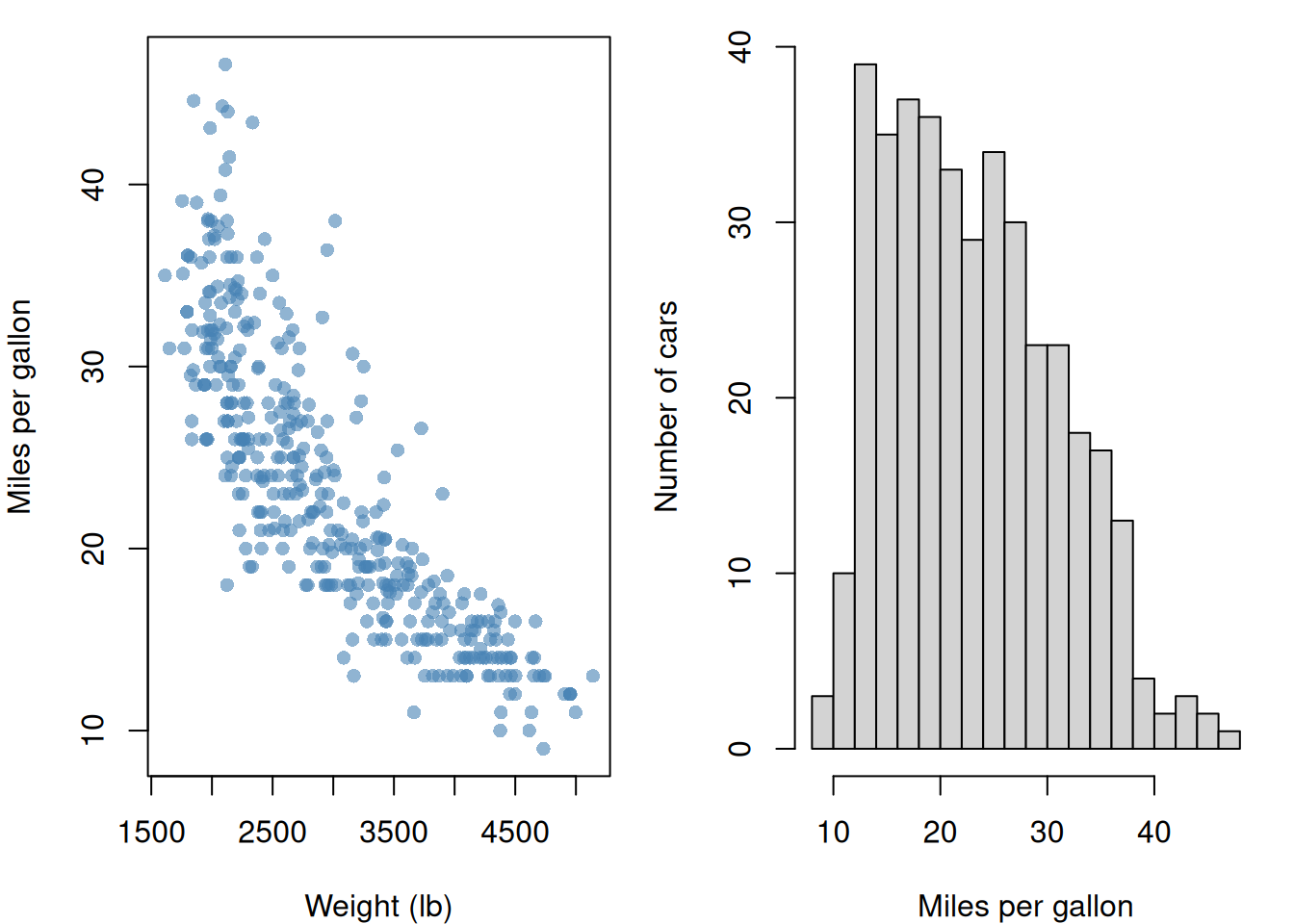
Two plots drawn with base R from the Auto data. Left: a scatter plot of miles per gallon against car weight in pounds; the points fall along a downward curve, with heavier cars getting fewer miles per gallon and more spread among light cars. Right: a histogram of miles per gallon that is highest between about 13 and 20 and then declines, with a long tail of efficient cars out to about 47.

Show code
par(old)
ExrExercise 60 (Plot your data (part 4))

Exercise 60 (Plot your data (part 4)) Use the setup of Exercise 57.

Count the cars in bins of mpg \(5\) wide from \(5\) to \(50\), and find which bin the car with the highest mpg is in. Print the share of cars in each bin, rounded to \(3\) decimal places.

Solution 60. Exercise 60 counts the cars in bins of mpg:

import numpy as np

# Bin edges 5 apart from 5 to 50 give nine bins.
mpg_edges = np.arange(5, 51, 5)
mpg_counts, _ = np.histogram(Auto["mpg"], bins=mpg_edges)

# `digitize` counts bins from 1, so subtract 1 for a position in `mpg_counts`.
best_bin = np.digitize(Auto["mpg"].max(), mpg_edges) - 1
print(best_bin, mpg_edges[best_bin])
8 45
print(np.round(mpg_counts / len(Auto), 3))
[0.003 0.133 0.25  0.191 0.194 0.14  0.069 0.018 0.003]
Show code
# Bin edges 5 apart from 5 to 50 give nine bins.
mpg_edges <- seq(5, 50, 5)
mpg_counts <- hist(auto$mpg, breaks = mpg_edges, right = FALSE, plot = FALSE)$counts

# `findInterval` counts bins from 1, so it is already a position in `mpg_counts`.
best_bin <- findInterval(max(auto$mpg), mpg_edges)
print(best_bin)
[1] 9
Show code
print(mpg_edges[best_bin])
[1] 45
Show code
print(round(mpg_counts / nrow(auto), 3))
[1] 0.003 0.133 0.250 0.191 0.194 0.140 0.069 0.018 0.003

The two languages number the bin differently (from \(0\) in Python, from \(1\) in R), but both pick the bin that starts at 45 mpg.

2.4 More plots with matplotlib

Besides scatter and hist, the notes use these methods of an axes object ax from fig, ax = plt.subplots():

Method What it draws or sets
ax.plot(x, y, marker="o", label="...") a line through the points, optionally with a marker at each, and a name for the legend
ax.fill_between(x, low, high, alpha=0.2) a shaded band between two curves
ax.axhline(y0, linestyle="--"), ax.axvline(x0) a horizontal or vertical reference line across the whole axes
ax.bar(positions, heights) a bar chart
ax.boxplot([values1, values2]) one box and whisker plot per group, from a list of arrays
ax.imshow(matrix, cmap="coolwarm", vmin=-1, vmax=1) a matrix as a grid of coloured cells; fig.colorbar(image, ax=ax) explains the colours
ax.text(x, y, "...") a text label at a position in the data’s coordinates
ax.set_xticks(positions, labels) which tick marks to show, and their labels (set_yticks for the vertical axis)
ax.set_title("...") a title above the axes
ax.legend() a legend of the label arguments given to earlier calls
ax.axis("equal") the same scale on both axes

The same figures with ggplot2, where each of these is a layer or a setting added with +:

Layer What it draws or sets
geom_line(aes(...)) and geom_point(aes(...)) a line through the points, and a marker at each
geom_ribbon(aes(ymin = low, ymax = high), alpha = 0.2) a shaded band between two curves
geom_hline(yintercept = y0, linetype = "dashed"), geom_vline(xintercept = x0) a horizontal or vertical reference line across the whole plot
geom_col(aes(x, y)) a bar chart from heights you computed (geom_bar() counts rows instead)
geom_boxplot(aes(group, values)) one box and whisker plot per group
geom_raster(aes(x, y, fill = value)) a matrix, in long form, as a grid of coloured cells
geom_text(aes(label = label)) and annotate("text", x, y, label) text labels from a column, or one label at a position
scale_fill_gradient2(limits = c(-1, 1)) colours that run from low to high through a neutral midpoint, over a fixed range
scale_x_continuous(breaks = positions, labels = labels) which tick marks to show, and their labels
labs(title = "...") a title above the plot
coord_equal() the same scale on both axes

A legend appears automatically when a layer maps a column to a colour or shape.

ExmExample 10 (Fuel economy by year, region and cylinders)

Example 10 (Fuel economy by year, region and cylinders) Draw four plots of the Auto data: the mean mpg of each model year with a band of one standard deviation and a reference line at the overall mean, the number of cars from each region, mpg by number of cylinders, and the correlations among four columns:

Show code
import matplotlib.pyplot as plt
import numpy as np
import pandas as pd

auto_mp = pd.read_csv("data/auto.csv")

# One mean and one standard deviation of mpg for each model year.
by_year_mp = auto_mp.groupby("year")["mpg"].agg(["mean", "std"])
fig_mp, ((ax_a, ax_b), (ax_c, ax_d)) = plt.subplots(2, 2, figsize=(9, 7), layout="constrained")

# `plot` draws the line; `label` names it for `legend`. `fill_between` shades a band
# between two curves, and `axhline` draws a reference line across the whole axes.
ax_a.plot(by_year_mp.index, by_year_mp["mean"], marker="o", label="Mean of the year");
ax_a.fill_between(by_year_mp.index, by_year_mp["mean"] - by_year_mp["std"],
                  by_year_mp["mean"] + by_year_mp["std"], alpha=0.2, label="Mean ± 1 SD");
ax_a.axhline(auto_mp["mpg"].mean(), linestyle="--", color="gray", label="Overall mean");
ax_a.set_xlabel("Model year");
ax_a.set_ylabel("mpg");
ax_a.set_title("Fuel economy by model year");
ax_a.legend();

# `bar` takes positions and heights; `text` writes each count just above its bar,
# and `set_xticks` replaces the numbers 1, 2, 3 by region names.
counts_mp = auto_mp["origin"].value_counts().sort_index()
ax_b.bar(counts_mp.index, counts_mp.values);
for pos_mp, height_mp in zip(counts_mp.index, counts_mp.values):
    ax_b.text(pos_mp, height_mp + 3, str(height_mp), ha="center");
ax_b.set_xticks([1, 2, 3], ["US", "Europe", "Japan"]);
ax_b.set_ylabel("Number of cars");
ax_b.set_ylim(0, 270);  # leave room above the tallest bar for its label
(0.0, 270.0)
Show code
# `boxplot` takes one array of values for each group.
groups_mp = [g["mpg"].to_numpy() for _, g in auto_mp.groupby("cylinders")]
ax_c.boxplot(groups_mp, tick_labels=sorted(auto_mp["cylinders"].unique()));
ax_c.set_xlabel("Cylinders");
ax_c.set_ylabel("mpg");

# `imshow` colours the cells of a matrix; fixing the range to -1 to 1 makes the colours comparable.
corr_mp = auto_mp[["mpg", "horsepower", "weight", "acceleration"]].corr()
image_mp = ax_d.imshow(corr_mp, vmin=-1, vmax=1, cmap="coolwarm")
ax_d.set_xticks(range(4), corr_mp.columns, rotation=45);
ax_d.set_yticks(range(4), corr_mp.columns);
fig_mp.colorbar(image_mp, ax=ax_d, label="Correlation");

plt.show()
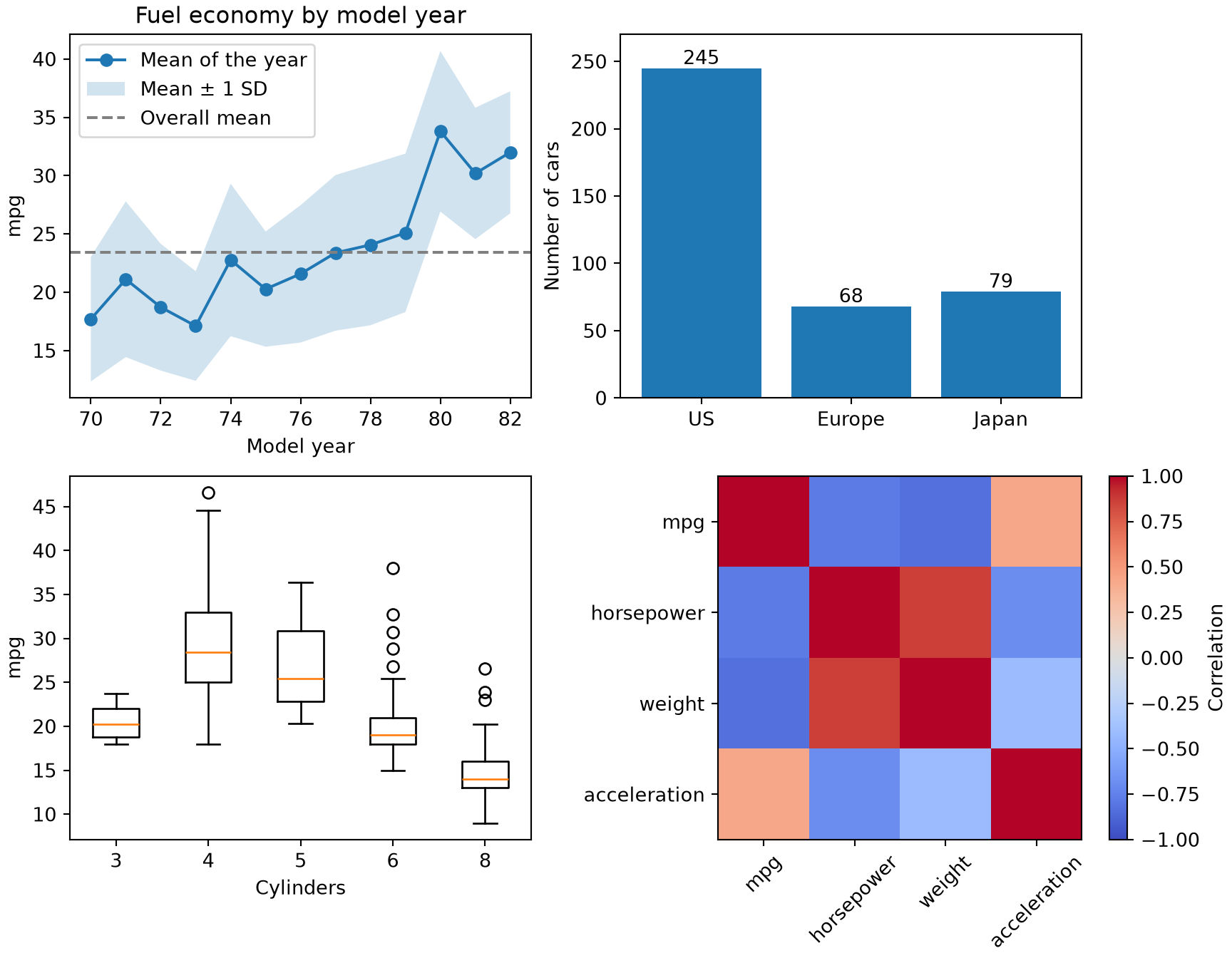
Four plots drawn with matplotlib from the Auto data. Top left: mean miles per gallon by model year, rising from about 18 in 1970 to about 32 in 1982, with a shaded band of one standard deviation and a dashed line at the overall mean of 23. Top right: a bar chart of the number of cars by region, 245 from the US, 68 from Europe and 79 from Japan. Bottom left: boxplots of miles per gallon by number of cylinders, highest for 4 cylinders and lowest for 8. Bottom right: a heat map of correlations among miles per gallon, horsepower, weight and acceleration, with strong negative values between miles per gallon and each of horsepower and weight.

Show code
library(dplyr)
library(ggplot2)

auto_mp <- read.csv("data/auto.csv")

# One mean and one standard deviation of mpg for each model year.
by_year_mp <- auto_mp |>
  group_by(year) |>
  summarise(mean = mean(mpg), sd = sd(mpg))

# `geom_line` and `geom_point` draw the line and its markers, `geom_ribbon` shades a band
# between two curves, and `geom_hline` draws a reference line across the whole plot.
ggplot(by_year_mp, aes(x = year, y = mean)) +
  geom_ribbon(aes(ymin = mean - sd, ymax = mean + sd), alpha = 0.2) +
  geom_line() +
  geom_point() +
  geom_hline(yintercept = mean(auto_mp$mpg), linetype = "dashed", colour = "gray50") +
  labs(x = "Model year", y = "mpg", title = "Fuel economy by model year")
# `geom_col` draws bars of heights we computed, and `geom_text` writes each count above its bar.
counts_mp <- auto_mp |>
  count(origin) |>
  mutate(region = factor(c("US", "Europe", "Japan")[origin], levels = c("US", "Europe", "Japan")))
ggplot(counts_mp, aes(x = region, y = n, label = n)) +
  geom_col() +
  geom_text(vjust = -0.4) +
  scale_y_continuous(expand = expansion(mult = c(0, 0.1))) +
  labs(x = NULL, y = "Number of cars")
# `geom_boxplot` draws one box per group; `group` and `factor` make the cylinders categories.
ggplot(auto_mp, aes(x = factor(cylinders), y = mpg)) +
  geom_boxplot() +
  labs(x = "Cylinders", y = "mpg")
# `geom_raster` colours the cells of a matrix given in long form, one row per cell;
# `scale_fill_gradient2` runs the colours from low to high through a neutral midpoint at 0,
# and `scale_y_discrete(limits = rev)` lists the rows top to bottom, as a matrix is written.
corr_mp <- auto_mp |>
  select(mpg, horsepower, weight, acceleration) |>
  cor() |>
  as.table() |>
  as.data.frame()
ggplot(corr_mp, aes(x = Var1, y = Var2, fill = Freq)) +
  geom_raster() +
  scale_fill_gradient2(limits = c(-1, 1)) +
  scale_y_discrete(limits = rev) +
  labs(x = NULL, y = NULL, fill = "Correlation")
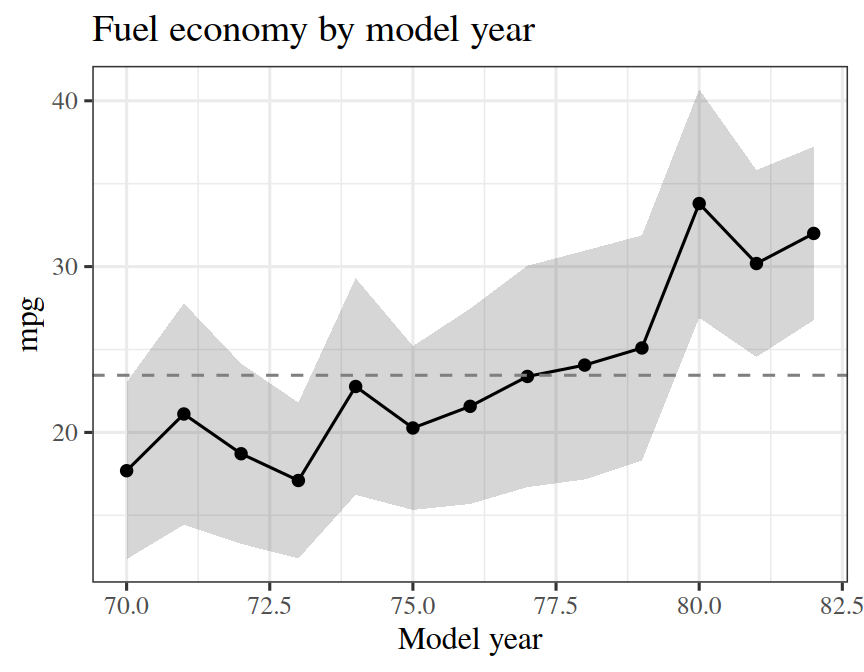
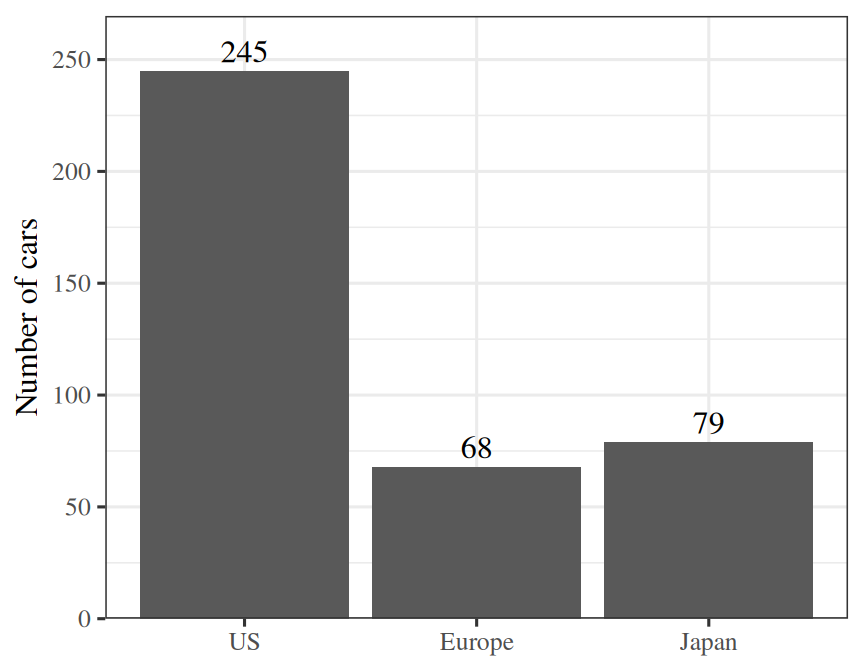
Boxplots drawn with ggplot2 of miles per gallon by number of cylinders, highest for 4 cylinders and lowest for 8.

A heat map drawn with ggplot2 of correlations among miles per gallon, horsepower, weight and acceleration, with strong negative values between miles per gallon and each of horsepower and weight.

A line plot drawn with ggplot2 from the Auto data: mean miles per gallon by model year, rising from about 18 in 1970 to about 32 in 1982, with a shaded band of one standard deviation and a dashed line at the overall mean of 23.

A bar chart drawn with ggplot2 of the number of cars by region: 245 from the US, 68 from Europe and 79 from Japan, with the count written above each bar.

The mean mpg rises from 17.7 in model year 70 to 32 in model year 82.

ExrExercise 61 (More plots of the Auto data)

Exercise 61 (More plots of the Auto data) Use the Auto data frame from the previous exercises.

Plot the mean weight of each model year as a line with markers, with a shaded band of one standard deviation and a dashed reference line at the overall mean.

Solution 61.

Show code
import matplotlib.pyplot as plt

fig_1, ax_1 = plt.subplots(figsize=(5, 3.5), layout="constrained")

# One mean and one standard deviation of weight for each model year.
wt_year = Auto.groupby("year")["weight"].agg(["mean", "std"])
ax_1.plot(wt_year.index, wt_year["mean"], marker="o");
ax_1.fill_between(wt_year.index, wt_year["mean"] - wt_year["std"],
                  wt_year["mean"] + wt_year["std"], alpha=0.2);
ax_1.axhline(Auto["weight"].mean(), linestyle="--", color="gray");
ax_1.set_xlabel("Model year");
ax_1.set_ylabel("Weight (lb)");
plt.show()
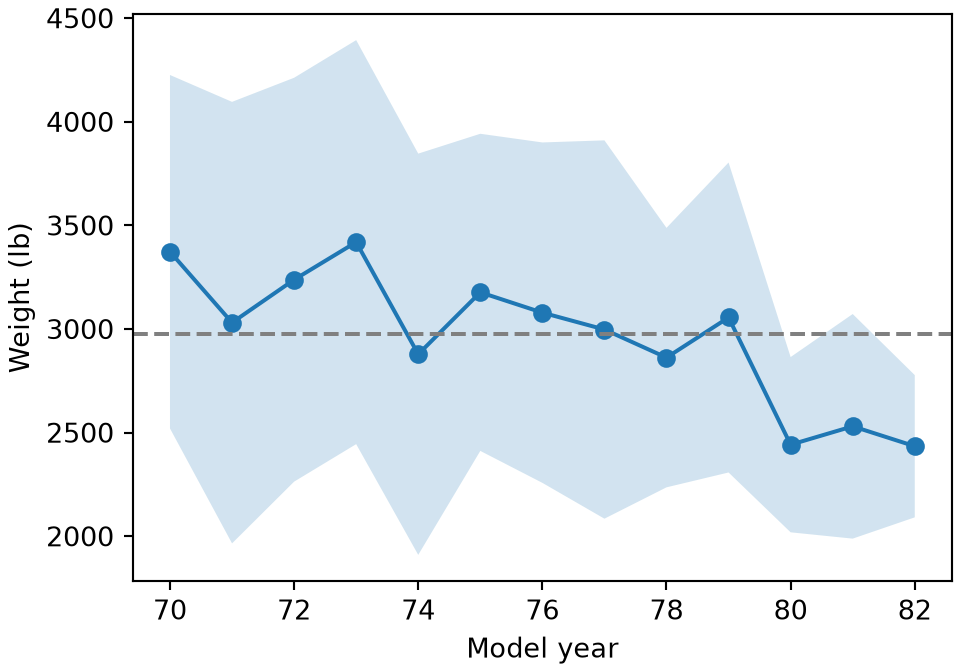
A line plot drawn with matplotlib from the Auto data: mean car weight by model year, falling overall from about 3,400 pounds in 1970 to about 2,400 in 1982, with a shaded band of one standard deviation and a dashed line at the overall mean.

Show code
library(dplyr)
library(ggplot2)

# One mean and one standard deviation of weight for each model year.
wt_year <- auto |>
  group_by(year) |>
  summarise(mean = mean(weight), sd = sd(weight))
ggplot(wt_year, aes(x = year, y = mean)) +
  geom_ribbon(aes(ymin = mean - sd, ymax = mean + sd), alpha = 0.2) +
  geom_line() +
  geom_point() +
  geom_hline(yintercept = mean(auto$weight), linetype = "dashed", colour = "gray50") +
  labs(x = "Model year", y = "Weight (lb)")
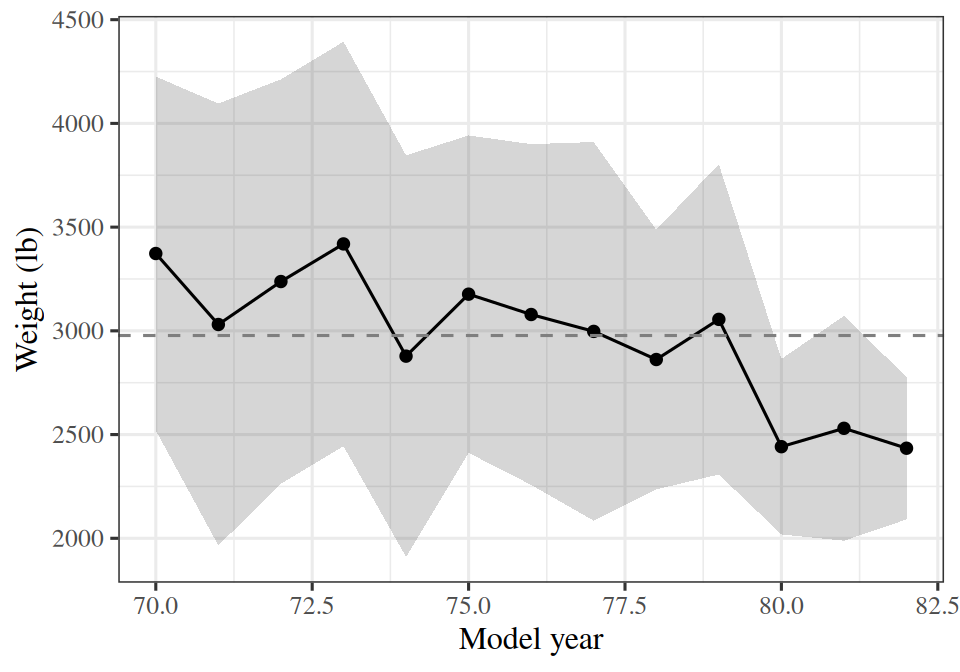
A line plot drawn with ggplot2 from the Auto data: mean car weight by model year, falling overall from about 3,400 pounds in 1970 to about 2,400 in 1982, with a shaded band of one standard deviation and a dashed line at the overall mean.

ExrExercise 62 (More plots of the Auto data (part 2))

Exercise 62 (More plots of the Auto data (part 2)) Use the setup of Exercise 61.

Draw a bar chart of the mean horsepower for each region (origin), with the mean written above each bar and the region names on the horizontal axis.

Solution 62.

Show code
fig_2, ax_2 = plt.subplots(figsize=(5, 3.5), layout="constrained")

# `bar` draws heights we computed; `text` writes each one above its bar.
hp_origin = Auto.groupby("origin")["horsepower"].mean()
ax_2.bar(hp_origin.index, hp_origin.values);
for pos, height in zip(hp_origin.index, hp_origin.values):
    ax_2.text(pos, height + 2, f"{height:.0f}", ha="center");
ax_2.set_xticks([1, 2, 3], ["US", "Europe", "Japan"]);
ax_2.set_ylabel("Mean horsepower");
ax_2.set_ylim(0, 135);  # leave room above the tallest bar for its label
(0.0, 135.0)
Show code
plt.show()

A bar chart drawn with matplotlib of mean horsepower by region, highest for the US and lowest for Japan, with each mean written above its bar.

Show code
# `geom_col` draws heights we computed; `geom_text` writes each one above its bar.
hp_origin <- auto |>
  group_by(origin) |>
  summarise(mean = mean(horsepower)) |>
  mutate(region = factor(c("US", "Europe", "Japan")[origin], levels = c("US", "Europe", "Japan")))
ggplot(hp_origin, aes(x = region, y = mean, label = round(mean))) +
  geom_col() +
  geom_text(vjust = -0.4) +
  scale_y_continuous(expand = expansion(mult = c(0, 0.1))) +
  labs(x = NULL, y = "Mean horsepower")
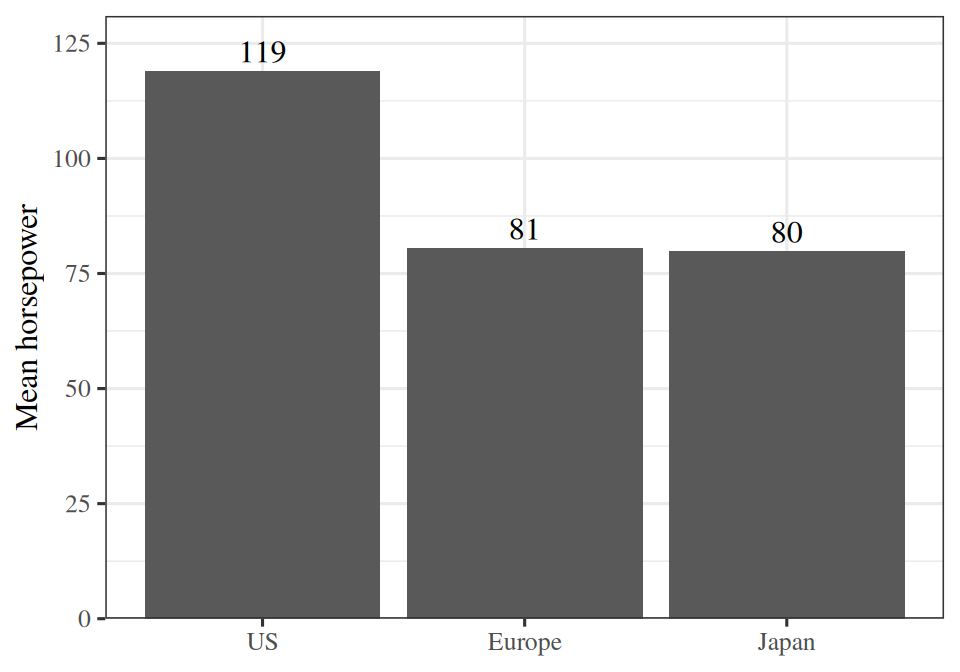
A bar chart drawn with ggplot2 of mean horsepower by region, highest for the US and lowest for Japan, with each mean written above its bar.

ExrExercise 63 (More plots of the Auto data (part 3))

Exercise 63 (More plots of the Auto data (part 3)) Use the setup of Exercise 61.

Draw boxplots of weight by number of cylinders.

Solution 63.

Show code
fig_3, ax_3 = plt.subplots(figsize=(5, 3.5), layout="constrained")

# `boxplot` takes one array of weights for each number of cylinders.
wt_groups = [g["weight"].to_numpy() for _, g in Auto.groupby("cylinders")]
ax_3.boxplot(wt_groups, tick_labels=sorted(Auto["cylinders"].unique()));
ax_3.set_xlabel("Cylinders");
ax_3.set_ylabel("Weight (lb)");
plt.show()
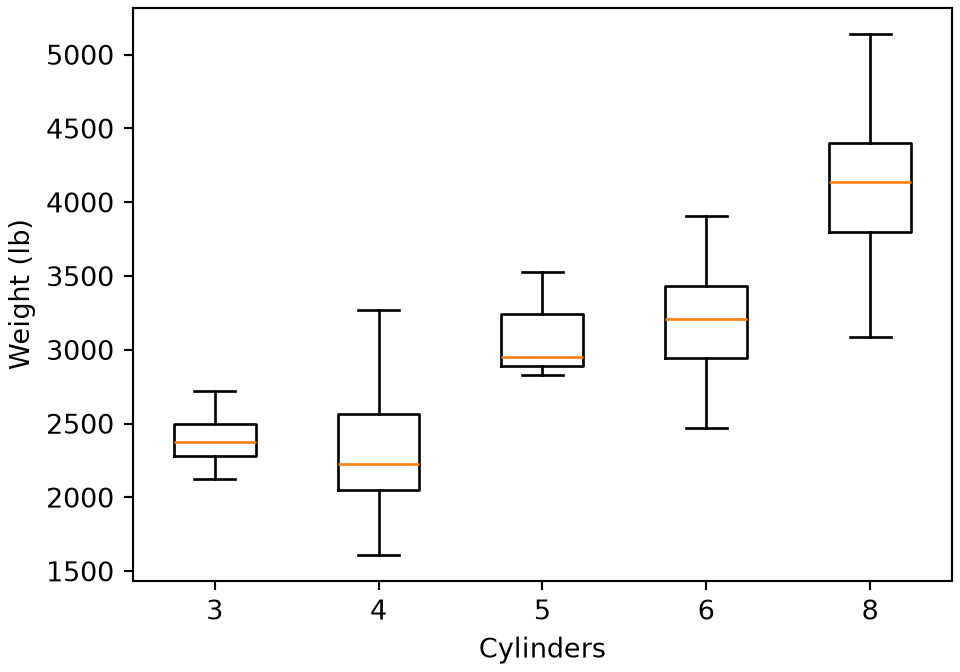
Boxplots drawn with matplotlib of weight by number of cylinders, highest for 8 cylinders and lowest for 3 and 4.

Show code
# `factor` makes the number of cylinders a category, one box each.
ggplot(auto, aes(x = factor(cylinders), y = weight)) +
  geom_boxplot() +
  labs(x = "Cylinders", y = "Weight (lb)")
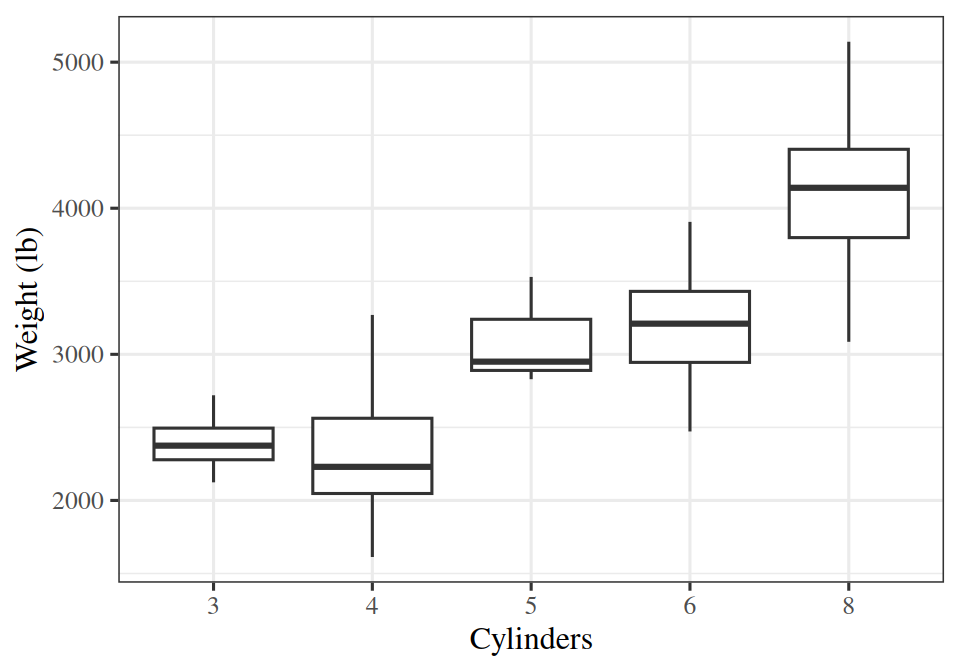
Boxplots drawn with ggplot2 of weight by number of cylinders, highest for 8 cylinders and lowest for 3 and 4.

2.5 Split, rescale and style plots

These matplotlib methods of an axes object ax do the jobs of the ggplot2 functions in the R tab:

Method What it does
fig, axes = plt.subplots(1, 3, sharey=True) one panel for each group, which you draw into yourself (facets)
ax.axline((0, 0), slope=1) a line given by a point and a slope, running across the whole axes
ax.vlines(x, ymin, ymax) a short vertical tick at each observation, along the bottom of the axes (a rug)
x + rng.uniform(-0.15, 0.15, size=len(x)) the same jitter, added by hand
ax.contour(x_grid, y_grid, z_grid, levels=[0.5]) contour lines of values given on a grid
ax.hist(x, density=True) a histogram scaled to a density
ax.set_xscale("log") a logarithmic axis (set_yscale for the vertical axis)
ax.xaxis.set_major_formatter("{x:,.0f}") tick labels written as plain numbers with commas, such as 1,000, in place of 10^3 (yaxis for the vertical axis)
ax.minorticks_off() removes the minor ticks, whose labels crowd a short logarithmic axis
ax.set_xlim(lo, hi) zoom to a range
ax.scatter(x, y, c=colours, marker="o") the colour and shape of each point
ax.fill_between(x, lower, upper, color="steelblue", alpha=0.3) a shaded band between two curves, such as a confidence band, in a colour you choose for each call

The notes also use these ggplot2 functions to split, rescale and style a plot, each added with +:

Function What it does
facet_wrap(~column) one panel for each value of a column, with shared axes (scales = "free_y" frees the vertical axis)
geom_abline(slope = 1, intercept = 0) a line given by its slope and intercept, such as the line where observed equals predicted
geom_rug(aes(x = column)) a tick on the axis for each observation, to show where the data are
geom_jitter(width = 0, height = 0.15) points moved randomly by a small amount, so that points with the same value do not overlap
geom_contour(aes(z = column), breaks = 0.5) contour lines of a quantity given on a grid, such as the line where a fitted probability is 0.5
after_stat(density) inside aes(), a quantity that the layer computed, such as the density that geom_histogram draws
scale_x_log10(labels = scales::label_comma()) a logarithmic axis labelled with plain numbers with commas, such as 1,000, not 1e+03 (scale_y_log10 for the vertical axis)
scale_colour_manual(values = c(a = "red", b = "blue")) the colour for each value, by name; scale_shape_manual and scale_linetype_manual do the same for shapes and line types
scale_fill_manual(values = c(a = "red", b = "blue")) the fill for each value, by name; the fill is the inside colour of a ribbon, bar or box, while colour is the outline of those and the colour of lines and points, so a grouping that sets both needs both scales
coord_cartesian(xlim = c(lo, hi), ylim = c(lo, hi)) zoom to a range without dropping the data outside it
theme(legend.position = "bottom") changes to individual parts of the plot; the lab’s theme, qnp::theme_morrison(), is already set for every page in .Rprofile
ExmExample 11 (Observed and fitted fuel economy, by region)

Example 11 (Observed and fitted fuel economy, by region) Fit mpg ~ weight + horsepower to the Auto data, and draw five plots: mpg against weight on a log axis, one panel for each region, with a rug along the axis; observed against fitted mpg, with the line where they are equal; the number of cylinders against mpg, jittered; the density of mpg; and contour lines of the fitted mpg over the two predictors:

Show code
import matplotlib.pyplot as plt
import numpy as np
import pandas as pd

auto_gg = pd.read_csv("data/auto.csv")
auto_gg["region"] = auto_gg["origin"].map({1: "US", 2: "Europe", 3: "Japan"})

# Least squares fit of mpg on weight and horsepower, with a column of ones for the intercept.
X_gg = np.column_stack([np.ones(len(auto_gg)), auto_gg["weight"], auto_gg["horsepower"]])
beta_gg = np.linalg.lstsq(X_gg, auto_gg["mpg"], rcond=None)[0]
auto_gg["fitted"] = X_gg @ beta_gg

fig_gg = plt.figure(figsize=(11, 6), layout="constrained")
grid_gg = fig_gg.add_gridspec(2, 4)

# A facet is one panel for each region, drawn here by a loop with `sharey` giving them one vertical axis.
# `set_xscale("log")` makes the horizontal axis logarithmic, `vlines` draws the rug,
# `set_major_formatter` writes the tick labels as 2,000, not 2e3, `set_xticks` picks which ticks to label,
# and `minorticks_off` removes the crowded minor tick labels of a log axis.
ax_first = None
for k, region in enumerate(["US", "Europe", "Japan"]):
    sub_gg = auto_gg[auto_gg["region"] == region]
    ax_k = fig_gg.add_subplot(grid_gg[0, k], sharey=ax_first)
    ax_first = ax_first or ax_k
    ax_k.scatter(sub_gg["weight"], sub_gg["mpg"], s=10, alpha=0.6);
    ax_k.vlines(sub_gg["weight"], 8, 10, alpha=0.2);
    ax_k.set_xscale("log");
    ax_k.xaxis.set_major_formatter("{x:,.0f}")
    ax_k.set_xticks([2000, 3000]);
    ax_k.minorticks_off();
    ax_k.set_title(region);
    ax_k.set_xlabel("Weight (lb)");

# `axline` draws the line where observed equals fitted; the colours say which region each car is from.
ax_l = fig_gg.add_subplot(grid_gg[1, 0])
colours_gg = {"US": "tab:blue", "Europe": "tab:orange", "Japan": "tab:green"}
ax_l.scatter(auto_gg["fitted"], auto_gg["mpg"], s=10, c=auto_gg["region"].map(colours_gg));
ax_l.axline((20, 20), slope=1, color="gray", linestyle="--");
ax_l.set_xlabel("Fitted mpg");
ax_l.set_ylabel("Observed mpg");

# Jitter: add a small random shift to the number of cylinders so that equal values do not overlap.
rng_gg = np.random.default_rng(571)
ax_m = fig_gg.add_subplot(grid_gg[1, 1])
ax_m.scatter(auto_gg["cylinders"] + rng_gg.uniform(-0.15, 0.15, len(auto_gg)), auto_gg["mpg"], s=10, alpha=0.6);
ax_m.set_xlabel("Cylinders");
ax_m.set_ylabel("mpg");

# `density=True` scales the histogram so that its total area is 1.
ax_n = fig_gg.add_subplot(grid_gg[1, 2])
ax_n.hist(auto_gg["mpg"], bins=20, density=True);
ax_n.set_xlabel("mpg");
ax_n.set_ylabel("Density");

# `contour` draws lines of constant fitted mpg over a grid of the two predictors.
w_gg, h_gg = np.meshgrid(np.linspace(1600, 5100, 60), np.linspace(45, 230, 60))
ax_o = fig_gg.add_subplot(grid_gg[:, 3])
lines_gg = ax_o.contour(w_gg, h_gg, beta_gg[0] + beta_gg[1] * w_gg + beta_gg[2] * h_gg)
ax_o.clabel(lines_gg);
ax_o.set_xlabel("Weight (lb)");
ax_o.set_ylabel("Horsepower");

plt.show()
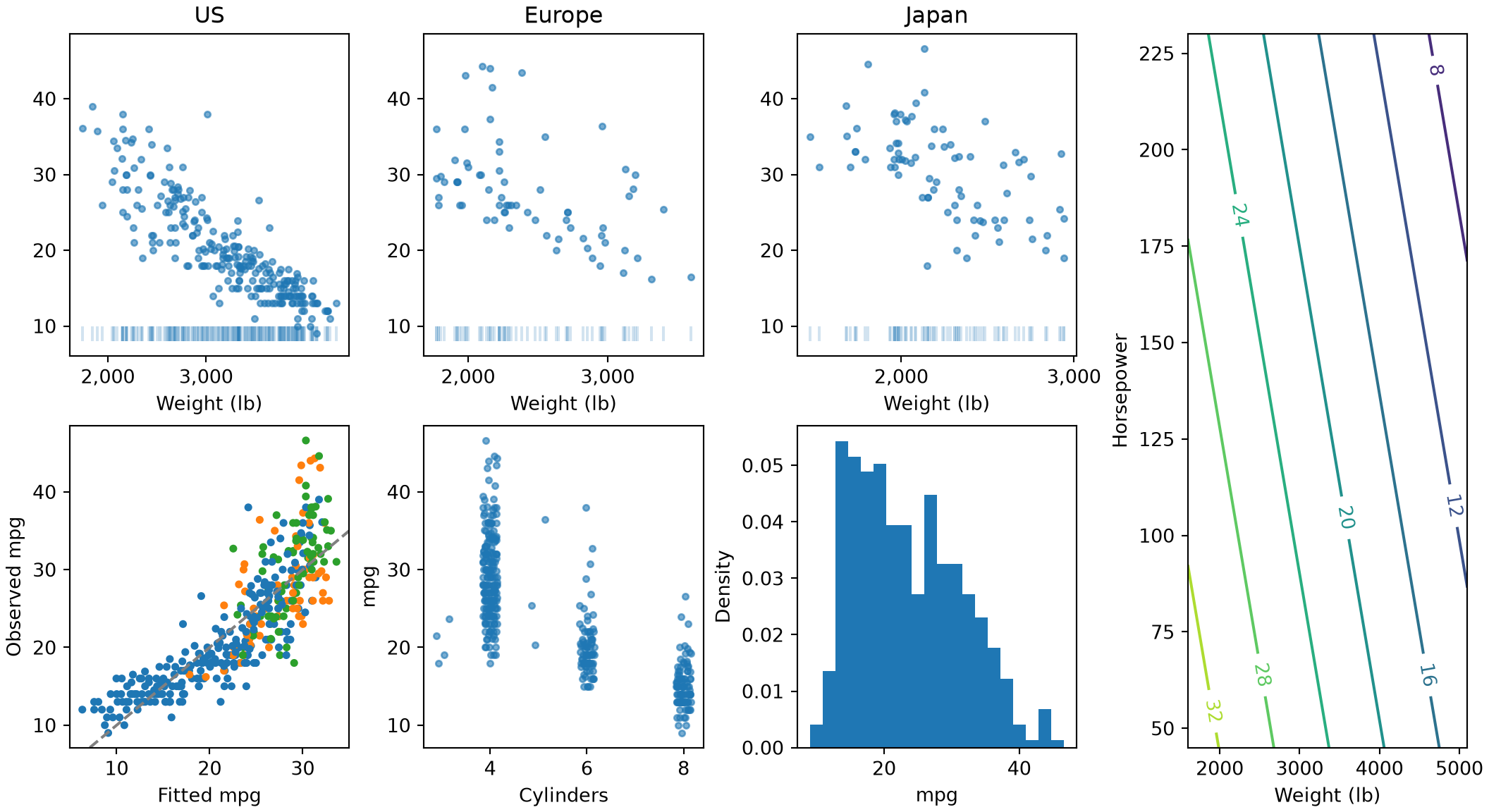
Five plots drawn with matplotlib from the Auto data. Top row, three panels for US, Europe and Japan cars: miles per gallon against weight on a log axis, falling as weight rises, with a short tick at the bottom for each car's weight. Bottom left: observed against fitted miles per gallon, scattered around a dashed diagonal line where they are equal, with the points colored by region. Bottom middle: miles per gallon against number of cylinders, with the points spread sideways so they do not overlap, higher for 4 cylinders than for 8. Bottom right: a histogram of miles per gallon scaled to a density, with a long right tail. Far right: contour lines of the fitted miles per gallon over weight and horsepower, falling toward heavy, powerful cars.

Next, shade a 95% confidence band around the fitted line of each of two periods, with a colour for each period:

Show code
import statsmodels.formula.api as smf

auto_gg["period"] = np.where(auto_gg["year"] <= 76, "1970 to 1976", "1977 to 1982")

# Fit a separate line for each period, with an interaction between weight and period, as in the R tab.
fit_period = smf.ols("mpg ~ weight * period", data=auto_gg).fit()
weights_gg = np.linspace(1600, 5100, 60)
fig_b, ax_b = plt.subplots()
for period, colour in [("1970 to 1976", "steelblue"), ("1977 to 1982", "firebrick")]:
    grid_b = pd.DataFrame({"weight": weights_gg, "period": period})
    band_b = fit_period.get_prediction(grid_b).summary_frame(alpha=0.05)
    # `fill_between` shades the band and `plot` draws the line, both in the colour chosen for this period.
    ax_b.fill_between(weights_gg, band_b["mean_ci_lower"], band_b["mean_ci_upper"], color=colour, alpha=0.3);
    ax_b.plot(weights_gg, band_b["mean"], color=colour, label=period);
ax_b.set_xlabel("Weight (lb)");
ax_b.set_ylabel("Fitted mpg");
ax_b.legend();
plt.show()
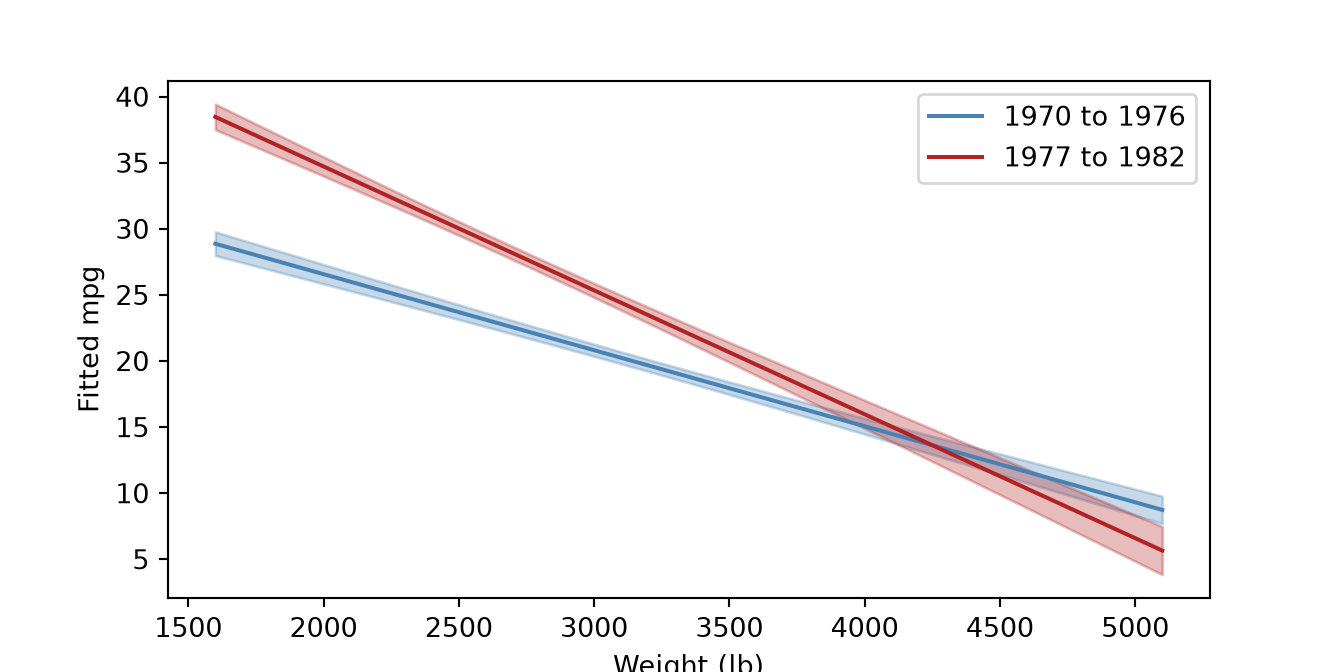
A plot drawn with matplotlib of fitted miles per gallon against weight for two periods, 1970 to 1976 and 1977 to 1982. Each period has a fitted line falling as weight rises, with a shaded 95% confidence band around it, blue for the early period and red for the later one.

Show code
library(dplyr)
library(ggplot2)

auto_gg <- read.csv("data/auto.csv") |>
  mutate(region = factor(c("US", "Europe", "Japan")[origin], levels = c("US", "Europe", "Japan")))
fit_gg <- lm(mpg ~ weight + horsepower, data = auto_gg)
auto_gg$fitted <- fitted(fit_gg)

# `facet_wrap` makes one panel for each region; `scale_x_log10` makes the axis logarithmic
# and `label_comma` labels it 2,000, not 2e+03; `geom_rug` marks where the data are.
ggplot(auto_gg, aes(x = weight, y = mpg)) +
  geom_point(alpha = 0.6, size = 1) +
  geom_rug(sides = "b", alpha = 0.3) +
  scale_x_log10(labels = scales::label_comma()) +
  facet_wrap(~region)
# `geom_abline` draws the line where observed equals fitted; `scale_colour_manual` and
# `scale_shape_manual` choose a colour and shape for each region by name.
ggplot(auto_gg, aes(x = fitted, y = mpg, colour = region, shape = region)) +
  geom_point() +
  geom_abline(slope = 1, intercept = 0, linetype = "dashed") +
  scale_colour_manual(values = c(US = "steelblue", Europe = "darkorange", Japan = "forestgreen")) +
  scale_shape_manual(values = c(US = 16, Europe = 17, Japan = 15)) +
  theme(legend.position = "bottom")
# `geom_jitter` shifts each point sideways by a small random amount so equal values do not overlap.
ggplot(auto_gg, aes(x = cylinders, y = mpg)) +
  geom_jitter(width = 0.15, height = 0, alpha = 0.6) +
  coord_cartesian(ylim = c(5, 50))
# `after_stat(density)` plots a quantity the histogram layer computed, instead of a column of the data.
ggplot(auto_gg, aes(x = mpg)) +
  geom_histogram(aes(y = after_stat(density)), bins = 20) +
  labs(y = "Density")
# `geom_contour` draws lines of constant fitted mpg over a grid of the two predictors.
grid_gg <- expand.grid(weight = seq(1600, 5100, length.out = 60),
                       horsepower = seq(45, 230, length.out = 60))
grid_gg$mpg_hat <- predict(fit_gg, newdata = grid_gg)
ggplot(grid_gg, aes(x = weight, y = horsepower, z = mpg_hat)) +
  geom_contour()
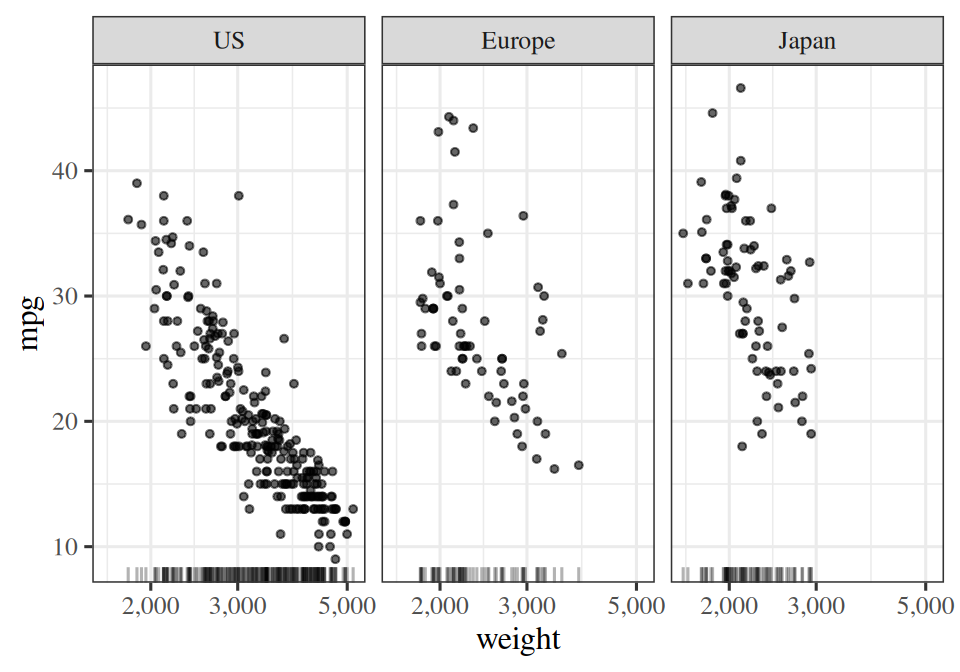
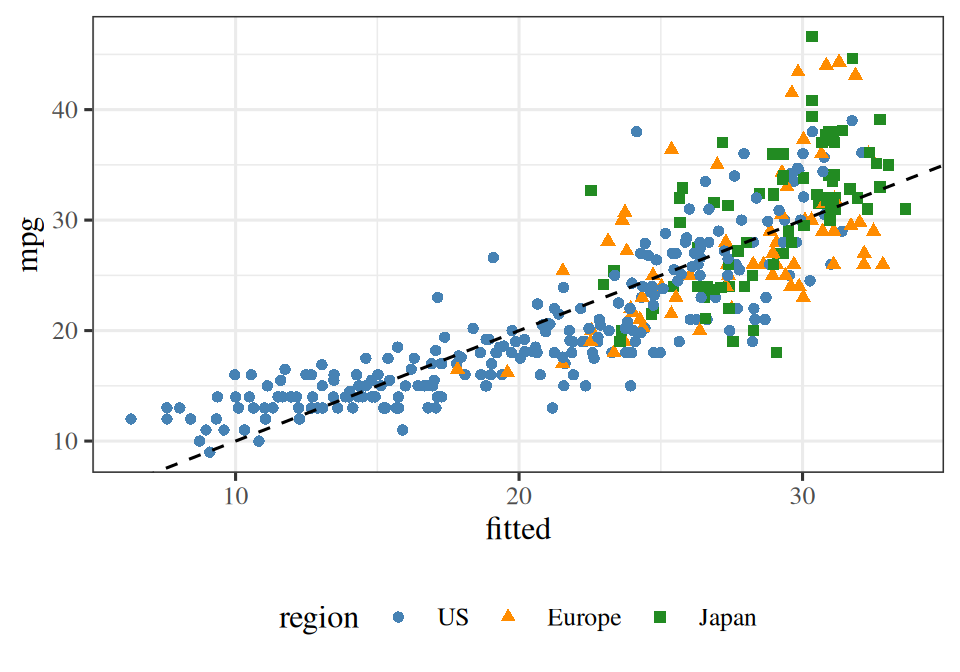
Contour lines drawn with ggplot2 of the fitted miles per gallon over weight and horsepower, falling toward heavy, powerful cars.

Three panels drawn with ggplot2 from the Auto data, one each for US, Europe and Japan cars: miles per gallon against weight on a log axis, falling as weight rises, with a tick on the horizontal axis for each car.

A scatter plot drawn with ggplot2 of observed against fitted miles per gallon, scattered around a dashed diagonal line where they are equal, with color and shape for the region.

A jittered plot drawn with ggplot2 of miles per gallon against number of cylinders, higher for 4 cylinders than for 8.

A histogram drawn with ggplot2 of miles per gallon scaled to a density, with a long right tail.

Next, shade a 95% confidence band around the fitted line of each of two periods, with a colour for each period:

Show code
auto_gg$period <- ifelse(auto_gg$year <= 76, "1970 to 1976", "1977 to 1982")

# Fit a separate line for each period with an interaction between weight and period,
# and predict on a grid of weights for both periods, with a 95% confidence interval.
fit_period <- lm(mpg ~ weight * period, data = auto_gg)
band_gg <- expand.grid(weight = seq(1600, 5100, length.out = 60),
                       period = c("1970 to 1976", "1977 to 1982"))
band_gg <- cbind(band_gg, predict(fit_period, newdata = band_gg, interval = "confidence"))

# A ribbon is filled while a line is coloured, so the period sets both `fill` and `colour`,
# and `scale_fill_manual` and `scale_colour_manual` give each period the same colour by name.
# `colour = NA` turns off the ribbon's own outline.
ggplot(band_gg, aes(x = weight, y = fit, colour = period, fill = period)) +
  geom_ribbon(aes(ymin = lwr, ymax = upr), alpha = 0.3, colour = NA) +
  geom_line() +
  scale_colour_manual(values = c("1970 to 1976" = "steelblue", "1977 to 1982" = "firebrick")) +
  scale_fill_manual(values = c("1970 to 1976" = "steelblue", "1977 to 1982" = "firebrick")) +
  labs(x = "Weight (lb)", y = "Fitted mpg")
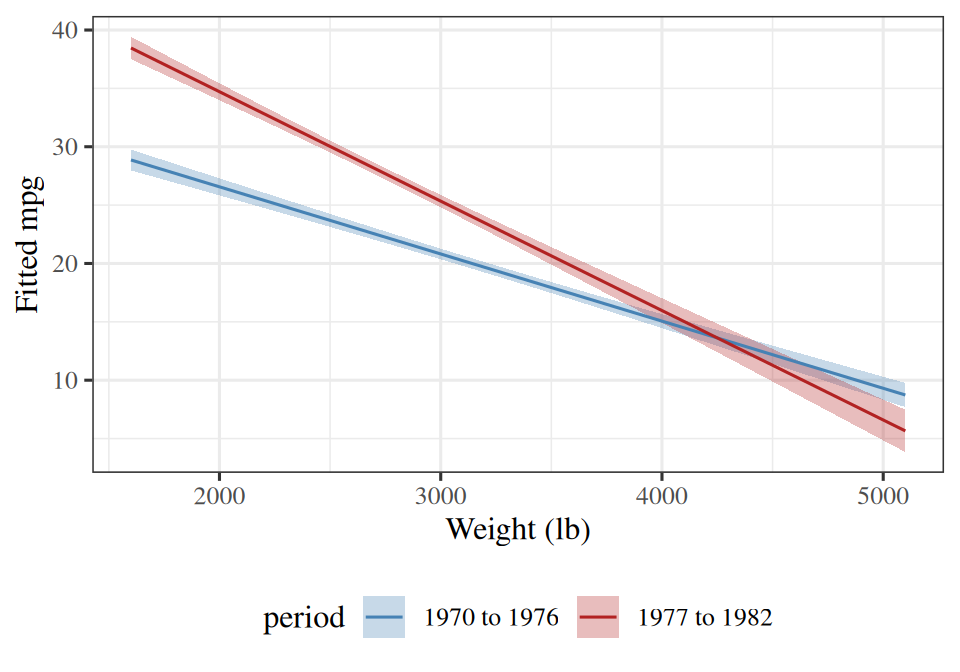
A plot drawn with ggplot2 of fitted miles per gallon against weight for two periods, 1970 to 1976 and 1977 to 1982. Each period has a fitted line falling as weight rises, with a shaded 95% confidence band around it, blue for the early period and red for the later one.

The fit has an \(R^2\) of 0.71, so the points in the second plot lie close to the dashed line.

ExrExercise 64 (Split and style a plot)

Exercise 64 (Split and style a plot) Use the Auto data frame from the previous exercises, and fit mpg ~ weight.

Plot mpg against horsepower with a logarithmic horizontal axis, one panel for each number of cylinders.

Solution 64.

Show code
import matplotlib.pyplot as plt
import numpy as np

# One panel for each number of cylinders, on shared axes, the horizontal one logarithmic.
cyl_groups = list(Auto.groupby("cylinders"))
fig_s2, axes_s2 = plt.subplots(1, len(cyl_groups), figsize=(11, 3), sharex=True, sharey=True,
                               layout="constrained")
for ax_k, (cyl, sub) in zip(axes_s2, cyl_groups):
    ax_k.scatter(sub["horsepower"], sub["mpg"], s=10, alpha=0.6);
    ax_k.set_xscale("log");
    ax_k.xaxis.set_major_formatter("{x:,.0f}")
    ax_k.set_xticks([50, 100, 200]);
    ax_k.minorticks_off();
    ax_k.set_title(f"{cyl} cylinders");
    ax_k.set_xlabel("Horsepower");
axes_s2[0].set_ylabel("Miles per gallon");
plt.show()
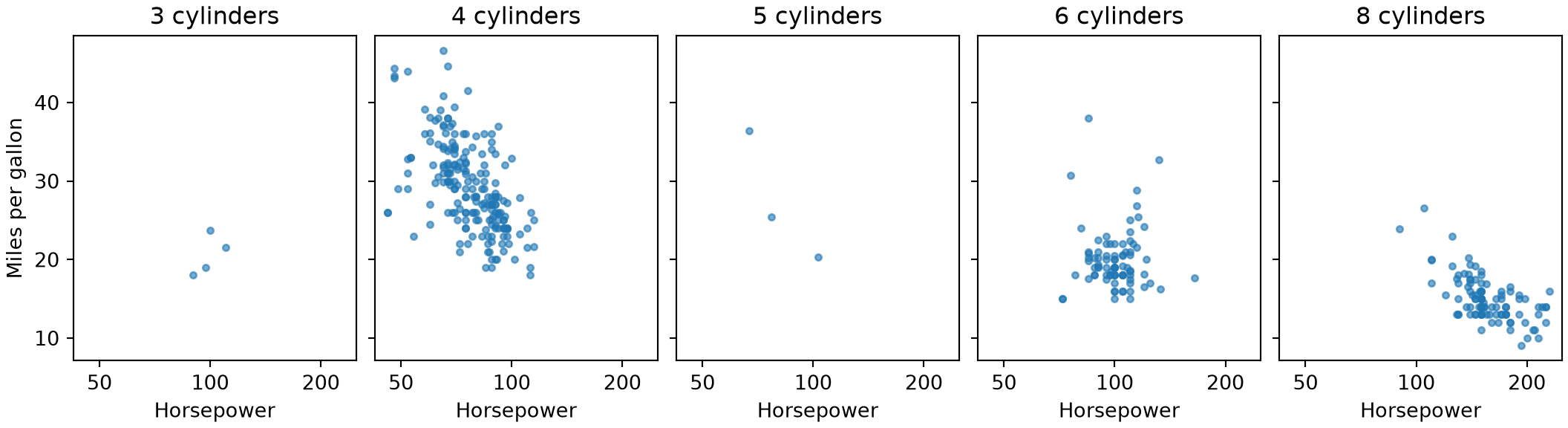
Five panels drawn with matplotlib from the Auto data, one each for 3, 4, 5, 6 and 8 cylinders: miles per gallon against horsepower on a log axis, falling as horsepower rises.

Show code
library(ggplot2)

# One panel for each number of cylinders, on a logarithmic horizontal axis.
ggplot(auto, aes(x = horsepower, y = mpg)) +
  geom_point(alpha = 0.6, size = 1) +
  scale_x_log10(labels = scales::label_comma()) +
  facet_wrap(~cylinders)
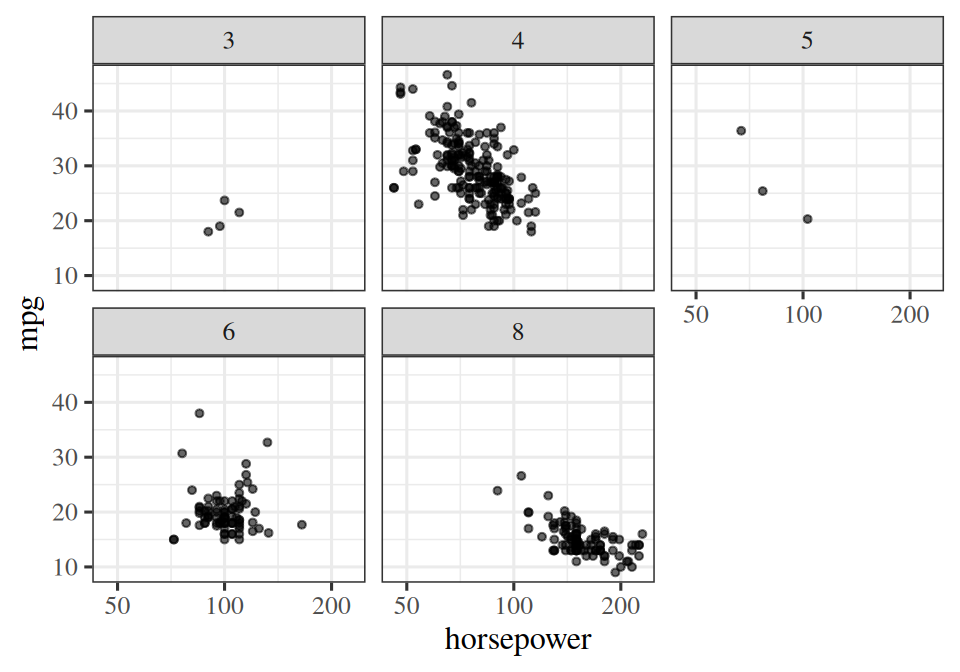
Five panels drawn with ggplot2 from the Auto data, one each for 3, 4, 5, 6 and 8 cylinders: miles per gallon against horsepower on a log axis, falling as horsepower rises.

ExrExercise 65 (Split and style a plot (part 2))

Exercise 65 (Split and style a plot (part 2)) Use the setup of Exercise 64.

Plot the observed against the fitted mpg, with the line where they are equal, and a colour for each region (origin).

Solution 65.

Show code
# Fit mpg on weight by least squares, then draw observed against fitted.
slope_s2, intercept_s2 = np.polyfit(Auto["weight"], Auto["mpg"], 1)
fitted_s2 = intercept_s2 + slope_s2 * Auto["weight"]
colours_s2 = {1: "tab:blue", 2: "tab:orange", 3: "tab:green"}
fig_l, ax_l = plt.subplots(figsize=(5, 3.5), layout="constrained")
ax_l.scatter(fitted_s2, Auto["mpg"], s=10, c=Auto["origin"].map(colours_s2));
ax_l.axline((20, 20), slope=1, color="gray", linestyle="--");
ax_l.set_xlabel("Fitted mpg");
ax_l.set_ylabel("Observed mpg");
plt.show()
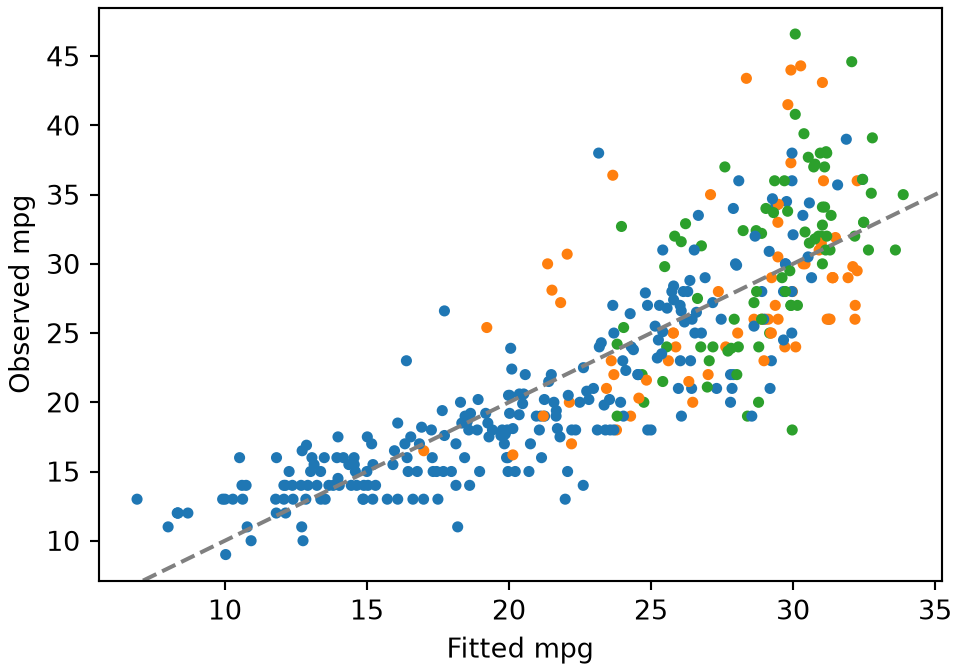
A scatter plot drawn with matplotlib of observed against fitted miles per gallon, scattered around a dashed diagonal line where they are equal, with a color for each region.

Show code
# Fit mpg on weight, then draw observed against fitted with the line where they are equal.
auto_s2 <- auto
auto_s2$fitted <- fitted(lm(mpg ~ weight, data = auto_s2))
ggplot(auto_s2, aes(x = fitted, y = mpg, colour = factor(origin))) +
  geom_point() +
  geom_abline(slope = 1, intercept = 0, linetype = "dashed") +
  scale_colour_manual(values = c("1" = "steelblue", "2" = "darkorange", "3" = "forestgreen"),
                      labels = c("US", "Europe", "Japan"), name = "Region")
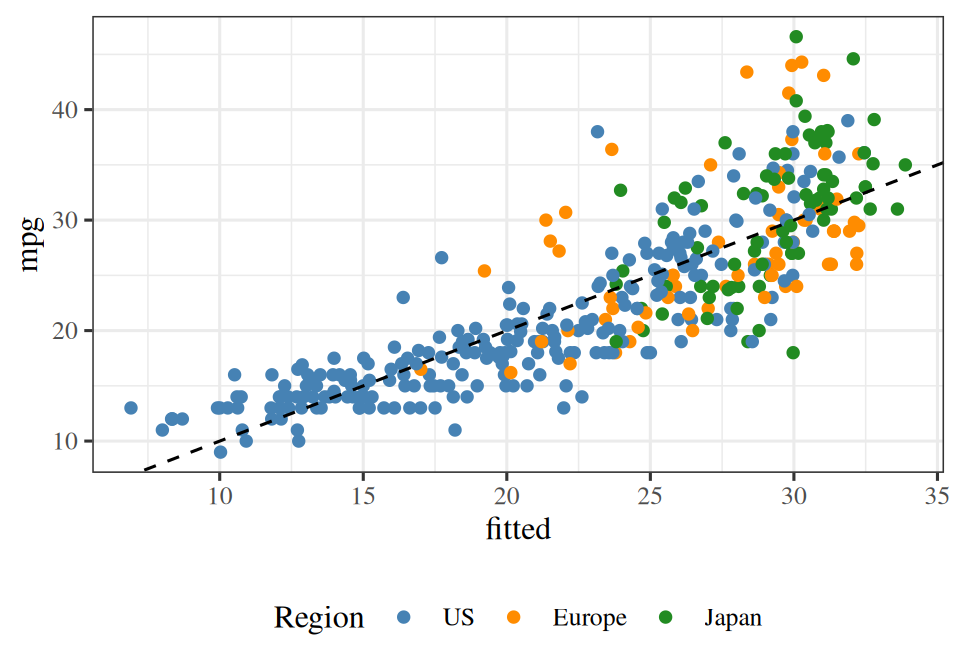
A scatter plot drawn with ggplot2 of observed against fitted miles per gallon, scattered around a dashed diagonal line where they are equal, with a color for each region.

ExrExercise 66 (Split and style a plot (part 3))

Exercise 66 (Split and style a plot (part 3)) Use the setup of Exercise 64.

Draw a histogram of weight scaled to a density.

Solution 66.

Show code
# `density=True` scales the histogram so that its total area is 1.
fig_m, ax_m = plt.subplots(figsize=(5, 3.5), layout="constrained")
ax_m.hist(Auto["weight"], bins=20, density=True);
ax_m.set_xlabel("Weight (lb)");
ax_m.set_ylabel("Density");
plt.show()
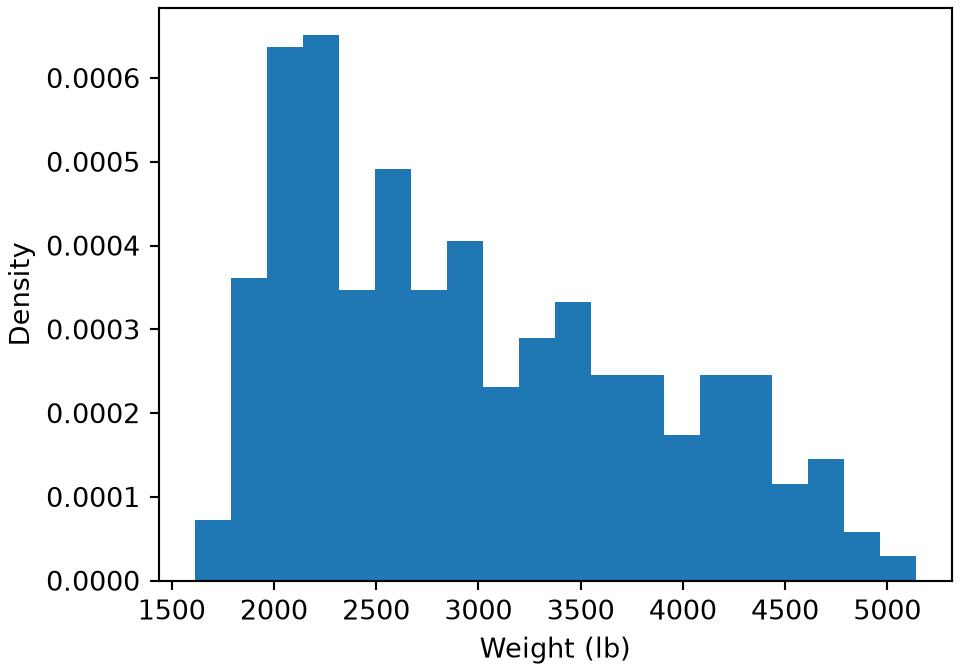
A histogram drawn with matplotlib of car weight scaled to a density, with most cars between about 2,000 and 4,000 pounds.

Show code
# `after_stat(density)` plots the density the histogram layer computed.
ggplot(auto, aes(x = weight)) +
  geom_histogram(aes(y = after_stat(density)), bins = 20) +
  labs(x = "Weight (lb)", y = "Density")
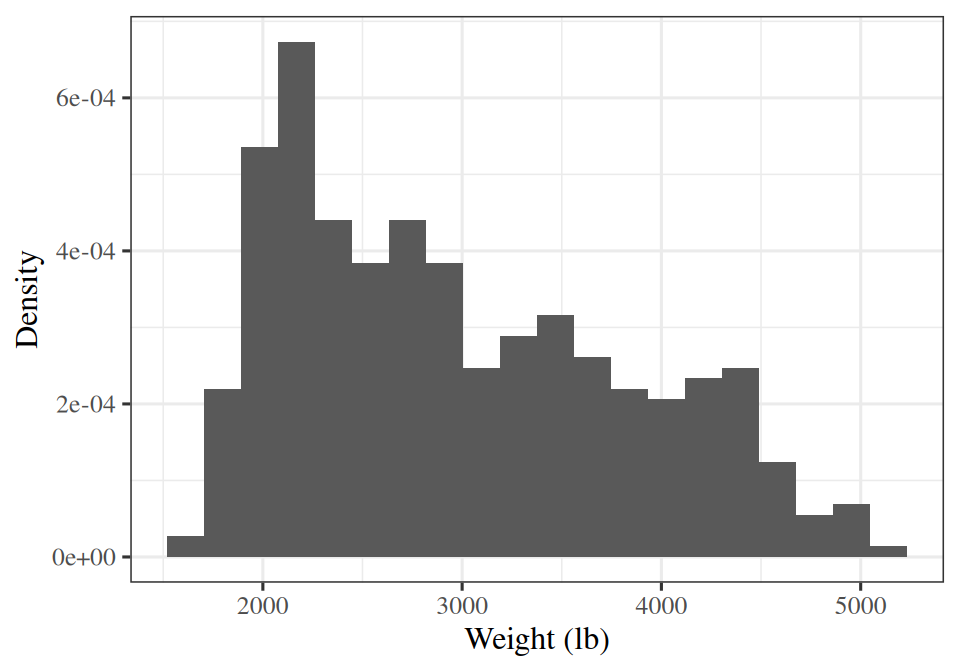
A histogram drawn with ggplot2 of car weight scaled to a density, with most cars between about 2,000 and 4,000 pounds.

ExrExercise 67 (Split and style a plot (part 4))

Exercise 67 (Split and style a plot (part 4)) Use the setup of Exercise 64.

Fit mpg ~ weight * period, where period is “early” for model years up to 76 and “late” after that.

Solution 67.

import pandas as pd
import statsmodels.formula.api as smf

# Label each car's period, then fit one line for each period with an interaction.
auto_s4 = Auto.assign(period=np.where(Auto["year"] <= 76, "early", "late"))
fit_s4 = smf.ols("mpg ~ weight * period", data=auto_s4).fit()
print(fit_s4.params.round(4).to_dict())
{'Intercept': 38.0718, 'period[T.late]': 15.3873, 'weight': -0.0058, 'weight:period[T.late]': -0.0036}
auto_s4 <- auto
auto_s4$period <- ifelse(auto_s4$year <= 76, "early", "late")

# Fit one line for each period with an interaction.
fit_s4 <- lm(mpg ~ weight * period, data = auto_s4)
print(round(coef(fit_s4), 4))
      (Intercept)            weight        periodlate weight:periodlate 
          38.0718           -0.0058           15.3873           -0.0036 
ExrExercise 68 (Split and style a plot (part 5))

Exercise 68 (Split and style a plot (part 5)) Use the setup of Exercise 64.

Plot the fitted line of each period with its 95% confidence band shaded, in a colour you choose for each period.

Solution 68.

Show code
weights_s4 = np.linspace(Auto["weight"].min(), Auto["weight"].max(), 60)

# For each period, `get_prediction` gives the fit and its 95% confidence limits on a grid of weights;
# `fill_between` shades between the limits and `plot` draws the line, in one colour for the period.
fig_s4, ax_s4 = plt.subplots()
for period, colour in [("early", "tab:blue"), ("late", "tab:orange")]:
    grid_s4 = pd.DataFrame({"weight": weights_s4, "period": period})
    band_s4 = fit_s4.get_prediction(grid_s4).summary_frame(alpha=0.05)
    ax_s4.fill_between(weights_s4, band_s4["mean_ci_lower"], band_s4["mean_ci_upper"], color=colour, alpha=0.3);
    ax_s4.plot(weights_s4, band_s4["mean"], color=colour, label=period);
ax_s4.set_xlabel("Weight (lb)");
ax_s4.set_ylabel("Fitted mpg");
ax_s4.legend();
plt.show()
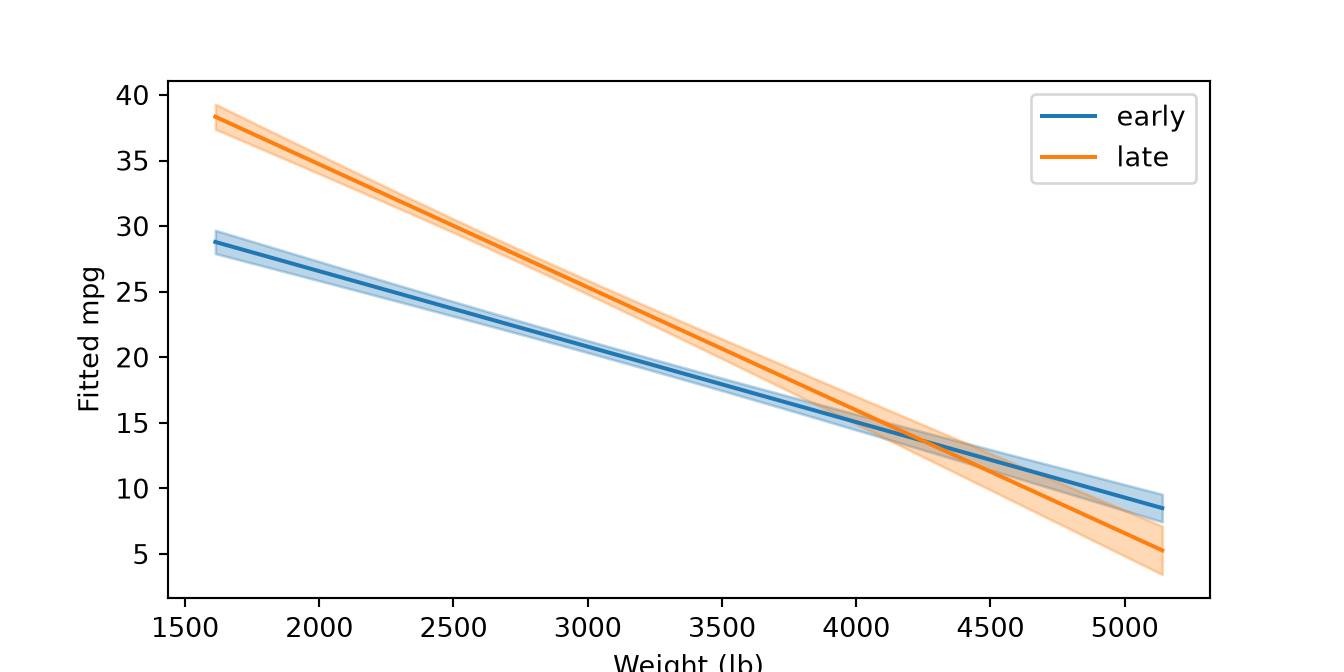
A plot drawn with matplotlib of fitted miles per gallon against weight for early and late model years. Each period has a falling fitted line with a shaded 95% confidence band, blue for the early period and orange for the late one.

Show code
# Predict with 95% confidence limits on a grid.
band_s4 <- expand.grid(weight = seq(min(auto$weight), max(auto$weight), length.out = 60),
                       period = c("early", "late"))
band_s4 <- cbind(band_s4, predict(fit_s4, newdata = band_s4, interval = "confidence"))

# The ribbon is filled and the line is coloured, so both scales are named with the same colours.
ggplot(band_s4, aes(x = weight, y = fit, colour = period, fill = period)) +
  geom_ribbon(aes(ymin = lwr, ymax = upr), alpha = 0.3, colour = NA) +
  geom_line() +
  scale_colour_manual(values = c(early = "steelblue", late = "darkorange")) +
  scale_fill_manual(values = c(early = "steelblue", late = "darkorange")) +
  labs(x = "Weight (lb)", y = "Fitted mpg")
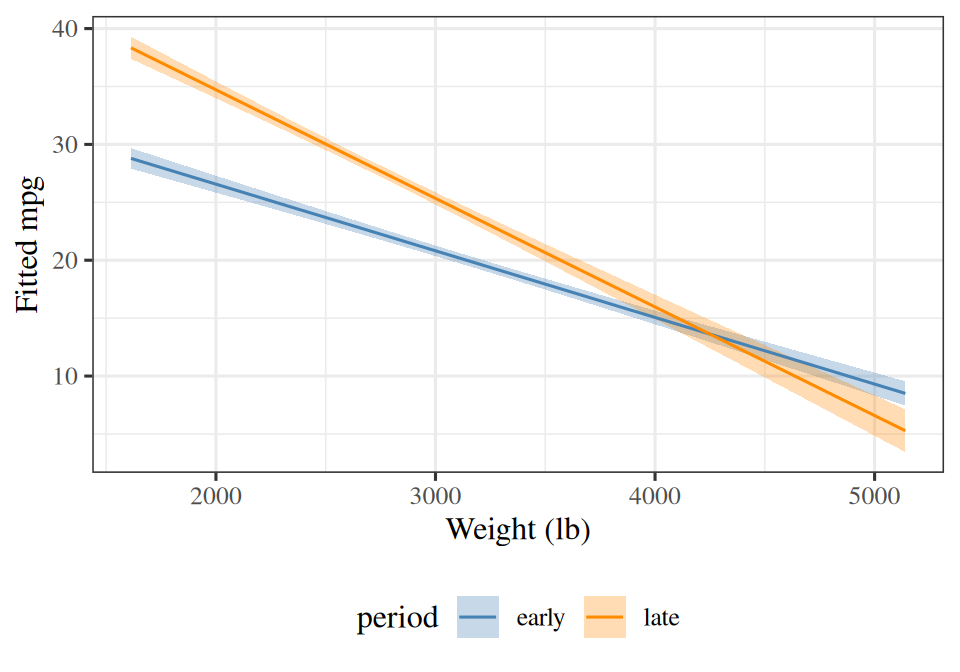
A plot drawn with ggplot2 of fitted miles per gallon against weight for early and late model years. Each period has a falling fitted line with a shaded 95% confidence band, blue for the early period and orange for the late one.

2.6 Interactive three-dimensional plots

Method What it draws or sets
ax = fig.add_subplot(projection="3d") an axes object for three-dimensional plots
ax.plot_surface(X, Y, Z) a surface over grids X and Y, from a grid Z of heights
ax.scatter(x, y, z) points in three dimensions
ax.view_init(elev=15, azim=-60) the viewing angle, since a static figure cannot be rotated

On the website, plotly draws a plot that a reader can rotate and zoom. A PDF cannot show that, so the code checks which format it is rendering:

Function What it does
knitr::is_html_output() TRUE when the page is rendered to HTML, so that the interactive version is drawn only there
plot_ly() starts an interactive plot
add_surface(x = x_vals, y = y_vals, z = z_matrix) a surface over the grid of x_vals and y_vals; z_matrix has one row for each y value, so pass t(z) if the rows follow x
add_trace(x = x, y = y, z = z, type = "scatter3d", mode = "markers") points or lines added to the plot
config(displaylogo = FALSE) settings of the plot’s toolbar
htmltools::div(role = "img", `aria-label` = "...", widget) wraps the plot in an element that has a text description, because a plotly widget has no alt text of its own
persp(x_vals, y_vals, z_matrix, theta = 55, phi = 25) the static surface that the PDF gets instead
ExmExample 12 (The fitted plane of fuel economy)

Example 12 (The fitted plane of fuel economy) Fit mpg ~ horsepower + weight to the Auto data and draw the fitted plane over a grid of the two predictors, with the cars as points:

Show code
import matplotlib.pyplot as plt
import numpy as np
import pandas as pd

auto_pl = pd.read_csv("data/auto.csv")

# Fit by least squares, with a column of ones for the intercept.
X_pl = np.column_stack([np.ones(len(auto_pl)), auto_pl["horsepower"], auto_pl["weight"]])
beta_pl = np.linalg.lstsq(X_pl, auto_pl["mpg"], rcond=None)[0]

# The fitted plane on a grid: `meshgrid` makes the grids of horsepower and weight.
hp_pl, wt_pl = np.meshgrid(np.linspace(46, 230, 20), np.linspace(1600, 5150, 20))
plane_pl = beta_pl[0] + beta_pl[1] * hp_pl + beta_pl[2] * wt_pl

# A 3D axes; `plot_surface` draws the plane, `scatter` the cars, and `view_init` sets the angle.
fig_pl = plt.figure(figsize=(7, 5), layout="constrained")
ax_pl = fig_pl.add_subplot(projection="3d")
ax_pl.plot_surface(hp_pl, wt_pl, plane_pl, alpha=0.4);
ax_pl.scatter(auto_pl["horsepower"], auto_pl["weight"], auto_pl["mpg"], s=6);
ax_pl.set_xlabel("Horsepower");
ax_pl.set_ylabel("Weight (lb)");
ax_pl.set_zlabel("mpg");
ax_pl.view_init(elev=15, azim=-60);
ax_pl.set_box_aspect(None, zoom=0.9);
plt.show()
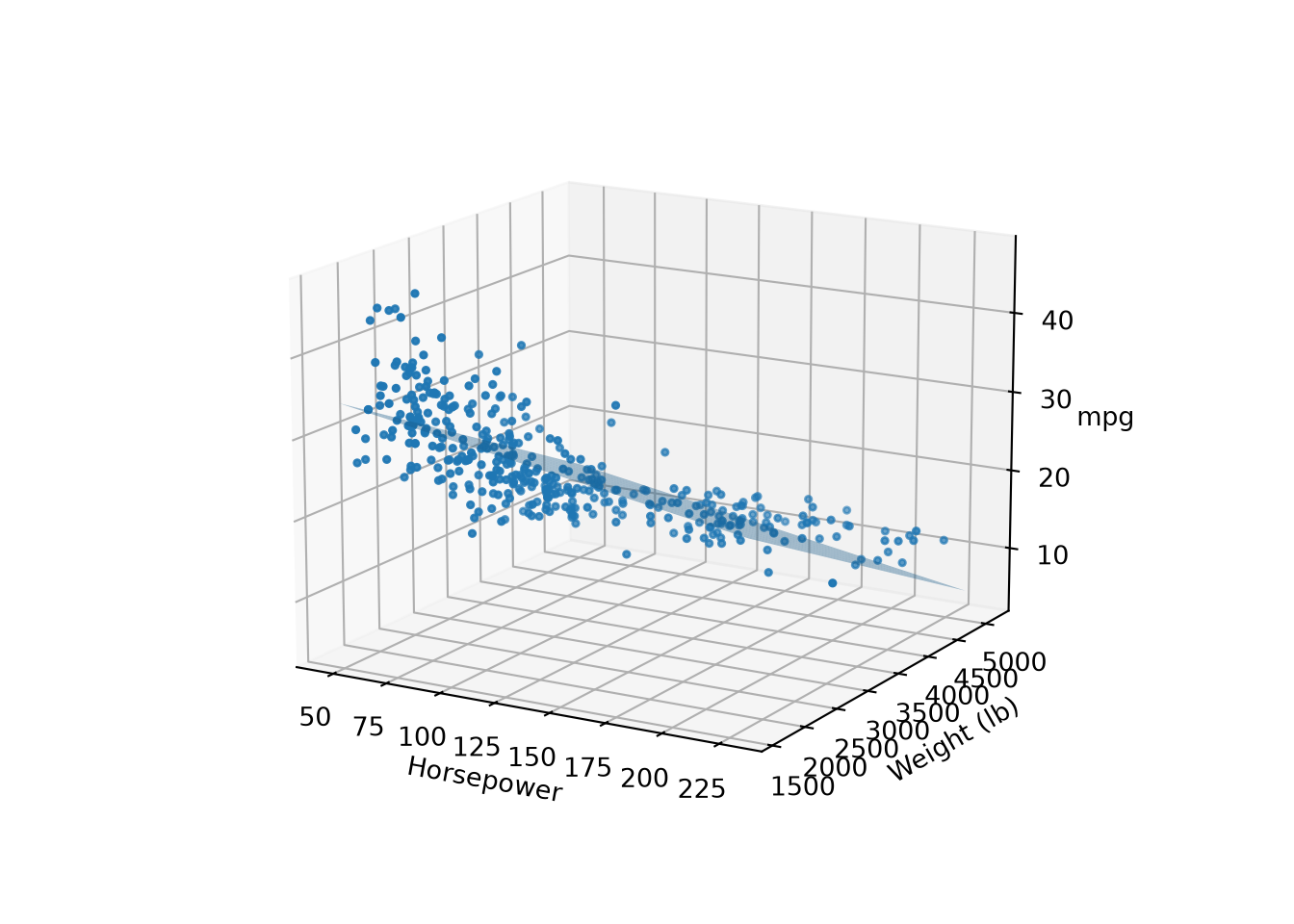
A three-dimensional plot drawn with matplotlib: the fitted plane of miles per gallon over horsepower and weight, sloping down toward heavy, powerful cars, with the cars as points scattered around it.

Show code
auto_pl <- read.csv("data/auto.csv")
fit_pl <- lm(mpg ~ horsepower + weight, data = auto_pl)

# The fitted plane on a grid of the two predictors; `outer` evaluates the plane at every pair.
hp_pl <- seq(46, 230, length.out = 20)
wt_pl <- seq(1600, 5150, length.out = 20)
coef_pl <- coef(fit_pl)
plane_pl <- outer(hp_pl, wt_pl, \(h, w) coef_pl[[1]] + coef_pl[[2]] * h + coef_pl[[3]] * w)

if (knitr::is_html_output()) {
  library(plotly)

  # `add_surface` wants one row of z for each y value, hence the transpose.
  widget_pl <- plot_ly() |>
    add_surface(x = hp_pl, y = wt_pl, z = t(plane_pl), opacity = 0.5, showscale = FALSE) |>
    add_trace(data = auto_pl, x = ~horsepower, y = ~weight, z = ~mpg,
              type = "scatter3d", mode = "markers", marker = list(size = 2)) |>
    layout(scene = list(xaxis = list(title = "Horsepower"), yaxis = list(title = "Weight (lb)"),
                        zaxis = list(title = "mpg"))) |>
    config(displaylogo = FALSE)

  # A plotly widget has no alt text, so wrap it in an element that has one.
  htmltools::div(
    role = "img",
    `aria-label` = "Interactive 3D plot of the fitted plane of miles per gallon over horsepower and weight, with the cars as points. Drag to rotate.",
    widget_pl
  )
} else {
  # The PDF cannot be rotated, so draw the plane with `persp`, and the cars on it with `trans3d`.
  view_pl <- persp(hp_pl, wt_pl, plane_pl, theta = 55, phi = 25, col = "lightblue",
                   xlab = "Horsepower", ylab = "Weight (lb)", zlab = "mpg")
  points(trans3d(auto_pl$horsepower, auto_pl$weight, auto_pl$mpg, view_pl), pch = 16, cex = 0.4)
}
ExrExercise 69 (Draw a fitted plane)

Exercise 69 (Draw a fitted plane) Use the Auto data frame from the previous exercises.

Fit acceleration ~ displacement + weight.

Solution 69.

import numpy as np

# 1. Fit by least squares.
X_sl = np.column_stack([np.ones(len(Auto)), Auto["displacement"], Auto["weight"]])
beta_sl = np.linalg.lstsq(X_sl, Auto["acceleration"], rcond=None)[0]
Show code
# 1. Fit, and evaluate the plane on a grid.
fit_sl <- lm(acceleration ~ displacement + weight, data = auto)
d_sl <- seq(68, 455, length.out = 20)
w_sl <- seq(1600, 5150, length.out = 20)
b_sl <- coef(fit_sl)
plane_sl <- outer(d_sl, w_sl, \(d, w) b_sl[[1]] + b_sl[[2]] * d + b_sl[[3]] * w)
ExrExercise 70 (Draw a fitted plane (part 2))

Exercise 70 (Draw a fitted plane (part 2)) Use the setup of Exercise 69.

Draw the fitted plane over a grid of the two predictors, with the cars as points.

Solution 70.

Show code
import matplotlib.pyplot as plt

# 2. The plane on a grid, and the cars as points.
d_sl, w_sl = np.meshgrid(np.linspace(68, 455, 20), np.linspace(1600, 5150, 20))
plane_sl = beta_sl[0] + beta_sl[1] * d_sl + beta_sl[2] * w_sl
fig_sl = plt.figure(figsize=(7, 5), layout="constrained")
ax_sl = fig_sl.add_subplot(projection="3d")
ax_sl.plot_surface(d_sl, w_sl, plane_sl, alpha=0.4);
ax_sl.scatter(Auto["displacement"], Auto["weight"], Auto["acceleration"], s=6);
ax_sl.set_xlabel("Displacement");
ax_sl.set_ylabel("Weight (lb)");
ax_sl.set_zlabel("Acceleration");
ax_sl.view_init(elev=15, azim=-60);
ax_sl.set_box_aspect(None, zoom=0.9);
plt.show()
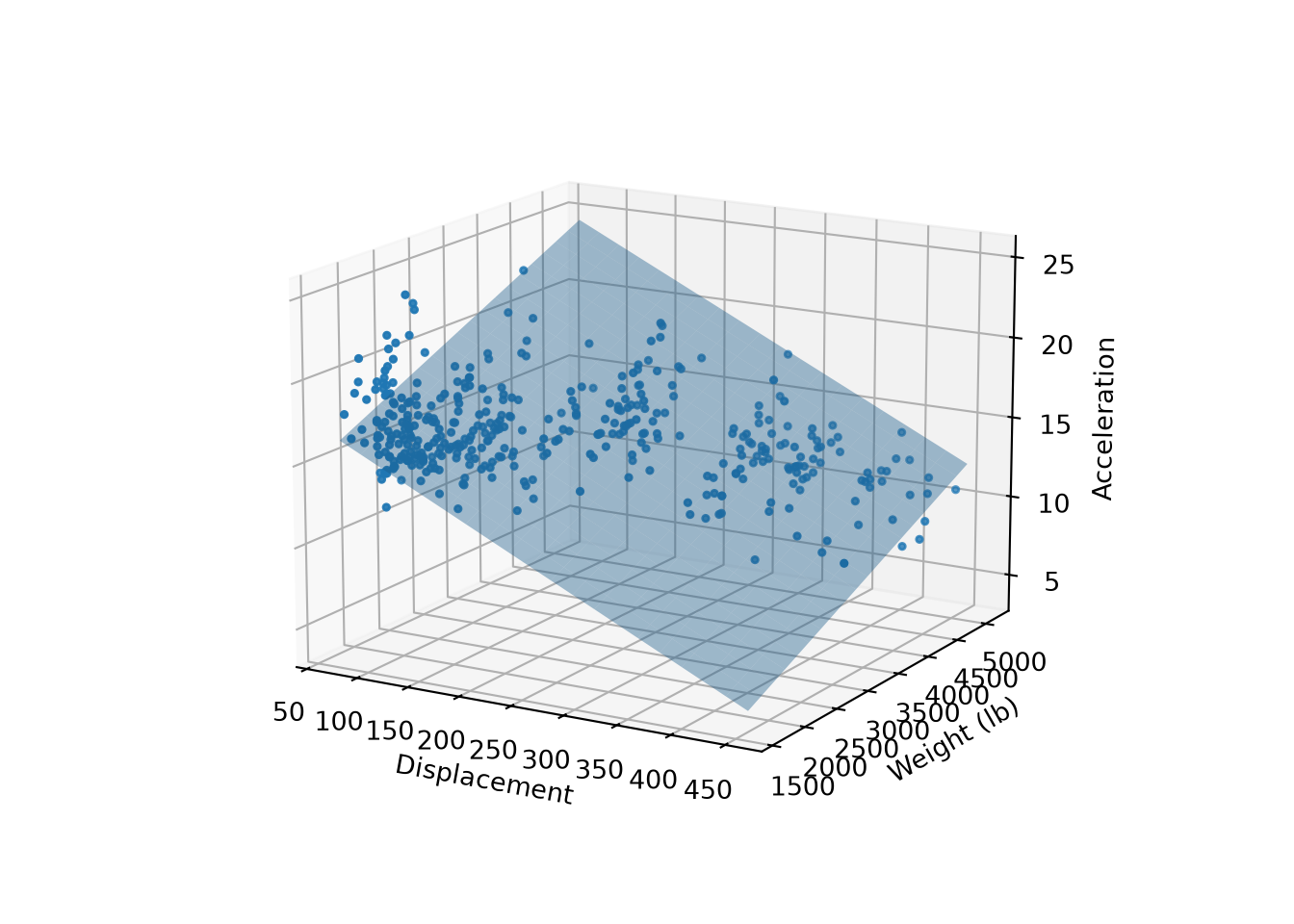
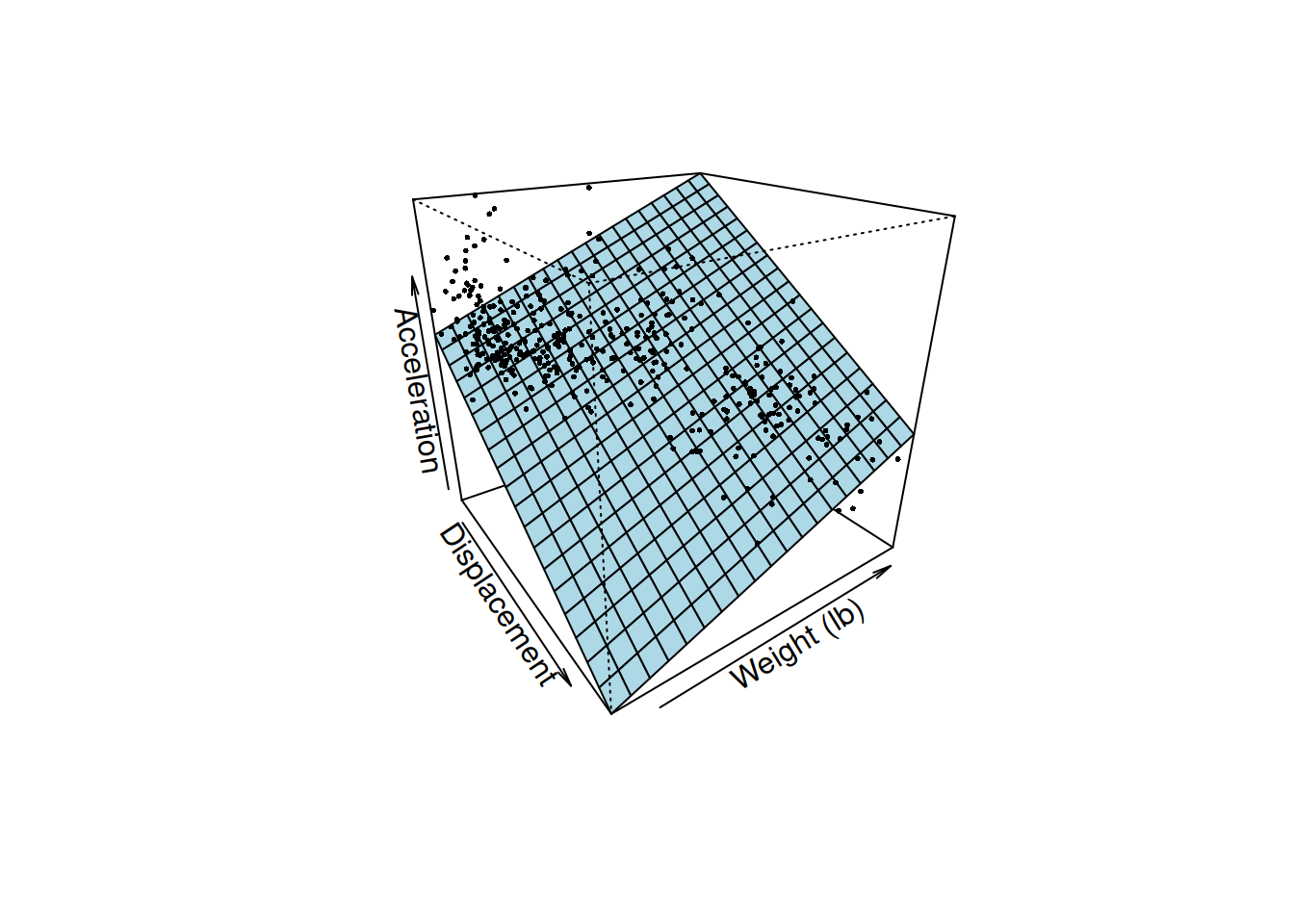
A three-dimensional plot drawn with matplotlib: the fitted plane of acceleration over displacement and weight, with the cars as points around it.

Show code
# 2. The plane on the grid, with the cars as points.
view_sl <- persp(d_sl, w_sl, plane_sl, theta = 55, phi = 25, col = "lightblue",
                 xlab = "Displacement", ylab = "Weight (lb)", zlab = "Acceleration")
points(trans3d(auto$displacement, auto$weight, auto$acceleration, view_sl), pch = 16, cex = 0.4)

A three-dimensional plot drawn with base R: the fitted plane of acceleration over displacement and weight, with the cars as points around it.

ExrExercise 71 (Draw a fitted plane (part 3))

Exercise 71 (Draw a fitted plane (part 3)) Use the setup of Exercise 69.

In R, draw the interactive version only when the page is rendered to HTML.

Solution 71.

Show code
# 3. Interactive on the website, static in the PDF.
if (knitr::is_html_output()) {
  library(plotly)
  widget_sl <- plot_ly() |>
    add_surface(x = d_sl, y = w_sl, z = t(plane_sl), opacity = 0.5, showscale = FALSE) |>
    add_trace(data = auto, x = ~displacement, y = ~weight, z = ~acceleration,
              type = "scatter3d", mode = "markers", marker = list(size = 2)) |>
    layout(scene = list(xaxis = list(title = "Displacement"), yaxis = list(title = "Weight (lb)"),
                        zaxis = list(title = "Acceleration"))) |>
    config(displaylogo = FALSE)
  htmltools::div(
    role = "img",
    `aria-label` = "Interactive 3D plot of the fitted plane of acceleration over displacement and weight, with the cars as points. Drag to rotate.",
    widget_sl
  )
} else {
  view_sl <- persp(d_sl, w_sl, plane_sl, theta = 55, phi = 25, col = "lightblue",
                   xlab = "Displacement", ylab = "Weight (lb)", zlab = "Acceleration")
  points(trans3d(auto$displacement, auto$weight, auto$acceleration, view_sl), pch = 16, cex = 0.4)
}

3 Fitting models

3.1 Fit and inspect a model with statsmodels

The statsmodels library fits statistical models and reports the usual inference that goes with them: standard errors, confidence intervals and tests. Its pieces are organized by what you hand them:

Import What it takes Use it for
import statsmodels.formula.api as smf a formula and a data frame smf.ols, smf.logit, smf.glm: the quickest way to fit
import statsmodels.api as sm arrays you build yourself sm.OLS, sm.Logit, sm.GLM, and sm.add_constant
from statsmodels.stats.anova import anova_lm fitted models comparing nested linear models by an \(F\) test

A formula such as "mpg ~ horsepower + weight" names the response on the left and the features on the right, and adds the intercept column for you. With the array interface you build the design matrix yourself, and sm.add_constant(X) prepends the column of ones.

Either way, calling .fit() on the model returns a results object. Its .summary() prints a table of estimates, .params holds the coefficients and .bse their standard errors, .conf_int() gives confidence intervals, and .rsquared is the \(R^2\). .predict(new_data) makes predictions for a data frame with the same columns, and .resid holds the residuals. Inside a formula, + and * have formula meanings, so arithmetic on a feature goes in I(...): "mpg ~ horsepower + I(horsepower**2)" adds the square of horsepower as a feature (Python writes a power as **). C(origin) tells the formula to treat a numeric code as a category, with one indicator column for each level except the first, the baseline. When the feature names are in a list, build the formula as text: "mpg ~ " + " + ".join(features).

Three more methods of the results object appear in the notes:

  • .summary2().tables[1] returns the table of estimates, standard errors, \(t\) statistics, \(p\)-values and confidence intervals as a data frame, so you can print it or compute with it. (.summary() returns only text.)
  • .get_prediction(new_data) predicts like .predict, but returns an object that holds the uncertainty too. Its .summary_frame(alpha=0.05) is a data frame with one row per new observation: mean (the prediction), mean_ci_lower and mean_ci_upper (the \(95\%\) confidence interval for the average response at those feature values), and obs_ci_lower and obs_ci_upper (the wider \(95\%\) prediction interval for one new observation). Its .conf_int(alpha=0.05) returns just the confidence interval, as an array with one row per observation. The new_data must have the same columns as the data the model was fitted to. With the array interface, that includes the column of ones.
  • .t_test(c) estimates, and tests, the linear combination \(\dprod{\vc{c}}{\vbeta}\) of the coefficients, where c is an array with one weight per coefficient, in the order of .params. The result’s .effect is the estimate, .sd its standard error, .pvalue the \(p\)-value for the hypothesis that the combination is \(0\), and .conf_int(alpha=0.05) its confidence interval. For example, c = np.array([0, 1, 10]) asks about the change in the response when the first feature rises by \(1\) and the second by \(10\), and gives the intercept weight \(0\).

The statsmodels documentation lists the other model families, such as time series (statsmodels.tsa) and generalized linear models.

R fits these models without an extra package. lm(formula, data = df) fits a linear model, and glm(formula, family = binomial, data = df) fits a logistic regression. A formula such as mpg ~ horsepower + weight names the response on the left and the features on the right, and adds the intercept for you.

The fitted object works with a standard set of functions: summary(fit) prints a table of estimates, standard errors and tests, coef(fit) returns the coefficients, confint(fit) their confidence intervals, predict(fit, newdata = df) makes predictions for a data frame with the same columns, and resid(fit) returns the residuals. anova(fit1, fit2) compares nested linear models by an \(F\) test.

Inside a formula, + and * have formula meanings, so arithmetic on a feature goes in I(...): mpg ~ horsepower + I(horsepower^2) adds the square of horsepower as a feature. When the feature names are in a character vector, reformulate(features, response = "mpg") builds the formula mpg ~ f1 + f2 + ... from them, so a loop can refit a model with a changing set of features. A factor, which is R’s categorical variable, enters a formula as one indicator column for each level except the first, the baseline; contrasts(f) prints that coding, with a row for each level and a column for each indicator that the model uses.

The notes show results with packages that return data frames, not with summary() printouts: parameters::parameters(fit) makes a table of estimates, standard errors and confidence intervals, and parameters::print_md() formats it for the page. broom::glance(fit) returns one row of fit statistics such as \(R^2\), and performance::model_performance(fit) returns a similar table.

The Python methods above have these R counterparts: broom::tidy(fit, conf.int = TRUE) is the table of estimates (Python’s .summary2().tables[1]); predict(fit, newdata = df, interval = "confidence") and interval = "prediction" give the two intervals of .summary_frame, in columns fit, lwr and upr; and for a linear combination with weights c, the estimate is sum(c * coef(fit)) and its standard error is sqrt(drop(t(c) %*% vcov(fit) %*% c)), where vcov(fit) is the covariance matrix of the coefficients.

ExmExample 13 (Fuel economy from horsepower and weight)

Example 13 (Fuel economy from horsepower and weight) Fit a linear model of mpg on horsepower and weight for the Auto data, then read the estimates, their confidence intervals and a prediction for one new car:

import numpy as np
import pandas as pd
import statsmodels.api as sm
import statsmodels.formula.api as smf

auto_sm_ex = pd.read_csv("data/auto.csv")

# The formula names the response and the features; the intercept is added for us.
fit_sm_ex = smf.ols("mpg ~ horsepower + weight", data=auto_sm_ex).fit()

# `params` holds the coefficients, `bse` their standard errors,
# and `conf_int` the 95% confidence intervals, one row per coefficient.
print(fit_sm_ex.params.round(4))
Intercept     45.6402
horsepower    -0.0473
weight        -0.0058
dtype: float64
print(fit_sm_ex.bse.round(4))
Intercept     0.7932
horsepower    0.0111
weight        0.0005
dtype: float64
print(fit_sm_ex.conf_int().round(4))
                  0        1
Intercept   44.0807  47.1997
horsepower  -0.0691  -0.0255
weight      -0.0068  -0.0048
print(round(fit_sm_ex.rsquared, 3))
0.706
# `predict` takes a data frame with the same column names as the formula uses.
new_car_ex = pd.DataFrame({"horsepower": [100], "weight": [3000]})
print(fit_sm_ex.predict(new_car_ex).round(2))
0    23.53
dtype: float64
# The array interface fits the same model: we build the design matrix ourselves
# and `add_constant` puts the column of ones in front.
X_sm_ex = sm.add_constant(auto_sm_ex[["horsepower", "weight"]])
fit_arr_ex = sm.OLS(auto_sm_ex["mpg"], X_sm_ex).fit()
print(np.allclose(fit_arr_ex.params, fit_sm_ex.params))
True
# `I(...)` protects arithmetic inside a formula: this adds a squared horsepower feature.
fit_quad_ex = smf.ols("mpg ~ horsepower + I(horsepower**2)", data=auto_sm_ex).fit()
print(fit_quad_ex.params.round(5))
Intercept             56.90010
horsepower            -0.46619
I(horsepower ** 2)     0.00123
dtype: float64
# A formula is text, so a list of feature names can build it.
features_ex = ["horsepower", "weight"]
formula_ex = "mpg ~ " + " + ".join(features_ex)
print(formula_ex, np.allclose(smf.ols(formula_ex, data=auto_sm_ex).fit().params, fit_sm_ex.params))
mpg ~ horsepower + weight True
# `C(origin)` treats the numeric code as a category: one indicator per level after the first.
# `get_dummies(..., drop_first=True)` shows those indicator columns.
print(pd.get_dummies(auto_sm_ex["origin"], prefix="origin", drop_first=True).head(3).astype(int))
   origin_2  origin_3
0         0         0
1         0         0
2         0         0
print(smf.ols("mpg ~ C(origin)", data=auto_sm_ex).fit().params.round(3))
Intercept         20.033
C(origin)[T.2]     7.569
C(origin)[T.3]    10.417
dtype: float64
# `summary2().tables[1]` is the table of estimates as a data frame, with a column for each statistic.
print(fit_sm_ex.summary2().tables[1].round(4))
              Coef.  Std.Err.        t  P>|t|   [0.025   0.975]
Intercept   45.6402    0.7932  57.5397    0.0  44.0807  47.1997
horsepower  -0.0473    0.0111  -4.2673    0.0  -0.0691  -0.0255
weight      -0.0058    0.0005 -11.5346    0.0  -0.0068  -0.0048
# `get_prediction` keeps the uncertainty. `summary_frame` gives the prediction (`mean`),
# the confidence interval for the average mpg of such cars (`mean_ci_*`),
# and the wider prediction interval for one such car (`obs_ci_*`).
print(fit_sm_ex.get_prediction(new_car_ex).summary_frame(alpha=0.05).round(2).T)
                   0
mean           23.53
mean_se         0.22
mean_ci_lower  23.09
mean_ci_upper  23.96
obs_ci_lower   15.18
obs_ci_upper   31.88
# `t_test` handles a linear combination of the coefficients, with one weight per coefficient
# in the order of `params` (intercept, horsepower, weight).
# Here: 10 more horsepower and 500 more pounds. The intercept gets weight 0 because it cancels.
change_ex = fit_sm_ex.t_test(np.array([0, 10, 500]))
print(change_ex.effect.round(3), change_ex.sd.round(3), change_ex.conf_int(alpha=0.05).round(3))
[-3.37] [[0.165]] [[-3.695 -3.046]]

print(fit_sm_ex.summary()) prints all of these in one table, which is handy for reading and awkward for computing with; the attributes above return numbers you can use.

auto_sm_ex <- read.csv("data/auto.csv")

# The formula names the response and the features; the intercept is added for us.
fit_sm_ex <- lm(mpg ~ horsepower + weight, data = auto_sm_ex)

# `coef` returns the coefficients and `confint` the 95% confidence intervals.
print(round(coef(fit_sm_ex), 4))
(Intercept)  horsepower      weight 
    45.6402     -0.0473     -0.0058 
print(round(confint(fit_sm_ex), 4))
              2.5 %  97.5 %
(Intercept) 44.0807 47.1997
horsepower  -0.0691 -0.0255
weight      -0.0068 -0.0048
# `parameters::parameters` puts the estimates, standard errors and confidence intervals
# in one table, and `print_md` formats it for the page.
parameters::parameters(fit_sm_ex) |>
  parameters::print_md(digits = 4)
Parameter Coefficient SE 95% CI t(389) p
(Intercept) 45.6402 0.7932 (44.0807, 47.1997) 57.5397 < .001
horsepower -0.0473 0.0111 (-0.0691, -0.0255) -4.2673 < .001
weight -0.0058 0.0005 (-0.0068, -0.0048) -11.5346 < .001
# `broom::glance` returns one row of fit statistics, including R squared.
r2_sm_ex <- broom::glance(fit_sm_ex)$r.squared
print(round(r2_sm_ex, 3))
[1] 0.706
# `predict` takes a data frame with the same column names as the formula uses.
new_car_ex <- data.frame(horsepower = 100, weight = 3000)
print(round(predict(fit_sm_ex, newdata = new_car_ex), 2))
    1 
23.53 
# `model.matrix` shows the design matrix the formula built for us.
print(head(model.matrix(fit_sm_ex), 3))
  (Intercept) horsepower weight
1           1        130   3504
2           1        165   3693
3           1        150   3436
# `I(...)` protects arithmetic inside a formula: this adds a squared horsepower feature.
fit_quad_ex <- lm(mpg ~ horsepower + I(horsepower^2), data = auto_sm_ex)
print(round(coef(fit_quad_ex), 5))
    (Intercept)      horsepower I(horsepower^2) 
       56.90010        -0.46619         0.00123 
# `reformulate` builds the formula from a character vector of feature names,
# so the model can be refit for any set of features.
features_ex <- c("horsepower", "weight")
formula_ex <- reformulate(features_ex, response = "mpg")
print(formula_ex)
mpg ~ horsepower + weight
print(isTRUE(all.equal(coef(lm(formula_ex, data = auto_sm_ex)), coef(fit_sm_ex))))
[1] TRUE
# A factor enters the model as indicator columns for every level after the first.
# `contrasts` prints that coding: the baseline level, 1, has a row of zeros.
origin_ex <- factor(auto_sm_ex$origin)
print(contrasts(origin_ex))
  2 3
1 0 0
2 1 0
3 0 1
print(round(coef(lm(mpg ~ origin_ex, data = auto_sm_ex)), 3))
(Intercept)  origin_ex2  origin_ex3 
     20.033       7.569      10.417 
# `broom::tidy` with `conf.int = TRUE` is the table of estimates as a data frame.
broom::tidy(fit_sm_ex, conf.int = TRUE)
# `interval = "confidence"` is for the average mpg of such cars, and `"prediction"` for one new car.
pred_ci_ex <- predict(fit_sm_ex, newdata = new_car_ex, interval = "confidence")
pred_pi_ex <- predict(fit_sm_ex, newdata = new_car_ex, interval = "prediction")
print(round(rbind(confidence = pred_ci_ex, prediction = pred_pi_ex), 2))
    fit   lwr   upr
1 23.53 23.09 23.96
1 23.53 15.18 31.88
# A linear combination of the coefficients: 10 more horsepower and 500 more pounds.
# Its standard error comes from the covariance matrix of the coefficients, and the interval from the t quantile.
c_ex <- c(0, 10, 500)
effect_ex <- sum(c_ex * coef(fit_sm_ex))
se_ex <- sqrt(drop(t(c_ex) %*% vcov(fit_sm_ex) %*% c_ex))
print(round(c(effect_ex, se_ex, effect_ex + c(-1, 1) * qt(0.975, df.residual(fit_sm_ex)) * se_ex), 3))
[1] -3.370  0.165 -3.695 -3.046

print(summary(fit_sm_ex)) prints the base R version of this table, which is handy for reading and awkward for computing with; parameters and glance return data frames you can use.

Each extra pound of weight changes the predicted mpg by -0.0058, holding horsepower fixed, and the model predicts 23.5 mpg for a \(100\) horsepower car that weighs \(3000\) pounds. The \(95\%\) prediction interval for that car runs from 15.2 to 31.9 mpg. It is much wider than the confidence interval for the average of such cars, 23.09 to 23.96, because one car also varies around its average. The Python and R fits agree, because both solve the same least-squares problem.

ExrExercise 72 (Fit and inspect a model)

Exercise 72 (Fit and inspect a model) Use the Auto data in data/auto.csv, with Python or R.

Fit a linear model of acceleration on horsepower and displacement, using a formula.

Solution 72.

import numpy as np
import pandas as pd
import statsmodels.api as sm
import statsmodels.formula.api as smf

auto_sm = pd.read_csv("data/auto.csv")

# 1. The formula interface reads the column names from the data frame.
fit_sm = smf.ols("acceleration ~ horsepower + displacement", data=auto_sm).fit()
print(fit_sm.params.round(4))
Intercept       21.3115
horsepower      -0.0740
displacement     0.0101
dtype: float64
auto_sm <- read.csv("data/auto.csv")

# 1. The formula reads the column names from the data frame.
fit_sm <- lm(acceleration ~ horsepower + displacement, data = auto_sm)
print(round(coef(fit_sm), 4))
 (Intercept)   horsepower displacement 
     21.3115      -0.0740       0.0101 
ExrExercise 73 (Fit and inspect a model (part 2))

Exercise 73 (Fit and inspect a model (part 2)) Use the setup of Exercise 72.

Report the coefficient of horsepower with its \(95\%\) confidence interval.

Solution 73.

# `conf_int` returns a data frame with one row per coefficient.
ci_sm = fit_sm.conf_int().loc["horsepower"]
print(ci_sm.round(4).tolist())
[-0.0854, -0.0626]
# `confint` returns one row per coefficient.
ci_sm <- confint(fit_sm)["horsepower", ]
print(round(ci_sm, 4))
  2.5 %  97.5 % 
-0.0854 -0.0626 
ExrExercise 74 (Fit and inspect a model (part 3))

Exercise 74 (Fit and inspect a model (part 3)) Use the setup of Exercise 72.

Does the interval contain \(0\)?

Solution 74.

# An interval that excludes 0 means the data are inconsistent with no effect of
# that feature, after adjusting for the other one.
print(bool(ci_sm.iloc[0] < 0 < ci_sm.iloc[1]))
False
# An interval that excludes 0 means the data are inconsistent with no effect of
# that feature, after adjusting for the other one.
print(ci_sm[1] < 0 && 0 < ci_sm[2])
[1] FALSE

The interval for horsepower runs from -0.085 to -0.063, so it does not contain \(0\).

ExrExercise 75 (Fit and inspect a model (part 4))

Exercise 75 (Fit and inspect a model (part 4)) Use the setup of Exercise 72.

Predict the acceleration of a car with \(120\) horsepower and displacement \(250\).

Solution 75.

# 3. `predict` needs the same column names as the formula.
new_sm = pd.DataFrame({"horsepower": [120], "displacement": [250]})
print(fit_sm.predict(new_sm).round(2))
0    14.95
dtype: float64
# 3. `predict` needs the same column names as the formula.
new_sm <- data.frame(horsepower = 120, displacement = 250)
print(round(predict(fit_sm, newdata = new_sm), 2))
    1 
14.95 
ExrExercise 76 (Fit and inspect a model (part 5))

Exercise 76 (Fit and inspect a model (part 5)) Use the setup of Exercise 72.

In Python, refit the model with the array interface (sm.OLS and sm.add_constant), and check that the coefficients match. In R, extract the design matrix with model.matrix and check that it has a column of ones.

Solution 76.

# 4. With arrays, we build the design matrix ourselves.
# `add_constant` adds the column of ones that the formula added automatically.
X_arr = sm.add_constant(auto_sm[["horsepower", "displacement"]])
fit_arr = sm.OLS(auto_sm["acceleration"], X_arr).fit()
print(np.allclose(fit_arr.params, fit_sm.params))
True
# 4. `model.matrix` returns the design matrix the formula built;
# its first column is the intercept's column of ones.
X_sm <- model.matrix(fit_sm)
print(all(X_sm[, "(Intercept)"] == 1))
[1] TRUE

The array interface, and model.matrix in R, show what the formula does underneath: it builds a design matrix whose first column is all ones.

ExrExercise 77 (Fit and inspect a model (part 6))

Exercise 77 (Fit and inspect a model (part 6)) Use the setup of Exercise 72.

Add the square of horsepower as a feature, with I(...) inside the formula. Does the \(R^2\) increase?

Solution 77.

# 5. `I(...)` makes the formula read `**` as a power, not as formula syntax.
fit_sq = smf.ols("acceleration ~ horsepower + displacement + I(horsepower**2)", data=auto_sm).fit()
print(round(fit_sm.rsquared, 4), round(fit_sq.rsquared, 4))
0.5035 0.5199
# 5. `I(...)` makes the formula read `^` as a power, not as formula syntax.
fit_sq <- lm(acceleration ~ horsepower + displacement + I(horsepower^2), data = auto_sm)
print(round(c(summary(fit_sm)$r.squared, summary(fit_sq)$r.squared), 4))
[1] 0.5035 0.5199

Adding a feature never lowers the \(R^2\) on the data it was fit to, so judge the squared term by a test or held-out error, not by this increase alone.

ExrExercise 78 (Fit and inspect a model (part 7))

Exercise 78 (Fit and inspect a model (part 7)) Use the setup of Exercise 72.

Store the feature names horsepower and displacement in a list or vector, and build the formula from them. Check that the fit has the same coefficients as in Exercise 72.

Solution 78.

# 6. A formula is text, so we join the names with " + ".
feats = ["horsepower", "displacement"]
fit_built = smf.ols("acceleration ~ " + " + ".join(feats), data=auto_sm).fit()
print(np.allclose(fit_built.params, fit_sm.params))
True
# 6. `reformulate` builds the same formula from a character vector.
feats <- c("horsepower", "displacement")
fit_built <- lm(reformulate(feats, response = "acceleration"), data = auto_sm)
print(isTRUE(all.equal(coef(fit_built), coef(fit_sm))))
[1] TRUE

A formula is the shortest way to specify a model.

ExrExercise 79 (Fit and inspect a model (part 8))

Exercise 79 (Fit and inspect a model (part 8)) Use the setup of Exercise 72.

Treat origin as a category. Which level is the baseline, and how many indicator columns does the model use?

Solution 79.

# 7. `C(origin)` makes one indicator per level after the first; the first level, 1, is the baseline.
fit_cat = smf.ols("acceleration ~ C(origin)", data=auto_sm).fit()
print(fit_cat.params.index.tolist())
['Intercept', 'C(origin)[T.2]', 'C(origin)[T.3]']
# 7. A factor enters as indicator columns for every level after the first.
# `contrasts` shows the coding; the level with a row of zeros is the baseline.
origin_f <- factor(auto_sm$origin)
print(contrasts(origin_f))
  2 3
1 0 0
2 1 0
3 0 1
print(names(coef(lm(acceleration ~ origin_f, data = auto_sm))))
[1] "(Intercept)" "origin_f2"   "origin_f3"  

For Exercise 79, the baseline is origin \(1\), which has no indicator column, so the model uses two indicators, for origins \(2\) and \(3\), each measured against the baseline.

The same machinery builds the extra columns that I(...) and categorical features ask for.

ExrExercise 80 (Fit and inspect a model (part 9))

Exercise 80 (Fit and inspect a model (part 9)) Use the setup of Exercise 72.

Print the table of estimates as a data frame (summary2 in Python, tidy in R).

Solution 80.

# 8. `summary2().tables[1]` returns the estimates table as a data frame we can index and compute with.
print(fit_sm.summary2().tables[1].round(4))
                Coef.  Std.Err.        t  P>|t|   [0.025   0.975]
Intercept     21.3115    0.3128  68.1246    0.0  20.6964  21.9265
horsepower    -0.0740    0.0058 -12.7603    0.0  -0.0854  -0.0626
displacement   0.0101    0.0021   4.7287    0.0   0.0059   0.0143
# 8. `tidy` with `conf.int = TRUE` returns the estimates table as a data frame.
broom::tidy(fit_sm, conf.int = TRUE)
ExrExercise 81 (Fit and inspect a model (part 10))

Exercise 81 (Fit and inspect a model (part 10)) Use the setup of Exercise 72.

For the car in Exercise 75, give the \(95\%\) confidence interval for the average acceleration of such cars and the \(95\%\) prediction interval for one such car. Which is wider, and why?

Solution 81.

# 9. `get_prediction` returns the uncertainty along with the prediction.
# The `obs_ci_*` columns add the noise of one new car to the uncertainty of the fitted line,
# so they are wider than the `mean_ci_*` columns.
pred_sm = fit_sm.get_prediction(new_sm).summary_frame(alpha=0.05)
print(pred_sm[["mean_ci_lower", "mean_ci_upper", "obs_ci_lower", "obs_ci_upper"]].round(2))
   mean_ci_lower  mean_ci_upper  obs_ci_lower  obs_ci_upper
0          14.73          15.17         11.11         18.79
# 9. `interval = "confidence"` is for the average of such cars; `"prediction"` adds the noise of one new car.
conf_sm <- predict(fit_sm, newdata = new_sm, interval = "confidence")
pred_sm <- predict(fit_sm, newdata = new_sm, interval = "prediction")
print(round(rbind(confidence = conf_sm, prediction = pred_sm), 2))
    fit   lwr   upr
1 14.95 14.73 15.17
1 14.95 11.11 18.79

The prediction interval is wider than the confidence interval because a new car differs from the average of its kind by its own noise, which more data cannot remove.

ExrExercise 82 (Fit and inspect a model (part 11))

Exercise 82 (Fit and inspect a model (part 11)) Use the setup of Exercise 72.

Estimate the change in acceleration when horsepower rises by \(20\) and displacement falls by \(100\), with a \(95\%\) confidence interval. In Python, use t_test; in R, use vcov.

Solution 82.

# 10. The weights follow the order of `params`: intercept, horsepower, displacement.
# The intercept gets weight 0 because it cancels in a difference of two predictions.
change_sm = fit_sm.t_test(np.array([0, 20, -100]))
print(change_sm.effect.round(3), change_sm.conf_int(alpha=0.05).round(3))
[-2.489] [[-3.121 -1.857]]
# 10. The weights follow the order of `coef`: intercept, horsepower, displacement.
# The intercept gets weight 0 because it cancels in a difference of two predictions.
# The standard error is the square root of c' V c, where V is the covariance matrix of the coefficients.
c_sm <- c(0, 20, -100)
effect_sm <- sum(c_sm * coef(fit_sm))
se_sm <- sqrt(drop(t(c_sm) %*% vcov(fit_sm) %*% c_sm))
print(round(c(effect_sm, effect_sm + c(-1, 1) * qt(0.975, df.residual(fit_sm)) * se_sm), 3))
[1] -2.489 -3.121 -1.857

3.2 Read the pieces of a linear fit

After you fit a linear model, you read pieces of the fit to check it. The pieces here are the residuals \(e_i = y_i - \hat{y}_i\), the residual degrees of freedom \(n - p\) for \(n\) cars and \(p\) fitted coefficients, the leverage \(h_i\) of each car, which is the \(i\)th diagonal entry of the hat matrix \(X (\tp{X} X)^{-1} \tp{X}\) and measures how far the car’s features sit from the rest, the standardized residual \(r_i = e_i / (\hat{\sigma} \sqrt{1 - h_i})\), where \(\hat{\sigma}\) is the residual standard error, and the covariance matrix of the estimated coefficients.

A results object from statsmodels holds each piece:

  • fit.resid holds the residuals, and fit.fittedvalues the fitted values.
  • fit.df_resid is the residual degrees of freedom.
  • fit.get_influence() returns an object of case diagnostics. Its .hat_matrix_diag holds the leverages, and its .resid_studentized_internal holds the standardized residuals.
  • fit.cov_params() is the covariance matrix of the coefficients, as a data frame. The square roots of its diagonal are the standard errors.
  • fit.model.endog is the response the model used, and fit.model.data.frame is the data frame it used, after any rows with missing values were dropped.

To bin a numeric variable into groups, pd.cut(x, bins, include_lowest=True, labels=...) assigns each value to the interval between consecutive bins edges. Edges taken from np.quantile(x, [0, 1/3, 2/3, 1]) give three groups with about the same number of values.

A fitted lm object has an accessor function for each piece:

  • residuals(fit) returns the residuals, which resid(fit) abbreviates.
  • df.residual(fit) returns the residual degrees of freedom.
  • hatvalues(fit) returns the leverages.
  • rstandard(fit) returns the standardized residuals.
  • vcov(fit) returns the covariance matrix of the coefficients. The square roots of its diagonal are the standard errors.
  • model.frame(fit) returns the data frame the model used, after any rows with missing values were dropped, and model.response(model.frame(fit)) extracts its response column. The notes use the pair to recover the response from a fit, or from a formula and a data frame, without naming the column.

To bin a numeric variable into groups, cut(x, breaks, include.lowest = TRUE, labels = ...) assigns each value to the interval between consecutive breaks. Breaks taken from quantile(x, c(0, 1/3, 2/3, 1)) give three groups with about the same number of values.

ExmExample 14 (Reading a fit of fuel economy on horsepower)

Example 14 (Reading a fit of fuel economy on horsepower) Fit mpg on horsepower, then recover the residual standard error, the standardized residuals and a standard error from the pieces of the fit, and compare the spread of the residuals for low, middle and high fitted values:

import numpy as np
import pandas as pd
import statsmodels.formula.api as smf

auto_dg_ex = pd.read_csv("data/auto.csv")
fit_dg_ex = smf.ols("mpg ~ horsepower", data=auto_dg_ex).fit()

# The residual degrees of freedom are n minus the number of coefficients.
n_dg_ex = len(auto_dg_ex)
print(fit_dg_ex.df_resid, n_dg_ex - 2)
390.0 390
# The residual standard error divides the sum of squared residuals by the degrees of freedom.
rse_dg_ex = np.sqrt((fit_dg_ex.resid ** 2).sum() / fit_dg_ex.df_resid)
print(round(rse_dg_ex, 3), round(np.sqrt(fit_dg_ex.scale), 3))
4.906 4.906
# The influence object holds the leverages and the standardized residuals.
infl_dg_ex = fit_dg_ex.get_influence()
h_dg_ex = infl_dg_ex.hat_matrix_diag
r_dg_ex = infl_dg_ex.resid_studentized_internal
# The leverages sum to the number of coefficients, 2, and the formula r = e / (s sqrt(1 - h)) agrees.
print(round(h_dg_ex.sum(), 6), np.allclose(r_dg_ex, fit_dg_ex.resid / (rse_dg_ex * np.sqrt(1 - h_dg_ex))))
2.0 True
# The standard errors are the square roots of the diagonal of the coefficient covariance matrix.
print(np.sqrt(np.diag(fit_dg_ex.cov_params())).round(5), fit_dg_ex.bse.round(5).tolist())
[0.7175  0.00645] [0.7175, 0.00645]
# `endog` is the response the model used.
print(np.allclose(fit_dg_ex.model.endog, auto_dg_ex["mpg"]))
True
# `cut` with quantile edges makes three groups of fitted values with about equal counts;
# `include_lowest` keeps the smallest fitted value in the first group.
fitted_dg_ex = fit_dg_ex.fittedvalues
edges_dg_ex = np.quantile(fitted_dg_ex, [0, 1 / 3, 2 / 3, 1])
third_dg_ex = pd.cut(fitted_dg_ex, edges_dg_ex, include_lowest=True, labels=["low", "middle", "high"])
print(fit_dg_ex.resid.groupby(third_dg_ex, observed=True).std().round(2))
low       3.85
middle    4.55
high      5.39
dtype: float64
auto_dg_ex <- read.csv("data/auto.csv")
fit_dg_ex <- lm(mpg ~ horsepower, data = auto_dg_ex)

# The residual degrees of freedom are n minus the number of coefficients.
n_dg_ex <- nrow(auto_dg_ex)
print(c(df.residual(fit_dg_ex), n_dg_ex - 2))
[1] 390 390
# The residual standard error divides the sum of squared residuals by the degrees of freedom.
rse_dg_ex <- sqrt(sum(residuals(fit_dg_ex)^2) / df.residual(fit_dg_ex))
print(round(c(rse_dg_ex, sigma(fit_dg_ex)), 3))
[1] 4.906 4.906
# `hatvalues` returns the leverages and `rstandard` the standardized residuals.
h_dg_ex <- hatvalues(fit_dg_ex)
r_dg_ex <- rstandard(fit_dg_ex)
# The leverages sum to the number of coefficients, 2, and the formula r = e / (s sqrt(1 - h)) agrees.
print(round(sum(h_dg_ex), 6))
[1] 2
print(isTRUE(all.equal(unname(r_dg_ex), unname(residuals(fit_dg_ex) / (rse_dg_ex * sqrt(1 - h_dg_ex))))))
[1] TRUE
# The standard errors are the square roots of the diagonal of the coefficient covariance matrix.
print(round(sqrt(diag(vcov(fit_dg_ex))), 5))
(Intercept)  horsepower 
    0.71750     0.00645 
# `model.frame` is the data the model used, and `model.response` extracts its response column.
print(isTRUE(all.equal(unname(model.response(model.frame(fit_dg_ex))), auto_dg_ex$mpg)))
[1] TRUE
# `cut` with quantile breaks makes three groups of fitted values with about equal counts;
# `include.lowest` keeps the smallest fitted value in the first group.
fitted_dg_ex <- fitted(fit_dg_ex)
breaks_dg_ex <- quantile(fitted_dg_ex, c(0, 1 / 3, 2 / 3, 1))
third_dg_ex <- cut(fitted_dg_ex, breaks_dg_ex, include.lowest = TRUE, labels = c("low", "middle", "high"))
print(round(tapply(residuals(fit_dg_ex), third_dg_ex, sd), 2))
   low middle   high 
  3.85   4.55   5.39 

Both languages agree: the residual standard error is 4.91 miles per gallon, on 390 degrees of freedom. The residuals spread out more for the middle and high fitted values than for the low ones, so a straight line does not describe the car data equally well everywhere. The leverages sum to the number of coefficients, which is why a leverage far above the average \(p / n =\) 0.0051 marks an unusual car.

ExrExercise 83 (Read the pieces of a fit)

Exercise 83 (Read the pieces of a fit) Use the Auto data in data/auto.csv, with Python or R, and fit mpg on weight with a formula.

How many residual degrees of freedom does the fit have, and how does that number relate to the number of cars?

Solution 83.

import numpy as np
import pandas as pd
import statsmodels.formula.api as smf

auto_dg = pd.read_csv("data/auto.csv")
fit_dg = smf.ols("mpg ~ weight", data=auto_dg).fit()

# The residual degrees of freedom are n - 2: one degree is spent on each of the two coefficients.
print(fit_dg.df_resid, len(auto_dg) - 2)
390.0 390
auto_dg <- read.csv("data/auto.csv")
fit_dg <- lm(mpg ~ weight, data = auto_dg)

# The residual degrees of freedom are n - 2: one degree is spent on each of the two coefficients.
print(c(df.residual(fit_dg), nrow(auto_dg) - 2))
[1] 390 390
ExrExercise 84 (Read the pieces of a fit (part 2))

Exercise 84 (Read the pieces of a fit (part 2)) Use the setup of Exercise 83.

Compute the residual standard error from the residuals and the degrees of freedom.

Solution 84.

# Dividing the sum of squared residuals by n - 2, not n, makes the estimate of the variance unbiased.
rse_dg = np.sqrt((fit_dg.resid ** 2).sum() / fit_dg.df_resid)
print(round(rse_dg, 3))
4.333
# Dividing the sum of squared residuals by n - 2, not n, makes the estimate of the variance unbiased.
rse_dg <- sqrt(sum(residuals(fit_dg)^2) / df.residual(fit_dg))
print(round(rse_dg, 3))
[1] 4.333

The residual standard error is 4.33 miles per gallon on 390 degrees of freedom.

ExrExercise 85 (Read the pieces of a fit (part 3))

Exercise 85 (Read the pieces of a fit (part 3)) Use the setup of Exercise 83.

Find the car with the largest leverage.

Solution 85.

# The leverages come from the influence object; `argmax` finds the row number of the largest one.
infl_dg = fit_dg.get_influence()
h_dg = infl_dg.hat_matrix_diag
top_dg = int(np.argmax(h_dg))
print(top_dg, auto_dg["name"][top_dg], round(h_dg[top_dg], 4))
43 pontiac safari (sw) 0.0191
# `hatvalues` returns the leverages, named by row; `which.max` finds the car.
h_dg <- hatvalues(fit_dg)
top_dg <- which.max(h_dg)
print(c(row = unname(top_dg), leverage = round(h_dg[[top_dg]], 4)))
     row leverage 
 44.0000   0.0191 
print(auto_dg$name[top_dg])
[1] "pontiac safari (sw)"

The car with the largest leverage is the pontiac safari (sw), a heavy car at the edge of the weight range.

ExrExercise 86 (Read the pieces of a fit (part 4))

Exercise 86 (Read the pieces of a fit (part 4)) Use the setup of Exercise 83.

Check that the leverages sum to the number of coefficients.

Solution 86.

print(round(h_dg.sum(), 6))
2.0
print(round(sum(h_dg), 6))
[1] 2

The leverages sum to the number of coefficients, \(2\), because the trace of the hat matrix equals its rank.

ExrExercise 87 (Read the pieces of a fit (part 5))

Exercise 87 (Read the pieces of a fit (part 5)) Use the setup of Exercise 83.

Compute the standardized residuals by hand from the residuals, the residual standard error and the leverages.

Solution 87.

# Standardized residuals divide each residual by its own standard deviation,
# which is smaller for high-leverage cars because the line is pulled toward them.
r_dg = fit_dg.resid / (rse_dg * np.sqrt(1 - h_dg))
print(r_dg[:3].round(3).tolist())
[-0.328, -0.688, -0.449]
# Standardized residuals divide each residual by its own standard deviation,
# which is smaller for high-leverage cars because the line is pulled toward them.
r_dg <- residuals(fit_dg) / (rse_dg * sqrt(1 - h_dg))
print(round(unname(r_dg[1:3]), 3))
[1] -0.328 -0.688 -0.449
ExrExercise 88 (Read the pieces of a fit (part 6))

Exercise 88 (Read the pieces of a fit (part 6)) Use the setup of Exercise 83.

Check them against the built-in ones.

Solution 88.

print(np.allclose(r_dg, infl_dg.resid_studentized_internal))
True
print(isTRUE(all.equal(r_dg, rstandard(fit_dg))))
[1] TRUE
ExrExercise 89 (Read the pieces of a fit (part 7))

Exercise 89 (Read the pieces of a fit (part 7)) Use the setup of Exercise 83.

Get the standard error of the slope from the covariance matrix of the coefficients, and check it against the standard error that the fit reports.

Solution 89.

# 4. The standard errors are the square roots of the diagonal of the covariance matrix.
print(round(np.sqrt(fit_dg.cov_params().loc["weight", "weight"]), 6), round(fit_dg.bse["weight"], 6))
0.000258 0.000258
# 4. The standard errors are the square roots of the diagonal of the covariance matrix.
print(round(c(sqrt(vcov(fit_dg)["weight", "weight"]), summary(fit_dg)$coefficients["weight", "Std. Error"]), 6))
[1] 0.000258 0.000258
ExrExercise 90 (Read the pieces of a fit (part 8))

Exercise 90 (Read the pieces of a fit (part 8)) Use the setup of Exercise 83.

Recover the response from the fitted model, without naming the mpg column.

Solution 90.

# 5. `endog` holds the response the model used, whatever its column was called.
print(np.allclose(fit_dg.model.endog, auto_dg["mpg"]))
True
# 5. `model.frame` is the data the model used, and `model.response` pulls out the response,
# whatever its column was called.
print(isTRUE(all.equal(unname(model.response(model.frame(fit_dg))), auto_dg$mpg)))
[1] TRUE
ExrExercise 91 (Read the pieces of a fit (part 9))

Exercise 91 (Read the pieces of a fit (part 9)) Use the setup of Exercise 83.

Split the fitted values into three groups with about the same number of cars, and compare the standard deviation of the residuals across the groups.

Solution 91.

# 6. `cut` with quantile edges makes groups of about equal size.
# A spread that grows with the fitted value is a sign of non-constant variance.
fitted_dg = fit_dg.fittedvalues
edges_dg = np.quantile(fitted_dg, [0, 1 / 3, 2 / 3, 1])
third_dg = pd.cut(fitted_dg, edges_dg, include_lowest=True, labels=["low", "middle", "high"])
print(fit_dg.resid.groupby(third_dg, observed=True).std().round(2))
low       2.67
middle    4.34
high      5.35
dtype: float64
# 6. `cut` with quantile breaks makes groups of about equal size.
# A spread that grows with the fitted value is a sign of non-constant variance.
fitted_dg <- fitted(fit_dg)
breaks_dg <- quantile(fitted_dg, c(0, 1 / 3, 2 / 3, 1))
third_dg <- cut(fitted_dg, breaks_dg, include.lowest = TRUE, labels = c("low", "middle", "high"))
print(round(tapply(residuals(fit_dg), third_dg, sd), 2))
   low middle   high 
  2.67   4.34   5.35 

The standard deviation of the residuals in the three groups is 2.67, 4.34, 5.35 miles per gallon, from low fitted values to high.

3.3 Logistic regression, model comparison and collinearity

A generalized linear model changes the response’s distribution through the family argument. smf.glm(formula, data=df, family=sm.families.Binomial()).fit() fits a logistic regression for a \(0/1\) response, and .params holds the coefficients on the log-odds scale. Exponentiating them with np.exp gives odds ratios. .predict(new_data) returns predicted probabilities, not log-odds.

To compare two linear models where the second adds terms to the first, fit both with smf.ols and call anova_lm(fit1, fit2), imported from statsmodels.stats.anova. It returns a table with the \(F\) statistic and its \(p\)-value.

To check whether features are nearly collinear, take the design matrix fit.model.exog and call variance_inflation_factor(exog, i) from statsmodels.stats.outliers_influence for column i. Values far above \(5\) or \(10\) flag a column that other columns nearly reproduce. The patsy package, which statsmodels uses to read formulas, has dmatrix(formula, data), which builds a design matrix from a formula without fitting a model.

glm(formula, family = binomial, data = df) fits a logistic regression for a \(0/1\) response. parameters::parameters(fit, exponentiate = TRUE) reports odds ratios instead of log-odds coefficients, and predict(fit, newdata = df, type = "response") returns predicted probabilities, not log-odds.

To compare two linear models where the second adds terms to the first, call anova(fit1, fit2). It returns a table with the \(F\) statistic and its \(p\)-value.

To check whether features are nearly collinear, call performance::check_collinearity(fit), which returns the variance inflation factor of each feature. Values far above \(5\) or \(10\) flag a feature that the other features nearly reproduce. model.matrix(formula, data) builds a design matrix from a formula without fitting a model.

ExmExample 15 (Which cars get above-median fuel economy?)

Example 15 (Which cars get above-median fuel economy?) Call a car efficient when its mpg is above the median. Fit a logistic regression of efficient on horsepower and weight, compare two linear models of mpg, and check the collinearity of the features:

import numpy as np
import pandas as pd
import statsmodels.api as sm
import statsmodels.formula.api as smf
from patsy import dmatrix
from statsmodels.stats.anova import anova_lm
from statsmodels.stats.outliers_influence import variance_inflation_factor

auto_gl_ex = pd.read_csv("data/auto.csv")
# A 0/1 response: 1 when the car is more fuel-efficient than the median car.
auto_gl_ex["efficient"] = (auto_gl_ex["mpg"] > auto_gl_ex["mpg"].median()).astype(int)

# The Binomial family makes this a logistic regression.
glm_gl_ex = smf.glm("efficient ~ horsepower + weight", data=auto_gl_ex,
                    family=sm.families.Binomial()).fit()

# Coefficients are on the log-odds scale; exponentiating gives odds ratios.
print(np.exp(glm_gl_ex.params).round(4))
Intercept     833043.8193
horsepower         0.9551
weight             0.9968
dtype: float64
# `predict` returns probabilities for the new car.
new_gl_ex = pd.DataFrame({"horsepower": [100], "weight": [3000]})
print(glm_gl_ex.predict(new_gl_ex).round(3))
0    0.331
dtype: float64
# `anova_lm` tests whether the larger model fits better than the smaller one.
small_gl_ex = smf.ols("mpg ~ horsepower", data=auto_gl_ex).fit()
large_gl_ex = smf.ols("mpg ~ horsepower + weight", data=auto_gl_ex).fit()
print(anova_lm(small_gl_ex, large_gl_ex).round(4))
   df_resid        ssr  df_diff    ss_diff         F  Pr(>F)
0     390.0  9385.9159      0.0        NaN       NaN     NaN
1     389.0  6993.8454      1.0  2392.0704  133.0477     0.0
# `dmatrix` builds the design matrix from a formula without fitting a model,
# and the variance inflation factor of each feature column measures its collinearity.
X_gl_ex = np.asarray(dmatrix("horsepower + weight", data=auto_gl_ex))
print([round(float(variance_inflation_factor(X_gl_ex, i)), 2) for i in (1, 2)])
[3.96, 3.96]
auto_gl_ex <- read.csv("data/auto.csv")
# A 0/1 response: 1 when the car is more fuel-efficient than the median car.
auto_gl_ex$efficient <- as.integer(auto_gl_ex$mpg > median(auto_gl_ex$mpg))

# The binomial family makes this a logistic regression.
glm_gl_ex <- glm(efficient ~ horsepower + weight, family = binomial, data = auto_gl_ex)

# `exponentiate = TRUE` turns the log-odds coefficients into odds ratios.
parameters::parameters(glm_gl_ex, exponentiate = TRUE) |>
  parameters::print_md(digits = 4)
Parameter Odds Ratio SE 95% CI z p
(Intercept) 8.3304e+05 1.2522e+06 (56937.2124, 2.1172e+07) 9.0692 < .001
horsepower 0.9551 0.0126 (0.9297, 0.9790) -3.4974 < .001
weight 0.9968 0.0005 (0.9958, 0.9976) -6.8572 < .001
# `type = "response"` returns probabilities for the new car, not log-odds.
new_gl_ex <- data.frame(horsepower = 100, weight = 3000)
print(round(predict(glm_gl_ex, newdata = new_gl_ex, type = "response"), 3))
    1 
0.331 
# `anova` tests whether the larger model fits better than the smaller one.
small_gl_ex <- lm(mpg ~ horsepower, data = auto_gl_ex)
large_gl_ex <- lm(mpg ~ horsepower + weight, data = auto_gl_ex)
print(anova(small_gl_ex, large_gl_ex))
Analysis of Variance Table

Model 1: mpg ~ horsepower
Model 2: mpg ~ horsepower + weight
  Res.Df    RSS Df Sum of Sq      F    Pr(>F)    
1    390 9385.9                                  
2    389 6993.8  1    2392.1 133.05 < 2.2e-16 ***
---
Signif. codes:  0 '***' 0.001 '**' 0.01 '*' 0.05 '.' 0.1 ' ' 1
# `check_collinearity` returns the variance inflation factor of each feature.
vif_gl_ex <- performance::check_collinearity(large_gl_ex)
print(round(vif_gl_ex$VIF, 2))
[1] 3.96 3.96

The odds of being efficient fall by a factor of 0.9968 for each extra pound, holding horsepower fixed. Both variance inflation factors are 3.96, because with two features each one predicts the other equally well.

ExrExercise 92 (Logistic regression, model comparison and collinearity)

Exercise 92 (Logistic regression, model comparison and collinearity) Use the Auto data in data/auto.csv, with Python or R.

Define a \(0/1\) variable that is \(1\) for cars with \(6\) or more cylinders. Fit a logistic regression of it on weight and acceleration.

Solution 92.

import numpy as np
import pandas as pd
import statsmodels.api as sm
import statsmodels.formula.api as smf
from patsy import dmatrix
from statsmodels.stats.anova import anova_lm
from statsmodels.stats.outliers_influence import variance_inflation_factor

auto_gs = pd.read_csv("data/auto.csv")

# 1. A comparison gives True/False; `astype(int)` turns it into the 0/1 response.
auto_gs["big"] = (auto_gs["cylinders"] >= 6).astype(int)
glm_gs = smf.glm("big ~ weight + acceleration", data=auto_gs,
                 family=sm.families.Binomial()).fit()
auto_gs <- read.csv("data/auto.csv")

# 1. A comparison gives TRUE/FALSE; `as.integer` turns it into the 0/1 response.
auto_gs$big <- as.integer(auto_gs$cylinders >= 6)
glm_gs <- glm(big ~ weight + acceleration, family = binomial, data = auto_gs)
ExrExercise 93 (Logistic regression, model comparison and collinearity (part 2))

Exercise 93 (Logistic regression, model comparison and collinearity (part 2)) Use the setup of Exercise 92.

Report the odds ratio for acceleration, and the predicted probability for a car that weighs \(3000\) and has acceleration \(15\).

Solution 93.

# 2. Exponentiating a log-odds coefficient gives an odds ratio.
print(np.exp(glm_gs.params["acceleration"]).round(4))
0.4364
new_gs = pd.DataFrame({"weight": [3000], "acceleration": [15]})
print(glm_gs.predict(new_gs).round(3))
0    0.891
dtype: float64
# 2. `exponentiate = TRUE` turns log-odds coefficients into odds ratios.
parameters::parameters(glm_gs, exponentiate = TRUE) |>
  parameters::print_md(digits = 4)
Parameter Odds Ratio SE 95% CI z p
(Intercept) 7.5370e-09 2.5459e-08 (4.0843e-12, 2.6786e-06) -5.5370 < .001
weight 1.0111 0.0018 (1.0081, 1.0153) 6.1999 < .001
acceleration 0.4364 0.0769 (0.2968, 0.5957) -4.7057 < .001
new_gs <- data.frame(weight = 3000, acceleration = 15)
print(round(predict(glm_gs, newdata = new_gs, type = "response"), 3))
    1 
0.891 
ExrExercise 94 (Logistic regression, model comparison and collinearity (part 3))

Exercise 94 (Logistic regression, model comparison and collinearity (part 3)) Use the setup of Exercise 92.

Fit horsepower on weight alone, and then on weight and displacement.

Solution 94.

small_gs = smf.ols("horsepower ~ weight", data=auto_gs).fit()
large_gs = smf.ols("horsepower ~ weight + displacement", data=auto_gs).fit()
print(round(small_gs.rsquared, 3), round(large_gs.rsquared, 3))
0.747 0.811
small_gs <- lm(horsepower ~ weight, data = auto_gs)
large_gs <- lm(horsepower ~ weight + displacement, data = auto_gs)
print(round(c(summary(small_gs)$r.squared, summary(large_gs)$r.squared), 3))
[1] 0.747 0.811
ExrExercise 95 (Logistic regression, model comparison and collinearity (part 4))

Exercise 95 (Logistic regression, model comparison and collinearity (part 4)) Use the setup of Exercise 92.

Does adding displacement improve the fit, according to the \(F\) test?

Solution 95.

# The second model contains the first, so `anova_lm` tests the added term.
print(anova_lm(small_gs, large_gs).round(4))
   df_resid          ssr  df_diff     ss_diff         F  Pr(>F)
0     390.0  146314.7998      0.0         NaN       NaN     NaN
1     389.0  109563.3236      1.0  36751.4762  130.4846     0.0
# The second model contains the first, so `anova` tests the added term.
print(anova(small_gs, large_gs))
Analysis of Variance Table

Model 1: horsepower ~ weight
Model 2: horsepower ~ weight + displacement
  Res.Df    RSS Df Sum of Sq      F    Pr(>F)    
1    390 146315                                  
2    389 109563  1     36751 130.48 < 2.2e-16 ***
---
Signif. codes:  0 '***' 0.001 '**' 0.01 '*' 0.05 '.' 0.1 ' ' 1

A small \(p\)-value in the last row says that adding displacement improves the fit.

ExrExercise 96 (Logistic regression, model comparison and collinearity (part 5))

Exercise 96 (Logistic regression, model comparison and collinearity (part 5)) Use the setup of Exercise 92.

Compute the variance inflation factors of weight and displacement as features of horsepower.

Solution 96.

# Column 0 of the design matrix is the intercept, so the features are columns 1 and 2.
X_gs = np.asarray(dmatrix("weight + displacement", data=auto_gs))
print([round(float(variance_inflation_factor(X_gs, i)), 2) for i in (1, 2)])
[7.72, 7.72]
# `check_collinearity` reports one variance inflation factor per feature.
vif_gs <- performance::check_collinearity(large_gs)$VIF
print(round(vif_gs, 2))
[1] 7.72 7.72
ExrExercise 97 (Logistic regression, model comparison and collinearity (part 6))

Exercise 97 (Logistic regression, model comparison and collinearity (part 6)) Use the setup of Exercise 92.

Are they close to \(1\)?

Solution 97. Weight and displacement measure much the same thing, so each has a variance inflation factor of 7.7, well above \(1\).

The \(F\) test can still say that displacement adds something, because the test asks about the added term and the variance inflation factor asks how well other features reproduce it.

3.4 Summarize data and report a fit

In Python, pandas and statsmodels give the same numbers, and you format them yourself:

Task Python
summary table of columns, by group df.groupby("g")[cols].agg(["mean", "std"])
\(R^2\), adjusted \(R^2\) and residual standard error of a fit fit.rsquared, fit.rsquared_adj, np.sqrt(fit.scale)
residuals against fitted values ax.scatter(fit.fittedvalues, fit.resid)
a fitted line over the data fit.predict(grid) on a grid of predictor values, drawn with ax.plot
a p-value for a report f"{p:.3f}", or "< 0.001" for small values
Function What it does
gtsummary::tbl_summary(df, by = g) a summary table of every column, by group; type = all_continuous() ~ "continuous2" and statistic = all_continuous() ~ c("{mean} ({sd})", "{min}, {max}") choose the rows of each continuous column, and as_kable() turns the result into a table for the page
performance::model_performance(fit) \(R^2\), adjusted \(R^2\), residual standard error and other fit statistics in one table, which insight::print_md(digits = 3) formats for the page
performance::check_model(fit, check = "linearity") the diagnostic plot of residuals against fitted values, drawn with plot()
sjPlot::plot_model(fit, type = "pred", terms = "x") the fitted line of a predictor with its confidence band, as a ggplot2 plot
insight::format_p(p) a p-value as text, such as “p = 0.012” or “p < .001”

The same page can render to HTML and to PDF. In R, knitr::is_latex_output() returns TRUE while the page renders to PDF and FALSE otherwise. Use it as a chunk option, #| eval: !expr knitr::is_latex_output(), to run a chunk in the PDF only, or #| eval: !expr !knitr::is_latex_output() to skip a chunk in the PDF, for instance one that draws an interactive figure. In inline code and in a chunk it is an ordinary logical value, so it also works inside if.

ExmExample 16 (Summarize the Auto data and report a simple regression)

Example 16 (Summarize the Auto data and report a simple regression) Summarize mpg, horsepower and weight by region, fit mpg ~ horsepower, and report its fit statistics, its residual plot, the fitted line over the data, and the p-value of the slope:

Show code
import matplotlib.pyplot as plt
import numpy as np
import pandas as pd
import statsmodels.formula.api as smf

auto_rp = pd.read_csv("data/auto.csv")
auto_rp["region"] = auto_rp["origin"].map({1: "US", 2: "Europe", 3: "Japan"})

# Mean and standard deviation of three columns for each region.
print(auto_rp.groupby("region")[["mpg", "horsepower", "weight"]].agg(["mean", "std"]).round(1))
         mpg      horsepower        weight       
        mean  std       mean   std    mean    std
region                                           
Europe  27.6  6.6       80.6  20.2  2433.5  491.8
Japan   30.5  6.1       79.8  17.8  2221.2  320.5
US      20.0  6.4      119.0  39.9  3372.5  795.3
Show code
# Fit statistics: R^2, adjusted R^2 and the residual standard error.
fit_rp = smf.ols("mpg ~ horsepower", data=auto_rp).fit()
print(round(fit_rp.rsquared, 3), round(fit_rp.rsquared_adj, 3), round(float(np.sqrt(fit_rp.scale)), 2))
0.606 0.605 4.91
Show code
# The p-value of the slope, written as text.
p_rp = fit_rp.pvalues["horsepower"]
print("p < 0.001" if p_rp < 0.001 else f"p = {p_rp:.3f}")
p < 0.001
Show code
# Residuals against fitted values, and the fitted line over the data.
fig_rp, (ax_a, ax_b) = plt.subplots(1, 2, figsize=(8, 3.5), layout="constrained")
ax_a.scatter(fit_rp.fittedvalues, fit_rp.resid, s=10, alpha=0.6);
ax_a.axhline(0, linestyle="--", color="gray");
ax_a.set_xlabel("Fitted mpg");
ax_a.set_ylabel("Residual");
grid_rp = pd.DataFrame({"horsepower": np.linspace(46, 230, 100)})
ax_b.scatter(auto_rp["horsepower"], auto_rp["mpg"], s=10, alpha=0.6);
ax_b.plot(grid_rp["horsepower"], fit_rp.predict(grid_rp), color="black");
ax_b.set_xlabel("Horsepower");
ax_b.set_ylabel("mpg");
plt.show()
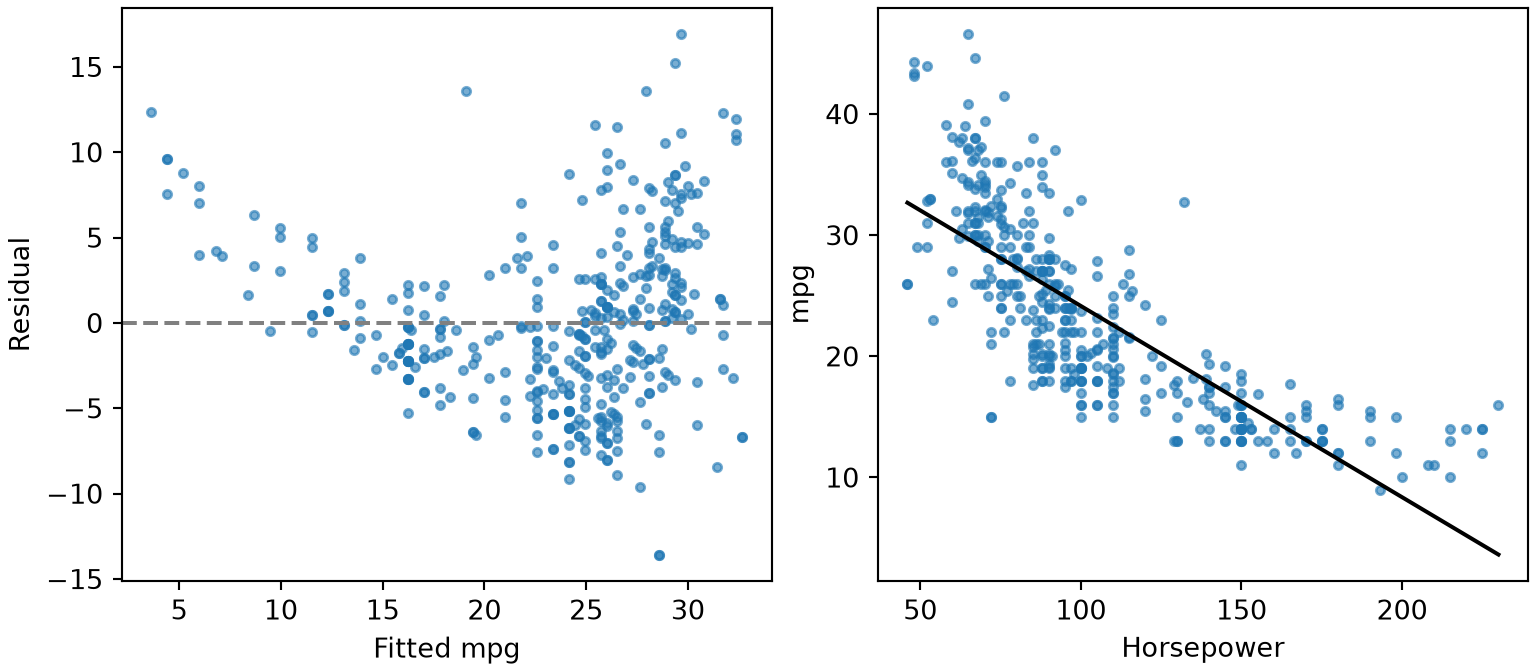
Two plots drawn with matplotlib from the Auto data. Left: residuals of the simple regression against its fitted values, forming a U shape around zero. Right: miles per gallon against horsepower with the fitted straight line, which lies below the points at both ends.

Show code
library(dplyr)

auto_rp <- read.csv("data/auto.csv") |>
  mutate(region = factor(c("US", "Europe", "Japan")[origin], levels = c("US", "Europe", "Japan")))

# A summary table of three columns by region: `by` is the grouping column, and each
# continuous column gets a mean (SD) row and a min, max row.
auto_rp |>
  select(region, mpg, horsepower, weight) |>
  gtsummary::tbl_summary(
    by = region,
    type = gtsummary::all_continuous() ~ "continuous2",
    statistic = gtsummary::all_continuous() ~ c("{mean} ({sd})", "{min}, {max}"),
    digits = gtsummary::all_continuous() ~ 1
  ) |>
  gtsummary::as_kable()
# Fit statistics in one table, formatted for the page.
fit_rp <- lm(mpg ~ horsepower, data = auto_rp)
performance::model_performance(fit_rp) |>
  insight::print_md(digits = 3)
# The p-value of the slope, formatted as text.
insight::format_p(summary(fit_rp)$coefficients["horsepower", "Pr(>|t|)"])
# The residual plot, and the fitted line with its confidence band over the data.
performance::check_model(fit_rp, check = "linearity") |>
  plot()
sjPlot::plot_model(fit_rp, type = "pred", terms = "horsepower", show.data = TRUE, title = "")
Characteristic US N = 245 Europe N = 68 Japan N = 79
mpg
Mean (SD) 20.0 (6.4) 27.6 (6.6) 30.5 (6.1)
Min, Max 9.0, 39.0 16.2, 44.3 18.0, 46.6
horsepower
Mean (SD) 119.0 (39.9) 80.6 (20.2) 79.8 (17.8)
Min, Max 52.0, 230.0 46.0, 133.0 52.0, 132.0
weight
Mean (SD) 3,372.5 (795.3) 2,433.5 (491.8) 2,221.2 (320.5)
Min, Max 1,800.0, 5,140.0 1,825.0, 3,820.0 1,613.0, 2,930.0
Indices of model performance
AIC AICc BIC R2 R2 (adj.) RMSE Sigma
2363.3 2363.4 2375.2 0.606 0.605 4.893 4.906
[1] "p < .001"

A diagnostic plot drawn in R with the performance package: residuals of the simple regression against its fitted values, forming a U shape around a dashed line at zero.

A plot drawn in R with sjPlot of miles per gallon against horsepower with the fitted straight line and its confidence band, which lies below the points at both ends.

A page that renders to both HTML and PDF can ask which one it is rendering to, with knitr::is_latex_output() in R:

# TRUE while the page renders to PDF, FALSE while it renders to HTML.
is_pdf_rp <- knitr::is_latex_output()
print(is_pdf_rp)
[1] FALSE

This render is not a PDF, so a chunk with the option #| eval: !expr !knitr::is_latex_output() would run here.

ExrExercise 98 (Summarize and report)

Exercise 98 (Summarize and report) Use the Auto data frame from the previous exercises.

Summarize acceleration and displacement by number of cylinders.

Solution 98.

Show code
import matplotlib.pyplot as plt
import numpy as np
import statsmodels.formula.api as smf

# 1. A mean and a standard deviation of each column for each number of cylinders.
print(Auto.groupby("cylinders")[["acceleration", "displacement"]].agg(["mean", "std"]).round(1))
          acceleration      displacement      
                  mean  std         mean   std
cylinders                                     
3                 13.2  0.5         72.5   5.0
4                 16.6  2.4        109.7  21.4
5                 18.6  2.4        145.0  33.3
6                 16.3  2.0        218.4  32.4
8                 13.0  2.2        345.0  46.8
Show code
library(dplyr)

# 1. A summary table by number of cylinders.
auto |>
  mutate(cylinders = factor(cylinders)) |>
  select(cylinders, acceleration, displacement) |>
  gtsummary::tbl_summary(
    by = cylinders,
    type = gtsummary::all_continuous() ~ "continuous2",
    statistic = gtsummary::all_continuous() ~ c("{mean} ({sd})", "{min}, {max}"),
    digits = gtsummary::all_continuous() ~ 1
  ) |>
  gtsummary::as_kable()
Characteristic 3 N = 4 4 N = 199 5 N = 3 6 N = 83 8 N = 103
acceleration
Mean (SD) 13.3 (0.5) 16.6 (2.4) 18.6 (2.4) 16.3 (2.0) 13.0 (2.2)
Min, Max 12.5, 13.5 11.6, 24.8 15.9, 20.1 11.3, 21.0 8.0, 22.2
displacement
Mean (SD) 72.5 (5.0) 109.7 (21.4) 145.0 (33.3) 218.4 (32.4) 345.0 (46.8)
Min, Max 70.0, 80.0 68.0, 156.0 121.0, 183.0 145.0, 262.0 260.0, 455.0
ExrExercise 99 (Summarize and report (part 2))

Exercise 99 (Summarize and report (part 2)) Use the setup of Exercise 98.

Fit acceleration ~ displacement, and report \(R^2\), the adjusted \(R^2\) and the residual standard error.

Solution 99.

# 2. Fit statistics.
fit_rs = smf.ols("acceleration ~ displacement", data=Auto).fit()
print(round(fit_rs.rsquared, 3), round(fit_rs.rsquared_adj, 3), round(float(np.sqrt(fit_rs.scale)), 2))
0.296 0.294 2.32
# 2. Fit statistics.
fit_rs <- lm(acceleration ~ displacement, data = auto)
performance::model_performance(fit_rs) |>
  insight::print_md(digits = 3)
Indices of model performance
AIC AICc BIC R2 R2 (adj.) RMSE Sigma
1775.6 1775.7 1787.6 0.296 0.294 2.312 2.318
ExrExercise 100 (Summarize and report (part 3))

Exercise 100 (Summarize and report (part 3)) Use the setup of Exercise 98.

Draw the residuals against the fitted values, and write the p-value of the slope as text.

Solution 100.

Show code
# 3. Residuals against fitted values, and the p-value of the slope as text.
fig_rs, ax_rs = plt.subplots(figsize=(4.5, 3.5), layout="constrained")
ax_rs.scatter(fit_rs.fittedvalues, fit_rs.resid, s=10, alpha=0.6);
ax_rs.axhline(0, linestyle="--", color="gray");
ax_rs.set_xlabel("Fitted acceleration");
ax_rs.set_ylabel("Residual");
plt.show()
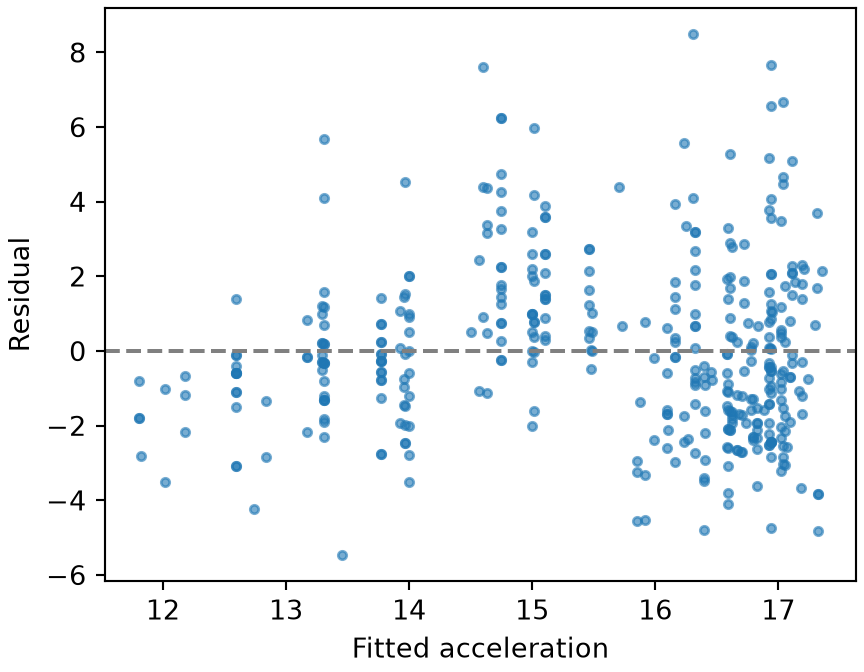
A scatter plot drawn with matplotlib of the residuals of the regression of acceleration on displacement against its fitted values, with a dashed line at zero. The residuals are spread widely, with somewhat more spread at high fitted values.

Show code
p_rs = fit_rs.pvalues["displacement"]
print("p < 0.001" if p_rs < 0.001 else f"p = {p_rs:.3f}")
p < 0.001
Show code
# 3. The residual plot, and the p-value of the slope as text.
performance::check_model(fit_rs, check = "linearity") |>
  plot()
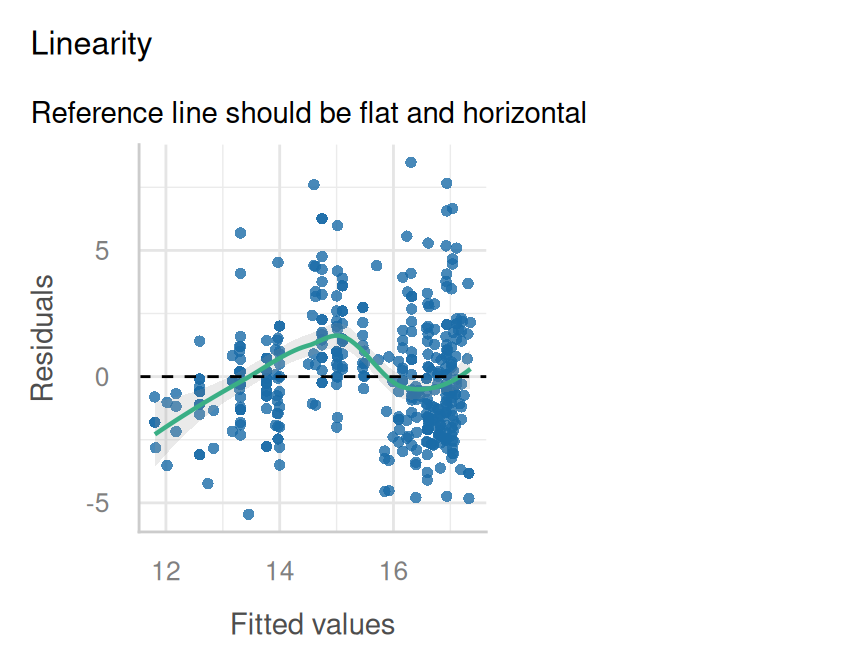
A diagnostic plot drawn in R with the performance package: residuals of the regression of acceleration on displacement against its fitted values, with a smooth trend line and a dashed line at zero.

Show code
insight::format_p(summary(fit_rs)$coefficients["displacement", "Pr(>|t|)"])
[1] "p < .001"
ExrExercise 101 (Summarize and report (part 4))

Exercise 101 (Summarize and report (part 4)) Use the setup of Exercise 98.

In R, print whether the page is being rendered to PDF, and say in a sentence of inline code which format it is.

Solution 101. Exercise 101 asks which format the page is rendering to, which only R’s knitr can answer:

# 4. `is_latex_output` is TRUE while rendering to PDF and FALSE otherwise.
is_pdf_rs <- knitr::is_latex_output()
print(is_pdf_rs)
[1] FALSE

This page is rendering to HTML.

3.5 Fit smooth curves with mgcv

statsmodels has no function that chooses the smoothness of a curve as mgcv does, so the nearest tool is a regression spline with a fixed number of degrees of freedom, written in the formula:

Formula term What it does
bs(x, df=5) a B-spline basis of x with 5 columns, inside a formula passed to smf.ols or smf.glm
C(origin) treat a numeric column as a category

The mgcv package fits a generalized additive model, in which each s() term is a smooth curve of one predictor:

Function What it does
gam(y ~ s(x1) + s(x2) + factor, data = df, method = "REML") fits the model; REML chooses how wiggly each curve is, and family = binomial() or another family changes the response, as in glm
s(x, k = 12) a smooth term of x, with a basis of k dimensions, so its effective degrees of freedom can reach at most k - 1
summary(fit)$s.table one row for each smooth term: its effective degrees of freedom (edf) and a test that the curve is flat
k.check(fit) whether each basis was large enough: k' is the largest edf the term could reach, and a k-index well below 1 with a small p-value says the term misses structure
ExmExample 17 (Smooth curves of horsepower and weight)

Example 17 (Smooth curves of horsepower and weight) Fit mpg as smooth curves of horsepower and weight, plus the region of origin as a category. Report how wiggly each curve is, and check that the basis was large enough:

import pandas as pd
import statsmodels.formula.api as smf

auto_gm = pd.read_csv("data/auto.csv")

# `bs(x, df=5)` gives each predictor a cubic spline with 5 basis columns; `C(origin)` makes
# the region a category. The number of columns is fixed by us, not chosen by the data.
fit_gm = smf.ols("mpg ~ bs(horsepower, df=5) + bs(weight, df=5) + C(origin)", data=auto_gm).fit()
print("R^2:", round(fit_gm.rsquared, 3))
R^2: 0.769
library(mgcv)

auto_gm <- read.csv("data/auto.csv")

# `s()` marks a smooth term, and `REML` picks how wiggly each one is.
fit_gm <- gam(mpg ~ s(horsepower) + s(weight) + factor(origin), data = auto_gm, method = "REML")

# Effective degrees of freedom of each smooth: near 1 is a straight line, larger is a curve.
round(summary(fit_gm)$s.table, 3)
                edf Ref.df      F p-value
s(horsepower) 4.679  5.762 12.547       0
s(weight)     2.898  3.703 16.024       0
# `k.check` compares each edf with `k'`, the most it could reach; an edf far below k' means
# the basis was big enough.
round(k.check(fit_gm), 2)
              k'  edf k-index p-value
s(horsepower)  9 4.68    0.70    0.00
s(weight)      9 2.90    1.03    0.73

The smooth of horsepower has an effective degrees of freedom of 4.7 and the smooth of weight 2.9, both below k'. An edf below k' means the smooth did not use up its basis. The k-index of horsepower is 0.7, with a p-value of < 0.005. k.check reads a k-index well below 1 with a small p-value as a sign that the smooth misses some structure.

ExrExercise 102 (Fit smooth curves)

Exercise 102 (Fit smooth curves) Use the Auto data frame from the previous exercises.

Fit acceleration as smooth curves of displacement and horsepower.

Solution 102.

Show code
import statsmodels.formula.api as smf

# A fixed 5-column spline for each predictor, as the nearest Python counterpart.
fit_gs = smf.ols("acceleration ~ bs(displacement, df=5) + bs(horsepower, df=5)", data=Auto).fit()
print("R^2:", round(fit_gs.rsquared, 3))
R^2: 0.578
Show code
library(mgcv)

# 1. Smooth curves of displacement and horsepower.
fit_gs <- gam(acceleration ~ s(displacement) + s(horsepower), data = auto, method = "REML")
ExrExercise 103 (Fit smooth curves (part 2))

Exercise 103 (Fit smooth curves (part 2)) Use the setup of Exercise 102.

Report the effective degrees of freedom of each curve.

Solution 103.

# The effective degrees of freedom are the `edf` column of the smooth-term table.
round(summary(fit_gs)$s.table, 3)
                  edf Ref.df      F p-value
s(displacement) 3.708  4.644 13.139       0
s(horsepower)   5.543  6.692 26.699       0
ExrExercise 104 (Fit smooth curves (part 3))

Exercise 104 (Fit smooth curves (part 3)) Use the setup of Exercise 102.

Is either one a straight line?

Solution 104. An effective degrees of freedom near \(1\) is a straight line, so look for values near \(1\) in the edf column.

ExrExercise 105 (Fit smooth curves (part 4))

Exercise 105 (Fit smooth curves (part 4)) Use the setup of Exercise 102.

Check whether each basis was large enough.

Solution 105.

# 3. Compare each edf with k', the most it could reach.
round(k.check(fit_gs), 2)
                k'  edf k-index p-value
s(displacement)  9 3.71    0.85    0.00
s(horsepower)    9 5.54    0.99    0.37

3.6 Fit models with tidymodels

In Python, the steps that a tidymodels recipe records are ordinary column operations, done before fitting:

Step Python
make dummy (indicator) columns from a categorical column pd.get_dummies(df["column"], drop_first=True)
add a squared column df["x"] ** 2
add an interaction df["x"] * df["z"]
fit the model np.linalg.lstsq(X, y, rcond=None)
predict X_new @ beta
\(R^2\) of predictions np.corrcoef(y, y_hat)[0, 1] ** 2
polynomial columns of degree \(d\) np.column_stack([df["x"] ** k for k in range(1, d + 1)])
table of estimates with confidence intervals sm.OLS(y, X).fit().summary2().tables[1]
one row of fit statistics .rsquared, .fvalue and np.sqrt(.scale) (the residual standard error) of the same fitted results
compare two nested models by an \(F\) test anova_lm(fit_small, fit_large) from statsmodels.stats.anova

The tidymodels packages describe a model in pieces that you combine and then fit:

Function What it does
recipe(y ~ ., data = df) starts a recipe: which column is the outcome, which are the predictors
step_mutate(x2 = x^2), step_poly(x, degree = 2, options = list(raw = TRUE)) steps that add a computed column, and polynomial columns; raw = TRUE makes them the plain powers \(x, x^2\), not orthogonal polynomials
step_dummy(all_nominal_predictors()) steps that turn the categorical predictors into indicator columns
step_interact(~ x:z) a step that adds the product of two predictors
prep() and bake(new_data = NULL) estimate the steps from the data, then show the resulting table, to check the recipe
linear_reg() and set_engine("lm") a model specification: a linear model, fitted by lm
workflow(), add_recipe() and add_model() combine a recipe and a model specification, then fit(df) fits both
extract_fit_engine() the underlying lm object of a fitted workflow, for functions such as anova
tidy(fit, conf.int = TRUE) the table of estimates, one row per coefficient: estimate, std.error, statistic, p.value and the confidence interval conf.low, conf.high. On anova output, tidy() gives the \(F\) test as a data frame
glance(fit) one row of fit statistics: r.squared, sigma (the residual standard error), statistic and p.value (the overall \(F\) test), and more
augment(fit, new_data = df) df with the predictions in a .pred column
rsq_trad_vec(truth, estimate) \(R^2\) of predictions, as one number
ExmExample 18 (A model with a recipe, from the Auto data)

Example 18 (A model with a recipe, from the Auto data) Fit mpg on horsepower, weight, the region of origin (as indicator columns), and the interaction of horsepower with weight. Report the coefficients, and the \(R^2\) of the fitted values:

Show code
import numpy as np
import pandas as pd

auto_tm = pd.read_csv("data/auto.csv")
auto_tm["region"] = auto_tm["origin"].map({1: "US", 2: "Europe", 3: "Japan"})

# The "recipe": indicator columns for Europe and Japan (US is the reference level, as in R),
# and the product of horsepower and weight. Everything goes into one table of predictors.
dummies_tm = pd.get_dummies(auto_tm["region"], dtype=float)[["Europe", "Japan"]]
X_tm = pd.concat([
    pd.Series(1.0, index=auto_tm.index, name="intercept"),
    auto_tm[["horsepower", "weight"]],
    dummies_tm,
    (auto_tm["horsepower"] * auto_tm["weight"]).rename("horsepower:weight"),
], axis=1)

# Fit by least squares, then predict. Printing a Series keeps the names with the numbers.
beta_tm = pd.Series(np.linalg.lstsq(X_tm, auto_tm["mpg"], rcond=None)[0], index=X_tm.columns)
fitted_tm = X_tm @ beta_tm
print(beta_tm.round(4))
intercept            60.6083
horsepower           -0.2431
weight               -0.0098
Europe                0.3426
Japan                 1.9233
horsepower:weight     0.0001
dtype: float64
Show code
print("R^2:", round(np.corrcoef(auto_tm["mpg"], fitted_tm)[0, 1] ** 2, 3))
R^2: 0.755
Show code
# A polynomial recipe step becomes extra columns of powers. `sm.OLS` fits from the table of columns
# and keeps their names, so `summary2().tables[1]` is the table of estimates with confidence intervals (R's `tidy`).
import statsmodels.api as sm
from statsmodels.stats.anova import anova_lm

X_line_tm = pd.DataFrame({"intercept": 1.0, "horsepower": auto_tm["horsepower"]})
X_poly_tm = X_line_tm.assign(horsepower_2=auto_tm["horsepower"] ** 2)
line_tm = sm.OLS(auto_tm["mpg"], X_line_tm).fit()
poly_tm = sm.OLS(auto_tm["mpg"], X_poly_tm).fit()
print(poly_tm.summary2().tables[1].round(4))
                Coef.  Std.Err.        t  P>|t|   [0.025   0.975]
intercept     56.9001    1.8004  31.6037    0.0  53.3603  60.4399
horsepower    -0.4662    0.0311 -14.9782    0.0  -0.5274  -0.4050
horsepower_2   0.0012    0.0001  10.0801    0.0   0.0010   0.0015
Show code
# The one-row summary (R's `glance`): R^2, residual standard error, and the overall F statistic.
print(round(poly_tm.rsquared, 3), round(np.sqrt(poly_tm.scale), 3), round(poly_tm.fvalue, 1))
0.688 4.374 428.0
Show code
# `anova_lm` compares the nested models by an F test (R's `anova` on the engines).
print(anova_lm(line_tm, poly_tm).round(4))
   df_resid        ssr  df_diff    ss_diff         F  Pr(>F)
0     390.0  9385.9159      0.0        NaN       NaN     NaN
1     389.0  7442.0294      1.0  1943.8865  101.6083     0.0
Show code
library(dplyr)
library(tidymodels)

auto_tm <- read.csv("data/auto.csv") |>
  mutate(region = factor(c("US", "Europe", "Japan")[origin], levels = c("US", "Europe", "Japan")))

# A recipe lists the steps that turn the data into predictors; nothing is estimated yet.
# `step_dummy` makes indicator columns, leaving out the first level (US) as the reference.
recipe_tm <- recipe(mpg ~ horsepower + weight + region, data = auto_tm) |>
  step_dummy(all_nominal_predictors()) |>
  step_interact(~ horsepower:weight)

# `prep` runs the steps on the data and `bake(new_data = NULL)` shows the result: a check on the recipe.
recipe_tm |> prep() |> bake(new_data = NULL) |> head(3)
Show code
# A model specification names the kind of model and the function that fits it;
# a workflow joins it to the recipe, and `fit` fits the two together.
fit_tm <- workflow() |>
  add_recipe(recipe_tm) |>
  add_model(linear_reg() |> set_engine("lm")) |>
  fit(auto_tm)
tidy(fit_tm)
Show code
# `augment` adds the predictions as `.pred`, and `rsq_trad_vec` computes R^2 from truth and predictions.
augment(fit_tm, new_data = auto_tm) |>
  summarise(r_squared = rsq_trad_vec(mpg, .pred))
Show code
# `step_poly` with `raw = TRUE` adds the columns horsepower and horsepower squared (not orthogonal polynomials),
# so the coefficients mean what they do in a model written with the squared column by hand.
line_recipe_tm <- recipe(mpg ~ horsepower, data = auto_tm)
poly_recipe_tm <- line_recipe_tm |>
  step_poly(horsepower, degree = 2, options = list(raw = TRUE))
fit_line_tm <- workflow() |>
  add_recipe(line_recipe_tm) |>
  add_model(linear_reg() |> set_engine("lm")) |>
  fit(auto_tm)
fit_poly_tm <- workflow() |>
  add_recipe(poly_recipe_tm) |>
  add_model(linear_reg() |> set_engine("lm")) |>
  fit(auto_tm)

# `tidy` with `conf.int = TRUE` is the table of estimates with confidence intervals.
tidy(fit_poly_tm, conf.int = TRUE)
Show code
# `glance` is one row of fit statistics; `select` keeps R^2, the residual standard error and the overall F test.
glance(fit_poly_tm) |>
  select(r.squared, sigma, statistic, p.value)
Show code
# `extract_fit_engine` pulls the `lm` object out of each workflow, so that `anova` can compare the two nested models.
# `tidy` turns the anova table into a data frame.
anova(extract_fit_engine(fit_line_tm), extract_fit_engine(fit_poly_tm)) |>
  tidy()

Both languages give the same coefficients, and the same \(F\) test for the squared horsepower column. Adding that column raises \(R^2\) from 0.606 to 0.688. The interaction coefficient is small because horsepower:weight is on the scale of a product of two large numbers.

ExrExercise 106 (Fit a model with a recipe)

Exercise 106 (Fit a model with a recipe) Use the Auto data frame from the previous exercises.

Fit mpg on weight, a squared weight column, and the number of cylinders, with the number of cylinders turned into indicator columns.

Solution 106.

import numpy as np
import pandas as pd

# Indicator columns for the number of cylinders, leaving out the first level (3) as the reference.
cyl_dummies = pd.get_dummies(Auto["cylinders"], prefix="cyl", drop_first=True, dtype=float)
X_new_cols = pd.concat([
    pd.Series(1.0, index=Auto.index, name="intercept"),
    Auto["weight"],
    (Auto["weight"] ** 2).rename("weight2"),
    cyl_dummies,
], axis=1)
library(tidymodels)

# The number of cylinders must be a factor for `step_dummy` to turn it into indicator columns.
auto_s <- auto |> mutate(cylinders = factor(cylinders))
recipe_s <- recipe(mpg ~ weight + cylinders, data = auto_s) |>
  step_mutate(weight2 = weight^2) |>
  step_dummy(all_nominal_predictors())
fit_s <- workflow() |>
  add_recipe(recipe_s) |>
  add_model(linear_reg() |> set_engine("lm")) |>
  fit(auto_s)
ExrExercise 107 (Fit a model with a recipe (part 2))

Exercise 107 (Fit a model with a recipe (part 2)) Use the setup of Exercise 106.

Report the coefficients and the \(R^2\) of the fitted values.

Solution 107.

# Fit by least squares and report the coefficients and R^2.
beta_s = pd.Series(np.linalg.lstsq(X_new_cols, Auto["mpg"], rcond=None)[0], index=X_new_cols.columns)
print(beta_s.round(5))
intercept    49.23321
weight       -0.01552
weight2       0.00000
cyl_4         7.82697
cyl_5        11.97368
cyl_6         5.17299
cyl_8         4.35734
dtype: float64
print("R^2:", round(np.corrcoef(Auto["mpg"], X_new_cols @ beta_s)[0, 1] ** 2, 3))
R^2: 0.737
tidy(fit_s)
# R^2 of the fitted values, and the prediction for a new car.
augment(fit_s, new_data = auto_s) |>
  summarise(r_squared = rsq_trad_vec(mpg, .pred))
ExrExercise 108 (Fit a model with a recipe (part 3))

Exercise 108 (Fit a model with a recipe (part 3)) Use the setup of Exercise 106.

Predict mpg for a car that weighs 3000 pounds and has 4 cylinders.

Solution 108.

# A new car is one row built in the same way: 3000 pounds, 4 cylinders.
new_row = pd.Series(0.0, index=X_new_cols.columns)
new_row[["intercept", "weight", "weight2", "cyl_4"]] = [1.0, 3000.0, 3000.0 ** 2, 1.0]
print("Predicted mpg:", round(float(new_row @ beta_s), 1))
Predicted mpg: 23.8
predict(fit_s, new_data = tibble(weight = 3000, cylinders = factor(4, levels = levels(auto_s$cylinders))))
ExrExercise 109 (Fit a model with a recipe (part 4))

Exercise 109 (Fit a model with a recipe (part 4)) Use the setup of Exercise 106.

Fit mpg on horsepower and its square, using polynomial columns (step_poly with raw = TRUE in R).

Solution 109.

# A polynomial of degree 2 is a column of horsepower and a column of its square.
# `sm.OLS` keeps the column names.
import statsmodels.api as sm
from statsmodels.stats.anova import anova_lm

X_lin_s = pd.DataFrame({"intercept": 1.0, "horsepower": Auto["horsepower"]})
X_quad_s = X_lin_s.assign(horsepower_2=Auto["horsepower"] ** 2)
lin_fit_s = sm.OLS(Auto["mpg"], X_lin_s).fit()
quad_fit_s = sm.OLS(Auto["mpg"], X_quad_s).fit()
print(quad_fit_s.params.round(4).to_dict())
{'intercept': 56.9001, 'horsepower': -0.4662, 'horsepower_2': 0.0012}
# `step_poly` with `raw = TRUE` adds horsepower and its square, so the coefficients are those of the plain powers.
lin_recipe_s <- recipe(mpg ~ horsepower, data = auto)
quad_recipe_s <- lin_recipe_s |>
  step_poly(horsepower, degree = 2, options = list(raw = TRUE))
lin_fit_s <- workflow() |>
  add_recipe(lin_recipe_s) |>
  add_model(linear_reg() |> set_engine("lm")) |>
  fit(auto)
quad_fit_s <- workflow() |>
  add_recipe(quad_recipe_s) |>
  add_model(linear_reg() |> set_engine("lm")) |>
  fit(auto)
print(round(coef(extract_fit_engine(quad_fit_s)), 4))
      (Intercept) horsepower_poly_1 horsepower_poly_2 
          56.9001           -0.4662            0.0012 
ExrExercise 110 (Fit a model with a recipe (part 5))

Exercise 110 (Fit a model with a recipe (part 5)) Use the setup of Exercise 106.

Report the coefficient table with \(95\%\) confidence intervals.

Solution 110.

# `summary2().tables[1]` is the table of estimates with confidence intervals.
print(quad_fit_s.summary2().tables[1].round(4))
                Coef.  Std.Err.        t  P>|t|   [0.025   0.975]
intercept     56.9001    1.8004  31.6037    0.0  53.3603  60.4399
horsepower    -0.4662    0.0311 -14.9782    0.0  -0.5274  -0.4050
horsepower_2   0.0012    0.0001  10.0801    0.0   0.0010   0.0015
# `tidy` gives the coefficient table.
tidy(quad_fit_s, conf.int = TRUE)
ExrExercise 111 (Fit a model with a recipe (part 6))

Exercise 111 (Fit a model with a recipe (part 6)) Use the setup of Exercise 106.

Report the \(R^2\) and the residual standard error.

Solution 111.

# R^2 and the residual standard error: the square root of the estimated noise variance `scale`.
print(round(quad_fit_s.rsquared, 3), round(np.sqrt(quad_fit_s.scale), 3))
0.688 4.374
# `glance` gives R^2 (`r.squared`) and the residual standard error (`sigma`).
glance(quad_fit_s) |>
  select(r.squared, sigma)

A recipe makes the model easy to extend: a new column is one more step in R and one more column in Python.

ExrExercise 112 (Fit a model with a recipe (part 7))

Exercise 112 (Fit a model with a recipe (part 7)) Use the setup of Exercise 106.

Compare this model with the one that has only horsepower, by an \(F\) test.

Solution 112.

# `anova_lm` takes the smaller model first. Its last row holds the F statistic and p-value.
print(anova_lm(lin_fit_s, quad_fit_s).round(4))
   df_resid        ssr  df_diff    ss_diff         F  Pr(>F)
0     390.0  9385.9159      0.0        NaN       NaN     NaN
1     389.0  7442.0294      1.0  1943.8865  101.6083     0.0
# `anova` needs `lm` objects, so `extract_fit_engine` pulls them out of the workflows.
# The smaller model goes first; the `tidy` output has the F statistic and p-value in its second row.
anova(extract_fit_engine(lin_fit_s), extract_fit_engine(quad_fit_s)) |>
  tidy()
ExrExercise 113 (Fit a model with a recipe (part 8))

Exercise 113 (Fit a model with a recipe (part 8)) Use the setup of Exercise 106.

Does the squared column help?

Solution 113. A small \(p\)-value in the \(F\) test says that the squared column explains more variation than chance would, so the curved model is preferred over the straight line.

4 Programming

4.1 Functions, loops and formatted output

A function is defined with def name(arguments): followed by an indented body, and it hands back a value with return. A for loop, for item in sequence:, runs its indented body once for each item. An f-string, written f"text {expression}", puts the value of an expression inside text, and a format such as {x:.2f} shows a number with two decimal places.

On arrays, v.mean() gives the mean and v.std(ddof=1) gives the sample standard deviation, which divides by \(n - 1\), as the last exercise on this page explains. round(value, digits) rounds a number. On a data frame, df[["a", "b"]] selects several columns at once.

Python has syntax where R has functions for repeating a call and for handling the unexpected:

  • A list comprehension, [f(x) for x in xs], applies f to each item of xs and collects the results in a list. With two sequences, zip(xs, ys) pairs their items, as in [f(x, y) for x, y in zip(xs, ys)].
  • f(*args) calls f with the items of a list as its arguments, and f(**kwargs) calls it with the entries of a dictionary as named arguments.
  • To drop names from a list, keep the others: [c for c in cols if c not in drop].
  • try: followed by except ErrorType as err: runs a block and, if it raises an error of that type, runs the handler instead of stopping the program.

A function is defined with name <- function(arguments) { ... }, and it hands back the value of its last expression, or whatever you pass to return(). A for loop, for (item in sequence) { ... }, runs its body once for each item. sprintf("%s: %.2f", name, x) builds text from values, where %s stands for a string and %.2f for a number with two decimal places, and cat() prints it.

On vectors, mean(v) gives the mean and sd(v) gives the sample standard deviation, which divides by \(n - 1\). round(value, digits) rounds a number. On a data frame, df[, c("a", "b")] selects several columns at once, and colMeans() averages each one.

With dplyr, summarise(df, across(c(a, b), f)) applies a function f to several columns at once, and mutate(df, z = f(a)) adds a column computed from another. purrr::map_dbl(v, f) applies f to each element of v and returns a numeric vector, a tidy form of a loop that collects results. \(x) x + 1 is shorthand for function(x) x + 1.

Base R has a family of functions that apply a function over a vector or list, a loop in one call. They differ in what they hand back:

  • lapply(v, f) applies f to each element of v and returns a list, whatever f returns.
  • vapply(v, f, numeric(1)) does the same but promises that each result is one number, and returns a numeric vector. If a result has another type or length, vapply stops with an error, where sapply would quietly return something else. The notes use it inside simulations, where a wrong shape should stop the run.
  • mapply(f, a, b) walks along a and b together, calling f(a[i], b[i]) for each \(i\).
  • do.call(f, args) calls f with the elements of the list args as its arguments, so do.call(rbind, pieces) stacks a whole list of pieces at once.

setdiff(a, b) returns the elements of a that are not in b, in their original order. try(expr, silent = TRUE) evaluates an expression and, if it fails, returns an object of class "try-error" instead of stopping the script; inherits(result, "try-error") tells you whether it failed.

A few notes pages run Julia from R through the JuliaCall package. JuliaCall::julia_assign("x", value) copies an R object into the Julia session under the name x, and JuliaCall::julia_eval("expression") runs a Julia expression and returns its value to R. Reading those pages, you need only know that they pass values between the two languages.

ExmExample 19 (A coefficient of variation, by function and by loop)

Example 19 (A coefficient of variation, by function and by loop) The coefficient of variation of a positive variable is its standard deviation divided by its mean, so it measures spread on a scale-free footing. Write it as a function, and report it for two Auto columns:

import numpy as np
import pandas as pd

auto_fn = pd.read_csv("data/auto.csv")

def cv(v):
    # Divide the sample standard deviation by the mean; `ddof=1` divides by n - 1.
    return v.std(ddof=1) / v.mean()

# A loop runs the same steps once per column; the f-string shows a number to 3 decimals.
for col in ["displacement", "acceleration"]:
    print(f"{col}: {cv(auto_fn[col]):.3f}")
displacement: 0.538
acceleration: 0.178
# Many loops over columns have a one-line vectorized form.
print((auto_fn[["displacement", "acceleration"]].std() /
       auto_fn[["displacement", "acceleration"]].mean()).round(3))
displacement    0.538
acceleration    0.178
dtype: float64
# A list comprehension is Python's `lapply`: it applies `cv` to each column and keeps a list.
cols_fn = ["displacement", "acceleration", "weight"]
cv_list_fn = [float(cv(auto_fn[col])) for col in cols_fn]

# `zip` pairs each column with its own cutoff, as `mapply` does in R;
# the mean of a boolean column is the fraction of True values.
cutoffs_fn = [300, 18, 3000]
share_fn = [round(float((auto_fn[col] > cut).mean()), 3) for col, cut in zip(cols_fn, cutoffs_fn)]
print(share_fn)
[0.25, 0.171, 0.426]
# `f(**kwargs)` calls a function with a dictionary of named arguments, as `do.call` does in R.
round_args_fn = {"number": cv_list_fn[0], "ndigits": 3}
print(round(**round_args_fn))
0.538
# Dropping names from a list is the job of `setdiff` in R.
print([col for col in auto_fn.columns if col not in ["name", "origin"]])
['mpg', 'cylinders', 'displacement', 'horsepower', 'weight', 'acceleration', 'year']
# `try` and `except` keep an error from stopping the program:
# a singular matrix has no inverse, and NumPy raises `LinAlgError` to say so.
try:
    np.linalg.solve(np.array([[1.0, 2.0], [2.0, 4.0]]), np.array([1.0, 2.0]))
except np.linalg.LinAlgError as err:
    print("failed:", err)
failed: Singular matrix
auto_fn <- read.csv("data/auto.csv")

cv <- function(v) {
  # Divide the sample standard deviation by the mean;
  # `sd` already divides by n - 1.
  sd(v) / mean(v)
}

# A loop runs the same steps once per column;
# `sprintf` shows a number to 3 decimals.
for (col in c("displacement", "acceleration")) {
  cat(sprintf("%s: %.3f\n", col, cv(auto_fn[[col]])))
}
displacement: 0.538
acceleration: 0.178
# Many loops over columns have a one-line vectorized form.
round(sapply(auto_fn[, c("displacement", "acceleration")], cv), 3)
displacement acceleration 
       0.538        0.178 

The same with dplyr and purrr:

library(dplyr)

# `across` applies `cv` to each named column,
# and `summarise` collects one value per column.
auto_fn |> summarise(across(c(displacement, acceleration), cv))
# `map_dbl` is the tidy loop:
# it applies `cv` to each column and returns the numbers as a vector.
purrr::map_dbl(auto_fn[c("displacement", "acceleration")], cv)
displacement acceleration 
   0.5382590    0.1775179 

Base R has its own loops over a vector, which need no packages:

cols_fn <- c("displacement", "acceleration", "weight")

# `lapply` returns a list, one element per column, whatever the function returns.
cv_list_fn <- lapply(auto_fn[cols_fn], cv)

# `vapply` promises one number per column (`numeric(1)`) and returns a plain vector;
# it stops with an error if a result has any other shape.
cv_vec_fn <- vapply(auto_fn[cols_fn], cv, numeric(1))
print(round(cv_vec_fn, 3))
displacement acceleration       weight 
       0.538        0.178        0.285 
# `mapply` walks along the columns and their own cutoffs together;
# the mean of a logical vector is the fraction of TRUE values.
cutoffs_fn <- c(300, 18, 3000)
share_fn <- mapply(function(col, cut) mean(auto_fn[[col]] > cut), cols_fn, cutoffs_fn)
print(round(share_fn, 3))
displacement acceleration       weight 
       0.250        0.171        0.426 
# `do.call` passes the elements of a list as the arguments of a function:
# here it stacks one small table per column into one table.
pieces_fn <- lapply(cols_fn, function(col) data.frame(column = col, cv = round(cv(auto_fn[[col]]), 3)))
do.call(rbind, pieces_fn)
# `do.call(round, list(x, 3))` is the same as `round(x, 3)`.
do.call(round, list(cv_vec_fn[[1]], 3))
[1] 0.538
# `setdiff` keeps the names of the first vector that are absent from the second.
setdiff(names(auto_fn), c("name", "origin"))
[1] "mpg"          "cylinders"    "displacement" "horsepower"   "weight"      
[6] "acceleration" "year"        
# `try` turns an error into a value, so the script keeps going:
# a singular matrix has no inverse, and `solve` raises an error to say so.
attempt_fn <- try(solve(matrix(c(1, 2, 2, 4), 2)), silent = TRUE)
inherits(attempt_fn, "try-error")
[1] TRUE

The loops and the one-line forms, in base R and dplyr alike, print the same numbers: 0.538 for displacement and 0.178 for acceleration. Displacement varies much more relative to its mean, even though the two variables have different units, which is the point of a scale-free measure.

ExrExercise 114 (Functions, loops and formatted output)

Exercise 114 (Functions, loops and formatted output) Write a function standardize(v) that subtracts the mean of a numeric vector and divides by its sample standard deviation. Apply it to mpg from the Auto data, and check that the result has mean about \(0\) and standard deviation \(1\).

Solution 114.

def standardize(v):
    """Return v with mean 0 and sample standard deviation 1."""
    # `ddof=1` divides by n - 1, the sample standard deviation, which is also R's default for `sd`.
    v = np.asarray(v, dtype=float)
    return (v - v.mean()) / v.std(ddof=1)

z = standardize(Auto["mpg"])
# Rounding hides the floating-point error that makes the mean 1e-16 rather than 0.
print(round(z.mean(), 10), round(z.std(ddof=1), 10))
0.0 1.0
standardize <- function(v) {
  # `sd` divides by n - 1, the sample standard deviation.
  # The last expression in the body is the value the function returns.
  (v - mean(v)) / sd(v)
}

z <- standardize(auto$mpg)
# Rounding hides the floating-point error that makes the mean 1e-16 rather than 0.
print(c(round(mean(z), 10), round(sd(z), 10)))
[1] 0 1
ExrExercise 115 (Functions, loops and formatted output (part 2))

Exercise 115 (Functions, loops and formatted output (part 2)) Use the setup of Exercise 114.

Loop over the columns mpg, weight and horsepower. For each one, print its name and its mean, rounded to two decimal places, on one line.

Solution 115.

# An f-string builds text around values; `:.2f` keeps two decimal places.
for col in ["mpg", "weight", "horsepower"]:
    print(f"{col}: {Auto[col].mean():.2f}")
mpg: 23.45
weight: 2977.58
horsepower: 104.47
# `sprintf` builds text around values; `%.2f` keeps two decimal places.
# `[[col]]` selects a column by a name stored in a variable.
for (col in c("mpg", "weight", "horsepower")) {
  cat(sprintf("%s: %.2f\n", col, mean(auto[[col]])))
}
mpg: 23.45
weight: 2977.58
horsepower: 104.47
ExrExercise 116 (Functions, loops and formatted output (part 3))

Exercise 116 (Functions, loops and formatted output (part 3)) Use the setup of Exercise 114.

Does your loop have a vectorized replacement?

Solution 116.

# The loop is not needed: pandas applies the mean to every selected column at once.
print(Auto[["mpg", "weight", "horsepower"]].mean().round(2))
mpg             23.45
weight        2977.58
horsepower     104.47
dtype: float64
# The loop is not needed: `colMeans` averages every selected column at once.
print(round(colMeans(auto[, c("mpg", "weight", "horsepower")]), 2))
       mpg     weight horsepower 
     23.45    2977.58     104.47 

The same with dplyr:

library(dplyr)

# `mutate` adds the standardized column;
# the function from above works inside it unchanged.
as_tibble(auto) |>
  mutate(mpg_z = standardize(mpg)) |>
  summarise(mean_z = round(mean(mpg_z), 10), sd_z = round(sd(mpg_z), 10))
# `across` applies one summary to several columns,
# replacing the loop over their names.
auto |> summarise(across(c(mpg, weight, horsepower), \(x) round(mean(x), 2)))

Prefer the vectorized form when one exists: it is shorter and faster. Write a loop when each step depends on the one before it, or when the body does something that is not a column operation.

ExrExercise 117 (Functions, loops and formatted output (part 4))

Exercise 117 (Functions, loops and formatted output (part 4)) Use the setup of Exercise 114.

Standardize mpg, weight and horsepower with one call that applies standardize to each column and collects the results, then combine them into one data frame.

Solution 117.

# 4. A list comprehension applies `standardize` to each column and collects the results;
# a dictionary of columns becomes a data frame, so the names carry over.
cols = ["mpg", "weight", "horsepower"]
import pandas as pd
z_frame = pd.DataFrame({col: standardize(Auto[col]) for col in cols})
print(z_frame.mean().round(10).tolist())
[0.0, 0.0, -0.0]
# 4. `lapply` applies `standardize` to each column and keeps a list, which keeps the column names;
# `do.call` hands that list to `data.frame` as separate arguments, one per column.
cols <- c("mpg", "weight", "horsepower")
z_frame <- do.call(data.frame, lapply(auto[cols], standardize))
print(round(colMeans(z_frame), 10))
       mpg     weight horsepower 
         0          0          0 

In R, lapply returns a list, vapply a checked vector, and mapply loops over several inputs at once, so choose by what you want back.

ExrExercise 118 (Functions, loops and formatted output (part 5))

Exercise 118 (Functions, loops and formatted output (part 5)) Use the setup of Exercise 114.

For each of those three columns and its own cutoff (\(25\), \(3000\) and \(100\)), find the fraction of cars above the cutoff.

Solution 118.

# 5. `zip` pairs each column with its own cutoff; `> cut` gives booleans, whose mean is the fraction of True.
cutoffs = [25, 3000, 100]
print({col: round(float((Auto[col] > cut).mean()), 3) for col, cut in zip(cols, cutoffs)})
{'mpg': 0.398, 'weight': 0.426, 'horsepower': 0.383}
# 5. `mapply` walks along the columns and their cutoffs together.
# The mean of a logical vector is the fraction of TRUE values.
# `vapply(..., numeric(1))` would also work for one vector, but `mapply` takes two inputs.
cutoffs <- c(25, 3000, 100)
print(round(mapply(function(col, cut) mean(auto[[col]] > cut), cols, cutoffs), 3))
       mpg     weight horsepower 
     0.398      0.426      0.383 
ExrExercise 119 (Functions, loops and formatted output (part 6))

Exercise 119 (Functions, loops and formatted output (part 6)) Use the setup of Exercise 114.

List the columns of the Auto data other than name, origin and mpg.

Solution 119.

# 6. A list comprehension with a condition keeps the columns we want, in order.
print([col for col in Auto.columns if col not in ["name", "origin", "mpg"]])
['cylinders', 'displacement', 'horsepower', 'weight', 'acceleration', 'year']
# 6. `setdiff` keeps the names of the first vector that are not in the second, in order.
print(setdiff(names(auto), c("name", "origin", "mpg")))
[1] "cylinders"    "displacement" "horsepower"   "weight"       "acceleration"
[6] "year"        
ExrExercise 120 (Functions, loops and formatted output (part 7))

Exercise 120 (Functions, loops and formatted output (part 7)) Use the setup of Exercise 114.

Try to standardize the text column name, without stopping your script when it fails, and report whether it failed.

Solution 120.

# 7. The `except` branch runs instead of stopping the script when the `try` block raises an error.
try:
    standardize(Auto["name"])
    failed = False
except (TypeError, ValueError):
    failed = True
print(failed)
True
# 7. `try` returns an object of class "try-error" when its expression fails, instead of stopping the script.
# `silent = TRUE` suppresses the error message; the failure is recorded in the result.
# Text has no mean, so `standardize` fails on the `name` column;
# `suppressWarnings` hides R's warning about the failed conversion.
attempt <- suppressWarnings(try(standardize(auto$name), silent = TRUE))
print(inherits(attempt, "try-error"))
[1] TRUE

4.2 Counting and combining with the standard library

These functions come with Python itself, so they need no installation, only an import.

Import Function What it does
import math math.ceil(x) rounds x up to the next integer
math.comb(n, k) the number of ways to choose k items from n, the binomial coefficient
math.dist(p, q) the Euclidean distance between two points, given as sequences of coordinates
import itertools itertools.product(a, b) every pair with one item from a and one from b; product(a, repeat=k) makes every sequence of length k
itertools.combinations(items, k) every way to choose k items from items, ignoring order
from collections import Counter Counter(items) counts how often each item occurs; .most_common() lists them from most to least common

itertools functions return an iterator, so wrap the call in list(...) to see every result at once.

The corresponding base R functions are:

Python R Notes
math.ceil(x) ceiling(x)
math.comb(n, k) choose(n, k)
math.dist(p, q) dist(rbind(p, q)) or sqrt(sum((p - q)^2)) dist returns a distance object; as.numeric extracts the number
itertools.product(a, b) expand.grid(a, b) a data frame with one row per pair
itertools.combinations(items, k) combn(items, k) a matrix with one combination per column
Counter(items) table(items) sort(table(items), decreasing = TRUE) lists them from most to least common
ExmExample 20 (Batches, subsets and distances)

Example 20 (Batches, subsets and distances) Split the cars of the Auto data into batches of \(32\) and count the batches. Count the ways to choose \(2\) of the \(5\) cylinder counts, list them, and tally the cars by cylinders. Then find the distance between the first two cars in weight and horsepower:

import itertools
import math
from collections import Counter

import pandas as pd

auto_sl_ex = pd.read_csv("data/auto.csv")

# A last, smaller batch still counts as a batch, so we round the quotient up.
print(math.ceil(len(auto_sl_ex) / 32))
13
# `Counter` tallies how often each value occurs, and `most_common` sorts the tally.
cyl_sl_ex = Counter(auto_sl_ex["cylinders"])
print(cyl_sl_ex.most_common())
[(4, 199), (8, 103), (6, 83), (3, 4), (5, 3)]
# `comb` counts the subsets of size 2, and `combinations` lists them.
levels_sl_ex = sorted(cyl_sl_ex)
print(math.comb(len(levels_sl_ex), 2))
10
print(list(itertools.combinations(levels_sl_ex, 2))[:3])
[(3, 4), (3, 5), (3, 6)]
# `product` lists every pair with one item from each list: a grid of settings to try.
print(list(itertools.product([0.1, 1.0], [10, 100]))[:3])
[(0.1, 10), (0.1, 100), (1.0, 10)]
# `dist` is the Euclidean distance between two points given as sequences of coordinates.
first_sl_ex, second_sl_ex = auto_sl_ex[["weight", "horsepower"]].iloc[0], auto_sl_ex[["weight", "horsepower"]].iloc[1]
print(round(math.dist(first_sl_ex, second_sl_ex), 2))
192.21
auto_sl_ex <- read.csv("data/auto.csv")

# A last, smaller batch still counts as a batch, so we round the quotient up.
print(ceiling(nrow(auto_sl_ex) / 32))
[1] 13
# `table` tallies how often each value occurs, and `sort` orders the tally.
cyl_sl_ex <- table(auto_sl_ex$cylinders)
print(sort(cyl_sl_ex, decreasing = TRUE))

  4   8   6   3   5 
199 103  83   4   3 
# `choose` counts the subsets of size 2, and `combn` lists them, one per column.
levels_sl_ex <- sort(unique(auto_sl_ex$cylinders))
print(choose(length(levels_sl_ex), 2))
[1] 10
print(combn(levels_sl_ex, 2)[, 1:3])
     [,1] [,2] [,3]
[1,]    3    3    3
[2,]    4    5    6
# `expand.grid` lists every pair with one item from each list: a grid of settings to try.
print(head(expand.grid(c(0.1, 1.0), c(10, 100)), 3))
  Var1 Var2
1  0.1   10
2  1.0   10
3  0.1  100
# `dist` returns the Euclidean distance between the rows of a matrix.
pair_sl_ex <- as.matrix(auto_sl_ex[1:2, c("weight", "horsepower")])
print(round(as.numeric(dist(pair_sl_ex)), 2))
[1] 192.21

The cars fill 13 batches, and 10 pairs of cylinder counts can be chosen from the 5 counts in the data.

ExrExercise 121 (Counting and combining with the standard library)

Exercise 121 (Counting and combining with the standard library) Use the Auto data in data/auto.csv, with Python or R.

How many batches of \(50\) cars does it take to cover the data, counting a smaller last batch?

Solution 121.

import itertools
import math
from collections import Counter

import pandas as pd

auto_sls = pd.read_csv("data/auto.csv")

# 1. A smaller last batch still counts, so round the quotient up.
print(math.ceil(len(auto_sls) / 50))
8
auto_sls <- read.csv("data/auto.csv")

# 1. A smaller last batch still counts, so round the quotient up.
print(ceiling(nrow(auto_sls) / 50))
[1] 8
ExrExercise 122 (Counting and combining with the standard library (part 2))

Exercise 122 (Counting and combining with the standard library (part 2)) Use the setup of Exercise 121.

Tally the cars by origin, from the most to the least common.

Solution 122.

# 2. `most_common` lists the values from most to least frequent.
print(Counter(auto_sls["origin"]).most_common())
[(1, 245), (3, 79), (2, 68)]
# 2. `sort(..., decreasing = TRUE)` lists the values from most to least frequent.
print(sort(table(auto_sls$origin), decreasing = TRUE))

  1   3   2 
245  79  68 
ExrExercise 123 (Counting and combining with the standard library (part 3))

Exercise 123 (Counting and combining with the standard library (part 3)) Use the setup of Exercise 121.

In how many ways can you choose \(3\) of the cars in the first \(6\) rows?

Solution 123.

# `comb` counts the subsets.
print(math.comb(6, 3))
20
# `choose` counts the subsets.
print(choose(6, 3))
[1] 20
ExrExercise 124 (Counting and combining with the standard library (part 4))

Exercise 124 (Counting and combining with the standard library (part 4)) Use the setup of Exercise 121.

List the ways.

Solution 124.

# `combinations` lists them as tuples of the items; the first four are shown.
print(list(itertools.combinations(range(6), 3))[:4])
[(0, 1, 2), (0, 1, 3), (0, 1, 4), (0, 1, 5)]
# `combn` lists them, one per column; the first four are shown.
print(combn(1:6, 3)[, 1:4])
     [,1] [,2] [,3] [,4]
[1,]    1    1    1    1
[2,]    2    2    2    2
[3,]    3    4    5    6
ExrExercise 125 (Counting and combining with the standard library (part 5))

Exercise 125 (Counting and combining with the standard library (part 5)) Use the setup of Exercise 121.

Make every combination of a learning rate in \(\{0.01, 0.1\}\) and a batch size in \(\{16, 32, 64\}\).

Solution 125.

# `product` pairs each learning rate with each batch size.
grid_sls = list(itertools.product([0.01, 0.1], [16, 32, 64]))
print(grid_sls[:2])
[(0.01, 16), (0.01, 32)]
# `expand.grid` pairs each learning rate with each batch size.
grid_sls <- expand.grid(rate = c(0.01, 0.1), batch = c(16, 32, 64))
print(head(grid_sls, 2))
  rate batch
1 0.01    16
2 0.10    16
ExrExercise 126 (Counting and combining with the standard library (part 6))

Exercise 126 (Counting and combining with the standard library (part 6)) Use the setup of Exercise 121.

How many combinations are there?

Solution 126.

print(len(grid_sls))
6
print(nrow(grid_sls))
[1] 6

The number of combinations of settings is the product of the numbers of values of each setting, so it grows quickly as settings are added.

That is why a grid search over many settings is expensive.

ExrExercise 127 (Counting and combining with the standard library (part 7))

Exercise 127 (Counting and combining with the standard library (part 7)) Use the setup of Exercise 121.

Find the distance between the first two cars in mpg, acceleration and weight.

Solution 127.

# 5. `dist` takes the two points' coordinates in the same order.
cols_sls = ["mpg", "acceleration", "weight"]
print(round(math.dist(auto_sls[cols_sls].iloc[0], auto_sls[cols_sls].iloc[1]), 2))
189.02
# 5. `dist` measures the distance between the rows of a matrix.
cols_sls <- c("mpg", "acceleration", "weight")
print(round(as.numeric(dist(as.matrix(auto_sls[1:2, cols_sls]))), 2))
[1] 189.02

4.3 Random numbers and reproducibility

A computer’s random numbers come from a generator that starts from a number called the seed. rng = np.random.default_rng(seed) makes a generator, and rng.normal(loc, scale, size) draws normal values with a given mean and standard deviation. The same seed gives the same draws every time.

rng.integers(low, high, size) draws whole numbers uniformly from low up to but not including high, with replacement. So rng.integers(0, n, n) picks n row positions of an array of length n, some more than once and some not at all. That is a bootstrap resample: a new data set of the same size, drawn from the old one with replacement.

np.corrcoef(x, y) returns a \(2 \times 2\) correlation matrix. np.var(x) computes a variance, and its ddof argument sets the number subtracted from the sample size \(n\) in the denominator. np.std(x) computes the standard deviation, the square root of the variance, with the same ddof argument. np.allclose(a, b) is True when two arrays agree up to rounding error.

To resample, rng.choice(n, size=n, replace=True) draws n row numbers from 0, ..., n - 1 with replacement, and indexing with them gives a bootstrap sample of the rows. Python has no function that repeats an expression, so a list comprehension, [expression for _ in range(B)], does it \(B\) times.

A computer’s random numbers come from a generator that starts from a number called the seed. set.seed(seed) seeds R’s one global generator, and rnorm(n, mean, sd) draws n normal values with a given mean and standard deviation. The same seed gives the same draws every time.

sample(n, n, replace = TRUE) draws n row positions from \(1, \dots, n\) with replacement, a bootstrap resample: a new data set of the same size, drawn from the old one with replacement. (R counts positions from \(1\), where rng.integers(0, n, n) counts from \(0\).)

cor(x, y) computes a correlation. var(x) computes a sample variance, which divides by \(n - 1\), and sd(x) is its square root, the sample standard deviation. all.equal(a, b) tests that two vectors agree up to rounding error, and returns TRUE or a message, so isTRUE(all.equal(a, b)) gives a plain TRUE or FALSE.

To resample, sample(n, replace = TRUE) draws n row numbers from 1, ..., n with replacement, and indexing with them gives a bootstrap sample of the rows. Given a single number n, sample(n) means sample(1:n), and given a longer vector it draws from that vector’s entries, so the notes always pass the row count, as sample(nrow(df), replace = TRUE). replicate(B, expression) evaluates an expression \(B\) times, each with fresh random draws, and collects the results in a vector.

ExmExample 21 (Reproducible draws)

Example 21 (Reproducible draws) Draw \(500\) values uniformly between \(0\) and \(1\), build a noisy second variable from them, and check that the same seed repeats the draws:

import numpy as np
import pandas as pd

# The seed fixes the whole stream of draws.
rng_ex = np.random.default_rng(2024)
u_ex = rng_ex.uniform(size=500)
w_ex = 2 * u_ex + rng_ex.normal(scale=0.5, size=500)
print(np.corrcoef(u_ex, w_ex)[0, 1].round(3))
0.734
# Seeding again gives exactly the same first three draws.
print(np.random.default_rng(2024).uniform(size=3).round(4))
[0.6758 0.2143 0.3095]
print(np.random.default_rng(2024).uniform(size=3).round(4))
[0.6758 0.2143 0.3095]
# Bootstrap the mean of `mpg`: resample the rows with replacement and average each resample.
# A list comprehension repeats the resampling 1000 times; `choice` draws the row numbers.
mpg_ex = pd.read_csv("data/auto.csv")["mpg"].to_numpy()
boot_ex = np.array([
    mpg_ex[rng_ex.choice(len(mpg_ex), size=len(mpg_ex), replace=True)].mean()
    for _ in range(1000)
])
# The standard deviation of the resampled means estimates the standard error of the mean.
print(boot_ex.std(ddof=1).round(3), (mpg_ex.std(ddof=1) / np.sqrt(len(mpg_ex))).round(3))
0.395 0.394
# A bootstrap resample draws 500 row positions from 0, ..., 499 with replacement.
# `integers` excludes its upper limit, so 500 is the right limit for positions 0 to 499.
# We reserve the results with `np.empty` and fill every entry in the loop.
boot_means_ex = np.empty(1000)
for b in range(1000):
    rows_ex = rng_ex.integers(0, 500, 500)
    boot_means_ex[b] = w_ex[rows_ex].mean()

# The standard deviation of the resampled means estimates the standard error of the mean.
# `ddof=1` divides by one less than the number of means, as `sd` does in R.
# The usual formula, the sample standard deviation over the square root of n, should be close.
print(np.std(boot_means_ex, ddof=1).round(4), (np.std(w_ex, ddof=1) / np.sqrt(500)).round(4))
0.0338 0.0342
# The seed fixes the whole stream of draws.
set.seed(2024)
u_ex <- runif(500)
w_ex <- 2 * u_ex + rnorm(500, sd = 0.5)
print(round(cor(u_ex, w_ex), 3))
[1] 0.758
# Seeding again gives exactly the same first three draws.
set.seed(2024)
first_ex <- runif(3)
set.seed(2024)
second_ex <- runif(3)
print(round(first_ex, 4))
[1] 0.8369 0.3209 0.6804
print(identical(first_ex, second_ex))
[1] TRUE
# Bootstrap the mean of `mpg`: resample the rows with replacement and average each resample.
# `replicate` repeats the braces 1000 times and collects the means in a vector;
# `sample(n, replace = TRUE)` draws the row numbers.
mpg_ex <- read.csv("data/auto.csv")$mpg
boot_ex <- replicate(1000, {
  mean(mpg_ex[sample(length(mpg_ex), replace = TRUE)])
})
# The standard deviation of the resampled means estimates the standard error of the mean.
print(round(c(sd(boot_ex), sd(mpg_ex) / sqrt(length(mpg_ex))), 3))
[1] 0.397 0.394
# A bootstrap resample draws 500 row positions from 1, ..., 500 with replacement.
# We reserve the results with `numeric` and fill every entry in the loop.
set.seed(2024)
boot_means_ex <- numeric(1000)
for (b in 1:1000) {
  rows_ex <- sample(500, 500, replace = TRUE)
  boot_means_ex[b] <- mean(w_ex[rows_ex])
}

# The standard deviation of the resampled means estimates the standard error of the mean.
# The usual formula, the sample standard deviation over the square root of n, should be close.
print(round(c(sd(boot_means_ex), sd(w_ex) / sqrt(500)), 4))
[1] 0.0322 0.0330

The correlation is positive, because w is built from u, and noise keeps it below \(1\). The bootstrap standard error of the mean of w is 0.032, against 0.033 from the formula. Reseeding repeats the draws within a language, but Python and R use different generators, so the same seed gives different numbers in the two languages. The bootstrap standard error of the mean of mpg is close to the formula \(s / \sqrt{n}\), which is \(\approx\) 0.394, because resampling the data mimics drawing new samples from the population.

ExrExercise 128 (Random numbers and reproducibility)

Exercise 128 (Random numbers and reproducibility) Seed the random number generator with \(1\), and draw \(100\) standard normal values x.

Solution 128.

# A generator seeded with the same number gives the same stream of draws.
# Pass the generator around instead of setting a global seed, so that each
# calculation controls its own randomness.
rng = np.random.default_rng(1)
x = rng.normal(size=100)
y = x + rng.normal(loc=50, scale=1, size=100)
# `set.seed` seeds R's one global generator, so every later draw depends on it.
set.seed(1)
x <- rnorm(100)
y <- x + rnorm(100, mean = 50, sd = 1)
ExrExercise 129 (Random numbers and reproducibility (part 2))

Exercise 129 (Random numbers and reproducibility (part 2)) Use the setup of Exercise 128.

Make y by adding an independent \(N(50, 1)\) draw to each entry of x. Find the correlation between x and y.

Solution 129.

# `corrcoef` returns a correlation matrix; the off-diagonal entry is corr(x, y).
print(np.corrcoef(x, y)[0, 1])
0.6394467767522596
# `cor` returns the correlation of two vectors.
print(cor(x, y))
[1] 0.6836311
ExrExercise 130 (Random numbers and reproducibility (part 3))

Exercise 130 (Random numbers and reproducibility (part 3)) Use the setup of Exercise 128.

Seed the generator with \(1\) again and redraw x. Do you get the same numbers?

Solution 130.

# Same seed, same numbers.
print(np.allclose(x, np.random.default_rng(1).normal(size=100)))
True
# Same seed, same numbers.
# `all.equal` returns a message when the vectors differ, so wrap it in `isTRUE`.
set.seed(1)
print(isTRUE(all.equal(x, rnorm(100))))
[1] TRUE
ExrExercise 131 (Random numbers and reproducibility (part 4))

Exercise 131 (Random numbers and reproducibility (part 4)) Use the setup of Exercise 128.

Do you get the same numbers if you seed with a different number?

Solution 131.

# A different seed, different numbers.
print(np.allclose(x, np.random.default_rng(2).normal(size=100)))
False
# A different seed, different numbers.
set.seed(2)
print(isTRUE(all.equal(x, rnorm(100))))
[1] FALSE

Seeding lets another reader of this page reproduce the same numbers, and lets you debug a stochastic method.

ExrExercise 132 (Random numbers and reproducibility (part 5))

Exercise 132 (Random numbers and reproducibility (part 5)) Use the setup of Exercise 128.

Compute the variance of x with the sum of squared deviations divided by \(\nobs\), and then divided by \(\nobs - 1\).

Solution 132.

# `ddof` is the number subtracted from n in the denominator.
# The default ddof=0 divides by n; ddof=1 divides by n - 1.
print(np.var(x), np.var(x, ddof=1))
0.7251488700949983 0.732473606156564
# `var` already divides by n - 1.
# Rescaling by (n - 1) / n gives the version that divides by n.
n <- length(x)
print(c(var(x) * (n - 1) / n, var(x)))
[1] 0.7986945 0.8067621
ExrExercise 133 (Random numbers and reproducibility (part 6))

Exercise 133 (Random numbers and reproducibility (part 6)) Use the setup of Exercise 128.

Which one is the sample variance?

Solution 133. The one that divides by \(\nobs - 1\) is the sample variance, and it is unbiased for the population variance.

ExrExercise 134 (Random numbers and reproducibility (part 7))

Exercise 134 (Random numbers and reproducibility (part 7)) Use the setup of Exercise 128.

Why do they differ?

Solution 134. The two variances differ by the factor \(\nobs / (\nobs - 1)\), which matters for small samples and disappears for large ones.

ExrExercise 135 (Random numbers and reproducibility (part 8))

Exercise 135 (Random numbers and reproducibility (part 8)) Use the setup of Exercise 128.

Compute the standard deviation of x in the way that matches the sample variance, and check that its square is that variance.

Solution 135.

# 5. `std` takes the same `ddof` argument, so `ddof=1` matches the sample variance.
# Squaring it must give that variance back, because the standard deviation is its square root.
print(np.std(x, ddof=1), np.allclose(np.std(x, ddof=1) ** 2, np.var(x, ddof=1)))
0.8558467188443056 True
# 5. `sd` divides by n - 1, like `var`, so it is the sample standard deviation.
# Squaring it must give `var` back, because the standard deviation is its square root.
print(c(sd(x), isTRUE(all.equal(sd(x)^2, var(x)))))
[1] 0.8981994 1.0000000
ExrExercise 136 (Random numbers and reproducibility (part 9))

Exercise 136 (Random numbers and reproducibility (part 9)) Use the setup of Exercise 128.

Draw \(1000\) bootstrap resamples of x: each time, draw \(100\) row positions with replacement, and take the mean of the matching entries.

Solution 136.

# `integers(0, 100, 100)` draws 100 positions from 0 to 99 (the upper limit is excluded)
# with replacement, so some rows repeat and some are missing: that is a bootstrap resample.
# `np.empty` reserves the 1000 means, and the loop fills every one before we read any.
boot_means = np.empty(1000)
for b in range(1000):
    rows = rng.integers(0, 100, 100)
    boot_means[b] = x[rows].mean()
# `sample(100, 100, replace = TRUE)` draws 100 positions from 1 to 100 with replacement,
# so some rows repeat and some are missing: that is a bootstrap resample.
# `numeric(1000)` reserves the 1000 means, and the loop fills every one.
boot_means <- numeric(1000)
for (b in 1:1000) {
  rows <- sample(100, 100, replace = TRUE)
  boot_means[b] <- mean(x[rows])
}
ExrExercise 137 (Random numbers and reproducibility (part 10))

Exercise 137 (Random numbers and reproducibility (part 10)) Use the setup of Exercise 128.

Find the standard deviation of the \(1000\) means.

Solution 137.

# The spread of the resampled means estimates the standard error of the mean.
print(np.std(boot_means, ddof=1))
0.08267449802702971
# The spread of the resampled means estimates the standard error of the mean.
print(sd(boot_means))
[1] 0.0886908
ExrExercise 138 (Random numbers and reproducibility (part 11))

Exercise 138 (Random numbers and reproducibility (part 11)) Use the setup of Exercise 128.

Compare it with the standard deviation of x divided by \(\sqrt{100}\).

Solution 138.

# The formula sd / sqrt(n) gives the standard error of the mean directly, so the two should be close.
print(np.std(x, ddof=1) / np.sqrt(100))
0.08558467188443056
# The formula sd / sqrt(n) gives the standard error of the mean directly, so the two should be close.
print(sd(x) / sqrt(100))
[1] 0.08981994

The bootstrap agrees with the formula for the standard error of a mean because resampling mimics drawing new samples from the population. Its advantage is that the same loop works for statistics with no simple formula.

ExrExercise 139 (Random numbers and reproducibility (part 12))

Exercise 139 (Random numbers and reproducibility (part 12)) Use the setup of Exercise 128.

Then repeat the resampling without a loop, in one expression.

Solution 139.

# `choice(100, size=100, replace=True)` draws 100 row numbers with replacement.
# A list comprehension repeats the resample-and-average step 1000 times.
boot_means_vec = np.array([x[rng.choice(len(x), size=len(x), replace=True)].mean() for _ in range(1000)])
print(boot_means_vec.std(ddof=1), x.std(ddof=1) / np.sqrt(len(x)))
0.0837473592488731 0.08558467188443056
# `sample(n, replace = TRUE)` draws n row numbers with replacement.
# `replicate` repeats the resample-and-average step 1000 times and returns a vector.
boot_means_vec <- replicate(1000, mean(x[sample(n, replace = TRUE)]))
print(c(sd(boot_means_vec), sd(x) / sqrt(n)))
[1] 0.09042841 0.08981994

The two standard errors, from the loop and from the loop-free version, are close, so the bootstrap recovers the textbook formula without using it.

5 Machine learning libraries

5.1 Fit models with scikit-learn

The scikit-learn library (imported as sklearn) gives every model the same interface. You create an estimator with its settings, as in LogisticRegression(max_iter=1000), and call .fit(X, y) with a matrix of features and a vector of responses. Fitting returns the estimator itself, so Model(...).fit(X, y) is a complete fit. Then .predict(X_new) returns predictions, .predict_proba(X_new) returns the probability of each class (one column per class, in the order of .classes_), and .score(X, y) returns the accuracy of a classifier. Quantities learned from the data are attributes ending in an underscore.

Estimator Import from Attributes it learns
LogisticRegression sklearn.linear_model coef_, intercept_, classes_
LinearDiscriminantAnalysis, QuadraticDiscriminantAnalysis sklearn.discriminant_analysis classes_, priors_ (class proportions), means_ (class means)
DecisionTreeRegressor(random_state=0) sklearn.tree none we use; .predict returns the mean response in a leaf
MLPRegressor(hidden_layer_sizes=(2,), activation="tanh", max_iter=5000) sklearn.neural_network a neural network with the given hidden layers, trained by gradient descent
KMeans(n_clusters, n_init=10, random_state=1) sklearn.cluster labels_ (cluster of each row), cluster_centers_; it has no y, so call .fit(X)

To measure a regression model’s prediction error, from sklearn.metrics import mean_squared_error and call mean_squared_error(y_true, y_pred). It returns the sample mean squared error (sMSE), the average of the squared differences, \(\frac{1}{n} \sum_i (y_i - \hat y_i)^2\), with the true responses first. Take np.sqrt of it for the sample root mean squared error (sRMSE), which has the units of the response. Evaluate it on rows the model did not train on, to estimate the error on new data.

sklearn.datasets.load_digits() returns the \(1797\) handwritten digits as an object with the images flattened to \(64\) numbers in .data, the digit in .target, and the \(8 \times 8\) images in .images.

R’s fitting functions take a formula and a data frame, not a matrix, and return an object that works with predict.

Python estimator R function Notes
LogisticRegression glm(y ~ ., family = binomial, data = df) predict(fit, df, type = "response") returns probabilities. glm has no penalty by default; LogisticRegression does.
LinearDiscriminantAnalysis MASS::lda(y ~ ., data = df) the fit holds $prior and $means; predict(fit, df)$class and $posterior
QuadraticDiscriminantAnalysis MASS::qda(y ~ ., data = df) the same components
DecisionTreeRegressor rpart::rpart(y ~ ., data = df) rpart.control(minsplit = 2, cp = 0) grows the tree until the leaves are pure, as scikit-learn does by default
MLPRegressor nnet::nnet(y ~ ., data = df, size = 2, linout = TRUE) size is the number of hidden units
KMeans kmeans(x, centers = k, nstart = 10) $cluster and $centers
load_digits none the notes use this data set in Python only
mean_squared_error(y_true, y_pred) mean((y - y_hat)^2) R has no one-line base function; yardstick::rmse_vec(truth, estimate) gives the root
ExmExample 22 (Classifying efficient cars, clustering and a small tree)

Example 22 (Classifying efficient cars, clustering and a small tree) Call a car efficient when its mpg is above the median. Train three classifiers of efficient on horsepower and weight using every other row, starting with the first, and compare their accuracy on the remaining rows. Then cluster the cars and fit a regression tree:

import numpy as np
import pandas as pd
from sklearn.cluster import KMeans
from sklearn.datasets import load_digits
from sklearn.discriminant_analysis import LinearDiscriminantAnalysis, QuadraticDiscriminantAnalysis
from sklearn.linear_model import LogisticRegression
from sklearn.metrics import mean_squared_error
from sklearn.tree import DecisionTreeRegressor

auto_sk_ex = pd.read_csv("data/auto.csv")
X_sk_ex = auto_sk_ex[["horsepower", "weight"]].to_numpy(dtype=float)
y_sk_ex = (auto_sk_ex["mpg"] > auto_sk_ex["mpg"].median()).to_numpy().astype(int)

# Standardize the features so that the optimizer behind `LogisticRegression` converges easily.
# The training rows alone set the center and scale, so the test rows stay unseen.
train_sk_ex = np.arange(len(y_sk_ex)) % 2 == 0
center_sk_ex = X_sk_ex[train_sk_ex].mean(axis=0)
scale_sk_ex = X_sk_ex[train_sk_ex].std(axis=0, ddof=1)
Z_sk_ex = (X_sk_ex - center_sk_ex) / scale_sk_ex

# Every estimator is created with its settings, then fitted with `fit(X, y)`.
# `score` returns the accuracy: the fraction of rows whose predicted class is correct.
for model_sk_ex in (LogisticRegression(), LinearDiscriminantAnalysis(), QuadraticDiscriminantAnalysis()):
    fitted_sk_ex = model_sk_ex.fit(Z_sk_ex[train_sk_ex], y_sk_ex[train_sk_ex])
    print(type(model_sk_ex).__name__, round(model_sk_ex.score(Z_sk_ex[~train_sk_ex], y_sk_ex[~train_sk_ex]), 3))
LogisticRegression 0.888
LinearDiscriminantAnalysis 0.872
QuadraticDiscriminantAnalysis 0.872
# Fitted attributes end in an underscore; `predict_proba` has one column per class,
# in the order of `classes_`.
logit_sk_ex = LogisticRegression().fit(Z_sk_ex[train_sk_ex], y_sk_ex[train_sk_ex])
print(logit_sk_ex.classes_, logit_sk_ex.coef_.round(3))
[0 1] [[-1.487 -2.128]]
print(logit_sk_ex.predict_proba(Z_sk_ex[:2]).round(3))
[[0.955 0.045]
 [0.993 0.007]]
# `KMeans` has no response: it only needs the features, and `labels_` is each row's cluster.
km_sk_ex = KMeans(3, n_init=10, random_state=1).fit(Z_sk_ex)
print(np.bincount(km_sk_ex.labels_))
[ 95 156 141]
# A regression tree predicts the mean response in a leaf; `max_depth` limits its size.
tree_sk_ex = DecisionTreeRegressor(max_depth=2, random_state=0).fit(Z_sk_ex[train_sk_ex], auto_sk_ex["mpg"][train_sk_ex])
print(tree_sk_ex.predict(Z_sk_ex[:3]).round(2))
[15.09 15.09 15.09]
# `mean_squared_error(y_true, y_pred)` averages the squared prediction errors.
# We compute it on the test rows, which the tree did not see, and compare it with the error of always
# predicting the training mean, the best model that ignores the features.
mpg_test_sk_ex = auto_sk_ex["mpg"][~train_sk_ex]
mse_tree_sk_ex = mean_squared_error(mpg_test_sk_ex, tree_sk_ex.predict(Z_sk_ex[~train_sk_ex]))
mse_const_sk_ex = mean_squared_error(mpg_test_sk_ex, np.full(len(mpg_test_sk_ex), auto_sk_ex["mpg"][train_sk_ex].mean()))
print(round(mse_tree_sk_ex, 2), round(mse_const_sk_ex, 2), round(np.sqrt(mse_tree_sk_ex), 2))
18.58 59.71 4.31
# `load_digits` is a data set that ships with scikit-learn.
digits_sk_ex = load_digits()
print(digits_sk_ex.data.shape, digits_sk_ex.images.shape, digits_sk_ex.target[:10])
(1797, 64) (1797, 8, 8) [0 1 2 3 4 5 6 7 8 9]
auto_sk_ex <- read.csv("data/auto.csv")
auto_sk_ex$efficient <- factor(as.integer(auto_sk_ex$mpg > median(auto_sk_ex$mpg)))

# The training rows alone set the center and scale, so the test rows stay unseen.
train_sk_ex <- seq_len(nrow(auto_sk_ex)) %% 2 == 1
feats_sk_ex <- c("horsepower", "weight")
center_sk_ex <- colMeans(auto_sk_ex[train_sk_ex, feats_sk_ex])
scale_sk_ex <- apply(auto_sk_ex[train_sk_ex, feats_sk_ex], 2, sd)
z_sk_ex <- as.data.frame(scale(auto_sk_ex[, feats_sk_ex], center = center_sk_ex, scale = scale_sk_ex))
z_sk_ex$efficient <- auto_sk_ex$efficient
z_sk_ex$mpg <- auto_sk_ex$mpg

# Each fitting function takes a formula and a data frame; accuracy is the fraction of correct classes.
accuracy_sk_ex <- function(predicted) mean(predicted == z_sk_ex$efficient[!train_sk_ex])
logit_sk_ex <- glm(efficient ~ horsepower + weight, family = binomial, data = z_sk_ex[train_sk_ex, ])
print(round(accuracy_sk_ex(as.integer(predict(logit_sk_ex, z_sk_ex[!train_sk_ex, ], type = "response") > 0.5)), 3))
[1] 0.888
lda_sk_ex <- MASS::lda(efficient ~ horsepower + weight, data = z_sk_ex[train_sk_ex, ])
print(round(accuracy_sk_ex(predict(lda_sk_ex, z_sk_ex[!train_sk_ex, ])$class), 3))
[1] 0.872
qda_sk_ex <- MASS::qda(efficient ~ horsepower + weight, data = z_sk_ex[train_sk_ex, ])
print(round(accuracy_sk_ex(predict(qda_sk_ex, z_sk_ex[!train_sk_ex, ])$class), 3))
[1] 0.872
# The fitted objects hold the learned quantities, such as the coefficients and the class priors.
print(round(coef(logit_sk_ex), 3))
(Intercept)  horsepower      weight 
     -0.856      -1.793      -2.495 
print(lda_sk_ex$prior)
        0         1 
0.5102041 0.4897959 
# `kmeans` needs only the features; `$cluster` is each row's cluster.
set.seed(1)
km_sk_ex <- kmeans(z_sk_ex[, feats_sk_ex], centers = 3, nstart = 10)
print(sort(table(km_sk_ex$cluster)))

  1   2   3 
 95 141 156 
# A regression tree predicts the mean response in a leaf; `maxdepth` limits its size.
tree_sk_ex <- rpart::rpart(mpg ~ horsepower + weight, data = z_sk_ex[train_sk_ex, ], control = rpart::rpart.control(maxdepth = 2))
print(round(predict(tree_sk_ex, z_sk_ex[1:3, ]), 2))
    1     2     3 
15.09 15.09 15.09 
# R has no one-line function for the mean squared error, so we average the squared prediction errors ourselves.
# We compute it on the test rows, which the tree did not see, and compare it with the error of always
# predicting the training mean, the best model that ignores the features.
mpg_test_sk_ex <- z_sk_ex$mpg[!train_sk_ex]
mse_tree_sk_ex <- mean((mpg_test_sk_ex - predict(tree_sk_ex, z_sk_ex[!train_sk_ex, ]))^2)
mse_const_sk_ex <- mean((mpg_test_sk_ex - mean(z_sk_ex$mpg[train_sk_ex]))^2)
print(round(c(mse_tree_sk_ex, mse_const_sk_ex, sqrt(mse_tree_sk_ex)), 2))
[1] 18.58 59.71  4.31

The tree’s test sMSE is 18.6, well below the 59.7 of the constant prediction, so the two features help. The R clustering splits the cars into groups of sizes 95, 141, 156. K-means starts from random centers, so the numbering of the clusters can differ between runs and between languages, and so can the groups themselves.

ExrExercise 140 (Fit models with scikit-learn)

Exercise 140 (Fit models with scikit-learn) Use the Auto data in data/auto.csv, with Python or R.

Define a \(0/1\) response that is \(1\) for cars with \(6\) or more cylinders. Use weight and acceleration as features. Train on every other row, starting with the first, and test on the remaining rows. Standardize the features with the mean and standard deviation of the training rows.

Solution 140.

import numpy as np
import pandas as pd
from sklearn.discriminant_analysis import LinearDiscriminantAnalysis
from sklearn.linear_model import LogisticRegression
from sklearn.metrics import mean_squared_error
from sklearn.tree import DecisionTreeRegressor

auto_sks = pd.read_csv("data/auto.csv")

# 1. The response is 1 for six or more cylinders; the training rows set the center and scale.
X_sks = auto_sks[["weight", "acceleration"]].to_numpy(dtype=float)
y_sks = (auto_sks["cylinders"] >= 6).to_numpy().astype(int)
train_sks = np.arange(len(y_sks)) % 2 == 0
Z_sks = (X_sks - X_sks[train_sks].mean(axis=0)) / X_sks[train_sks].std(axis=0, ddof=1)
auto_sks <- read.csv("data/auto.csv")

# 1. The response is 1 for six or more cylinders; the training rows set the center and scale.
auto_sks$big <- factor(as.integer(auto_sks$cylinders >= 6))
train_sks <- seq_len(nrow(auto_sks)) %% 2 == 1
feats_sks <- c("weight", "acceleration")
z_sks <- as.data.frame(scale(
  auto_sks[, feats_sks],
  center = colMeans(auto_sks[train_sks, feats_sks]),
  scale = apply(auto_sks[train_sks, feats_sks], 2, sd)
))
z_sks$big <- auto_sks$big
z_sks$mpg <- auto_sks$mpg
ExrExercise 141 (Fit models with scikit-learn (part 2))

Exercise 141 (Fit models with scikit-learn (part 2)) Use the setup of Exercise 140.

Fit a logistic regression and a linear discriminant analysis on the training rows.

Solution 141.

# `fit` learns from the training rows.
logit_sks = LogisticRegression().fit(Z_sks[train_sks], y_sks[train_sks])
lda_sks = LinearDiscriminantAnalysis().fit(Z_sks[train_sks], y_sks[train_sks])
print(type(logit_sks).__name__, type(lda_sks).__name__)
LogisticRegression LinearDiscriminantAnalysis
# Fit on the training rows.
# glm warns that some fitted probabilities are numerically 0 or 1, which is expected here.
logit_sks <- glm(big ~ weight + acceleration, family = binomial, data = z_sks[train_sks, ])
stopifnot(logit_sks$converged)
lda_sks <- MASS::lda(big ~ weight + acceleration, data = z_sks[train_sks, ])
print(c(class(logit_sks)[1], class(lda_sks)))
[1] "glm" "lda"
ExrExercise 142 (Fit models with scikit-learn (part 3))

Exercise 142 (Fit models with scikit-learn (part 3)) Use the setup of Exercise 140.

Which has the higher accuracy on the test rows?

Solution 142.

# `score` is the accuracy on the rows we held out.
print(round(logit_sks.score(Z_sks[~train_sks], y_sks[~train_sks]), 3), round(lda_sks.score(Z_sks[~train_sks], y_sks[~train_sks]), 3))
0.949 0.918
# Compare the classes with the truth on the held-out rows.
pred_logit_sks <- factor(as.integer(predict(logit_sks, z_sks[!train_sks, ], type = "response") > 0.5), levels = c(0, 1))
pred_lda_sks <- predict(lda_sks, z_sks[!train_sks, ])$class
print(round(c(mean(pred_logit_sks == z_sks$big[!train_sks]), mean(pred_lda_sks == z_sks$big[!train_sks])), 3))
[1] 0.939 0.918

The model with the larger of the two printed accuracies, logistic regression first, is the better classifier on the held-out rows.

ExrExercise 143 (Fit models with scikit-learn (part 4))

Exercise 143 (Fit models with scikit-learn (part 4)) Use the setup of Exercise 140.

What fraction of the cars does each model classify as having \(6\) or more cylinders, in the test rows?

Solution 143.

# 3. `predict` returns the class of each row; its mean is the fraction predicted to be 1.
print(logit_sks.predict(Z_sks[~train_sks]).mean().round(3), lda_sks.predict(Z_sks[~train_sks]).mean().round(3))
0.48 0.408
# 3. The mean of a 0/1 indicator is the fraction of ones.
print(round(c(mean(pred_logit_sks == 1), mean(pred_lda_sks == 1)), 3))
[1] 0.480 0.408

The two classifiers give similar accuracy because the classes are close to separable by a line in these two features.

ExrExercise 144 (Fit models with scikit-learn (part 5))

Exercise 144 (Fit models with scikit-learn (part 5)) Use the setup of Exercise 140.

Fit a regression tree of mpg on the two features with at most \(3\) levels, and predict the mpg of the first two cars.

Solution 144.

# 4. `max_depth=3` allows at most three levels of splits.
tree_sks = DecisionTreeRegressor(max_depth=3, random_state=0).fit(Z_sks[train_sks], auto_sks["mpg"][train_sks])
print(tree_sks.predict(Z_sks[:2]).round(2))
[17.05 17.05]
# 4. `maxdepth = 3` allows at most three levels of splits.
tree_sks <- rpart::rpart(mpg ~ weight + acceleration, data = z_sks[train_sks, ], control = rpart::rpart.control(maxdepth = 3))
print(round(predict(tree_sks, z_sks[1:2, ]), 2))
    1     2 
17.05 17.05 
ExrExercise 145 (Fit models with scikit-learn (part 6))

Exercise 145 (Fit models with scikit-learn (part 6)) Use the setup of Exercise 140.

Compute the sMSE of that tree on the test rows, and of the constant prediction that always returns the training mean of mpg.

Solution 145.

# `mean_squared_error` takes the true values first, then the predictions.
# We use the test rows because the training error flatters a tree.
mpg_test_sks = auto_sks["mpg"][~train_sks]
mse_tree_sks = mean_squared_error(mpg_test_sks, tree_sks.predict(Z_sks[~train_sks]))
mse_const_sks = mean_squared_error(mpg_test_sks, np.full(len(mpg_test_sks), auto_sks["mpg"][train_sks].mean()))
print(round(mse_tree_sks, 2), round(mse_const_sks, 2))
23.14 59.71
# The mean squared error is the average squared difference between truth and prediction.
# We use the test rows because the training error flatters a tree.
mpg_test_sks <- z_sks$mpg[!train_sks]
mse_tree_sks <- mean((mpg_test_sks - predict(tree_sks, z_sks[!train_sks, ]))^2)
mse_const_sks <- mean((mpg_test_sks - mean(z_sks$mpg[train_sks]))^2)
print(round(c(mse_tree_sks, mse_const_sks), 2))
[1] 18.42 59.71

In R the tree’s test sMSE is 18.4, against 59.7 for the constant prediction.

ExrExercise 146 (Fit models with scikit-learn (part 7))

Exercise 146 (Fit models with scikit-learn (part 7)) Use the setup of Exercise 140.

Which is smaller?

Solution 146. The Python chunk prints the same two quantities, and in both languages the tree’s error is the lower one, so the features carry information about mpg.

The two trees can differ in their errors because rpart also stops splitting when a split gains too little, through its complexity parameter and minsplit defaults.

A tree predicts the same value for every car in a leaf, so its predictions take few distinct values.

5.2 Distributions, optimization and clustering with SciPy

The scipy library supplies the numerical routines that NumPy leaves out.

  • Distributions: from scipy import stats gives a distribution object for each family, such as stats.t and stats.norm. Its .cdf(x, df) is the probability below x, and its .ppf(q, df) is the quantile function, the value with probability q below it. For example, stats.t.ppf(0.975, df=n - 1) is the critical value of a \(95\%\) confidence interval for a mean. The chi-squared family is stats.chi2, and stats.chi2.ppf(0.975, df=n - 1) is a quantile that appears in a confidence interval for a standard deviation.
  • Tail probabilities: each distribution object also has .sf(x, ...), the survival function, the probability above x, which equals 1 - cdf but stays accurate far out in the tail. A \(p\)-value is a tail probability, so stats.t.sf(t_stat, df=d) is the upper-tail \(p\)-value of a \(t\) statistic, and doubling it for abs(t_stat) gives the two-sided \(p\)-value. The \(F\) family is stats.f, and stats.f.sf(f_stat, dfn, dfd) is the \(p\)-value of an \(F\) statistic with dfn numerator and dfd denominator degrees of freedom. Large \(F\) is the evidence against the null hypothesis, so only the upper tail counts.
  • Interval for a proportion: stats.binomtest(k, n) tests k successes in n trials, and its .proportion_ci(confidence_level=0.95, method="exact") returns the exact (Clopper-Pearson) confidence interval, with the endpoints in .low and .high.
  • Optimization: from scipy.optimize import minimize, minimize_scalar. minimize_scalar(f) finds the minimizer of a function of one number. minimize(f, x0=start, method="BFGS") finds the minimizer of a function of a vector, searching from the starting vector start. The result’s .x is the minimizer and .fun is the function’s value there.
  • Hierarchical clustering: from scipy.cluster.hierarchy import linkage, fcluster. linkage(X, method="average") takes a matrix with one observation per row and returns the merge tree, with the height of each merge in the third column. fcluster(tree, k, criterion="maxclust") cuts the tree into k clusters and returns each observation’s cluster label. To start from a table of distances instead, from scipy.spatial.distance import squareform converts a square distance table to the condensed form linkage expects, and back.

R’s stats package covers the same ground without extra libraries.

  • Distributions: each family has a quantile function qt, qnorm and so on, and a probability function pt, pnorm. For example, qt(0.975, df = n - 1) is the critical value of a \(95\%\) confidence interval for a mean. The chi-squared family has qchisq, and qchisq(0.975, df = n - 1) is a quantile that appears in a confidence interval for a standard deviation.
  • Tail probabilities: the probability functions take lower.tail = FALSE for the upper tail, which is Python’s .sf. The two-sided \(p\)-value of a \(t\) statistic is 2 * pt(abs(t_stat), df = d, lower.tail = FALSE), and the \(p\)-value of an \(F\) statistic is pf(f_stat, dfn, dfd, lower.tail = FALSE).
  • Interval for a proportion: binom.test(k, n) tests k successes in n trials, and its $conf.int is the exact (Clopper-Pearson) \(95\%\) confidence interval.
  • Optimization: optimize(f, interval = c(a, b)) finds the minimizer of a function of one number between a and b. optim(par = start, fn = f, method = "BFGS") finds the minimizer of a function of a vector, searching from the starting vector start. The result’s $par is the minimizer and $value is the function’s value there.
  • Hierarchical clustering: hclust(dist(X), method = "average") takes a matrix with one observation per row, builds the distance table with dist, and returns the merge tree, with the height of each merge in $height. cutree(tree, k) cuts the tree into k clusters and returns each observation’s cluster label. as.matrix(dist(X)) converts the distances to a square table.
ExmExample 23 (Confidence intervals, a minimizer and a tree of cars)

Example 23 (Confidence intervals, a minimizer and a tree of cars) Take \(95\%\) confidence intervals for the mean, the standard deviation and the share above \(25\) of the mpg of the Auto data, find the best constant prediction by minimizing the squared error, and cluster eight cars by weight and horsepower:

import numpy as np
import pandas as pd
from scipy import stats
from scipy.cluster.hierarchy import fcluster, linkage
from scipy.optimize import minimize, minimize_scalar
from scipy.spatial.distance import pdist, squareform

auto_sp_ex = pd.read_csv("data/auto.csv")
mpg_sp_ex = auto_sp_ex["mpg"].to_numpy()

# The critical value of a 95% interval leaves 2.5% in each tail,
# so we ask the t quantile function for the 0.975 quantile.
n_sp_ex = len(mpg_sp_ex)
t_crit_ex = stats.t.ppf(0.975, df=n_sp_ex - 1)
half_ex = t_crit_ex * mpg_sp_ex.std(ddof=1) / np.sqrt(n_sp_ex)
print(round(t_crit_ex, 4), (mpg_sp_ex.mean() - half_ex).round(2), (mpg_sp_ex.mean() + half_ex).round(2))
1.966 22.67 24.22
# The interval for the standard deviation divides (n - 1) s^2 by two chi-squared quantiles,
# the upper one for the lower endpoint and the lower one for the upper endpoint.
ss_ex = (n_sp_ex - 1) * mpg_sp_ex.var(ddof=1)
sd_ci_ex = np.sqrt(ss_ex / stats.chi2.ppf([0.975, 0.025], df=n_sp_ex - 1))
print(sd_ci_ex.round(2))
[7.29 8.39]
# `binomtest` counts the cars above 25 mpg, and `proportion_ci` gives the exact interval for their share.
high_ex = stats.binomtest(int((mpg_sp_ex > 25).sum()), n_sp_ex).proportion_ci(confidence_level=0.95, method="exact")
print(round(high_ex.low, 3), round(high_ex.high, 3))
0.349 0.448
# `sf` is the upper-tail probability. For the t statistic of "the mean mpg is 20",
# the two-sided p-value doubles the tail beyond |t|, since a t statistic below -|t| is as extreme.
t_stat_ex = (mpg_sp_ex.mean() - 20) / (mpg_sp_ex.std(ddof=1) / np.sqrt(n_sp_ex))
print(round(t_stat_ex, 3), f"{2 * stats.t.sf(abs(t_stat_ex), df=n_sp_ex - 1):.3g}")
8.741 6.89e-17
# An F statistic is a ratio of variances, here of weight in 8-cylinder cars to 4-cylinder cars.
# Only the upper tail counts, because a large ratio is the evidence that the variances differ.
w8_ex = auto_sp_ex.loc[auto_sp_ex["cylinders"] == 8, "weight"].to_numpy(dtype=float)
w4_ex = auto_sp_ex.loc[auto_sp_ex["cylinders"] == 4, "weight"].to_numpy(dtype=float)
f_stat_ex = w8_ex.var(ddof=1) / w4_ex.var(ddof=1)
print(round(f_stat_ex, 3), f"{stats.f.sf(f_stat_ex, len(w8_ex) - 1, len(w4_ex) - 1):.3g}")
1.714 0.000661
# `minimize_scalar` searches for the constant c that minimizes the mean squared error;
# the answer is the sample mean.
best_c_ex = minimize_scalar(lambda c: np.mean((mpg_sp_ex - c) ** 2))
print(round(best_c_ex.x, 4), round(mpg_sp_ex.mean(), 4))
23.4459 23.4459
# `minimize` handles a vector of parameters: intercept and slope of a line for mpg on weight in tons.
# The result object keeps the minimizer in `x` and the minimum in `fun`.
ton_ex = auto_sp_ex["weight"].to_numpy() / 1000
line_ex = minimize(lambda b: np.mean((mpg_sp_ex - b[0] - b[1] * ton_ex) ** 2), x0=np.zeros(2), method="BFGS")
print(line_ex.x.round(3), round(line_ex.fun, 3))
[46.217 -7.647] 18.677
# `linkage` builds the tree from the rows of a matrix; `fcluster` cuts it into 3 clusters.
# We scale each column to mean 0 and standard deviation 1 so that weight does not dominate.
cars_ex = auto_sp_ex[["weight", "horsepower"]].head(8).to_numpy(dtype=float)
cars_z_ex = (cars_ex - cars_ex.mean(axis=0)) / cars_ex.std(axis=0, ddof=1)
tree_ex = linkage(cars_z_ex, method="average")
print(fcluster(tree_ex, 3, criterion="maxclust"))
[2 3 2 2 2 1 1 1]
# `pdist` lists the pairwise distances, and `squareform` turns them into the square table.
print(squareform(pdist(cars_z_ex)).round(1)[:2])
[[0.  1.1 0.6 0.6 0.3 2.7 3.2 3. ]
 [1.1 0.  0.7 0.7 0.9 1.7 2.2 2. ]]
auto_sp_ex <- read.csv("data/auto.csv")
mpg_sp_ex <- auto_sp_ex$mpg

# The critical value of a 95% interval leaves 2.5% in each tail,
# so we ask the t quantile function for the 0.975 quantile.
n_sp_ex <- length(mpg_sp_ex)
t_crit_ex <- qt(0.975, df = n_sp_ex - 1)
half_ex <- t_crit_ex * sd(mpg_sp_ex) / sqrt(n_sp_ex)
print(c(round(t_crit_ex, 4), round(mean(mpg_sp_ex) - half_ex, 2), round(mean(mpg_sp_ex) + half_ex, 2)))
[1]  1.966 22.670 24.220
# The interval for the standard deviation divides (n - 1) s^2 by two chi-squared quantiles,
# the upper one for the lower endpoint and the lower one for the upper endpoint.
ss_ex <- (n_sp_ex - 1) * var(mpg_sp_ex)
print(round(sqrt(ss_ex / qchisq(c(0.975, 0.025), df = n_sp_ex - 1)), 2))
[1] 7.29 8.39
# `binom.test` counts the cars above 25 mpg and gives the exact interval for their share in `conf.int`.
print(round(binom.test(sum(mpg_sp_ex > 25), n_sp_ex)$conf.int[1:2], 3))
[1] 0.349 0.448
# `lower.tail = FALSE` asks for the upper-tail probability. For the t statistic of "the mean mpg is 20",
# the two-sided p-value doubles the tail beyond |t|, since a t statistic below -|t| is as extreme.
t_stat_ex <- (mean(mpg_sp_ex) - 20) / (sd(mpg_sp_ex) / sqrt(n_sp_ex))
print(round(t_stat_ex, 3))
[1] 8.741
print(signif(2 * pt(abs(t_stat_ex), df = n_sp_ex - 1, lower.tail = FALSE), 3))
[1] 6.89e-17
# An F statistic is a ratio of variances, here of weight in 8-cylinder cars to 4-cylinder cars.
# Only the upper tail counts, because a large ratio is the evidence that the variances differ.
w8_ex <- auto_sp_ex$weight[auto_sp_ex$cylinders == 8]
w4_ex <- auto_sp_ex$weight[auto_sp_ex$cylinders == 4]
f_stat_ex <- var(w8_ex) / var(w4_ex)
print(round(f_stat_ex, 3))
[1] 1.714
print(signif(pf(f_stat_ex, length(w8_ex) - 1, length(w4_ex) - 1, lower.tail = FALSE), 3))
[1] 0.000661
# `optimize` searches for the constant c that minimizes the mean squared error;
# the answer is the sample mean.
best_c_ex <- optimize(function(c) mean((mpg_sp_ex - c)^2), interval = range(mpg_sp_ex))
print(c(round(best_c_ex$minimum, 4), round(mean(mpg_sp_ex), 4)))
[1] 23.4459 23.4459
# `optim` handles a vector of parameters: intercept and slope of a line for mpg on weight in tons.
# The result keeps the minimizer in `par` and the minimum in `value`.
ton_ex <- auto_sp_ex$weight / 1000
line_ex <- optim(c(0, 0), function(b) mean((mpg_sp_ex - b[1] - b[2] * ton_ex)^2), method = "BFGS")
print(round(line_ex$par, 3))
[1] 46.217 -7.647
print(round(line_ex$value, 3))
[1] 18.677
# `hclust` builds the tree from a distance table; `cutree` cuts it into 3 clusters.
# `scale` gives each column mean 0 and standard deviation 1 so that weight does not dominate.
cars_z_ex <- scale(head(auto_sp_ex[, c("weight", "horsepower")], 8))
tree_ex <- hclust(dist(cars_z_ex), method = "average")
print(cutree(tree_ex, 3))
1 2 3 4 5 6 7 8 
1 2 1 1 1 3 3 3 
# `as.matrix` turns the distances into the square table.
print(round(as.matrix(dist(cars_z_ex))[1:2, ], 1))
    1   2   3   4   5   6   7 8
1 0.0 1.1 0.6 0.6 0.3 2.7 3.2 3
2 1.1 0.0 0.7 0.7 0.9 1.7 2.2 2

The \(95\%\) interval for the mean is 22.67 to 24.22 mpg, and the minimizer of the squared error is the mean, 23.45. The \(t\) statistic for a mean of \(20\) is 8.7, far in the tail, so its \(p\)-value is tiny. The weights of \(8\)-cylinder cars vary more than those of \(4\)-cylinder cars, with an \(F\) ratio of 1.71.

ExrExercise 147 (Distributions, optimization and clustering)

Exercise 147 (Distributions, optimization and clustering) Use the Auto data in data/auto.csv, with Python or R.

Find the \(99\%\) critical value of the \(t\) distribution with \(19\) degrees of freedom.

Solution 147.

import numpy as np
import pandas as pd
from scipy import stats
from scipy.cluster.hierarchy import fcluster, linkage
from scipy.optimize import minimize, minimize_scalar

auto_sps = pd.read_csv("data/auto.csv")
weight_sps = auto_sps["weight"].to_numpy(dtype=float)

# A 99% interval leaves 0.5% in each tail, so the quantile is 0.995.
print(round(stats.t.ppf(0.995, df=19), 4))
2.8609
auto_sps <- read.csv("data/auto.csv")
weight_sps <- as.numeric(auto_sps$weight)

# A 99% interval leaves 0.5% in each tail, so the quantile is 0.995.
print(round(qt(0.995, df = 19), 4))
[1] 2.8609
ExrExercise 148 (Distributions, optimization and clustering (part 2))

Exercise 148 (Distributions, optimization and clustering (part 2)) Use the setup of Exercise 147.

Is it larger or smaller than the normal critical value for \(99\%\), which is about \(2.576\)?

Solution 148.

print(round(stats.norm.ppf(0.995), 4))
2.5758
print(round(qnorm(0.995), 4))
[1] 2.5758

The \(t\) distribution has heavier tails than the normal, so its critical value is larger. The \(t\) critical value shrinks toward the normal one as the degrees of freedom grow.

ExrExercise 149 (Distributions, optimization and clustering (part 3))

Exercise 149 (Distributions, optimization and clustering (part 3)) Use the setup of Exercise 147.

Find the constant \(c\) that minimizes the sample mean absolute error (sMAE) \(\text{mean}(|\text{weight} - c|)\).

Solution 149.

# The mean absolute error is not smooth, but it has one minimum, and `minimize_scalar` finds it.
best_sps = minimize_scalar(lambda c: np.mean(np.abs(weight_sps - c)))
print(round(best_sps.x, 1))
2801.4
# The mean absolute error is not smooth, but it has one minimum, and `optimize` finds it.
best_sps <- optimize(function(c) mean(abs(weight_sps - c)), interval = range(weight_sps))
print(round(best_sps$minimum, 1))
[1] 2803.7
ExrExercise 150 (Distributions, optimization and clustering (part 4))

Exercise 150 (Distributions, optimization and clustering (part 4)) Use the setup of Exercise 147.

How does it compare with the median of weight?

Solution 150.

print(np.median(weight_sps))
2803.5
print(median(weight_sps))
[1] 2803.5

The minimizer is close to the median, which minimizes the mean absolute error exactly.

ExrExercise 151 (Distributions, optimization and clustering (part 5))

Exercise 151 (Distributions, optimization and clustering (part 5)) Use the setup of Exercise 147.

Minimize \(f(b) = (b_1 - 3)^2 + (b_2 + 1)^2\) over \(b = (b_1, b_2)\), starting from \((0, 0)\).

Solution 151.

# 3. The minimum of a sum of squares is where each term is zero: (3, -1).
fit_sps = minimize(lambda b: (b[0] - 3) ** 2 + (b[1] + 1) ** 2, x0=np.zeros(2), method="BFGS")
print(fit_sps.x.round(4), round(fit_sps.fun, 8))
[ 3. -1.] 0.0
# 3. The minimum of a sum of squares is where each term is zero: (3, -1).
fit_sps <- optim(c(0, 0), function(b) (b[1] - 3)^2 + (b[2] + 1)^2, method = "BFGS")
print(round(fit_sps$par, 4))
[1]  3 -1
print(round(fit_sps$value, 8))
[1] 0

A numerical optimizer returns an approximate answer, so compare it with a known answer, as above, before trusting it on a problem with no closed-form solution.

ExrExercise 152 (Distributions, optimization and clustering (part 6))

Exercise 152 (Distributions, optimization and clustering (part 6)) Use the setup of Exercise 147.

Cluster the first \(10\) cars by acceleration and displacement (each scaled to mean \(0\) and standard deviation \(1\)) with complete linkage. Cut the tree into \(2\) clusters and say how many cars are in each.

Solution 152.

# 4. Scale each column, build the tree with complete linkage, and cut it into 2 clusters.
cars_sps = auto_sps[["acceleration", "displacement"]].head(10).to_numpy(dtype=float)
z_sps = (cars_sps - cars_sps.mean(axis=0)) / cars_sps.std(axis=0, ddof=1)
labels_sps = fcluster(linkage(z_sps, method="complete"), 2, criterion="maxclust")
print(labels_sps, np.bincount(labels_sps)[1:])
[1 1 1 1 1 2 2 2 2 2] [5 5]
# 4. Scale each column, build the tree with complete linkage, and cut it into 2 clusters.
z_sps <- scale(head(auto_sps[, c("acceleration", "displacement")], 10))
labels_sps <- cutree(hclust(dist(z_sps), method = "complete"), 2)
print(labels_sps)
 1  2  3  4  5  6  7  8  9 10 
 1  1  1  1  1  2  2  2  2  2 
print(table(labels_sps))
labels_sps
1 2 
5 5 
ExrExercise 153 (Distributions, optimization and clustering (part 7))

Exercise 153 (Distributions, optimization and clustering (part 7)) Use the setup of Exercise 147.

Find a \(95\%\) confidence interval for the standard deviation of weight, and the exact \(95\%\) confidence interval for the share of cars heavier than \(3000\) pounds.

Solution 153.

# 5. The interval for the standard deviation divides (n - 1) s^2 by two chi-squared quantiles.
# `binomtest` counts the heavy cars, and `proportion_ci` gives the exact interval for their share.
n_sps = len(weight_sps)
sd_ci_sps = np.sqrt((n_sps - 1) * weight_sps.var(ddof=1) / stats.chi2.ppf([0.975, 0.025], df=n_sps - 1))
heavy_sps = stats.binomtest(int((weight_sps > 3000).sum()), n_sps).proportion_ci(confidence_level=0.95, method="exact")
print(sd_ci_sps.round(1), round(heavy_sps.low, 3), round(heavy_sps.high, 3))
[793.8 913.4] 0.377 0.477
# 5. The interval for the standard deviation divides (n - 1) s^2 by two chi-squared quantiles.
# `binom.test` counts the heavy cars and gives the exact interval for their share in `conf.int`.
n_sps <- length(weight_sps)
print(round(sqrt((n_sps - 1) * var(weight_sps) / qchisq(c(0.975, 0.025), df = n_sps - 1)), 1))
[1] 793.8 913.4
print(round(binom.test(sum(weight_sps > 3000), n_sps)$conf.int[1:2], 3))
[1] 0.377 0.477
ExrExercise 154 (Distributions, optimization and clustering (part 8))

Exercise 154 (Distributions, optimization and clustering (part 8)) Use the setup of Exercise 147.

Compute the \(t\) statistic for the hypothesis that the mean weight is \(3000\), and its two-sided \(p\)-value.

Solution 154.

# 6. The t statistic divides the distance from 3000 by the standard error of the mean.
# `sf` gives the upper tail beyond |t|, and doubling it counts both tails.
t_sps = (weight_sps.mean() - 3000) / (weight_sps.std(ddof=1) / np.sqrt(n_sps))
print(round(t_sps, 3), f"{2 * stats.t.sf(abs(t_sps), df=n_sps - 1):.3g}")
-0.522 0.602
# 6. The t statistic divides the distance from 3000 by the standard error of the mean.
# `lower.tail = FALSE` gives the upper tail beyond |t|, and doubling it counts both tails.
t_sps <- (mean(weight_sps) - 3000) / (sd(weight_sps) / sqrt(n_sps))
print(round(t_sps, 3))
[1] -0.522
print(signif(2 * pt(abs(t_sps), df = n_sps - 1, lower.tail = FALSE), 3))
[1] 0.602

A one-sided \(p\)-value is a tail probability, so sf (or lower.tail = FALSE) turns a test statistic into one directly, and a two-sided \(p\)-value doubles the tail beyond the absolute value of the statistic.

ExrExercise 155 (Distributions, optimization and clustering (part 9))

Exercise 155 (Distributions, optimization and clustering (part 9)) Use the setup of Exercise 147.

The variance of mpg is larger for European cars (origin \(2\)) than for Japanese cars (origin \(3\)) in the sample. Compute the \(F\) ratio of the two sample variances.

Solution 155.

# The F ratio puts the larger sample variance on top, so only the upper tail matters.
mpg_eu_sps = auto_sps.loc[auto_sps["origin"] == 2, "mpg"].to_numpy(dtype=float)
mpg_jp_sps = auto_sps.loc[auto_sps["origin"] == 3, "mpg"].to_numpy(dtype=float)
f_sps = mpg_eu_sps.var(ddof=1) / mpg_jp_sps.var(ddof=1)
print(round(f_sps, 3))
1.167
# The F ratio puts the larger sample variance on top, so only the upper tail matters.
mpg_eu_sps <- auto_sps$mpg[auto_sps$origin == 2]
mpg_jp_sps <- auto_sps$mpg[auto_sps$origin == 3]
f_sps <- var(mpg_eu_sps) / var(mpg_jp_sps)
print(round(f_sps, 3))
[1] 1.167
ExrExercise 156 (Distributions, optimization and clustering (part 10))

Exercise 156 (Distributions, optimization and clustering (part 10)) Use the setup of Exercise 147.

Compute its upper-tail \(p\)-value.

Solution 156.

# The degrees of freedom are each group's sample size minus 1, numerator first.
print(round(stats.f.sf(f_sps, len(mpg_eu_sps) - 1, len(mpg_jp_sps) - 1), 3))
0.254
# The degrees of freedom are each group's sample size minus 1, numerator first.
p_f_sps <- pf(f_sps, length(mpg_eu_sps) - 1, length(mpg_jp_sps) - 1, lower.tail = FALSE)
print(round(p_f_sps, 3))
[1] 0.254
ExrExercise 157 (Distributions, optimization and clustering (part 11))

Exercise 157 (Distributions, optimization and clustering (part 11)) Use the setup of Exercise 147.

Is the difference clearly larger than chance?

Solution 157. The \(F\) ratio is 1.17 and its upper-tail \(p\)-value is 0.25, so the larger variance among European cars is within what chance alone would often produce.

6 Where to go next

ReadingRead

The NumPy user guide, the pandas user guide, the statsmodels documentation and the matplotlib tutorials document everything used here. The ISLP lab notebook is a longer introduction [1]. Python Tutor runs a short program one line at a time and draws each variable and object in memory after every step, which helps when a loop or an assignment does not behave as you expect. The tool visualizes Python, Java, C, C++ and JavaScript, but not R. Because programs may run only a limited number of steps, use small examples.
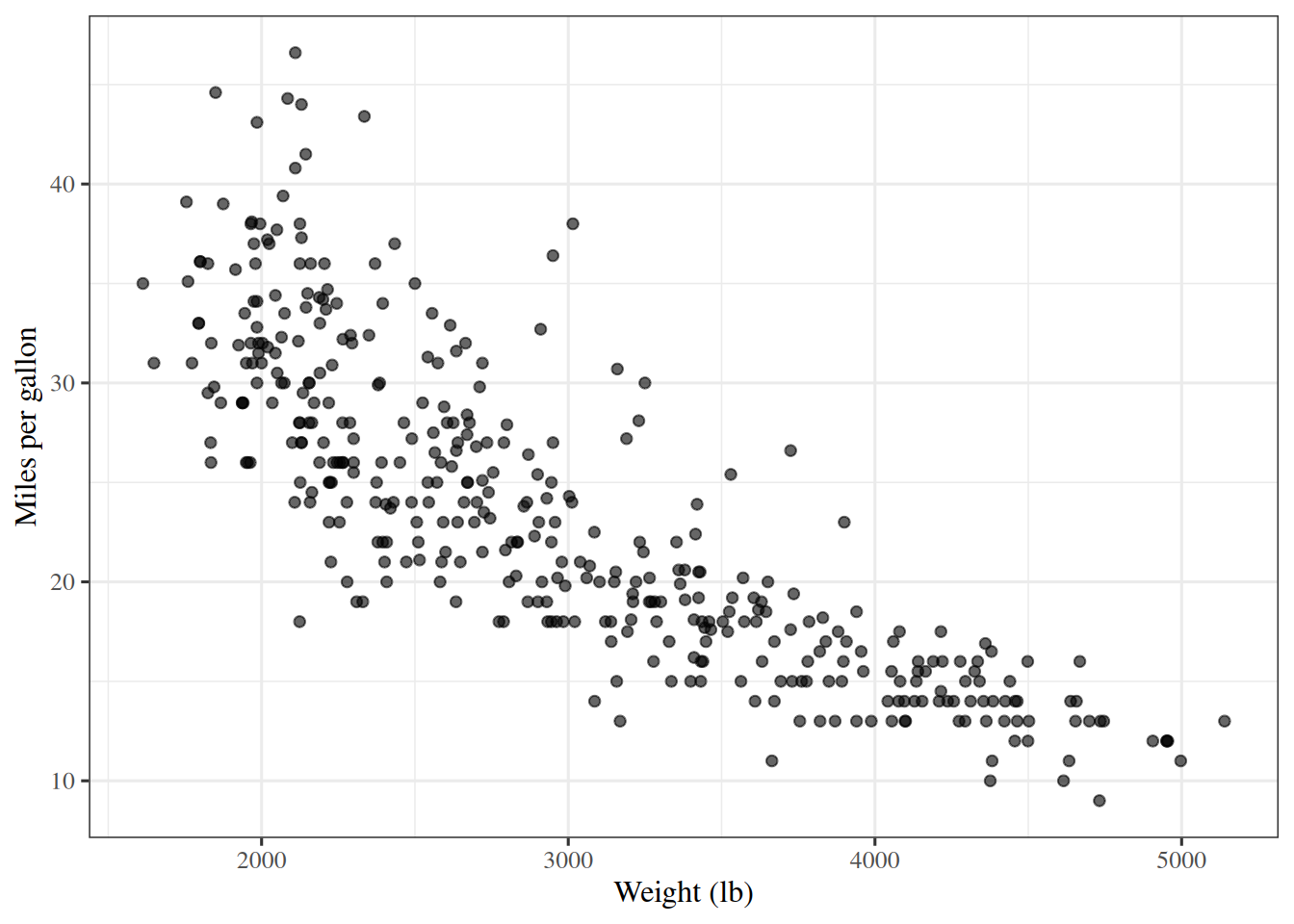
References

[1]
G. James, D. Witten, T. Hastie, R. Tibshirani, and J. Taylor, “ISLP labs: Lab notebooks for an introduction to statistical learning with applications in python.” GitHub repository, BSD 2-Clause license, 2023. Available: https://github.com/intro-stat-learning/ISLP_labs
[2]
G. James, D. Witten, T. Hastie, R. Tibshirani, and J. Taylor, An introduction to statistical learning: With applications in Python. Springer, 2023. doi: 10.1007/978-3-031-38747-0.
Back to top