Course Overview: What Is Machine Learning?
Last modified: 2026-10-25
1 Welcome
1.1 Plan for this lecture
The syllabus covers how the course runs. This lecture is about what the course is for:
- what machine learning is, and when to use it;
- how it relates to artificial intelligence and statistics;
- the parts every learning system has;
- the kinds of learning problems we will meet;
- an outline of the course.
2 What is machine learning?
2.1 A working definition
Exercise 1 (What is machine learning?)
Exercise 1 (What is machine learning?) A spam filter, a movie recommender and a checkers program all get better with use. What do they have in common?
Solution 1. All three programs learn from data.
Exercise 2 (What is machine learning? (part 2))
Exercise 2 (What is machine learning? (part 2)) Use the setup of Exercise 1.
Write a one-sentence definition of machine learning.
Solution 2. We could say machine learning is the field of algorithms that learn from data.
Watch
Hutchinson covers supervised and unsupervised learning, feature vectors, classification and regression, Machine Learning Overview (30 min) [2]. The video site requires a login, which enrolled students find in the syllabus.
Read
GeeksforGeeks explains machine learning [3].
Definition 1 (Machine learning)
Definition 1 (Machine learning) Machine learning is the study of algorithms that improve at a task by learning from data, rather than by following rules a person wrote down for that task [4].
Example 1 (Letting the data choose a spam cutoff)
Example 1 (Letting the data choose a spam cutoff) Take the Spambase emails [5]. A person could write a spam rule by hand: call a message spam when more than 0.5% of its characters are !. Machine learning lets the data choose that cutoff instead, by trying many cutoffs and keeping the one that makes the fewest mistakes:
   char_freq_!  Class
0        0.778      1
1        0.372      1
2        0.276      1
3        0.137      1
4        0.135      1
x_ml = spam_ml["char_freq_!"].to_numpy()
y_ml = spam_ml["Class"].to_numpy()
def err_ml(cut):
# The rule "spam when x > cut" is wrong where its call differs from the label.
return np.mean((x_ml > cut) != (y_ml == 1))
# The hand-written cutoff is one candidate; learning scores a whole grid of them
# on the data, and keeps the best.
grid_ml = np.round(np.arange(0, 3.01, 0.05), 2)
errs_ml = np.array([err_ml(c) for c in grid_ml])
print("hand-written cutoff 0.5:", round(err_ml(0.5), 3))hand-written cutoff 0.5: 0.288learned cutoff 0.1 : 0.211x_ml <- spam_ml[["char_freq_!"]]
y_ml <- spam_ml[["Class"]]
err_ml <- function(cut) {
# The rule "spam when x > cut" is wrong where its call differs from the label.
mean((x_ml > cut) != (y_ml == 1))
}
# The hand-written cutoff is one candidate; learning scores a whole grid of them
# on the data, and keeps the best.
grid_ml <- round(seq(0, 3, by = 0.05), 2)
errs_ml <- sapply(grid_ml, err_ml)
cat("hand-written cutoff 0.5:", round(err_ml(0.5), 3), "\n")hand-written cutoff 0.5: 0.288 learned cutoff 0.1 : 0.211 The hand-written cutoff mislabels 28.8% of the messages. The cutoff 0.1, chosen by the data, mislabels only 21.1%. Nobody wrote that number down: the algorithm found it by improving its score on the data.
Exercise 3 (What is the goal of machine learning?)
Exercise 3 (What is the goal of machine learning?) A spam filter is trained on emails that have already arrived. Which emails does its owner care about it labelling correctly?
Solution 3. The goal of machine learning is almost always accurate generalization to, or prediction of, new data. The spam filter’s owner cares about future emails, not the emails the filter was trained on. An algorithm could do perfectly on its training data by memorizing them, and memorizing says nothing about how the algorithm does on new data.
Exercise 4 (What is generalization?)
Exercise 4 (What is generalization?) What does it mean for an algorithm to generalize?
Solution 4. The spam filter generalizes if it labels next month’s emails about as well as the emails it was trained on.
Definition 2 (Generalization)
Definition 2 (Generalization) An algorithm generalizes when it does well on new data, meaning data that the algorithm did not see while it was learning [6].
Example 2 (Doing well on messages the rule never saw)
Example 2 (Doing well on messages the rule never saw) Learn the same kind of spam cutoff as in Example 1, but from only half of the Spambase messages [5], and then score it on the other half, which it never saw:
import numpy as np
import pandas as pd

spam_gn = pd.read_csv("data/spambase.csv")
x_gn = spam_gn["char_freq_!"].to_numpy()
y_gn = spam_gn["Class"].to_numpy()
n_gn = len(y_gn)

# The file lists the spam first, so take every 1009th row, wrapping around:
# 1009 shares no factor with n, so each row is visited once, in a scrambled order.
order_gn = (np.arange(n_gn) * 1009) % n_gn
seen_gn, new_gn = order_gn[: n_gn // 2], order_gn[n_gn // 2 :]

def err_gn(cut, rows):
    return np.mean((x_gn[rows] > cut) != (y_gn[rows] == 1))

# Learn the cutoff on the seen half only.
grid_gn = np.round(np.arange(0, 3.01, 0.05), 2)
cut_gn = grid_gn[np.argmin([err_gn(c, seen_gn) for c in grid_gn])]
print("cutoff:", cut_gn)
cutoff: 0.1error on the half it learned from: 0.208error on the half it never saw: 0.213spam_gn <- read.csv("data/spambase.csv", check.names = FALSE)
x_gn <- spam_gn[["char_freq_!"]]
y_gn <- spam_gn[["Class"]]
n_gn <- length(y_gn)
# The file lists the spam first, so take every 1009th row, wrapping around:
# 1009 shares no factor with n, so each row is visited once, in a scrambled order.
order_gn <- ((seq_len(n_gn) - 1) * 1009) %% n_gn + 1
seen_gn <- order_gn[seq_len(n_gn %/% 2)]
new_gn <- order_gn[-seq_len(n_gn %/% 2)]
err_gn <- function(cut, rows) mean((x_gn[rows] > cut) != (y_gn[rows] == 1))
# Learn the cutoff on the seen half only.
grid_gn <- round(seq(0, 3, by = 0.05), 2)
cut_gn <- grid_gn[which.min(sapply(grid_gn, err_gn, rows = seen_gn))]
cat("cutoff:", cut_gn, "\n")cutoff: 0.1 error on the half it learned from: 0.208 error on the half it never saw: 0.213 The cutoff 0.1 makes mistakes on 20.8% of the messages it learned from and on 21.3% of the 2301 messages it never saw. The second number is the one that measures generalization: it says how the rule will do on new mail.
Exercise 5 (What is a spam filter trying to learn?)
Exercise 5 (What is a spam filter trying to learn?) A spam filter learns to label emails by studying labelled examples. What is its input?
Solution 5. The input \(X\) is an email, for example the counts of words such as “free” and “winner” in it.
Exercise 6 (What is a spam filter trying to learn? (part 2))
Exercise 6 (What is a spam filter trying to learn? (part 2)) Use the setup of Exercise 5.
What is its output?
Solution 6. The output \(Y\) is its label, spam or email.
Exercise 7 (What is a spam filter trying to learn? (part 3))
Exercise 7 (What is a spam filter trying to learn? (part 3)) Use the setup of Exercise 5.
What is unknown?
Solution 7. James et al. [7, Sec. 2.1] writes the relationship between them as \[ Y = f(X) + \varepsilon, \] where \(f\) is a fixed but unknown function and \(\varepsilon\) is random error with mean zero, independent of \(X\). James et al. state this for a numeric output. To apply it to spam, we code spam as 1 and email as 0; that coding is our adaptation, not theirs. Then \(f(X)\) is the systematic part: the probability that an email with those word counts is spam. The error \(\varepsilon\) still has mean zero, but it is no longer independent of \(X\): its spread depends on how close \(f(X)\) is to 0 or 1. The error \(\varepsilon\) covers what the word counts miss, such as two emails with identical counts that carry different labels. Statistical learning is a set of approaches for estimating \(f\). We estimate \(f\) to predict \(Y\) for new emails, or to learn how \(Y\) depends on \(X\), for example which words make spam most likely [7, Sec. 2.1.1].
Exercise 8 (What is a spam filter trying to learn? (part 4))
Exercise 8 (What is a spam filter trying to learn? (part 4)) Use the setup of Exercise 5.
Solution 8. Abu-Mostafa et al. break the learning problem into four parts [8, Sec. 1.1.1]:
- an unknown target function \(f\) from inputs to outputs: the rule that labels every possible email correctly, so here \(f(x)\) is a label rather than a probability;
- data \((x_1, y_1), \ldots, (x_N, y_N)\): the labelled emails the filter studies;
- a prediction function family \(\predfam\) of candidate functions: for example, every rule that adds up a weight per word and calls the email spam when the total passes a threshold;
- a learning algorithm (Definition 9) that uses the data to pick one candidate function \(g\) from \(\predfam\): for example, the weights that mislabel the fewest training emails.
The target and the data come with the problem; we choose the prediction function family and the learning algorithm. Abu-Mostafa et al. refer to that pair informally as the learning model [8, Sec. 1.1.2]. The filter succeeds when \(g\) agrees with \(f\) on emails it has not seen, which is generalization (Definition 2). Abu-Mostafa et al. start from a target with no noise and allow for it later, replacing \(f\) with a distribution of \(Y\) given \(X\) [8, Sec. 1.4.2]; James et al. [7] includes \(\varepsilon\) from the start.
Example 3 (An early learning program: checkers)
Example 3 (An early learning program: checkers) In the late 1950s, a checkers program written at IBM improved by playing against itself and by remembering the board positions it had already analysed. The program came to play better than its author, Arthur Samuel, after 8 or 10 hours of play on an IBM 704:
Enough work has been done to verify the fact that a computer can be programmed so that it will learn to play a better game of checkers than can be played by the person who wrote the program.
[9], abstract
Samuel’s paper gives one reason to want programs that learn:
Programming computers to learn from experience should eventually eliminate the need for much of this detailed programming effort.
[9], “Introduction”
Sixty-four years later, Matt Welsh made the same case in more direct terms:
Indeed, I think CS as a field is in for a pretty major upheaval few of us are really prepared for. Programming will be obsolete. I believe the conventional idea of “writing a program” is headed for extinction, and indeed, for all but very specialized applications, most software, as we know it, will be replaced by AI systems that are trained rather than programmed.
As Brian Hutchinson puts it [11]:
- Some input–output relationships are too complicated to model by hand. Writing down explicit rules for recognizing speech, steering a car, or detecting tumours requires handling millions of unusual cases that hand-written rules cannot handle.
- Learning from examples is a different way of computing. Letting a model learn its parameters from large sets of examples solves a whole class of problems that traditional algorithms cannot solve.
- Machine learning is the most important application of computer science — the application compelling enough to drive the systems, hardware, and infrastructure that it depends on.
- Every data-rich domain is involved: each one either has been transformed by machine learning, is being transformed by it, or is likely to be transformed.
2.2 A formal definition of machine learning
Exercise 9 (What does it mean for a program to learn?)
Exercise 9 (What does it mean for a program to learn?) The checkers program got better at checkers by playing. Which three parts of the problem would you have to name to say precisely that a program learned?
Solution 9. We need to name:
- what the program does;
- what it learns from;
- how we measure whether it got better.
Definition 3 (Learning from experience)
Definition 3 (Learning from experience)
A computer program is said to learn from experience \(E\) with respect to some class of tasks \(T\) and performance measure \(P\), if its performance at tasks in \(T\), as measured by \(P\), improves with experience \(E\).
Example 4 (Spam filtering as \(T\), \(E\) and \(P\))
Example 4 (Spam filtering as \(T\), \(E\) and \(P\)) For a spam filter built on the Spambase data [5], the task \(T\) is to label a message as spam or email, the performance measure \(P\) is the share of held-out messages labelled wrongly, and the experience \(E\) is labelled messages. Give the cutoff rule of Example 1 more and more experience, and measure \(P\) on the same held-out half each time:
import numpy as np
import pandas as pd

spam_et = pd.read_csv("data/spambase.csv")
x_et = spam_et["char_freq_!"].to_numpy()
y_et = spam_et["Class"].to_numpy()
n_et = len(y_et)

# Scrambled row order (see the generalization example): the first half is the
# pool that experience E is drawn from, the second half is held out for P.
order_et = (np.arange(n_et) * 1009) % n_et
pool_et, held_et = order_et[: n_et // 2], order_et[n_et // 2 :]

def err_et(cut, rows):
    return np.mean((x_et[rows] > cut) != (y_et[rows] == 1))

grid_et = np.round(np.arange(0, 3.01, 0.05), 2)
for k in (10, 100, 1000, 2300):
    rows = pool_et[:k]  # E: the first k labelled messages of the pool
    cut = grid_et[np.argmin([err_et(c, rows) for c in grid_et])]
    print(k, "messages: P =", round(err_et(cut, held_et), 3))  # P on the held-out half
10 messages: P = 0.231
100 messages: P = 0.221
1000 messages: P = 0.218
2300 messages: P = 0.213spam_et <- read.csv("data/spambase.csv", check.names = FALSE)
x_et <- spam_et[["char_freq_!"]]
y_et <- spam_et[["Class"]]
n_et <- length(y_et)
# Scrambled row order (see the generalization example): the first half is the
# pool that experience E is drawn from, the second half is held out for P.
order_et <- ((seq_len(n_et) - 1) * 1009) %% n_et + 1
pool_et <- order_et[seq_len(n_et %/% 2)]
held_et <- order_et[-seq_len(n_et %/% 2)]
err_et <- function(cut, rows) mean((x_et[rows] > cut) != (y_et[rows] == 1))
grid_et <- round(seq(0, 3, by = 0.05), 2)
sizes_et <- c(10, 100, 1000, 2300)
p_et <- sapply(sizes_et, function(k) {
rows <- pool_et[seq_len(k)] # E: the first k labelled messages of the pool
cut <- grid_et[which.min(sapply(grid_et, err_et, rows = rows))]
err_et(cut, held_et) # P on the held-out half
})
data.frame(messages = sizes_et, P = round(p_et, 3))With 10 labelled messages the filter’s \(P\) is 23.1%; with 2300 it is 21.3%. The performance measure improved as the experience grew, as the definition asks of a program that learns.
The task \(T\) is the job the program does. The experience \(E\) is the data the program learns from. The performance measure \(P\) is the score that tells us whether the program does \(T\) better after seeing \(E\). Setting up a machine learning problem starts with naming all three.
Example 5 (Experience, task and performance for checkers)
Example 5 (Experience, task and performance for checkers) For the checkers program in Example 3:
- \(E\) is the games the program played against itself;
- \(T\) is playing checkers;
- \(P\) is the fraction of games the program wins against human opponents.
Exercise 10 (Name \(E\), \(T\) and \(P\))
Exercise 10 (Name \(E\), \(T\) and \(P\)) For an email spam filter, what are the experience \(E\), the task \(T\) and the performance measure \(P\)?
Solution 10.
- \(T\): label each incoming email as spam or not spam.
- \(E\): a collection of past emails, each labelled by a person (for instance, when users click “report spam”).
- \(P\): the fraction of new emails labelled correctly.
A better \(P\) might weigh the two mistakes differently: losing a real email to the spam folder is usually worse than letting one spam message through. Choosing \(P\) is a modelling decision, and Metrics covers it in more depth.
3 Why learn from data?
3.1 Writing the rules by hand
Show code
# The %george and %you columns of the Spambase emails, with their labels
# (spam = 1), the data the spam widgets below read.
spam_data <- read.csv("data/spam-george-you.csv")
spam_n <- nrow(spam_data)
spam_n_spam <- sum(spam_data$spam == 1)

spam_fmt <- function(x, digits = 1) formatC(x, format = "f", digits = digits)
spam_pct <- function(k, n) spam_fmt(100 * k / n)
Our first dataset holds 4601 real emails [5], each labelled email or spam. For each one we know the relative frequency of 57 common words and characters. Among the largest differences between the two groups:
| Word or character | george |
you |
free |
! |
hp |
|---|---|---|---|---|---|
| Spam | 0.00 | 2.26 | 0.52 | 0.51 | 0.02 |
| 1.27 | 1.27 | 0.07 | 0.11 | 0.90 |
(The data were donated by George Forman of Hewlett-Packard Labs, and words like george were meant to be customized for each user [13, Ch. 1]. The customization explains why george and hp strongly indicate real email: they are his name and his employer.)
Show code
'data.frame':   4601 obs. of  4 variables:
 $ george: num  0 0 0 0 0 0 0 0 0 0 ...
 $ you   : num  1.93 3.47 1.36 3.18 3.18 0 3.85 0 1.23 1.67 ...
 $ spam  : int  1 1 1 1 1 1 1 1 1 1 ...
 $ half  : chr  "B" "A" "B" "A" ...
Exercise 11 (Write a rule by hand)
Exercise 11 (Write a rule by hand) Using Table 1, write a rule that labels a message spam or email.
Solution 11. One rule a person might write from Table 1:
if (
%george< 0.6) and (%you> 1.5), then spam; else email.
Rules built on free, ! or hp are just as reasonable.
Exercise 12 (What does a hand-written rule not tell you?)
Exercise 12 (What does a hand-written rule not tell you?) Suppose you wrote the rule in Solution 11. What would you want to know about the rule before trusting it with your inbox?
Solution 12.
- Why 0.6 and 1.5, and not 0.5 and 1.7?
- Why those two words, out of 57?
- What happens when spammers change what they write next month?
3.2 Letting the data choose the rule
A learning algorithm answers all three the same way: search a family of rules, and pick the one that does best on labelled examples. Rerun the search whenever the examples change.
A new way of programming
Traditional programming: a person supplies the rules, and the program turns data into answers.
Machine learning: a person supplies data and answers, and the algorithm produces the rules.
In classical programming, the paradigm of symbolic AI, humans input rules (a program) and data to be processed according to these rules, and out come answers. With machine learning, humans input data as well as the answers expected from the data, and out come the rules. These rules can then be applied to new data to produce original answers.
Exercise 13 (The all-email rule)
Exercise 13 (The all-email rule) Of the 4601 messages, 1813 are spam and 2788 are email (Exercise 65 counts them from the raw data). The all-email rule labels every message email. How many mistakes does the all-email rule make, and what fraction of the messages do those mistakes make up?
Solution 13. It gets every spam message wrong and every email right: 1813 mistakes, and \(1813 / 4601 \approx 0.394\), or 39.4%. Any rule worth using has to beat a 39.4% error rate.
Exercise 14 (Beat the all-email rule)
Exercise 14 (Beat the all-email rule) Move the sliders to set a rule: spam if %george is below the first number and %you is above the second. The sliders start at the rule from Solution 11. How few mistakes can you make on all 4601 emails? Then choose searched on all emails to see the best rule of this form.
Show code
spamData = FileAttachment("data/spam-george-you.csv").csv({typed: true})

// The rules the computer searches: every george threshold 0, 0.05, ..., 5
// and every you threshold 0, 0.05, ..., 10: 101 x 201 = 20301 rules.
gSteps = d3.range(101).map(i => i * 0.05)
ySteps = d3.range(201).map(j => j * 0.05)

countMistakes = (emails, maxGeorge, minYou) => emails.filter(d =>
  ((d.george < maxGeorge && d.you > minYou) ? 1 : 0) !== d.spam
).length

// Try all 20301 rules and keep the one with the fewest mistakes.
// Rather than rescoring every email for every rule, count spam and email
// on a grid: a point is flagged by rule (i, j) exactly when
// i >= (first george step above it) and j <= (last you step below it).
bestRuleOn = emails => {
  const G = gSteps.length, Y = ySteps.length;
  const net = Array.from({length: G + 1}, () => new Float64Array(Y + 1));
  for (const d of emails) {
    const a = gSteps.findIndex(g => d.george < g);   // -1: never flagged
    let b = -1;
    ySteps.forEach((y, j) => { if (d.you > y) b = j; });
    if (a < 0 || b < 0) continue;
    // flagging a spam removes a mistake; flagging an email adds one
    net[a][b] += d.spam === 1 ? -1 : 1;
  }
  // cum[i][j] = sum of net over a <= i and b >= j
  const cum = Array.from({length: G}, () => new Float64Array(Y + 1));
  let best = {george: 0, you: 0, mistakes: Infinity};
  const spamCount = emails.filter(d => d.spam === 1).length;
  for (let i = 0; i < G; i++) {
    for (let j = Y - 1; j >= 0; j--) {
      cum[i][j] = net[i][j] + (i > 0 ? cum[i - 1][j] : 0) + cum[i][j + 1]
                  - (i > 0 ? cum[i - 1][j + 1] : 0);
      const m = spamCount + cum[i][j];
      if (m < best.mistakes) best = {george: gSteps[i], you: ySteps[j], mistakes: m};
    }
  }
  return best;
}

spamHalves = ({
  "all emails": spamData,
  "half A": spamData.filter(d => d.half === "A"),
  "half B": spamData.filter(d => d.half === "B")
})

bestRules = ({
  "searched on all emails": bestRuleOn(spamHalves["all emails"]),
  "searched on half A": bestRuleOn(spamHalves["half A"]),
  "searched on half B": bestRuleOn(spamHalves["half B"])
})

pct = (k, n) => (100 * k / n).toFixed(1) + "%"
Show code
viewof maxGeorge = Inputs.range([0, 5], {width: 360, step: 0.05, value: 0.6, label: "%george below"})
viewof minYou = Inputs.range([0, 10], {width: 360, step: 0.05, value: 1.5, label: "%you above"})
viewof scoreOn = Inputs.radio(["all emails", "half A", "half B"], {value: "all emails", label: "score on"})
viewof bestOn = Inputs.radio(["none", "searched on all emails", "searched on half A", "searched on half B"], {value: "none", label: "best rule"})

scored = spamHalves[scoreOn]
yourMistakes = countMistakes(scored, maxGeorge, minYou)
shownBest = bestOn === "none" ? null : bestRules[bestOn]

md`Your rule makes **${yourMistakes}** mistakes on ${scored.length} emails (${pct(yourMistakes, scored.length)}).

${shownBest ? `The best rule ${bestOn}, %george below ${shownBest.george.toFixed(2)} and %you above ${shownBest.you.toFixed(2)} (dashed box), makes ${countMistakes(scored, shownBest.george, shownBest.you)} on these ${scored.length} (${pct(countMistakes(scored, shownBest.george, shownBest.you), scored.length)}).` : ""}`
Show code
spamPlotted = scored
  .map((d, i) => ({...d, y: d.george > 0 ? d.george : -0.08 - 0.6 * ((i * 0.6180339887) % 1)}))
  .sort((a, b) => a.spam - b.spam)

Plot.plot({
  ariaLabel: 'Scatter plot of emails, %you on the x-axis and %george on the y-axis, spam in orange and email in blue. The region the rule flags as spam is shaded, and the best rule found by search can be drawn as a dashed box.',
  height: 340, width: 760, grid: true,
  x: {label: "%you", domain: [0, 8]},
  y: {label: "%george (band below 0: george absent)", domain: [-0.75, 4]},
  color: {legend: true, domain: ["email", "spam"], range: ["#1f77b4", "#ff7f0e"]},
  marks: [
    Plot.rect([{}], {x1: minYou, x2: 10, y1: -0.75, y2: maxGeorge,
                     fill: "#ff7f0e", fillOpacity: 0.12, clip: true}),
    shownBest ? Plot.rect([{}], {x1: shownBest.you, x2: 10, y1: -0.75, y2: shownBest.george,
                     stroke: "black", strokeDasharray: "4 3", fill: "none", clip: true}) : null,
    Plot.ruleY([0], {stroke: "#888"}),
    Plot.dot(spamPlotted, {x: "you", y: "y", clip: true,
                      fill: d => d.spam === 1 ? "spam" : "email",
                      symbol: d => d.spam === 1 ? "spam" : "email",
                      r: 2, fillOpacity: 0.5})
  ]
})Most messages never mention George, so their %george is exactly 0; the plot spreads them over the band below 0 so they do not all sit on one line. The 210 emails with %you above 8 or %george above 4 fall outside the plot, but they are still counted.
Solution 14.
Show code
# The widget's search of every rule of this form, redone in R.
spam_g_steps <- seq(0, 5, by = 0.05)
spam_y_steps <- seq(0, 10, by = 0.05)

# Mistakes made by every rule at once: rule (i, j) flags an email as spam
# when %george is below spam_g_steps[i] and %you is above spam_y_steps[j].
spam_rule_mistakes <- function(emails) {
  first_g <- findInterval(emails$george, spam_g_steps) + 1
  last_y <- findInterval(emails$you, spam_y_steps, left.open = TRUE)
  flaggable <- first_g <= length(spam_g_steps) & last_y >= 1
  # Flagging a spam removes a mistake; flagging an email adds one.
  change <- ifelse(emails$spam[flaggable] == 1, -1, 1)
  net <- tapply(
    change,
    list(
      factor(first_g[flaggable], levels = seq_along(spam_g_steps)),
      factor(last_y[flaggable], levels = seq_along(spam_y_steps))
    ),
    sum,
    default = 0
  )
  net <- apply(net, 2, cumsum)
  net <- t(apply(net, 1, function(row) rev(cumsum(rev(row)))))
  sum(emails$spam) + net
}

# The widget's tie-break: the lowest %george step, then the highest %you step.
spam_best <- function(mistakes) {
  at <- which(mistakes == min(mistakes), arr.ind = TRUE)
  at[order(at[, 1], -at[, 2]), , drop = FALSE][1, ]
}

# The hand-written rule of the solution to "Write a rule by hand"
# (sol-rule-by-hand): %george below 0.6, %you above 1.5.
spam_hand <- c(
  which.min(abs(spam_g_steps - 0.6)),
  which.min(abs(spam_y_steps - 1.5))
)
spam_mistakes <- spam_rule_mistakes(spam_data)
spam_hand_mistakes <- spam_mistakes[spam_hand[1], spam_hand[2]]
spam_rule <- spam_best(spam_mistakes)
spam_rule_g <- spam_g_steps[spam_rule[1]]
spam_rule_y <- spam_y_steps[spam_rule[2]]
spam_flagged <- spam_data$george < spam_rule_g & spam_data$you > spam_rule_y

# The prose below reads these off; stop the render if one stops holding.
stopifnot(
  spam_hand_mistakes < spam_n_spam,
  all(spam_data$george[spam_flagged] == 0),
  mean(spam_data$spam[spam_data$george > 0]) < 0.05,
  min(spam_mistakes) > spam_n / 4
)
The rule from Solution 11 makes 1322 mistakes (28.7%), already better than the all-email rule’s 1813. The best rule of this form, spam if %george is below 0.05 and %you is above 1.15, makes 1271 (27.6%). Every message this rule flags has a %george of exactly 0, so it flags only messages that never mention George: the search rediscovered that a message addressed to George is almost never spam.
That rule was found by trying every pair of thresholds in steps of 0.05 and keeping the pair with the fewest mistakes: a search over a family of rules, scored on labelled examples. Even the best rule of this form gets more than a quarter of the messages wrong, because two words cannot separate the spam from the email; the plot shows spam and email overlap heavily.
Exercise 15 (Will the best rule keep working?)
Exercise 15 (Will the best rule keep working?)
Show code
# The published split, and the best rule on its half A, found with the
# search defined in the solution to "Beat the all-email rule"
# (sol-write-a-rule).
ho_half_a <- dplyr::filter(spam_data, half == "A")
ho_half_b <- dplyr::filter(spam_data, half == "B")
ho_mistakes_a <- spam_rule_mistakes(ho_half_a)
ho_rule <- spam_best(ho_mistakes_a)
ho_rule_a <- ho_mistakes_a[ho_rule[1], ho_rule[2]]
The emails were split at random into two halves: A (2301 emails) and B (2300). Searching only half A, the best rule is %george below 0.05 and %you above 0.80. It makes 604 mistakes on half A, or 26.2%.
Predict before you check: on half B, which the search never saw, will that rule’s error rate be higher, lower or about the same? Vote.
Solution 15.
Show code
# The rule found on half A, scored on half B.
ho_mistakes_b <- spam_rule_mistakes(ho_half_b)
ho_rule_b <- ho_mistakes_b[ho_rule[1], ho_rule[2]]

# How much worse, in percentage points, the rule found on one half does on
# the other.
# spam_rule_mistakes() and spam_best() come from the solution to
# "Beat the all-email rule" (sol-write-a-rule), which lintr cannot see from
# this file.
# nolint start: object_usage_linter.
ho_gap <- function(in_a) {
  half_a <- dplyr::filter(spam_data, in_a)
  half_b <- dplyr::filter(spam_data, !in_a)
  mistakes_a <- spam_rule_mistakes(half_a)
  rule <- spam_best(mistakes_a)
  error_a <- mistakes_a[rule[1], rule[2]] / nrow(half_a)
  error_b <- spam_rule_mistakes(half_b)[rule[1], rule[2]] / nrow(half_b)
  100 * (error_b - error_a)
}
# nolint end

# Re-split the emails many times, redo the search on each new half A,
# and score the winner on the new half B.
ho_published <- ho_gap(spam_data$half == "A")
set.seed(571)
ho_n_splits <- 200
ho_gaps <- replicate(
  ho_n_splits,
  ho_gap(seq_len(nrow(spam_data)) %in% sample(nrow(spam_data), nrow(ho_half_a)))
)
# Count against the gap as printed, so the prose and the count agree.
ho_published_shown <- round(ho_published, 1)
Higher. On half B the rule makes 672 mistakes out of 2300, or 29.2%, 3.0 percentage points worse than on the half it was chosen on.
Exercise 16 (Will the best rule keep working? (part 2))
Exercise 16 (Will the best rule keep working? (part 2)) Use the setup of Exercise 15.
Compare your prediction with a neighbor’s.
Solution 16. The search picked the thresholds that happened to fit half A best, including its chance peculiarities, so its score on half A is an optimistic estimate of how it will do on new email. Part of the difference is also due to chance: even the hand-written rule, which saw neither half, makes 27.7% mistakes on A and 29.8% on B.
Exercise 17 (Will the best rule keep working? (part 3))
Exercise 17 (Will the best rule keep working? (part 3)) Use the setup of Exercise 15.
Check your prediction with Figure 1 (best rule searched on half A, scored on half B).
Solution 17. The best rule searched on half B itself makes 655 (choose searched on half B to see it).
How much is chance? Splitting the same 4601 emails at random 200 more times, and searching each new half A, the rule each search found did worse on the half it never saw by 0.6 percentage points on average, with a standard deviation of 1.3 points. It did better on the unseen half in 67 of the 200 splits, and at least 3.0 points worse in only 7 of them. So the split in Exercise 15 is unusually unlucky: about 0.6 of its 3.0 points is the search’s optimism, and the rest is the luck of the split. A single held-out half is a noisy measurement. Holding out several parts in turn, each email once, and averaging gives a steadier one, which is the idea behind cross-validation.
To estimate how well a learned rule will do on messages it has not seen, score it on data the search did not use. A First Model and Generalization covers generalization (Definition 2) in depth.
Exercise 18 (When is machine learning a suitable method?)
Exercise 18 (When is machine learning a suitable method?) Name a task where a rule learned from data works better than writing one by hand.
Solution 18. Machine learning is worth using when
- the input-output relationship is too complicated to write down by hand (recognizing a handwritten digit from its pixels);
- the relationship changes over time, so hand-written rules become out of date (spam);
- there are many more examples than there are experts to write rules.
Exercise 19 (When is machine learning a suitable method? (part 2))
Exercise 19 (When is machine learning a suitable method? (part 2)) Use the setup of Exercise 18.
Name a task where it does not.
Solution 19. It is not suitable when
- a correct rule is already known and short (computing sales tax);
- there is too little data to learn from;
- a mistake is costly and nobody can check the model’s reasoning.
Exercise 20 (When is machine learning a suitable method? (part 3))
Exercise 20 (When is machine learning a suitable method? (part 3)) Use the setup of Exercise 18.
What makes the difference?
Solution 20. What separates the two cases is whether a rule can be written by hand and whether there are data to learn one from. A learned rule wins when the rule is too complicated or changes too fast to write down and examples are plentiful. It loses when a short correct rule is known, or the data are too few, or a mistake is too costly to trust an unchecked model.
4 Where machine learning fits
4.1 AI, ML, and deep learning
Exercise 21 (What is artificial intelligence?)
Exercise 21 (What is artificial intelligence?) A chess program that searches many moves ahead, a spam filter learned from emails, and a thermostat that follows a fixed schedule all run on computers. Which of them would you call intelligent, and why?
Solution 21. Answers differ, because “intelligent” is a judgement about behavior. The chess program and the spam filter handle tasks that people do with thought, and the thermostat only repeats a schedule.
Exercise 22 (What is artificial intelligence? (part 2))
Exercise 22 (What is artificial intelligence? (part 2)) Use the setup of Exercise 21.
Write a one-sentence definition of artificial intelligence.
Solution 22. We could say artificial intelligence is the field of building programs that do tasks which need intelligence when a person does them.
Definition 4 (Artificial intelligence)
Definition 4 (Artificial intelligence) Artificial intelligence (AI) is “the science and engineering of making intelligent machines, especially intelligent computer programs” [15].
Example 6 (Three ways to build a checkers program)
Example 6 (Three ways to build a checkers program) Each of these programs displays artificial intelligence if it plays checkers well:
- Hard-coded knowledge. A person writes the rules of the game, a search over moves, and a scoring formula for board positions with fixed weights. Nothing is learned from data, so this approach is AI but not machine learning.
- Machine learning. The program improves its play by learning from games, as the checkers program in Example 3 did.
- A hybrid. A person hard-codes the rules and the search, and the program learns the weights of its scoring formula from games. Samuel’s program combined the two in this way [9].
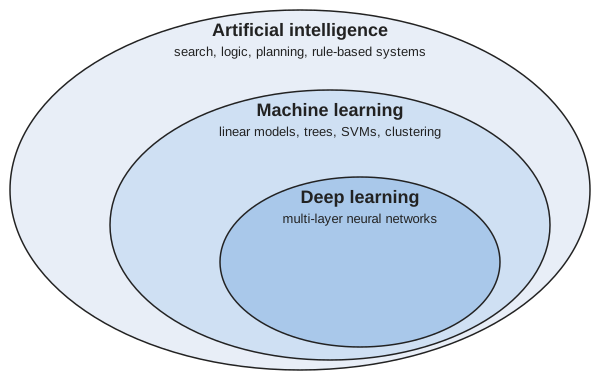
Machine learning is therefore one approach to creating programs that display artificial intelligence, not a synonym for it. A program that learns a model from training data can be viewed as artificially intelligent when it succeeds, and approaches that combine learning with hard-coded knowledge are also possible.
This course covers the middle ellipse of Figure 2, including a first introduction to the innermost one (Neural Networks). Deep learning, with modern architectures such as transformers, is the subject of more advanced courses.
Watch
Weinberger contrasts AI with machine learning, from 12:46 [1], Lecture 1.
Read
GeeksforGeeks explains artificial intelligence, machine learning and deep learning [17].
4.2 A first dataset: the Auto data
Definition 5 (Auto data)
Example 7 (A first look at the Auto data)
Example 7 (A first look at the Auto data) Each column of the Auto data records one attribute of a car:
-
mpg: fuel economy, in miles per gallon; -
cylinders: the number of cylinders in the engine; -
displacement: the engine displacement, in cubic inches; -
horsepower: the engine power, in horsepower; -
weight: the weight of the car, in pounds; -
acceleration: the time to accelerate from 0 to 60 miles per hour, in seconds; -
year: the model year, with 70 standing for 1970; -
origin: where the car was made, coded 1 for American, 2 for European and 3 for Japanese; -
name: the make and model, as free text.
To look at the data, load data/auto.csv, then look at its rows.
    mpg  cylinders  displacement  ...  year  origin                       name
0  18.0          8         307.0  ...    70       1  chevrolet chevelle malibu
1  15.0          8         350.0  ...    70       1          buick skylark 320
2  18.0          8         318.0  ...    70       1         plymouth satellite

[3 rows x 9 columns]The model years run from 1970 to 1982.
Remark 1 (Where the Auto data come from)
Remark 1 (Where the Auto data come from). The cars come from the Auto MPG dataset in the UCI Machine Learning Repository [19]. That dataset came from the StatLib library at Carnegie Mellon University. The book ships a version of it. The file data/auto.csv on this site is the copy shipped in ISLP, the book’s Python package. The book’s R package ISLR2 has the same cars as the data frame Auto.
4.3 Machine learning and statistics
Machine learning and statistics study the same object: a relationship \(y \approx f(x)\) between inputs \(x\) and an output \(y\), estimated from data. There are two reasons to estimate \(f\).
Exercise 23 (Why estimate \(f\)?)
Exercise 23 (Why estimate \(f\)?) A hospital estimates \(f\) for a blood test that predicts a disease. Give two different reasons the hospital might want the estimate.
Solution 23. The hospital might want to predict whether a new patient has the disease from the test result. The hospital might also want to understand how the test result relates to the disease, such as whether higher readings mean higher risk.
Definition 6 (Prediction)
Definition 6 (Prediction) Prediction estimates \(f\) to make good guesses of \(y\) for new \(x\), treating the fitted \(f\) as a black box.
Remark 2 (Why predictions and fitted values estimate the conditional mean)
Remark 2 (Why predictions and fitted values estimate the conditional mean). Under squared error loss, the best prediction of \(\outvar\) at an input \(\predvar\) is the conditional mean \(\condE{\Outvar}{\Predvar = \predvar}\). No other function of \(\predvar\) has a smaller expected squared error (proved in the probability notes). The conditional mean is unknown, so a fitted model estimates it, and its prediction at a new input is the estimated conditional mean. Its fitted value \(\eoutvar_i\) is the same prediction at the observed input \(\predvar_i\). Other losses have other targets: absolute error gives the conditional median [13, p. 20].
Definition 7 (Inference)
Definition 7 (Inference) Inference estimates \(f\) to understand \(f\) itself, such as which inputs matter and in which direction.
Example 8 (One fitted line, two uses)
Example 8 (One fitted line, two uses) Fit mpg on horsepower in the Auto data [18] by least squares, and use the fitted line in both ways:
    mpg  horsepower
0  18.0         130
1  15.0         165
2  18.0         150
3  16.0         150
4 17.0 140predicted mpg at 100 hp: 24.2slope (mpg per hp): -0.158predicted mpg at 100 hp: 24.2 slope (mpg per hp): -0.158 For prediction (Definition 6), the line says a new car with 100 horsepower gets about 24.2 mpg, and we do not need to know why. For inference (Definition 7), the slope is -0.158: among these cars, each extra horsepower goes with about 0.16 fewer miles per gallon, so more powerful engines go with lower fuel economy. This is an association in the data, not a claim that adding horsepower to a car causes its mpg to drop.
Exercise 24 (Prediction or inference first?)
Exercise 24 (Prediction or inference first?) A statistics course and this course share much of their machinery. Which goal does each one usually put first: prediction (Definition 6) or inference (Definition 7)?
Solution 24. Statistics courses usually put inference first; this course puts prediction first. Much of the machinery is shared, and the name statistical learning covers both.
4.4 One idea, two vocabularies
Exercise 25 (Translate the sentence)
Exercise 25 (Translate the sentence) The two communities often use different words for the same concept. Rewrite this sentence the way a statistician would say it:
We trained a model on the features to predict the output, and learned the bias \(b_0\) along with the other weights.
Solution 25.
We fitted a model with the predictors to predict the response, and estimated the intercept \(\hintcoef\) along with the other coefficients.
Each swap comes from this table:
| Machine learning | Statistics |
|---|---|
| inputs, features | predictors, independent variables |
| outputs | responses, dependent variables |
| bias | intercept, \(\hintcoef\) |
| training a model | fitting a model |
| learning | estimation |
This course uses both vocabularies. The word bias is the one to be careful with: in statistics it also names an estimator’s bias, the difference between its expected value and its target, and that meaning, not the intercept, is the one in the bias-variance decomposition of A First Model and Generalization. For systematic comparisons of parallel terminology across fields, see Ripley [21], Table 1.1 (neural networks and statistics) and Varian [22] (machine learning and econometrics). The two communities also differ in how they approach modeling [23], [24].
4.5 Machine learning in the world
A few examples, chosen to cover a wide variety, follow.
Example 9 (Mail sorting)
Example 9 (Mail sorting) A program reads the handwritten ZIP code on an envelope. Its input is a \(16 \times 16\) grayscale image of one digit, and its output is which of the ten digits the image shows [13, Ch. 1]. Reading digits this way was an early success of neural networks.
Example 10 (Predicting eye disease)
Example 10 (Predicting eye disease) A deep network trained on 3D retinal scans predicts which patients will go on to develop the wet form of age-related macular degeneration [25].
Example 11 (Protein structure)
Example 11 (Protein structure) DeepMind’s AlphaFold predicts a protein’s 3D structure from its amino-acid sequence [26]. The work was recognized with half of the 2024 Nobel Prize in Chemistry.
Example 12 (Emulating a climate model)
Example 13 (Everyday software)
Example 13 (Everyday software) Much everyday software learns from data, and each piece maps an input to an output:
- a spam filter maps an email to a label, spam or not spam;
- a recommendation system maps what a user has watched or bought to items they are likely to want next;
- speech recognition maps an audio recording to the words spoken in it;
- a large language model such as ChatGPT maps the text so far to the next token, a word or part of one.
Watch
Hastie and Tibshirani open their Statistical Learning course with examples of what it is for [20], video 1.1.
Watch
5 The anatomy of a learning problem
5.1 Two steps: training and prediction
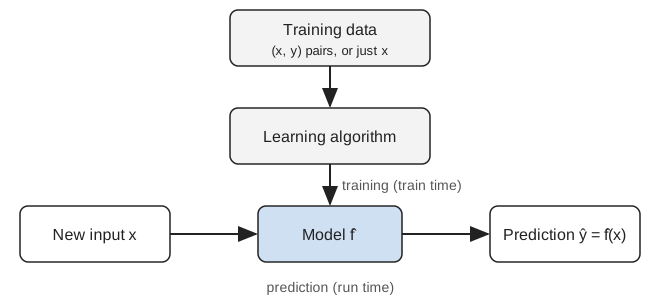
A machine learning system works in two steps, shown in Figure 3. In the first step, training (Definition 10), a learning algorithm (Definition 9) reads some training data \(\trainset\) (Definition 8) and produces a model (Definition 12), a function \(\fitmodf{\trainset}\). Training happens once, ahead of time (train time). In the second step, prediction (Definition 6), the system feeds a new input \(x\) to the model and gets back a prediction \(\fitmodf{\trainset}\paren{x}\). Prediction happens every time the system is used (run time). The next section defines each of these terms.
5.2 The three parts of a learning problem
Exercise 26 (What are the parts of a learning problem?)
Exercise 26 (What are the parts of a learning problem?) Figure 3 shows training and then prediction. Name the three objects that training involves:
- what goes in;
- what does the computation;
- what comes out.
Solution 26. Training involves three objects:
- data go in;
- an algorithm does the computation;
- a rule for making predictions comes out.
Definition 8 (Training data (training set))
Definition 8 (Training data (training set)) The training data are inputs \(x\), possibly with outputs \(y\).
Other names: the training data are also called the training set.
Definition 9 (Learning algorithm)
Definition 9 (Learning algorithm) A learning algorithm turns the training data (Definition 8) into a function \(h\).
Definition 10 (Training (fitting, learning, estimation))
Definition 10 (Training (fitting, learning, estimation)) Running a learning algorithm (Definition 9) on the training data is called training.
Other names: training is also called fitting, learning or estimation.
Definition 11 (Feature (input variable, predictor, covariate, attribute, independent variable))
Definition 11 (Feature (input variable, predictor, covariate, attribute, independent variable)) A feature is one measured property of an input, written as a number [30].
Other names: a feature is also called an input variable, a predictor, a covariate, an attribute or an independent variable. Statistics uses predictor for a feature, not for a model.
Definition 12 (Model)
Definition 12 (Model) A model is either a model family, a set of candidate functions, or a fitted model, a member of such a family that has been chosen to describe a data set. The context says which is meant.
In these notes, a model is usually a fitted model: the function \(\fitmodf{\trainset}\) that training (Definition 10) produces from the training data \(\trainset\) (Definition 8) and a model family. It maps a new value \(x\) of the features to the prediction \(\fitmodf{\trainset}\paren{x}\). The hat marks a function estimated from data.
A candidate that training has not chosen, written \(h\), is any member of the prediction function family.
Example 14 (The parts of the spam cutoff problem)
Example 14 (The parts of the spam cutoff problem) Name the parts of the cutoff rule from Example 1 on the Spambase data [5]: the training data (Definition 8) are the \((x, y)\) pairs of half the messages, the learning algorithm (Definition 9) is a function that searches cutoffs, training (Definition 10) is running it, and the model (Definition 12) is the rule it returns.
import numpy as np
import pandas as pd

spam_tp = pd.read_csv("data/spambase.csv")
n_tp = len(spam_tp)
order_tp = (np.arange(n_tp) * 1009) % n_tp  # scrambled row order, as before
train_tp, new_tp = order_tp[: n_tp // 2], order_tp[n_tp // 2 :]

# Training data: x is the share of "!" characters, y the label (1 = spam).
x_tp = spam_tp["char_freq_!"].to_numpy()
y_tp = spam_tp["Class"].to_numpy()

def learn_cutoff_tp(x, y):
    # The learning algorithm: turn training data into a cutoff.
    grid = np.round(np.arange(0, 3.01, 0.05), 2)
    return grid[np.argmin([np.mean((x > c) != (y == 1)) for c in grid])]

cut_tp = learn_cutoff_tp(x_tp[train_tp], y_tp[train_tp])  # training

def model_tp(x):
    # The model: map a new input x to a prediction.
    return (x > cut_tp).astype(int)

print("cutoff:", cut_tp)
cutoff: 0.1 x prediction label
0 1.103 1 1
1 0.000 0 0
2 0.000 0 0
3 0.633 1 1
4 0.443 1 1spam_tp <- read.csv("data/spambase.csv", check.names = FALSE)
n_tp <- nrow(spam_tp)
order_tp <- ((seq_len(n_tp) - 1) * 1009) %% n_tp + 1 # scrambled row order, as before
train_tp <- order_tp[seq_len(n_tp %/% 2)]
new_tp <- order_tp[-seq_len(n_tp %/% 2)]
# Training data: x is the share of "!" characters, y the label (1 = spam).
x_tp <- spam_tp[["char_freq_!"]]
y_tp <- spam_tp[["Class"]]
learn_cutoff_tp <- function(x, y) {
# The learning algorithm: turn training data into a cutoff.
grid <- round(seq(0, 3, by = 0.05), 2)
grid[which.min(sapply(grid, function(c) mean((x > c) != (y == 1))))]
}
cut_tp <- learn_cutoff_tp(x_tp[train_tp], y_tp[train_tp]) # training
# The model: map a new input x to a prediction.
model_tp <- function(x) as.integer(x > cut_tp)
cat("cutoff:", cut_tp, "\n")cutoff: 0.1 Training on 2300 messages produced the model “spam when ! makes up more than 0.1% of the characters”. The model never saw the five messages printed, and it gets 5 of them right. The same algorithm, trained on different data, can return a different model.
Watch
Abu-Mostafa names the components of a learning problem in his first Caltech lecture, from 3:06, and then formalizes them, from 12:47 [31], Lecture 1.
5.3 Inputs: feature vectors
Exercise 27 (How can an email be an input?)
Exercise 27 (How can an email be an input?) A learning algorithm computes with numbers. How could you describe one email, or one car, so that a learning algorithm can use it as an input?
Solution 27. Measure a list of properties, and write each one as a number: for an email, how often each of several words appears; for a car, its horsepower, weight and number of cylinders.
Definition 13 (Feature vector)
Definition 13 (Feature vector) A feature vector \(x \in \reals^{\ninputvars}\) describes one input by \(\ninputvars\) features (Definition 11), one per measured property. It is an element of the real coordinate space \(\reals^{\ninputvars}\).
Example 15 (A column and a row of Spambase)
Example 15 (A column and a row of Spambase) In the Spambase table [5], each column except Class is a feature (Definition 11): word_freq_free is the percentage of a message’s words that are free. A message’s feature vector is its row of those columns.
0    0.32
1    0.14
2    0.06
Name: word_freq_free, dtype: float64[0. 0.64 0.64 0. 0.32 0. ]D = 57[1] 0.32 0.14 0.06[1] 0.00 0.64 0.64 0.00 0.32 0.00D = 57 The feature word_freq_free has 4601 values, one per message. The first message’s feature vector has \(\ninputvars = 57\) entries, one per feature, so \(x \in \reals^{57}\) (Definition 13).
Watch
Weinberger introduces feature vectors, from 33:27 [1], Lecture 1.
Definition 14 (Feature function (feature map, encoding))
Definition 14 (Feature function (feature map, encoding)) A feature function \(\vfeatmap\) sends a covariate vector \(\vpredvar\), whose entries may be numbers or categories, to its feature vector (Definition 13) \(\vfeatmap(\vpredvar) \in \reals^{\ninputvars \times 1}\).
Example 16 (Encoding a shelf location in the Carseats data)
Example 16 (Encoding a shelf location in the Carseats data) In the Carseats data [18], a store’s covariate vector holds its shelf location, a category (Bad, Medium or Good), and its price, a number. The feature function replaces the category with one 0/1 feature per category and keeps the price. The first three stores’ feature vectors are the rows below, so \(\ninputvars\) is the number of columns.
Definition 15 (Output variable (label, target, response, outcome, dependent variable))
Definition 15 (Output variable (label, target, response, outcome, dependent variable)) The output variable is the quantity a supervised model predicts for an input. Each example has one value of it, written \(\outvar\) once observed; before it is observed, it is a random variable, written \(\Outvar\). In regression the output is a number, and in classification it is a class.
Other names: the output is also called the label, target, response, outcome or dependent variable. The term outcome is common in statistics and the term target in machine learning.
Example 17 (The output of Spambase)
Example 17 (The output of Spambase) In the Spambase table [5], the Class column is the output variable (Definition 15): it is 1 for a message that is spam and 0 for one that is not. The other columns are the features (Definition 11).
Of the 4601 messages, 1813 are spam, so the output takes the value 1 for 39.4% of them.
Most often, each input is a feature vector.
Exercise 28 (How long is the feature vector?)
Exercise 28 (How long is the feature vector?) What is \(\ninputvars\) for each of these inputs?
An email in the spam data, described by the relative frequencies of 57 words and characters.
Solution 28. \(\ninputvars = 57\): one relative frequency per word or character.
Exercise 29 (How long is the feature vector? (part 2))
Exercise 29 (How long is the feature vector? (part 2)) Use the setup of Exercise 28.
A handwritten ZIP-code digit, scanned as a 16-by-16 grid of grayscale pixels.
Solution 29. One intensity per pixel:
\[ \begin{aligned} \ninputvars &= 16 \times 16 \\ &= 256. \end{aligned} \]
Exercise 30 (Does every input fit in a row?)
Exercise 30 (Does every input fit in a row?) Consider four inputs:
- one car, described by its engine size, weight and fuel economy;
- the text of an email;
- a colour photograph;
- a recorded spoken sentence.
Which of them arrive as a fixed list of attributes, and which do not?
Solution 30. Only the car arrives as a fixed list of attributes. Tabular data like it is structured; text, images and audio are unstructured.
Exercise 31 (Does every input fit in a row? (part 2))
Exercise 31 (Does every input fit in a row? (part 2)) Use the setup of Exercise 30.
For each one that does not, name a form in which a model could receive it.
Solution 31. An unstructured input can be presented to a model in several forms:
- flattened into a \(\ninputvars\)-vector for a classical model, as the scanned digit was in Exercise 29;
- kept as a multi-dimensional array for a model that takes grid-shaped input directly: a matrix \(\predvar \in \reals^{D_1 \times D_2}\) for a grayscale image or a spectrogram, or a 3-D array for the colour photograph;
- given as a sequence of inputs, as for the spoken sentence or the email’s words;
- structured as an object, such as a parse tree of the email’s sentences.
Definition 16 (Structured data)
Definition 16 (Structured data) Data are structured when every observation is described by the same fixed list of attributes, so a dataset of them fits in a table with one row per observation and one column per attribute.
Example: a list of cars, each described by its engine size, weight and fuel economy.
Definition 17 (Unstructured data)
Definition 17 (Unstructured data) Data are unstructured when they do not come as a fixed list of attributes: a model receives the raw content, such as words, pixels or audio samples, and any attributes have to be derived from it.
Examples: the text of an email, a photograph, a recorded sentence.
Example 18 (The numbers and the names in the Auto table)
Example 18 (The numbers and the names in the Auto table) The Auto data [18] describe each car by the same fixed list of attributes: mpg, cylinders, displacement, horsepower, weight, acceleration, year and origin. The last column, name, is free text:
    mpg  cylinders  displacement  ...  acceleration  year  origin
0  18.0          8         307.0  ...          12.0    70       1
1  15.0          8         350.0  ...          11.5    70       1
2  18.0          8         318.0  ...          11.0    70       1

[3 rows x 8 columns]['chevrolet chevelle malibu', 'buick skylark 320', 'plymouth satellite']name
ford 48
chevrolet 43
plymouth 31
Name: count, dtype: int64[1] "chevrolet chevelle malibu" "buick skylark 320"
[3] "plymouth satellite" make_sd
ford chevrolet plymouth
48 43 31 The numeric columns of the 392 cars are structured data (Definition 16): every row has the same 8 attributes. The name text is unstructured (Definition 17) until we derive an attribute from it, and the make we derived takes 37 distinct values. A derived attribute inherits the text’s quirks: chevrolet, chevy and chevroelt count as three makes.
An unstructured input can reach a model in several forms: flattened into a \(\ninputvars\)-vector, kept as a multi-dimensional array, given as a sequence, or structured as an object such as a parse tree; Solution 30 gives an example of each.
Historically, turning unstructured data (Definition 17) into good features was a large part of applied machine learning. Hand-engineered features create an information bottleneck: any attribute left out of the feature vector is lost to the model, and the choice of features reflects what its designers overlooked. Deep learning architectures, such as convolutional and recurrent networks, avoid the bottleneck by taking raw inputs and learning feature representations from them. Categorical inputs, such as a colour, are turned into numbers too, for example by one-hot encoding (Harris’ 2022 weekly notes).
Exercise 32 (Explore a real dataset)
Show code
Show code
Show code
Plot.plot({
  ariaLabel: 'Scatter plot of the Auto cars, with the x, y and color variables chosen from the controls; by default mpg against horsepower, colored by origin.',
  height: 320, width: 760, grid: true,
  x: {label: autoX}, y: {label: autoY},
  color: {legend: true, label: autoColor,
          type: autoColor === "origin" || autoColor === "cylinders" ? "ordinal" : "linear",
          scheme: autoColor === "origin" || autoColor === "cylinders" ? "category10" : "viridis"},
  marks: [Plot.dot(auto, {x: autoX, y: autoY, fill: autoColor, r: 3,
                          fillOpacity: 0.8, tip: true, title: "name"})]
})Auto variables plotted against each other, colored by a third.
In origin, 1 is American, 2 is European and 3 is Japanese.
Solution 32. There is no single right answer. Two natural choices:
- Predict
mpgfromhorsepower,weightand the rest. Plottingmpgagainsthorsepower(Figure 5) showsmpgfalling ashorsepowerrises, and along a curve rather than a straight line. - Predict
originfrom the rest. The colours in Figure 5 show that the European and Japanese cars differ from the American ones in bothmpgandhorsepower.
6 Kinds of learning problems
6.1 Supervised and unsupervised learning
Exercise 33 (What differs between the two panels?)
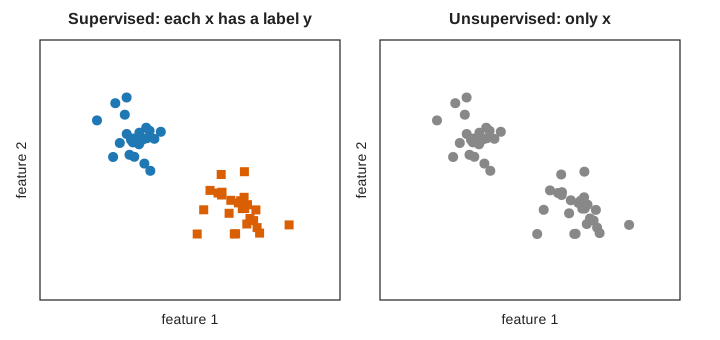
Exercise 33 (What differs between the two panels?) The two panels of Figure 6 show the same fifty points. What does the left panel give a learning algorithm that the right panel does not?
Solution 33. The left panel gives the group of every point, and the right panel gives only the points.
Exercise 34 (What differs between the two panels? (part 2))
Exercise 34 (What differs between the two panels? (part 2)) Use the setup of Exercise 33.
What could the goal be in each of the two panels?
Solution 34. With the group of every point, the goal could be to predict the group of a new point. With only the points, the goal could be to find groups among them.
Definition 18 (Supervised learning)
Definition 18 (Supervised learning) In supervised learning, every training example is a pair \((\vpredvar, \outvar)\): the correct output is given, and the goal is to predict \(\outvar\) for new \(\vpredvar\) [32].
Here \(\outvar\) is the output variable (Definition 15), which has other names there. A training example is also called an observation or an instance.
Definition 19 (Unsupervised learning)
Definition 19 (Unsupervised learning) In unsupervised learning, the training data are inputs \(x\) alone, and the goal is to find structure in them, such as groups, directions of variation, or a density [33].
Example 19 (The Spambase table with and without its labels)
Example 19 (The Spambase table with and without its labels) Take three feature columns of Spambase [5], and the Class column that labels each message. With Class, the table holds \((x, y)\) pairs. Without it, the table holds inputs \(x\) alone.
import pandas as pd

spam_su = pd.read_csv("data/spambase.csv")
feats_su = ["word_freq_free", "word_freq_you", "char_freq_!"]

# Supervised: each row is a pair (x, y), and the goal is to predict y from x.
# Comparing the label groups shows which features carry information about y.
print(spam_su[feats_su + ["Class"]].head(3))
word_freq_free word_freq_you char_freq_! Class
0 0.32 1.93 0.778 1
1 0.14 3.47 0.372 1
2 0.06 1.36 0.276 1 word_freq_free word_freq_you char_freq_!
Class
0 0.07 1.27 0.11
1 0.52 2.26 0.51 word_freq_free word_freq_you char_freq_!
word_freq_free 1.00 0.08 0.10
word_freq_you 0.08 1.00 0.15
char_freq_! 0.10 0.15 1.00spam_su <- read.csv("data/spambase.csv", check.names = FALSE)
feats_su <- c("word_freq_free", "word_freq_you", "char_freq_!")
# Supervised: each row is a pair (x, y), and the goal is to predict y from x.
# Comparing the label groups shows which features carry information about y.
head(spam_su[, c(feats_su, "Class")], 3) word_freq_free word_freq_you char_freq_!
word_freq_free 1.00 0.08 0.10
word_freq_you 0.08 1.00 0.15
char_freq_! 0.10 0.15 1.00In the supervised view (Definition 18), spam averages 0.52% free against 0.07% in email, so free helps predict the label. In the unsupervised view (Definition 19) there is no label to predict: the only finding is structure in the inputs, such as a correlation of 0.08 between free and you.
Watch
Hastie and Tibshirani present the supervised learning problem, then unsupervised learning, from 4:02 [20], video 1.2.
Read
GeeksforGeeks explains supervised and unsupervised learning [34].
Exercise 35 (What if labels are scarce, or there are none?)
Exercise 35 (What if labels are scarce, or there are none?) Suppose only a few of the training examples have labels. A harder case: no one gives the correct answer at all, and a game program learns only whether it won. What kind of learning does each case call for?
Solution 35. An algorithm given a few labels could learn from the labelled and the unlabelled examples together. A program given no correct answers could learn from the results of its own moves, counting a win as good and a loss as bad.
Definition 20 (Semi-supervised learning)
Definition 20 (Semi-supervised learning) In semi-supervised learning, the training data hold a few labelled examples and many unlabelled ones [35]. For a spam filter, the labelled examples are the emails someone has read and marked as spam or email; the rest of the inbox is unlabelled.
Example 20 (A spam filter with 100 labelled messages)
Example 20 (A spam filter with 100 labelled messages) Suppose only 100 of the Spambase messages [5] have been read and marked as spam or email, and the rest of the inbox is unlabelled.
import numpy as np
import pandas as pd

spam_ss = pd.read_csv("data/spambase.csv")
n_ss = len(spam_ss)
order_ss = (np.arange(n_ss) * 1009) % n_ss  # scrambled row order, as before

# Hide every label except those of the first 100 messages in the scrambled order.
y_ss = np.array(spam_ss["Class"], dtype=float)  # a writable copy
y_ss[order_ss[100:]] = np.nan
print("labelled:", int(np.sum(~np.isnan(y_ss))), " unlabelled:", int(np.sum(np.isnan(y_ss))))
labelled: 100 unlabelled: 4501# Every message still has its features; only the labelled ones can score a cutoff.
x_ss = spam_ss["char_freq_!"].to_numpy()
lab_ss = ~np.isnan(y_ss)
grid_ss = np.round(np.arange(0, 3.01, 0.05), 2)
errs_ss = [np.mean((x_ss[lab_ss] > c) != (y_ss[lab_ss] == 1)) for c in grid_ss]
cut_ss = grid_ss[np.argmin(errs_ss)]
# Check it against the labels we hid.
truth_ss = spam_ss["Class"].to_numpy()[~lab_ss]
print("cutoff:", cut_ss, " error on the unlabelled:",
round(np.mean((x_ss[~lab_ss] > cut_ss) != (truth_ss == 1)), 3))cutoff: 0.05 error on the unlabelled: 0.217spam_ss <- read.csv("data/spambase.csv", check.names = FALSE)
n_ss <- nrow(spam_ss)
order_ss <- ((seq_len(n_ss) - 1) * 1009) %% n_ss + 1 # scrambled row order, as before
# Hide every label except those of the first 100 messages in the scrambled order.
y_ss <- spam_ss$Class
y_ss[order_ss[-seq_len(100)]] <- NA
cat("labelled:", sum(!is.na(y_ss)), " unlabelled:", sum(is.na(y_ss)), "\n")labelled: 100 unlabelled: 4501 # Every message still has its features; only the labelled ones can score a cutoff.
x_ss <- spam_ss[["char_freq_!"]]
lab_ss <- !is.na(y_ss)
grid_ss <- round(seq(0, 3, by = 0.05), 2)
errs_ss <- sapply(grid_ss, function(c) mean((x_ss[lab_ss] > c) != (y_ss[lab_ss] == 1)))
cut_ss <- grid_ss[which.min(errs_ss)]
# Check it against the labels we hid.
truth_ss <- spam_ss$Class[!lab_ss]
cat("cutoff:", cut_ss, " error on the unlabelled:",
round(mean((x_ss[!lab_ss] > cut_ss) != (truth_ss == 1)), 3), "\n")cutoff: 0.05 error on the unlabelled: 0.217 The training data hold 100 labelled examples and 4501 unlabelled ones (Definition 20). This code uses only the labelled 100 to choose the cutoff, so the 4501 unlabelled messages go unused. A semi-supervised method would also learn from their features. The hidden labels were used above only to check the result.
Definition 21 (Reinforcement learning)
Definition 21 (Reinforcement learning) In reinforcement learning, an agent acts and learns from rewards rather than from correct answers [36]. For a program learning to play a board game, for example, its actions are its moves, and its reward comes from how its games turn out, not from a label saying which move was right.
Example 21 (A filter that learns only from rewards)
Example 21 (A filter that learns only from rewards) Let a spam filter act on the Spambase messages [5] one at a time: its action is to send each message to the junk folder or to the inbox, and the only feedback is a reward, +1 for a right call and -1 for a wrong one. Try three cutoff policies, each on its own 500 messages, and keep the one with the highest average reward:
import numpy as np
import pandas as pd

spam_rl = pd.read_csv("data/spambase.csv")
n_rl = len(spam_rl)
order_rl = (np.arange(n_rl) * 1009) % n_rl  # scrambled message order, as before
x_rl = spam_rl["char_freq_!"].to_numpy()
y_rl = spam_rl["Class"].to_numpy()

def reward_rl(cut, rows):
    # Act: junk the message if x > cut. The environment returns +1 or -1;
    # the learner keeps these rewards, not the labels behind them.
    return np.where((x_rl[rows] > cut) == (y_rl[rows] == 1), 1, -1)

for j, cut in enumerate([0.05, 0.5, 1.5]):
    rows = order_rl[500 * j : 500 * (j + 1)]
    print("cutoff", cut, "mean reward:", round(reward_rl(cut, rows).mean(), 3))
cutoff 0.05 mean reward: 0.576
cutoff 0.5 mean reward: 0.432
cutoff 1.5 mean reward: 0.248spam_rl <- read.csv("data/spambase.csv", check.names = FALSE)
n_rl <- nrow(spam_rl)
order_rl <- ((seq_len(n_rl) - 1) * 1009) %% n_rl + 1 # scrambled message order, as before
x_rl <- spam_rl[["char_freq_!"]]
y_rl <- spam_rl$Class
reward_rl <- function(cut, rows) {
# Act: junk the message if x > cut. The environment returns +1 or -1;
# the learner keeps these rewards, not the labels behind them.
ifelse((x_rl[rows] > cut) == (y_rl[rows] == 1), 1, -1)
}
cuts_rl <- c(0.05, 0.5, 1.5)
mean_reward_rl <- sapply(seq_along(cuts_rl), function(j) {
mean(reward_rl(cuts_rl[j], order_rl[(500 * (j - 1) + 1):(500 * j)]))
})
for (j in seq_along(cuts_rl)) {
cat("cutoff", cuts_rl[j], "mean reward:", round(mean_reward_rl[j], 3), "\n")
}cutoff 0.05 mean reward: 0.576
cutoff 0.5 mean reward: 0.432
cutoff 1.5 mean reward: 0.248 The policy with cutoff 0.05 earns the highest average reward, 0.58, so this agent would adopt it (Definition 21). This is the simplest case. In a game such as checkers, the reward arrives only when the game ends, and says nothing about which move was the mistake.
Read
GeeksforGeeks explains:
Semi-supervised data are common, because labels cost time and money: someone has to read each email to mark it as spam, while unread emails arrive at no cost. The week 10 lecture on reinforcement learning replaces labels with rewards.
Exercise 36 (How could a computer find groups?)
Exercise 36 (How could a computer find groups?) A dataset has points with no labels, and we want \(k\) groups. Propose a procedure that a computer could repeat to split the points into \(k\) groups.
Solution 36. Start with a rough guess at the groups, then keep improving the guess:
- put each point with the group whose middle is closest;
- recompute each middle;
- stop once no point changes group.
Definition 22 (Clustering)
Definition 22 (Clustering) Clustering is the unsupervised task (Definition 19) of dividing \(N\) inputs \(\vx_1, \ldots, \vx_N\) into groups, called clusters, so that inputs in the same cluster are more similar to each other than to inputs in other clusters [39]. The output is a cluster assignment for each input. No labels are given, so the clusters are found, not learned from examples of the right answer.
Example 22 (Grouping cars without labels)
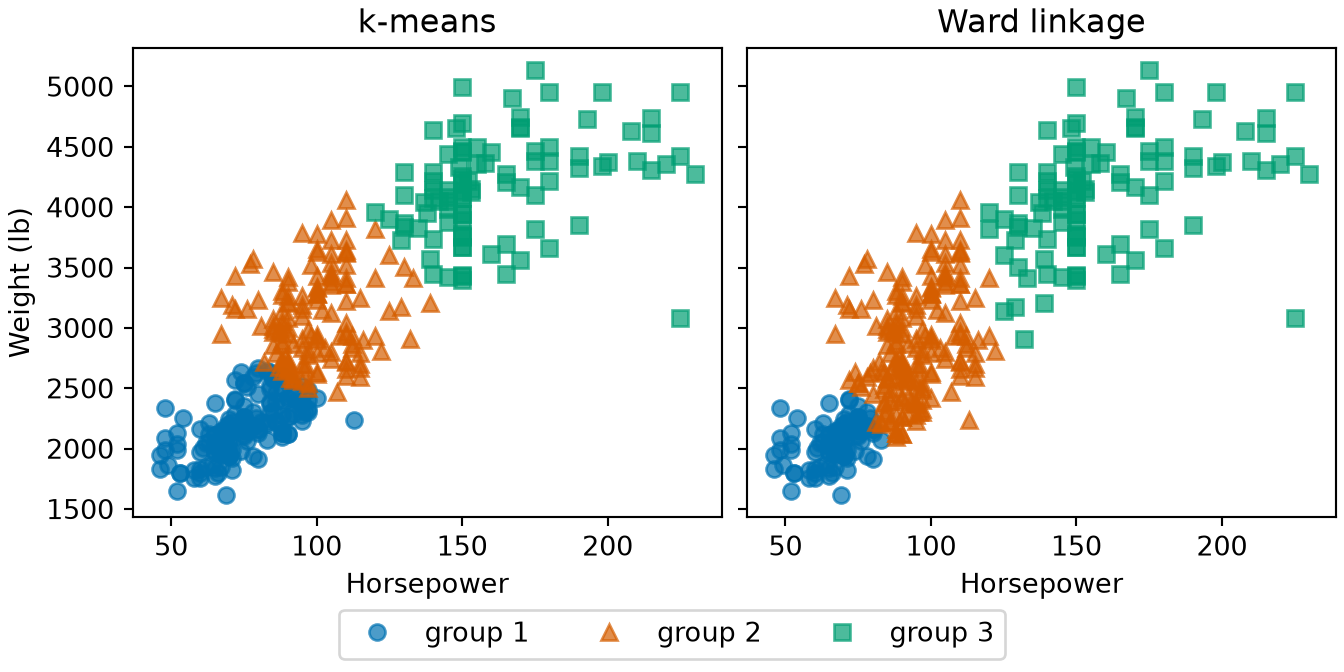
Example 22 (Grouping cars without labels) Ignore mpg and every other column of the Auto data [18] except two: the horsepower and weight of each car. Standardize both, so that neither dominates the distances, and cluster the cars into three groups by two methods, \(k\)-means and hierarchical clustering with Ward linkage. Cluster labels are arbitrary, so number the clusters from the lightest cars to the heaviest:
import numpy as np
import pandas as pd
from scipy.cluster.hierarchy import fcluster, linkage
from sklearn.cluster import KMeans

auto_cl = pd.read_csv("data/auto.csv").dropna(subset=["horsepower"])
x_cl = auto_cl[["horsepower", "weight"]].to_numpy(float)
x_cl = (x_cl - x_cl.mean(axis=0)) / x_cl.std(axis=0, ddof=1)
w_cl = auto_cl["weight"].to_numpy(float)

def by_weight(labels, weight):
    # Renumber the clusters 0, 1, 2 in order of their mean weight.
    ids, inverse = np.unique(labels, return_inverse=True)
    order = np.argsort([weight[labels == g].mean() for g in ids])
    return np.argsort(order)[inverse]

km_cl = by_weight(KMeans(3, n_init=10, random_state=1).fit(x_cl).labels_, w_cl)
hc_cl = by_weight(fcluster(linkage(x_cl, "ward"), 3, criterion="maxclust"), w_cl)

print(np.bincount(km_cl), np.bincount(hc_cl))
[159 138 95] [102 187 103]col_0 0 1 2
row_0
0 102 57 0
1 0 130 8
2 0 0 95auto_cl <- na.omit(read.csv("data/auto.csv")[, c("horsepower", "weight")])
x_cl <- scale(auto_cl)
# Renumber the clusters 1, 2, 3 in order of their mean weight.
by_weight <- function(labels, weight) {
rank(tapply(weight, labels, mean))[as.character(labels)]
}
set.seed(1)
km_fit <- kmeans(x_cl, centers = 3, nstart = 10)
km_cl <- by_weight(km_fit$cluster, auto_cl$weight)
hc_cl <- by_weight(cutree(hclust(dist(x_cl), "ward.D2"), k = 3), auto_cl$weight)
rbind(kmeans = table(km_cl), ward = table(hc_cl)) 1 2 3
kmeans 156 141 95
ward 102 187 103 ward
kmeans 1 2 3
1 102 54 0
2 0 133 8
3 0 0 95Both methods split the 392 cars into light, middle and heavy groups, and neither was told which cars are which. \(k\)-means puts 156, 141 and 95 cars in them, Ward linkage 102, 187 and 103. They agree on 330 cars and differ on the other 62. Each method is an answer to the same task, clustering (Definition 22). The two languages start \(k\)-means differently, so their counts can differ slightly. The prose gives the R values.
Show code
library(ggplot2)
cl_long <- rbind(
  data.frame(auto_cl, method = "k-means", group = factor(km_cl)),
  data.frame(auto_cl, method = "Ward linkage", group = factor(hc_cl))
)
cl_long$method <- factor(cl_long$method, levels = c("k-means", "Ward linkage"))
ggplot(cl_long, aes(horsepower, weight, colour = group, shape = group)) +
  geom_point(alpha = 0.7) +
  scale_colour_manual(values = c("1" = "#0072B2", "2" = "#D55E00", "3" = "#009E73")) +
  scale_shape_manual(values = c("1" = 16, "2" = 17, "3" = 15)) +
  facet_wrap(~method) +
  labs(x = "Horsepower", y = "Weight (lb)", colour = "Group", shape = "Group")
Show code
import matplotlib.pyplot as plt

fig, axes = plt.subplots(1, 2, figsize=(7, 3.5), sharey=True, layout="constrained")
styles_cl = [("#0072B2", "o"), ("#D55E00", "^"), ("#009E73", "s")]
for ax, labels, title in zip(axes, [km_cl, hc_cl], ["k-means", "Ward linkage"]):
    for g, (colour, marker) in enumerate(styles_cl):
        keep = labels == g
        ax.plot(auto_cl["horsepower"][keep], auto_cl["weight"][keep], color=colour,
                marker=marker, linestyle="", alpha=0.7, label=f"group {g + 1}");
    ax.set_title(title);
    ax.set_xlabel("Horsepower");
axes[0].set_ylabel("Weight (lb)");
fig.legend(*axes[0].get_legend_handles_labels(), loc="outside lower center", ncol=3);
plt.show()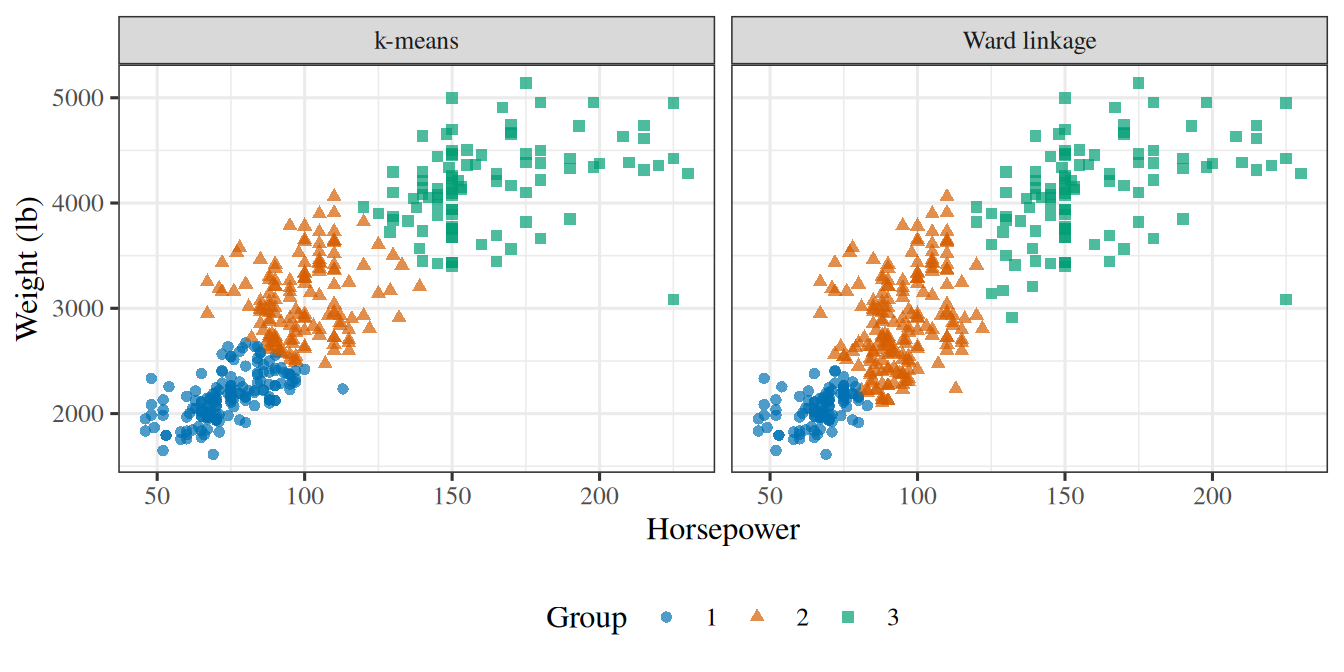
Remark 3 (Clustering is a task, not an algorithm)
Remark 3 (Clustering is a task, not an algorithm). Clustering names the task, not a way of doing it. \(k\)-means (Definition 23) is one method for it, and hierarchical clustering is another, so the same inputs can be clustered in more than one way.
Definition 23 (k-means)
Definition 23 (k-means) k-means is a classic method for clustering (Definition 22) the inputs into \(k\) groups [40]. It starts with \(k\) group centers and repeats two steps until the assignments stop changing:
- assign each point to its nearest center;
- move each center to the mean of the points assigned to it.
Example 23 (Two groups among the Spambase messages)
Example 23 (Two groups among the Spambase messages) Run \(k\)-means with \(k = 2\) on two Spambase features [5], the percentages of ! and $ characters, without showing it the labels. Both percentages are heavy-tailed, so the code works with \(\log(1 + \text{percentage})\), which keeps a few extreme messages from taking over:
import numpy as np
import pandas as pd

spam_km = pd.read_csv("data/spambase.csv")
feat_km = np.log1p(spam_km[["char_freq_!", "char_freq_$"]].to_numpy())

# Start from the messages with the smallest and the largest feature total.
sums_km = feat_km.sum(axis=1)
centers_km = feat_km[[sums_km.argmin(), sums_km.argmax()]]

for _ in range(100):
    # Step 1: assign each point to its nearest center.
    dist_km = ((feat_km[:, None, :] - centers_km[None, :, :]) ** 2).sum(axis=2)
    group_km = dist_km.argmin(axis=1)
    # Step 2: move each center to the mean of its points; stop when nothing moves.
    new_km = np.array([feat_km[group_km == g].mean(axis=0) for g in range(2)])
    if np.allclose(new_km, centers_km):
        break
    centers_km = new_km

print(centers_km.round(2))
[[0.06 0.04]
[0.64 0.16]]Class 0 1
group
0 2652 1025
1 136 788spam_km <- read.csv("data/spambase.csv", check.names = FALSE)
feat_km <- log1p(as.matrix(spam_km[, c("char_freq_!", "char_freq_$")]))
# Start from the messages with the smallest and the largest feature total.
sums_km <- rowSums(feat_km)
start_km <- feat_km[c(which.min(sums_km), which.max(sums_km)), ]
# kmeans() repeats the assign and move steps; "Lloyd" is the version
# described in the definition.
fit_km <- kmeans(feat_km, centers = start_km, algorithm = "Lloyd", iter.max = 100)
round(fit_km$centers, 2) char_freq_! char_freq_$
1 0.06 0.04
2 0.64 0.16 Class
group 0 1
1 2652 1025
2 136 788The groups hold 3677 and 924 messages. The method used only the features, as an unsupervised method does (Definition 19), yet 85% of the messages in group 2 are spam, against 28% in group 1. Groups found without labels can still line up with the labels.
Show code
library(ggplot2)
km_points <- data.frame(
  excl = feat_km[, 1], dollar = feat_km[, 2],
  group = factor(fit_km$cluster)
)
km_centers <- data.frame(excl = fit_km$centers[, 1], dollar = fit_km$centers[, 2])
ggplot(km_points, aes(excl, dollar, colour = group, shape = group)) +
  geom_point(alpha = 0.4) +
  geom_point(data = km_centers, shape = 4, size = 4, stroke = 1.5, colour = "black") +
  scale_colour_manual(values = c("1" = "#0072B2", "2" = "#D55E00")) +
  scale_shape_manual(values = c("1" = 16, "2" = 17)) +
  labs(
    x = "Log of one plus the percentage of !",
    y = "Log of one plus the percentage of $",
    colour = "Group", shape = "Group"
  )
Show code
import matplotlib.pyplot as plt

fig, ax = plt.subplots(figsize=(5, 4), layout="constrained")
for g, (colour, marker) in enumerate([("#0072B2", "o"), ("#D55E00", "^")]):
    keep = group_km == g
    ax.plot(feat_km[keep, 0], feat_km[keep, 1], color=colour, marker=marker,
            linestyle="", alpha=0.4, label=f"group {g + 1}");
ax.plot(centers_km[:, 0], centers_km[:, 1], color="black", marker="x", markersize=10,
        markeredgewidth=2, linestyle="", label="centre");
ax.set_xlabel("Log of one plus the percentage of !");
ax.set_ylabel("Log of one plus the percentage of $");
fig.legend(loc="outside lower center", ncol=3);
plt.show()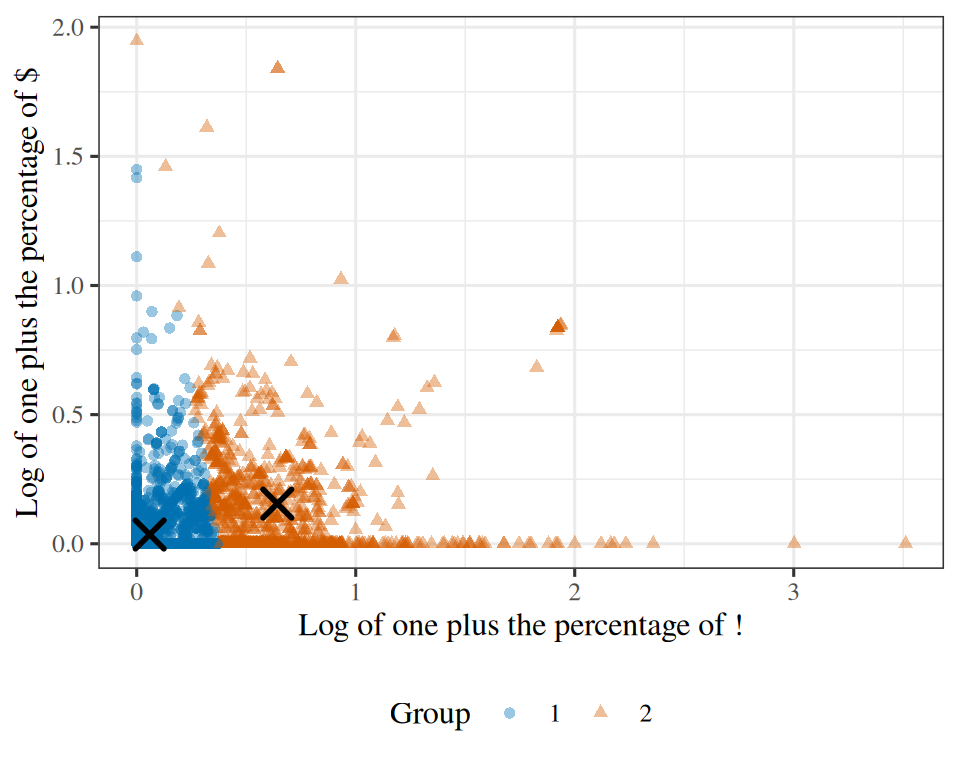
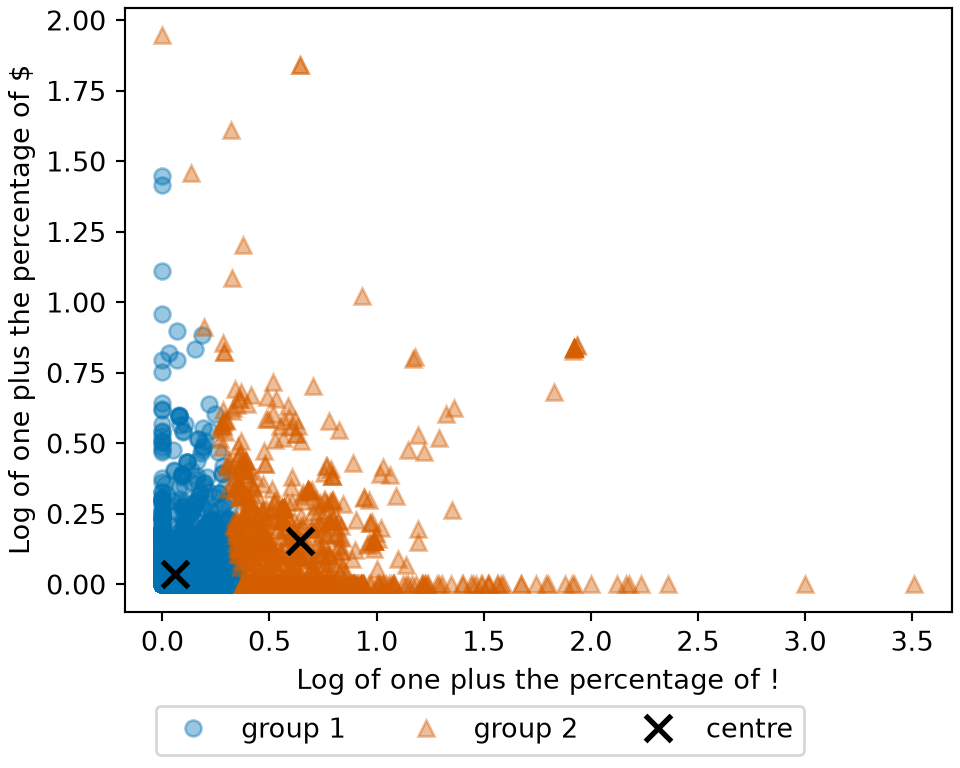
Read
GeeksforGeeks explains \(k\)-means clustering [41].
Exercise 37 (Let the computer find groups)
Exercise 37 (Let the computer find groups) Here are the cars of the Auto data again, plotted by weight and mpg, this time with no labels. First, by eye: how many groups do you see, and where are they?
Show code
kmZ = {
  const mw = d3.mean(auto, (d) => d.weight), sw = d3.deviation(auto, (d) => d.weight);
  const mm = d3.mean(auto, (d) => d.mpg), sm = d3.deviation(auto, (d) => d.mpg);
  return auto.map((d) => [(d.weight - mw) / sw, (d.mpg - mm) / sm]);
}

// Lloyd's algorithm with a fixed start: the initial centers are the cars
// at evenly spaced weight quantiles, so every student sees the same run.
kmRun = (k, iters) => {
  const order = d3.range(kmZ.length).sort((a, b) => auto[a].weight - auto[b].weight);
  let centers = d3.range(k).map((i) => kmZ[order[Math.floor((i + 0.5) / k * kmZ.length)]]);
  const assign = () => kmZ.map((p) => d3.minIndex(centers,
    (c) => (p[0] - c[0]) ** 2 + (p[1] - c[1]) ** 2));
  let labels = assign();
  for (let t = 0; t < iters; t++) {
    centers = d3.range(k).map((j) => {
      const members = kmZ.filter((p, i) => labels[i] === j);
      return [d3.mean(members, (p) => p[0]), d3.mean(members, (p) => p[1])];
    });
    labels = assign();
  }
  return labels;
}
Show code
viewof kmShow = Inputs.radio(["no groups", "k-means groups"], {value: "no groups", label: "show"})
viewof kmK = Inputs.range([2, 5], {width: 360, value: 2, step: 1, label: "k (groups)"})
viewof kmIter = Inputs.range([0, 15], {width: 360, value: 0, step: 1, label: "iterations"})
viewof kmCompare = Inputs.radio(["nothing", "origin", "cylinders"], {value: "nothing", label: "compare with"})
Show code
Plot.plot({
  ariaLabel: 'Scatter plot of the Auto cars, mpg against weight. The points are gray until k-means groups are shown, and then each group has its own color.',
  height: 320, width: 760, grid: true,
  x: {label: "weight (lb)"}, y: {label: "mpg"},
  color: {legend: kmShow === "k-means groups", type: "ordinal", scheme: "category10"},
  marks: [Plot.dot(auto, {x: "weight", y: "mpg", r: 3, fillOpacity: 0.8,
                          fill: kmShow === "k-means groups" ? (d, i) => kmLabels[i] : "#777",
                          tip: true, title: "name"})]
})
Show code
{
  if (kmShow !== "k-means groups" || kmCompare === "nothing") return md``;
  const values = Array.from(new Set(auto.map((d) => d[kmCompare]))).sort((a, b) => a - b);
  const groups = Array.from(new Set(kmLabels)).sort();
  const count = (g, v) => auto.filter((d, i) => kmLabels[i] === g && d[kmCompare] === v).length;
  const head = `| ${kmCompare}: | ${values.join(" | ")} |`;
  const rule = `|:--|${values.map(() => "--:").join("|")}|`;
  const rows = groups.map((g) => `| ${g} | ${values.map((v) => count(g, v)).join(" | ")} |`);
  return md`${[head, rule, ...rows].join("\n")}`;
}Auto cars’ weight and mpg, step by step, with its groups compared against origin or cylinders.
In origin, 1 is American, 2 is European and 3 is Japanese.
Solution 37. By eye, most people see two groups: light cars with high mpg, and heavy cars with low mpg.
Exercise 38 (Let the computer find groups (part 2))
Exercise 38 (Let the computer find groups (part 2)) Use the setup of Exercise 37.
Then let k-means (Definition 23) look. Choose \(k\), and step through the iterations. At what iteration does it stop changing?
Solution 38. K-means with \(k = 2\) agrees and stops changing after one iteration. It finds 217 light cars, averaging 2335 lb and 29 mpg, and 175 heavy ones, averaging 3774 lb and 17 mpg.Larger \(k\) also takes longer to stop changing: \(k = 3\) is still changing until its ninth iteration.
Exercise 39 (Let the computer find groups (part 3))
Exercise 39 (Let the computer find groups (part 3)) Use the setup of Exercise 37.
Then compare its groups with origin and with cylinders. Which one do the groups match better?
Solution 39. The groups match cylinders much better than origin. The heavy group holds all 103 eight-cylinder cars, and the light group holds 194 of the 199 four-cylinder cars. By origin, the heavy group is almost all American (163 of 175), but the light group mixes all three: 82 American, 58 European and 77 Japanese cars. European and Japanese cars have much the same weights and mpg, so no grouping of these two variables could separate them.
The mismatch with origin shows a limitation of unsupervised learning. The algorithm finds structure in the data, and that structure need not match the label we care about. The algorithm always returns \(k\) groups, even if the data hold fewer, so choosing \(k\) is itself a question. Unsupervised Learning returns to k-means, and to that question.
6.2 Regression and classification
Exercise 40 (How do outputs differ?)
Exercise 40 (How do outputs differ?) Supervised problems are named for their output. Compare two supervised problems: predicting a house’s price, and labelling a message spam or email. How does the output \(y\) differ between them?
Solution 40. A house’s price is a number, and a message’s label is one of two categories.
Definition 24 (Regression)
Definition 24 (Regression) A supervised problem (Definition 18) is a regression problem when the output \(y\) is a quantity, such as a price or a temperature, or a vector of quantities [42].
Definition 25 (Classification)
Definition 25 (Classification) A supervised problem (Definition 18) is a classification problem when \(y\) is one of a fixed set of categories, such as spam or email [43].
With two classes the problem is binary classification; with more, it is multi-class classification.
Other names: the categories are also called classes.
Example 24 (Predicting mpg versus predicting spam)
Example 24 (Predicting mpg versus predicting spam) Look at the output \(y\) of two problems from this page: a car’s mpg in the Auto data [18], and a message’s Class in the Spambase data [5].
count    392.0
mean      23.4
std        7.8
min        9.0
25%       17.0
50%       22.8
75%       29.0
max       46.6
Name: mpg, dtype: float64Class
0 2788
1 1813
Name: count, dtype: int64 Min. 1st Qu. Median Mean 3rd Qu. Max.
9.00 17.00 22.75 23.45 29.00 46.60
   0    1
2788 1813
Predicting mpg, which takes 127 distinct values between 9 and 46.6, is a regression problem (Definition 24). Predicting Class, which takes 2 values, is a classification problem (Definition 25), and a binary one because there are two classes. What decides the kind of problem is the output: predicting a car’s origin, coded 1, 2 or 3 but standing for a country, would be classification too.
Show code
library(ggplot2)
library(patchwork)
rg_mpg <- ggplot(auto_rc, aes(mpg)) +
  geom_histogram(bins = 20, fill = "#0072B2", colour = "white") +
  labs(x = "Miles per gallon", y = "Number of cars")
rg_class <- ggplot(
  data.frame(Class = factor(spam_rc$Class, levels = 0:1, labels = c("email", "spam"))),
  aes(Class, fill = Class)
) +
  geom_bar(show.legend = FALSE) +
  scale_fill_manual(values = c(email = "#0072B2", spam = "#D55E00")) +
  labs(x = "Message class", y = "Number of messages")
rg_mpg + rg_class
Show code
import matplotlib.pyplot as plt

fig, (ax_mpg, ax_class) = plt.subplots(1, 2, figsize=(7, 3.5), layout="constrained")
ax_mpg.hist(auto_rc["mpg"], bins=20, color="#0072B2", edgecolor="white");
ax_mpg.set_xlabel("Miles per gallon");
ax_mpg.set_ylabel("Number of cars");
counts_rg = spam_rc["Class"].value_counts().sort_index()
ax_class.bar(["email", "spam"], counts_rg.to_numpy(), color=["#0072B2", "#D55E00"]);
ax_class.set_xlabel("Message class");
ax_class.set_ylabel("Number of messages");
plt.show()mpg of cars; on the right, the output of a classification takes just a few, such as the two Class values of messages (Example 24).
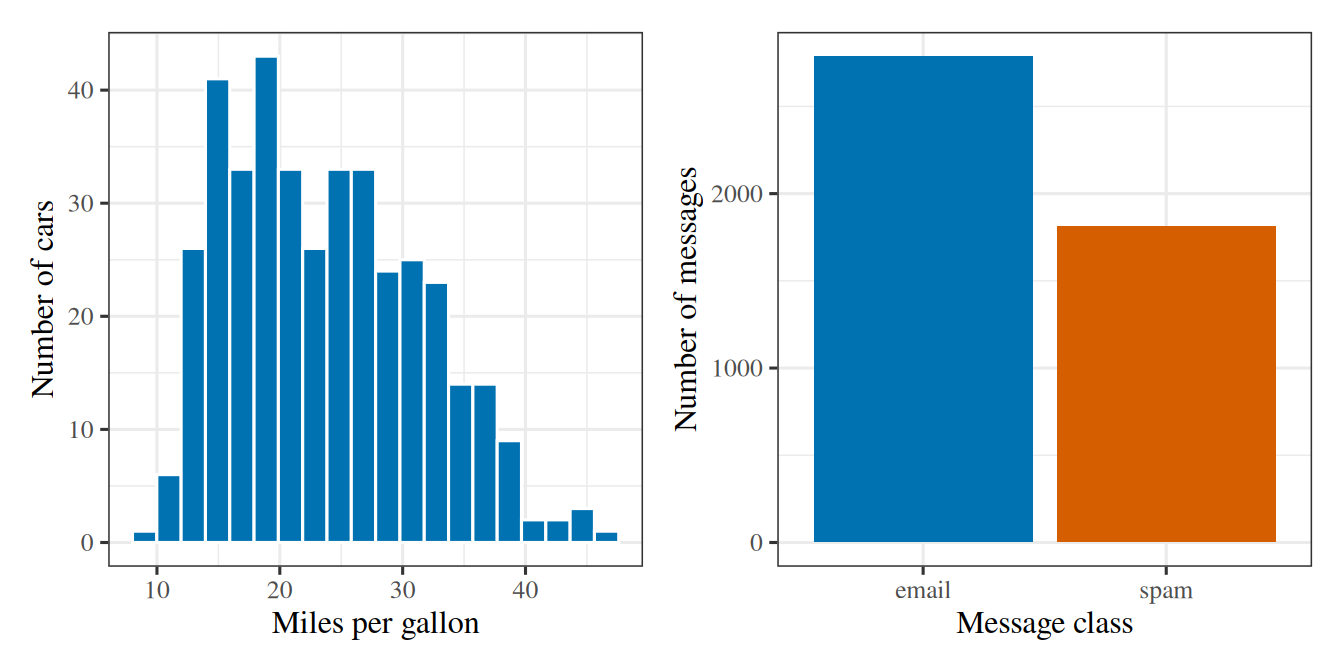
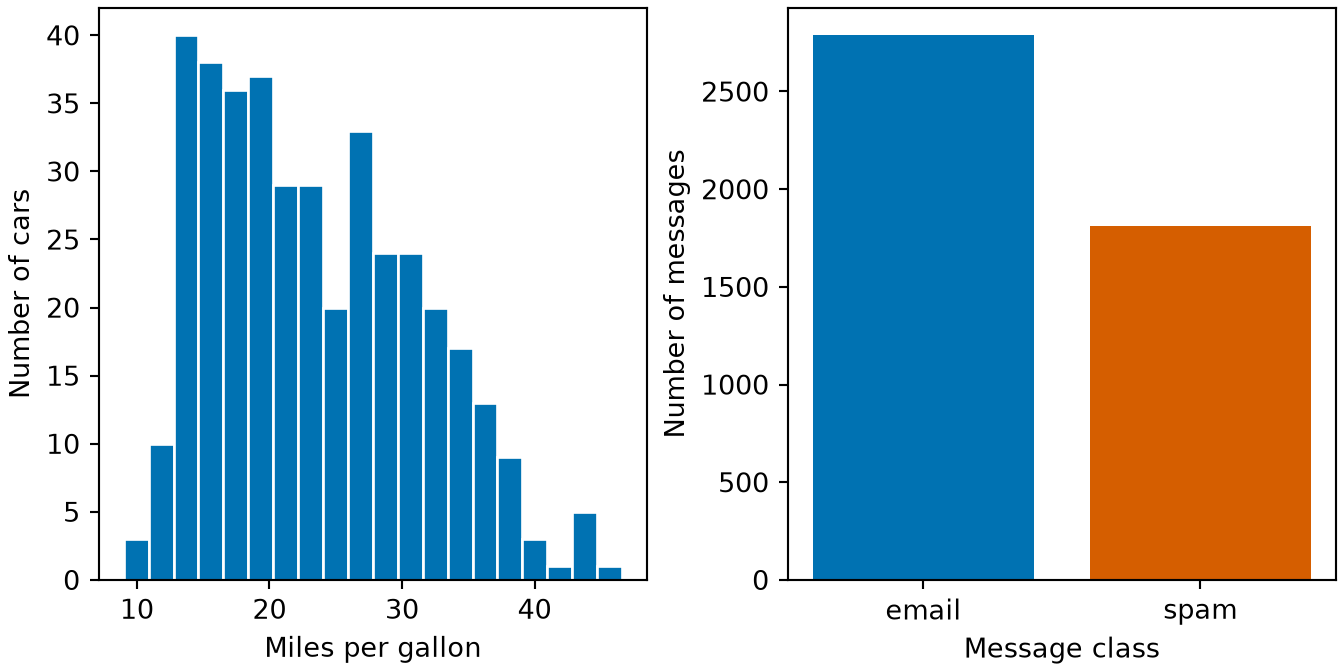
Read
GeeksforGeeks explains classification and regression [44].
The spam filter is a classification problem with two classes. Predicting the log of a prostate-cancer antigen level in the blood from clinical measurements is a regression problem. So is predicting a house’s price from its living area, using 47 houses in Portland, Oregon. Other output types exist, such as a ranking of search results by relevance or a sequence of part-of-speech tags, one for each word of a sentence, but these two are the focus of most of this course.
Exercise 41 (Regression or classification?)
Exercise 41 (Regression or classification?) Is predicting mpg from the other Auto data variables a regression or a classification problem?
Solution 41. Predicting mpg is regression, because mpg is a quantity.
Exercise 42 (Regression or classification? (part 2))
Exercise 42 (Regression or classification? (part 2)) Use the setup of Exercise 41.
Is predicting origin a regression or a classification problem?
Solution 42. Predicting origin is classification, because origin is one of three categories, even though it is stored as the numbers 1, 2 and 3.
6.3 A first regression model
Exercise 43 (What is the simplest rule?)
Exercise 43 (What is the simplest rule?) We want a rule that takes a car’s horsepower and returns a predicted mpg.
What is the simplest shape such a rule can take?
Exercise 44 (What is the simplest rule? (part 2))
Exercise 44 (What is the simplest rule? (part 2)) Use the setup of Exercise 43.
How many numbers do we have to choose to specify that rule exactly?
Solution 44. Two: \(\hcoef{0}\) and \(\hcoef{1}\). To choose them, we need a way to score a line.
Exercise 45 (How could we score a line?)
Exercise 45 (How could we score a line?) The line’s error on each car is \(y - \hat{y}\). Propose one number that scores the line on \(n\) cars, so that a lower score means a better line.
Solution 45. Square each car’s error, so that errors above and below the line both increase its total, and average the squares over the \(n\) cars.
Definition 26 (Sample mean squared error)
Definition 26 (Sample mean squared error) The sample mean squared error (sMSE) of a fitted model on \(n\) examples \((x_1, y_1), \ldots, (x_n, y_n)\) is the average squared error [45], \[ \sMSEt = \frac{1}{n} \sum_{i=1}^{n} (y_i - \hat{y}_i)^2, \] where \(\hat{y}_i\) is the fitted model’s prediction for example \(i\).
Example 25 (A baseline’s sample mean squared error on Auto)
Example 25 (A baseline’s sample mean squared error on Auto) The simplest rule for predicting mpg in the Auto data [18] ignores the car and always guesses the sample mean mpg. Compute its sMSE, and compare it with the sMSE of a line that uses horsepower:
import numpy as np
import pandas as pd

auto_ms = pd.read_csv("data/auto.csv")
y_ms = auto_ms["mpg"].to_numpy(float)

# Baseline: predict the mean mpg for every car.
mse_base_ms = np.mean((y_ms - y_ms.mean()) ** 2)

# Line: predict from horsepower, with the least squares fit.
slope_ms, intercept_ms = np.polyfit(auto_ms["horsepower"], y_ms, 1)
pred_ms = intercept_ms + slope_ms * auto_ms["horsepower"].to_numpy()
mse_line_ms = np.mean((y_ms - pred_ms) ** 2)

print("baseline sMSE:", round(mse_base_ms, 1))
baseline sMSE: 60.8line sMSE: 23.9auto_ms <- read.csv("data/auto.csv")
y_ms <- auto_ms$mpg
# Baseline: predict the mean mpg for every car.
mse_base_ms <- mean((y_ms - mean(y_ms))^2)
# Line: predict from horsepower, with the least squares fit.
fit_ms <- lm(mpg ~ horsepower, data = auto_ms)
mse_line_ms <- mean((y_ms - fitted(fit_ms))^2)
cat("baseline sMSE:", round(mse_base_ms, 1), "\n")baseline sMSE: 60.8 line sMSE: 23.9 On these 392 cars the baseline’s sMSE (Definition 26) is 60.8, in squared miles per gallon, and the line’s is 23.9. The line’s sMSE cannot be larger, because the baseline is a line with slope 0. The line’s sMSE is smaller by a factor of 2.54.
Definition 27 (Sample root mean squared error)
Definition 27 (Sample root mean squared error) The sample root mean squared error (sRMSE) of a fitted model on \(n\) examples is the square root of its sMSE (Definition 26) [46], \[ \sRMSEt = \sqrt{\sMSEt}. \]
Remark 5 (The sRMSE has the unit of the outcome)
Remark 5 (The sRMSE has the unit of the outcome). Squaring the errors squares their unit, and the square root returns the sRMSE to the unit of the outcome. The sRMSE ranks fitted models in the same order as the sMSE (Definition 26), because the square root is increasing. We therefore report the sRMSE, and later say more about why.
Example 26 (A baseline’s sample root mean squared error on Auto)
Example 26 (A baseline’s sample root mean squared error on Auto) Take the square root of the two sMSEs from Example 25:
The baseline’s sRMSE (Definition 27) is 7.80 miles per gallon, the same unit as mpg, and the line’s is 4.89. Using horsepower shrinks the typical error by a factor of 1.59.
Watch
Hutchinson explains a model, training and a loss step by step, Machine Learning Example (21 min) [2].
Read
GeeksforGeeks explains mean squared error [47].
Squaring makes every error increase the rule’s total, and makes big errors count much more than small ones.
Exercise 46 (Score a line by hand)
Exercise 46 (Score a line by hand) Take the line \(\hat{y} = 40 - 0.16x\) and the first three cars in Auto:
| car | horsepower \(x\) |
mpg \(y\)
|
|---|---|---|
| chevrolet chevelle malibu | 130 | 18 |
| buick skylark 320 | 165 | 15 |
| plymouth satellite | 150 | 18 |
For each car, find the prediction \(\hat{y}\) and the error \(y - \hat{y}\). Then find the line’s sMSE (Definition 26) on these three cars, and take its square root to get the sRMSE (Definition 27).
Solution 46.
| car | \(\hat{y} = 40 - 0.16x\) | error \(y - \hat{y}\) | squared |
|---|---|---|---|
| chevrolet chevelle malibu | \(40 - 20.8 = 19.2\) | \(-1.2\) | 1.44 |
| buick skylark 320 | \(40 - 26.4 = 13.6\) | \(1.4\) | 1.96 |
| plymouth satellite | \(40 - 24.0 = 16.0\) | \(2.0\) | 4.00 |
The average of the squared errors is \[ \frac{1.44 + 1.96 + 4.00}{3} = \frac{7.40}{3} \approx 2.47. \] That average is the line’s sMSE on these three cars (Definition 26). Its square root, \(\sqrt{7.40/3} \approx 1.57\) miles per gallon, is the line’s sRMSE (Definition 27).
Exercise 47 (Fit a line yourself)
Exercise 47 (Fit a line yourself) Now score lines on all 392 cars at once. Move the intercept and slope to make the sRMSE (Definition 27) as small as you can. What is the lowest sRMSE you can reach?
Show code
autoFit = auto

mseOf = (predict) => d3.mean(autoFit, (d) => (d.mpg - predict(d.horsepower)) ** 2)
mpgMean = d3.mean(autoFit, (d) => d.mpg)
rmseOf = (predict) => Math.sqrt(mseOf(predict))
meanMse = mseOf(() => mpgMean)

// Least-squares fits, computed here rather than typed in,
// so the page cannot disagree with its own data.
lsLine = {
  const xm = d3.mean(autoFit, (d) => d.horsepower);
  const b1 = d3.sum(autoFit, (d) => (d.horsepower - xm) * (d.mpg - mpgMean)) /
             d3.sum(autoFit, (d) => (d.horsepower - xm) ** 2);
  return {b0: mpgMean - b1 * xm, b1};
}

lsQuad = {
  // Solve the 3x3 normal equations for mpg ~ 1 + x + x^2.
  const cols = autoFit.map((d) => [1, d.horsepower, d.horsepower ** 2]);
  const A = [0, 1, 2].map((i) => [0, 1, 2].map((j) => d3.sum(cols, (c) => c[i] * c[j])));
  const b = [0, 1, 2].map((i) => d3.sum(autoFit, (d, k) => cols[k][i] * d.mpg));
  for (let p = 0; p < 3; p++) {
    for (let r = p + 1; r < 3; r++) {
      const f = A[r][p] / A[p][p];
      for (let c = p; c < 3; c++) A[r][c] -= f * A[p][c];
      b[r] -= f * b[p];
    }
  }
  const w = [0, 0, 0];
  for (let p = 2; p >= 0; p--) {
    w[p] = (b[p] - d3.sum([0, 1, 2].filter((c) => c > p), (c) => A[p][c] * w[c])) / A[p][p];
  }
  return w;
}

hpGrid = d3.range(40, 236, 2)
Show code
viewof fitB0 = Inputs.range([20, 60], {width: 360, value: 30, step: 0.1, label: "intercept b0"})
viewof fitB1 = Inputs.range([-0.4, 0.1], {width: 360, value: -0.05, step: 0.001, label: "slope b1"})
viewof fitShow = Inputs.checkbox(
  ["least-squares line", "least-squares curve"],
  {label: "also show"}
)
Show code
{
  const sign = (b) => (b < 0 ? "\u2212" : "+");
  const ls = fitShow.includes("least-squares line")
    ? ` The least-squares line is mpg = ${lsLine.b0.toFixed(2)} ${sign(lsLine.b1)} ${Math.abs(lsLine.b1).toFixed(4)} \u00d7 horsepower, with sRMSE ${rmseOf((x) => lsLine.b0 + lsLine.b1 * x).toFixed(2)}.`
    : "";
  return md`Your line: mpg = ${fitB0.toFixed(1)} ${sign(fitB1)} ${Math.abs(fitB1).toFixed(3)} \u00d7 horsepower,
with sRMSE **${Math.sqrt(yourMse).toFixed(2)}**.
Predicting the sample mean, ${mpgMean.toFixed(1)}, for every car has sRMSE ${Math.sqrt(meanMse).toFixed(2)}.${ls}`;
}
Show code
Plot.plot({
  ariaLabel: 'Scatter plot of mpg against horsepower for the Auto cars, with a dotted gray line at the average mpg, a red line set by the intercept and slope controls, and optionally the least-squares line and curve.',
  height: 340, width: 560, grid: true,
  x: {label: "horsepower", domain: [40, 235]},
  y: {label: "mpg", domain: [5, 50]},
  marks: [
    Plot.dot(autoFit, {x: "horsepower", y: "mpg", r: 2.5, fill: "#888", fillOpacity: 0.6,
                       tip: true, title: "name"}),
    Plot.ruleY([mpgMean], {stroke: "#aaa", strokeDasharray: "2,3"}),
    Plot.line(hpGrid, {x: (x) => x, y: (x) => fitB0 + fitB1 * x,
                       stroke: "#d62728", strokeWidth: 2.5, clip: true}),
    fitShow.includes("least-squares line")
      ? Plot.line(hpGrid, {x: (x) => x, y: (x) => lsLine.b0 + lsLine.b1 * x,
                           stroke: "#1f77b4", strokeWidth: 2, strokeDasharray: "6,4", clip: true})
      : null,
    fitShow.includes("least-squares curve")
      ? Plot.line(hpGrid, {x: (x) => x, y: (x) => lsQuad[0] + lsQuad[1] * x + lsQuad[2] * x * x,
                           stroke: "#2ca02c", strokeWidth: 2, clip: true})
      : null
  ]
})mpg against horsepower, with its mean squared error beside the least-squares fit’s.
The red line is yours; the dotted gray line is the average mpg.
Solution 47.
Show code
{
  const ls = (x) => lsLine.b0 + lsLine.b1 * x;
  const hand = (x) => 40 - 0.16 * x;
  const lsRmse = rmseOf(ls);
  const handRmse = rmseOf(hand);
  const pctOver = 100 * (handRmse - lsRmse) / lsRmse;
  const sign = lsLine.b1 < 0 ? "−" : "+";
  const out = md`A line fitted by least squares has the lowest possible sRMSE, ${lsRmse.toFixed(2)} miles per gallon.
It is
$$
\\hat{y} = ${lsLine.b0.toFixed(2)} ${sign} ${Math.abs(lsLine.b1).toFixed(4)}x,
$$
the **least-squares** line (tick *least-squares line* to see it).
Each extra unit of horsepower predicts about ${Math.abs(lsLine.b1).toFixed(2)} fewer miles per gallon.

The line from @exr-mse-by-hand, $40 - 0.16x$, has an sRMSE of ${handRmse.toFixed(2)} on all 392 cars,
within ${pctOver.toFixed(1)}% of the best.
Nobody has to find the best line by sliding, though:
[linear regression](linear-regression.qmd) derives a [closed-form solution](https://morrison-lab.github.io/mds/expressions-algorithms.html#def-closed-form-solution) for it,
and [gradient descent](gradient-descent.qmd) finds it by repeatedly making small changes that lower the sMSE,
much as you just did by hand.`;
  // OJS output is inserted into the DOM after this cell runs, and MathJax's
  // own pass only fires once at page load -- so the $$...$$ this cell just
  // wrote would never get typeset without an explicit, deferred retypeset.
  requestAnimationFrame(() => window.Quarto?.typesetMath?.(out));
  return out;
}
Exercise 48 (Fit a line yourself (part 2))
Exercise 48 (Fit a line yourself (part 2)) Use the setup of Exercise 47.
How does the lowest sRMSE you reached compare with the sRMSE of ignoring horsepower and predicting the sample mean mpg for every car?
Solution 48.
Show code
Exercise 49 (Is a straight line the right shape?)
Exercise 49 (Is a straight line the right shape?) Look at where the cars are relative to the least-squares line, at low, middle and high horsepower. Is there a pattern in the errors?
Solution 49. The errors have a pattern. The line predicts too low at both ends, below about 80 and above about 170 horsepower, and too high in the middle, because mpg falls steeply at first and then flattens.
Exercise 50 (Is a straight line the right shape? (part 2))
Exercise 50 (Is a straight line the right shape? (part 2)) Use the setup of Exercise 49.
Then tick least-squares curve, which fits \(\hat{y} = \hcoef{0} + \hcoef{1} x + \hcoef{2} x^2\) by least squares. Should we always prefer the model with the lower sRMSE (Definition 27)?
Solution 50.
Show code
{
  const ls = (x) => lsLine.b0 + lsLine.b1 * x;
  const quad = (x) => lsQuad[0] + lsQuad[1] * x + lsQuad[2] * x ** 2;
  const lsRmse = rmseOf(ls);
  const quadRmse = rmseOf(quad);
  const signB1 = lsQuad[1] < 0 ? "−" : "+";
  const signB2 = lsQuad[2] < 0 ? "−" : "+";
  const out = md`The curve
$$
\\hat{y} = ${lsQuad[0].toFixed(2)} ${signB1} ${Math.abs(lsQuad[1]).toFixed(4)}x ${signB2} ${Math.abs(lsQuad[2]).toFixed(6)}x^2
$$
follows that bend, and its sRMSE is ${quadRmse.toFixed(2)}, against ${lsRmse.toFixed(2)} for the line.`;
  // Same deferred-retypeset reason as the cell in #sol-fit-a-line: MathJax
  // never sees this $$...$$ unless something asks it to look again.
  requestAnimationFrame(() => window.Quarto?.typesetMath?.(out));
  return out;
}
But a lower sRMSE on the data we fit is not the goal. A curve with enough terms could pass through every car and reach an sRMSE of zero, and still predict the next car badly. Minimizing sRMSE on the data we fit repeats the mistake of trusting the best spam rule’s score on half A. The error that matters is the error on data the rule has not seen, which is generalization (Definition 2), the subject of A First Model and Generalization.
Watch
Abu-Mostafa sorts learning problems into supervised, unsupervised and reinforcement learning in his first Caltech lecture, from 36:04 [31], Lecture 1.
7 Learning a game from self-play
7.1 Scoring a checkers position
A program that plays checkers has to choose a move on every turn. One way to choose is to look at the positions each move could lead to, score each position, and pick the move whose position scores best.
Exercise 51 (Describe a checkers position with numbers)
Exercise 51 (Describe a checkers position with numbers) Suppose the program plays Black. List four numbers you could compute from a checkers board that say whether the position is good for Black.
Hint
Think about what a checkers player counts or looks at before deciding who is ahead.
Solution 51. Four good choices:
- piece advantage: Black’s pieces minus White’s pieces, with a king counted as more than a man;
- mobility: the number of squares Black could move a piece to;
- center control: the number of Black pieces on the eight central squares;
- advancement: how far Black’s men have moved toward the far row, where they become kings.
The IBM checkers program used all four, from a list of 38 such features plus piece advantage [9], “Term replacement”.
Exercise 52 (What does scoring a position take?)
Exercise 52 (What does scoring a position take?) To pick a move, the program scores each position it could reach. What goes into that scoring rule, and what comes out?
Solution 52. A board position goes in, and one number comes out. A bigger number should mean the position is better for Black. So the scoring rule is a function from positions to numbers.
Definition 28 (Evaluation function)
Definition 28 (Evaluation function) An evaluation function \(V\) assigns a number \(V(s)\) to each game position \(s\), with a larger number meaning the position is better for the player it scores [48].
Example 27 (Scoring a position by who has more pieces)
Example 27 (Scoring a position by who has more pieces) Score a position \(s\) from Black’s side with \[ V(s) = \begin{cases} 1 & \text{if Black has more pieces than White,} \\ 0 & \text{if the two sides have the same number of pieces,} \\ -1 & \text{if Black has fewer pieces than White.} \end{cases} \] A position \(s\) where Black has 7 pieces and White has 5 scores \(V(s) = 1\).
Exercise 53 (Combine the features into one score)
Exercise 53 (Combine the features into one score) How could the program combine the numbers from Exercise 51 into a single score for a position?
Solution 53. Give each feature a weight, multiply each feature by its weight, and add up the products. A feature that matters more for winning gets a larger weight.
Definition 29 (Linear evaluation function)
Definition 29 (Linear evaluation function) A linear evaluation function is an evaluation function (Definition 28) that is a weighted sum, the dot product of a weight vector with a feature vector (Definition 13) describing the position, \[ V_{w}(s) = \sum_{j=1}^{\ninputvars} w_j x_j(s), \] where \(x_1(s), \ldots, x_{\ninputvars}(s)\) are the features of \(s\), and the numbers \(w_1, \ldots, w_{\ninputvars}\) are its weights.
Example 28 (A two-feature evaluation function)
Example 28 (A two-feature evaluation function) Take two features, \(x_1(s)\), Black’s piece advantage, and \(x_2(s)\), Black’s mobility advantage (the number of squares Black can move a piece to, minus White’s number), with weights \(w_1 = 3\) and \(w_2 = 1\). A position \(s\) where Black is ahead by one piece and can move to 5 more squares than White scores \[ \begin{aligned} V_{w}(s) &= 3 \times 1 + 1 \times 5 \\ &= 8. \end{aligned} \]
The features say what the program looks at. The weights say how much each feature matters, and the program can learn the weights.
Exercise 54 (Where can the weights come from?)
Exercise 54 (Where can the weights come from?) Name three ways to choose the weights \(w_1, \ldots, w_{\ninputvars}\) of a linear evaluation function for checkers (Definition 29).
Solution 54.
- A person sets them by hand, from experience of the game. No learning happens.
- The program learns them from games between expert players, choosing weights whose top-scored move tends to match the move the expert made.
- The program learns them from games it plays against itself.
Exercise 55 (Where can the weights come from? (part 2))
Exercise 55 (Where can the weights come from? (part 2)) Use the setup of Exercise 54.
Which of your three ways count as machine learning (Definition 1)?
Solution 55. Ways 2 and 3 are machine learning: the program’s play improves with experience, and the experience is data, not rules a person wrote down. The IBM checkers program learned its weights by way 3 in 1959 [9]. A 1967 follow-up reported an improved “book learning” procedure, which Samuel judged “much superior to the linear polynomial method” [49], abstract.
7.2 Learning from self-play
Nobody tells a program playing against itself how good a position really is, or which move was correct. Learning from self-play is a kind of reinforcement learning (Definition 21), and the program has to make its own targets.
Exercise 56 (Score a position by looking ahead)
Exercise 56 (Score a position by looking ahead) The evaluation function scores a position from its features alone. How could the program use the evaluation function to get a more reliable score for a position \(s\), by looking several moves ahead of \(s\)?
Solution 56. Look at every position the game could reach from \(s\) within a few moves, and score each of those positions with the evaluation function. Then work backwards, assuming each player picks the move that is best for that player.
Definition 30 (Backed-up score)
Definition 30 (Backed-up score) The backed-up score of a position \(s\) looks several moves ahead: it applies the evaluation function to every position reachable from \(s\) within a fixed number of moves, then assumes each side picks the move best for itself, working back one move at a time until it reaches \(s\) [50].
Example 29 (A two-move backed-up score)
Example 29 (A two-move backed-up score) In position \(s\), Black is to move and has two moves, A and B. White then has two replies to each. The evaluation function scores the four resulting positions for Black:
| Black’s move | White’s reply | score for Black |
|---|---|---|
| A | A1 | \(5\) |
| A | A2 | \(1\) |
| B | B1 | \(3\) |
| B | B2 | \(2\) |
White picks the reply that is worst for Black, so move A is worth \(\min(5, 1) = 1\) and move B is worth \(\min(3, 2) = 2\). Black picks the better of the two moves, so the backed-up score of \(s\) is \(\max(1, 2) = 2\).
Exercise 57 (A target without labels)
Exercise 57 (A target without labels) The program has two ways to score a position \(s\): the evaluation function \(V_{w}(s)\) (Definition 29), and the backed-up score of \(s\) (Definition 30). Which of the two should the program trust more?
Solution 57. The backed-up score is more trustworthy.
Exercise 58 (A target without labels (part 2))
Exercise 58 (A target without labels (part 2)) Use the setup of Exercise 57.
Why should the program trust that one more?
Solution 58. The backed-up score has seen more of the game: it scores positions several moves further on, where more of the outcome is already settled.
Exercise 59 (A target without labels (part 3))
Exercise 59 (A target without labels (part 3)) Use the setup of Exercise 57.
How could the program use the one it trusts more to improve the weights \(w\)?
Solution 59. So the program can treat the backed-up score as the target, and change the weights until \(V_{w}(s)\) comes closer to it.
we are attempting to make the score, calculated for the current board position, look like that calculated for the terminal board position of the chain of moves which most probably will occur during actual play.
[9], “Polynomial modification procedure”
Exercise 60 (Score a position and find the gap)
Exercise 60 (Score a position and find the gap) Use the two-feature evaluation function of Example 28, with a new position \(s\) and these values:
| symbol | meaning | value |
|---|---|---|
| \(x_1(s)\) | Black’s piece advantage in \(s\) | \(2\) |
| \(x_2(s)\) | Black’s mobility advantage in \(s\) | \(-1\) |
| \(w_1, w_2\) | current weights | \(1, 1\) |
| \(t\) | backed-up score of \(s\) (Definition 30) | \(3\) |
Find the score \(V_{w}(s)\) and the gap \(\delta = t - V_{w}(s)\) between the target and the score.
Solution 60. \[ \begin{aligned} V_{w}(s) &= w_1 x_1(s) + w_2 x_2(s) && \text{(definition of } V_w\text{)} \\ &= 1 \times 2 + 1 \times (-1) && \text{(substitute the values)} \\ &= 1, \\ \delta &= t - V_{w}(s) && \text{(definition of } \delta\text{)} \\ &= 3 - 1 && \text{(substitute the values)} \\ &= 2. \end{aligned} \]
The score is too low by 2.
Exercise 61 (Change the weights slightly)
Exercise 61 (Change the weights slightly) One rule for changing the weights is \[ w_j \leftarrow w_j + \eta \, \delta \, x_j(s), \] where the step size \(\eta\) controls how far each weight moves. Use \(\eta = 0.1\) and your \(\delta\) from Exercise 60 to find the new weights \(w_1\) and \(w_2\).
Solution 61. \[ \begin{aligned} w_1 &\leftarrow w_1 + \eta \, \delta \, x_1(s) && \text{(the update rule, } j = 1\text{)} \\ &= 1 + 0.1 \times 2 \times 2 && \text{(substitute the values)} \\ &= 1.4, \\ w_2 &\leftarrow w_2 + \eta \, \delta \, x_2(s) && \text{(the update rule, } j = 2\text{)} \\ &= 1 + 0.1 \times 2 \times (-1) && \text{(substitute the values)} \\ &= 0.8. \end{aligned} \]
The score was too low (\(\delta > 0\)), so the weight on the feature that raised the score (\(x_1 > 0\)) grew, and the weight on the feature that lowered the score (\(x_2 < 0\)) shrank.
Exercise 62 (Check the new score)
Exercise 62 (Check the new score) Find the new score \(V_{w}(s)\) with the new weights from Exercise 61.
Solution 62. \[ \begin{aligned} V_{w}(s) &= w_1 x_1(s) + w_2 x_2(s) && \text{(definition of } V_w\text{)} \\ &= 1.4 \times 2 + 0.8 \times (-1) && \text{(substitute the new weights)} \\ &= 2.8 - 0.8 && \text{(multiply)} \\ &= 2.0. \end{aligned} \]
Exercise 63 (Check the new score (part 2))
Exercise 63 (Check the new score (part 2)) Use the setup of Exercise 62.
Did the score move toward the target \(t = 3\)?
Solution 63. The new score, 2.0, is closer to \(t = 3\) than the old score of 1.
Exercise 64 (Remember positions you have scored)
Exercise 64 (Remember positions you have scored) Suppose the program looks 3 moves ahead, and it saves every position it meets in play, together with that position’s backed-up score (Definition 30). The 3-move lookahead in a later game reaches one of the saved positions. How far ahead does the saved score effectively look?
Solution 64. The saved score already looks 3 moves past the saved position, and the saved position is 3 moves past the current one, so the score in use looks \(3 + 3 = 6\) moves ahead. The memory grows with every game, and the effective lookahead grows with the memory.
The IBM program saved over 53,000 positions this way. It learned to play good openings and endgames, though its midgame play barely improved [9], “Rote-learning tests”.
8 The course ahead
8.1 Topics
The course covers these topics; the calendar says when each is taught.
- Linear regression, the math refreshers, and gradient descent
- Generalization, logistic regression, and performance metrics
- Support vector machines
- Neural networks and backpropagation
- Machine learning experimentation: how to train, tune and compare models so that their error estimates are not biased
- Machine learning theory and ethics
- Clustering
- Short introductions to decision trees, random forests, k-nearest neighbors, reinforcement learning, simulated annealing and genetic algorithms
8.2 Goals for the course
By the end of the course you should be able to:
- recognize the main learning scenarios (supervised or unsupervised; regression, classification or clustering);
- choose among a set of core algorithms for each;
- state the limitations of each method, and the conditions it needs;
- explain why models fail to generalize, and what to do about it;
- evaluate and compare machine learning systems fairly, since a wrong number reported confidently is worse than no number;
- implement the algorithms yourself, and use standard libraries.
The syllabus lists the formal course outcomes.
8.3 Tools
You may complete assignments in Python, R, Julia, or MATLAB/Octave. One of the course outcomes is implementing standard algorithms yourself, so expect to write core methods yourself, without libraries before using libraries such as scikit-learn (Python).
8.4 Suggested reading
There is no required textbook. For this lecture’s material, the suggested reading is:
- An Introduction to Statistical Learning, Sections 2.1–2.1.5;
- The Elements of Statistical Learning, Chapter 1 and Sections 2.1–2.2;
- Goodfellow, Bengio and Courville, Deep Learning, Section 5.1;
- the opening pages of Part I of the CS229 lecture notes by Andrew Ng and Tengyu Ma, which set up the housing example and the notation for supervised learning.
An Introduction to Statistical Learning is free to download from statlearning.com, in a Python edition and an R edition. The authors’ slides for chapter 1 and chapter 2 cover this lecture’s ideas from a statistician’s perspective. Ng’s first CS229 lecture is free to watch on YouTube. The syllabus has links to free copies of the other books and to video lectures.
9 Going further
The rest of this page is optional: we do it in class if there is time, and otherwise it is here for you to work through on your own.
9.1 More on the spam data
Exercise 65 (Look at the spam data)
Exercise 65 (Look at the spam data) The spam data are the Spambase set, collected at Hewlett-Packard Labs and published in the UCI Machine Learning Repository [5]. The same 4601 messages also ship as spam in R’s kernlab package [51], and Python’s ucimlrepo package downloads them from UCI. These notes keep a copy of the file, with UCI’s column names, at data/spambase.csv, so each spam exercise in this section that loads the data reads the same file.
Load it.
Exercise 66 (Look at the spam data (part 2))
Exercise 66 (Look at the spam data (part 2)) Use the setup of Exercise 65.
Look at the george, you, free and hp columns.
Solution 66.
Show code
'data.frame':   4601 obs. of  4 variables:
 $ word_freq_george: num  0 0 0 0 0 0 0 0 0 0 ...
 $ word_freq_you   : num  1.93 3.47 1.36 3.18 3.18 0 3.85 0 1.23 1.67 ...
 $ word_freq_free  : num  0.32 0.14 0.06 0.31 0.31 0 0.96 0 0 0 ...
 $ word_freq_hp    : num  0 0 0 0 0 0 0 0 0 0 ...
Most entries are 0: in any one message, most of the 57 words never appear.
Exercise 67 (Look at the spam data (part 3))
Exercise 67 (Look at the spam data (part 3)) Use the setup of Exercise 65.
Count how many messages are spam.
Solution 67.
There are 4601 messages: 1813 spam and 2788 email. The file codes spam as 1 and email as 0.
Exercise 68 (Read the file with R’s defaults)
Exercise 68 (Read the file with R’s defaults) UCI names six of Spambase’s columns after punctuation marks: char_freq_;, char_freq_( and so on. Read data/spambase.csv into R with read.csv() and no other arguments, and print the names of columns 49 to 54.
Exercise 69 (Read the file with R’s defaults (part 2))
Exercise 69 (Read the file with R’s defaults (part 2)) Use the setup of Exercise 68.
What happened to them?
Solution 69. Six names changed: ;, (, [, !, $ and # cannot appear in an R name, so each became ., and the six results were made unique by appending .1, .2 and so on.
Exercise 70 (Read the file with R’s defaults (part 3))
Exercise 70 (Read the file with R’s defaults (part 3)) Use the setup of Exercise 68.
Why did that happen to them?
Solution 70. By default read.csv passes every column name through make.names(), which turns anything that is not a legal R name into one.
Exercise 71 (Read the file with R’s defaults (part 4))
Exercise 71 (Read the file with R’s defaults (part 4)) Use the setup of Exercise 68.
How do you keep the names as they are in the file?
Solution 71.
[1] "char_freq_;" "char_freq_(" "char_freq_[" "char_freq_!" "char_freq_$"
[6] "char_freq_#"
check.names = FALSE keeps the file’s names, which must then be quoted with backticks in $ access: spam$`char_freq_(`.
Python’s pandas.read_csv keeps them as they are, and they are used as strings in either case: spam["char_freq_!"].
Exercise 72 (Look at four messages)
Exercise 72 (Look at four messages) Table 1 gives the average message in each group. Select the same five columns for the first two messages in the file, and for the first two real messages that contain both george and hp.
Solution 72. Python counts rows from 0 and R from 1, so the same four messages are [0, 1, 1818, 1823] in one and c(1, 2, 1819, 1824) in the other.
Show code
      word_freq_george  word_freq_you  word_freq_free  char_freq_!  word_freq_hp  Class
0                 0.00           1.93            0.32        0.778          0.00      1
1                 0.00           3.47            0.14        0.372          0.00      1
1818              2.04           0.00            0.00        0.000          4.08      0
1823              0.24           0.24            0.00        0.149          9.33      0
Show code
spam <- read.csv("data/spambase.csv", check.names = FALSE)
cols <- c("word_freq_george", "word_freq_you", "word_freq_free",
          "char_freq_!", "word_freq_hp", "Class")
spam |>
  dplyr::mutate(id = dplyr::row_number()) |>
  dplyr::filter(id %in% c(1, 2, 1819, 1824)) |>
  dplyr::select(id, dplyr::all_of(cols)) |>
knitr::kable()| id | word_freq_george | word_freq_you | word_freq_free | char_freq_! | word_freq_hp | Class |
|---|---|---|---|---|---|---|
| 1 | 0.00 | 1.93 | 0.32 | 0.778 | 0.00 | 1 |
| 2 | 0.00 | 3.47 | 0.14 | 0.372 | 0.00 | 1 |
| 1819 | 2.04 | 0.00 | 0.00 | 0.000 | 4.08 | 0 |
| 1824 | 0.24 | 0.24 | 0.00 | 0.149 | 9.33 | 0 |
Exercise 73 (Look at four messages (part 2))
Exercise 73 (Look at four messages (part 2)) Use the setup of Exercise 72.
Does each message look like its group’s average?
Solution 73.
Each message does look like its group. Neither spam message contains george or hp at all, and both real ones contain both.
An average is not a guarantee, though. Message 1 is spam with you at 1.93, below the spam average of 2.26 and well below message 2’s 3.47. A rule built on one column will misclassify messages that a rule built on several would classify correctly.
Exercise 74 (Check the order of the rows)
Exercise 74 (Check the order of the rows) Is the file shuffled? Look at the Class column from top to bottom and say how it is arranged.
Solution 74. Count the runs of a constant label, from the top of the file down:
There are 2 runs, so the label changes exactly once: all 1813 spam messages come first, then all 2788 real ones.
Exercise 75 (Check the order of the rows (part 2))
Exercise 75 (Check the order of the rows (part 2)) Use the setup of Exercise 74.
Why would the order of the rows matter?
Solution 75. So taking the first 80% of the rows, 3680 of them, as a training set would put every spam message in training and leave a test set of email alone. Any split of this file has to shuffle first, so the two halves in Exercise 15 were drawn at random.
Exercise 76 (How many rules did the computer try?)
Exercise 76 (How many rules did the computer try?) The best rule search in Exercise 14 tried every %george threshold from 0 to 5 and every %you threshold from 0 to 10, each in steps of 0.05. Count the candidate rules.
Solution 76. From 0 to 5 in steps of 0.05 is \(5 / 0.05 + 1 = 101\) thresholds, and from 0 to 10 is \(10 / 0.05 + 1 = 201\). Every pair is a rule, so the search tried \(101 \times 201 = 20301\) rules, each scored on all 4601 emails. A computer does that in much less than a second; a person does not.
9.2 Statistical learning: a short history
The name statistical learning is recent, but many of its methods are old [18, Ch. 1]:
- least squares, the first form of linear regression, in the early 1800s;
- linear discriminant analysis in 1936, and logistic regression in the 1940s;
- generalized linear models in the early 1970s;
- classification and regression trees and neural networks in the 1980s, once computers could fit nonlinear models;
- support vector machines in the 1990s.
Statisticians and computer scientists developed these methods at the same time. The same tools led to data mining, machine learning and bioinformatics, fields whose methods “have common underpinnings but are often expressed with different terminology” [13], back cover.
Watch
The Data Science Learning Community’s book clubs discuss An Introduction to Statistical Learning, Chapter 1, in recorded meetings:
- the R book club, in one meeting [52];
- the Python book club, in one meeting [53].
9.3 Loading the Auto data yourself
Exercise 77 (Load the data yourself)
Exercise 77 (Load the data yourself) The Auto data are on this page as data/auto.csv; Remark 1 says where that file comes from. In either language, load the file and report how many rows and columns it has.
Solution 77.
'data.frame':   392 obs. of  9 variables:
 $ mpg         : num  18 15 18 16 17 15 14 14 14 15 ...
 $ cylinders   : int  8 8 8 8 8 8 8 8 8 8 ...
 $ displacement: num  307 350 318 304 302 429 454 440 455 390 ...
 $ horsepower  : int  130 165 150 150 140 198 220 215 225 190 ...
 $ weight      : int  3504 3693 3436 3433 3449 4341 4354 4312 4425 3850 ...
 $ acceleration: num  12 11.5 11 12 10.5 10 9 8.5 10 8.5 ...
 $ year        : int  70 70 70 70 70 70 70 70 70 70 ...
 $ origin      : int  1 1 1 1 1 1 1 1 1 1 ...
 $ name        : Factor w/ 301 levels "amc ambassador brougham",..: 49 36 230 14 160 141 54 222 240 2 ...
Both find 392 cars. Python reports 8 columns, because the code makes each car’s name the row index, as ISLP does; R reports 9, with name as an ordinary column.
Exercise 78 (Summarize three variables)
Exercise 78 (Summarize three variables) Now summarize mpg, horsepower and weight. What is the range of each, and the mean of mpg?
Solution 78.
              mpg  horsepower       weight
count  392.000000  392.000000   392.000000
mean    23.445918  104.469388  2977.584184
std      7.805007   38.491160   849.402560
min      9.000000   46.000000  1613.000000
25%     17.000000   75.000000  2225.250000
50%     22.750000   93.500000  2803.500000
75%     29.000000  126.000000  3614.750000
max     46.600000  230.000000  5140.000000
Show code
Auto <- read.csv("data/auto.csv", stringsAsFactors = TRUE)
Auto |>
  dplyr::select(mpg, horsepower, weight) |>
  gtsummary::tbl_summary(
    type = gtsummary::all_continuous() ~ "continuous2",
    statistic = gtsummary::all_continuous() ~
      c("{mean} ({sd})", "{min}, {max}"),
    digits = gtsummary::all_continuous() ~ 1
  ) |>
gtsummary::as_kable()| Characteristic | N = 392 |
|---|---|
| mpg | |
| Mean (SD) | 23.4 (7.8) |
| Min, Max | 9.0, 46.6 |
| horsepower | |
| Mean (SD) | 104.5 (38.5) |
| Min, Max | 46.0, 230.0 |
| weight | |
| Mean (SD) | 2,977.6 (849.4) |
| Min, Max | 1,613.0, 5,140.0 |
mpg runs from 9 to 46.6, with a mean of 23.4; horsepower from 46 to 230; and weight from 1613 to 5140 pounds.
The chapter 2 lab goes further, in Python (Ch02-statlearn-lab.ipynb in the ISLP labs repository) and in R (the chapter 2 files on the book’s R resources page).
9.4 Sorting learning problems
Exercise 79 (Supervised or unsupervised?)
Exercise 79 (Supervised or unsupervised?) For each task, decide whether it is supervised or unsupervised.
Recognize which digit, 0 to 9, a handwritten image shows.
Solution 79. Supervised: each image comes with its digit.
Exercise 80 (Supervised or unsupervised? (part 2))
Exercise 80 (Supervised or unsupervised? (part 2)) Use the setup of Exercise 79.
Predict tomorrow’s high temperature in Bellingham.
Solution 80. Supervised: past days come with their recorded highs.
Exercise 81 (Supervised or unsupervised? (part 3))
Exercise 81 (Supervised or unsupervised? (part 3)) Use the setup of Exercise 79.
Group news articles by topic, with no topics given in advance.
Solution 81. Unsupervised (clustering): no topics are given.
Exercise 82 (Supervised or unsupervised? (part 4))
Exercise 82 (Supervised or unsupervised? (part 4)) Use the setup of Exercise 79.
Predict a house’s sale price from its size and location.
Solution 82. Supervised: past sales come with their prices.
Exercise 83 (Supervised or unsupervised? (part 5))
Exercise 83 (Supervised or unsupervised? (part 5)) Use the setup of Exercise 79.
Decide whether a credit-card transaction is fraudulent, given past transactions marked as fraud or not.
Solution 83. Supervised: past transactions are marked as fraud or not.
The fraud task can also be an unsupervised problem. A detector could flag transactions unlike the rest even with no labels marking past fraud. That version of the task is called anomaly detection. The same goal can lead to different problems depending on what data exist.
Exercise 84 (Supervised or unsupervised? (part 6))
Exercise 84 (Supervised or unsupervised? (part 6)) Use the setup of Exercise 79.
Find groups of customers who shop in similar ways.
Solution 84. Unsupervised (clustering): no groups are given.
Exercise 85 (Regression or classification, again)
Exercise 85 (Regression or classification, again) For each supervised task in Exercise 79, decide whether it is regression or classification.
Solution 85.
- Recognizing a handwritten digit (Exercise 79) is classification, with ten classes.
- Predicting tomorrow’s high temperature (Exercise 80) and a house’s sale price (Exercise 82) are regression.
- Deciding whether a transaction is fraudulent (Exercise 83) is classification, with two classes.
9.5 Asking questions of data
Exercise 86 (Asking questions of data)
Exercise 86 (Asking questions of data) Machine learning starts with a question that data can help answer. For each of three datasets, given one at a time, what patterns might exist?
Public transit: card taps at stations, with the time, the line, and the weather that day.
Solution 86. Many answers work. Some examples:
Public transit: the traffic at a station may depend on the time, the line and the weather, and the traffic at some stations may rise and fall together.
Exercise 87 (Asking questions of data (part 2))
Exercise 87 (Asking questions of data (part 2)) Use the setup of Exercise 86.
What would you want a model to predict from the transit data of Exercise 86?
Solution 87. Public transit: predict how many people will tap in at a station during the next hour from the time, the line and the weather.
Exercise 88 (Asking questions of data (part 3))
Exercise 88 (Asking questions of data (part 3)) Use the setup of Exercise 86.
Would that model be supervised or unsupervised?
Solution 88. Public transit: predicting the number of taps is supervised regression, and finding groups of stations whose traffic rises and falls together is unsupervised.
Exercise 89 (Asking questions of data (part 4))
Exercise 89 (Asking questions of data (part 4)) Use the setup of Exercise 86.
Farming: soil samples, planting dates, rainfall and harvest weights for many fields. What patterns might exist in these data?
Solution 89. Farming: a field’s harvest weight may depend on its soil, planting date and rainfall, and fields planted late with little rain may form a group.
Exercise 90 (Asking questions of data (part 5))
Exercise 90 (Asking questions of data (part 5)) Use the setup of Exercise 86.
What would you want a model to predict from the farming data of Exercise 87?
Solution 90. Farming: predict a field’s harvest weight from its soil, planting date and rainfall.
Exercise 91 (Asking questions of data (part 6))
Exercise 91 (Asking questions of data (part 6)) Use the setup of Exercise 86.
Would that model be supervised or unsupervised?
Solution 91. Farming: predicting the harvest weight is supervised regression, and flagging fields that were planted late and got little rain is unsupervised grouping.
Exercise 92 (Asking questions of data (part 7))
Exercise 92 (Asking questions of data (part 7)) Use the setup of Exercise 86.
A public library: each loan, with the book’s subject and the borrower’s earlier loans. What patterns might exist in these data?
Solution 92. A public library: borrowers who read one subject may borrow more books on it, and some borrowers may read alike.
Exercise 93 (Asking questions of data (part 8))
Exercise 93 (Asking questions of data (part 8)) Use the setup of Exercise 86.
What would you want a model to predict from the library data of Exercise 88?
Solution 93. A public library: predict whether a borrower will take out a second book from the same subject.
Exercise 94 (Asking questions of data (part 9))
Exercise 94 (Asking questions of data (part 9)) Use the setup of Exercise 86.
Would that model be supervised or unsupervised?
Solution 94. A public library: predicting whether a borrower takes a second book is supervised classification, and grouping borrowers by what they read is unsupervised.
Exercise 95 (Your own problem)
Exercise 95 (Your own problem) Brainstorm one use of machine learning not mentioned in this lecture, and name its input features and its output.
Solution 95. Answers will vary; we will share a few and sort them together, as supervised or unsupervised. For a supervised one, check that its output is something you could have recorded for past examples, since the model learns from those recorded outputs.