import numpy as np, pandas as pd
from matplotlib.pyplot import subplots
import statsmodels.api as sm
from ISLP import load_data
from ISLP.models import (summarize,
                         poly,
                         ModelSpec as MS)
from statsmodels.stats.anova import anova_lmNon-Linear Modeling
Chapter 7 lab handout
In this lab we demonstrate some of the nonlinear models discussed in this chapter. We use the Wage data as a running example, and show that many of the complex non-linear fitting procedures discussed can easily be implemented in Python.
Setup
As usual, we start with some of our standard imports.
We again collect the new imports needed for this lab. Many of these are developed specifically for the ISLP package.
from pygam import (s as s_gam,
                   l as l_gam,
                   f as f_gam,
                   LinearGAM,
                   LogisticGAM)

from ISLP.transforms import (BSpline,
                             NaturalSpline)
from ISLP.models import bs, ns
from ISLP.pygam import (approx_lam,
                        degrees_of_freedom,
                        plot as plot_gam,
                        anova as anova_gam)
Polynomial Regression and Step Functions
Exercise 1. Load the Wage data with load_data('Wage'). Store the response (wage) as y and the predictor (age) as age.
Exercise 2. Use poly() inside MS() to build a 4th-degree polynomial in age, fit an OLS model of y on this basis, and print the coefficient summary.
Exercise 3. Build a grid age_grid of 100 evenly spaced values spanning the observed range of age, and wrap it in a single-column DataFrame named age_df.
Exercise 4. Write a function plot_wage_fit(age_df, basis, title) that fits OLS on the supplied basis, evaluates it on age_df, and plots the raw data with the fitted curve and its 95% confidence bands.
Exercise 5. Use your helper to plot the degree-4 polynomial fit.
SolutionSolution
plot_wage_fit(age_df,
              poly_age,
              'Degree-4 Polynomial');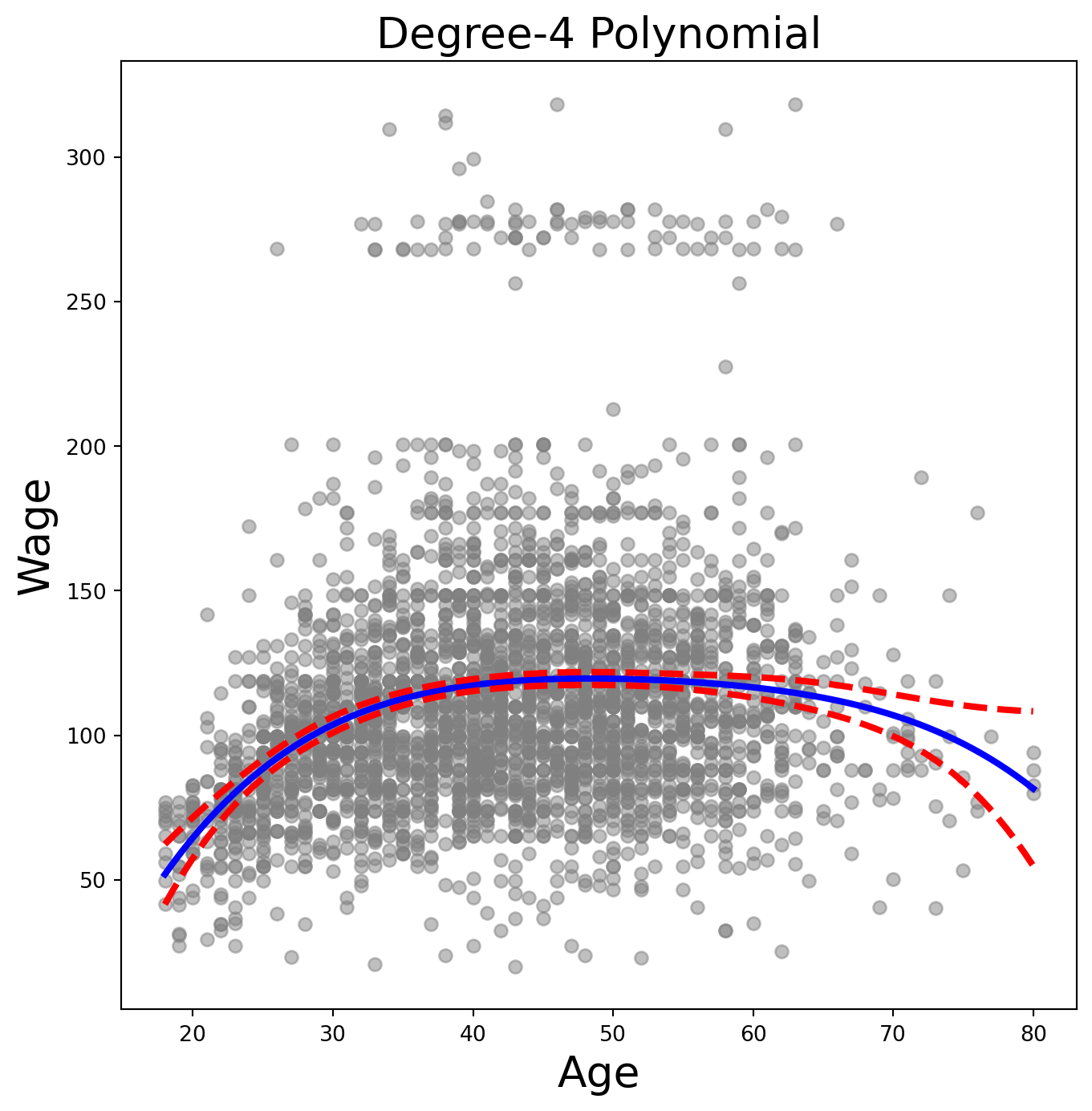
Exercise 6. With polynomial regression we must decide on the degree of the polynomial to use. Fit polynomial models in age of degrees 1 through 5, and use anova_lm() to test which degree is sufficient.
Exercise 7. Repeat the ANOVA, but with a linear term in education included in each model alongside a polynomial in age of degrees 1, 2, 3.
Exercise 8. Now consider predicting whether someone earns more than $250,000 per year. Fit a logistic regression (use sm.GLM with a Binomial family) of wage > 250 on the same 4th-degree polynomial basis in age, and produce a plot of the predicted probability vs. age (with confidence bands and a rug plot).
SolutionSolution
X = poly_age.transform(Wage)
high_earn = Wage['high_earn'] = y > 250  # shorthand
glm = sm.GLM(y > 250,
             X,
             family=sm.families.Binomial())
B = glm.fit()
summarize(B)| coef | std err | z | P>|z| | |
|---|---|---|---|---|
| intercept | -4.3012 | 0.345 | -12.457 | 0.000 |
| poly(age, degree=4)[0] | 71.9642 | 26.133 | 2.754 | 0.006 |
| poly(age, degree=4)[1] | -85.7729 | 35.929 | -2.387 | 0.017 |
| poly(age, degree=4)[2] | 34.1626 | 19.697 | 1.734 | 0.083 |
| poly(age, degree=4)[3] | -47.4008 | 24.105 | -1.966 | 0.049 |
(The double assignment high_earn = Wage['high_earn'] = y > 250 both binds the local variable high_earn and stores the indicator as a new column on the Wage DataFrame. We’ll re-use that column in Exercises 29 and 30.)
newX = poly_age.transform(age_df)
preds = B.get_prediction(newX)
bands = preds.conf_int(alpha=0.05)

fig, ax = subplots(figsize=(8, 8))
rng = np.random.default_rng(0)
ax.scatter(age +
           0.2 * rng.uniform(size=y.shape[0]),
           np.where(high_earn, 0.198, 0.002),
           fc='gray',
           marker='|')
for val, ls in zip([preds.predicted_mean,
                    bands[:, 0],
                    bands[:, 1]],
                   ['b', 'r--', 'r--']):
    ax.plot(age_df.values, val, ls, linewidth=3)
ax.set_title('Degree-4 Polynomial', fontsize=20)
ax.set_xlabel('Age', fontsize=20)
ax.set_ylim([0, 0.2])
ax.set_ylabel('P(Wage > 250)', fontsize=20);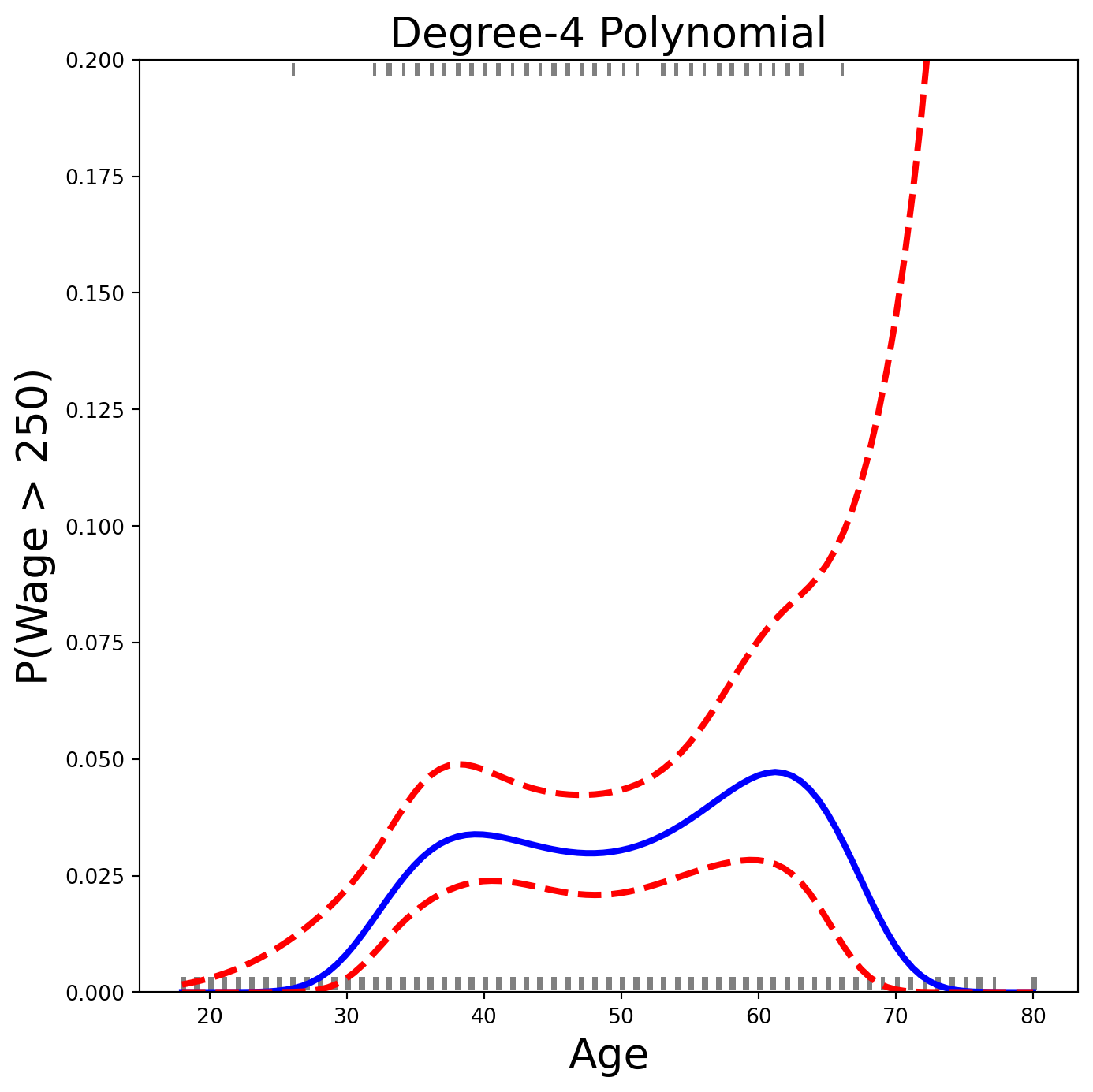
The age values above 250 are shown as gray marks at the top of the plot; those below 250 at the bottom. A small amount of jitter prevents identical-age points from overlapping. This is called a rug plot.
Exercise 9. Fit a step-function regression: discretise age into 4 quantile-based bins with pd.qcut(), build dummy columns with pd.get_dummies(), and fit OLS.
Splines
Exercise 10. Use BSpline() from ISLP.transforms with internal_knots=[25, 40, 60] and intercept=True to build a cubic B-spline basis for age. What shape is the resulting design matrix?
Exercise 11. Now fit a cubic spline regression of wage on age using the helper bs() inside MS(). Pass name='bs(age)' to clean up the column labels in the summary.
Exercise 12. Instead of specifying knots, ask BSpline for df=6. Inspect internal_knots_ to see where the knots ended up.
Exercise 13. B-splines need not be cubic. Fit a degree-0 spline with df=3 and compare the coefficients to your earlier qcut() step-function fit.
Exercise 14. Fit a natural cubic spline with 5 degrees of freedom using ns(), and plot the fit with plot_wage_fit().
SolutionSolution
ns_age = MS([ns('age', df=5)]).fit(Wage)
M_ns = sm.OLS(y, ns_age.transform(Wage)).fit()
summarize(M_ns)| coef | std err | t | P>|t| | |
|---|---|---|---|---|
| intercept | 60.4752 | 4.708 | 12.844 | 0.000 |
| ns(age, df=5)[0] | 61.5267 | 4.709 | 13.065 | 0.000 |
| ns(age, df=5)[1] | 55.6912 | 5.717 | 9.741 | 0.000 |
| ns(age, df=5)[2] | 46.8184 | 4.948 | 9.463 | 0.000 |
| ns(age, df=5)[3] | 83.2036 | 11.918 | 6.982 | 0.000 |
| ns(age, df=5)[4] | 6.8770 | 9.484 | 0.725 | 0.468 |
plot_wage_fit(age_df,
              ns_age,
              'Natural spline, df=5');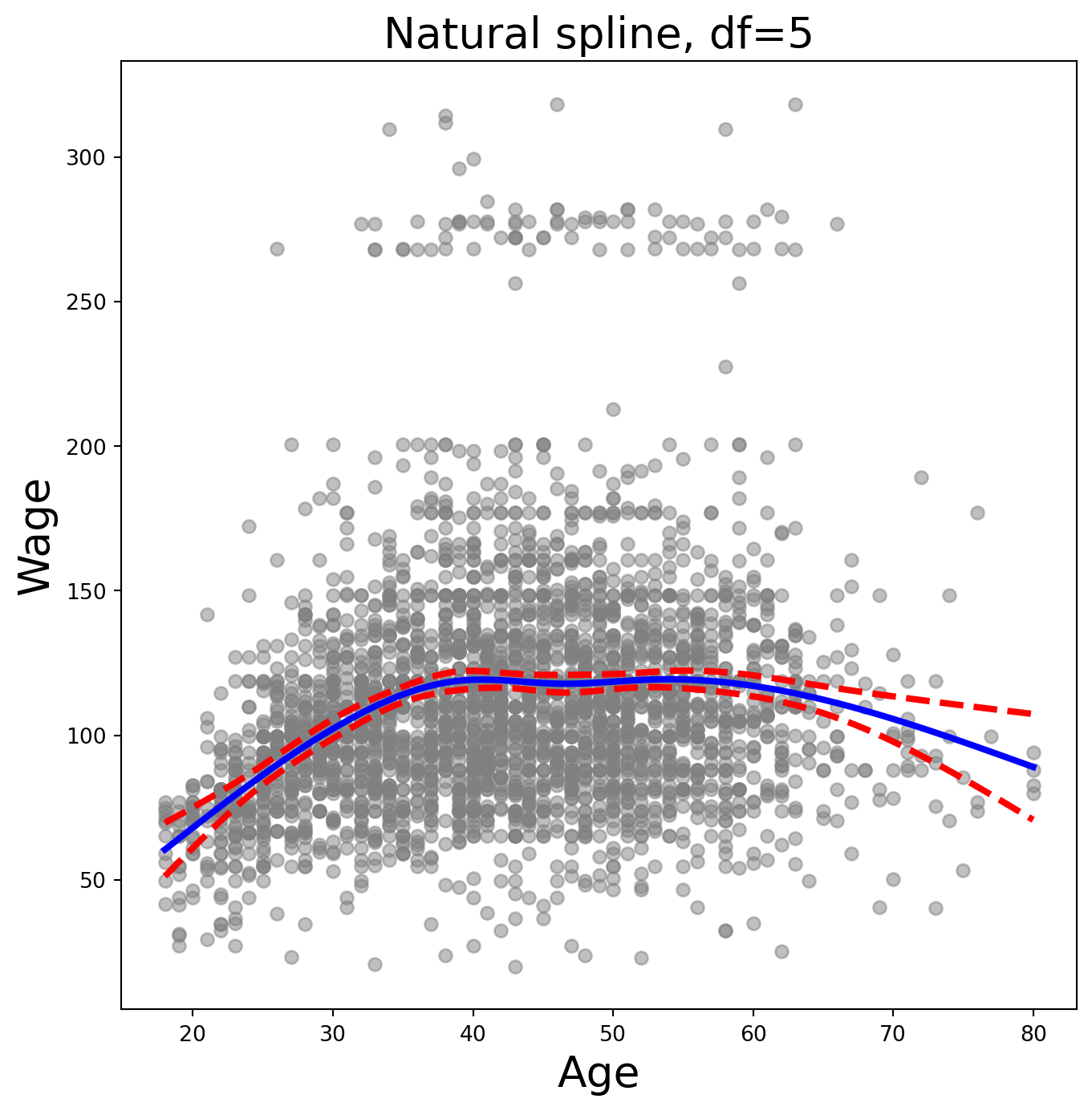
Smoothing Splines and GAMs
Exercise 15. A smoothing spline is a special case of a GAM with squared-error loss and a single feature. Fit LinearGAM(s_gam(0, lam=0.6)) to predict wage from age. (Remember pygam expects a 2-D feature matrix.)
Exercise 16. Investigate how the fit changes with the smoothing parameter. Loop lam over np.logspace(-2, 6, 5) and plot each resulting fit.
SolutionSolution
fig, ax = subplots(figsize=(8, 8))
ax.scatter(age, y, facecolor='gray', alpha=0.5)
for lam in np.logspace(-2, 6, 5):
    gam = LinearGAM(s_gam(0, lam=lam)).fit(X_age, y)
    ax.plot(age_grid,
            gam.predict(age_grid),
            label='{:.1e}'.format(lam),
            linewidth=3)
ax.set_xlabel('Age', fontsize=20)
ax.set_ylabel('Wage', fontsize=20);
ax.legend(title=r'$\lambda$');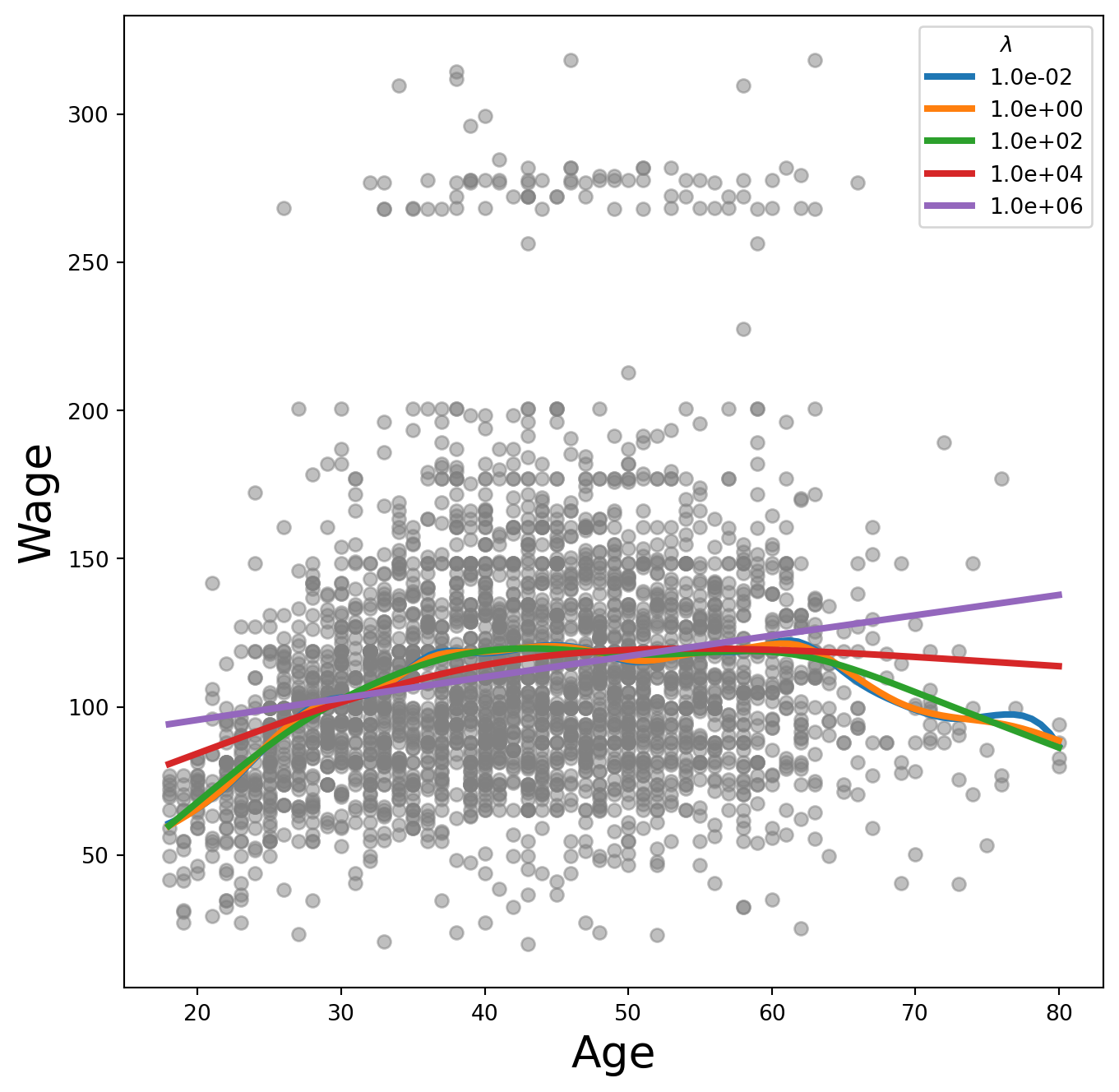
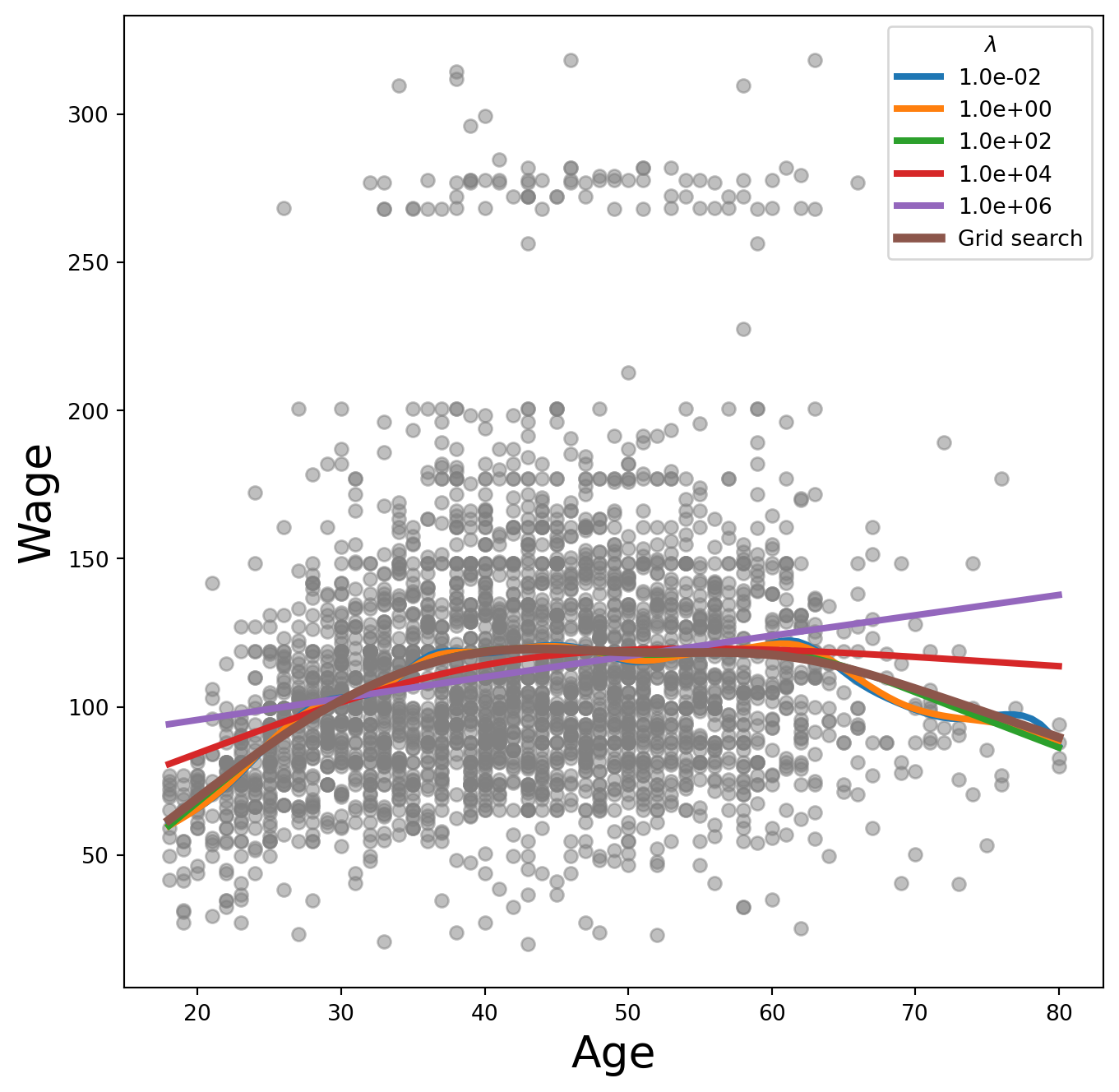
Exercise 17. pygam can search for an optimal smoothing parameter. Reproduce the plot from Exercise 16, call .gridsearch(X_age, y), and add the resulting fit on top.
SolutionSolution
fig, ax = subplots(figsize=(8, 8))
ax.scatter(age, y, facecolor='gray', alpha=0.5)
for lam in np.logspace(-2, 6, 5):
    gam = LinearGAM(s_gam(0, lam=lam)).fit(X_age, y)
    ax.plot(age_grid,
            gam.predict(age_grid),
            label='{:.1e}'.format(lam),
            linewidth=3)
gam_opt = gam.gridsearch(X_age, y)
ax.plot(age_grid,
        gam_opt.predict(age_grid),
        label='Grid search',
        linewidth=4)
ax.set_xlabel('Age', fontsize=20)
ax.set_ylabel('Wage', fontsize=20)
ax.legend(title=r'$\lambda$')
fig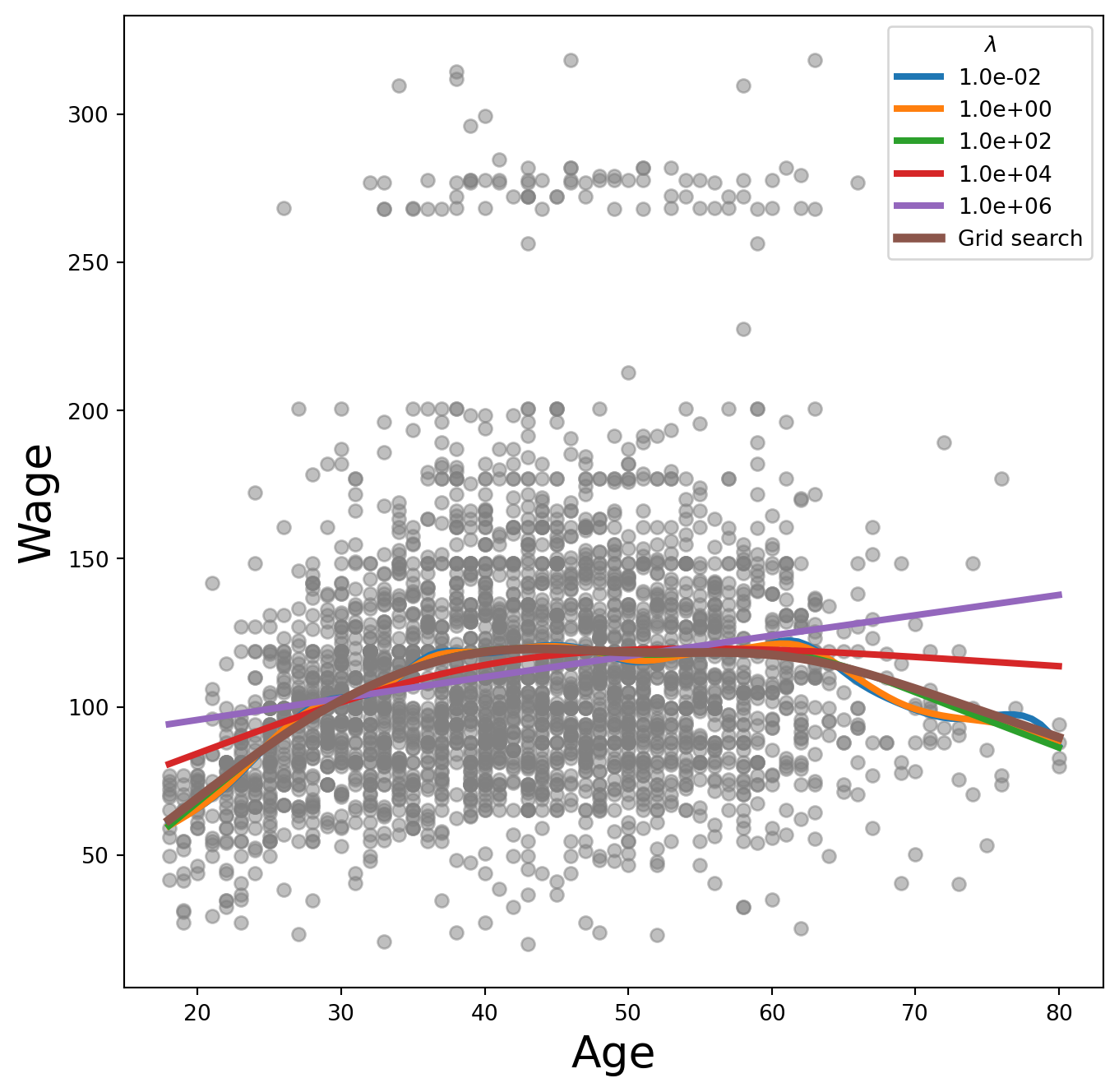
Exercise 18. It’s often more interpretable to specify the effective degrees of freedom than lam. Use approx_lam() from ISLP.pygam to find a lam giving roughly 4 degrees of freedom for the age term, and verify with degrees_of_freedom().
Exercise 19. Now loop over df values [1, 3, 4, 8, 15] (passing df + 1 to approx_lam() to account for the intercept), refit, and plot each.
SolutionSolution
fig, ax = subplots(figsize=(8, 8))
ax.scatter(X_age,
           y,
           facecolor='gray',
           alpha=0.3)
for df in [1, 3, 4, 8, 15]:
    lam = approx_lam(X_age, age_term, df + 1)
    age_term.lam = lam
    gam.fit(X_age, y)
    ax.plot(age_grid,
            gam.predict(age_grid),
            label='{:d}'.format(df),
            linewidth=4)
ax.set_xlabel('Age', fontsize=20)
ax.set_ylabel('Wage', fontsize=20);
ax.legend(title='Degrees of freedom');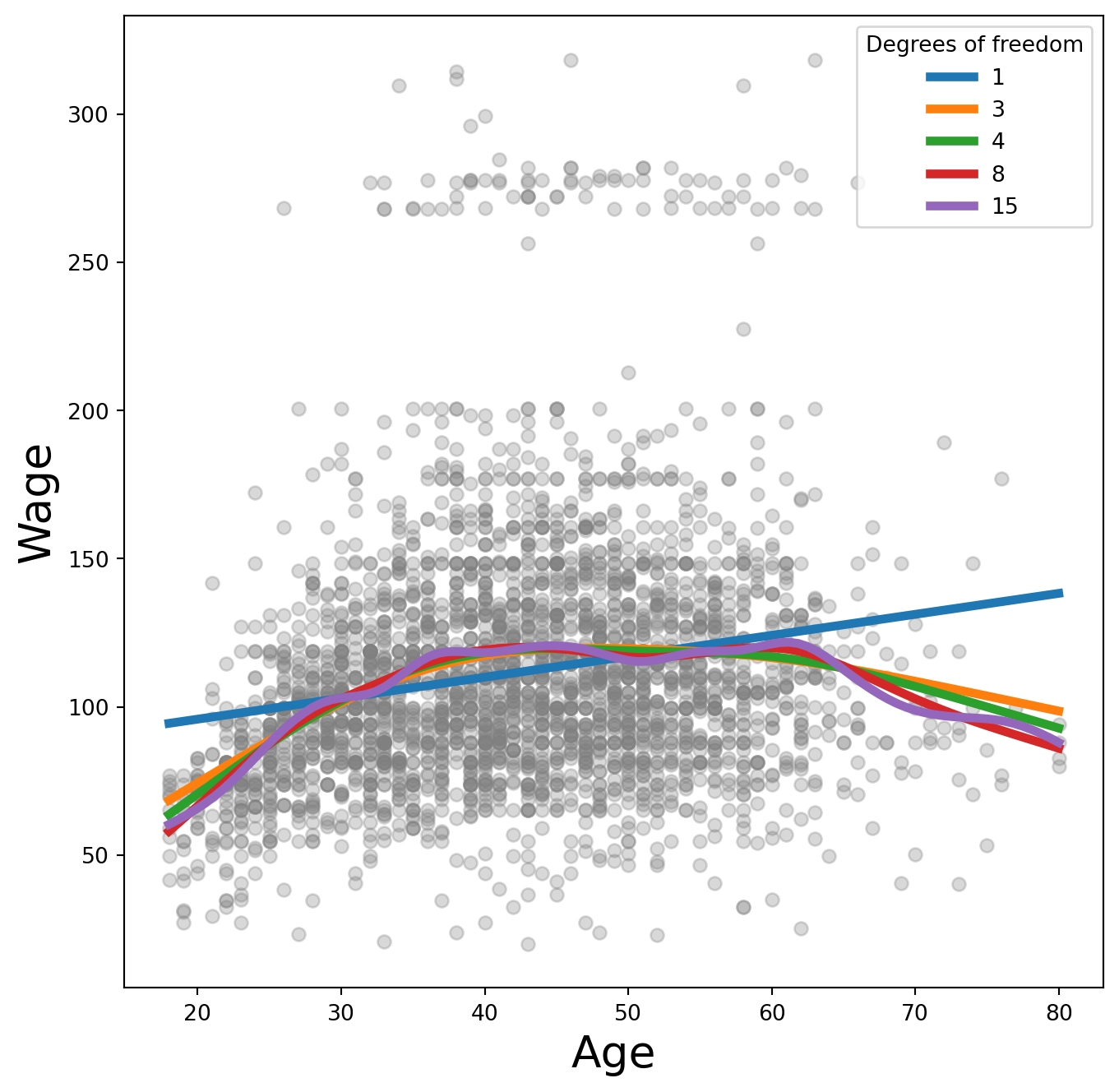
A value of df=1 corresponds to a straight-line fit.
Additive Models with Several Terms
Exercise 20. Build a GAM “by hand”: use natural splines (NaturalSpline) with df=4 for age and df=5 for year, get dummies for education, stack them all into a model matrix X_bh, and fit OLS.
Exercise 21. Construct a partial-dependence plot for age from the by-hand GAM: predict on a matrix where all columns except those for age are held at their column means, and the age columns are swept across age_grid.
SolutionSolution
age_grid = np.linspace(age.min(),
                       age.max(),
                       100)
X_age_bh = X_bh.copy()[:100]
X_age_bh[:] = X_bh.mean(0)[None, :]
X_age_bh[:, :4] = ns_age.transform(age_grid)
preds = gam_bh.get_prediction(X_age_bh)
bounds_age = preds.conf_int(alpha=0.05)
partial_age = preds.predicted_mean
center = partial_age.mean()
partial_age -= center
bounds_age -= center
fig, ax = subplots(figsize=(8, 8))
ax.plot(age_grid, partial_age, 'b', linewidth=3)
ax.plot(age_grid, bounds_age[:, 0], 'r--', linewidth=3)
ax.plot(age_grid, bounds_age[:, 1], 'r--', linewidth=3)
ax.set_xlabel('Age')
ax.set_ylabel('Effect on wage')
ax.set_title('Partial dependence of age on wage', fontsize=20);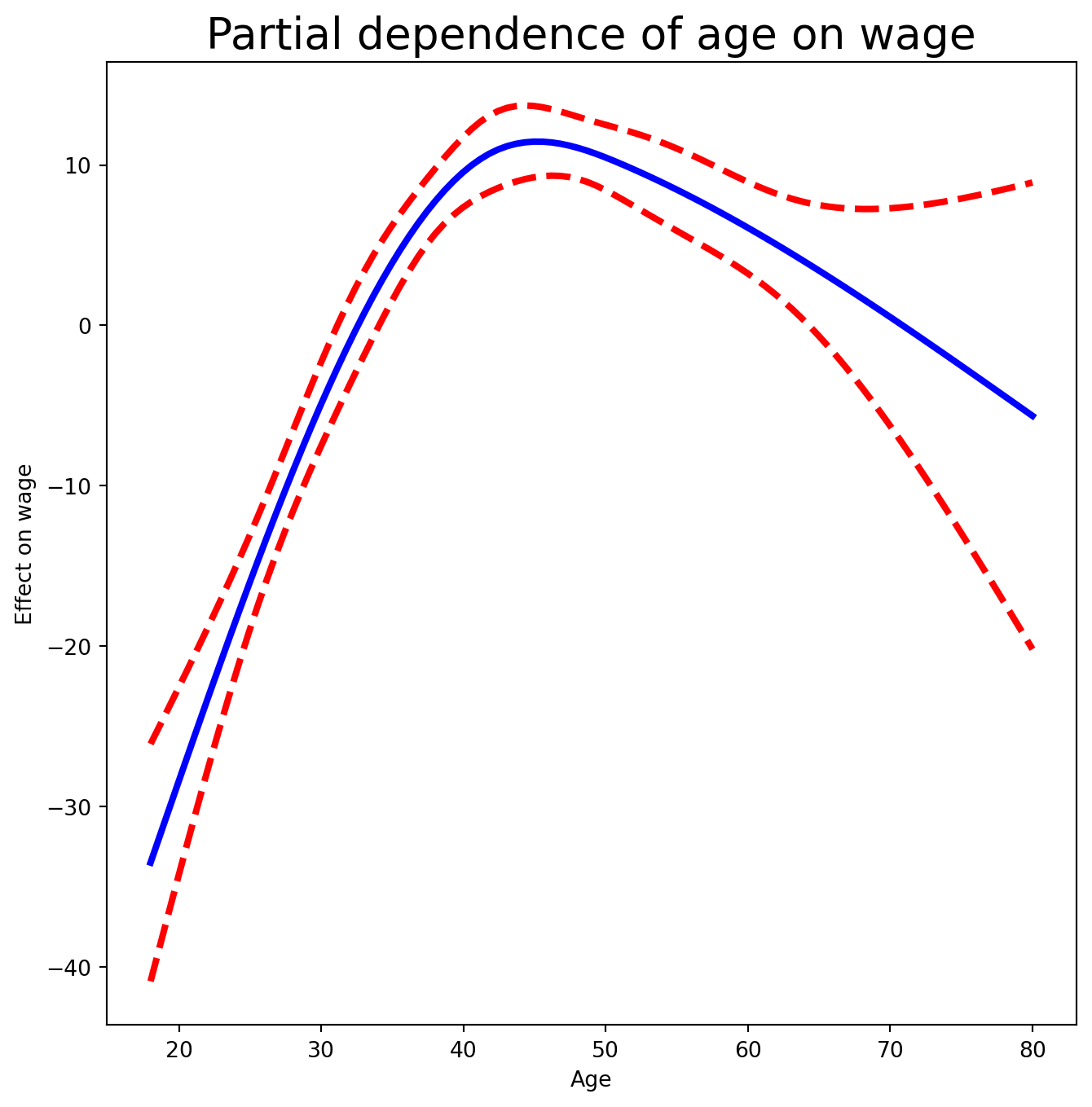
The idea is to create a new prediction matrix in which all but the columns for age are held constant at the training-data means; the four age columns are filled with the natural spline basis evaluated at the 100 values in age_grid.
Exercise 22. Do the same for year.
SolutionSolution
year_grid = np.linspace(Wage['year'].min(),
                        Wage['year'].max(),
                        100)
X_year_bh = X_bh.copy()[:100]
X_year_bh[:] = X_bh.mean(0)[None, :]
X_year_bh[:, 4:9] = ns_year.transform(year_grid)
preds = gam_bh.get_prediction(X_year_bh)
bounds_year = preds.conf_int(alpha=0.05)
partial_year = preds.predicted_mean
center = partial_year.mean()
partial_year -= center
bounds_year -= center
fig, ax = subplots(figsize=(8, 8))
ax.plot(year_grid, partial_year, 'b', linewidth=3)
ax.plot(year_grid, bounds_year[:, 0], 'r--', linewidth=3)
ax.plot(year_grid, bounds_year[:, 1], 'r--', linewidth=3)
ax.set_xlabel('Year')
ax.set_ylabel('Effect on wage')
ax.set_title('Partial dependence of year on wage', fontsize=20);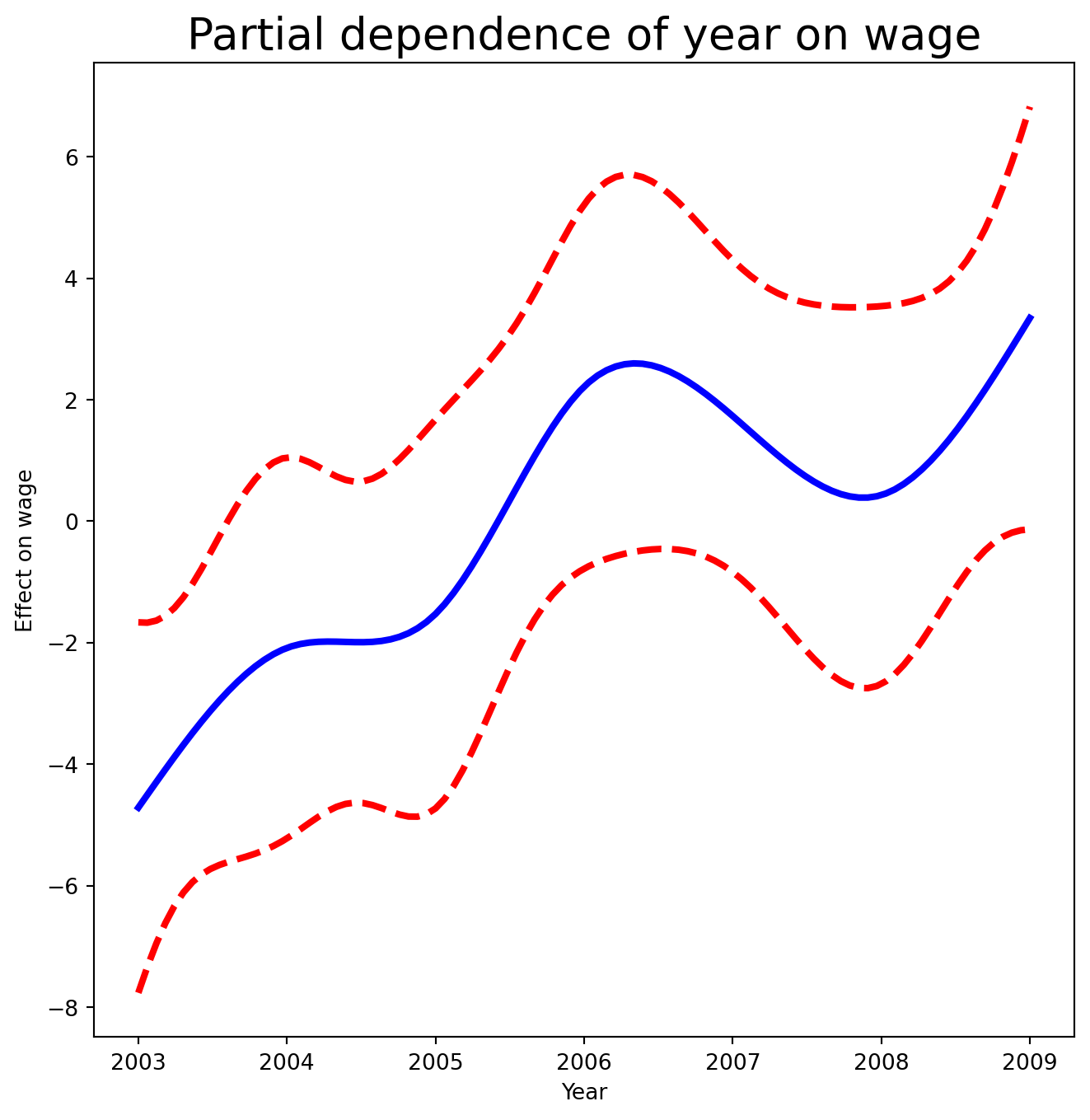
Exercise 23. Now fit the same GAM using smoothing splines via pygam. Build LinearGAM(s_gam(0) + s_gam(1, n_splines=7) + f_gam(2, lam=0)), where f_gam is a factor term for education. (Convert education to numeric codes with .cat.codes.) Then plot the partial dependence for age using plot_gam() from ISLP.pygam.
SolutionSolution
gam_full = LinearGAM(s_gam(0) +
                     s_gam(1, n_splines=7) +
                     f_gam(2, lam=0))
Xgam = np.column_stack([age,
                        Wage['year'],
                        Wage['education'].cat.codes])
gam_full = gam_full.fit(Xgam, y)
fig, ax = subplots(figsize=(8, 8))
plot_gam(gam_full, 0, ax=ax)
ax.set_xlabel('Age')
ax.set_ylabel('Effect on wage')
ax.set_title('Partial dependence of age on wage - default lam=0.6', fontsize=20);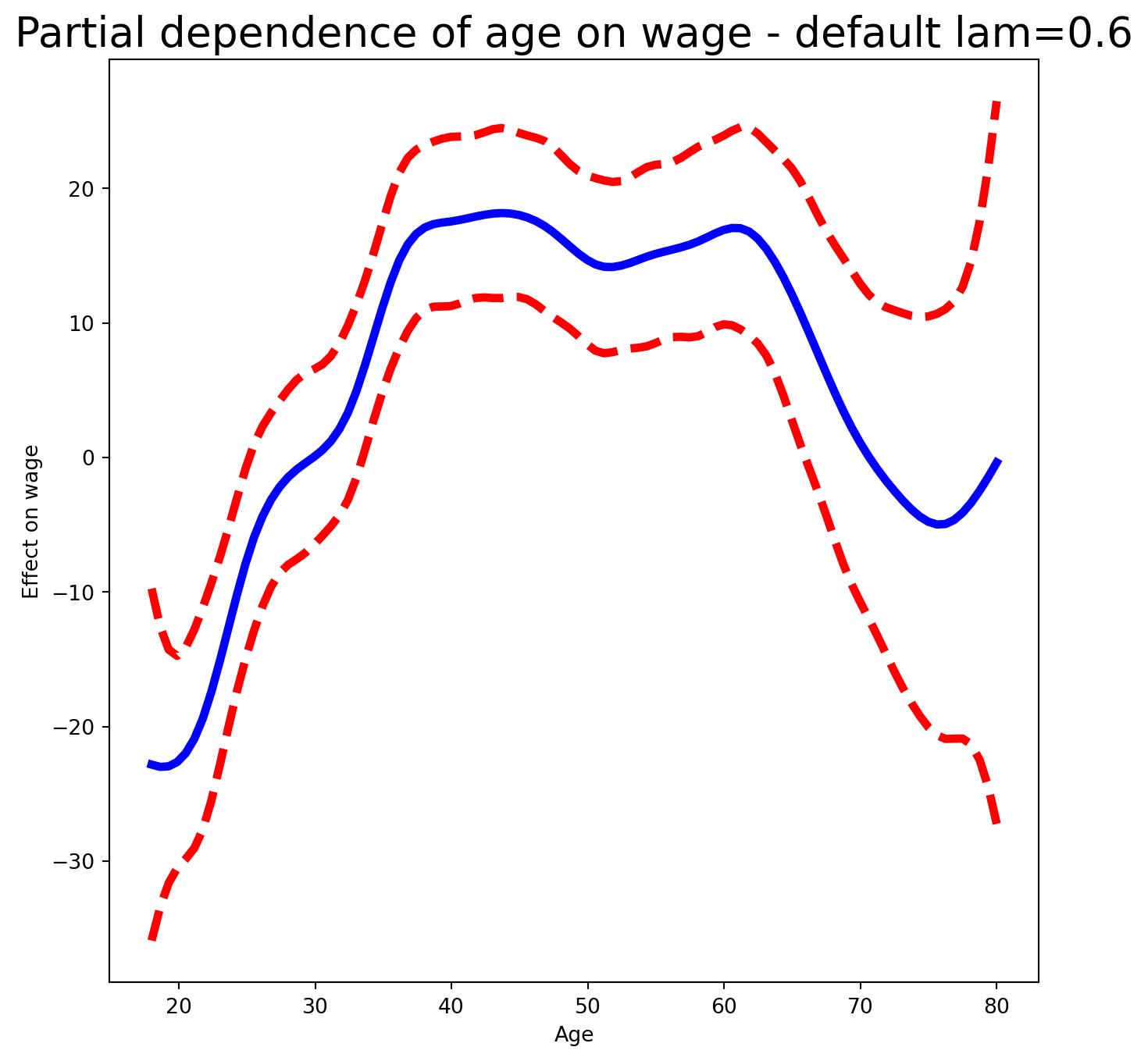
year has only 7 unique values, so we use 7 basis functions. lam=0 on the factor term avoids any shrinkage. The default lam=0.6 for age produces a noticeably wiggly fit.
Exercise 24. Re-tune gam_full so that the age and year smoothers each have ~4 degrees of freedom (use approx_lam() with df=4+1), then re-plot the partial dependence for age and for year.
SolutionSolution
age_term = gam_full.terms[0]
age_term.lam = approx_lam(Xgam, age_term, df=4 + 1)
year_term = gam_full.terms[1]
year_term.lam = approx_lam(Xgam, year_term, df=4 + 1)
gam_full = gam_full.fit(Xgam, y)
Note that updating age_term.lam updates gam_full.terms[0] in place.
fig, ax = subplots(figsize=(8, 8))
plot_gam(gam_full,
         1,
         ax=ax)
ax.set_xlabel('Year')
ax.set_ylabel('Effect on wage')
ax.set_title('Partial dependence of year on wage', fontsize=20)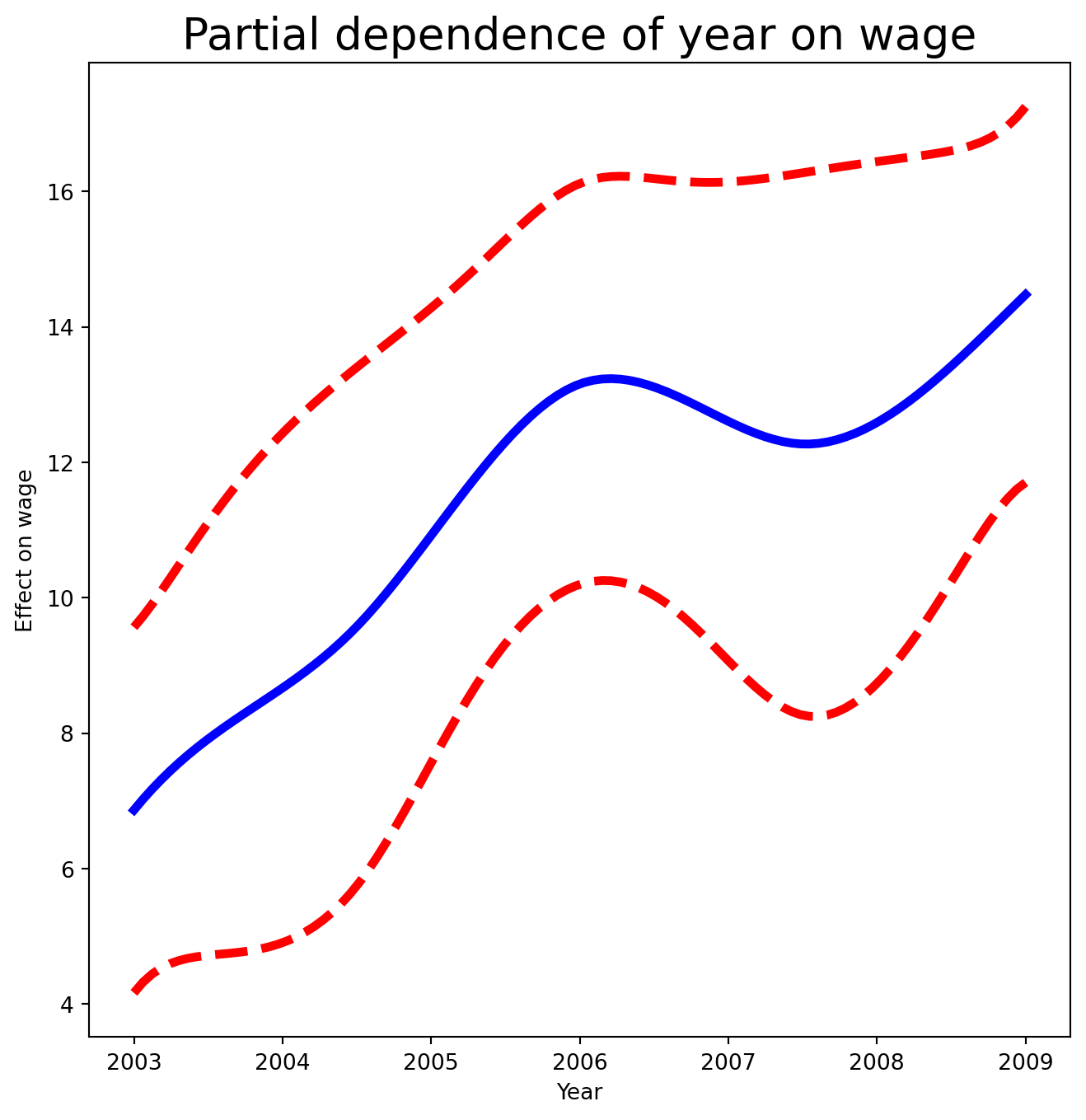
Exercise 25. Plot the partial dependence for education — a categorical term gets a different style of plot, suited to a set of fitted constants per level.
SolutionSolution
fig, ax = subplots(figsize=(8, 8))
ax = plot_gam(gam_full, 2)
ax.set_xlabel('Education')
ax.set_ylabel('Effect on wage')
ax.set_title('Partial dependence of wage on education',
             fontsize=20);
ax.set_xticklabels(Wage['education'].cat.categories, fontsize=8);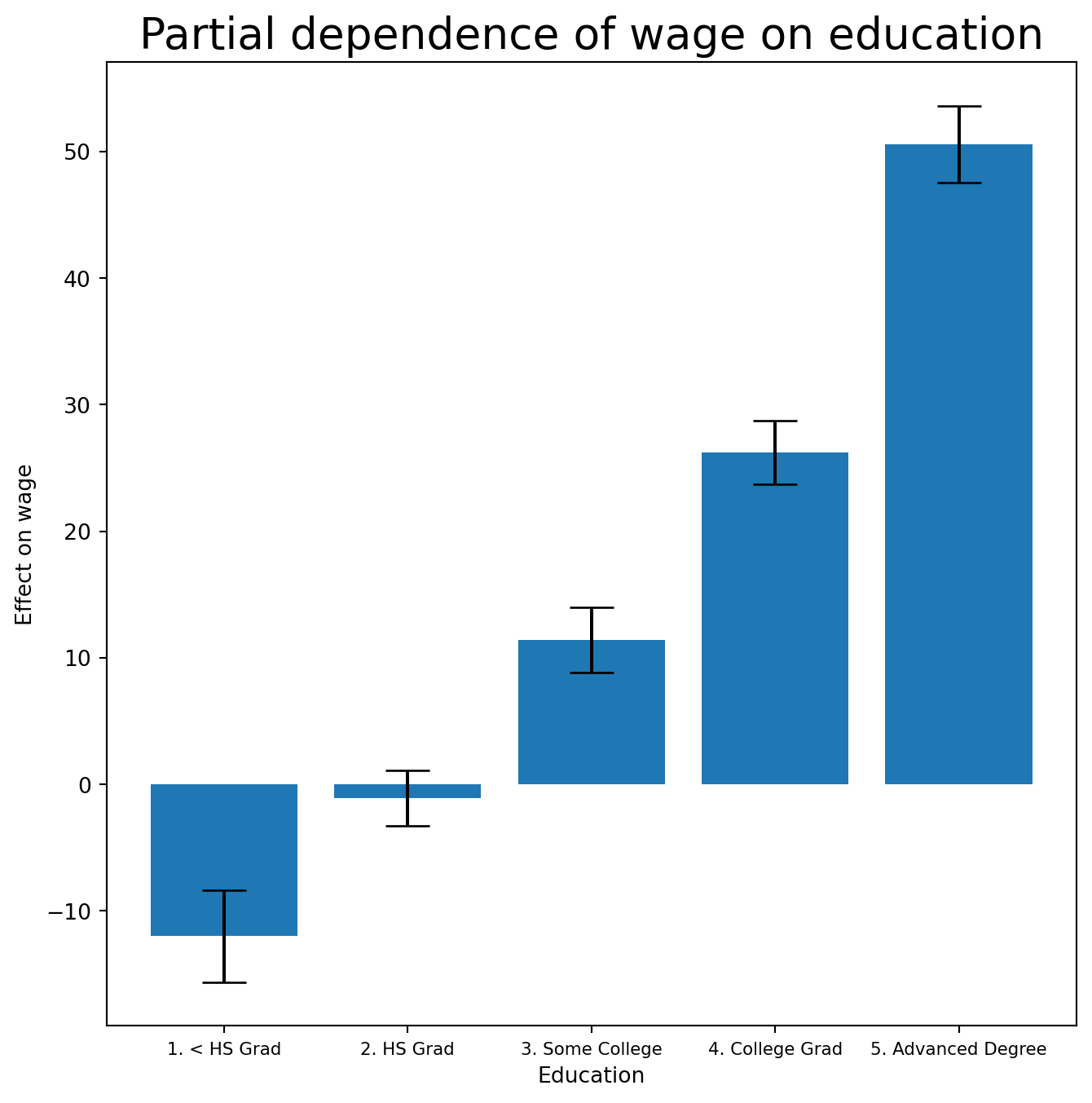
ANOVA Tests for Additive Models
Exercise 26. In all our models, the function of year looks fairly linear. Compare three models by ANOVA: a GAM that excludes year (\(\mathcal{M}_1\)), a GAM that uses a linear term in year (\(\mathcal{M}_2\)), and the full GAM with a smoothing spline in year (\(\mathcal{M}_3\)). What do you conclude?
Exercise 27. Repeat the test for age.
Exercise 28. Print gam_full.summary() and use gam_full.predict() to generate fitted values on the training set.
Exercise 29. Fit a logistic GAM for high_earn (i.e. wage > 250) using LogisticGAM(age_term + l_gam(1, lam=0) + f_gam(2, lam=0)). Plot the partial dependence for education.
SolutionSolution
gam_logit = LogisticGAM(age_term +
                        l_gam(1, lam=0) +
                        f_gam(2, lam=0))
gam_logit.fit(Xgam, high_earn)
LogisticGAM(callbacks=[Deviance(), Diffs(), Accuracy()],
fit_intercept=True, max_iter=100,
terms=s(0) + l(1) + f(2) + intercept, tol=0.0001, verbose=False)fig, ax = subplots(figsize=(8, 8))
ax = plot_gam(gam_logit, 2)
ax.set_xlabel('Education')
ax.set_ylabel('Effect on wage')
ax.set_title('Partial dependence of wage on education',
fontsize=20);
ax.set_xticklabels(Wage['education'].cat.categories, fontsize=8);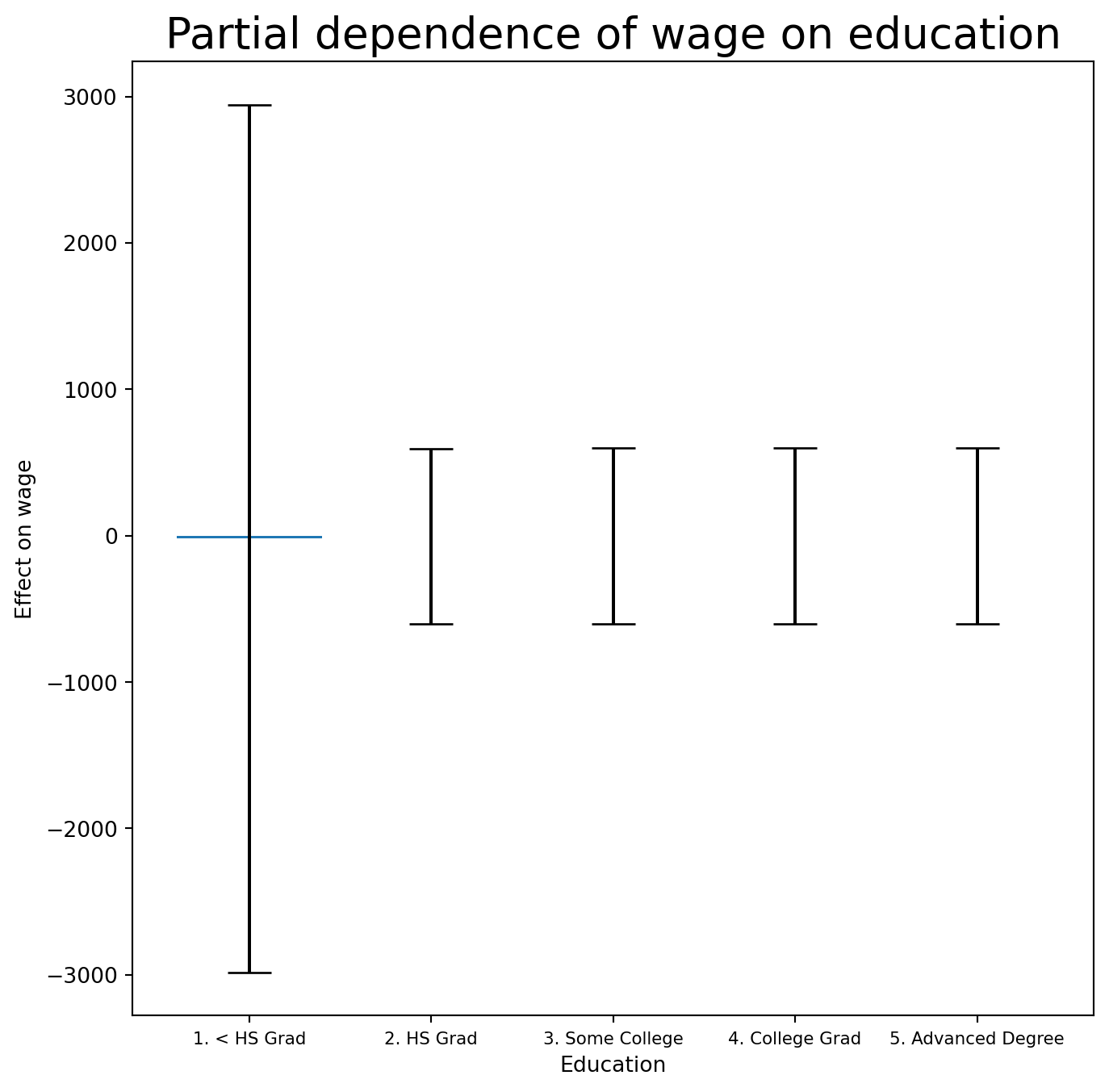
The fit looks flat with very wide error bars on the first category.
Exercise 30. Cross-tabulate high_earn against education. What do you see?
Exercise 31. Refit the logistic GAM excluding observations in the “1. < HS Grad” category, then plot the partial dependence for education, year, and age.
SolutionSolution
only_hs = Wage['education'] == '1. < HS Grad'
Wage_ = Wage.loc[~only_hs]
Xgam_ = np.column_stack([Wage_['age'],
                         Wage_['year'],
                         Wage_['education'].cat.codes - 1])
high_earn_ = Wage_['high_earn']
We subtract 1 from cat.codes to work around a pygam bug — the relabeling has no effect on the fit.
gam_logit_ = LogisticGAM(age_term +
                         year_term +
                         f_gam(2, lam=0))
gam_logit_.fit(Xgam_, high_earn_)
LogisticGAM(callbacks=[Deviance(), Diffs(), Accuracy()],
fit_intercept=True, max_iter=100,
terms=s(0) + s(1) + f(2) + intercept, tol=0.0001, verbose=False)fig, ax = subplots(figsize=(8, 8))
ax = plot_gam(gam_logit_, 2)
ax.set_xlabel('Education')
ax.set_ylabel('Effect on wage')
ax.set_title('Partial dependence of high earner status on education', fontsize=20);
ax.set_xticklabels(Wage['education'].cat.categories[1:],
fontsize=8);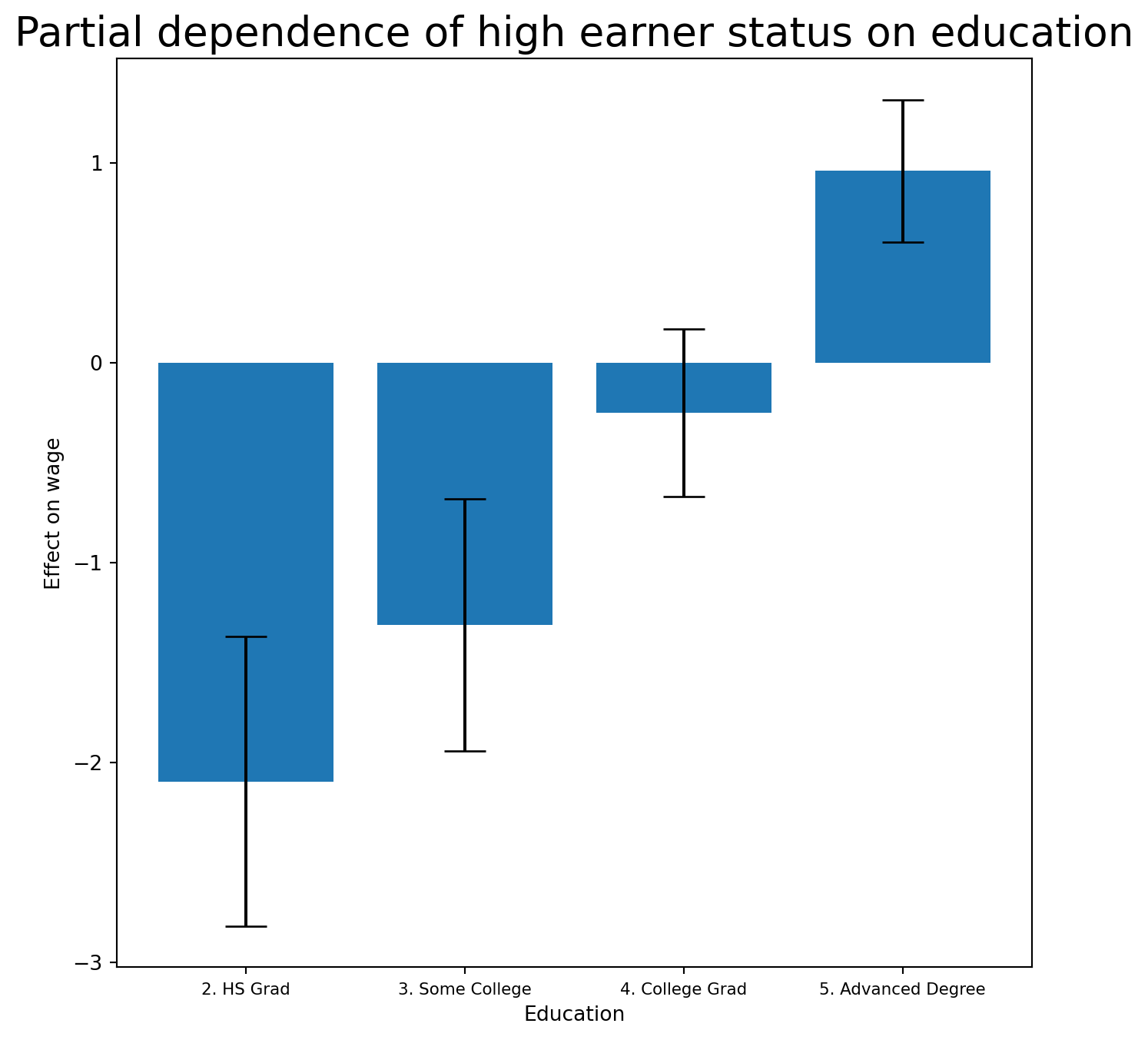
fig, ax = subplots(figsize=(8, 8))
ax = plot_gam(gam_logit_, 1)
ax.set_xlabel('Year')
ax.set_ylabel('Effect on wage')
ax.set_title('Partial dependence of high earner status on year',
             fontsize=20);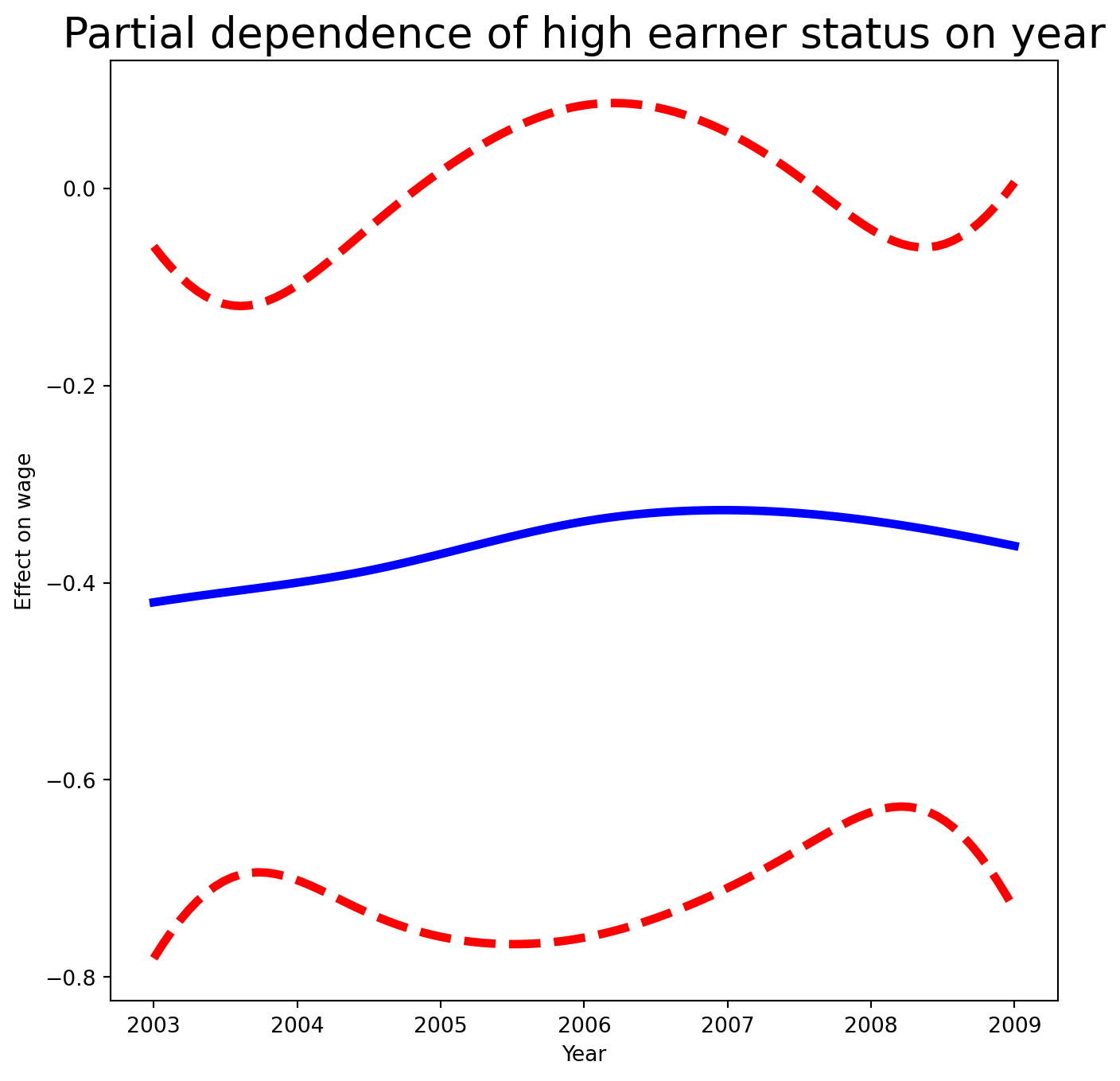
fig, ax = subplots(figsize=(8, 8))
ax = plot_gam(gam_logit_, 0)
ax.set_xlabel('Age')
ax.set_ylabel('Effect on wage')
ax.set_title('Partial dependence of high earner status on age', fontsize=20);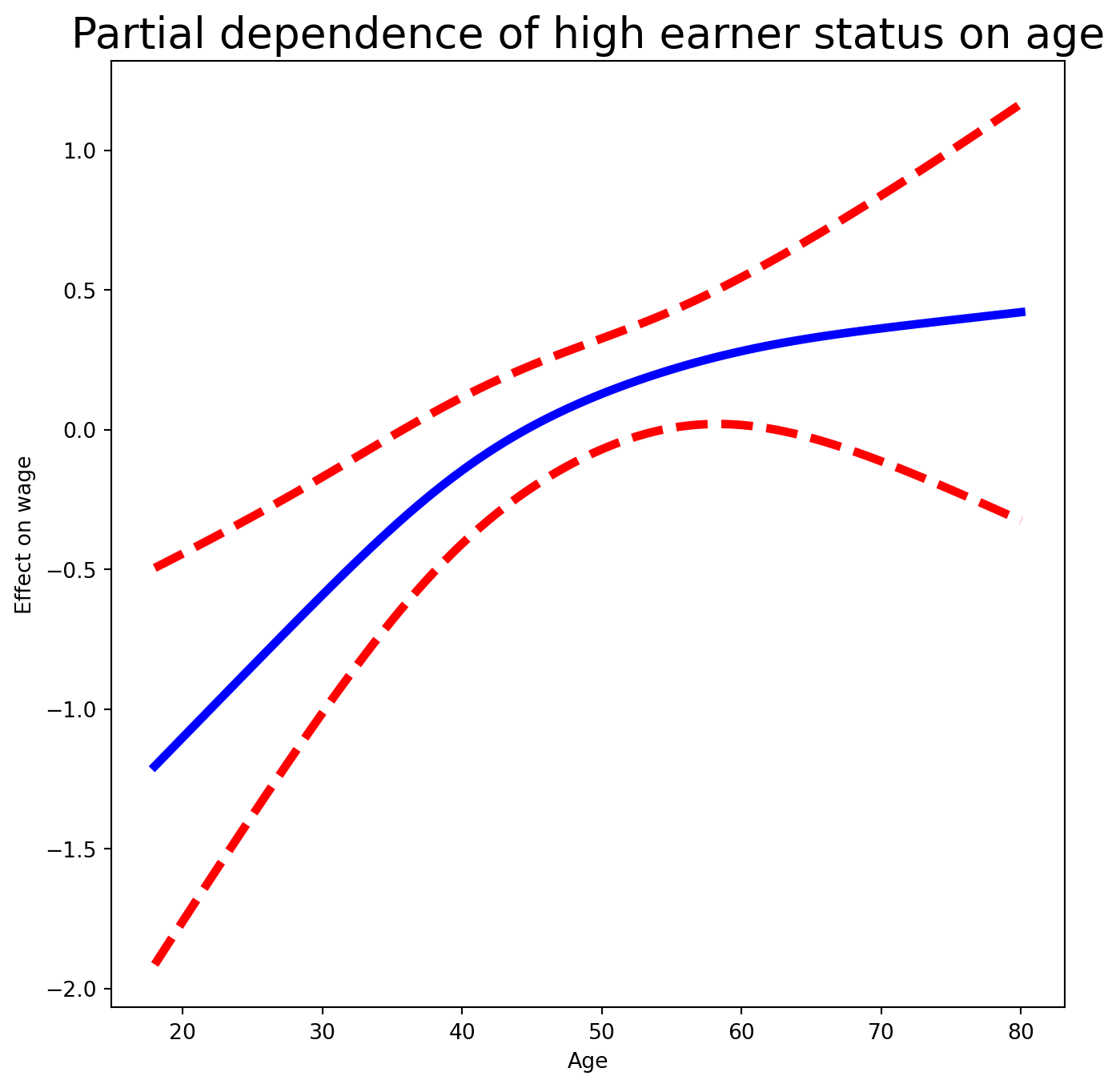
Local Regression
Exercise 32. Finally, use sm.nonparametric.lowess to fit local linear regression models with spans of 0.2 and 0.5, and plot them together. Some implementations of GAMs allow local-regression terms; pygam does not.
SolutionSolution
lowess = sm.nonparametric.lowess
fig, ax = subplots(figsize=(8, 8))
ax.scatter(age, y, facecolor='gray', alpha=0.5)
for span in [0.2, 0.5]:
    fitted = lowess(y,
                    age,
                    frac=span,
                    xvals=age_grid)
    ax.plot(age_grid,
            fitted,
            label='{:.1f}'.format(span),
            linewidth=4)
ax.set_xlabel('Age', fontsize=20)
ax.set_ylabel('Wage', fontsize=20);
ax.legend(title='span', fontsize=15);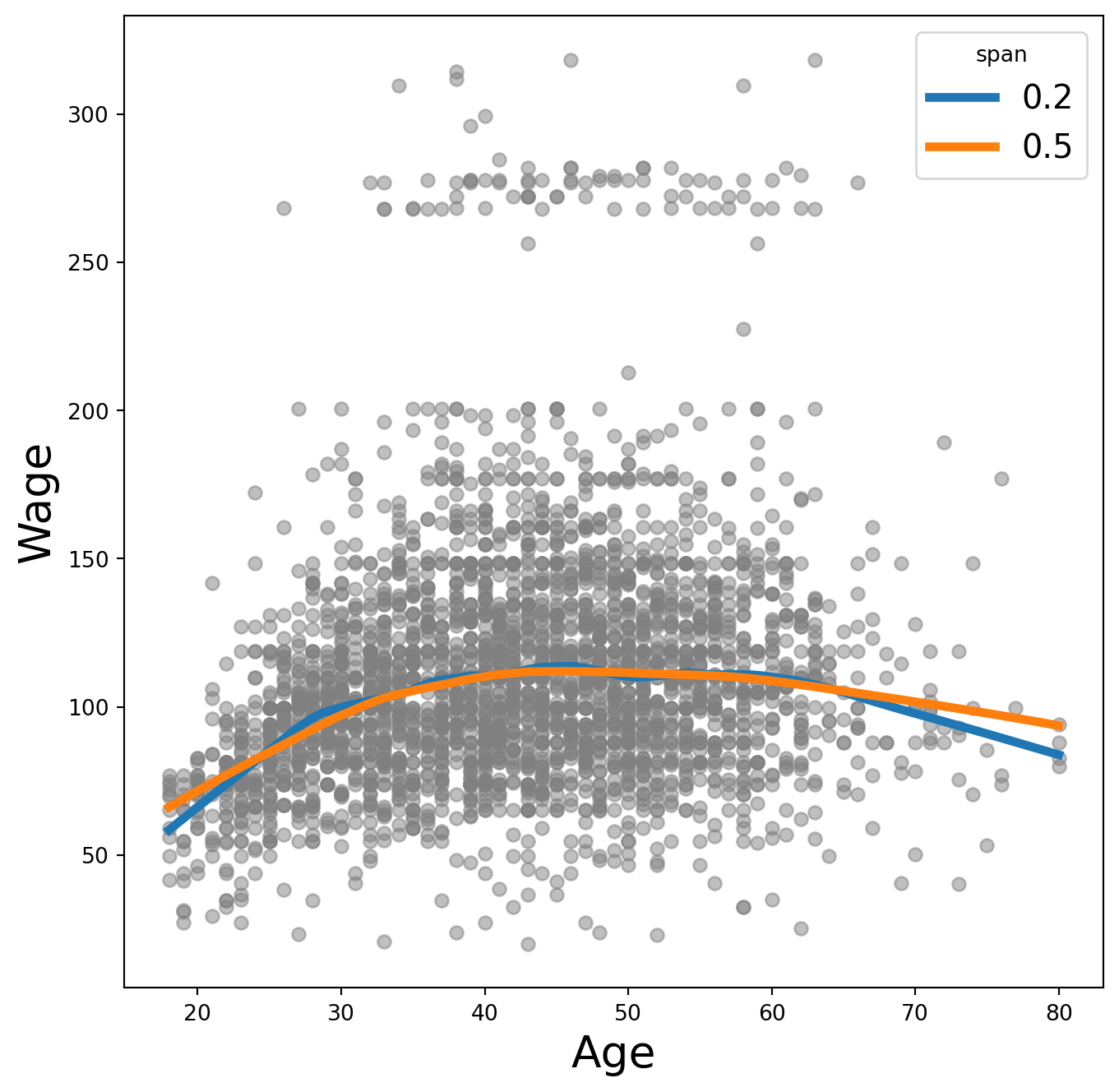
As expected, a span of 0.5 produces a smoother fit than 0.2.