---
title: "Chapter 7 — Moving Beyond Linearity"
subtitle: "Introduction to Statistical Learning, 2nd ed."
format:
html: default
revealjs:
output-file: ch07-moving-beyond-linearity-slides.html
---
# Overview
## Why move beyond a straight line
Linear regression is interpretable but rigid. Whenever the true
relationship between $Y$ and $X$ has curvature or thresholds, a straight
line trades bias for nothing in return. This chapter keeps the linear-
model machinery (OLS, GLM, standard errors) but enriches the model
class.
## The toolkit
- **Polynomial regression** — add powers of one predictor.
- **Step functions** — chop a predictor into bins.
- **Regression splines** — piecewise polynomials joined at knots.
- **Smoothing splines** — penalise wiggliness directly.
- **Local regression** — fit weighted regressions in moving neighbourhoods.
- **Generalized additive models (GAMs)** — combine the above across many predictors.
## Running example: `Wage`
A US labour-force survey with `wage` against `age`, `year`,
`education`. Used throughout to make every method concrete.
::: {.panel-tabset}
### Python
```{python}
from ISLP import load_data
Wage = load_data('Wage')
Wage[['age', 'year', 'education', 'wage']].head()
```
### R
```r
library(ISLR2)
head(Wage[, c("age", "year", "education", "wage")])
```
:::
# Polynomial Regression
## The model
Fit a degree-$d$ polynomial in one predictor by treating powers of $X$
as additional columns of the design matrix:
$$Y = \beta_0 + \beta_1 X + \beta_2 X^2 + \cdots + \beta_d X^d + \varepsilon$$
Still **linear in the parameters**, so OLS theory applies unchanged.
The fitted curve is a smooth polynomial of degree $d$; standard errors
at any $x_0$ come from the usual variance–covariance matrix of
$\hat{\boldsymbol\beta}$.
## Choosing the degree
- Visual: plot the fit at several degrees and pick by eye.
- Hypothesis tests (orthogonal polynomials → independent t-tests, or
nested-model ANOVA F-tests via `anova_lm`).
- Cross-validation on test MSE (Chapter 5).
## Code
::: {.panel-tabset}
### Python
```{python}
import statsmodels.api as sm
from ISLP.models import poly, ModelSpec as MS

poly_age = MS([poly('age', degree=4)]).fit(Wage)
fit_poly = sm.OLS(Wage['wage'], poly_age.transform(Wage)).fit()
fit_poly.summary().tables[1]
```
### R
```r
fit_poly <- lm(wage ~ poly(age, 4), data = Wage)
summary(fit_poly)$coefficients
```
:::
In both languages `poly(..., 4)` produces a 4-column design matrix
using *orthogonal* polynomials, so individual t-statistics are
independent — convenient for choosing the degree.
## Try it yourself — Exercises 1–8 {.smaller}
From the [Ch07 handout](../Ch07-nonlin-lab.html):
- **Exercise 1.** Load the `Wage` data with `load_data('Wage')`; store the response as `y` and the predictor as `age`.
- **Exercise 2.** Use `poly()` inside `MS()` to build a 4th-degree polynomial in `age`, fit OLS, print the coefficient summary.
- **Exercise 3.** Build a grid `age_grid` of 100 evenly spaced values spanning observed `age`; wrap in a one-column DataFrame `age_df`.
- **Exercise 4.** Write a helper `plot_wage_fit(age_df, basis, title)` that fits OLS on `basis`, evaluates it on `age_df`, and plots data + curve + 95 % bands.
- **Exercise 5.** Use the helper to plot the degree-4 polynomial fit.
- **Exercise 6.** Fit polynomial models of degrees 1–5 in `age`; pick a degree with `anova_lm`.
- **Exercise 7.** Repeat the ANOVA with a linear `education` term alongside the polynomial in `age`.
- **Exercise 8.** Fit a logistic GLM of `wage > 250` on the 4th-degree polynomial basis; plot $P(Y=1)$ vs. age with a rug plot.
# Step Functions
## The model
Cut $X$ into $K+1$ intervals at chosen breakpoints $c_1 < c_2 < \cdots
< c_K$ and fit a separate constant in each interval:
$$Y = \beta_0 + \beta_1 \mathbf 1(c_1 \le X < c_2) + \cdots + \beta_K \mathbf 1(c_K \le X) + \varepsilon$$
The model is *piecewise constant* — no smoothness across cutpoints.
Useful for predictors with a known threshold (e.g. tax brackets) or as
a baseline against fancier smoothers.
## Code
::: {.panel-tabset}
### Python
```{python}
import pandas as pd
cut_age = pd.qcut(Wage['age'], 4)
sm.OLS(Wage['wage'], pd.get_dummies(cut_age, dtype=float)).fit().params
```
### R
```r
quartile_breaks <- quantile(Wage$age, probs = seq(0, 1, by = 0.25))
fit_step <- lm(
  wage ~ cut(age, breaks = quartile_breaks, include.lowest = TRUE),
  data = Wage
)
coef(fit_step)
```
:::
`pd.qcut(x, 4)` splits at the 25 / 50 / 75 % quantiles, giving four
roughly equal-sized bins. R's `cut(x, 4)` instead divides the *range*
of `x` into four equal-width intervals (which usually leaves the
extreme bins much sparser); so the R panel above passes
quantile-based breaks explicitly to match Python's behaviour. In the
Python fit each coefficient is the average wage in its bin (no
intercept; cell-means parameterisation). The R fit uses the default
treatment coding instead — the intercept is the mean of the first bin
and the other three coefficients are *differences* from it.
## Try it yourself — Exercise 9
From the [Ch07 handout](../Ch07-nonlin-lab.html):
- **Exercise 9.** Fit a step-function regression: discretise `age` into 4 quantile-based bins with `pd.qcut()`, build dummy columns with `pd.get_dummies()`, and fit OLS.
# Basis Functions: A Common Framework
## The pattern
Polynomial regression and step functions both replace the original $X$
with a fixed family of *basis functions* $b_1(X), b_2(X), \ldots,
b_K(X)$ and fit OLS in the new design matrix:
$$Y = \beta_0 + \beta_1 b_1(X) + \cdots + \beta_K b_K(X) + \varepsilon$$
- Polynomial: $b_k(X) = X^k$.
- Step: $b_k(X) = \mathbf 1(c_k \le X < c_{k+1})$.
Regression splines use a smarter family — piecewise polynomials
joined smoothly at *knots* — which makes a flexible, local fit possible
without exploding the parameter count.
# Regression Splines
## Piecewise polynomials, smoothly joined
A cubic regression spline is piecewise cubic between knots, with the
function value, first derivative, and second derivative continuous at
each knot. The total number of free parameters is
$$\underbrace{(K + 3)}_{\text{degrees of freedom}} = (\text{knots}) + (\text{degree}) + 1,$$
equivalently the dimension of the cubic B-spline basis with $K$
interior knots (no intercept).
## Natural cubic splines
A *natural* cubic spline adds boundary constraints (linear beyond the
extreme knots), which trims four parameters off a cubic spline and
prevents the wild tail behaviour cubic splines display at the edges of
the data. Almost always preferred to plain cubic splines when knots
extend to the boundary of $X$.
## Choosing knots and degrees of freedom
- Place knots at quantiles of $X$ (uniform-by-density).
- Specify *degrees of freedom* (e.g. `df = 4`); the basis constructor
picks knot positions for you.
- Compare a few df values by cross-validation if it matters.
## Code
::: {.panel-tabset}
### Python
```{python}
from ISLP.models import bs, ns

bs_age = MS([bs('age', df=6, name='bs(age)')])
sm.OLS(Wage['wage'], bs_age.fit_transform(Wage)).fit().params
```
### R
```r
library(splines)
fit_bs <- lm(wage ~ bs(age, df = 6), data = Wage)
coef(fit_bs)
```
:::
For a natural spline replace `bs(...)` with `ns(...)` in either
language — the rest of the workflow is identical.
## Try it yourself — Exercises 10–14 {.smaller}
From the [Ch07 handout](../Ch07-nonlin-lab.html):
- **Exercise 10.** Use `BSpline()` with `internal_knots=[25, 40, 60]` and `intercept=True`; check the shape of the design matrix.
- **Exercise 11.** Fit a cubic spline regression with `bs()` inside `MS()`; pass `name='bs(age)'` for cleaner column labels.
- **Exercise 12.** Ask `BSpline` for `df=6`; inspect `internal_knots_` to see where knots ended up.
- **Exercise 13.** Fit a degree-0 spline with `df=3`; compare its coefficients to the earlier `qcut` step function.
- **Exercise 14.** Fit a natural cubic spline with `df=5` via `ns()`; plot the fit with `plot_wage_fit()`.
# Smoothing Splines
## The motivation
Regression splines need you to pick knots and degrees of freedom.
A *smoothing spline* puts a knot at every observation and controls
flexibility through a penalty on roughness:
$$\hat g = \arg\min_{g}\;\sum_{i=1}^n \bigl(y_i - g(x_i)\bigr)^2
\;+\; \lambda \int g''(t)^2\,\mathrm dt$$
- $\lambda = 0$ — interpolating, infinitely wiggly.
- $\lambda \to \infty$ — a straight-line OLS fit.
- Intermediate $\lambda$ — a smooth natural cubic spline.
## Effective degrees of freedom
The fit $\hat{\mathbf y} = \mathbf S_\lambda \mathbf y$ is linear in
$\mathbf y$ via a smoother matrix $\mathbf S_\lambda$. Its trace gives
the *effective* degrees of freedom:
$$\text{df}_\lambda = \operatorname{tr}(\mathbf S_\lambda).$$
A smoothing spline is often easier to think about by specifying
$\text{df}$ (e.g., "give me an age fit with df $\approx 4$") and letting
the software solve for $\lambda$.
## Code
::: {.panel-tabset}
### Python
```{python}
from pygam import LinearGAM, s as s_gam
import numpy as np
X_age = np.asarray(Wage['age']).reshape(-1, 1)
gam_age = LinearGAM(s_gam(0, lam=0.6)).fit(X_age, Wage['wage'])
```
### R
```r
fit_ss <- smooth.spline(Wage$age, Wage$wage, df = 4)
fit_ss$lambda
```
:::
`smooth.spline` in R finds $\lambda$ for the requested df directly. In
`pygam` you set $\lambda$ (`lam`) explicitly or use
`ISLP.pygam.approx_lam` to translate a desired df into a $\lambda$.
## Try it yourself — Exercises 15–19 {.smaller}
From the [Ch07 handout](../Ch07-nonlin-lab.html):
- **Exercise 15.** Fit `LinearGAM(s_gam(0, lam=0.6))` on `age` → `wage` (reshape `age` to a 2-D feature matrix).
- **Exercise 16.** Loop `lam` over `np.logspace(-2, 6, 5)` and plot each resulting fit.
- **Exercise 17.** Reproduce the loop and add a grid-search-optimal fit via `.gridsearch(X_age, y)` on top.
- **Exercise 18.** Use `approx_lam()` to find a `lam` giving ≈ 4 effective degrees of freedom; verify with `degrees_of_freedom()`.
- **Exercise 19.** Loop `df ∈ {1, 3, 4, 8, 15}` (passing `df + 1` to `approx_lam` for the intercept), refit, plot.
# Local Regression
## The idea
For each query point $x_0$:
1. Pick a *span* (fraction of points to include in the neighbourhood).
2. Weight points in $\mathcal N(x_0)$ by distance from $x_0$ (e.g.,
tricubic weights).
3. Fit a weighted polynomial (typically degree 0, 1, or 2).
4. Predict $\hat f(x_0)$ from that local model.
Repeat across $x_0$ to get a smooth curve.
## Span vs. smoothness
- Small span — fewer neighbours, lower bias, higher variance.
- Large span — more neighbours, higher bias, lower variance.
Choose by visual inspection or cross-validation. The fitted span has a
similar role to $\lambda$ in smoothing splines.
## Code
::: {.panel-tabset}
### Python
```{python}
lowess = sm.nonparametric.lowess
age_grid = np.linspace(Wage['age'].min(), Wage['age'].max(), 100)
fitted = lowess(Wage['wage'], Wage['age'], frac=0.3, xvals=age_grid)
fitted[:5]
```
### R
```r
fit_loess <- loess(wage ~ age, data = Wage, span = 0.3)
predict(fit_loess, data.frame(age = seq(20, 80, length.out = 5)))
```
:::
`statsmodels.lowess` and R's `loess` use slightly different defaults
(degree, weighting, robustness) but produce qualitatively similar
fits.
## Try it yourself — Exercise 32
From the [Ch07 handout](../Ch07-nonlin-lab.html):
- **Exercise 32.** Use `sm.nonparametric.lowess` to fit local linear regression models with spans of 0.2 and 0.5; plot them together. Note `pygam` does not support local-regression terms inside a GAM.
# Generalized Additive Models (GAMs)
## The model
Replace the linear sum with a sum of *smooth* functions, one per
predictor:
$$Y = \alpha + f_1(X_1) + f_2(X_2) + \cdots + f_p(X_p) + \varepsilon$$
- Each $f_j$ can be a polynomial, a regression spline, a smoothing
spline, or a step function — different methods can be mixed in the
same model.
- Coefficient interpretation becomes "effect of $X_j$ on $Y$, holding
the other $X$'s at their mean", visualised via *partial dependence*
curves.
## Strengths and limits
**Strengths**
- Captures non-linear effects without giving up the additive interpretability.
- Each $f_j$ can be tested or constrained separately.
- Inference and ANOVA against nested models works as it does for OLS.
**Limits**
- Pure additive — no interactions unless you add them explicitly via $f_{jk}(X_j, X_k)$ terms.
- Effective df grows with the number of smooth terms.
## Fitting a GAM with three predictors
::: {.panel-tabset}
### Python
```{python}
from pygam import s as s_gam, f as f_gam, LinearGAM
X = np.column_stack([
    Wage['age'],
    Wage['year'],
    Wage['education'].cat.codes,
])
gam = LinearGAM(s_gam(0) + s_gam(1, n_splines=7) + f_gam(2, lam=0))
gam.fit(X, Wage['wage'])
```
### R
```r
library(gam)
gam_fit <- gam(
  wage ~ s(age, df = 4) + s(year, df = 5) + education,
  data = Wage
)
```
:::
`s(...)` in both languages is a smoothing-spline term; `f_gam` in
`pygam` (or a plain factor in R) handles categorical predictors. The
`mgcv::gam` package fits a different smoothness selection algorithm
than `gam::gam` — both are common choices in R.
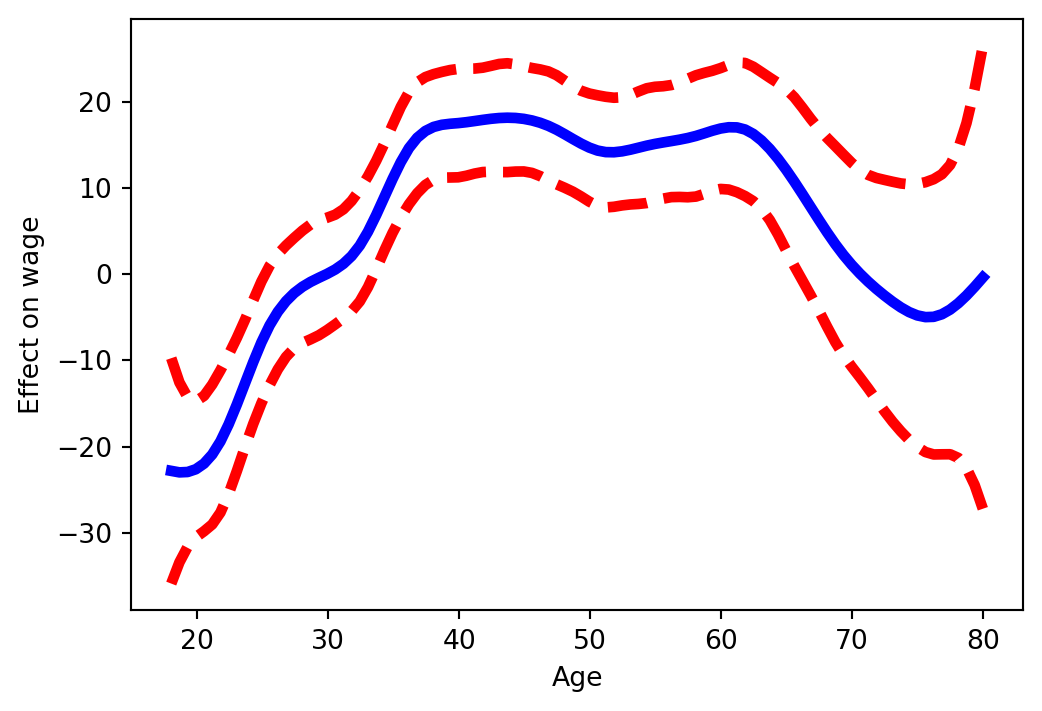
## Partial dependence plots
Visualise the contribution of one predictor while the others are held
at their mean (numeric) or summed out (categorical):
::: {.panel-tabset}
### Python
```{python}
from ISLP.pygam import plot as plot_gam
import matplotlib.pyplot as plt
fig, ax = plt.subplots(figsize=(6, 4))
plot_gam(gam, 0, ax=ax)        # 0 = age
ax.set_xlabel("Age"); ax.set_ylabel("Effect on wage");
```
### R
```r
par(mfrow = c(1, 3))
plot(gam_fit, se = TRUE, col = "steelblue")
```
:::
The shape of the partial dependence — flat / linear / hump-shaped /
threshold — is what makes GAMs interpretable.
## ANOVA-style model comparison
GAMs can be compared by nested ANOVA, just like OLS:
::: {.panel-tabset}
### Python
```{python}
from pygam import l as l_gam
from ISLP.pygam import anova as anova_gam
# gam_no_year: drop year from the feature matrix entirely so the term
# index in the model spec lines up with the column index in X_no_yr.
X_no_yr = np.column_stack([Wage['age'], Wage['education'].cat.codes])
gam_no_year = LinearGAM(s_gam(0) + f_gam(1, lam=0)).fit(X_no_yr, Wage['wage'])
gam_lin_yr  = LinearGAM(s_gam(0) + l_gam(1, lam=0) + f_gam(2, lam=0)).fit(X, Wage['wage'])
anova_gam(gam_no_year, gam_lin_yr, gam)
```
### R
```r
gam_no_year <- gam(wage ~ s(age, df = 4) + education, data = Wage)
gam_lin_yr  <- gam(wage ~ s(age, df = 4) + year + education, data = Wage)
anova(gam_no_year, gam_lin_yr, gam_fit, test = "F")
```
:::
## GAMs for classification
For a binary outcome ($Y \in \{0, 1\}$) extend the additive model to a
logistic link:
$$\log\frac{\Pr(Y = 1 \mid X)}{\Pr(Y = 0 \mid X)} = \alpha + \sum_{j=1}^p f_j(X_j)$$
::: {.panel-tabset}
### Python
```{python}
from pygam import LogisticGAM, s as s_gam, f as f_gam
high_earn = (Wage['wage'] > 250).astype(int)
gam_logit = LogisticGAM(s_gam(0) + s_gam(1, n_splines=7) + f_gam(2, lam=0))
gam_logit.fit(X, high_earn)
```
### R
```r
gam_logit <- gam(
  I(wage > 250) ~ s(age, df = 4) + s(year, df = 5) + education,
  family = binomial,
  data = Wage
)
```
:::
## Try it yourself — Exercises 20–31 {.smaller .scrollable}
From the [Ch07 handout](../Ch07-nonlin-lab.html):
- **Exercise 20.** Build a GAM "by hand": `NaturalSpline(df=4)` for `age`, `df=5` for `year`, dummies for `education`; stack and fit OLS.
- **Exercise 21.** Construct a partial-dependence plot for `age` from the by-hand GAM.
- **Exercise 22.** Do the same for `year`.
- **Exercise 23.** Fit the same model with smoothing splines via `pygam`: `LinearGAM(s_gam(0) + s_gam(1, n_splines=7) + f_gam(2, lam=0))`; plot the age partial dependence.
- **Exercise 24.** Re-tune `gam_full` so `age` and `year` each have ≈ 4 df via `approx_lam(..., df=4+1)`; re-plot.
- **Exercise 25.** Plot the partial dependence for `education` (categorical term).
- **Exercise 26.** ANOVA across three GAMs in `year`: excluded vs. linear vs. smooth. What do you conclude?
- **Exercise 27.** Repeat the ANOVA for `age`.
- **Exercise 28.** Print `gam_full.summary()` and call `gam_full.predict()` on the training set.
- **Exercise 29.** Fit a logistic GAM for `high_earn` (i.e. `wage > 250`); plot the `education` partial dependence.
- **Exercise 30.** Crosstab `high_earn` against `education` — what do you see?
- **Exercise 31.** Refit the logistic GAM excluding the "< HS Grad" category; plot partial dependence for `education`, `year`, `age`.
# Summary
## Comparing the tools
| Method | Smoothness | Knot choice | Parametric? | Interactions |
|---|---|---|---|---|
| Polynomial | High order ⇒ wiggly tails | None | Yes | Add product terms |
| Step | None at cutpoints | Manual | Yes | Cross-tabulate factors |
| Regression spline | $C^2$ at knots | Manual or quantiles | Yes | Tensor product / `bs` interaction |
| Smoothing spline | Penalty-controlled | All points | Effectively no | Add tensor smooths |
| Local regression | Kernel-controlled | None | No | Multivariate kernel |
| GAM | Per-feature smooth | Per-feature | Hybrid | Add `f(X_j, X_k)` smooth |
## Take-aways
1. The methods sit on a spectrum from "rigid, interpretable" to
"flexible, hard to read". Choose by how much you care about each.
2. Splines (regression or smoothing) are the workhorse: smooth, local,
and computable as standard OLS once a basis is fixed.
3. GAMs scale the same ideas to multiple predictors with additive,
visualisable effects — the next step before tree-based or neural
models.
4. Cross-validation (Chapter 5) is the impartial way to compare any of
these against linear regression on a given problem.
## What's next
- **Chapter 8** — Tree-based methods: decision trees, bagging, random
forests, boosting. Different flexibility–interpretability trade-off.
- **Chapter 10** — Deep learning: neural networks as another flexible
function-fitter, with much higher capacity at the cost of opacity.