Kinds of Learning Problems and Features
What the output looks like, which models keep what, and how inputs become numbers
Last modified: 2026-10-27
Show code
biCrime = (await FileAttachment("data/crime.csv").csv({typed: true})).map((d) => [d.x, d.y])
// The simulated world of the bias-variance explorer, which needs a known true mean function:
// this function, plus Gaussian noise with standard deviation biSigma, on inputs in [0.05, 0.95].
biTruth = (x) => 0.55 - 0.9 * x + 0.6 * Math.sin(6 * x)
biSigma = 0.1
biXlo = 0.05
biXhi = 0.95
// The real data of the train, cross-validation and nearest-neighbour figures:
// the 392 cars of the Auto data, as (horsepower, mpg) pairs.
// Horsepower is rescaled to [0, 1], which the polynomial basis below assumes,
// and mpg is standardized to mean 0 and standard deviation 1,
// so that a squared error is a fraction of the variance of mpg.
// biHpAxis, biMpgAxis and biMpgUnits below turn both back into horsepower and mpg
// wherever a figure labels an axis or a number.
biAuto = FileAttachment("data/auto.csv").csv({typed: true})
biHpRange = d3.extent(biAuto, (d) => d.horsepower)
biMpgMean = d3.mean(biAuto, (d) => d.mpg)
biMpgSd = d3.deviation(biAuto, (d) => d.mpg)
biCars = biAuto.map((d) => [
  (d.horsepower - biHpRange[0]) / (biHpRange[1] - biHpRange[0]),
  (d.mpg - biMpgMean) / biMpgSd
])
// Axes in the original units, drawn on the scaled data.
// Every axis shows ticks in the units the variable was measured in,
// however the model is parametrized: the scaled value x sits at the tick
// labelled with its horsepower, and the standardized value y at its mpg.
biHpAxis = ({
  label: "horsepower",
  ticks: d3.range(50, biHpRange[1] + 1e-9, 50)
    .map((hp) => (hp - biHpRange[0]) / (biHpRange[1] - biHpRange[0])),
  tickFormat: (x) => Math.round(biHpRange[0] + x * (biHpRange[1] - biHpRange[0]))
})
biMpgAxis = ({
  label: "mpg",
  ticks: d3.range(10, 51, 10).map((mpg) => (mpg - biMpgMean) / biMpgSd),
  tickFormat: (y) => Math.round(biMpgMean + y * biMpgSd)
})
// An RMSE in standardized units, converted to miles per gallon.
biMpgUnits = (v) => v * biMpgSd
// An interval printed as [lo, hi] in miles per gallon, to two decimals.
biFmtCIMpg = (ci) => `[${biMpgUnits(ci.lo).toFixed(2)}, ${biMpgUnits(ci.hi).toFixed(2)}]`
// n cars chosen at random as a training set, reproducibly from an integer seed;
// the held-out set is every car not chosen.
biCarSplit = (n, seed) => {
  const order = d3.shuffler(d3.randomLcg(seed))(d3.range(biCars.length));
  return {
    train: order.slice(0, n).map((i) => biCars[i]),
    held: order.slice(n).map((i) => biCars[i])
  };
}
// An evenly spaced grid of horsepower values, for drawing curves over the cars.
biCarGrid = d3.range(0, 1 + 1e-9, 1 / 200)
// Least-squares polynomial of the given degree, returned as a function of x.
// The basis is Chebyshev polynomials of t = 2x - 1, and the system is solved by
// Householder QR, so degrees up to about 10 stay well conditioned on [0, 1].
biBasis = (x, degree) => {
  const t = 2 * x - 1;
  const row = [1, t];
  for (let j = 2; j <= degree; j++) row.push(2 * t * row[j - 1] - row[j - 2]);
  return row.slice(0, degree + 1);
}
// A degree of n - 1 or more interpolates n points, so it is capped there.
biPolyfit = (pts, deg) => {
  const n = pts.length;
  const degree = Math.min(deg, n - 1);
  const p = degree + 1;
  const a = pts.map(([x]) => biBasis(x, degree));
  const b = pts.map(([, y]) => y);
  for (let k = 0; k < p; k++) {
    let norm = 0;
    for (let i = k; i < n; i++) norm += a[i][k] ** 2;
    norm = Math.sqrt(norm);
    if (norm === 0) continue;
    const alpha = a[k][k] > 0 ? -norm : norm;
    const v = [];
    for (let i = k; i < n; i++) v.push(a[i][k]);
    v[0] -= alpha;
    const vv = v.reduce((s, e) => s + e * e, 0);
    if (vv === 0) continue;
    for (let j = k; j < p; j++) {
      let s = 0;
      for (let i = k; i < n; i++) s += v[i - k] * a[i][j];
      for (let i = k; i < n; i++) a[i][j] -= 2 * v[i - k] * s / vv;
    }
    let s = 0;
    for (let i = k; i < n; i++) s += v[i - k] * b[i];
    for (let i = k; i < n; i++) b[i] -= 2 * v[i - k] * s / vv;
  }
  const c = new Array(p).fill(0);
  for (let k = p - 1; k >= 0; k--) {
    let s = b[k];
    for (let j = k + 1; j < p; j++) s -= a[k][j] * c[j];
    c[k] = a[k][k] === 0 ? 0 : s / a[k][k];
  }
  return (x) => biBasis(x, degree).reduce((s, e, j) => s + e * c[j], 0);
}
// Mean squared error of a prediction function h on a set of points.
biMse = (h, pts) => d3.mean(pts, ([x, y]) => (h(x) - y) ** 2)
// A 95% confidence interval for the risk of h (its mean squared error over the population),
// from the squared errors of h on points it was not fitted to.
// By the central limit theorem the mean of n squared errors is close to normal,
// with standard error sd / sqrt(n), so the interval is the mean plus or minus 1.96 standard errors.
// The held-out sets here have at least 190 cars, so 1.96 stands in for the t quantile.
// It is not meant for points the model was fitted to, whose errors are not independent draws.
biMseCI = (h, pts) => {
  const errs = pts.map(([x, y]) => (h(x) - y) ** 2);
  const m = d3.mean(errs);
  const half = 1.96 * d3.deviation(errs) / Math.sqrt(errs.length);
  return {mean: m, lo: m - half, hi: m + half};
}
// The root mean squared error (RMSE) of h on a set of points, in the units of the response,
// and the same interval as biMseCI with its endpoints square-rooted.
biRmse = (h, pts) => Math.sqrt(biMse(h, pts))
biRmseCI = (h, pts) => {
  const ci = biMseCI(h, pts);
  return {mean: Math.sqrt(ci.mean), lo: Math.sqrt(Math.max(ci.lo, 0)), hi: Math.sqrt(ci.hi)};
}
// The RMSE interval for a short list of squared errors, one per case, by the percentile bootstrap:
// resample the errors with replacement 1,000 times, take the root of each resample's mean,
// and keep the 2.5th and 97.5th percentiles of those roots.
// Cross-validation uses it on the held-out squared errors, one per point.
// With so few skewed errors, the interval 1.96 standard errors either side of the mean
// can reach below zero, which a root mean squared error cannot do; the bootstrap never does.
// The seed fixes the resamples, so the interval does not change when the page redraws.
biRmseCIBoot = (sq, seed = 1) => {
  const rand = d3.randomLcg(seed);
  const n = sq.length;
  const roots = d3.range(1000).map(() =>
    Math.sqrt(d3.mean(d3.range(n), () => sq[Math.floor(rand() * n)])));
  roots.sort(d3.ascending);
  return {mean: Math.sqrt(d3.mean(sq)), lo: d3.quantileSorted(roots, 0.025),
          hi: d3.quantileSorted(roots, 0.975)};
}
// Print an interval as [lo, hi] to four decimals.
biFmtCI = (ci) => `[${ci.lo.toFixed(4)}, ${ci.hi.toFixed(4)}]`
// Tick marks for a log axis: the powers of ten from lo to hi, printed in plain
// decimals (0.001, 1,000), never in scientific notation.
// Plot's default log ticks label every minor tick, which crowds a short axis.
biPow10 = (lo, hi) => d3.range(Math.round(Math.log10(lo)), Math.round(Math.log10(hi)) + 1)
  .map((e) => 10 ** e)
biExp = (v) => d3.format(",.8~f")(v)
Source
This chapter was split from A First Model and Generalization, which keeps the first worked example and the rest of its topics. The two chapters share one set of figures and data.
1 Kinds of learning problems
1.1 Models as assumptions and constraints
Exercise 1 (What the data cannot decide)
Exercise 1 (What the data cannot decide) Many different functions pass through all five points of the crime data. Fit the straight line and the polynomial of degree 4 to the five neighbourhoods, and compare their training errors.
Solution 1.
Show code
# Fit each family by least squares to the five neighbourhoods of the crime data.
fits_r <- do.call(rbind, lapply(c(1, 4), function(d) {
  fit <- lm(y ~ poly(x, d, raw = TRUE), data = crime)
  data.frame(
    degree = d,
    training_mse = mean(residuals(fit)^2),
    pred_at_0.1 = predict(fit, data.frame(x = 0.1)),
    pred_at_0.9 = predict(fit, data.frame(x = 0.9))
  )
}))
print(fits_r, digits = 3, row.names = FALSE)
degree training_mse pred_at_0.1 pred_at_0.9
1 0.00272 0.576 -0.454
4 0.00000 -1.222 -95.851Show code
import numpy as np

# Fit each family by least squares to the five neighbourhoods of the crime data.
rows = []
for degree in (1, 4):
    coefs = np.polyfit(crime["x"], crime["y"], degree)
    train_mse = np.mean((np.polyval(coefs, crime["x"]) - crime["y"]) ** 2)
    rows.append([degree, train_mse, np.polyval(coefs, 0.1), np.polyval(coefs, 0.9)])

fits = pd.DataFrame(rows, columns=["degree", "training MSE", "prediction at 0.1", "prediction at 0.9"])
print(fits.round(3).to_string(index=False))
degree training MSE prediction at 0.1 prediction at 0.9
1 0.003 0.576 -0.454
4 0.000 -1.222 -95.851The polynomial of degree 4 passes through all five points, so its training error is zero (to rounding), and the line’s is 0.0027. On the training error alone, the polynomial wins.
Exercise 2 (What the data cannot decide (part 2))
Exercise 2 (What the data cannot decide (part 2)) Use the two fits of Exercise 1. Compare their predictions at incomes \(x = 0.1\) and \(x = 0.9\), both outside the incomes in the data. What does the comparison say about what a model has to supply besides the data?
Solution 2. Away from the data the two disagree sharply: at \(x = 0.1\) the line predicts a crime rate of 0.58 and the polynomial predicts -1.22, which is impossible for a rate. At \(x = 0.9\) both leave the possible range, but the line predicts -0.45 and the polynomial -95.9.
Five points do not say which of these functions to trust. The data fix the value of the function at five inputs and leave the rest open. A model closes the gap by supplying the rest: it restricts the functions we consider, so that the data can choose among the few that remain.
Remark 1 (A model is a set of assumptions, and each one constrains the learner)
Remark 1 (A model is a set of assumptions, and each one constrains the learner). Choosing a model family is an assumption about the true mean function, and the assumptions made in the course come in three kinds.
- Functional form. The family of the crime example assumes the true mean function has no curvature. It constrains training to the two numbers \(m\) and \(b\). If the true mean function \(\truemean\) bends, the best member \(\bestmod\) of the family (best in the sense of the smallest squared gap to \(\truemean\), averaged over the population of inputs) still differs from \(\truemean\), and more data narrows the search to \(\bestmod\) without closing that gap.
- Noise. The noise has mean zero by definition of the true mean function (zero-mean-noise theorem). That fixes what the fitted model estimates, the mean of the outcome given the input, and it is why squared error is a sensible loss. The noise model adds the assumption that the variance of the noise is finite, which keeps the squared error well defined.
- Independence. Treating the neighbourhoods as independent draws from the population is what lets the error on a validation set of held-out neighbourhoods stand in for the error on a new one. The error on the training set cannot stand in, whatever the dependence, because the fit has already seen those neighbourhoods.
The constraint is what makes learning possible, and it is also the cost: a conclusion drawn from a fitted model is only as good as the assumptions behind it. What the fitted model recovers from the data is \(\bestmod\) within the family, and the estimator is the training procedure that picks a member of the family from the data.
1.2 Supervised, unsupervised, and in between
Exercise 3 (What the training data contain)
Exercise 3 (What the training data contain) Course Overview sorted learning problems by what the training data contain. Name the three cases, and say which one the crime-rate data of A first model, end to end are.
Solution 3.
- Every point is a pair \((x, y)\): supervised learning.
- Every point is an \(x\) alone: unsupervised learning, whose goal is to find structure.
- A few points have labels and most do not: semi-supervised learning.
The crime-rate data are supervised: each neighbourhood comes with its crime rate, which is the \(y\) the model learns to predict. That is also the case the anatomy figure draws.
Exercise 4 (Which of these is unsupervised?)
Exercise 4 (Which of these is unsupervised?)
- Predicting a neighbourhood’s crime rate from its per-capita income.
- Grouping news articles so that each group is about one topic, without being told the topics in advance.
- Deciding whether an email is spam, from a corpus of emails somebody has already marked.
Solution 4. The second. Nothing in its training data says which topic any article belongs to, so there is no \(y\) to compare a prediction against — which also means there is no obvious way to score the result, and that difficulty is characteristic of unsupervised learning rather than incidental to it.
The first and third both include the answer and are supervised: regression and classification respectively.
Watch
Hutchinson covers machine learning and its main problem types, Machine Learning Overview (30 min) [1].
Watch
Starmer gives a gentle introduction to machine learning [2].
1.3 What the output looks like
Exercise 5 (Other kinds of output)
Exercise 5 (Other kinds of output) In regression the output \(y\) is a quantity, and in classification it is one of a fixed set of categories. What other shapes could \(y\) take? For each one you think of, name a task that produces it.
Solution 5. A few possibilities:
- a sequence of labels, one per word of a sentence, such as each word’s part of speech;
- a sequence of arbitrary length, such as captioning an image with words or transcribing speech to text;
- an ordering, such as a search engine’s list of results;
- a structured object, such as the parse tree of a sentence.
The definitions that follow name the problem each one poses. The shape of \(y\) decides what kind of problem it is, and largely decides which algorithms are available.
Definition 1 (Sequence labelling)
Definition 1 (Sequence labelling) In sequence labelling, the input is a sequence and the output \(y\) is a sequence of labels of the same length, one label per input position [3].
Example 1 (Part-of-speech tagging)
Example 1 (Part-of-speech tagging) Tagging each word of a sentence with its part of speech is sequence labelling.
Definition 2 (Sequence-to-sequence prediction (sequence-to-sequence decoding, seq2seq))
Definition 2 (Sequence-to-sequence prediction (sequence-to-sequence decoding, seq2seq)) In sequence-to-sequence prediction, the output \(y\) is a sequence whose length is not fixed in advance and need not match the length of the input [4].
Other names: sequence-to-sequence decoding, seq2seq.
Example 2 (Captioning, transcribing and translating)
Example 2 (Captioning, transcribing and translating) Captioning an image, transcribing speech to text and translating a sentence are all sequence-to-sequence prediction.
Definition 3 (Ranking)
Definition 3 (Ranking) In ranking, the output \(y\) is an ordering of a set of candidates [5].
Definition 4 (Structured prediction)
Definition 4 (Structured prediction) In structured prediction, the output \(y\) is an object with internal structure, such as a tree or a graph, whose parts constrain one another [6].
Example 4 (Parsing a sentence)
Example 4 (Parsing a sentence) Producing the parse tree of a sentence is structured prediction.
Exercise 6 (Learning without an output)
Exercise 6 (Learning without an output) Clustering learns from inputs \(x\) alone, with no output \(y\). What else could a model learn from inputs alone, and what task could it serve?
Solution 6. A model can learn how probable each input is: a probability distribution over the inputs. Such a model says which inputs are typical and which are improbable.
The commonest use is to flag improbable inputs, such as an unusual credit card transaction or a sensor reading from a failing machine, for a person to inspect.
These notes spend most of their time on regression and classification, and visit the other kinds of problem once the needed methods have been introduced.
Definition 5 (Density estimation)
Definition 5 (Density estimation) In density estimation, there is no output \(y\): the model is a probability density or mass function \(P(x)\) over the inputs [7].
Example 5 (A histogram density for horsepower)
Example 5 (A histogram density for horsepower) Ignore mpg and every other column of the Auto data [8]: the inputs are the horsepower of the 392 cars, and there is no output. Estimate a density \(P(x)\) for horsepower with a histogram, using bins 20 horsepower wide from 40 to 240, scaled so that the total area is 1:
import numpy as np
import pandas as pd

auto_de = pd.read_csv("data/auto.csv").dropna(subset=["horsepower"])
hp_de = auto_de["horsepower"].to_numpy(float)

# density=True divides each bin's count by n times the bin width.
edges_de = np.arange(40, 241, 20)
dens_de, _ = np.histogram(hp_de, bins=edges_de, density=True)
print(dens_de.round(4))
[0.0019 0.0124 0.0144 0.0078 0.0028 0.0057 0.0022 0.0014 0.0008 0.0006]1.0# The share of cars from 80 to 120 horsepower, with a normal-approximation 95% interval.
share_de = np.mean((hp_de >= 80) & (hp_de < 120))
share_se_de = np.sqrt(share_de * (1 - share_de) / len(hp_de))
print(round(share_de, 3), round(share_de - 1.96 * share_se_de, 3), round(share_de + 1.96 * share_se_de, 3))0.444 0.395 0.493Show code
auto_de <- read.csv("data/auto.csv")
auto_de <- na.omit(auto_de[, c("name", "horsepower", "origin")])

# right = FALSE makes each bin include its left edge, as the Python bins do.
edges_de <- seq(40, 240, 20)
hist_de <- hist(auto_de$horsepower, breaks = edges_de, right = FALSE, plot = FALSE)
dens_de <- hist_de$density
round(dens_de, 4)
[1] 0.0019 0.0124 0.0144 0.0078 0.0028 0.0057 0.0022 0.0014 0.0008 0.0006[1] 1Show code
# The share of cars from 80 to 120 horsepower, with a normal-approximation 95% interval.
share_de <- mean(auto_de$horsepower >= 80 & auto_de$horsepower < 120)
share_se_de <- sqrt(share_de * (1 - share_de) / nrow(auto_de))
round(c(share = share_de, lower = share_de - 1.96 * share_se_de, upper = share_de + 1.96 * share_se_de), 3)
share lower upper
0.444 0.395 0.493 The model is the function that gives a car with horsepower in bin \(j\) the density dens_de[j]. The densest bin is 80 to 100 horsepower, at 0.0144, and the sparsest is 220 to 240, at 0.0006. Its area is 1.00, as a density’s must be, and the area between 80 and 120 horsepower, 0.44, estimates the share of cars in that range, with a 95% confidence interval of 0.39 to 0.49 from the 392 cars. No label was used anywhere, so density estimation is unsupervised (Definition 5).
Remark 2 (Density estimation is unsupervised)
Remark 2 (Density estimation is unsupervised). Density estimation is unsupervised.
Definition 6 (Anomaly detection (novelty detection, outlier detection))
Definition 6 (Anomaly detection (novelty detection, outlier detection)) Anomaly detection flags inputs that are unlike the training inputs, such as those in regions where an estimated density \(P(x)\) is low [9].
Other names: novelty detection, outlier detection.
Example 6 (Flagging the low-density cars)
Example 6 (Flagging the low-density cars) Use the histogram density of Example 5 and flag every car whose horsepower falls in a region where the estimated density is below 0.001:
11 200 name horsepower origin
chevrolet impala 220 1
plymouth fury iii 215 1
pontiac catalina 225 1
buick estate wagon (sw) 225 1
ford f250 215 1Show code
import matplotlib.pyplot as plt

# Draw each bin as a bar; the flagged bins are those below the threshold.
low_ad = dens_de < 0.001
fig, ax = plt.subplots(figsize=(6, 3), layout="constrained")
ax.bar(edges_de[:-1], dens_de, width=20, align="edge", edgecolor="white",
       color=np.where(low_ad, "firebrick", "steelblue"));
ax.axhline(0.001, linestyle="--", color="black");
ax.set_xlabel("horsepower");
ax.set_ylabel("estimated density");
plt.show()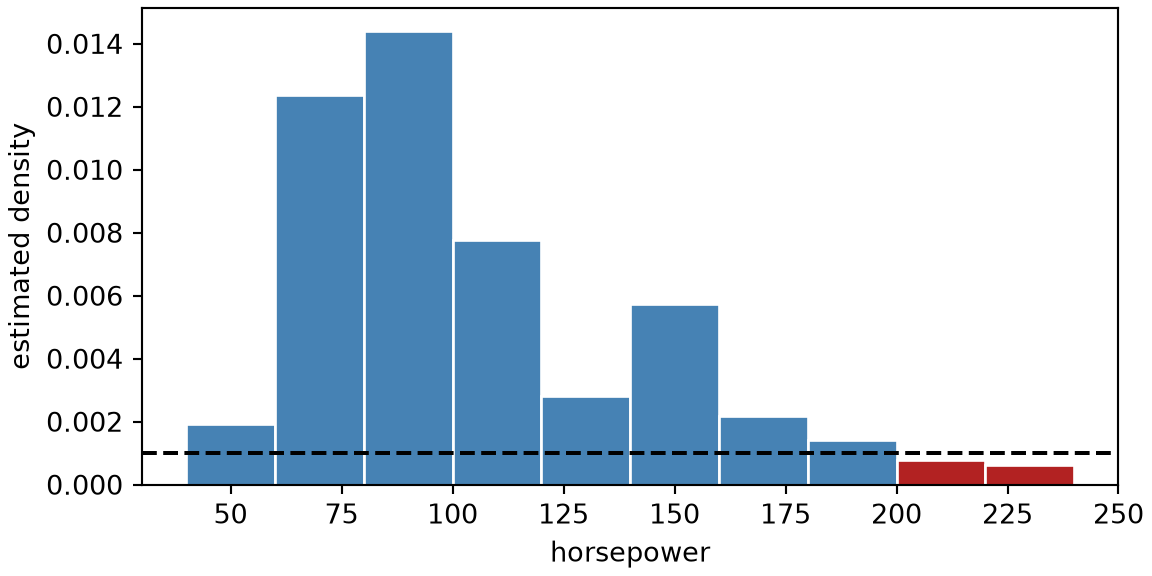
Figure 1 shows the density and the threshold. This flags 11 of the 392 cars, all with at least 200 horsepower. Among them, 11 have origin 1 (American), such as the chevrolet impala and the plymouth fury iii. Nobody labeled these cars as unusual. They are flagged only because few training cars look like them, which is anomaly detection (Definition 6). Whether they are errors or just large-engined cars is a question the density cannot answer, and the threshold of 0.001 was a choice. It flags a bin only if it holds under 2% of the cars, since the bins are 20 horsepower wide.
Example 7 (A purchase unlike a customer’s others)
Example 7 (A purchase unlike a customer’s others) A bank’s model of its customers’ usual card transactions can flag a purchase whose amount and location look like none of them, without anyone having labeled that purchase as fraud.
1.4 Parametric and non-parametric models
Exercise 7 (What does a model keep?)
Exercise 7 (What does a model keep?) A new neighbourhood reports its per-capita income, and the city wants a predicted crime rate.
To predict with the fitted line of the crime example, what does the city need to have kept from training?
Solution 7. The line needs only its two parameters, \(\hat{m}\) and \(\hat{b}\). After training, the five data points can be thrown away.
Exercise 8 (What does a model keep? (part 2))
Exercise 8 (What does a model keep? (part 2)) Use the setup of Exercise 7.
A second rule predicts by averaging the crime rates of the \(k\) training neighbourhoods whose incomes are nearest the new one. What does the city need to have kept to use this rule?
Exercise 9 (What does a model keep? (part 3))
Exercise 9 (What does a model keep? (part 3)) Use the setup of Exercise 7.
How does each answer change as the number of training points \(\nobs\) grows?
Solution 9. In Exercise 9, the line keeps two numbers however large \(\nobs\) gets. The averaging rule keeps \(2N\) numbers, so its storage grows with the data.
The two rules also spend their computing time at different stages. The line does its work at training time, by solving the empirical-risk minimization, and then each prediction costs one multiplication and one addition. The averaging rule does nothing at training time, and each prediction searches all \(\nobs\) stored points. This is the train-time-versus-run-time distinction of The anatomy of a learning system.
The averaging rule also becomes more flexible as \(\nobs\) grows. With few points its predictions follow a coarse pattern; with many, its predictions can follow a curved relationship that no straight line can fit.
Definition 7 (Non-parametric model)
Definition 7 (Non-parametric model) A non-parametric model is a model family whose description grows with the training set, so that it is not a parametric model [10].
Example 8 (Nearest neighbors keep every car)
Example 8 (Nearest neighbors keep every car) Predict the mpg of a car with 100 horsepower by averaging the mpg of the five cars in the training set whose horsepower is closest to 100. This is the averaging rule of Exercise 7. Train it on the first 20, the first 100 and then all 392 cars of the Auto data [8], and count the numbers it must keep to make a prediction:
import numpy as np
import pandas as pd

auto_np = pd.read_csv("data/auto.csv").dropna(subset=["horsepower"])
hp_np = auto_np["horsepower"].to_numpy(float)
mpg_np = auto_np["mpg"].to_numpy(float)

for n_np in (20, 100, 392):
    # The prediction needs every stored pair, to find the five nearest in horsepower.
    nearest_np = np.argsort(np.abs(hp_np[:n_np] - 100), kind="stable")[:5]
    print(n_np, 2 * n_np, round(mpg_np[:n_np][nearest_np].mean(), 2))
20 40 22.4
100 200 17.8
392 784 17.8auto_np <- na.omit(read.csv("data/auto.csv")[, c("mpg", "horsepower")])
knn_np <- t(sapply(c(20, 100, 392), function(n) {
train <- auto_np[1:n, ]
# The prediction needs every stored pair, to find the five nearest.
nearest <- order(abs(train$horsepower - 100))[1:5]
c(cars = n, stored = 2 * n, prediction = mean(train$mpg[nearest]))
}))
round(knn_np, 2) cars stored prediction
[1,] 20 40 22.4
[2,] 100 200 17.8
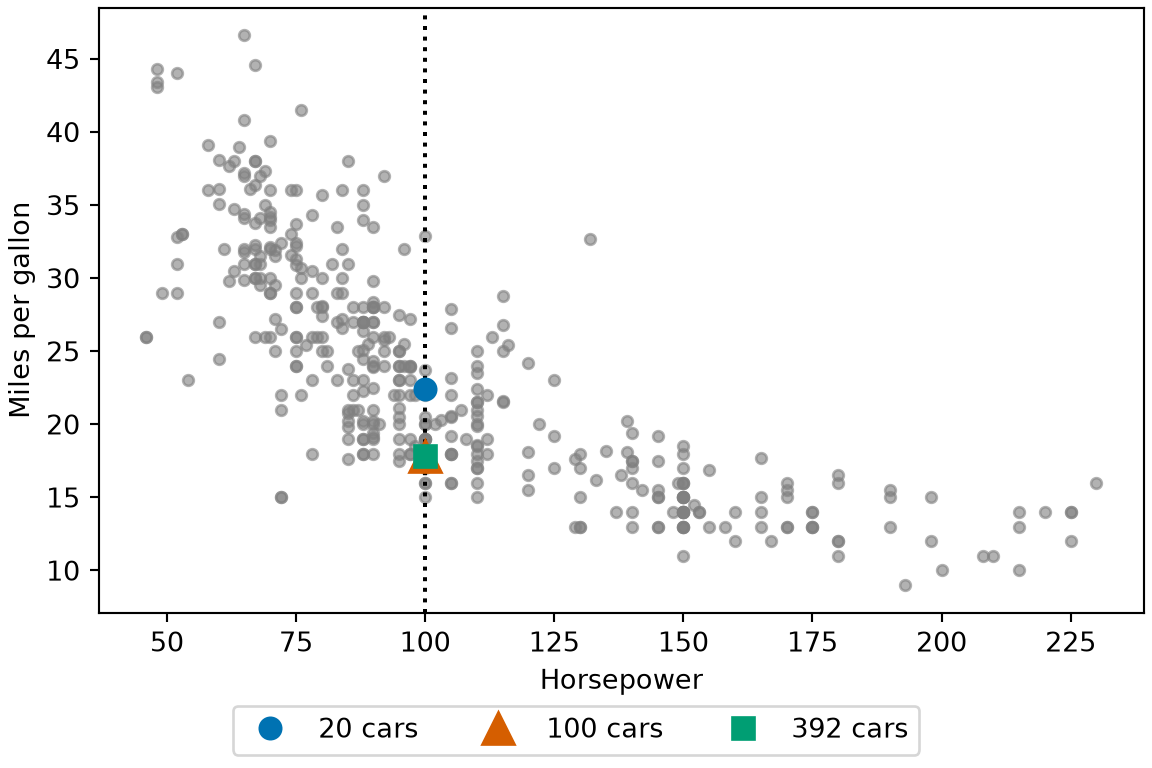
[3,] 392 784 17.8The line of the parametric-model example keeps two numbers at every size. This rule keeps 40 numbers after 20 cars, 200 after 100 and 784 after all 392, two for each car, because any of them might be among the five nearest to the next input. Its description grows with the training set, so it is non-parametric (Definition 7). Its prediction at 100 horsepower also moves with the data, from 22.4 to 17.8 miles per gallon.
Show code
library(ggplot2)
npf_pred <- data.frame(
  horsepower = 100,
  mpg = knn_np[, "prediction"],
  cars = factor(knn_np[, "cars"])
)
ggplot(auto_np, aes(horsepower, mpg)) +
  geom_point(colour = "grey60", alpha = 0.6) +
  geom_vline(xintercept = 100, linetype = "dotted") +
  geom_point(data = npf_pred, aes(colour = cars, shape = cars, size = cars)) +
  scale_size_manual(values = c("20" = 3.5, "100" = 5.5, "392" = 3.5)) +
  scale_colour_manual(values = c("20" = "#0072B2", "100" = "#D55E00", "392" = "#009E73")) +
  scale_shape_manual(values = c("20" = 16, "100" = 17, "392" = 15)) +
  labs(
    x = "Horsepower", y = "Miles per gallon",
    colour = "Cars used", shape = "Cars used", size = "Cars used"
  )
Show code
import matplotlib.pyplot as plt
import numpy as np

fig, ax = plt.subplots(figsize=(6, 4), layout="constrained")
ax.plot(hp_np, mpg_np, color="grey", marker="o", linestyle="", alpha=0.6, markersize=4);
ax.axvline(100, color="black", linestyle=":");
for n_npf, colour, marker, size in [
    (20, "#0072B2", "o", 8), (100, "#D55E00", "^", 12), (392, "#009E73", "s", 8)
]:
    nearest_npf = np.argsort(np.abs(hp_np[:n_npf] - 100), kind="stable")[:5]
    ax.plot(100, mpg_np[:n_npf][nearest_npf].mean(), color=colour, marker=marker,
            markersize=size, linestyle="", label=f"{n_npf} cars");
ax.set_xlabel("Horsepower");
ax.set_ylabel("Miles per gallon");
fig.legend(loc="outside lower center", ncol=3);
plt.show()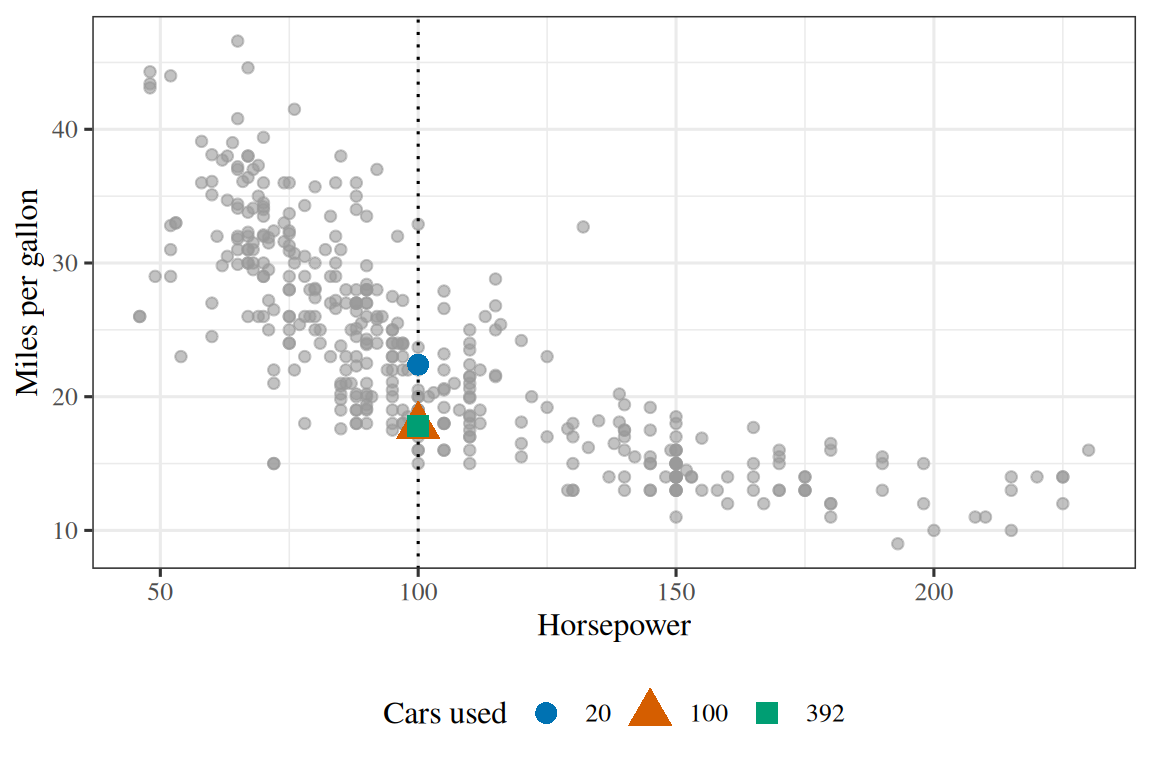
Remark 3 (Nearest neighbours and support vectors keep training points)
Remark 3 (Nearest neighbours and support vectors keep training points). The averaging rule of Exercise 7 is non-parametric: it keeps every training point. \(k\)-nearest neighbours is the general form of that rule. A support vector machine keeps a subset of the training points.
Show code
knSplit = biCarSplit(knN, 6100 + knDraw)
knTrain = knSplit.train
knHeld = knSplit.held
// The line: two numbers, whatever the size of the training set.
knLine = biPolyfit(knTrain, 1)
// k-nearest-neighbours regression: average the y of the k training points nearest in x.
// It has to keep every training point to make a prediction.
knK = Math.min(knKwant, knN)
knPredict = (x) => d3.mean(
  d3.sort(knTrain, (d) => Math.abs(d[0] - x)).slice(0, knK),
  (d) => d[1]
)
knRows = [
  {model: "line", stored: 2, held: biRmse(knLine, knHeld), ci: biRmseCI(knLine, knHeld)},
  {model: `${knK}-nearest neighbours`, stored: 2 * knN, held: biRmse(knPredict, knHeld), ci: biRmseCI(knPredict, knHeld)}
]
Slide \(k\) in Figure 3 up from 1, then add training points, and compare what each model has to keep.
Show code
Show code
md`${knKwant > knN ? `(k cannot exceed the ${knN} training points, so k = ${knN}.)` : ""}
The line keeps **2** numbers after training.
${knK}-nearest neighbours keeps all ${knN} training points, **${2 * knN}** numbers,
and uses them for every prediction.
Root mean squared error (RMSE) on the ${knHeld.length} held-out cars:
line ${biMpgUnits(knRows[0].held).toFixed(2)} mpg (95% interval ${biFmtCIMpg(knRows[0].ci)}),
nearest neighbours ${biMpgUnits(knRows[1].held).toFixed(2)} mpg (${biFmtCIMpg(knRows[1].ci)}).`
Show code
Plot.plot({
  ariaLabel: 'The training cars, the least-squares line in blue, ' +
    'and the k-nearest-neighbours prediction in orange, a step-shaped curve that stays close to the points.',
  width: 440, height: 300, grid: true,
  x: {domain: [0, 1], ...biHpAxis},
  y: {domain: [-2, 3.5], ...biMpgAxis},
  color: {domain: ["line", "nearest neighbours"],
          range: ["#1f77b4", "#ff7f0e"], legend: true},
  marks: [
    Plot.dot(knTrain, {x: (d) => d[0], y: (d) => d[1], r: 3, fill: "#999"}),
    Plot.line(biCarGrid, {x: (x) => x, y: knLine, stroke: () => "line", strokeWidth: 2.5}),
    Plot.line(biCarGrid, {x: (x) => x, y: knPredict, stroke: () => "nearest neighbours",
                       strokeWidth: 2.5, curve: "step"})
  ]
})Read
GeeksforGeeks explains parametric and non-parametric methods [11].
1.5 Probabilistic and non-probabilistic models
Exercise 10 (What does a probability add?)
Exercise 10 (What does a probability add?) Two spam filters read the same incoming message \(x\).
- Filter A outputs one label, “spam” or “not spam”.
- Filter B outputs a number between 0 and 1: its estimate of the probability that the message is spam.
Name two actions the mail system can take with Filter B’s output that it cannot take with Filter A’s.
Solution 10. Filter B’s number says how sure the filter is, and the mail system can act on that confidence. Any two of these actions answer the question:
- rank messages from most to least likely to be spam;
- leave a message in the inbox, or send it to a person to check, when the probability is close to one half;
- choose a cutoff other than one half, such as quarantining a message only when the probability exceeds 0.9, because losing a real message costs more than reading one spam message.
Filter A’s label carries no confidence, so it supports none of these actions.
Exercise 11 (What does a probability add? (part 2))
Exercise 11 (What does a probability add? (part 2)) Use the setup of Exercise 10.
Can the mail system recover Filter A’s kind of output from Filter B’s?
Solution 11. Comparing Filter B’s number with a cutoff produces a label, so Filter A’s kind of output can be recovered from Filter B’s.
Exercise 12 (What does a probability add? (part 3))
Exercise 12 (What does a probability add? (part 3)) Use the setup of Exercise 10.
Can it recover Filter B’s kind of output from Filter A’s?
Solution 12. Recovering Filter B’s kind of output from Filter A’s fails: a label does not say how close the message came to the other label.
Definition 8 (Probabilistic model)
Definition 8 (Probabilistic model) A probabilistic model is a model whose output is a probability distribution. In supervised learning, it produces the conditional distribution \(P(y \mid x)\) of the output given the input. In unsupervised learning, it produces the distribution \(P(x)\) of the input.
Example 9 (Filter B is probabilistic)
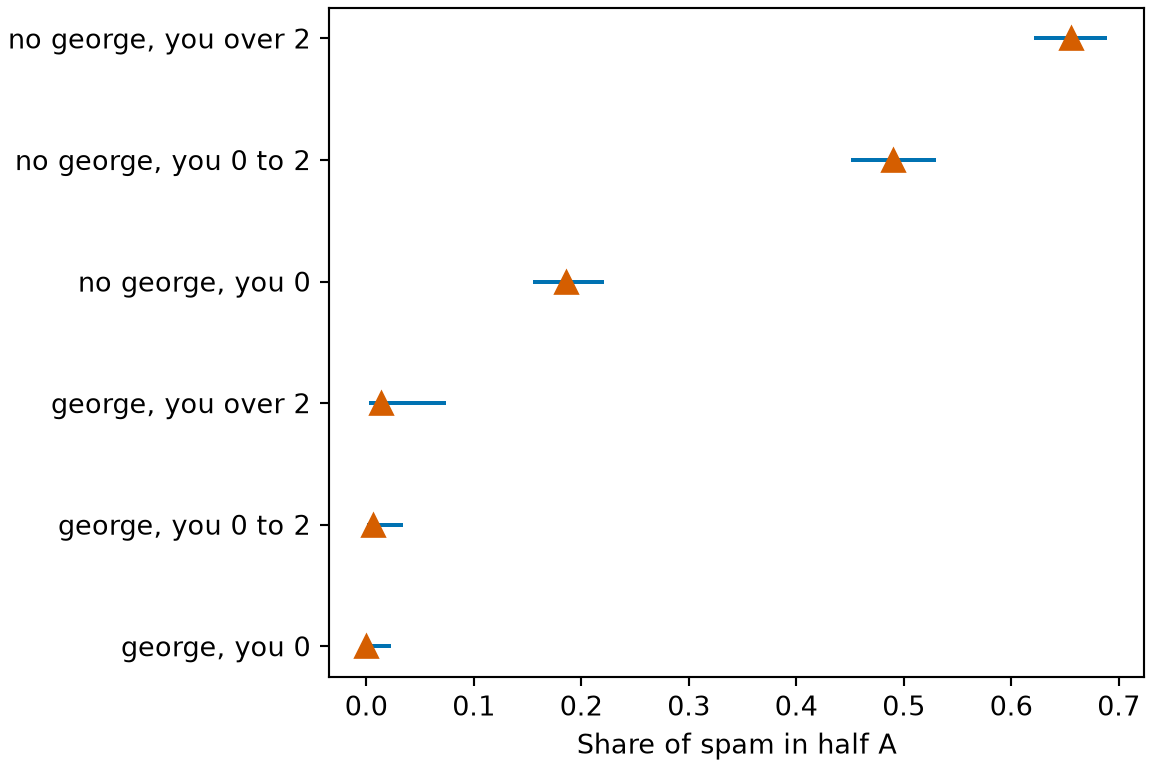
Example 9 (Filter B is probabilistic) Filter B of Exercise 10 is a probabilistic model. Build one from the 4,601 emails of the spam data [12]: sort each message into a group by whether it contains the word “george” at all and by how often it uses the word “you” (never, up to 2% of its words, or more), and let Filter B output the share of spam among the first half of the data (half A) that fall in the message’s group. Each share comes with a 95% Wilson interval, which stays inside \([0, 1]\) even when a group has no spam.
import numpy as np
import pandas as pd

spam_pm = pd.read_csv("data/spam-george-you.csv")

# Group each message by "george" (present or not) and by how much it uses "you".
spam_pm["george_group"] = np.where(spam_pm["george"] > 0, "george", "no george")
spam_pm["you_group"] = np.where(
    spam_pm["you"] == 0, "0", np.where(spam_pm["you"] <= 2, "0 to 2", "over 2")
)
spam_pm["key"] = spam_pm["george_group"] + ", you " + spam_pm["you_group"]

# Filter B learns from half A only: the share of spam in each group.
train_pm = spam_pm[spam_pm["half"] == "A"]
tab_pm = train_pm.groupby("key").agg(n=("spam", "size"), p=("spam", "mean")).reset_index()

# 95% Wilson interval for each share, from its size n and share p.
z_pm = 1.96
scale_pm = 1 + z_pm**2 / tab_pm["n"]
centre_pm = (tab_pm["p"] + z_pm**2 / (2 * tab_pm["n"])) / scale_pm
half_pm = z_pm * np.sqrt(
    tab_pm["p"] * (1 - tab_pm["p"]) / tab_pm["n"] + z_pm**2 / (4 * tab_pm["n"] ** 2)
) / scale_pm
tab_pm["lower"] = centre_pm - half_pm
tab_pm["upper"] = centre_pm + half_pm
print(tab_pm.round(3))
key n p lower upper
0 george, you 0 164 0.000 0.000 0.023
1 george, you 0 to 2 160 0.006 0.001 0.035
2 george, you over 2 72 0.014 0.002 0.075
3 no george, you 0 537 0.186 0.156 0.221
4 no george, you 0 to 2 612 0.490 0.451 0.530
5 no george, you over 2 756 0.656 0.622 0.689spam_pm <- read.csv("data/spam-george-you.csv")
# Group each message by "george" (present or not) and by how much it uses "you".
george_group <- ifelse(spam_pm$george > 0, "george", "no george")
you_group <- ifelse(spam_pm$you == 0, "0", ifelse(spam_pm$you <= 2, "0 to 2", "over 2"))
spam_pm$key <- paste0(george_group, ", you ", you_group)
# Filter B learns from half A only: the share of spam in each group.
train_pm <- spam_pm[spam_pm$half == "A", ]
tab_pm <- data.frame(
key = sort(unique(train_pm$key)),
n = as.vector(tapply(train_pm$spam, train_pm$key, length)),
p = as.vector(tapply(train_pm$spam, train_pm$key, mean))
)
# 95% Wilson interval for each share, from its size n and share p.
z_pm <- 1.96
scale_pm <- 1 + z_pm^2 / tab_pm$n
centre_pm <- (tab_pm$p + z_pm^2 / (2 * tab_pm$n)) / scale_pm
half_pm <- z_pm * sqrt(tab_pm$p * (1 - tab_pm$p) / tab_pm$n + z_pm^2 / (4 * tab_pm$n^2)) / scale_pm
tab_pm$lower <- centre_pm - half_pm
tab_pm$upper <- centre_pm + half_pm
print(round(tab_pm[, -1], 3)) n p lower upper
1 164 0.000 0.000 0.023
2 160 0.006 0.001 0.035
3 72 0.014 0.002 0.075
4 537 0.186 0.156 0.221
5 612 0.490 0.451 0.530
6 756 0.656 0.622 0.689A message with no “george” and “you” up to 2% of its words gets the output 0.49 (95% interval 0.45 to 0.53). One with no “george” and “you” above 2% gets 0.66 (95% interval 0.62 to 0.69). A message containing “george” that never says “you” gets 0.00 (95% interval 0.00 to 0.02). Filter B says how sure it is, and the mail system can rank, quarantine or send for review by that number.
Show code
Show code
import matplotlib.pyplot as plt

order_pmf = tab_pm.sort_values("p").reset_index(drop=True)
fig, ax = plt.subplots(figsize=(6, 4), layout="constrained")
ax.hlines(order_pmf.index, order_pmf["lower"], order_pmf["upper"], color="#0072B2");
ax.plot(order_pmf["p"], order_pmf.index, color="#D55E00", marker="^", markersize=8, linestyle="");
ax.set_yticks(order_pmf.index, order_pmf["key"]);
ax.set_xlabel("Share of spam in half A");
plt.show()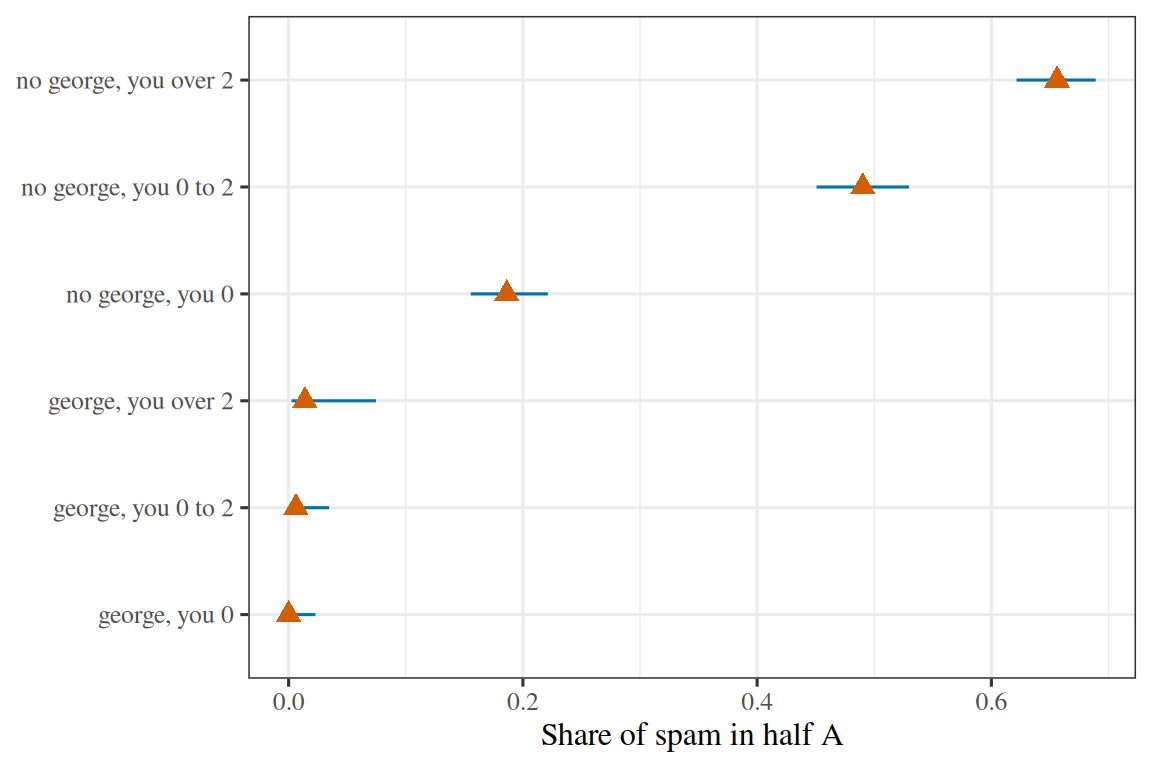
Definition 9 (Non-probabilistic model)
Definition 9 (Non-probabilistic model) A non-probabilistic model is a model whose output is a single label, value or cluster assignment, with no probability distribution attached.
Example 10 (Filter A is non-probabilistic)
Example 10 (Filter A is non-probabilistic) Filter A of Exercise 10 is a non-probabilistic model. Take the groups and shares tab_pm of Example 9 and keep only a label: Filter A says “spam” for a group whose training share of spam exceeds one half, and “not spam” otherwise. Score it on the second half of the data (half B), which Filter A never saw:
# Filter A's rule, a label for each group, from Filter B's shares.
label_pm = tab_pm.set_index("key")["p"] > 0.5

# Half B: look up each message's group label and compare it with the truth.
test_pm = spam_pm[spam_pm["half"] == "B"]
pred_pm = label_pm.loc[test_pm["key"]].to_numpy()
correct_pm = pred_pm == (test_pm["spam"].to_numpy() == 1)
acc_pm = correct_pm.mean()
n_test_pm = len(correct_pm)
se_pm = np.sqrt(acc_pm * (1 - acc_pm) / n_test_pm)
print(label_pm)
key
george, you 0 False
george, you 0 to 2 False
george, you over 2 False
no george, you 0 False
no george, you 0 to 2 False
no george, you over 2 True
Name: p, dtype: bool0.695 0.676 0.714# Filter A's rule, a label for each group, from Filter B's shares.
label_pm <- setNames(tab_pm$p > 0.5, tab_pm$key)
# Half B: look up each message's group label and compare it with the truth.
test_pm <- spam_pm[spam_pm$half == "B", ]
pred_pm <- label_pm[test_pm$key]
correct_pm <- pred_pm == (test_pm$spam == 1)
acc_pm <- mean(correct_pm)
n_test_pm <- length(correct_pm)
se_pm <- sqrt(acc_pm * (1 - acc_pm) / n_test_pm)
print(label_pm) george, you 0 george, you 0 to 2 george, you over 2
FALSE FALSE FALSE
no george, you 0 no george, you 0 to 2 no george, you over 2
FALSE FALSE TRUE [1] 0.695 0.676 0.714Filter A is right on 69.5% of the 2300 messages in half B (95% interval 67.6% to 71.4%, a normal approximation). Its labels hide how close some calls were: “no george, you 0 to 2” is labelled “not spam” from a share of 0.49, almost a coin flip, and “no george, you over 2” is labelled “spam” from 0.66. The two labels differ, but a label cannot say that the first call was nearly a toss-up and the second was not.
Exercise 13 (Joint or conditional?)
Exercise 13 (Joint or conditional?) A probabilistic spam filter (Definition 8) can be built in two ways. One version estimates the conditional distribution \(P(\outvar \mid \predvar)\) of the label given the message. The other estimates the joint distribution \(P(\predvar, \outvar)\) of messages and labels.
Given the joint distribution \(P(\predvar, \outvar)\), write the conditional distribution \(P(\outvar \mid \predvar)\) in terms of it.
Solution 13. By the definition of conditional probability,
\[ P(\outvar \mid \predvar) = \frac{P(\predvar, \outvar)}{P(\predvar)} , \]
and the denominator comes from the joint distribution by summing over the labels:
\[ P(\predvar) = \sum_{\outvar} P(\predvar, \outvar) . \]
Exercise 14 (Joint or conditional? (part 2))
Exercise 14 (Joint or conditional? (part 2)) Use the setup of Exercise 13.
Given only the conditional distribution \(P(\outvar \mid \predvar)\), can you compute \(P(\predvar, \outvar)\)?
Solution 14. No. The two are related by
\[ P(\predvar, \outvar) = P(\outvar \mid \predvar) \, P(\predvar) , \]
Exercise 15 (Joint or conditional? (part 3))
Exercise 15 (Joint or conditional? (part 3)) Use the setup of Exercise 13.
If not, what else would you need to compute \(P(\predvar, \outvar)\)?
Solution 15. Computing the joint distribution also requires \(P(\predvar)\), the distribution of the messages themselves. The conditional version never estimates \(P(\predvar)\).
Exercise 16 (Joint or conditional? (part 4))
Exercise 16 (Joint or conditional? (part 4)) Use the setup of Exercise 13.
Which of the two versions could generate a new, realistic message \(\predvar\)?
Solution 16. Only the joint version. It describes how messages arise, so it can draw a message \(\predvar\) from \(P(\predvar)\), or a message and its label together from \(P(\predvar, \outvar)\). The conditional version only scores messages that it is given.
So the joint version can answer every question the conditional version can answer, and it can also generate data; in return, it has to estimate the harder object.
Definition 10 (Discriminative model)
Definition 10 (Discriminative model) A discriminative model is a probabilistic model (Definition 8) that estimates the conditional distribution \(P(y \mid x)\) of the output given the input directly, without estimating the distribution of the input [13].
Remark 4 (A discriminative spam filter cannot generate email)
Remark 4 (A discriminative spam filter cannot generate email). For spam, a discriminative model takes an email’s word frequencies \(x\) and returns the probability that it is spam, but it cannot generate a new email, because it never learned which word frequencies are common.
Definition 11 (Generative model)
Definition 11 (Generative model) A generative model is a probabilistic model (Definition 8) that estimates the distribution of the inputs: the joint distribution \(P(x, y)\) in supervised learning, or the input distribution \(P(x)\) in unsupervised learning [14].
Example 11 (Generating a spam email)
Example 11 (Generating a spam email) A generative model can produce new data by sampling from the distribution it estimates. For spam, a generative model of \(P(x, y)\) could generate the word frequencies of a new spam email by first drawing \(y = \text{spam}\) and then drawing \(x\) from \(P(x \mid y = \text{spam})\).
Show code
# HTML formats get two interactive plotly panels; the handout and other formats
# get the same two panels with base R graphics.
set.seed(571)

# Two classes of 100 emails: the frequencies (in percent of all words) of the
# words "free" and "meeting". Spam has more "free" and fewer "meeting".
n_per_class <- 100
make_class <- function(center) {
  z <- matrix(rnorm(2 * n_per_class), ncol = 2)
  # Correlate the two frequencies a little, by mixing the second column.
  z[, 2] <- 0.4 * z[, 1] + sqrt(1 - 0.4^2) * z[, 2]
  sweep(z, 2, center, "+")
}
emails <- data.frame(
  rbind(make_class(c(2.5, 1.0)), make_class(c(0.8, 2.2))),
  spam = rep(c(1, 0), each = n_per_class)
)
names(emails)[1:2] <- c("free", "meeting")

# Generative: estimate each class's mean and covariance, so that the density of
# the frequencies within the class is known and new emails can be drawn from it.
grid_free <- seq(-2.5, 6, length.out = 120)
grid_meeting <- seq(-2.5, 5.5, length.out = 120)
grid <- expand.grid(free = grid_free, meeting = grid_meeting)
class_density <- function(is_spam) {
  cls <- emails[emails$spam == is_spam, c("free", "meeting")]
  d <- as.matrix(sweep(grid, 2, colMeans(cls), "-"))
  sigma <- cov(cls)
  quad <- rowSums((d %*% solve(sigma)) * d)
  exp(-quad / 2) / (2 * pi * sqrt(det(sigma)))
}
density_spam <- matrix(class_density(1), nrow = length(grid_free))
density_not_spam <- matrix(class_density(0), nrow = length(grid_free))

# Discriminative: fit the probability of spam given the two frequencies
# directly.
fit <- glm(spam ~ free + meeting, data = emails, family = binomial)
p_spam <- matrix(
  predict(fit, newdata = grid, type = "response"),
  nrow = length(grid_free)
)

if (knitr::is_html_output()) {
  library(plotly)

  points <- function(widget) {
    widget |>
      add_trace(
        data = emails[emails$spam == 1, ], x = ~free, y = ~meeting,
        type = "scatter", mode = "markers", name = "spam",
        marker = list(color = "#d95f02", size = 5, opacity = 0.6)
      ) |>
      add_trace(
        data = emails[emails$spam == 0, ], x = ~free, y = ~meeting,
        type = "scatter", mode = "markers", name = "not spam",
        marker = list(color = "#1f77b4", size = 5, opacity = 0.6)
      )
  }
  axes <- list(
    xaxis = list(title = "frequency of \"free\" (%)"),
    yaxis = list(title = "frequency of \"meeting\" (%)"),
    legend = list(orientation = "h", y = -0.25),
    margin = list(t = 30)
  )

  generative <- plot_ly() |>
    add_trace(
      x = grid_free, y = grid_meeting, z = t(density_spam), type = "contour",
      contours = list(coloring = "none"), line = list(color = "#d95f02"),
      showscale = FALSE, hoverinfo = "skip", name = "spam density"
    ) |>
    add_trace(
      x = grid_free, y = grid_meeting, z = t(density_not_spam),
      type = "contour",
      contours = list(coloring = "none"), line = list(color = "#1f77b4"),
      showscale = FALSE, hoverinfo = "skip", name = "not-spam density"
    ) |>
    points() |>
    layout(
      title = list(
        text = "Generative: density per class", font = list(size = 13)
      ),
      xaxis = axes$xaxis, yaxis = axes$yaxis, legend = axes$legend,
      margin = axes$margin
    ) |>
    config(displaylogo = FALSE, responsive = TRUE)

  discriminative <- plot_ly() |>
    add_trace(
      x = grid_free, y = grid_meeting, z = t(p_spam), type = "contour",
      contours = list(start = 0.1, end = 0.9, size = 0.2, showlabels = TRUE),
      colorscale = "RdBu", reversescale = TRUE, opacity = 0.5,
      showscale = FALSE, name = "probability of spam"
    ) |>
    points() |>
    layout(
      title = list(
        text = "Discriminative: P(spam | x)", font = list(size = 13)
      ),
      xaxis = axes$xaxis, yaxis = axes$yaxis, legend = axes$legend,
      margin = axes$margin
    ) |>
    config(displaylogo = FALSE, responsive = TRUE)

  # Two panels in a row that wraps on a narrow screen. The alt text: a plotly
  # widget has none of its own.
  cell <- function(widget) htmltools::div(style = "flex: 1 1 300px", widget)
  htmltools::div(
    role = "img",
    `aria-label` = paste(
      "Two interactive scatter plots of the same spam and not-spam emails. The",
      "generative panel draws density contours around each class; the",
      "discriminative panel draws contours of the probability of spam instead."
    ),
    style = "display: flex; flex-wrap: wrap; gap: 8px",
    cell(generative), cell(discriminative)
  )
} else {
  old <- par(mfrow = c(1, 2))
  draw_points <- function(main) {
    plot(
      emails$free, emails$meeting, pch = 16, main = main, cex.main = 0.9,
      col = ifelse(emails$spam == 1, "#d95f02", "#1f77b4"),
      xlab = "frequency of \"free\" (%)", ylab = "frequency of \"meeting\" (%)"
    )
  }
  draw_points("Generative: density per class")
  contour(
    grid_free, grid_meeting, density_spam,
    add = TRUE, col = "#d95f02", drawlabels = FALSE
  )
  contour(
    grid_free, grid_meeting, density_not_spam,
    add = TRUE, col = "#1f77b4", drawlabels = FALSE
  )
  draw_points("Discriminative: P(spam | x)")
  contour(
    grid_free, grid_meeting, p_spam,
    add = TRUE, levels = c(0.1, 0.3, 0.5, 0.7, 0.9)
  )
  par(old)
}Read
GeeksforGeeks explains generative and discriminative algorithms [15].
Exercise 17 (Four more learning tasks)
Exercise 17 (Four more learning tasks) For each of these four tasks, name the training data, the training algorithm, the model \(\modmem\), the input \(x\) and the output \(y\), and place it in the categories of Section 1:
- spam filtering;
- machine translation;
- customer segmentation;
- movie recommendation.
Solution 17.
Spam filtering. Training data: email messages, each with a label saying whether it is spam. Training algorithm: gradient descent for logistic regression. \(\modmem\) is a logistic regression model, \(x \in \reals^{\ninputvars}\) is a vector of word counts for one message, and \(y \in \{0, 1\}\) is the predicted label. Supervised, classification, parametric.
Machine translation. Training data: pairs of sentences, one in each language. Training algorithm: backpropagation through a neural network. \(\modmem\) is an encoder–decoder model, \(x\) is a sentence in the source language, and \(y\) is its translation into the other language. Supervised, and the output is a sequence rather than one label, which is a kind this chapter has not listed.
Customer segmentation. Training data: one vector of purchase counts per customer, with no labels at all. Training algorithm: K-means clustering. \(\modmem\) is a clustering function, \(x\) is a customer’s purchase vector, and \(y\) is a segment identifier. Unsupervised: nothing here says which segmentation is correct.
Movie recommendation. Training data: the ratings that users gave to the movies they watched. Training algorithm: gradient descent on a low-rank factorization of the ratings table. \(\modmem\) is the pair of factor matrices, one row per user and one per movie, \(x\) is a (user, movie) pair, and \(y\) is the predicted rating. Supervised on the ratings that were observed, with a numeric output, so regression; the pairs without ratings are exactly where the model is used.
2 Features
Exercise 18 (The crime example’s feature vector)
Exercise 18 (The crime example’s feature vector) In the crime example of A first model, end to end, what is the feature vector \(x\), and what is its dimension \(\ninputvars\)?
Solution 18. The feature vector holds one feature, the neighbourhood’s per-capita income, so \(x \in \reals^1\) and \(\ninputvars = 1\). That is the smallest a feature vector can be, and it let us draw the whole data set in one scatter plot.
Exercise 19 (What flexibility cannot recover)
Exercise 19 (What flexibility cannot recover) Suppose two neighbourhoods in the crime example of A first model, end to end have the same per-capita income but different crime rates. Can any model that sees only income predict both crime rates correctly, however flexible it is?
Solution 19. No. A model that sees only income is a function of income, so two inputs with the same income get the same prediction. At least one of the two neighbourhoods is predicted wrongly, and the most any model can do is predict a value between them. A more flexible model changes how predictions vary with income, not what it can tell apart at a single income.
Exercise 20 (What flexibility cannot recover (part 2))
Exercise 20 (What flexibility cannot recover (part 2)) Use the setup of Exercise 19.
What does that answer say about when the most important decision in building such a model gets made?
Solution 20. So a model can only be as good as the features it is shown, and no amount of flexibility recovers information that was never measured. The choice of what to measure is made before any algorithm runs, and it is one of the most important decisions in machine learning. So the crime example flagged per-capita income as a choice rather than a given.
The rest of these notes mostly take the features as fixed and ask what to do with them. That is a division of the work, not a claim that the choice is unimportant.
Exercise 21 (Features of a delivery)
Solution 21. Distance to the customer (a number), number of items (a number), time of day (a number, or a category such as “lunch” and “dinner”), weather (a category), and whether the customer lives in an apartment (a category). Many other answers work.
Some of these are numbers already and some are categories. The section on categorical features is about what to do with the second kind.
2.1 Categorical features
Exercise 22 (Turning a category into numbers)
Exercise 22 (Turning a category into numbers) A feature vector is a vector of numbers, but some features are categorical: a car’s region of origin, a colour, a film title.
How would you turn a categorical feature with two categories into a number?
Solution 22. One number suffices. Code one category as \(0\) and the other as \(1\), or one as \(-1\) and the other as \(1\); either coding carries the same information.
Exercise 23 (Turning a category into numbers (part 2))
Exercise 23 (Turning a category into numbers (part 2)) Use the setup of Exercise 22.
How would you turn a categorical feature with \(K\) categories into numbers, without implying that one category is larger than another?
Solution 23. Give each category its own column. A car from the second region becomes the vector \((0, 1, 0, \ldots, 0)\): a \(1\) in the column for its category and \(0\) in every other column. Every pair of categories then differs in exactly two columns, so the coding ranks no category above or between any other.
Definition 12 (One-hot encoding (indicator coding))
Definition 12 (One-hot encoding (indicator coding)) The one-hot encoding of a categorical feature with categories \(1, \ldots, K\) maps category \(k\) to the indicator vector \(e_k \in \{0, 1\}^K\), which has a \(1\) in position \(k\) and \(0\) in every other position [16].
Other names: indicator coding. Statistics texts often drop the column for one reference category, leaving \(K - 1\) columns, and call the result dummy coding or treatment coding.
Exercise 24 (One-hot or integers?)
Exercise 24 (One-hot or integers?) One-hot encoding costs \(K\) columns where numbering the categories \(1, 2, \ldots, K\) costs one. When is the cheaper encoding the right one?
Solution 24. Integer encoding is right when the categories are genuinely ordered and the spacing between them is meaningful: a rating of poor, fair, good carries an order, and a model treating it as \(1, 2, 3\) is using real information.
Exercise 25 (One-hot or integers? (part 2))
Exercise 25 (One-hot or integers? (part 2)) Use the setup of Exercise 24.
What goes wrong when the cheaper encoding is not the right one?
Solution 25. It goes wrong on unordered categories, because it invents an order and a spacing that are not there. Encoding red, green, blue as \(1, 2, 3\) tells a linear model that green sits halfway between red and blue, and that blue is three times red. No such statement was in the data.
Tree-based models are the usual exception: they split on thresholds rather than multiplying by weights, so an arbitrary integer coding costs them much less.
Watch
Starmer compares one-hot, label and target encoding [17].
Read
GeeksforGeeks explains:
Exercise 26 (How many columns?)
Exercise 26 (How many columns?) The Auto data [8] describe cars by numeric measurements, a region of origin, and a name. Take mpg as the output and every other column as a feature.
Load data/auto.csv from this site, and count how many features \(\ninputvars\) the feature vector has after one-hot encoding both origin and name.
Solution 26.
auto <- read.csv("data/auto.csv")
features <- dplyr::select(auto, -mpg)
categorical <- c("origin", "name")

n_numeric <- ncol(features) - length(categorical)
n_levels <- features |>
  dplyr::select(dplyr::all_of(categorical)) |>
  vapply(function(x) length(unique(x)), integer(1))
n_encoded <- n_numeric + sum(n_levels)
print(c(n_numeric, n_levels, n_encoded = n_encoded))
origin name n_encoded
6 3 301 310 The 6 numeric features keep one column each. One-hot encoding turns origin into 3 columns and name into 301 columns, so the feature vector has \(\ninputvars = 310\) features.
Exercise 27 (How many columns? (part 2))
Exercise 27 (How many columns? (part 2)) Use the setup of Exercise 26.
What does the count say about encoding name this way?
Solution 27. \(\ninputvars\) counts the features in the vector, and \(K\) counts the categories of one feature; a feature with \(K\) categories contributes \(K\) of the \(\ninputvars\) columns. Here name alone contributes almost all of them. The data hold 392 cars and 301 distinct names, so the name columns nearly identify each car, and a model could fit the training set by memorizing which car is which. Such a model tells us nothing about a car it has not seen.
2.2 Feature scaling
Exercise 28 (Distance between two cars)
Exercise 28 (Distance between two cars) Describe each car in data/auto.csv by two features: weight, in pounds, and acceleration, the time in seconds to reach 60 miles per hour. Many methods compare two inputs by the squared Euclidean distance between their feature vectors.
For the first two cars in the file, what share of the squared distance comes from weight?
Solution 28.
import pandas as pd

cars = pd.read_csv("data/auto.csv")[["weight", "acceleration"]]
raw_gap = (cars.iloc[0] - cars.iloc[1]) ** 2
scaled = (cars - cars.mean()) / cars.std()
scaled_gap = (scaled.iloc[0] - scaled.iloc[1]) ** 2
print(raw_gap["weight"] / raw_gap.sum(), scaled_gap["weight"] / scaled_gap.sum())
0.9999930013647339 0.601174200694182cars <- read.csv("data/auto.csv") |> dplyr::select(weight, acceleration)
raw_gap <- unlist((cars[1, ] - cars[2, ])^2)
share_raw <- raw_gap[["weight"]] / sum(raw_gap)
scaled <- cars |>
scale() |>
tibble::as_tibble()
scaled_gap <- unlist((scaled[1, ] - scaled[2, ])^2)
share_scaled <- scaled_gap[["weight"]] / sum(scaled_gap)
print(c(share_raw = share_raw, share_scaled = share_scaled)) share_raw share_scaled
0.9999930 0.6011742 weight contributes 99.9993% of the squared distance. The two cars differ by 189 pounds and by 0.5 seconds, and the distance sees only the size of those numbers, not their units. Measuring weight in tons instead would make the distance depend almost entirely on acceleration.
Exercise 29 (Distance between two cars (part 2))
Exercise 29 (Distance between two cars (part 2)) Use the setup of Exercise 28.
Propose a change to the features that makes both of them contribute comparably.
Solution 29. Measure each feature in units of its own spread: subtract the feature’s mean and divide by its standard deviation. After that change, weight contributes 60.1% of the squared distance, and the share reflects how unusual each difference is rather than which unit each feature happens to be recorded in.
Scale matters to methods that measure distance and to methods that reduce the loss in fixed-size steps, since a step that is appropriate for one feature is far too large or too small for another. Features on very different scales can also make the arithmetic numerically unstable. Tree-based methods split one feature at a time on a threshold, so rescaling a feature does not change them.
Definition 13 (Standardization (z-scoring, standard scaling))
Definition 13 (Standardization (z-scoring, standard scaling)) The standardization [20] of feature \(i\) replaces each value \(x_i\) with
\[ \hat{x}_i \eqdef \frac{x_i - \hmean_i}{\hsdpar_i} , \tag{1}\]
where \(\hmean_i\) and \(\hsdpar_i\) are the sample mean and standard deviation of feature \(i\) over the training set.
Other names: z-scoring, standard scaling.
Remark 5 (Standardization in the statistics notes)
Remark 5 (Standardization in the statistics notes). The statistics notes give the same formula for one variable: standardization.
Definition 14 (Min–max normalization (min–max scaling))
Definition 14 (Min–max normalization (min–max scaling)) The min–max normalization [20] of feature \(i\) replaces each value \(x_i\) with
\[ \tilde{x}_i \eqdef \frac{x_i - x_i^{\min}}{x_i^{\max} - x_i^{\min}} , \tag{2}\]
where \(x_i^{\min}\) and \(x_i^{\max}\) are the minimum and maximum of feature \(i\) over the training set.
Other names: min–max scaling.
Remark 6 (Range of the normalized values, and the statistics notes)
Remark 6 (Range of the normalized values, and the statistics notes). Min–max normalization puts training values within \([0, 1]\). The statistics notes give the same formula for one variable: min–max scaling.
Show code
# HTML formats get three interactive plotly panels (hover for the car's name);
# the handout and other formats get the same three panels as a static SVG from
# tools/make_big_ideas_figures.py.
if (knitr::is_html_output()) {
  library(plotly)

  cars <- read.csv("data/auto.csv")
  weight <- cars$weight
  acceleration <- cars$acceleration

  # Standardization and min-max normalization, applied to each feature.
  standardize <- function(v) (v - mean(v)) / sd(v)
  min_max <- function(v) (v - min(v)) / (max(v) - min(v))

  # One panel: a scatter of acceleration against weight, with axis settings.
  panel <- function(x, y, xlab, ylab, xaxis = list(), yaxis = list()) {
    plot_ly(
      x = x, y = y, type = "scatter", mode = "markers",
      # Hover reads the car's own weight and acceleration, whatever the panel's scale.
      text = sprintf(
        "%s<br>weight: %s pounds<br>acceleration: %s seconds",
        cars$name, format(weight, big.mark = ",", trim = TRUE), acceleration
      ),
      marker = list(color = "#1f77b4", size = 5, opacity = 0.5),
      hovertemplate = "%{text}<extra></extra>"
    ) |>
      layout(
        xaxis = c(list(title = xlab), xaxis),
        yaxis = c(list(title = ylab), yaxis),
        margin = list(t = 10)
      ) |>
      config(displaylogo = FALSE, responsive = TRUE)
  }

  # The raw panel gives both axes the same number of units per pixel, as a
  # distance computed from the raw features does.
  raw <- panel(
    weight, acceleration, "weight (pounds)", "acceleration (seconds)",
    xaxis = list(range = c(1000, 5400)),
    yaxis = list(range = c(-1200, 3200), scaleanchor = "x", scaleratio = 1)
  )
  # The rescaled panels draw the cars where the rescaling puts them, but their
  # ticks sit at round weights and accelerations, labelled in pounds and seconds.
  weight_ticks <- c(2000, 3000, 4000, 5000)
  accel_ticks <- c(10, 15, 20, 25)
  original_axis <- function(rescale, ticks, v) {
    list(
      tickmode = "array", tickvals = rescale(ticks, v),
      ticktext = format(ticks, big.mark = ",", trim = TRUE)
    )
  }
  standardize_at <- function(at, v) (at - mean(v)) / sd(v)
  min_max_at <- function(at, v) (at - min(v)) / (max(v) - min(v))
  standardized <- panel(
    standardize(weight), standardize(acceleration),
    "weight (pounds)", "acceleration (seconds)",
    xaxis = original_axis(standardize_at, weight_ticks, weight),
    yaxis = original_axis(standardize_at, accel_ticks, acceleration)
  )
  normalized <- panel(
    min_max(weight), min_max(acceleration),
    "weight (pounds)", "acceleration (seconds)",
    xaxis = original_axis(min_max_at, weight_ticks, weight),
    yaxis = original_axis(min_max_at, accel_ticks, acceleration)
  )

  # Three panels in a row that wraps on a narrow screen. The alt text: a plotly
  # widget has none of its own.
  cell <- function(widget) htmltools::div(style = "flex: 1 1 260px", widget)
  htmltools::div(
    role = "img",
    `aria-label` = paste(
      "Three interactive scatter plots of acceleration against weight: raw with",
      "equal units on both axes, where the points lie along a flat line, then",
      "standardized and min-max normalized, where they form a cloud that slopes",
      "down to the right."
    ),
    style = "display: flex; flex-wrap: wrap; gap: 8px",
    cell(raw), cell(standardized), cell(normalized)
  )
} else {
  knitr::include_graphics("../images/big-ideas/feature-scaling.svg")
}data/auto.csv, raw, standardized and min–max normalized. In the raw panel both axes use the same number of units per pixel, as a distance computed from the raw features does, so weight, in thousands of pounds, spreads the cars along a line and acceleration, which spans under 20 seconds, barely registers. After either rescaling the two features have comparable spreads, and the shape of the cloud is the same in all three panels. The rescaled panels are drawn on the rescaled values, but their ticks read in pounds and seconds.
Read
GeeksforGeeks explains feature scaling, normalization and standardization [21].
Exercise 30 (Which data determine the scale?)
Exercise 30 (Which data determine the scale?) Equation 1 needs a sample mean \(\hmean_i\) and a standard deviation \(\hsdpar_i\) for each feature. Should they be computed from the training set, or from all the data, including the test set?
Solution 30. From the training set only. The mean and standard deviation are fitted to data, just as the model’s parameters are, so they are part of training. Computing them from all the data lets the test set shape the model before the test set is used to judge it. That leaks information out of the held-out data that the risk-estimation solution set aside, and the resulting estimate of risk is no longer honest.
New inputs, test inputs included, are scaled with the training set’s \(\hmean_i\) and \(\hsdpar_i\). The same holds for \(x_i^{\min}\) and \(x_i^{\max}\) in Equation 2, so a test value can fall outside \([0, 1]\).
Dependency graph
Open the block to see every definition and result of this page, with prerequisites at the top. Click a box to jump to it.